The Smell of Molten Projects in the Morning

Ed Nisley's Blog: Shop notes, electronics, firmware, machinery, 3D printing, laser cuttery, and curiosities. Contents: 100% human thinking, 0% AI slop.

Tag: M2

Using and tweaking a Makergear M2 3D printer

  • Makergear M2: New Nozzle

    Makergear M2: New Nozzle

    A second clog in the M2’s hot end prompted me to dismantle the hot end:

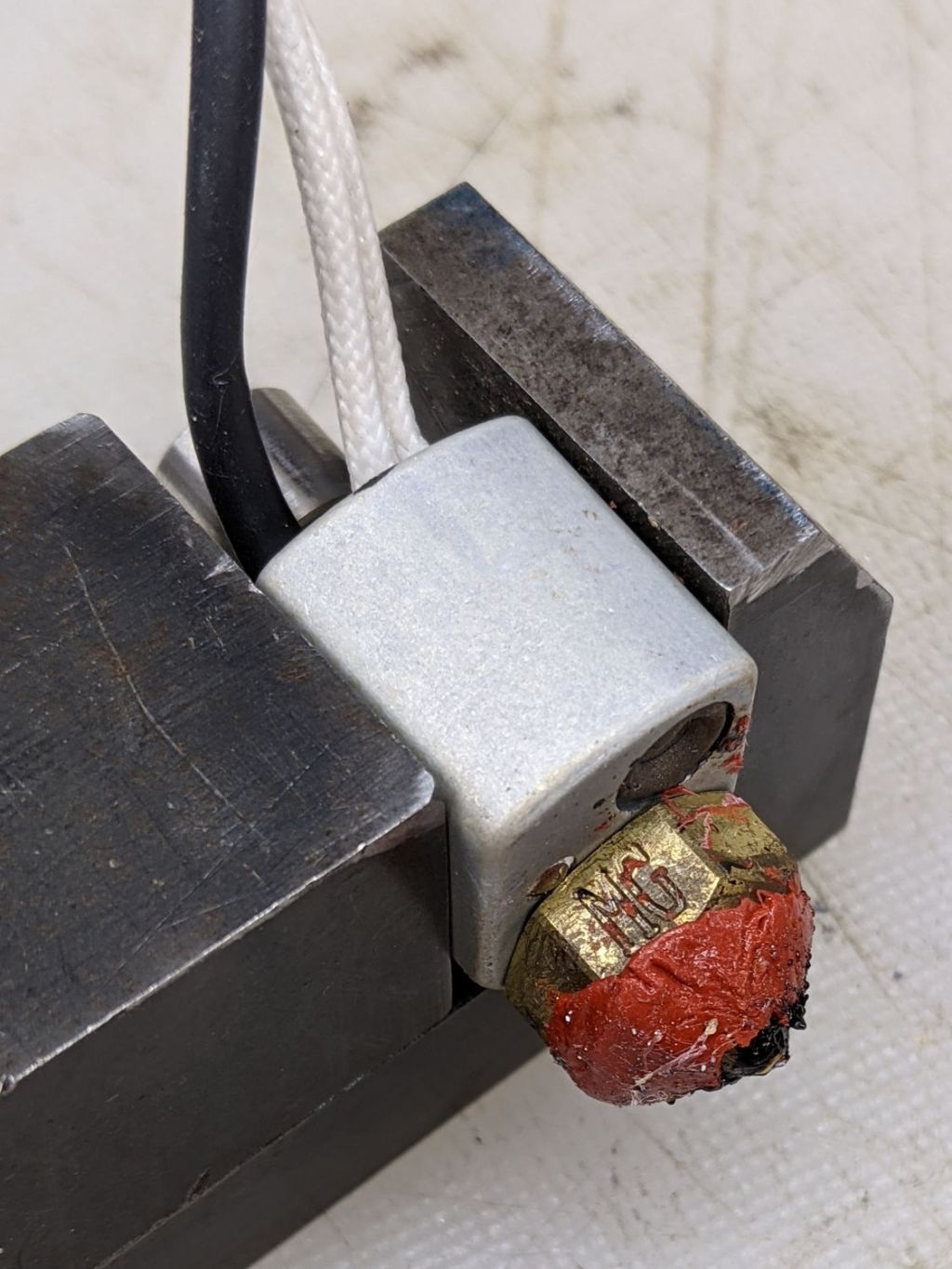
    Makergear M2 V4 hot end - eroded silicone coat
    Makergear M2 V4 hot end – eroded silicone coat

    That’s what half a year of use does to a nice, shiny coat of high-temperature silicone rubber.

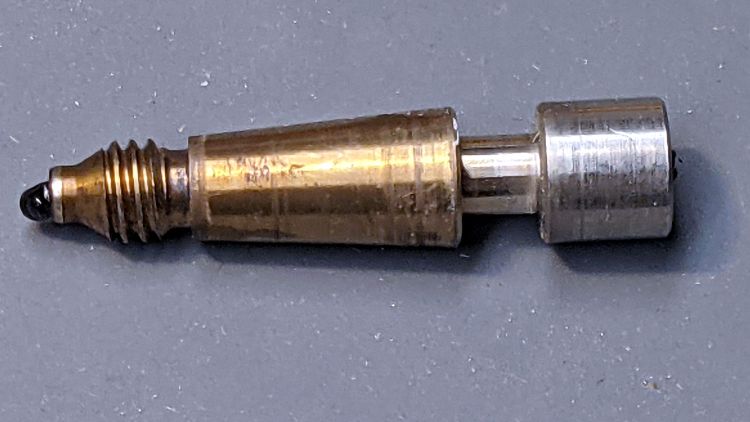
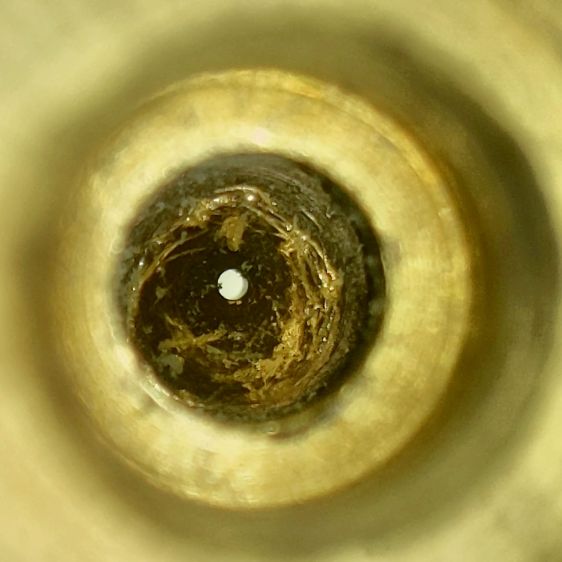
    This being the first time I’ve dismantled the hot end, here’s what lies inside:

    Makergear M2 V4 hot end - tapered inner guide
    Makergear M2 V4 hot end – tapered inner guide

    The tighter you make the nozzle, the closer the fit inside the hot end, and the more heat gets transferred to the plastic. The bright ring just to the right of the plastic drool shows where it fits into the brass nozzle.

    Peeling the remaining silicone off the nozzle, scraping off the black PETG around the tip, and scraping the gunk out left the inside a bit scuffed:

    Makergear 0.35 mm nozzle - interior
    Makergear 0.35 mm nozzle – interior

    The orifice still looks good and is still as close to 0.35 mm as I can measure eyeballometrically:

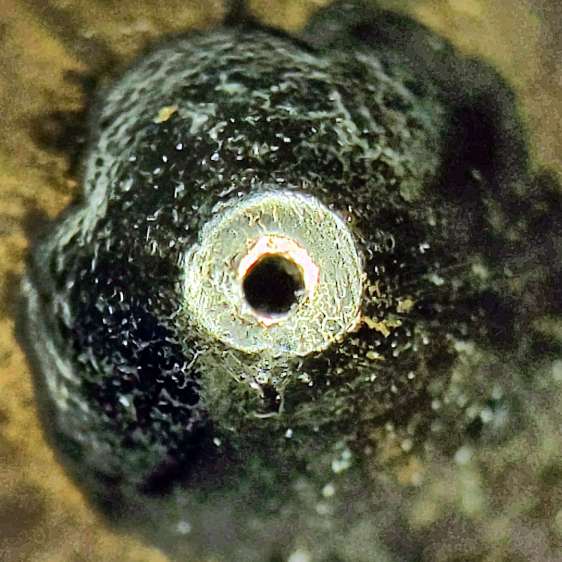
    Makergear 0.35 mm nozzle - exterior
    Makergear 0.35 mm nozzle – exterior

    Despite what it looks like, that’s actually a very thin PETG layer.

    Having a spare nozzle on the shelf, I decided to install it and leave the old nozzle as a backup. I’ve probably wrecked the snug seal required to keep the plastic out of the hot end.

    A fresh coat of silicone, reset the position with the platform at Z=0, and it’s back in action:

    Makergear M2 V4 hot end - Z zero set
    Makergear M2 V4 hot end – Z zero set

    The PETG remnants show I didn’t get the nozzle quite tight enough on the first attempt, but it’s all good now. The rubbery fiberglass insulator will conceal the mess.

    Protip: Always remove the hot end from the printer and clamp it securely before unscrewing the nozzle, because the very thin heat break (over on the right in the second picture) will snap under less torque than you need to break the nozzle free.

    You should unscrew the nozzle with the hot end warm enough to soften whatever plastic you’re using, lest it have glued everything inside into a solid lump.

  • Drive Wheelchair Brake Knob

    Drive Wheelchair Brake Knob

    The bent-steel brake levers on our Drive Blue Streak wheelchair present themselves edge-on to the rider:

    Drive Wheelchair Brake
    Drive Wheelchair Brake

    There are good mechanical reasons for shaping and orienting the steel like that, but the handle concentrates the considerable force required to push the brake tab into the rubberoid tire on your (well, my) palms. After a couple of weeks, I decided I didn’t need two more sore spots and conjured a palm-filling knob from the vasty digital deep:

    Wheelchair Brake Knob - installed
    Wheelchair Brake Knob – installed

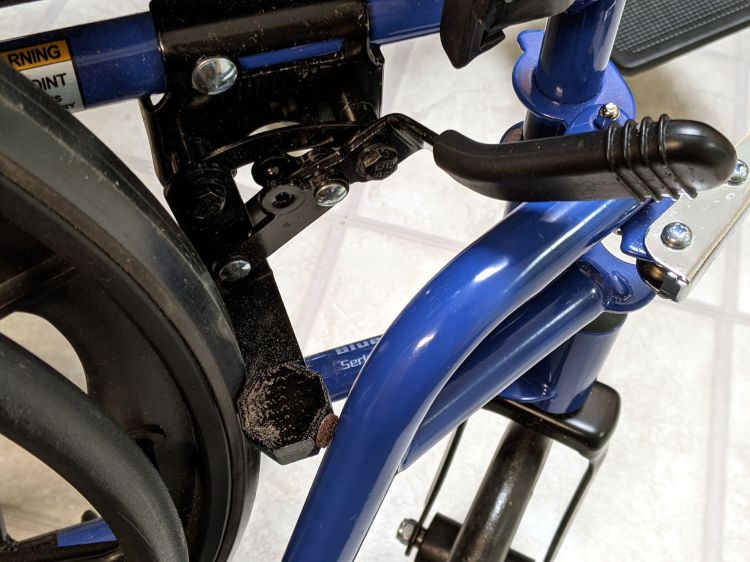
    Bonus part: the little octagon near the wheel prevents the leg rest (seen in the first picture) from smashing into the end of the brake tab and chipping the lovely blue powder coat. The brown fuzzy felt foot seemed like a good idea at the time, but isn’t strictly necessary.

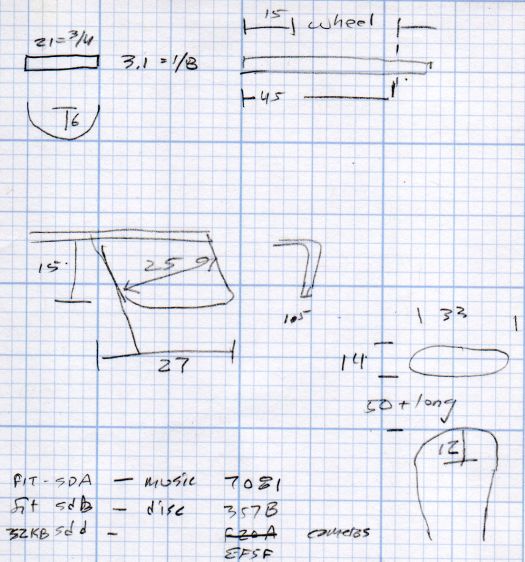
    A cylindrical handle on Thingiverse apparently fits on the bare steel underneath the rubberish “cushion”, but cutting a perfectly good, albeit uncomfortable, cushion off seemed like a step in the wrong direction. My knob thus descends from a doodle of the OEM dimensions:

    Drive Wheelchair Brake Handle - dimensions
    Drive Wheelchair Brake Handle – dimensions

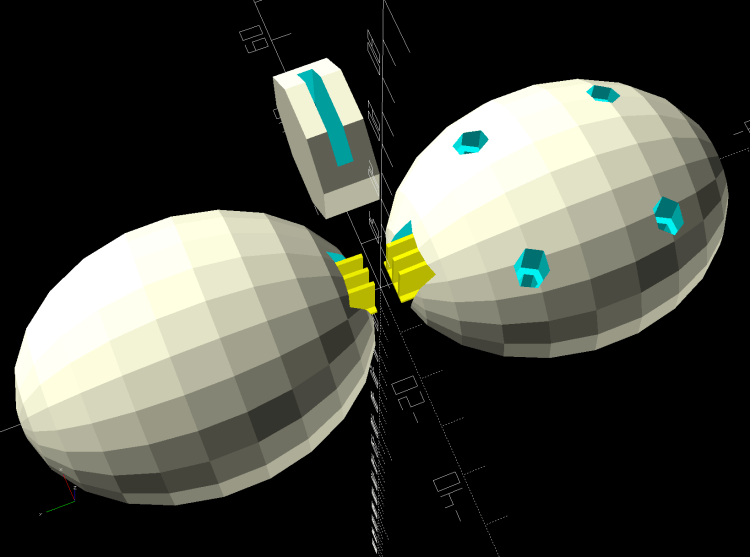
    The knob builds in two halves adjoining the bonus octagon, which stands on edge to eliminate support inside its slot:

    Wheelchair Brake Mods - solid model - build layout
    Wheelchair Brake Mods – solid model – build layout

    You (probably) need two of all those shapes, a job your slicer is ready to perform. At three hours for each knob, I just printed the same G-Code twice.

    You can customize the knob width to fit your palm, with the other two dimensions fitting themselves around the cushion. Mary and I settled on a knob size that fits both our hands reasonably well, so it’s probably not critical.

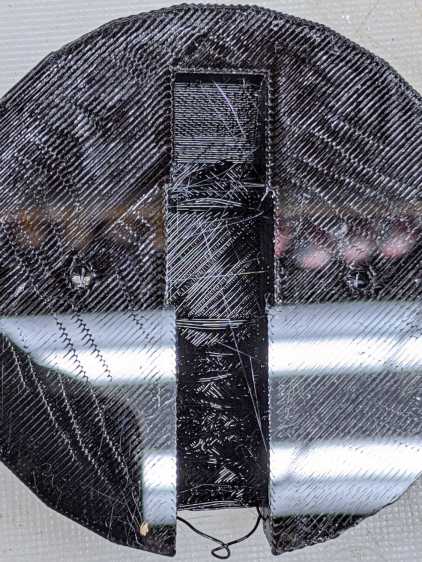
    I tried building the knob halves without support for the first prototype, but the sloped upper surface produced awful bridging:

    Wheelchair Brake Knob - unsupported interior
    Wheelchair Brake Knob – unsupported interior

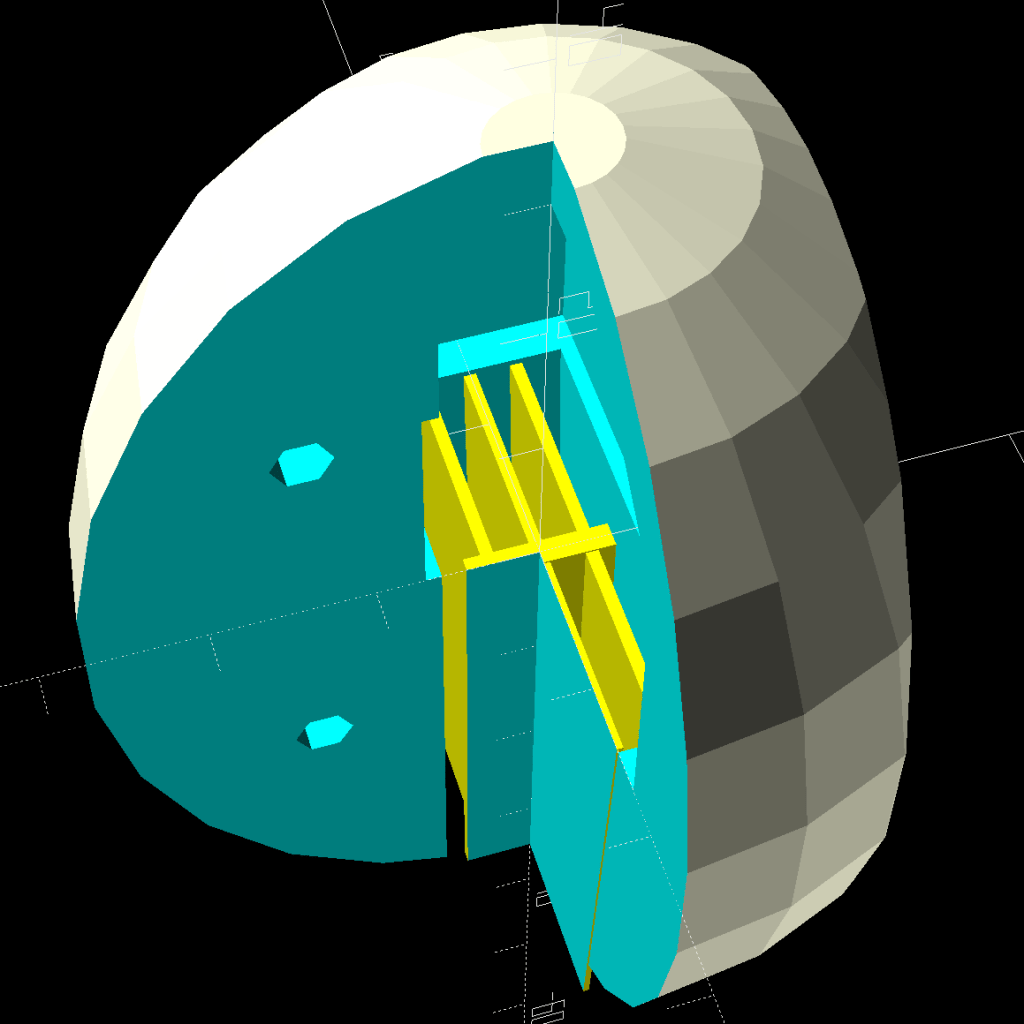
    It’s easy enough to design a customized support structure:

    Wheelchair Brake Mods - cross section
    Wheelchair Brake Mods – cross section

    I oriented the knob to put the split on the narrow sides of the brake handle in order to not have a seam facing my palm:

    Wheelchair Brake Knob - rear half installed
    Wheelchair Brake Knob – rear half installed

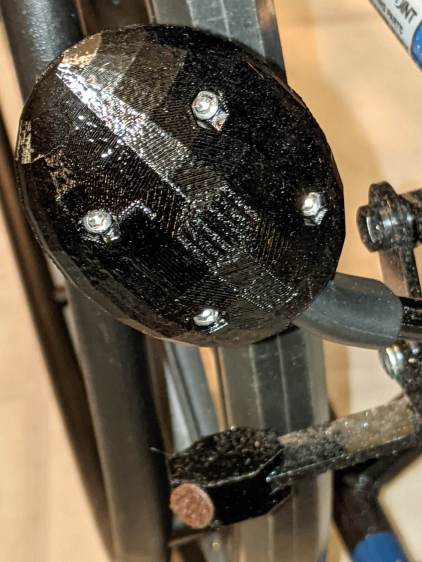
    The quartet of M3×20 mm socket-head cap screws thread into brass inserts epoxied into the rear half. I recessed their heads deeply into the front half and avoided thinking too hard about plugs matching the surface curvature:

    Wheelchair Brake Knob - front view
    Wheelchair Brake Knob – front view

    The low-vertex-count polygonal shape is a stylin’ thing and produces a nice feel during a firm shove, at least to my paws. Although I’d rather not need a wheelchair at all, setting the brakes now seems authoritative instead of annoying.

    The OpenSCAD source code as a GitHub gist:

    // Pride wheelchair brake lever mods
    // Ed Nisley KE4ZNU 2020-11
    /* [Layout options] */
    Layout = "Build"; // [Build, Show, Fit, TabCap, Handle, Knob, Support]
    // Hold up the knob's inside
    Support = true;
    /* [Extrusion parameters] */
    /* [Hidden] */
    ThreadThick = 0.25;
    ThreadWidth = 0.40;
    HoleWindage = 0.2;
    function IntegerMultiple(Size,Unit) = Unit * ceil(Size / Unit);
    function IntegerLessMultiple(Size,Unit) = Unit * floor(Size / Unit);
    Protrusion = 0.1; // make holes end cleanly
    inch = 25.4;
    ID = 0;
    OD = 1;
    LENGTH = 2;
    //———————-
    // Useful routines
    module PolyCyl(Dia,Height,ForceSides=0) { // based on nophead's polyholes
    Sides = (ForceSides != 0) ? ForceSides : (ceil(Dia) + 2);
    FixDia = Dia / cos(180/Sides);
    cylinder(r=(FixDia + HoleWindage)/2,h=Height,$fn=Sides);
    }
    //* [Basic dimensions] */
    WallThick = 4.0; // min wall thickness
    Screw = [3.0,5.5,20.0]; // thread, head, length under head
    Insert = [3.0,4.1,8.0]; // thread, knurl, length
    //———————-
    // Brake tab cap
    BrakeTab = [15,21,3.1]; // length to wheel, width, thickness
    BrakeTabSagitta = 8.0; // height of curved endcap
    CapOAL = [BrakeTab.y + 2*WallThick,BrakeTab.y + 2*WallThick,BrakeTab.z + 2*WallThick];
    module TabCap() {
    difference() {
    rotate(180/8)
    cylinder(d=CapOAL.y,h=CapOAL.z,center=true,$fn=8);
    translate([BrakeTab.x/2,0,0])
    cube(BrakeTab,center=true);
    rotate(180/8)
    cylinder(d=BrakeTab.y/cos(180/8),h=BrakeTab.z,center=true,$fn=8);
    }
    }
    //———————-
    // Brake lever handle
    // Soft covering with rounded sides that we square off for simplicity
    HandleRibs = [15,34,14]; // ignoring slight taper from end
    HandleCore = [50.0,24.0,12.0]; // straight section of lever to top of ribs
    HandleTipWidth = 30.0; // ignoring actual sector height
    module Handle() {
    union() {
    hull() {
    rotate(180/8)
    cylinder(d=HandleTipWidth/cos(180/8),h=HandleCore.z,center=true,$fn=8);
    translate([-HandleCore.x/2,0,0])
    cube(HandleCore,center=true);
    }
    translate([-(3*HandleCore.x/2 – Protrusion),0,0]) // extend base for ball trimming
    cube(HandleCore,center=true);
    translate([-HandleRibs.x/2,0,0])
    cube(HandleRibs,center=true);
    }
    }
    //———————-
    // Support structure for handle cavity inside knob
    // Totally ad-hoc tweakage
    // Remember it's lying on its side to match the handle
    NumRibs = 2 + 1; // must be odd
    RibSpace = floor(HandleCore.z/(NumRibs + 1));
    module KnobSupport() {
    color("Yellow") { // support overlaps in the middle
    render(convexity=3)
    intersection() {
    for (k=[-1,1])
    translate([0,k*ThreadThick,0]) // shrink inward to break adhesion
    Handle();
    translate([(HandleCore.x – HandleRibs.x)/2 – HandleCore.x – Protrusion,0,0])
    cube([HandleCore.x – HandleRibs.x,HandleRibs.y,HandleCore.z],center=true);
    union()
    for (k=[-floor(NumRibs/2):floor(NumRibs/2)])
    translate([0,0,k* RibSpace])
    cube([2*HandleCore.x,HandleRibs.y,2*ThreadWidth],center=true);
    }
    translate([(HandleCore.x – HandleRibs.x)/2 – HandleCore.x,0,0])
    cube([HandleCore.x – HandleRibs.x,4*ThreadWidth,NumRibs*RibSpace],center=true);
    }
    }
    //———————-
    // Brake handle knob
    // Largely built with magic numbers
    // Includes support because it's not really optional
    KnobOD = 55.0;
    KnobOffset = HandleRibs.x/1;
    KnobSides = 2*4*3;
    module Knob() {
    difference() {
    hull() {
    resize([0,HandleRibs.y + 4*WallThick,HandleCore.x + HandleTipWidth/2 + WallThick])
    sphere(d=KnobOD,$fn=KnobSides);
    }
    translate([0,0,KnobOffset])
    rotate([0,-90,0])
    Handle();
    for (i=[-1,1],k=[-1,1])
    translate([i*KnobOD/4,0,k*KnobOD/4]) {
    rotate([90,0,0])
    PolyCyl(Insert[OD],1.5*Insert[LENGTH],6);
    translate([0,-Screw[LENGTH]/2,0])
    rotate([-90,0,0])
    PolyCyl(Screw[ID],KnobOD,6);
    translate([0,Screw[LENGTH] – Insert[LENGTH],0])
    rotate([-90,0,0])
    PolyCyl(Screw[OD],KnobOD,6);
    }
    }
    if (Support)
    translate([0,0,KnobOffset])
    rotate([0,-90,0])
    KnobSupport();
    }
    //———————-
    // Lash it together
    if (Layout == "TabCap") {
    TabCap();
    }
    if (Layout == "Handle") {
    Handle();
    }
    if (Layout == "Support") {
    KnobSupport();
    }
    if (Layout == "Knob") {
    Knob();
    }
    if (Layout == "Show") {
    translate([60,0,0])
    TabCap();
    Knob();
    }
    if (Layout == "Fit") {
    translate([60,0,0])
    difference() {
    TabCap();
    translate([0,0,CapOAL.z/2])
    cube(CapOAL,center=true);
    }
    difference() {
    Knob();
    translate([KnobOD + KnobOD/4,0*KnobOD,0])
    cube(2*KnobOD,center=true);
    translate([-KnobOD,-KnobOD,0])
    cube(2*KnobOD,center=true);
    }
    }
    if (Layout == "Build") {
    translate([KnobOD/2,0,(CapOAL.y*cos(180/8))/2])
    rotate([0,-90,90])
    TabCap();
    for (j=[-1,1])
    translate([0,-j*0.75*HandleCore.x,0])
    difference() {
    rotate([j*90,0,0])
    Knob();
    translate([0,0,-KnobOD])
    cube(2*KnobOD,center=true);
    }
    }

    A doodle with dimensions of other parts:

    Drive Wheelchair - brake footrest tab dimensions
    Drive Wheelchair – brake footrest tab dimensions

    The angled tab on the middle left is for the leg rest release latch, but I decided not to silk-purse-ize the thing.

  • Astable Multivibrator: Dressed-up LED Spider

    Astable Multivibrator: Dressed-up LED Spider

    Adding a bit of trim to the bottom of the LED spider makes it look better and helps keep the strut wires in place:

    Astable Multivibrator - Alkaline - Radome trim
    Astable Multivibrator – Alkaline – Radome trim

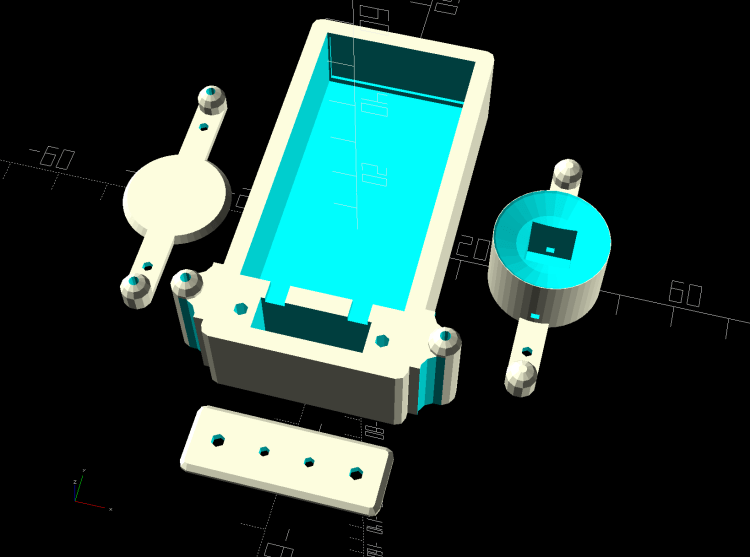
    It’s obviously impossible to build like that, so it’s split across the middle of the strut:

    Astable Multivibrator - Alkaline - Radome trim
    Astable Multivibrator – Alkaline – Radome trim

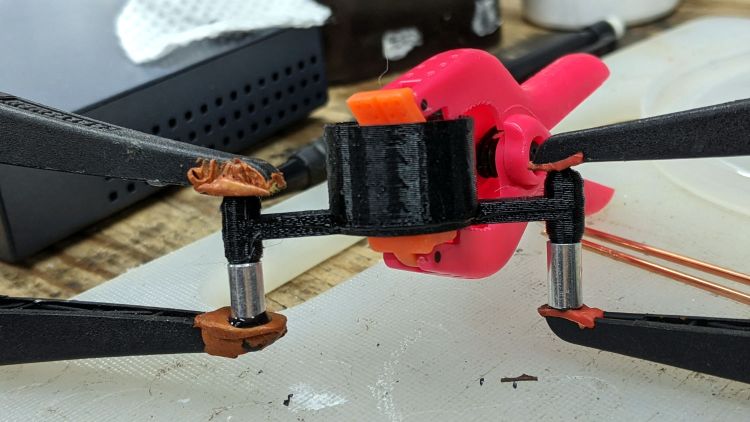
    Glue it together with black adhesive and a couple of clamps:

    LED Spider - glue clamping
    LED Spider – glue clamping

    The aluminum fixtures (jigs?) are epoxied around snippets of strut wire aligning the spider parts:

    LED Spider - gluing fixture
    LED Spider – gluing fixture

    Those grossly oversized holes came pre-drilled in an otherwise suitable aluminum rod from the Little Tray o’ Cutoffs. I faced off the ends, chopped the rod in two, recessed the new ends, and declared victory. Might need better ones at some point, but they’ll do for now.

    Next step: wire up an astable with a yellow LED to go with the green and blue boosted LEDs.

  • Kenmore Progressive Vacuum Cleaner vs. Dust Brush Adapters

    Kenmore Progressive Vacuum Cleaner vs. Dust Brush Adapters

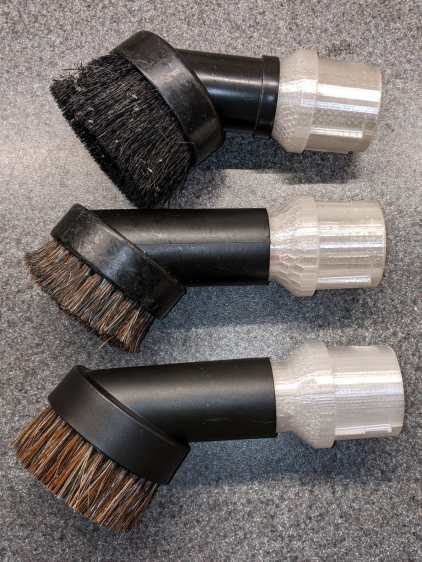
    Contemporary vacuum cleaner dust brush heads have bristles in some combination of [long | short] with [flexy | stiff]. The long + flexy combination results in the bristles jamming the inlet and the short + stiff combo seems unsuited for complex surfaces. Shaking the Amazonian dice brought a different combination:

    Vacuum cleaner dust brush assortment - with adapters
    Vacuum cleaner dust brush assortment – with adapters

    That’s the new one on the bottom and, contrary to what you might think from the picture, it is not identical to the one just above it.

    In particular, the black plastic housing came from a different mold (the seam lines are now top-and-bottom) and required a new adapter for the Kenmore Progressive vacuum cleaner’s complicated wand / hose inlet, with a 3/4 inch PVC pipe reinforcement inside.

    Early reports indicate it works fine, so I’ll declare a temporary victory in the war on entropy.

    I’m still using the same OpenSCAD source code with minute tweaks to suit the as-measured tapers.

  • Raspberry Pi HQ Camera Mount

    Raspberry Pi HQ Camera Mount

    As far as I can tell, Raspberry Pi cases are a solved problem, so 3D printing an intricate widget to stick a Pi on the back of an HQ camera seems unnecessary unless you really, really like solid modeling, which, admittedly, can be a thing. All you really need is a simple adapter between the camera PCB and the case of your choice:

    HQ Camera Backplate - OpenSCAD model
    HQ Camera Backplate – OpenSCAD model

    A quartet of 6 mm M2.5 nylon spacers mount the adapter to the camera PCB:

    RPi HQ Camera - nylon standoffs
    RPi HQ Camera – nylon standoffs

    The plate has recesses to put the screw heads below the surface. I used nylon screws, but it doesn’t really matter.

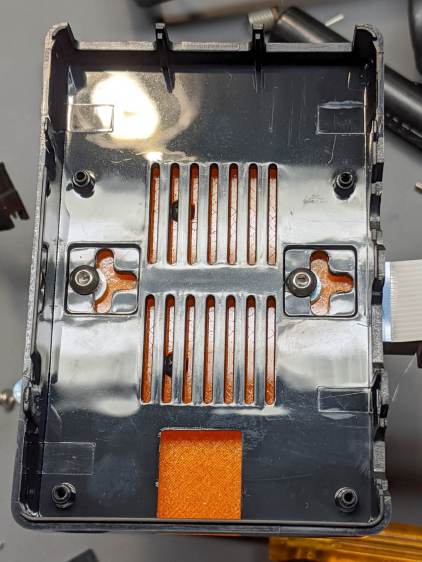
    The case has all the right openings, slots in the bottom for a pair of screws, and costs six bucks. A pair of M3 brass inserts epoxied into the plate capture the screws:

    RPi HQ Camera - case adapter plate - screws
    RPi HQ Camera – case adapter plate – screws

    Thick washers punched from an old credit card go under the screws to compensate for the case’s silicone bump feet. I suppose Doing the Right Thing would involve 3D printed spacers matching the cross-shaped case cutouts.

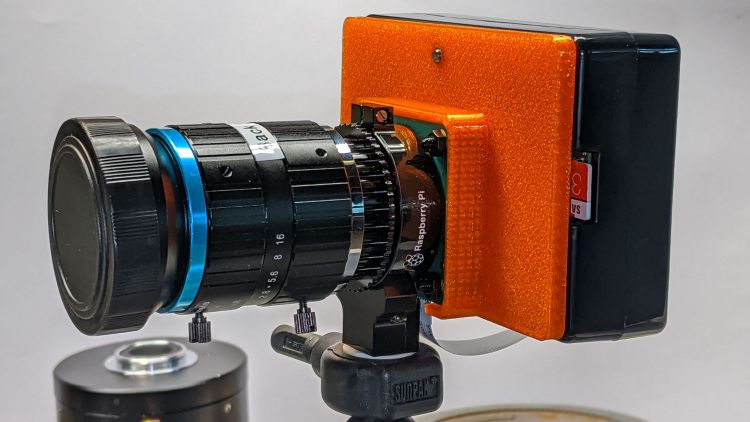
    Not everyone agrees with my choice of retina-burn orange PETG:

    RPi HQ Camera - 16 mm lens - case adapter plate
    RPi HQ Camera – 16 mm lens – case adapter plate

    Yes, that’s a C-mount TV lens lurking in the background, about which more later.

    The OpenSCAD source code as a GitHub Gist:

    // Raspberry Pi HQ Camera Backplate
    // Ed Nisley KE4ZNU 2020-09
    //– Extrusion parameters
    /* [Hidden] */
    ThreadThick = 0.25;
    ThreadWidth = 0.40;
    HoleWindage = 0.2;
    function IntegerMultiple(Size,Unit) = Unit * ceil(Size / Unit);
    function IntegerLessMultiple(Size,Unit) = Unit * floor(Size / Unit);
    Protrusion = 0.1; // make holes end cleanly
    inch = 25.4;
    ID = 0;
    OD = 1;
    LENGTH = 2;
    //- Basic dimensions
    CamPCB = [39.0,39.0,1.5]; // Overall PCB size, plus a bit
    CornerRound = 3.0; // … has rounded corners
    CamScrewOC = [30.0,30.0,0]; // … mounting screw layout
    CamScrew = [2.5,5.0,2.2]; // … LENGTH = head thickness
    Standoff = [2.5,5.5,6.0]; // nylon standoffs
    Insert = [3.0,4.0,4.0];
    WallThick = IntegerMultiple(2.0,ThreadWidth);
    PlateThick = Insert[LENGTH];
    CamBox = [CamPCB.x + 2*WallThick,
    CamPCB.y + 2*WallThick,
    Standoff.z + PlateThick + CamPCB.z + 1.0];
    PiPlate = [90.0,60.0,PlateThick];
    PiPlateOffset = [0.0,(PiPlate.y – CamBox.y)/2,0];
    PiSlotOC = [0.0,40.0];
    PiSlotOffset = [3.5,3.5];
    NumSides = 2*3*4;
    TextDepth = 2*ThreadThick;
    //———————-
    // Useful routines
    module PolyCyl(Dia,Height,ForceSides=0) { // based on nophead's polyholes
    Sides = (ForceSides != 0) ? ForceSides : (ceil(Dia) + 2);
    FixDia = Dia / cos(180/Sides);
    cylinder(r=(FixDia + HoleWindage)/2,h=Height,$fn=Sides);
    }
    //———————-
    // Build it
    difference() {
    union() {
    hull() // camera enclosure
    for (i=[-1,1], j=[-1,1])
    translate([i*(CamBox.x/2 – CornerRound),j*(CamBox.y/2 – CornerRound),0])
    cylinder(r=CornerRound,h=CamBox.z,$fn=NumSides);
    translate(PiPlateOffset)
    hull()
    for (i=[-1,1], j=[-1,1]) // Pi case plate
    translate([i*(PiPlate.x/2 – CornerRound),j*(PiPlate.y/2 – CornerRound),0])
    cylinder(r=CornerRound,h=PiPlate.z,$fn=NumSides);
    }
    hull() // camera PCB space
    for (i=[-1,1], j=[-1,1])
    translate([i*(CamPCB.x/2 – CornerRound),j*(CamPCB.y/2 – CornerRound),PlateThick])
    cylinder(r=CornerRound,h=CamBox.z,$fn=NumSides);
    translate([0,-CamBox.y/2,PlateThick + CamBox.z/2])
    cube([CamScrewOC.x – Standoff[OD],CamBox.y,CamBox.z],center=true);
    for (i=[-1,1], j=[-1,1]) // camera screws with head recesses
    translate([i*CamScrewOC.x/2,j*CamScrewOC.y/2,-Protrusion]) {
    PolyCyl(CamScrew[ID],2*CamBox.z,6);
    PolyCyl(CamScrew[OD],CamScrew[LENGTH] + Protrusion,6);
    }
    for (j=[-1,1]) // Pi case screw inserts
    translate([0,j*PiSlotOC.y/2 + PiSlotOffset.y,-Protrusion] + PiPlateOffset)
    PolyCyl(Insert[OD],2*PiPlate.z,6);
    translate([-PiPlate.x/2 + (PiPlate.x – CamBox.x)/4,0,PlateThick – TextDepth/2] + PiPlateOffset)
    cube([15.0,30.0,TextDepth + Protrusion],center=true);
    }
    translate([-PiPlate.x/2 + (PiPlate.x – CamBox.x)/4 + 3,0,PlateThick – TextDepth – Protrusion] + PiPlateOffset)
    linear_extrude(height=TextDepth + Protrusion,convexity=2)
    rotate(-90)
    text("Ed Nisley",font="Arial:style=Bold",halign="center",valign="center",size=4,spacing=1.05);
    translate([-PiPlate.x/2 + (PiPlate.x – CamBox.x)/4 – 3,0,PlateThick – TextDepth – Protrusion] + PiPlateOffset)
    linear_extrude(height=TextDepth + Protrusion,convexity=2)
    rotate(-90)
    text("KE4ZNU",font="Arial:style=Bold",halign="center",valign="center",size=4,spacing=1.05);

  • Bike Helmet Mirror: Brasswork Clamp

    Bike Helmet Mirror: Brasswork Clamp

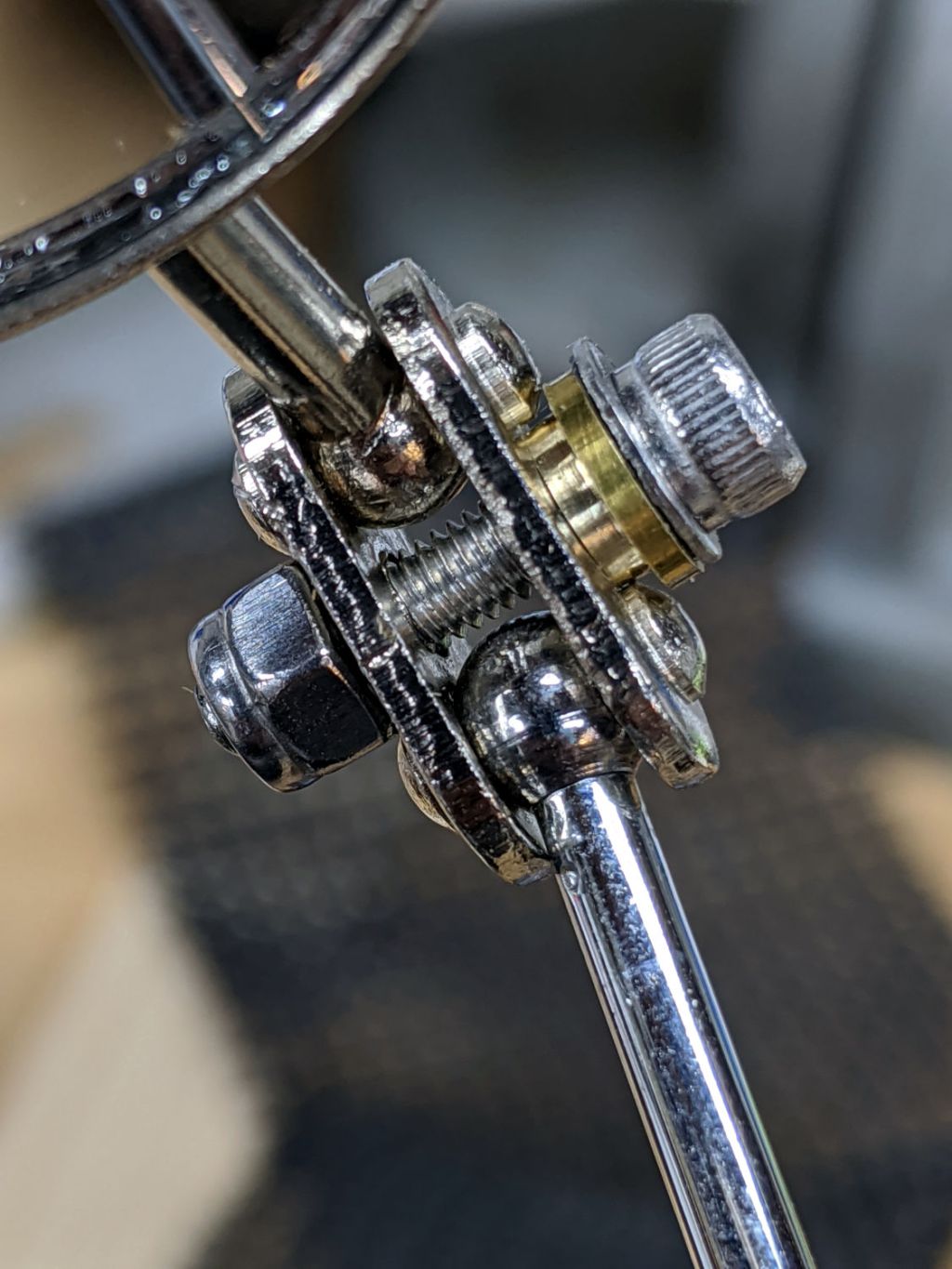
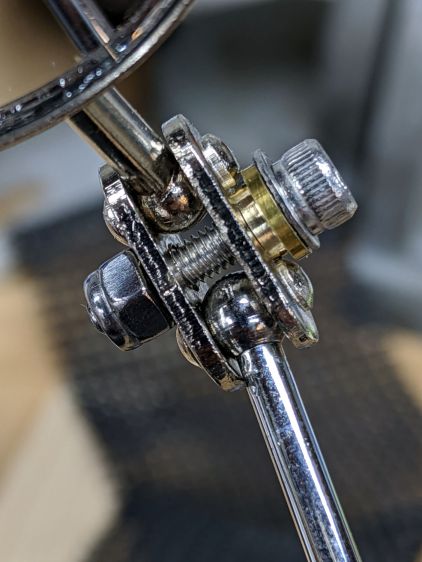
    A bit of Quality Shop Time produced a slight improvement to the clamp holding the mirror to the stalk:

    Helmet Mirror Ball Mount - mirror joint brasswork
    Helmet Mirror Ball Mount – mirror joint brasswork

    The general idea is to hold the wave washer (it’s mashed under the flat washer, honest) above those bumps on the plate holding the mirror and stalk balls. It’s a few millimeters from the end of a ¼ inch brass rod, drilled for the M3 screw, and reduced to 4.5 mm with a parting tool to clear the bumps.

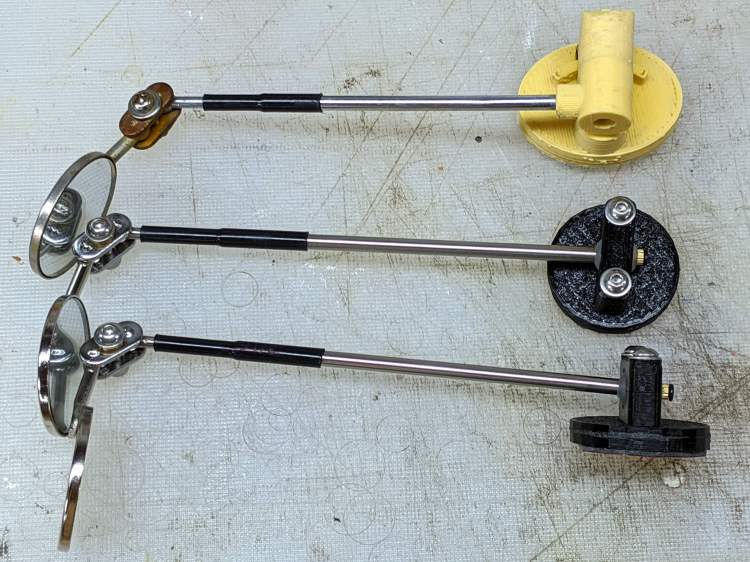
    While I was at it, I made two spare mirrors, just to have ’em around:

    Helmet Mirror Ball Mount - new vs old
    Helmet Mirror Ball Mount – new vs old

    The new ball mount looks downright svelte compared to the old Az-El mount, doesn’t it?

    I should replace the steel clamp plates with a stainless-steel doodad of some sort to eliminate the unsightly rust, but that’s definitely in the nature of fine tuning.

  • More AAA-to-AA Alkaline Adapters

    More AAA-to-AA Alkaline Adapters

    Having a handful of not-dead-yet AAA alkalines and a bunch of LED blinkies built for AA alkalines, a pair of adapters seemed in order:

    AAA-to-AA Alkaline Adapters - installed
    AAA-to-AA Alkaline Adapters – installed

    The blinkies need a somewhat wider base than they’d get from a pair of AAA alkalines, so it’s not quite as dumb as it may seem.

    In any event, the positive terminal comes from a brass rod:

    AAA-to-AA Alkaline Adapters - brass terminal
    AAA-to-AA Alkaline Adapters – brass terminal

    Nobody will ever see the fancy Hilbert Curve infill around the brass:

    AAA-to-AA Alkaline Adapters - end view
    AAA-to-AA Alkaline Adapters – end view

    In this application, they’ll go from not-dead-yet to oh-it’s-dead faster than AA cells, so I can watch how the blinkies work with lower voltages.