The Smell of Molten Projects in the Morning

Ed Nisley's Blog: Shop notes, electronics, firmware, machinery, 3D printing, laser cuttery, and curiosities. Contents: 100% human thinking, 0% AI slop.

Tag: Improvements

Making the world a better place, one piece at a time

  • Drive Wheelchair Brake Knob

    Drive Wheelchair Brake Knob

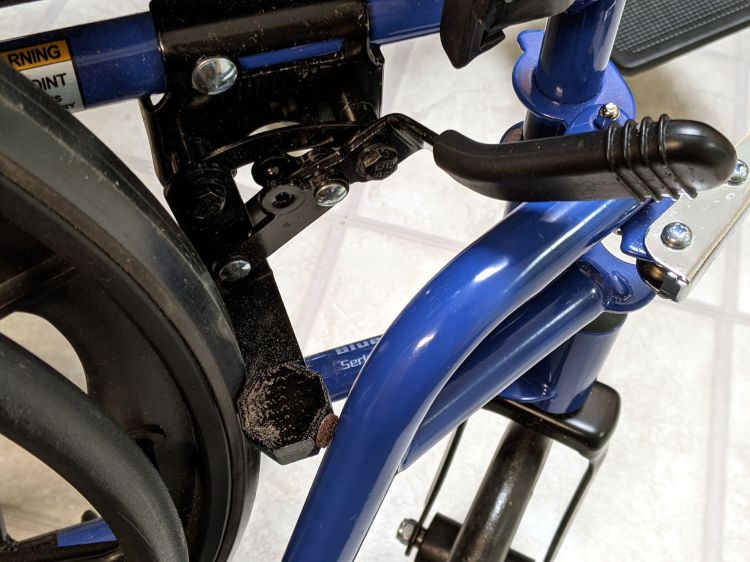
    The bent-steel brake levers on our Drive Blue Streak wheelchair present themselves edge-on to the rider:
    Drive Wheelchair Brake
    Drive Wheelchair Brake

    There are good mechanical reasons for shaping and orienting the steel like that, but the handle concentrates the considerable force required to push the brake tab into the rubberoid tire on your (well, my) palms. After a couple of weeks, I decided I didn’t need two more sore spots and conjured a palm-filling knob from the vasty digital deep:

    Wheelchair Brake Knob - installed
    Wheelchair Brake Knob – installed

    Bonus part: the little octagon near the wheel prevents the leg rest (seen in the first picture) from smashing into the end of the brake tab and chipping the lovely blue powder coat. The brown fuzzy felt foot seemed like a good idea at the time, but isn’t strictly necessary.

    A cylindrical handle on Thingiverse apparently fits on the bare steel underneath the rubberish “cushion”, but cutting a perfectly good, albeit uncomfortable, cushion off seemed like a step in the wrong direction. My knob thus descends from a doodle of the OEM dimensions:

    Drive Wheelchair Brake Handle - dimensions
    Drive Wheelchair Brake Handle – dimensions

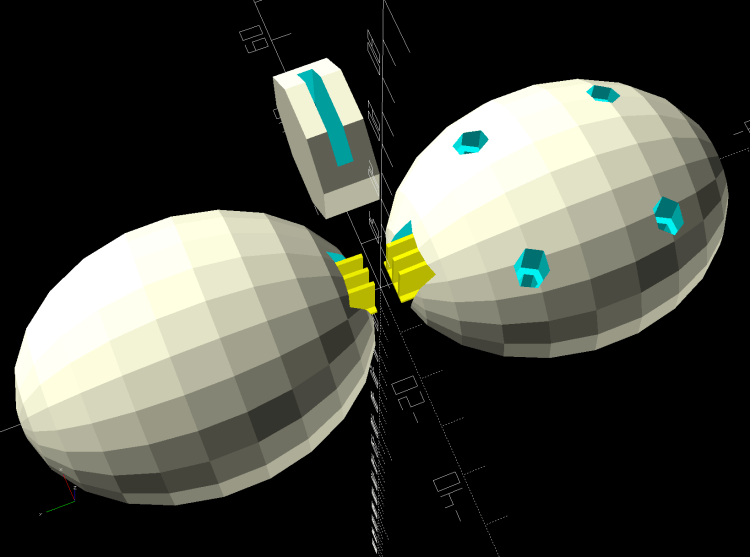
    The knob builds in two halves adjoining the bonus octagon, which stands on edge to eliminate support inside its slot:
    Wheelchair Brake Mods - solid model - build layout
    Wheelchair Brake Mods – solid model – build layout

    You (probably) need two of all those shapes, a job your slicer is ready to perform. At three hours for each knob, I just printed the same G-Code twice.

    You can customize the knob width to fit your palm, with the other two dimensions fitting themselves around the cushion. Mary and I settled on a knob size that fits both our hands reasonably well, so it’s probably not critical.

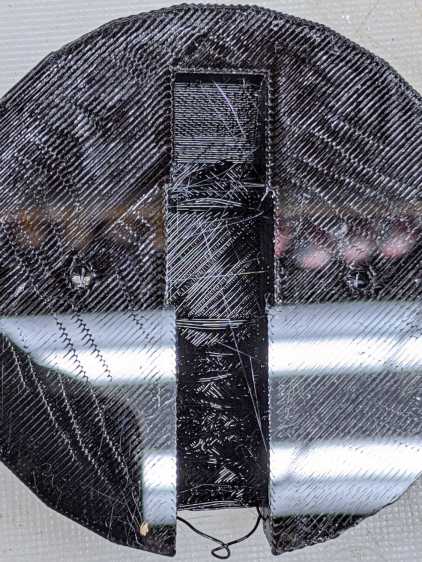
    I tried building the knob halves without support for the first prototype, but the sloped upper surface produced awful bridging:
    Wheelchair Brake Knob - unsupported interior
    Wheelchair Brake Knob – unsupported interior

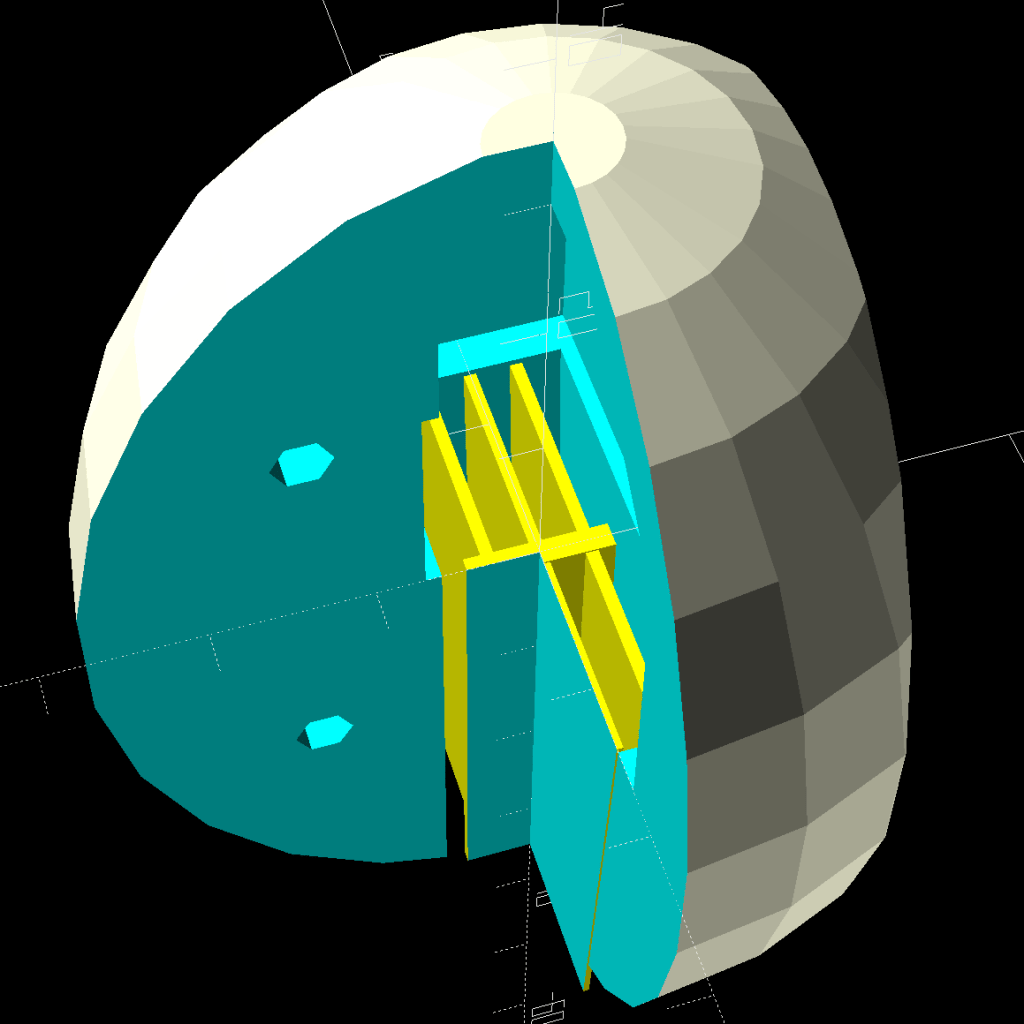
    It’s easy enough to design a customized support structure:

    Wheelchair Brake Mods - cross section
    Wheelchair Brake Mods – cross section

    I oriented the knob to put the split on the narrow sides of the brake handle in order to not have a seam facing my palm:

    Wheelchair Brake Knob - rear half installed
    Wheelchair Brake Knob – rear half installed

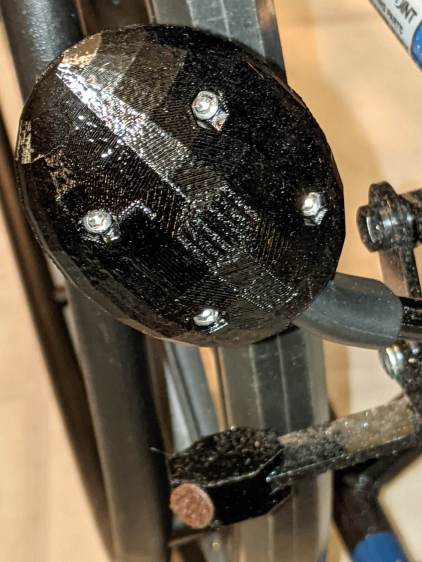
    The quartet of M3×20 mm socket-head cap screws thread into brass inserts epoxied into the rear half. I recessed their heads deeply into the front half and avoided thinking too hard about plugs matching the surface curvature:
    Wheelchair Brake Knob - front view
    Wheelchair Brake Knob – front view

    The low-vertex-count polygonal shape is a stylin’ thing and produces a nice feel during a firm shove, at least to my paws. Although I’d rather not need a wheelchair at all, setting the brakes now seems authoritative instead of annoying.

    The OpenSCAD source code as a GitHub gist:

    // Pride wheelchair brake lever mods
    // Ed Nisley KE4ZNU 2020-11
    /* [Layout options] */
    Layout = "Build"; // [Build, Show, Fit, TabCap, Handle, Knob, Support]
    // Hold up the knob's inside
    Support = true;
    /* [Extrusion parameters] */
    /* [Hidden] */
    ThreadThick = 0.25;
    ThreadWidth = 0.40;
    HoleWindage = 0.2;
    function IntegerMultiple(Size,Unit) = Unit * ceil(Size / Unit);
    function IntegerLessMultiple(Size,Unit) = Unit * floor(Size / Unit);
    Protrusion = 0.1; // make holes end cleanly
    inch = 25.4;
    ID = 0;
    OD = 1;
    LENGTH = 2;
    //———————-
    // Useful routines
    module PolyCyl(Dia,Height,ForceSides=0) { // based on nophead's polyholes
    Sides = (ForceSides != 0) ? ForceSides : (ceil(Dia) + 2);
    FixDia = Dia / cos(180/Sides);
    cylinder(r=(FixDia + HoleWindage)/2,h=Height,$fn=Sides);
    }
    //* [Basic dimensions] */
    WallThick = 4.0; // min wall thickness
    Screw = [3.0,5.5,20.0]; // thread, head, length under head
    Insert = [3.0,4.1,8.0]; // thread, knurl, length
    //———————-
    // Brake tab cap
    BrakeTab = [15,21,3.1]; // length to wheel, width, thickness
    BrakeTabSagitta = 8.0; // height of curved endcap
    CapOAL = [BrakeTab.y + 2*WallThick,BrakeTab.y + 2*WallThick,BrakeTab.z + 2*WallThick];
    module TabCap() {
    difference() {
    rotate(180/8)
    cylinder(d=CapOAL.y,h=CapOAL.z,center=true,$fn=8);
    translate([BrakeTab.x/2,0,0])
    cube(BrakeTab,center=true);
    rotate(180/8)
    cylinder(d=BrakeTab.y/cos(180/8),h=BrakeTab.z,center=true,$fn=8);
    }
    }
    //———————-
    // Brake lever handle
    // Soft covering with rounded sides that we square off for simplicity
    HandleRibs = [15,34,14]; // ignoring slight taper from end
    HandleCore = [50.0,24.0,12.0]; // straight section of lever to top of ribs
    HandleTipWidth = 30.0; // ignoring actual sector height
    module Handle() {
    union() {
    hull() {
    rotate(180/8)
    cylinder(d=HandleTipWidth/cos(180/8),h=HandleCore.z,center=true,$fn=8);
    translate([-HandleCore.x/2,0,0])
    cube(HandleCore,center=true);
    }
    translate([-(3*HandleCore.x/2 – Protrusion),0,0]) // extend base for ball trimming
    cube(HandleCore,center=true);
    translate([-HandleRibs.x/2,0,0])
    cube(HandleRibs,center=true);
    }
    }
    //———————-
    // Support structure for handle cavity inside knob
    // Totally ad-hoc tweakage
    // Remember it's lying on its side to match the handle
    NumRibs = 2 + 1; // must be odd
    RibSpace = floor(HandleCore.z/(NumRibs + 1));
    module KnobSupport() {
    color("Yellow") { // support overlaps in the middle
    render(convexity=3)
    intersection() {
    for (k=[-1,1])
    translate([0,k*ThreadThick,0]) // shrink inward to break adhesion
    Handle();
    translate([(HandleCore.x – HandleRibs.x)/2 – HandleCore.x – Protrusion,0,0])
    cube([HandleCore.x – HandleRibs.x,HandleRibs.y,HandleCore.z],center=true);
    union()
    for (k=[-floor(NumRibs/2):floor(NumRibs/2)])
    translate([0,0,k* RibSpace])
    cube([2*HandleCore.x,HandleRibs.y,2*ThreadWidth],center=true);
    }
    translate([(HandleCore.x – HandleRibs.x)/2 – HandleCore.x,0,0])
    cube([HandleCore.x – HandleRibs.x,4*ThreadWidth,NumRibs*RibSpace],center=true);
    }
    }
    //———————-
    // Brake handle knob
    // Largely built with magic numbers
    // Includes support because it's not really optional
    KnobOD = 55.0;
    KnobOffset = HandleRibs.x/1;
    KnobSides = 2*4*3;
    module Knob() {
    difference() {
    hull() {
    resize([0,HandleRibs.y + 4*WallThick,HandleCore.x + HandleTipWidth/2 + WallThick])
    sphere(d=KnobOD,$fn=KnobSides);
    }
    translate([0,0,KnobOffset])
    rotate([0,-90,0])
    Handle();
    for (i=[-1,1],k=[-1,1])
    translate([i*KnobOD/4,0,k*KnobOD/4]) {
    rotate([90,0,0])
    PolyCyl(Insert[OD],1.5*Insert[LENGTH],6);
    translate([0,-Screw[LENGTH]/2,0])
    rotate([-90,0,0])
    PolyCyl(Screw[ID],KnobOD,6);
    translate([0,Screw[LENGTH] – Insert[LENGTH],0])
    rotate([-90,0,0])
    PolyCyl(Screw[OD],KnobOD,6);
    }
    }
    if (Support)
    translate([0,0,KnobOffset])
    rotate([0,-90,0])
    KnobSupport();
    }
    //———————-
    // Lash it together
    if (Layout == "TabCap") {
    TabCap();
    }
    if (Layout == "Handle") {
    Handle();
    }
    if (Layout == "Support") {
    KnobSupport();
    }
    if (Layout == "Knob") {
    Knob();
    }
    if (Layout == "Show") {
    translate([60,0,0])
    TabCap();
    Knob();
    }
    if (Layout == "Fit") {
    translate([60,0,0])
    difference() {
    TabCap();
    translate([0,0,CapOAL.z/2])
    cube(CapOAL,center=true);
    }
    difference() {
    Knob();
    translate([KnobOD + KnobOD/4,0*KnobOD,0])
    cube(2*KnobOD,center=true);
    translate([-KnobOD,-KnobOD,0])
    cube(2*KnobOD,center=true);
    }
    }
    if (Layout == "Build") {
    translate([KnobOD/2,0,(CapOAL.y*cos(180/8))/2])
    rotate([0,-90,90])
    TabCap();
    for (j=[-1,1])
    translate([0,-j*0.75*HandleCore.x,0])
    difference() {
    rotate([j*90,0,0])
    Knob();
    translate([0,0,-KnobOD])
    cube(2*KnobOD,center=true);
    }
    }

    A doodle with dimensions of other parts:
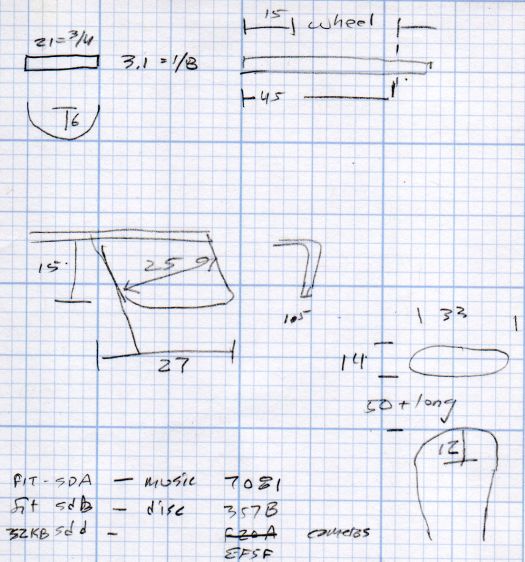
    Drive Wheelchair - brake footrest tab dimensions
    Drive Wheelchair – brake footrest tab dimensions

    The angled tab on the middle left is for the leg rest release latch, but I decided not to silk-purse-ize the thing.
  • Hiatus

    Posts will appear intermittently over the next week or two.

    I’m still spending an inordinate amount of time studying the back of my eyelids while horizontally polarized in the lift chair. I can highly recommend not doing whatever it is that triggers a pinched lumbar nerve, but as nearly as I can tell, the proximate cause (shredding leaves) isn’t anything close to whatever the root cause might be.

    It does provide plenty of time to conjure solid models from the vasty digital deep:

    Wheelchair Brake Mods - solid model - build layout
    Wheelchair Brake Mods – solid model – build layout

    The wheelchair brake lever seems to have been designed by somebody who never actually had to shove it very often:

    Drive Wheelchair Brake
    Drive Wheelchair Brake

    At least I can fix that …

  • Monthly Science: Batmax NP-BX1 Status

    Monthly Science: Batmax NP-BX1 Status

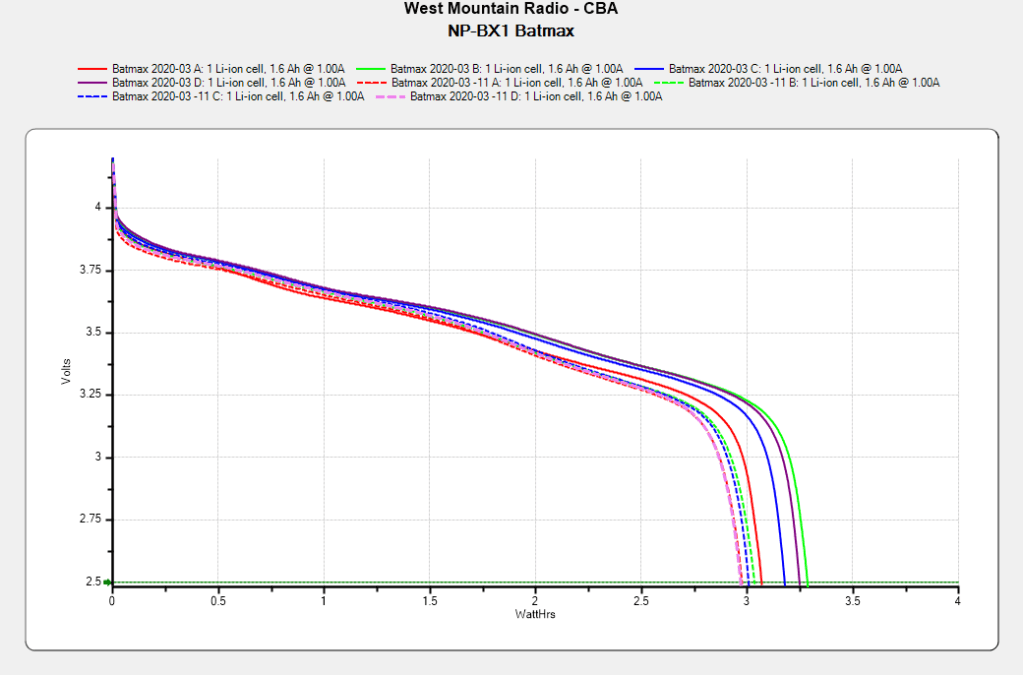
    After powering my Sony HDR-AS30V helmet camera for nearly all of this year’s riding, the Batmax NP-BX1 lithium batteries still have roughly 90% of their original capacity:

    Batmax NP-BX1 - 2020-11
    Batmax NP-BX1 – 2020-11

    Those are hot off the Official Batmax charger, which appears identical to other randomly named chargers available on Amazon.

    They’re holding up much better after a riding season than the DOT-01 batteries I used two years ago:

    Sony DOT-01 NP-BX1 - 2019-10-29
    Sony DOT-01 NP-BX1 – 2019-10-29

    Empirically, they power the camera for about 75 minutes, barely enough for our typical rides. I should top off the battery sitting in the camera unused for a few days, although that hasn’t happened yet.

    Of course, the Batmax NP-BX1 batteries I might order early next year for the new riding season have little relation to the ones you see here.

  • Neiko Hole Punch Accurizing

    Neiko Hole Punch Accurizing

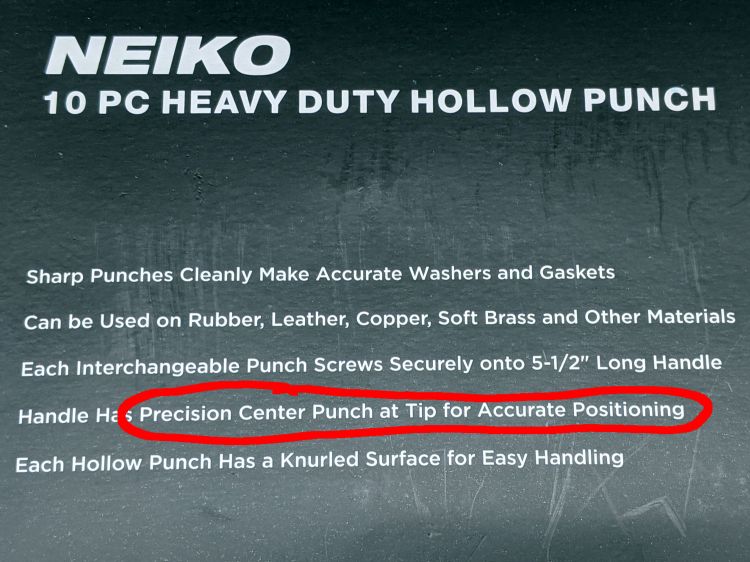
    Having struggled to cut nice rings from gooey foam adhesive tape, I got a Neiko hollow hole punch set, despite reviews suggesting the pilot point might be a bit off. The case wrapper claims otherwise:

    Neiko hole punch - description
    Neiko hole punch – description

    As the saying (almost) goes:

    “Inconcievable! Precision!”

    “You keep using that word. I do not think it means what you think it means.”

    Goldman, The Princess Bride

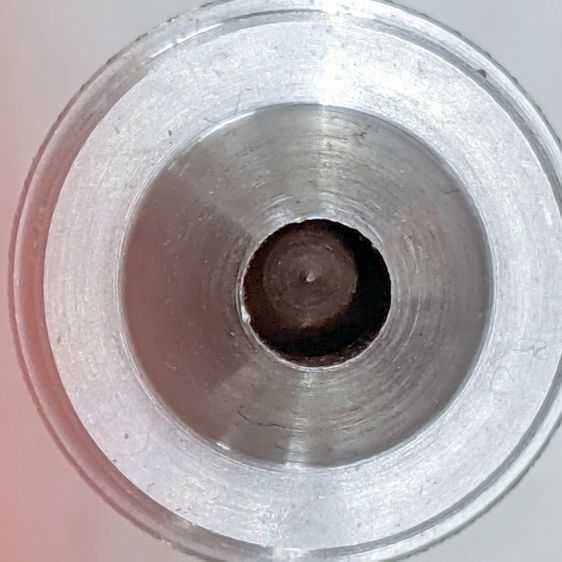
    An eyeballometric measurement suggests this is another one of those Chinese tools missing the last 10% of its manufacturing process:

    Neiko hole punch - as-received off-center tip
    Neiko hole punch – as-received off-center tip

    That’s the 5 mm punch, where being (at least) half a millimeter off-center matters more than it would in the 32 mm punch.

    Unscrewing the painfully awkward screw in the side releases the pilot:

    Neiko hole punch - punch tip debris
    Neiko hole punch – punch tip debris

    The debris on the back end of the pilot is a harbinger of things to come:

    Neiko hole punch - damaged spring debris
    Neiko hole punch – damaged spring debris

    Looks like whoever was on spring-cutting duty nicked the next coil with the cutoff wheel. I have no idea where the steel curl came from, as it arrived loose inside the spring.

    Although it doesn’t appear here, I replaced that huge screw with a nice stainless steel grub screw that doesn’t stick out at all.

    Chucking the pilot in the lathe suggested it was horribly out of true, but cleaning the burrs off the outside diameter and chamfering the edges with a file improved it mightily. Filing doesn’t remove much material, so apparently the pilot is supposed to have half a millimeter of free play in the handle:

    Neiko hole punch - undersized pilot
    Neiko hole punch – undersized pilot

    That’s looking down at the handle, without a punch screwed onto the threads surrounding the pilot.

    Wrapping a rectangle of 2 mil brass shimstock into a cylinder around the pilot removed the slop:

    Neiko hole punch - cleaned tip brass shim
    Neiko hole punch – cleaned tip brass shim

    But chucking the handle in the lathe showed the pilot was still grossly off-center, so I set it up for boring:

    Neiko hole punch - boring setup
    Neiko hole punch – boring setup

    The entry of the hole was comfortingly on-axis, but the far end was way off-center. I would expect it to be drilled on a lathe and, with a hole that size, it ought to go right down the middle. I’ve drilled a few drunken holes, though.

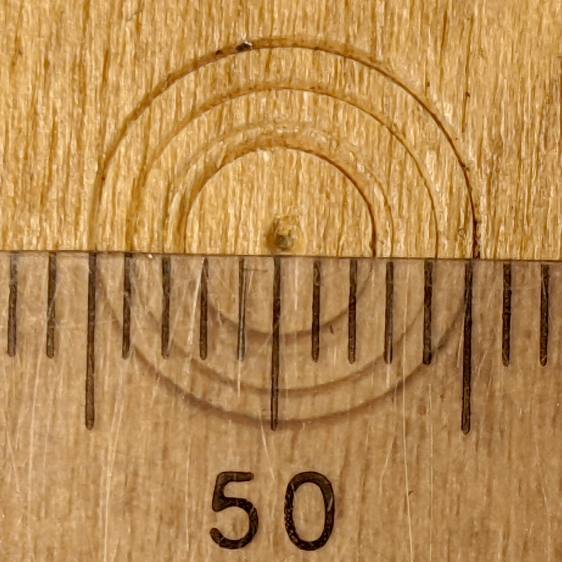
    Truing the hole enlarged it enough to require a 0.5 mm shimstock wrap, but the pilot is now pretty much dead on:

    Neiko hole punch - accurized results
    Neiko hole punch – accurized results

    Those are 5, 6, 8, and 10 mm punches whacked into a plywood scrap; looks well under a quarter millimeter to me and plenty good enough for what I need.

  • Suet Feeder Extension

    Suet Feeder Extension

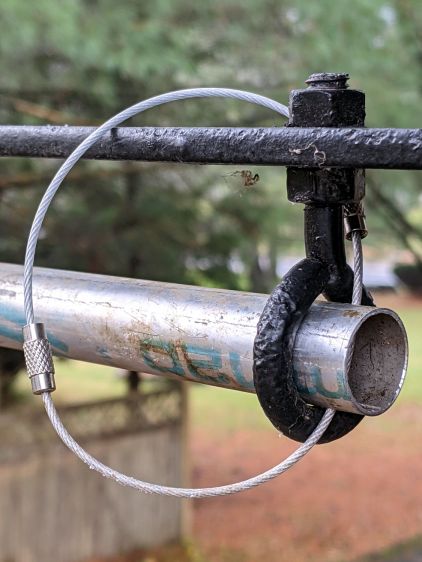
    Shortly after this season’s suet feeder deployment, the neighborhood raccoons emptied it. A few years ago, putting a 3D printed feeder at the end of a repurposed ski pole protected it for a few weeks, so I scrounged another pole from the pile, cut off the flattened top and battered tip, and put it into service:

    Suet Feeder Extension - deployed
    Suet Feeder Extension – deployed

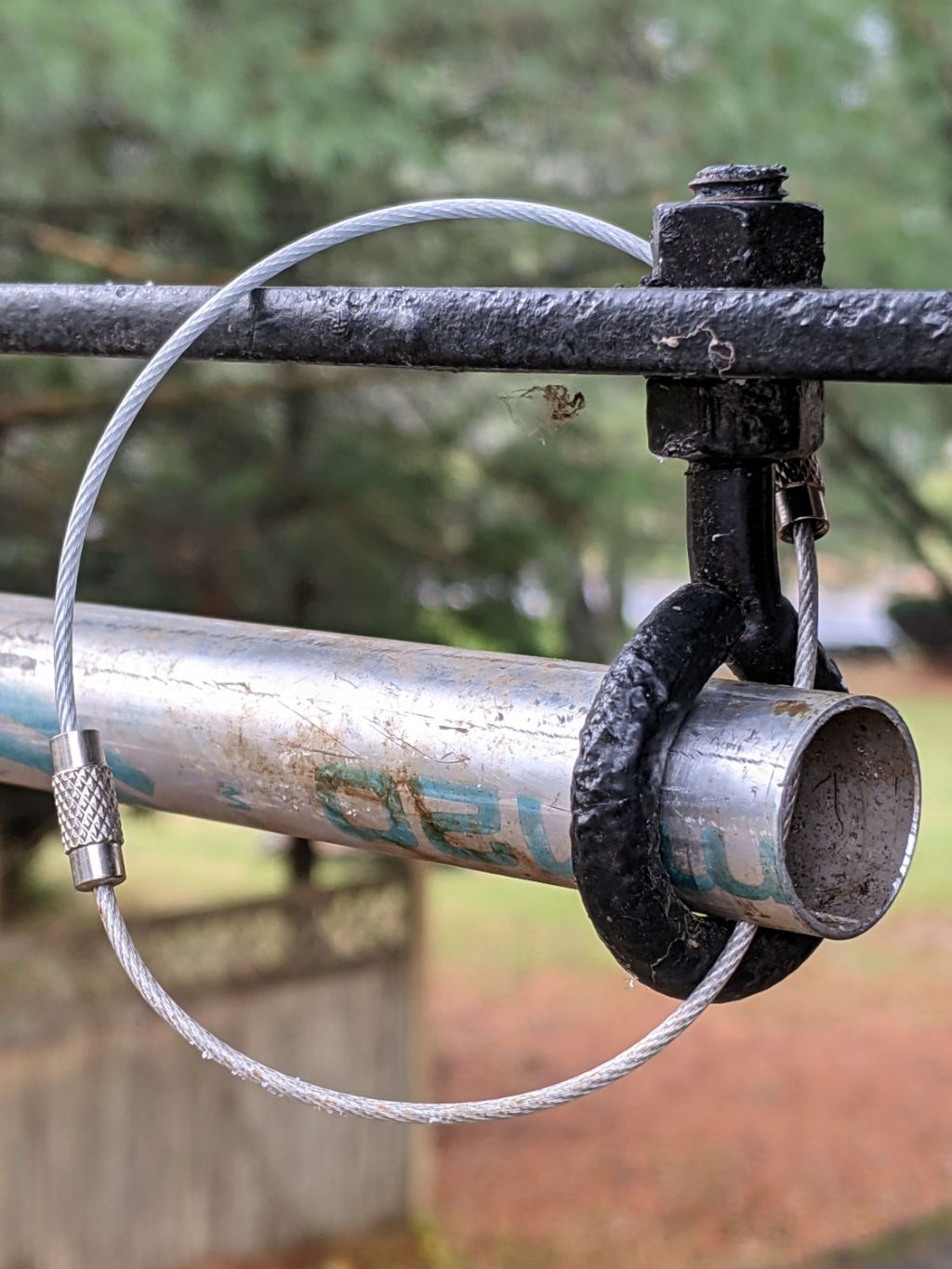
    The near end has a loop made from a pair of stainless steel key cables, because a single cable was just slightly too short:

    Suet Feeder Extension - anchor loop
    Suet Feeder Extension – anchor loop

    The far end has what was once a hook, beaten straight to fit through the hole, then beaten around the curve of the pole:

    Suet Feeder Extension - chain anchor
    Suet Feeder Extension – chain anchor

    Raccoons lacking opposable thumbs, this should suffice until the black bear(s) spotted around here take up residence in the yard.

  • Astable Multivibrator: Dressed-up LED Spider

    Astable Multivibrator: Dressed-up LED Spider

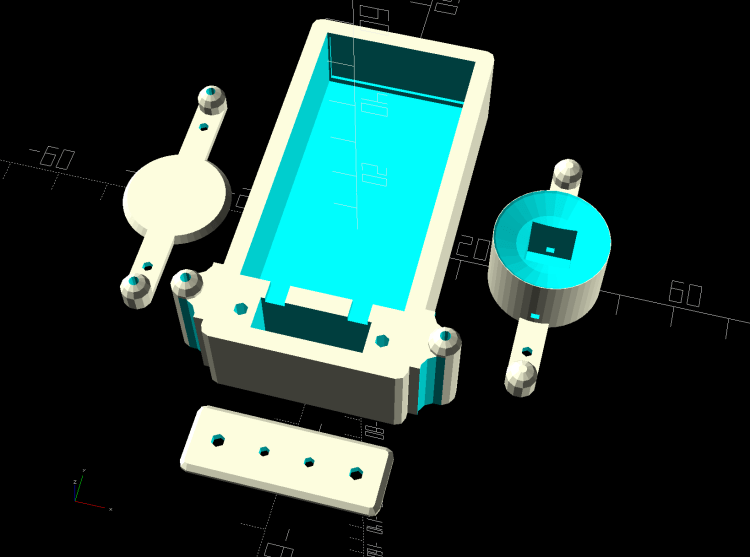
    Adding a bit of trim to the bottom of the LED spider makes it look better and helps keep the strut wires in place:

    Astable Multivibrator - Alkaline - Radome trim
    Astable Multivibrator – Alkaline – Radome trim

    It’s obviously impossible to build like that, so it’s split across the middle of the strut:

    Astable Multivibrator - Alkaline - Radome trim
    Astable Multivibrator – Alkaline – Radome trim

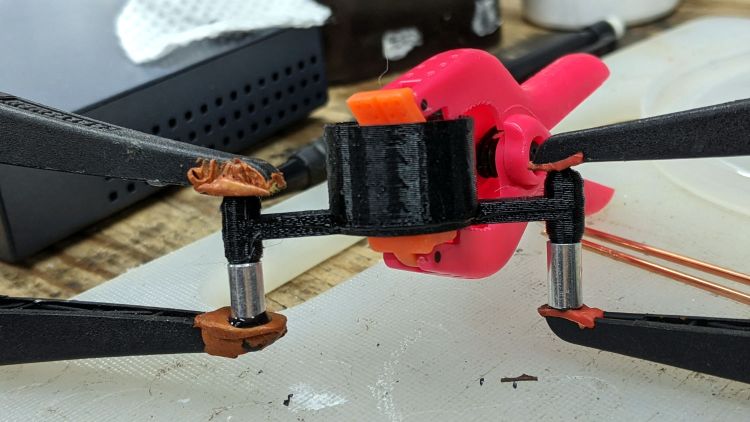
    Glue it together with black adhesive and a couple of clamps:

    LED Spider - glue clamping
    LED Spider – glue clamping

    The aluminum fixtures (jigs?) are epoxied around snippets of strut wire aligning the spider parts:

    LED Spider - gluing fixture
    LED Spider – gluing fixture

    Those grossly oversized holes came pre-drilled in an otherwise suitable aluminum rod from the Little Tray o’ Cutoffs. I faced off the ends, chopped the rod in two, recessed the new ends, and declared victory. Might need better ones at some point, but they’ll do for now.

    Next step: wire up an astable with a yellow LED to go with the green and blue boosted LEDs.

  • Atreus Keyboard: LED Thoughts

    Atreus Keyboard: LED Thoughts

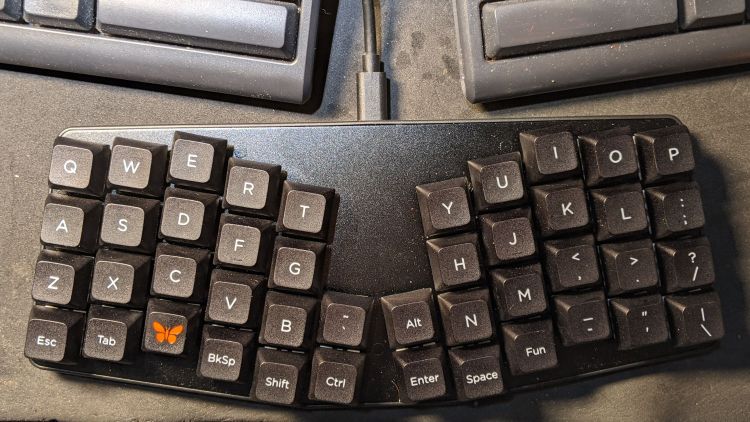
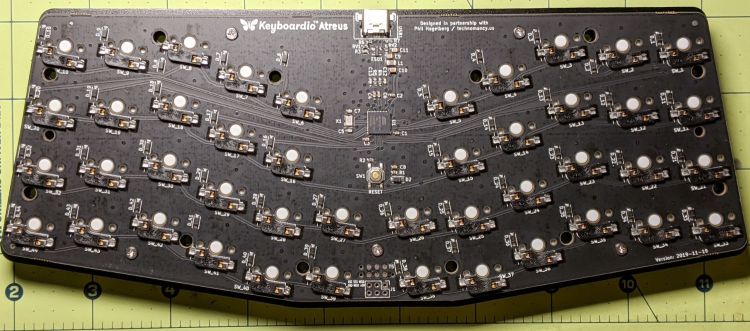
    Having helped grossly over-fund the Atreus Kickstarter earlier this year, a small box arrived pretty much on-time:

    Atreus keyboard - overview
    Atreus keyboard – overview

    I did get the blank keycap set, but have yet to screw up sufficient courage to install them. The caps sit atop the stock Kailh (pronounced, I think, kale) BOX Brown soft tactile switches; they’re clicky, yet not offensively loud.

    Removing a dozen screws lets you take it apart, revealing all the electronics on the underside of the PCB:

    Atreus keyboard - PCB overview
    Atreus keyboard – PCB overview

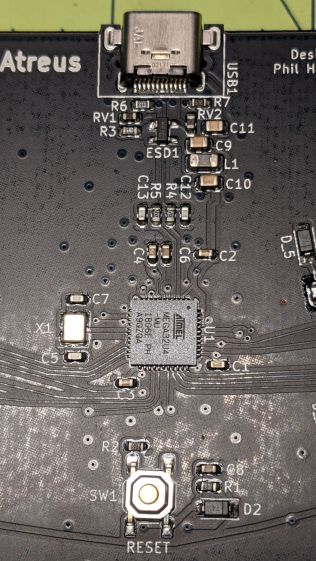
    The central section holds most of the active ingredients:

    Atreus keyboard - USB 32U4 Reset - detail
    Atreus keyboard – USB 32U4 Reset – detail

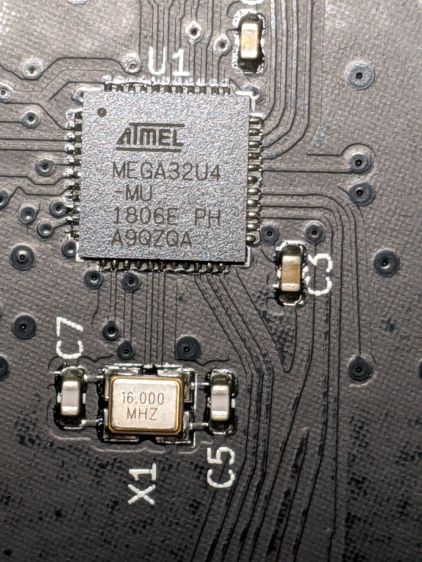
    The Atmel MEGA32U4 microcontroller runs a slightly customized version of QMK:

    Atreus keyboard - 32U4 - detail
    Atreus keyboard – 32U4 – detail

    Of interest is the JTAG header at the front center of the PCB:

    Atreus keyboard - JTAG header
    Atreus keyboard – JTAG header

    I have yet to delve into the code, but I think those signals aren’t involved with the key matrix and one might be available to drive an addressable RGB LED.

    For future reference, they’re tucked into the lower left corner of the chip (the mauled format comes from the original PDF):

    Atmel 32U4 - JTAG pins
    Atmel 32U4 – JTAG pins

    The alternate functions:

    • SCK = PB1
    • MOSI = PB2
    • MISO = PB3

    I don’t need exotic lighting, but indicating which key layer is active would be helpful.

    Love the key feel, even though I still haven’t hit the B key more than 25% of the time.