The Smell of Molten Projects in the Morning

Ed Nisley's Blog: Shop notes, electronics, firmware, machinery, 3D printing, laser cuttery, and curiosities. Contents: 100% human thinking, 0% AI slop.

Tag: Improvements

Making the world a better place, one piece at a time

  • NPN RGB Astable Multivibrator: End-of-Life Battery Runtime

    NPN RGB Astable Multivibrator: End-of-Life Battery Runtime

    After un-wedging the astable’s synchronized periods and recharging the harvested 18650 lithium cell, I put a sock (not shown) over the radome and let it blink on a corner of the desk:

    Astable - 10 11 12 uF tweak - 027
    Astable – 10 11 12 uF tweak – 027

    The periods are much too short and the NPN astable currents much too high, but the thing runs for about ten days before the over-discharge circuit shuts it down.

    So a single NPN astable driving a single-color LED with a more reasonable period should get a month or so from an end-of-life 18650 cell and a MOSFET astable might run for two months.

  • Discrete-transistor LM3909 LED Flasher

    Discrete-transistor LM3909 LED Flasher

    I’ve been using not-dead-yet lithium batteries to power astable multivibrators blinking LEDs on the red-to-yellow end of the spectrum, because the over-discharge protection circuitry in the batteries shuts down at 2.5 V, while not eking much light from LEDs toward the blue end of the spectrum.

    Back in the late 60s, when integrated circuits were new, National Semiconductor designed and, in the early 70s, introduced the LM3909: “a monolithic oscillator specifically designed to flash Light Emitting Diodes”. The IC used an electrolytic capacitor as both timing element and voltage booster by charging the cap, then switching it in reverse series with the LED, to produce a voltage drop larger than the 1.5 V battery supply. The original National Semiconductor LM3909 datasheet will get you started and Application Note 154 gives more details and insight.

    Rob Paisley’s work from 2008 suggested a discrete-transistor version might look just as attractive, in a techie sort of way, as the astables, and perhaps boost the 2 V from a pair of not-dead-yet alkaline cells high enough to light a blue LED.

    Some LTSpice twiddling produces a suitable circuit:

    Discrete LM3909 - basic circuit
    Discrete LM3909 – basic circuit

    The labeled nodes correspond to pin numbers on the IC package, with a suffix indicating what they did for a living. R2 combines the two timing resistors in the IC into a single unit, so “P18-RC” combines the pins. The Q2 pair over on the right forms a current mirror driving Q3, which the doc calls the “power transistor”, to yank the positive end of the capacitor to ground to light the LED.

    The LED is faked by a PT-121-B diode with a 2.34 V forward drop at 20 mA. It’s rated for 20 A average current, so it’s not a particularly good model for a piddly 5 mm LED, but I’ll define it to be Good Enough for now.

    Running the simulation at 1.5 V is encouraging:

    Discrete LM3909 - basic circuit - 1.5 V simulation
    Discrete LM3909 – basic circuit – 1.5 V simulation

    The green trace gives the voltage across the capacitor. Under these conditions, the voltage stays positive, although not by much.

    Running it from a 3 V supply changes the results:

    Discrete LM3909 - basic circuit - 3.0 V simulation
    Discrete LM3909 – basic circuit – 3.0 V simulation

    The cap charges to about the same voltage, but the pulse now lasts long enough to charge it nearly half a volt in the wrong direction. This is Bad Practice, even though my similarly offending astables have been doing it for years.

    The data sheet points out that the forward drops of Q1 and Q2 determine the trigger level for the start of the LED pulse, so adding another forward-biased junction in series should let the cap charge to a higher voltage and, for the same pulse duration, pull the low end up above zero to increase overall happiness.

  • Lathe-straightened Copper Wire

    Lathe-straightened Copper Wire

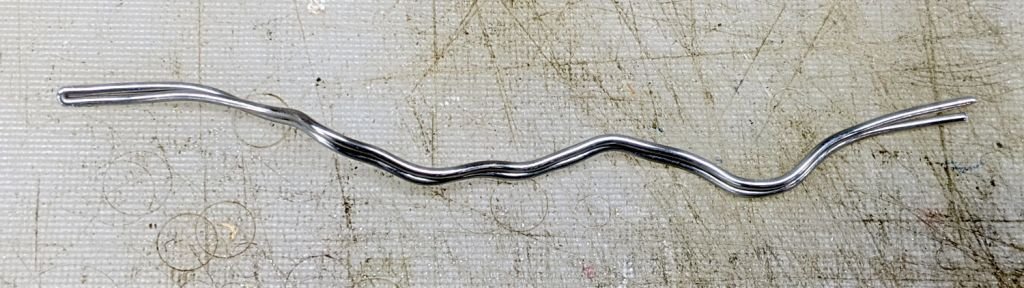
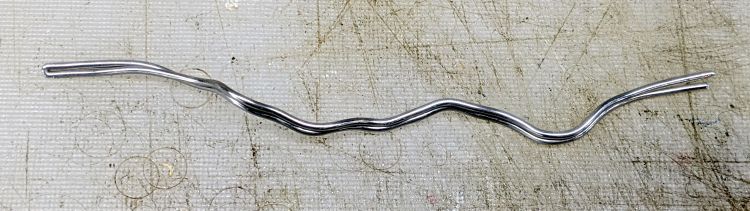
    I formerly straightened the copper wire into “bus bars” for the astable multivibrators by whacking it with a slide hammer, but someone whose name is lost in the mists of time told me the right way to do it:

    Lathe-straightening Wire - setup
    Lathe-straightening Wire – setup

    Yup, grab a piece of wire at both ends in Tiny Lathe and give it a few low-speed turns while pulling firmly on the tailstock.

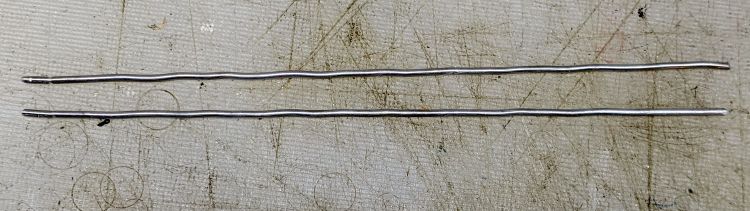
    No muss, no fuss, no drama, just bar-straight and slightly work-hardened copper wires:

    Lathe-straightening Wire - results
    Lathe-straightening Wire – results

    I slide-hammered the top wire before remembering the clue. The bottom two wires have peppermint-stick swirls.

    Thank you, whoever you were!

  • PTC Fuses

    PTC Fuses

    Lithium battery packs have overcurrent protection cutouts, but alkaline cells depend on their internal resistance and may overheat in response to a serious short circuit. So adding a PTC fuse to the circuitry over an alkaline battery case seemed appropriate:

    Discrete LM3909 - Darl Q1 - 1X Q2 - blue LED test
    Discrete LM3909 – Darl Q1 – 1X Q2 – blue LED test

    That’s a test setup for a discrete-transistor version of an LM3909 LED blinker, about which more later. The PTC fuse looks a lot like a ceramic capacitor with one leg caught in an alligator clip.

    Two bags of PTC fuses recently arrived from halfway around the planet, rated at 100 mA and 170 mA. One allegedly came from JinKe and the other probably didn’t pass through a Littelfuse factory despite its part number, but the only datasheet I can find is for the Littelfuse RXEF PTC PolySwitch series, which is surely close enough.

    I set up a torture test involving a bench power supply and an ammeter, both offscreen and left to your imagination:

    PTC Polyfuse test setup
    PTC Polyfuse test setup

    At 75 °F:

    • 100 mA PTC – 4.75 Ω
    • 170 mA PTC – 2.80 Ω

    With a dead short simulated by 3 V from the supply, the current stabilized at:

    • 100 mA PTC – 125 mA
    • 170 mA PTC – 135 mA

    Cranked to 5 V for that good old TTL vibe:

    • 100 mA PTC – 70 mA
    • 170 mA PTC – 85 mA

    The datasheet says they’re good up to 60 V, but that’s just crazy talk.

    The abuse put a shiny gloss on the epoxy coating, sort of like when you overcooked one of those wax-insulated capacitors back in the day.

    Despite that, a PTC fuse is better than a dead short, if only because the plastic battery case won’t get all melty with the batteries supplying less than half a watt.

  • LTSpice Diode Models Sorted By Forward Voltage

    LTSpice includes a bunch of LEDs I’ll never own, so finding a tabulation of their forward voltages helped match them against various LEDs on hand. The table was sorted by the forward voltage at the diode’s rated average current, which wasn’t helpful for my simple needs, so I re-sorted it on the Vf @ If = 20 mA column over on the right:

    Part #       Mfg             Is         N      Iavg Vf@Iavg  Vd@If
    QTLP690C     Fairchild    1.00E-22    1.500    0.16   1.90    1.82
    PT-121-B     Luminous     4.35E-07    8.370   20.00   3.84    2.34
    LUW-W5AP     OSRAM        6.57E-08    7.267    2.00   3.26    2.39
    LXHL-BW02    Lumileds     4.50E-20    2.600    0.40   2.95    2.75
    W5AP-LZMZ-5K Lumileds     3.50E-17    3.120    2.00   3.13    2.76
    LXK2-PW14    Lumileds     3.50E-17    3.120    1.60   3.11    2.76
    AOT-2015     AOT          5.96E-10    6.222    0.18   3.16    2.80
    NSSW008CT-P  Nichia       2.30E-16    3.430    0.04   2.92    2.86
    NSSWS108T    Nichia       1.13E-18    3.020    0.04   2.99    2.94
    NSPW500BS    Nichia       2.70E-10    6.790    0.03   3.27    3.20
    NSCW100      Nichia       1.69E-08    9.626    0.03   3.60    3.50

    The currents come from plugging the various constants into the Schockley Diode Equation and turning the crank.

    One could, of course, measure the constants for the diodes on hand to generate a proper Spice model, but that seems like a lot of work for what’s basically a blinking LED.

  • Quilting Hexagon Template Generator: Knobless Half-Triangle

    Quilting Hexagon Template Generator: Knobless Half-Triangle

    Although I’d put the same knob on the half-triangle end piece template as on the equilateral triangle template for piecing hexagons into strips, Mary decided a flat chip would be easier to use:

    Quilting Hex Template - family - knobless half-triangle
    Quilting Hex Template – family – knobless half-triangle

    Bonus: you can now flip it over to cut the other half-triangles, if you haven’t already figured out how to cut two layers of fabric folded wrong sides together.

    While I was at it, the knob on the triangle became optional, too. Flipping that one doesn’t buy you much, though.

    The OpenSCAD source as a GitHub Gist has been ever so slightly tweaked:

    // Quilting – Hexagon Templates
    // Ed Nisley KE4ZNU – July 2020
    // Reverse-engineered to repair a not-quite-standard hexagon quilt
    // Useful geometry:
    // https://en.wikipedia.org/wiki/Hexagon
    /* [Layout Options] */
    Layout = "Build"; // [Build, HexBuild, HexPlate, TriBuild, TriPlate, EndBuild, EndPlate]
    //——-
    //- Extrusion parameters must match reality!
    // Print with 2 shells
    /* [Hidden] */
    ThreadThick = 0.25;
    ThreadWidth = 0.40;
    HoleFinagle = 0.2;
    HoleFudge = 1.00;
    function HoleAdjust(Diameter) = HoleFudge*Diameter + HoleFinagle;
    Protrusion = 0.1; // make holes end cleanly
    function IntegerMultiple(Size,Unit) = Unit * ceil(Size / Unit);
    inch = 25.4;
    //——-
    // Dimensions
    /* [Layout Options] */
    FinishedWidthInch = 2.75;
    FinishedWidth = FinishedWidthInch * inch;
    SeamAllowanceInch = 0.25;
    SeamAllowance = SeamAllowanceInch * inch;
    TemplateThick = 3.0;
    TriKnob = true;
    EndKnob = false;
    /* [Hidden] */
    FinishedSideInch = FinishedWidthInch/sqrt(3);
    FinishedSide = FinishedSideInch * inch;
    echo(str("Finished side: ",FinishedSideInch," inch"));
    CutWidth = FinishedWidth + 2*SeamAllowance;
    CutSide = CutWidth/sqrt(3);
    echo(str("Cut side: ",CutSide / inch," inch"));
    // Make polygon-circles circumscribe the target widths
    TemplateID = FinishedWidth / cos(180/6);
    TemplateOD = CutWidth / cos(180/6);
    /* [Hidden] */
    TriRadius = FinishedSide/sqrt(3);
    TriPoints = [[TriRadius,0],
    [TriRadius*cos(120),TriRadius*sin(120)],
    [TriRadius*cos(240),TriRadius*sin(240)]
    ];
    echo(str("TriPoints: ",TriPoints));
    EndPoints = [[TriRadius,0],
    [TriRadius*cos(120),TriRadius*sin(120)],
    [TriRadius*cos(120),0]
    ];
    echo(str("EndPoints: ",EndPoints));
    TipCutRadius = 2*(TriRadius + SeamAllowance); // circumscribing radius of tip cutter
    TipPoints = [[TipCutRadius,0],
    [TipCutRadius*cos(120),TipCutRadius*sin(120)],
    [TipCutRadius*cos(240),TipCutRadius*sin(240)]
    ];
    HandleHeight = 1 * inch;
    HandleLength = (TemplateID + TemplateOD)/2;
    HandleThick = IntegerMultiple(3.0,ThreadWidth);
    HandleSides = 12*4;
    StringDia = 4.0;
    StringHeight = 0.6*HandleHeight;
    DentDepth = HandleThick/4;
    DentDia = 15 * DentDepth;
    DentSphereRadius = (pow(DentDepth,2) + pow(DentDia,2)/4)/(2*DentDepth);
    KnobOD = 15.0; // Triangle handle
    KnobHeight = 20.0;
    //——-
    module PolyCyl(Dia,Height,ForceSides=0) { // based on nophead's polyholes
    Sides = (ForceSides != 0) ? ForceSides : (ceil(Dia) + 2);
    FixDia = Dia / cos(180/Sides);
    cylinder(r=HoleAdjust(FixDia)/2,h=Height,$fn=Sides);
    }
    //——-
    // Hex template
    module HexPlate() {
    difference() {
    cylinder(r=TemplateOD/2,h=TemplateThick,$fn=6);
    translate([0,0,-Protrusion])
    cylinder(r=TemplateID/2,h=(TemplateThick + 2*Protrusion),$fn=6);
    }
    for (i=[1:6/2])
    rotate(i*60)
    translate([0,0,TemplateThick/2])
    cube([HandleLength,HandleThick,TemplateThick],center=true);
    }
    module HexHandle() {
    difference() {
    rotate([90,0,0])
    scale([1,HandleHeight/(TemplateOD/2),1])
    rotate(180/HandleSides)
    cylinder(d=HandleLength,h=HandleThick,center=true,$fn=HandleSides);
    translate([0,0,-HandleHeight])
    cube([2*TemplateOD,2*TemplateOD,2*HandleHeight],center=true);
    translate([0,HandleThick,StringHeight])
    rotate([90,090,0])
    rotate(180/8)
    PolyCyl(StringDia,2*HandleThick,8);
    for (j=[-1,1]) {
    translate([0,j*(DentSphereRadius + HandleThick/2 – DentDepth),StringHeight])
    rotate(180/48)
    sphere(r=DentSphereRadius,$fn=48);
    }
    }
    }
    module HexTemplate() {
    HexPlate();
    HexHandle();
    }
    //——-
    // Triangle template
    module TriPlate() {
    linear_extrude(height=TemplateThick)
    intersection() {
    offset(delta=SeamAllowance) // basic cutting outline
    polygon(points=TriPoints);
    rotate(180)
    polygon(points=TipPoints);
    }
    }
    module TriTemplate() {
    union() {
    if (TriKnob)
    cylinder(d=KnobOD,h=KnobHeight,$fn=HandleSides);
    TriPlate();
    }
    }
    //——-
    // End piece template
    module EndPlate() {
    linear_extrude(height=TemplateThick)
    intersection() {
    offset(delta=SeamAllowance) // basic cutting outline
    polygon(points=EndPoints);
    rotate(180)
    polygon(points=TipPoints);
    }
    }
    module EndTemplate() {
    union() {
    if (EndKnob)
    translate([0,(TriRadius/2)*sin(30),0])
    cylinder(d=KnobOD,h=KnobHeight,$fn=HandleSides);
    EndPlate();
    }
    }
    //——-
    // Build it!
    if (Layout == "HexPlate")
    HexPlate();
    if (Layout == "HexBuild")
    HexTemplate();
    if (Layout == "TriPlate")
    TriPlate();
    if (Layout == "TriBuild")
    TriTemplate();
    if (Layout == "EndPlate")
    EndPlate();
    if (Layout == "EndBuild")
    EndTemplate();
    if (Layout == "Build") {
    translate([1.5*TriRadius,-TriRadius,0])
    rotate(180/6)
    TriTemplate();
    translate([-1.5*TriRadius,-TriRadius,0])
    rotate(180/6)
    EndTemplate();
    translate([0,TemplateOD/2,0])
    HexTemplate();
    }

  • Shuttles Game: Tapered Pegs

    Shuttles Game: Tapered Pegs

    As is all too common with 3D printed replacement parts done remotely, the first Shuttles game pegs didn’t quite fit into the game board’s holes. Fortunately, living in the future means rapid prototyping and quick turnaround:

    Shuttles Game pegs - tapered - solid model
    Shuttles Game pegs – tapered – solid model

    They’re slightly smaller, tapered toward the bottom, and take slightly less time to print.

    The OpenSCAD code in the GitHub Gist now has has the tweaks.