The Smell of Molten Projects in the Morning

Ed Nisley's Blog: Shop notes, electronics, firmware, machinery, 3D printing, laser cuttery, and curiosities. Contents: 100% human thinking, 0% AI slop.

Tag: Improvements

Making the world a better place, one piece at a time

  • USB Current Probe Extender

    USB Current Probe Extender

    Having gotten two answers from two USB meters, I figured it was time to get primal:

    USB Current-Probe Extender - wiring
    USB Current-Probe Extender – wiring

    That’s a pair of USB breakout connectors and lengths of nice silicone wire (24 AWG power & 28 AWG data), with just enough slack for a Tek A6302 current probe:

    USB Current-Probe Extender - in action
    USB Current-Probe Extender – in action

    So I can see the actual current waveform of a Glass Tile box running from a bench power supply:

    Tiles 2x2 - bench supply - 50 mA-div
    Tiles 2×2 – bench supply – 50 mA-div

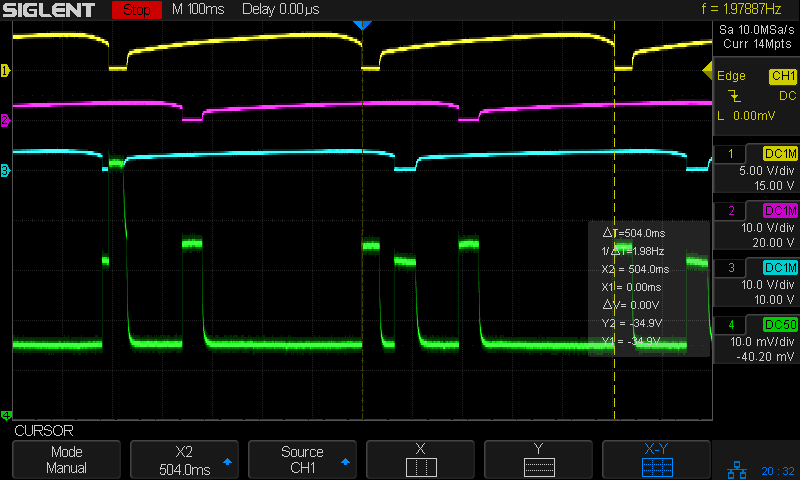
    The top trace is the firmware heartbeat from the Arduino Nano, the middle trace is the SK6812 LED data stream, and the bottom trace is the USB current at 50 mA/div. The current steps downward by about 10 mA (just after the data burst) when one of the tiles changes color and and LED shuts off.

    The current probe reveals some mysteries, such as this waveform from a dirt-cheap USB charger:

    Tiles 2x2 - anon white charger - 50 mA-div
    Tiles 2×2 – anon white charger – 50 mA-div

    I wonder why it’s ramming 100 mA current spikes into the circuit, too. At least now I can see what’s going on.

  • Monthly Image: Rt 376 Overgrowth Clearing

    Monthly Image: Rt 376 Overgrowth Clearing

    NYS DOT cleared the Japanese Knotweed from the shoulder along Rt 376 north of Maloney last year:

    The last image in that gallery is from the end of April; you can see the weeds just starting to grow under the guide rail.

    Japanese Knotweed, being basically a weed on crystal meth, becomes a lush hedge from a standing start in five weeks:

    Knowing how NYS DOT’s Region 8 Dutchess South Residency’s brush trimming has(n’t) worked in previous years, this took us by surprise:

    Rt 376 Marker 1095 - 2020-06-10
    Rt 376 Marker 1095 – 2020-06-10

    Because chopping Japanese Knotweed to the ground doesn’t actually discourage it, we hope they’re scheduled to return every couple of months …

  • Solid Modeling: Support Puzzle

    Solid Modeling: Support Puzzle

    I’ve been putting this type of support structure inside screw holes & suchlike for years:

    Browning Hi-Power Magazine Block - solid model - Generic 1 - support detail
    Browning Hi-Power Magazine Block – solid model – Generic 1 – support detail

    It’s basically a group of small rectangles rotated around the hole’s axis and about one thread thickness shorter than the overhanging interior.

    I’ve found that incorporating exactly the right support structure eliminates Slic3r’s weird growths, eases removal, and generally works better all around.

    So doing this for the baseplate of the Glass Tile frame came naturally:

    Glass Tile Frame - octagonal support
    Glass Tile Frame – octagonal support

    This OpenSCAD snippet plunks one of those asterisks in each of four screw holes:

      if (Support)
        color("Yellow")
          for (i=[-1,1], j=[-1,1])
            translate([i*InsertOC.x/2,j*InsertOC.y/2,0])
              for (a=[0:45:135])
                  rotate(a)
                    translate([0,0,(Screw[LENGTH] - ThreadThick)/2])
                      cube([Screw[OD] - 2*ThreadWidth,2*ThreadWidth,Screw[LENGTH] - ThreadThick],center=true);

    The “cubes” overlap in the middle, with no completely coincident faces or common edges, so it’s 2-manifold. Slic3r, however, produces a weird time estimate whenever the model includes those structures:

    Slic3r - NaN time estimate
    Slic3r – NaN time estimate

    NaN stands for Not A Number and means something horrible has happened in the G-Code generation. Fortunately, the G-Code worked perfectly and produced the desired result, but I’m always uneasy when Something Seems Wrong.

    Messing around with the code produced a slightly different support structure:

    Glass Tile Frame - quad support
    Glass Tile Frame – quad support

    The one thread thick square on the bottom helps glue the structure to the platform and four ribs work just as well as eight in the octagonal hole:

      Fin = [Screw[OD]/2 - 1.5*ThreadWidth,2*ThreadWidth,ScrewRecess - ThreadThick];
      if (Inserts && SupportInserts)
        color("Yellow")
          for (i=[-1,1], j=[-1,1])
            translate([i*InsertOC.x/2,j*InsertOC.y/2,0]) {
              rotate(180/8)
                cylinder(d=6*ThreadWidth,h=ThreadThick,$fn=8);
              for (a=[0:90:360])
                  rotate(a)
                    translate([Fin.x/2 + ThreadWidth/2,0,(ScrewRecess - ThreadThick)/2])
                      cube(Fin,center=true);
            }

    Which changed the NaN time estimates into actual numbers.

    One key difference may be the small hole in the middle. The four ribs (not two!) now overlap by one thread width around the hole, so they’re not quite coincident and Slic3r produces a tidy model:

    Glass Tile Frame - quad support - Slic3r
    Glass Tile Frame – quad support – Slic3r

    The hole eliminates a smear of infill from the center, which may have something to do with the improvement.

    In any event, I have an improved copypasta recipe for the next screw holes in need of support, even if I don’t understand why it’s better.

  • Glass Tiles: Matrix for SK6812 PCBs

    Glass Tiles: Matrix for SK6812 PCBs

    Tweaking the glass tile frame for press-fit SK6812 PCBs in the bottom of the array cells:

    Glass Tile Frame - cell array - openscad
    Glass Tile Frame – cell array – openscad

    Which looks like this with the LEDs and brass inserts installed:

    Glass Tile - 2x2 array - interior
    Glass Tile – 2×2 array – interior

    The base holds an Arduino Nano with room for wiring under the cell array:

    Glass Tile Frame - base - openscad
    Glass Tile Frame – base – openscad

    Which looks like this after it’s all wired up:

    Glass Tile - 2x2 array - wiring
    Glass Tile – 2×2 array – wiring

    The weird colors showing through the inserts are from the LEDs. The red thing in the upper left is a silicone insulation snippet. Yes, that’s hot-melt glue holding the Arduino Nano in place and preventing the PCBs from getting frisky.

    Soak a handful of glass tiles overnight in paint stripper:

    Glass Tiles - paint stripper soak
    Glass Tiles – paint stripper soak

    Whereupon the adhesive slides right off with the gentle application of a razor scraper. Rinse carefully, dry thoroughly, and snap into place.

    Tighten the four M3 SHCS and it’s all good:

    Glass Tile - 2x2 array - operating
    Glass Tile – 2×2 array – operating

    So far, I’ve had two people tell me they don’t know what it is, but they want one:

    Glass Tile - various versions
    Glass Tile – various versions

    The OpenSCAD Customizer lets you set the array size:

    Glass Tile Frame - 3x3 - press-fit SK6812 LEDs
    Glass Tile Frame – 3×3 – press-fit SK6812 LEDs

    However, just because you can do something doesn’t mean you should:

    Glass Tile Frame - 6x6 cell array - openscad
    Glass Tile Frame – 6×6 cell array – openscad

    Something like this might be interesting:

    Glass Tile Frame - 2x6 cell array - openscad
    Glass Tile Frame – 2×6 cell array – openscad

    In round numbers, printing the frame takes about an hour per cell, so a 2×2 array takes three hours and 3×3 array runs around seven hours. A 6×6 frame is just not happening.

    The OpenSCAD source code as a GitHub Gist:

    // Illuminated Tile Grid
    // Ed Nisley – KE4ZNU
    // 2020-05
    /* [Configuration] */
    Layout = "Build"; // [Cell,CellArray,MCU,Base,Show,Build]
    Shape = "Square"; // [Square, Pyramid, Cone]
    Cells = [2,2];
    CellDepth = 15.0;
    Inserts = true;
    SupportInserts = true;
    /* [Hidden] */
    ThreadThick = 0.25;
    ThreadWidth = 0.40;
    HoleWindage = 0.2;
    function IntegerMultiple(Size,Unit) = Unit * ceil(Size / Unit);
    Protrusion = 0.1; // make holes end cleanly
    ID = 0;
    OD = 1;
    LENGTH = 2;
    Tile = [25.0 + 0.1,25.0 + 0.1,4.0];
    WallThick = 4*ThreadWidth;
    FloorThick = 3.0;
    Flange = [2*ThreadWidth,2*ThreadWidth,0]; // ridge supporting tile
    Separator = [3*ThreadWidth,3*ThreadWidth,Tile.z – 1]; // between tiles
    Screw = [3.0,6.0,3.5]; // M3 SHCS, OD=head, LENGTH=head
    Insert = [3.0,4.2,8.0]; // threaded brass insert
    ScrewRecess = Screw[LENGTH] + 4*ThreadThick;
    LEDPCB = [9.6,9.6,2.9]; // round SK6812, squared-off sides
    LED = [5.0 + 2*HoleWindage,5.0 + 2*HoleWindage,1.3];
    LEDOffset = [0.0,0.0,0.0]; // if offset from PCB center
    CellOAL = [Tile.x,Tile.y,0] + Separator + [0,0,CellDepth] + [0,0,FloorThick];
    ArrayOAL = [Cells.x*CellOAL.x,Cells.y*CellOAL.y,CellOAL.z]; // just the LED cells
    BlockOAL = ArrayOAL + [2*WallThick,2*WallThick,0]; // LED cells + exterior wall
    echo(str("Block OAL: ",BlockOAL));
    InsertOC = ArrayOAL – [Insert[OD],Insert[OD],0] – [WallThick,WallThick,0];
    echo(str("Insert OC: ",InsertOC));
    TapeThick = 1.0;
    Arduino = [44.0,18.0,8.0 + TapeThick]; // Arduino Nano to top of USB Mini-B plug
    USBPlug = [15.0,11.0,9.0]; // USB Mini-B plug insulator
    USBOffset = [0,0,5.0]; // offset from PCB base
    WiringSpace = 3.5;
    WiringBay = [(Cells.x – 1)*CellOAL.x + LEDPCB.x,(Cells.y – 1)*CellOAL.y + LEDPCB.x,WiringSpace];
    PlateOAL = [BlockOAL.x,BlockOAL.y,FloorThick + Arduino.z + WiringSpace]; // allow wiring above Arduino
    echo(str("Base Plate: ",PlateOAL));
    echo(str("Screw length: ",(PlateOAL.z – ScrewRecess) + Insert.z/2," to ",(PlateOAL.z – ScrewRecess) + Insert.z));
    LegendRecess = 1*ThreadThick;
    //————————
    module PolyCyl(Dia,Height,ForceSides=0) { // based on nophead's polyholes
    Sides = (ForceSides != 0) ? ForceSides : (ceil(Dia) + 2);
    FixDia = Dia / cos(180/Sides);
    cylinder(d=(FixDia + HoleWindage),h=Height,$fn=Sides);
    }
    //———————–
    // Base and optics in single tile
    module LEDCone() {
    hull() {
    translate([0,0,CellDepth + Tile.z/2])
    cube(Tile – 2*[Flange.x,Flange.y,0],center=true);
    if (Shape == "Square") {
    translate([0,0,LEDPCB.z/2])
    cube([Tile.x,Tile.y,LEDPCB.z] – 2*[Flange.x,Flange.y,0],center=true);
    }
    else if (Shape == "Pyramid") {
    translate([0,0,LEDPCB.z/2])
    cube(LEDPCB,center=true);
    }
    else if (Shape == "Cone") {
    translate([0,0,LEDPCB.z/2])
    cylinder(d=1.0*LEDPCB.x,h=LED.z,center=true);
    }
    else {
    echo(str("Whoopsie! Invalid Shape: ",Shape));
    cube(5);
    }
    }
    }
    // One complete LED cell
    module LEDCell() {
    difference() {
    translate([0,0,CellOAL.z/2])
    cube(CellOAL + [Protrusion,Protrusion,0],center=true); // force overlapping adjacent sides!
    translate([0,0,CellOAL.z – Separator.z + Tile.z/2])
    cube(Tile,center=true);
    translate([0,0,LEDPCB.z])
    LEDCone();
    // cube([LED.x,LED.y,CellOAL.z],center=true);
    translate(-LEDOffset + [0,0,-CellOAL.z/2])
    rotate(180/8)
    PolyCyl(LEDPCB.x,CellOAL.z,8);
    }
    }
    // The whole array of cells
    module CellArray() {
    difference() {
    union() {
    translate([CellOAL.x/2 – Cells.x*CellOAL.x/2,CellOAL.y/2 – Cells.y*CellOAL.y/2,0])
    for (i=[0:Cells.x – 1], j=[0:Cells.y – 1])
    translate([i*CellOAL.x,j*CellOAL.y,0])
    LEDCell();
    if (Inserts) // bosses
    for (i=[-1,1], j=[-1,1])
    translate([i*InsertOC.x/2,j*InsertOC.y/2,0])
    rotate(180/8)
    cylinder(d=Insert[OD] + 2*WallThick,h=Insert[LENGTH],$fn=8);
    }
    if (Inserts) // holes
    for (i=[-1,1], j=[-1,1])
    translate([i*InsertOC.x/2,j*InsertOC.y/2,-Protrusion])
    rotate(180/8)
    PolyCyl(Insert[OD],Insert[LENGTH] + FloorThick + Protrusion,8);
    }
    difference() {
    translate([0,0,CellOAL.z/2])
    cube(BlockOAL,center=true);
    translate([0,0,CellOAL.z])
    cube(ArrayOAL + [0,0,2*CellOAL.z],center=true);
    }
    }
    // Arduino bounding box
    // Origin at center bottom of PCB
    module Controller() {
    union() {
    translate([0,0,Arduino.z/2])
    cube(Arduino,center=true);
    translate([Arduino.x/2 – Protrusion,-USBPlug.y/2,USBOffset.z + TapeThick – USBPlug.z/2])
    cube(USBPlug + [Protrusion,0,0],center=false);
    }
    }
    // Baseplate
    module BasePlate() {
    difference() {
    translate([0,0,PlateOAL.z/2])
    cube(PlateOAL,center=true);
    translate([PlateOAL.x/2 – Arduino.x/2 – 2*WallThick,0,FloorThick])
    Controller();
    translate([PlateOAL.x/2 – Arduino.x/2 – 2*WallThick,0,FloorThick + PlateOAL.z/2])
    cube([Arduino.x – 2*2.0,WiringBay.y,PlateOAL.z],center=true); // cutouts beside MCU
    translate([0,0,PlateOAL.z – WiringBay.z + PlateOAL.z/2 – Protrusion])
    cube([PlateOAL.x – 2*WallThick,WiringBay.y,PlateOAL.z],center=true); // cutout above MCU
    translate([0,0,PlateOAL.z – WiringBay.z + PlateOAL.z/2 – Protrusion])
    cube([WiringBay.x,PlateOAL.y – 2*WallThick,PlateOAL.z],center=true); // cutout above MCU
    if (Inserts)
    for (i=[-1,1], j=[-1,1])
    translate([i*InsertOC.x/2,j*InsertOC.y/2,-Protrusion])
    rotate(180/8) {
    PolyCyl(Screw[ID],2*PlateOAL.z,8);
    PolyCyl(Screw[OD],ScrewRecess + Protrusion,8);
    }
    cube([45,17.0,2*LegendRecess],center=true);
    }
    linear_extrude(height=2*LegendRecess) {
    translate([0,1])
    rotate(-0*90) mirror([1,0,0])
    text(text="Ed Nisley",size=6,font="Arial:style:Bold",halign="center");
    translate([0,-6.5])
    rotate(-0*90) mirror([1,0,0])
    text(text="softsolder.com",size=4.5,font="Arial:style:Bold",halign="center");
    }
    Fin = [Screw[OD]/2 – 1.5*ThreadWidth,2*ThreadWidth,ScrewRecess – ThreadThick];
    if (Inserts && SupportInserts)
    color("Yellow")
    for (i=[-1,1], j=[-1,1])
    translate([i*InsertOC.x/2,j*InsertOC.y/2,0]) {
    rotate(180/8)
    cylinder(d=6*ThreadWidth,h=ThreadThick,$fn=8);
    for (a=[0:90:360])
    rotate(a)
    translate([Fin.x/2 + ThreadWidth/2,0,(ScrewRecess – ThreadThick)/2])
    cube(Fin,center=true);
    }
    }
    //———————–
    // Build things
    if (Layout == "Cell")
    LEDCell();
    else if (Layout == "CellArray")
    CellArray();
    else if (Layout == "MCU")
    Controller();
    else if (Layout == "Base")
    BasePlate();
    else if (Layout == "Show") {
    translate([0,0,3*PlateOAL.z])
    CellArray();
    BasePlate();
    translate([PlateOAL.x/2 – Arduino.x/2 – 2*WallThick,0,FloorThick])
    color("Orange",0.3)
    Controller();
    }
    else if (Layout == "Build") union() {
    translate([0,0.6*BlockOAL.y,0])
    CellArray();
    translate([0,-0.6*BlockOAL.x,0])
    rotate(90)
    BasePlate();
    }
  • No-Knead Bread

    No-Knead Bread

    Although it’s not particularly keto-friendly, I made a loaf of NY Times No-Knead Bread (fine-tuned versions):

    No-knead bread - loaf
    No-knead bread – loaf

    Wow, that tasted good and definitely added a bit more pep to my morning bike rides!

    The receipe produces a rather wet lump of dough in the mixing bowl:

    No-knead bread - mixed
    No-knead bread – mixed

    It looks much more promising after rising for 18 hours:

    No-knead bread - 18 hour rise
    No-knead bread – 18 hour rise

    The recipe calls for a large heavy pot, which produced a long-disused nickel-plated cast iron Wagner Ware No. 8 Drip-Drop Roaster from the attic:

    No-knead bread - Wagner No 8 Roaster
    No-knead bread – Wagner No 8 Roaster

    I scrubbed out the interior and used it as-found to good effect. After the cookin’ was done, a few hours of electrolytic stripping seemed in order:

    No-knead bread - electrolytic pot strip
    No-knead bread – electrolytic pot strip

    The lovely nickel plating on the outside of the pot didn’t need stripping, but the interior is once again a nice flat black surface and the next loaf should drop right out …

  • Tree Stump Removal

    Tree Stump Removal

    This makes writing 3D modeling code and turning threads look downright attractive:

    Tree stump - crater
    Tree stump – crater

    The previous owners apparently surrounded a cedar (?) tree with a ring of large, decorative rocks. The tree vanished long before we arrived, with the stump accreting random stones, bricks, and similar impedimenta ever since; my first task involved (re)moving a couple hundred pounds of rocky debris.

    After using the stump as a fulcrum for that steel bar to break the rotted roots and loosen the surrounding soil, it’s out and away:

    Tree stump - excavated
    Tree stump – excavated

    Back to the Basement Laboratory …

  • Screw Thread Measurement

    Screw Thread Measurement

    While I was cutting threads for the Floor Lamp poles, I tried measuring my progress over wires:

    Floor Lamp - tube fitting - thread measurement
    Floor Lamp – tube fitting – thread measurement

    Those are three lengths of music wire, slightly bent from their storage roll, held in place with a precision clamp metric micrometer. Given the crudity of the setup, the uncalibrated wire diameter, and my lack of thread-fu, the results came out both close and unconvincing.

    A set of real thread measuring wires being cheap & readily available, I’m prepared for the next time around this block:

    Thread Measuring Wires - eBay set
    Thread Measuring Wires – eBay set

    The 185 mil “wires” (they’re all allegedly ground rod) will let me cut threads matching things like a Jesus nut; they’re suited for 3 TPI / 8 mm pitch screws. Mostly, wires from the front row will be all I ever need.

    Which look like this in action:

    Thread Measuring Wires - eBay setThread Measuring Wires - detail
    Thread Measuring Wires – eBay setThread Measuring Wires – detail

    The black doodad (the set includes half a dozen for all the wire sizes) fits over the micrometer anvil and holds two wires betwixt anvil and screw, leaving me to manipulate the screw, the third wire, and the micrometer with my remaining hands. Hence the vise holding the micrometer, which is known to be Very Bad Practice.

    From the side:

    Thread Measuring Wires - overview
    Thread Measuring Wires – overview

    All of the smaller wires measure 0.5 mil too thin, which is likely due to my lack of calibrated measurement equipment:

    Thread Measuring Wires - scant 24 mil
    Thread Measuring Wires – scant 24 mil

    The few thread pitch diameters I measured also came out slightly too small, again likely due to calibration and screw tolerances.

    The LittleMachineShop description of measuring threads over wires seems entirely adequate.

    To forestall link rot, a slightly rearranged version of their tables of wire constants:

    Thread Wire Measurement Constants
    Thread Wire Measurement Constants

    The lower table has metric thread pitches with the wire sizes in inches.

    You measure the distance over the recommended wire (in inches or millimeters, as appropriate), subtract the constant, and get the pitch diameter in the same units. Conversely, add the constant to the desired pitch diameter to get the target over-wire distance, carefully cut the thread until it measures a bit less than that, back up sixty seconds, and cut it spot on.

    Verily, it is written: there is no UnDo key (⎌) in machine shop work.