The Smell of Molten Projects in the Morning

Ed Nisley's Blog: Shop notes, electronics, firmware, machinery, 3D printing, laser cuttery, and curiosities. Contents: 100% human thinking, 0% AI slop.

Tag: Improvements

Making the world a better place, one piece at a time

  • Manjaro 20.1: CUPS Setup

    Tweaking a new Manjaro Linux 20.1 installation to share printers and allow remote administration, done while replacing an aging Optiplex desktop box that’s been running unattended for far too long.

    Start by installing Manjaro’s printer support package:

    pamac install manjaro-printer
    

    In the general section of the default /etc/cups/cupsd.conf file, up near the top:

    Listen *:631       # listen on all interfaces
    DefaultShared Yes  # share the local printers
    BrowseWebIF Yes    # turn on the Web interface
    

    Allow remote admin:

    <Location />
      Allow all
      Order allow,deny
    </Location>
    <Location /admin>
      Allow all
      Order allow,deny
    </Location>


    Restart the CUPS server:

    sudo systemctl restart org.cups.cupsd
    

    And then It Should Just Work.

  • Bicycling For The Fun of It All

    Bicycling For The Fun of It All

    Somewhere out there, you’ll find his video:

    Photo Op - 2020-11-09 - 287
    Photo Op – 2020-11-09 – 287

    Everybody needs a reason to smile!

    Bonus: enough vehicles to keep the signal at Burnett green.

    In the unlikely event you were wondering, 287 is the frame number from the video-to-still conversion:

    ffmpeg -ss 00:03:30 -i /mnt/video/AS30V/2020-11-09/MAH07624.mp4 -t 20 -f image2 -q 1 'Photo Op - 2020-11-09 - '%03d.jpg

    All in all, a fine day for a ride …

  • Mini-Lathe Ball Drilling Fixture

    Mini-Lathe Ball Drilling Fixture

    Despite successfully drilling holes in a few plastic balls, I wanted a somewhat less terrifying setup than this:

    Micromark Ball Vise - lathe ball hack
    Micromark Ball Vise – lathe ball hack

    The stiffness of the bike helmet mirror mount suggested a similar clamp would have enough griptivity to immobilize the ball while cutting it in the lathe:

    Helmet Mirror Mount - 10 mm ball
    Helmet Mirror Mount – 10 mm ball

    Building the clamp around the lathe’s three-jaw lathe chuck eliminates the need for screws / washers / inserts:

    Lathe Ball Fixture - 19 mm - Show
    Lathe Ball Fixture – 19 mm – Show

    The Ah-ha! moment came when I realized the fixture can expose half of the ball’s diameter for drilling while clamping 87% of its diameter, because 0.5 = sin 30° and 0.87 = cos 30°:

    Lathe Ball Fixture - 19 mm - Show - front orthogonal
    Lathe Ball Fixture – 19 mm – Show – front orthogonal

    That’s an orthogonal view showing 13% of the ball radius sticking out of the fixture; it’s 6% of the diameter.

    Which looks like this in real life:

    Lathe Ball Fixture - 19 mm - sections with ball
    Lathe Ball Fixture – 19 mm – sections with ball

    The socket is offset toward the tailstock end of the clamp (on the right in the picture) to expose half its diameter flush with the surface perpendicular to the lathe axis. The other side necks down into a cylinder of the same diameter to clear the drill bit.

    This works nicely until the ball diameter equals the chuck jaw’s 20 mm length, whereupon larger balls protrude into the chuck body’s spindle opening. Although I haven’t yet built one, the 25 mm balls in my Box o’ Bearings should fit, with exceedingly sissy cuts required for large holes.

    The fixture doesn’t require support material, because the axial holes eliminate the worst of the overhang. Putting the tailstock side flat on the platform gives it the best-looking surface:

    Lathe Ball Fixture - 19 mm - Slic3r - equator
    Lathe Ball Fixture – 19 mm – Slic3r – equator

    The kerf between the segments ensures the jaws can apply pressure to the ball, whereupon the usual crappy serrated 3D printed surface firmly grabs it.

    The fixture is a slip fit on the chuck jaws:

    Lathe Ball Fixture - 19 mm - installed
    Lathe Ball Fixture – 19 mm – installed

    Tightening the jaws shoves them all the way into the fixture’s slots and clamps the ball:

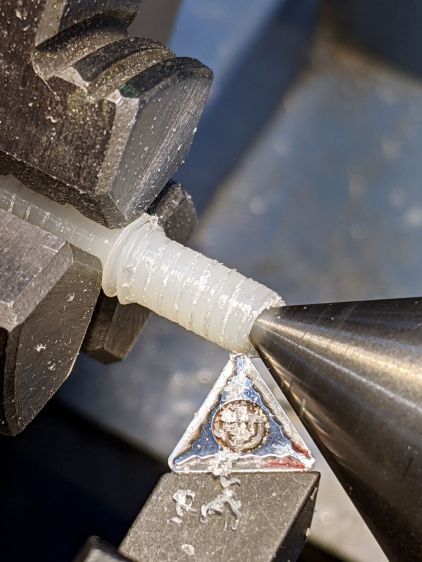
    Lathe Ball Fixture - 19 mm - center drill
    Lathe Ball Fixture – 19 mm – center drill

    Overtightening the chuck will (probably) compress the ball around the drill, which will (best case) give you slightly oversize holes or (worst case) cause the ball to seize / melt around the drill bit, so sleaze up to the correct hole diameter maybe half a millimeter at a time:

    Lathe Ball Fixture - 19 mm - 6 mm drill
    Lathe Ball Fixture – 19 mm – 6 mm drill

    That fixture exposes 9.5 mm = 19/2 of the ball. The drill makes a 6 mm hole to fit the telescoping shaft seen above.

    Obviously, you must build a custom fixture for every ball diameter in your inventory, which is no big deal when you have a hands-off manufacturing process. Embossing the diameter into the fixture helps match them, although the scribbled Sharpie isn’t particularly elegant.

    The OpenSCAD source code as a GitHub Gist:

    // Lathe Ball Drilling Fixture
    // Ed Nisley KE4ZNU 2020-11
    /* [Layout options] */
    Layout = "Build"; // [Build, Show, Body, Jaws]
    BallDia = 10.0; // [5.0:0.5:25.0]
    /* [Extrusion parameters] */
    /* [Hidden] */
    ThreadThick = 0.25;
    ThreadWidth = 0.40;
    HoleWindage = 0.2;
    function IntegerMultiple(Size,Unit) = Unit * ceil(Size / Unit);
    function IntegerLessMultiple(Size,Unit) = Unit * floor(Size / Unit);
    Protrusion = 0.1; // make holes end cleanly
    inch = 25.4;
    ID = 0;
    OD = 1;
    LENGTH = 2;
    //* [Basic dimensions] */
    Chuck = [21.0,100.0,20.0]; // chuck bore, OD, jaw length
    Jaw = [Chuck[LENGTH],15.0,12.0]; // jaw free length, base width, first step radius
    JawInclAngle = 112; // < 120 degrees for clearance!
    JawAngle = JawInclAngle/2; // angle from radius
    WallThick = 5.0; // min wall thickness
    Kerf = 0.75; // space between clamp blocks
    ClampSides = 8*(2*3);
    ClampBore = BallDia/2; // clear bore through clamp
    ClampAngle = asin(ClampBore/BallDia); // angle from lathe axis to clamp front
    Plate = [ClampBore,
    BallDia + 2*WallThick + 2*Jaw.z,
    Jaw.x];
    LegendDepth = 1*ThreadWidth;
    ShaftOD = 3.6; // sample shaft
    ShowGap = 1.5;
    //———————-
    // Chuck jaws
    // Real jaws have a concave radiused tip we simply ignore
    module ChuckJaws(l=Jaw.x,r=10) {
    for (a=[0:120:240])
    rotate(a)
    linear_extrude(height=l)
    translate([r,0])
    difference() {
    translate([Chuck[OD]/4,0])
    square([Chuck[OD]/2,Jaw.y],center=true);
    for (i=[-1,1])
    rotate(i*(90 – JawAngle))
    translate([-Jaw.z/2,0])
    square([Jaw.z,2*Jaw.y],center=true);
    }
    }
    //———————-
    // Clamp body
    module ClampBlocks() {
    difference() {
    cylinder(d=Plate[OD],h=Plate[LENGTH],$fn=ClampSides); // main disk
    translate([0,0,-Protrusion]) // central bore
    cylinder(d=ClampBore,h=2*Plate[LENGTH],$fn=ClampSides);
    for (a=[0:120:240]) // kerf slits
    rotate(60 + a)
    translate([Plate[OD]/2,0,Protrusion])
    cube([Plate[OD],Kerf,2*Plate[LENGTH]],center=true);
    translate([0,0,BallDia/2 * cos(ClampAngle)]) // ball socket
    sphere(d=BallDia,$fn=ClampSides);
    for (a=[0:120:240]) { // legend
    rotate(4.5*360/ClampSides + a)
    translate([Plate[OD]/2 – LegendDepth,0,Plate[LENGTH]/2])
    rotate([0,90,0])
    linear_extrude(height=LegendDepth + Protrusion,convexity=10)
    mirror([0,0,0])
    text(text=str(BallDia," mm"),size=2.5,spacing=1.20,font="Arial:style:Bold",halign="center",valign="center");
    rotate(-4.5*360/ClampSides + a)
    translate([Plate[OD]/2 – LegendDepth,0,Plate[LENGTH]/2])
    rotate([0,90,0])
    linear_extrude(height=LegendDepth + Protrusion,convexity=10)
    mirror([0,0,0])
    text(text="KE4ZNU",size=2.5,spacing=1.20,font="Arial:style:Bold",halign="center",valign="center");
    }
    }
    }
    //———————-
    // Clamp with jaw cutouts
    module ClampBody() {
    difference() {
    ClampBlocks();
    translate([0,0,-Protrusion])
    ChuckJaws(l=Jaw.x + 2*Protrusion,r=BallDia/2 + WallThick);
    }
    }
    //———————-
    // Lash it together
    if (Layout == "Body") {
    ClampBlocks();
    }
    if (Layout == "Jaws") {
    ChuckJaws();
    }
    if (Layout == "Build") {
    ClampBody();
    }
    if (Layout == "Show") {
    ClampBody();
    color("ivory",0.2)
    ChuckJaws(r=BallDia/2 + WallThick + ShowGap); // move out for E-Z viewing
    color("red",0.4)
    translate([0,0,-Jaw.x/2])
    cylinder(d=ShaftOD,h=2*Jaw.x,$fn=ClampSides,center=false);
    color("white",0.5)
    translate([0,0,BallDia/2 * cos(ClampAngle)]) // ball socket
    sphere(d=BallDia,$fn=ClampSides);
    }

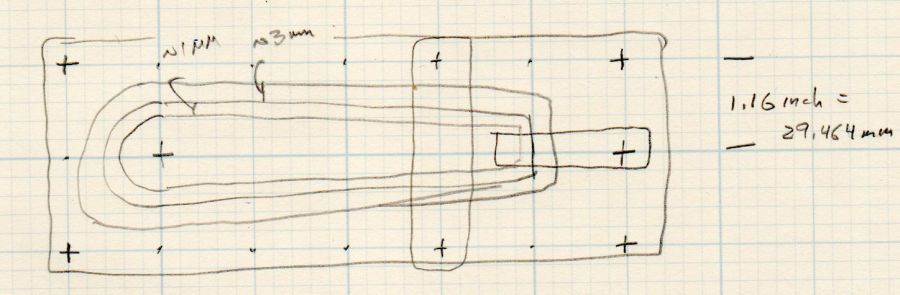
    The dimension doodles, including some notions that didn’t work:

    Lathe Ball Clamp - dimension doodles
    Lathe Ball Clamp – dimension doodles
  • Eyeglass Case Padding

    Eyeglass Case Padding

    Zenni ships their glasses in a snap-close case with a fuzzy insert on the bottom, but after you unpack the cleaning cloth and suchlike, the glasses rattle against the hard plastic top.

    Make trial fit prototype from thin cardboard and trace it onto a sheet of craft foam:

    Eyeglass case foam padding - outline
    Eyeglass case foam padding – outline

    The pen, much favored by quiltists, has a white ceramic lead that washes out of dark fabrics. You can find a corresponding dark-lead pen, but I can use an ordinary pencil.

    Use different colors for different glasses:

    Eyeglass case foam padding - installed
    Eyeglass case foam padding – installed

    Then walk ninja-style again.

    Protip: slip an address label atop the foam so a nice person can reunite you with your glasses, should they slip out of your pocket in the unlikely event you sit down anywhere other than in your house.

  • Beckman DM73: Package Armor

    Beckman DM73: Package Armor

    For reasons not relevant here, I sent the Beckman DM73 to a good home in Europe. Having some experience with the brutality applied to innocent packages by various package-delivery organizations, I filled a Priority Mail Flat Rate Small Box with a solid block of corrugated cardboard:

    DM73 - cardboard armor
    DM73 – cardboard armor

    One inner layer has a cutout for the manual:

    DM73 - Operator Manual package
    DM73 – Operator Manual package

    The meter and its leads tuck into form-fitting cutouts:

    Beckman DM73 - cardboard packing
    Beckman DM73 – cardboard packing

    I bandsawed the cutouts from a block with enough layers for some space on the top and bottom:

    DM73 - bandsawing cardboard package
    DM73 – bandsawing cardboard package

    After mulling that layout overnight, I made a similar block with the saw cuts on diagonally opposite corners, so pressure on the center of the edges won’t collapse the unsupported sides. A slightly larger meter cutout allowed a wrap of closed-cell foam sheet that likely doesn’t make any difference at all.

    With everything in place, the box had just enough space for a pair of plastic sheets to better distribute any top & bottom impacts.

    I won’t know how the armor performed for a few weeks, but it’s definitely the best packaging idea I’ve had so far.

    Update: After nearly two weeks, the package arrived undamaged and the meter was in fine shape. Whew!

  • Arducam Motorized Focus Camera: Depth of Field

    Arducam Motorized Focus Camera: Depth of Field

    According to the Arducam doc, their Motorized Focus Camera has a 54°×41° field of view, (roughly) equivalent to an old-school wide(-ish) angle 35 mm lens on a 35 mm still camera. For my simple purposes, the camera will be focused on objects within maybe 200 mm:

    Arducam Motorized Focus Camera - desktop test range
    Arducam Motorized Focus Camera – desktop test range

    The numeric keys are 6.36 mm = ¼ inch tall, the function keys are 5.3 mm tall, and the rows are 10 to 11 mm apart.

    The focusing equation converting distance to lens DAC values depends critically on my crude measurements, so the focus distance accuracy isn’t spot on. Bonus: there’s plenty of room for discussion about where the zero origin should be, but given the tune-for-best-picture nature of focusing, it’s good enough.

    I set the CANCEL legend at 50 mm and it’s in good focus with the lens set to that distance:

    Arducam Motorized Focus Camera - 50 mm
    Arducam Motorized Focus Camera – 50 mm

    Focusing at 55 mm sharpens the ON key legend, while the CANCEL legend remains reasonably crisp:

    Arducam Motorized Focus Camera - 55 mm
    Arducam Motorized Focus Camera – 55 mm

    Adding another 5 mm to focus at 60 mm near the front of the second row shows the DoF is maybe 15 mm total:

    Arducam Motorized Focus Camera - 60 mm
    Arducam Motorized Focus Camera – 60 mm

    Focusing at 65 mm, near the middle of the second row, softens the first and fourth rows. Both of the middle two rows seem OK, making the DoF about 20 mm overall:

    Arducam Motorized Focus Camera - 65 mm
    Arducam Motorized Focus Camera – 65 mm

    Jumping to 100 mm, near the top of the first function row:

    Arducam Motorized Focus Camera - 100 mm
    Arducam Motorized Focus Camera – 100 mm

    At 150 mm, about the top of the far row just under the display:

    Arducam Motorized Focus Camera - 150 mm
    Arducam Motorized Focus Camera – 150 mm

    I think 200 mm may be the far limit of useful detail for a 5 MP camera:

    Arducam Motorized Focus Camera - 200 mm
    Arducam Motorized Focus Camera – 200 mm

    At 300 mm the DoF includes the mug at 600 mm, but the calculator keyboard is uselessly fuzzy:

    Arducam Motorized Focus Camera - 300 mm
    Arducam Motorized Focus Camera – 300 mm

    At 500 mm, the mug becomes as crisp as it’ll get and the text on the box at 750 mm is entirely legible:

    Arducam Motorized Focus Camera - 500 mm
    Arducam Motorized Focus Camera – 500 mm

    At 1000 mm, which is basically the edge of the desk all this junk sits atop, the mug and text become slightly fuzzy, so the DoF doesn’t quite reach them:

    Arducam Motorized Focus Camera - 1000 mm
    Arducam Motorized Focus Camera – 1000 mm

    I limited the focus range to 1500 mm, which doesn’t much change the results:

    Arducam Motorized Focus Camera - 1500 mm
    Arducam Motorized Focus Camera – 1500 mm

    I could focus-stack a set of still images along the entire range to get one of those unnatural everything-in-focus pictures.

  • Arducam Motorized Focus Camera: Rotary Encoder and Equation

    Arducam Motorized Focus Camera: Rotary Encoder and Equation

    Mashing rotary encoder reading together with the focus-distance-to-DAC equation produces well-behaved camera focusing.

    First, set up another test range:

    Arducam Motorized Focus Camera - desktop test range
    Arducam Motorized Focus Camera – desktop test range

    Run the test code:

    # Simpleminded focusing test for
    #  Arducam Motorized Focus Camera
    # Gets events through evdev from rotary encoder knob
    
    # Ed Nisley - KE4ZNU
    # 2020-10-20
    
    import sys
    import math
    import evdev
    import smbus
    
    # useful functions
    
    def DAC_from_distance(dist):
        return math.trunc(256*(10.8 + 2180/dist))
    
    # write DAC word to camera I2C bus device
    #  and ignore the omnipresent error return
    
    def write_lens_DAC(bus,addr,val):
        done = False
        while not done:
            try:
                bus.write_word_data(addr,val >> 8,val & 0xff)
            except OSError as e:
                if e.errno == 121:
    #                print('OS remote error ignored')
                    done = True
            except:
                print(sys.exc_info()[0],sys.exc_info()[1])
            else:
                print('Write with no error!')
                done = True
    
    # set up focus distances
    
    closest = 50            # mm
    farthest = 500
    nominal = 100           # default focus distance
    
    foci = [n for n in range(closest,nominal,5)] \
         + [n for n in range(nominal,250,10)]  \
         + [n for n in range(250,1501,25)]
    
    # compute DAC equivalents for each distance
    
    foci_DAC = list(map(DAC_from_distance,foci))
    
    focus_index = foci.index(nominal)
    
    # set up the I2C bus
    
    f = smbus.SMBus(0)
    lens = 0x0c
    
    # set up the encoder device handler
    # requires rotary-encoder dtoverlay aimed at pins 20 & 21
    
    d = evdev.InputDevice('/dev/input/by-path/platform-rotary@14-event')
    print('Rotary encoder device: {}'.format(d.name))
    
    # set initial focus
    
    write_lens_DAC(f,lens,foci_DAC[focus_index])
    
    # fetch I2C events and update the focus forever
    
    for e in d.read_loop():
    #    print('Event: {}'.format(e))
    
        if e.type == evdev.ecodes.EV_REL:
    #        print('Rel: {}'.format(e.value))
    
            if (e.value > 0 and focus_index < len(foci) - 1) or (e.value < 0 and focus_index > 0):
                focus_index += e.value
    
            dist = foci[focus_index]
            dac = foci_DAC[focus_index]
    
            print('Distance: {:4d} mm DAC: {:5d} {:04x} i: {:3d}'.format(dist,dac,dac,focus_index))
    
            write_lens_DAC(f,lens,dac)
    

    Because the knob produces increments of ±1, the code accumulates them into an index for the foci & foci_DAC lists, then sends the corresponding entry from the latter to the lens on every rotary encoder event.

    And then It Just Works!

    The camera powers up with the lens focused at infinity (or slightly beyond), but setting it to 100 mm seems more useful:

    Arducam Motorized Focus Camera - 100 mm
    Arducam Motorized Focus Camera – 100 mm

    Turning the knob counterclockwise runs the focus inward to 50 mm:

    Arducam Motorized Focus Camera - 50 mm
    Arducam Motorized Focus Camera – 50 mm

    Turning it clockwise cranks it outward to 1500 mm:

    Arducam Motorized Focus Camera - 1500 mm
    Arducam Motorized Focus Camera – 1500 mm

    The mug is about 300 mm away, so the depth of field extends from there to infinity (and beyond).

    It needs more work, but now it has excellent upside potential!