The Smell of Molten Projects in the Morning

Ed Nisley's Blog: Shop notes, electronics, firmware, machinery, 3D printing, laser cuttery, and curiosities. Contents: 100% human thinking, 0% AI slop.

Tag: Improvements

Making the world a better place, one piece at a time

  • Dish Drainer Drain Board Draining Improvement

    Dish Drainer Drain Board Draining Improvement

    It seems all the drain boards under dish drainers are now intended for contemporary under-counter sinks without a rim, which is not the Old School drop-in sink we have in the kitchen. After considerable faffing about, I hacked a fix to make the drain board & drainer fit the sink:

    Dish Drainer - sink lip cutout
    Dish Drainer – sink lip cutout

    The crude notch not only lowers the front edge by a few millimeters, it also encourages the lip to stay over the sink, rather than sliding back over the counter and slobbering water everywhere.

    The drain board has stiffening ribs under the center section, cleverly arranged so they do not actually touch the counter. I measured the shape of the board near the ribs:

    Dish Drainer - measuring center ribs
    Dish Drainer – measuring center ribs

    And then cut shapes to both support the board and rest on the counter:

    Dish Drainer - center support
    Dish Drainer – center support

    The board has a swale in the middle, directly over those ribs, requiring more tilt for proper drainage:

    Dish Drainer - rear support
    Dish Drainer – rear support

    Getting all of that flying in formation required several iterations and we’re still not entirely satisfied, but at least the water flows into the sink and does not puddle in the drain board or on the counter.

    Stipulated: wood is the wrong material for the job, hot melt glue is breathtakingly ugly, and you want no part of this.

    You can buy fancier drain boards, some with cute spouts leading into the sink, but the fine print suggests most expect to work with rimless under-counter sinks.

  • Laser Material Scrap Bins

    Laser Material Scrap Bins

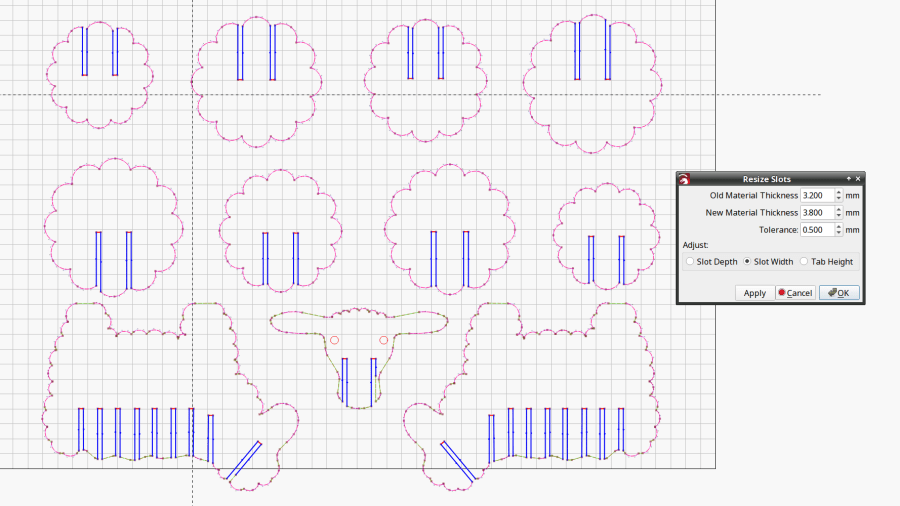
    Being in need of small bins to sort cutoffs / scrap material from the laser and now having an essentially unlimited supply of corrugated cardboard at hand, this made some sense:

    Laser scrap bins - cutting
    Laser scrap bins – cutting

    The cardboard is 3.8 mm thick and laid with the ribs parallel to the X axis to make all the parts stiff in the right direction. I rearranged the parts to fit the space available and work around the butterfly finger hole over on the right.

    The box pattern comes from the infinite supply at boxes.py (you’re welcome to the jawbreaker URL with my parameters) and assembles to become a sturdy little box:

    Laser scrap bins - in action
    Laser scrap bins – in action

    Rather than gluing all those fingers into their holes, I ran a hot melt glue bead around the bottom perimeter and up the four corners, which seems to do the trick. The fingers parallel to the X axis tend to be fragile, as only one or two corrugated ribs run along their length, but the overall box is surprisingly rigid after gluing.

    They’re nominally stackable and the pattern includes stiffeners glued across the leg openings so they don’t slide off the box below, but it’s obvious these boxes will always have too much stuff to allow stacking.

    I made a longer box for plywood scraps and may need a couple more for other stuff yet to be unpacked, but you get the general idea.

    The WordPress AI Assistant reminds me to remind you of the safety measures appropriate for using hot melt glue: consider yourself warned.

  • Sillcock Faucet Alignment Wedge: Getting the Angle Right

    Sillcock Faucet Alignment Wedge: Getting the Angle Right

    A pair of frost-free sillcock faucets arrived to replace the house’s leaky and un-repairable hose bibs. The faucet must be mounted at a 5° angle to let the water drain out when it’s closed:

    Everbilt Frost-Free Sillcock faucet - installation
    Everbilt Frost-Free Sillcock faucet – installation

    One might expect the Alignment Wedge included with the faucet to have a 5° angle. Because I can both measure and math, it has a 1° angle.

    Well, I can fix that.

    Start by scanning the bottom (widest side) of the wedge and apply GIMP’s Select by color tool:

    Sillcock faucet alignment wedge - GIMP color selection
    Sillcock faucet alignment wedge – GIMP color selection

    After a little manual cleanup in Quick Mask mode, apply a 1 mm inset to ensure it snaps around the pipe, convert the selection to a path, export it as an SVG image, and import it into OpenSCAD to cut the angle:

    // Sillcock faucet alignment wedge
    // Ed Nisley KE4ZNU - May 2024
    
    MaxThick = 5.0;
    Tilt = -5.0;
    
    PlateOA = [60,40,MaxThick];   // XY = original angle plate size
    
    difference() {
      linear_extrude(height=MaxThick,convexity=5)
        offset(r=-1.0)
          import("/mnt/bulkdata/Cameras/2024/Shop Projects/Sillcock Faucets/Sillcock faucet angle washer - outline.svg",
                 center=true);
       translate([-PlateOA.x/2,-PlateOA.y/2,MaxThick])
         rotate([Tilt,0,0])
            cube(PlateOA,center=false);
    }
    

    The solid model goes into PrusaSlicer for duplication & slicing:

    Sillcock faucet alignment wedge - PrusaSlicer layout
    Sillcock faucet alignment wedge – PrusaSlicer layout

    And comes off the printer looking just about like you’d expect:

    Sillcock faucet alignment wedge - OEM vs printed
    Sillcock faucet alignment wedge – OEM vs printed

    The far side of both wedges are 5 mm tall, but you can see the difference four more degrees makes in the front.

    It’s even more obvious from the edge:

    Sillcock faucet alignment wedge - on pipe
    Sillcock faucet alignment wedge – on pipe

    The wood siding where these will fit is perfectly vertical, so getting the wedge angle right isn’t really optional.

    I must drill the existing hole in the sill plate out to 1-1/8 inch to clear the pipe fittings, plus the wood around the screws holding the current bibs to the wall will surely need some buttressing, but all that’s in the nature of fine tuning.

    FWIW, this was the first 3D print after the move and I’m happy to say the M2 had no any need of adjustments.

    The WordPress AI image generator apparently ignored the post text and produced a stylin’ picture of an arched bathroom faucet over a rimless sink, which I shall leave to your imagination.

  • Baofeng UV-5 Wiring Plate Globbery

    Baofeng UV-5 Wiring Plate Globbery

    The weekly battery swap revealed the dismal state of the headset wires on Mary’s radio:

    Baofeng wiring plate - loose wires
    Baofeng wiring plate – loose wires

    That’s after sorting & disentangling loose ends, ramming cables under their ties, and generally tidying things up.

    Which suggested an improvement I should have done long ago:

    Baofeng wiring plate - globbed
    Baofeng wiring plate – globbed

    Verily, it is written: the bigger the blob, the better the job.

    Gotta glob my bike the next time around.

    Update: It’s hot melt glue!

  • Magnifying Desk Light: LED-ifying & Base Refooting

    Magnifying Desk Light: LED-ifying & Base Refooting

    My ancient fluorescent magnifying desk lamp emerged from a box and cried out to be used, but the equally ancient 22 W fluorescent ring light was long past its prime and cried out to be replaced with something from the current millennium.

    So I removed the fluorescent ballast / choke from the junction box at the lamp base:

    Magnifying Ring Light - ballast removed
    Magnifying Ring Light – ballast removed

    That’s a grounded outlet in the cover plate serving as a wire termination block. The red crimp connector joins a white wire that formerly went to the ballast with the black wire going to the lamp head; you’ll note the black wire from the line cord going into the same heatstink tubing at the outlet.

    The lamp head had a push-to-start switch, presumably with an internal starting capacitor or some such, but also sporting a pair of terminals behaving like a single-pole push-on / push-off switch. A bit of rewiring, of which there are no pictures, made it work perfectly with the new 13 W LED ring light:

    Magnifying Ring Light - LED ring installed
    Magnifying Ring Light – LED ring installed

    It now sits on a bit of laboratory ironmongery weighing about as much as a small child:

    Magnifying Ring Light - on base
    Magnifying Ring Light – on base

    Although the base has four feet, it sits perfectly flat on my (admittedly battered) surface plate because all four feet have been ground to make that happen:

    Magnifying Ring Light - foot plan view
    Magnifying Ring Light – foot plan view

    Those feet will be hostile to any table / bench top outside their intended laboratory environment. Fortunately, the geometry is simple enough to build directly in LightBurn and cut from a cork disk with PSA backing suited to become a coaster:

    Magnifying Ring Light - cork foot cutting
    Magnifying Ring Light – cork foot cutting

    Which fit well enough, although all four feet are just slightly different:

    Magnifying Ring Light - cork foot
    Magnifying Ring Light – cork foot

    The new Basement Shop™ is coming together and this stuff is getting easier …

    The WordPress AI came up with a plausible steampunk build:

    Magnifying Ring Light - WP AI image 1
    Magnifying Ring Light – WP AI image 1

    Love those flowy feet, although the vertical rod in the back seems misplaced.

    Adding “one-piece base” to the prompt produces contemporary style:

    Magnifying Ring Light - WP AI image 2
    Magnifying Ring Light – WP AI image 2

    Dunno what the dingus on the lower arm might be (perhaps a spring?), but it’s got the right general idea.

  • Laser Cutter: Streaming Camera Support

    Laser Cutter: Streaming Camera Support

    If I’m making something with the laser cutter during a Zoomed SquidWrench meeting, switching the view to a camera inside the cabinet is always a crowd-pleaser. Having tried several locations with various degrees of success, the camera now sits atop a small chipboard box holding it as high as it can get over the front left corner of the platform:

    Laser camera support box - position overview
    Laser camera support box – position overview

    It juuuust barely kisses the head in that corner:

    Laser camera support box - near collision
    Laser camera support box – near collision

    The box is a simple ClosedBox from boxes.py with a jawbreaker URL full of parameters, minus two holes, plus a quartet of shims, all cut from chipboard:

    Camera Support box - LB layout
    Camera Support box – LB layout

    The holes fit a 1/4-20 button head screw for the Logitch C615 camera’s tripod mount and the hex wrench needed to tighten it:

    Laser camera support box - interior
    Laser camera support box – interior

    The box is held together with Genuine Scotch Tape, because I want it to fall apart if it gets hit by the laser head. It’s held to the cabinet with a finger-crushingly strong bar magnet.

    The camera has a reasonably good view of the entire platform:

    Laser Cutter - USB Camera view
    Laser Cutter – USB Camera view

    The camera’s closest focus point sits about halfway across the platform, roughly corresponding to the typical monitor-to-face distance the camera was intended for, but it’s Good Enough™ for the purpose.

  • Harbor Freight Bar Clamp: Plywood Handle

    Harbor Freight Bar Clamp: Plywood Handle

    After only a dozen years, one of the 3D printed replacement handles for my Harbor Freight bar clamps snapped exactly where you’d expect:

    HF bar clamp - plywood handle
    HF bar clamp – plywood handle

    The replacement this time around is laser-cut plywood, with a pair of 3 mm sheets glued together to just about match the original thickness:

    HF bar clamp - plywood handle gluing
    HF bar clamp – plywood handle gluing

    I hacked the OpenSCAD code to use its projection() operation to export the outline of the solid model on the XY plane, inhaled the SVG into LightBurn, replaced the original chunky hole with a Real Circle, cut a pair of them, discovered I messed up the diameter, tweaked that, cut a pair that fit perfectly, and that was that.

    Flushed with success, I cut another pair to replace the (not yet failed) handle in the other HF bar clamp and restarted the failure clock.

    Not as fancy as something milled on the Sherline, but way easier and, if it lasts another decade, I’ll call it a win.

    The WordPress AI had fun with this post:

    HF Bar Clamp Handle - WP AI image
    HF Bar Clamp Handle – WP AI image

    The thing over on the left must be a 3D printer, but what’s floating in the middle? Those hand tools look downright scary.