The Smell of Molten Projects in the Morning

Ed Nisley's Blog: Shop notes, electronics, firmware, machinery, 3D printing, laser cuttery, and curiosities. Contents: 100% human thinking, 0% AI slop.

Category: Software

General-purpose computers doing something specific

  • Everybody Wants to be a Star

    The Wzye Pan camera overlooking the bird feeders attracted the attention of a Downy Woodpecker:


    Screenshot_20181029-112307 - Downy Woodpecker at the Pan
    Screenshot_20181029-112307 – Downy Woodpecker at the Pan

    The camera sits on a “guest” branch of the house network, fenced off from the rest of the devices, because Pi-Hole showed it relentlessly nattering with its Chinese servers:

    Blocked Domains - Wyze iotcplatform
    Blocked Domains – Wyze iotcplatform

    In round numbers, the Pan camera tried to reach those (blocked) iotcplatform domains every 30 seconds around the clock, using a (permitted) google.com lookup to check Internet connectivity. Pi-Hole supplied the latter from its cache and squelched the former, but enough is enough.

    I haven’t tested for traffic to hardcoded dotted-quad IP addresses not requiring DNS lookups through the Pi-Hole. Scuttlebutt suggests the camera firmware includes binary blobs from the baseline Xaiomi/Dafang cameras, so there’s no telling what’s going on in there.

    The Xiaomi-Dafang Hacks firmware doesn’t phone home to anybody, but requires router port forwarding and a compatible RTSP client on the remote end. Isolating it from the rest of the LAN must suffice until I can work out that mess; I assume the camera has already made my WiFi passwords public knowledge.

  • MPCNC: Drag Knife Holder

    My attempt to use a HP 7475A plotter as a vinyl cutter failed due to its 19 g pen load limit:

    HP 7475A knife stabilizer - big nut weight
    HP 7475A knife stabilizer – big nut weight

    The MPCNC, however, can apply plenty of downforce, so I tinkered up a quick-and-dirty adapter to put the drag knife “pen” body into the MPCNC’s standard DW660 router holder:

    MPCNC - DW660 adapter drag knife holder - fixed position
    MPCNC – DW660 adapter drag knife holder – fixed position

    That’s using the DW660 adapter upside-down to get the business end of the knife closer to the platform. The solid model descends from the linear-bearing Sakura pen holder by ruthless pruning.

    It didn’t work well at all, because you really need a spring for some vertical compliance and control over the downforce pressure.

    Back to the Comfy Chair:

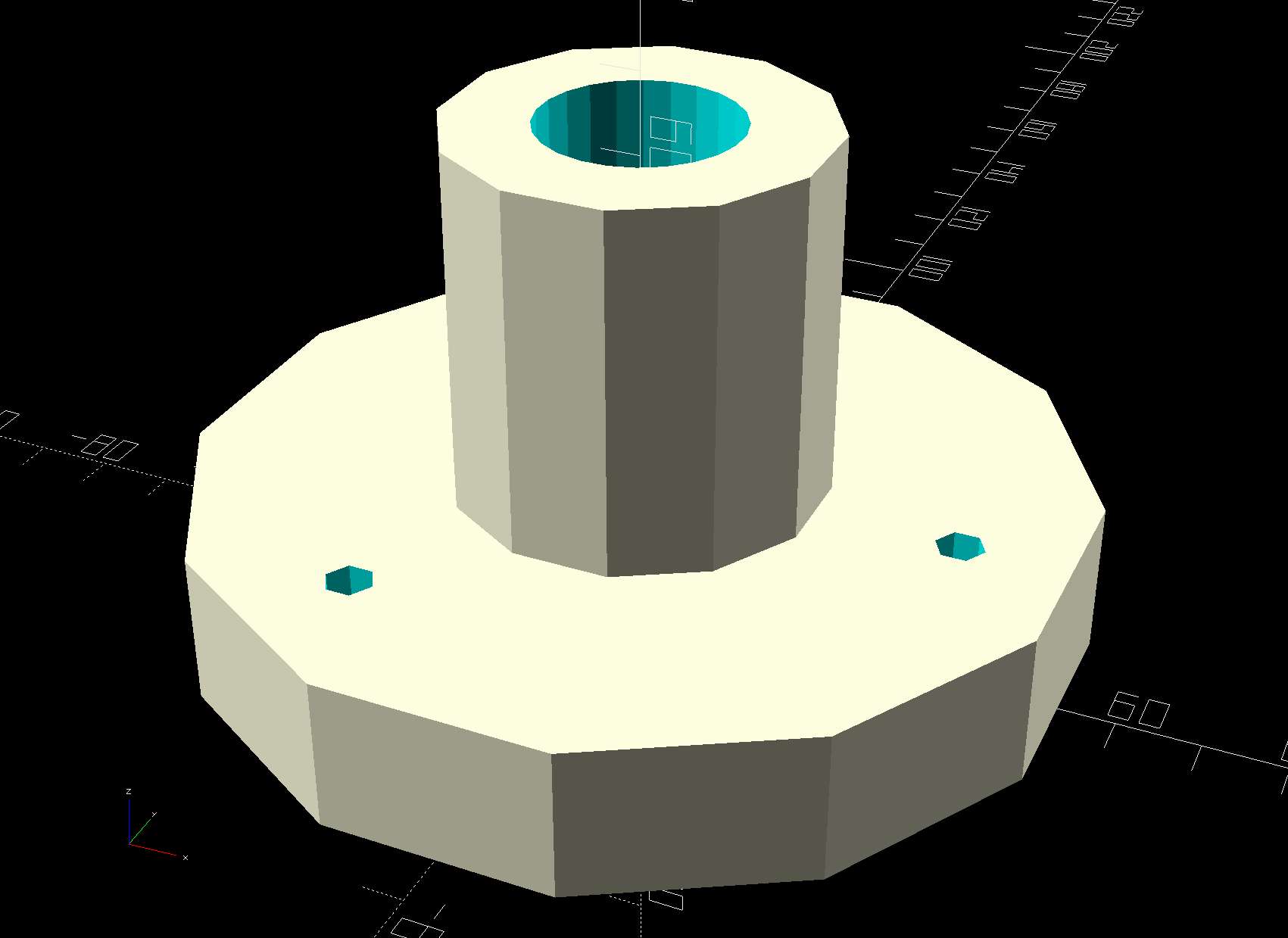
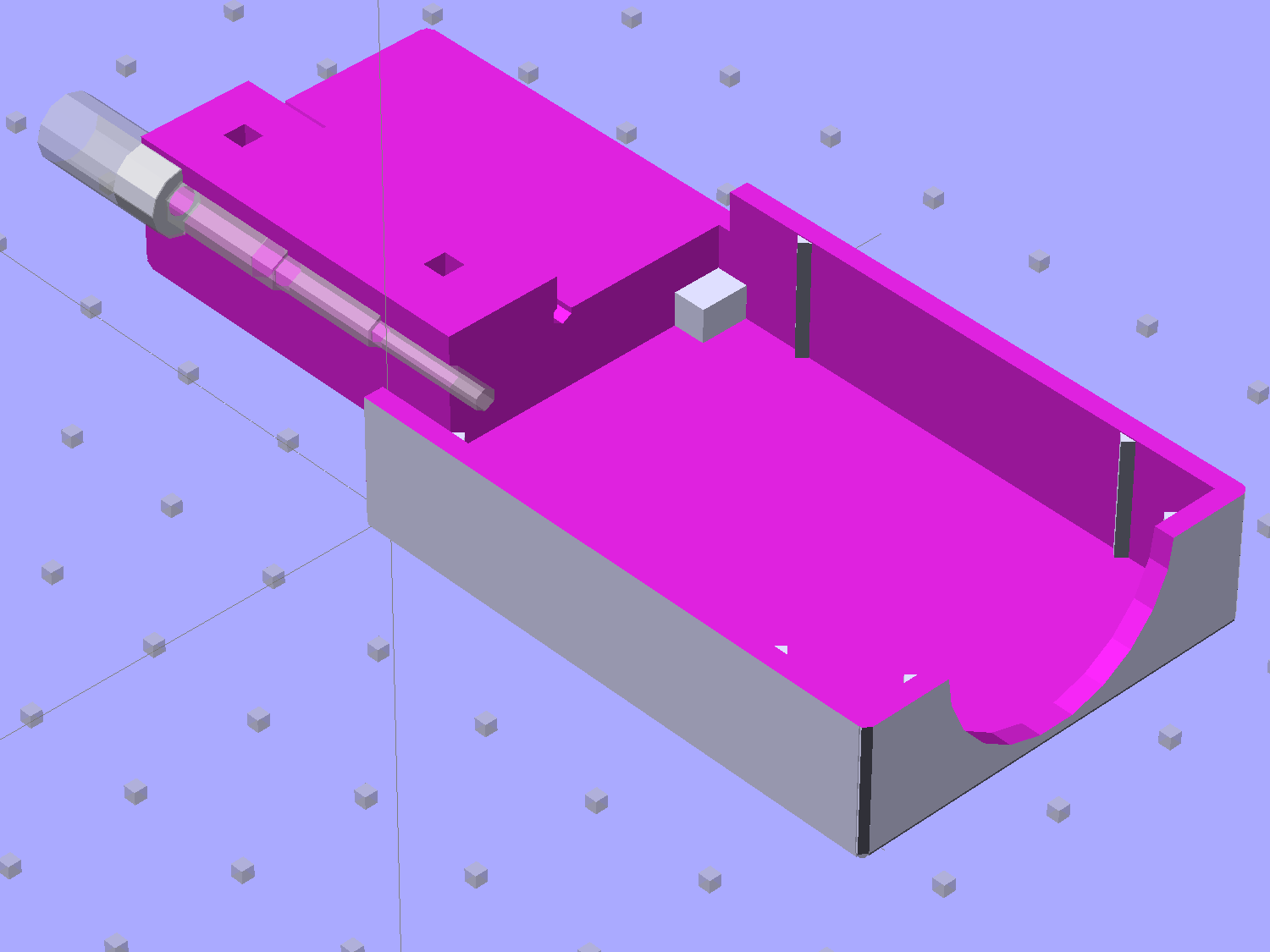
    Drag Knife Holder - DW660 Mount - solid model
    Drag Knife Holder – DW660 Mount – solid model

    A trio of the lightest springs from a 200 piece assortment (in the front left compartment) pushes the upper plate downward against the drag knife’s flange:

    MPCNC - DW660 adapter drag knife holder - spring loaded
    MPCNC – DW660 adapter drag knife holder – spring loaded

    There’s a bit more going on than may be obvious at first glance.

    The screws slide in brass tubing press-fit into the upper plate, because otherwise their threads hang up on the usual 3D printed layers inside the (drilled-out) holes. Smaller free-floating brass tubing snippets inside the springs keep them away from the screw threads; the gap between the top of the tubing and the screw head limits the vertical compliance to 3 mm. The screws thread into brass inserts epoxied into the bottom disk, with a dab of low-strength Loctite for stay-put adjustment.

    I bored the orange PETG disk to a nice slip fit around the knife body:

    DW660 drag knife holder - boring body
    DW660 drag knife holder – boring body

    The upper plate also required fitting:

    DW660 drag knife holder - boring plate
    DW660 drag knife holder – boring plate

    A few iterations produced reasonably smooth motion over a few millimeters, but it’s definitely not a low-friction / low-stiction drag knife holder. It ought to be good for some proof-of-concept vinyl cutting, though.

    The OpenSCAD source code as a GitHub Gist:

    // Drag Knife Holder for DW660 Mount
    // Ed Nisley KE4ZNU – 2018-09-26
    Layout = "Show"; // Build, Show, Puck, Mount, Plate
    /* [Extrusion] */
    ThreadThick = 0.25; // [0.20, 0.25]
    ThreadWidth = 0.40; // [0.40]
    /* [Hidden] */
    Protrusion = 0.1; // [0.01, 0.1]
    HoleWindage = 0.2;
    inch = 25.4;
    function IntegerMultiple(Size,Unit) = Unit * ceil(Size / Unit);
    ID = 0;
    OD = 1;
    LENGTH = 2;
    //- Adjust hole diameter to make the size come out right
    module PolyCyl(Dia,Height,ForceSides=0) { // based on nophead's polyholes
    Sides = (ForceSides != 0) ? ForceSides : (ceil(Dia) + 2);
    FixDia = Dia / cos(180/Sides);
    cylinder(r=(FixDia + HoleWindage)/2,h=Height,$fn=Sides);
    }
    //- Dimensions
    KnifeBody = [12.0,16.0,2.0]; // body flange — resembles HP plotter pen
    WallThick = 3.0; // minimum thickness / width
    Screw = [4.0,8.5,8.0]; // holding it all together, OD = washer
    Insert = [4.0,6.0,10.0]; // brass insert
    Plate = [KnifeBody[ID],KnifeBody[OD] + 3*Screw[OD],4.0]; // spring reaction plate
    PlateGuide = [4.0,4.8,Plate[LENGTH]]; // … guide tubes
    NumScrews = 3;
    ScrewBCD = 2*(KnifeBody[OD]/2 + Screw[OD]/2 + 0.5);
    NumSides = 9*4; // cylinder facets (multiple of 3 for lathe trimming)
    // Basic shape of DW660 snout fitting into the holder
    // Lip goes upward to lock into MPCNC mount
    Snout = [44.6,50.0,9.6]; // LENGTH = ID height
    Lip = 4.0; // height of lip at end of snout
    PuckOAL = Snout[LENGTH] + Lip; // total height
    Key = [Snout[ID],25.7,PuckOAL]; // rectangular key
    module DW660Puck() {
    translate([0,0,PuckOAL])
    rotate([180,0,0]) {
    cylinder(d=Snout[OD],h=Lip/2,$fn=NumSides);
    translate([0,0,Lip/2])
    cylinder(d1=Snout[OD],d2=Snout[ID],h=Lip/2,$fn=NumSides);
    cylinder(d=Snout[ID],h=PuckOAL,$fn=NumSides);
    intersection() {
    translate([0,0,0*Lip + Key.z/2])
    cube(Key,center=true);
    cylinder(d=Snout[OD],h=Lip + Key.z,$fn=NumSides);
    }
    }
    }
    module MountBase() {
    difference() {
    DW660Puck();
    translate([0,0,-Protrusion]) // knife holder body
    PolyCyl(KnifeBody[ID],2*PuckOAL,NumSides);
    translate([0,0,PuckOAL – KnifeBody[LENGTH]/2]) // … half of flange, loose fit
    PolyCyl(KnifeBody[OD] + 2*HoleWindage,KnifeBody[LENGTH],NumSides);
    for (i=[0:NumScrews – 1]) // clamp screws
    rotate(i*360/NumScrews)
    translate([ScrewBCD/2,0,-Protrusion])
    rotate(180/8)
    PolyCyl(Insert[OD],2*PuckOAL,8);
    }
    }
    module SpringPlate() {
    difference() {
    cylinder(d=Plate[OD],h=Plate[LENGTH],$fn=NumSides);
    translate([0,0,-Protrusion]) // knife holder body
    PolyCyl(KnifeBody[ID],2*PuckOAL,NumSides);
    translate([0,0,Plate[LENGTH] – KnifeBody[LENGTH]/2]) // … half of flange, snug fit
    PolyCyl(KnifeBody[OD],KnifeBody[LENGTH],NumSides);
    for (i=[0:NumScrews – 1]) // clamp screws
    rotate(i*360/NumScrews)
    translate([ScrewBCD/2,0,-Protrusion])
    rotate(180/8)
    PolyCyl(PlateGuide[OD],2*PuckOAL,8);
    }
    }
    //—–
    // Build it
    if (Layout == "Puck")
    DW660Puck();
    if (Layout == "Plate")
    SpringPlate();
    if (Layout == "Mount")
    MountBase();
    if (Layout == "Show") {
    MountBase();
    translate([0,0,2*PuckOAL])
    rotate([180,0,0])
    SpringPlate();
    }
    if (Layout == "Build") {
    translate([0,Snout[OD]/2,0])
    MountBase();
    translate([0,-Snout[OD]/2,0])
    SpringPlate();
    }


  • Raspberry Pi vs. MicroSD-as-Disk Memory

    The MPCNC has bCNC running on a Raspberry Pi, with a Samsung EVO MicroSD card serving as the “hard drive”:

    Sandisk Extreme Plus vs. Samsung EVO MicroSD cards
    Sandisk Extreme Plus vs. Samsung EVO MicroSD cards

    The picture also shows a defunct Sandisk Extreme Plus killed by continuous video recording in my Fly6 bike camera. I later replaced the EVO with a video-rated Samsung card which has been running fine ever since, albeit with the occasional crash-and-reformat expected with “action” cameras.

    With that as background, a different Samsung EVO card from the same batch has been running the MPCNC’s Raspberry Pi for about a year. Over the course of a few days last week, the RPi went from an occasional stall to a complete lockup, although waiting for minutes to hours would sometimes resolve the problem. As I’ve learned by now, it’s not a software crash, it’s the controller inside the card suffering from write amplification while trying to move data from failing sectors.

    Applying f3write to the card shows the problem:

    MPCNC MicroSD - f3write slowdown
    MPCNC MicroSD – f3write slowdown

    The write speed started out absurdly high as the card’s write cache fills, then slowed to to the flash memory’s ability to absorb data, and eventually ran out of steam during the last few files.

    But, as you might not expect, f3read reported the data was fine:

    sudo f3read /mnt/part
    F3 read 7.0
    Copyright (C) 2010 Digirati Internet LTDA.
    This is free software; see the source for copying conditions.
    
                      SECTORS      ok/corrupted/changed/overwritten
    Validating file 1.h2w ... 2097152/        0/      0/      0
    Validating file 2.h2w ... 2097152/        0/      0/      0
    Validating file 3.h2w ... 2097152/        0/      0/      0
    Validating file 4.h2w ... 2097152/        0/      0/      0
    Validating file 5.h2w ... 2097152/        0/      0/      0
    Validating file 6.h2w ... 2097152/        0/      0/      0
    Validating file 7.h2w ... 2097152/        0/      0/      0
    Validating file 8.h2w ... 2097152/        0/      0/      0
    Validating file 9.h2w ... 2097152/        0/      0/      0
    Validating file 10.h2w ... 2097152/        0/      0/      0
    Validating file 11.h2w ... 2097152/        0/      0/      0
    Validating file 12.h2w ... 2097152/        0/      0/      0
    Validating file 13.h2w ... 2097152/        0/      0/      0
    Validating file 14.h2w ... 2097152/        0/      0/      0
    Validating file 15.h2w ... 2097152/        0/      0/      0
    Validating file 16.h2w ... 2097152/        0/      0/      0
    Validating file 17.h2w ... 2097152/        0/      0/      0
    Validating file 18.h2w ... 2097152/        0/      0/      0
    Validating file 19.h2w ... 2097152/        0/      0/      0
    Validating file 20.h2w ... 2097152/        0/      0/      0
    Validating file 21.h2w ... 1322894/        0/      0/      0
    
      Data OK: 20.63 GB (43265934 sectors)
    Data LOST: 0.00 Byte (0 sectors)
    	       Corrupted: 0.00 Byte (0 sectors)
    	Slightly changed: 0.00 Byte (0 sectors)
    	     Overwritten: 0.00 Byte (0 sectors)
    Average reading speed: 43.04 MB/s
    

    Obviously, the card’s read speed isn’t affected by the write problems.

    Assuming the actual data & programs on the card were still good, I slurped the partitions:

    sudo partimage save /dev/sdf1 mpcnc_boot.gz
    sudo partimage save /dev/sdf2 mpcnc_partition.gz
    

    And wrote them back:

    sudo partimage restmbr  mpcnc_boot.gz.000 
    sudo partimage restore /dev/sdf1 mpcnc_boot.gz.000 
    sudo partimage restore /dev/sdf2 mpcnc_partition.gz.000
    

    Unshown: a finger fumble requiring MBR restoration.

    Having forced the card controller to reallocate all the failed sectors, the card works now fine and runs at full speed again. This won’t last long, but it’ll be interesting to see how it plays out.

    While I was at it, I wrote the partitions to a new-ish / unused Samsung EVO Plus card, now tucked under the MPCNC’s monitor in case of emergency.

    An old SFF Optiplex with an SSD may be a better fallback.

  • GCMC Guilloche Plot Generator

    It turns out the Spirograph patterns I’d been using to wring out the MPCNC are also known as Guilloché, perhaps after the guy who invented a lathe-turning machine to engrave them. Sounds pretentious, but they still look nice:

    Guilloche 591991062 - scanned
    Guilloche 591991062 – scanned

    With the ballpoint pen / knife collet holder in mind, I stripped the tool changes out of the Spirograph generator GCMC source code, set the “paper size” to a convenient 100 mm square, and tidied up the code a bit.

    As with Spirograph patterns, changing the random number seed produces entirely different results. A collection differing in the last digit, previewed online:

    Seed = 213478836:

    Guilloche 213478836
    Guilloche 213478836

    Seed = 213478837:

    Guilloche 213478837
    Guilloche 213478837

    Seed = 213478838:

    Guilloche 213478838
    Guilloche 213478838

    Seed = 213478839:

    Guilloche 213478839
    Guilloche 213478839

    They’re such unique snowflakes …

    The Bash script now accepts a single parameter to force the PRNG seed to a value you presumably want to plot again, rather than just accept whatever the Gods of Cosmic Jest will pick for you.

    The GCMC source code and Bash (or whatever) script feeding it as a GitHub Gist:

    // Spirograph simulator for MPCNC used as plotter
    // Ed Nisley KE4ZNU – 2017-12-23
    // Adapted for Guillioche plots with ball point pens – 2018-09-25
    // Spirograph equations:
    // https://en.wikipedia.org/wiki/Spirograph
    // Loosely based on GCMC cycloids.gcmc demo:
    // https://gitlab.com/gcmc/gcmc/tree/master/example/cycloids.gcmc
    // Required command line parameters:
    // -D Pen=n pen selection, 0 = no legend, 1 = current pen
    // -D PaperSize=[x,y] overall sheet size: [17in,11in]
    // -D PRNG_Seed=i non-zero random number seed
    include("tracepath.inc.gcmc");
    include("engrave.inc.gcmc");
    //—–
    // Greatest Common Divisor
    // https://en.wikipedia.org/wiki/Greatest_common_divisor#Using_Euclid's_algorithm
    // Inputs = integers without units
    function gcd(a,b) {
    if (!isnone(a) || isfloat(a) || !isnone(b) || isfloat(b)) {
    warning("GCD params must be dimensionless integers:",a,b);
    }
    local d = 0; // power-of-two counter
    while (!((a | b) & 1)) { // remove and tally common factors of two
    a >>= 1;
    b >>= 1;
    d++;
    }
    while (a != b) {
    if (!(a & 1)) {a >>= 1;} // discard non-common factor of 2
    elif (!(b & 1)) {b >>= 1;} // … likewise
    elif (a > b) {a = (a – b) >> 1;} // gcd(a,b) also divides a-b
    else {b = (b – a) >> 1;} // … likewise
    }
    local GCD = a*(1 << d); // form gcd
    // message("GCD: ",GCD);
    return GCD;
    }
    //—–
    // Max and min functions
    function max(x,y) {
    return (x > y) ? x : y;
    }
    function min(x,y) {
    return (x < y) ? x : y;
    }
    //—–
    // Pseudo-random number generator
    // Based on xorshift:
    // https://en.wikipedia.org/wiki/Xorshift
    // http://www.jstatsoft.org/v08/i14/paper
    // Requires initial state from calling script
    // -D "PRNG_Seed=whatever"
    // You can get nine reasonably random digits from $(date +%N)
    function XORshift() {
    local x = PRNG_State;
    x ^= x << 13;
    x ^= x >> 17;
    x ^= x << 5;
    PRNG_State = x;
    return x;
    }
    //—–
    // Spirograph tooth counts mooched from:
    // http://nathanfriend.io/inspirograph/
    // Stators includes both inside and outside counts, because we're not fussy
    Stators = [96, 105, 144, 150];
    Rotors = [24, 30, 32, 36, 40, 45, 48, 50, 52, 56, 60, 63, 64, 72, 75, 80, 84];
    //—–
    // Start drawing things
    // Set initial parameters from command line!
    comment("PRNG seed: ",PRNG_Seed);
    PRNG_State = PRNG_Seed;
    // Define some useful constants
    AngleStep = 2.0deg;
    Margins = [12mm,12mm] * 2;
    comment("Paper size: ",PaperSize);
    PlotSize = PaperSize – Margins;
    comment("PlotSize: ",PlotSize);
    //—–
    // Set up gearing
    s = (XORshift() & 0xffff) % count(Stators);
    StatorTeeth = Stators[s];
    comment("Stator ",s,": ",StatorTeeth);
    r = (XORshift() & 0xffff) % count(Rotors);
    RotorTeeth = Rotors[r];
    comment("Rotor ",r,": ",RotorTeeth);
    GCD = gcd(StatorTeeth,RotorTeeth); // reduce teeth to ratio of least integers
    comment("GCD: ",GCD);
    StatorN = StatorTeeth / GCD;
    RotorM = RotorTeeth / GCD;
    L = to_float((XORshift() & 0x3ff) – 512) / 100.0; // normalized pen offset in rotor
    comment("Offset: ", L);
    sgn = sign((XORshift() & 0xff) – 128);
    K = sgn*to_float(RotorM) / to_float(StatorN); // normalized rotor dia
    comment("Dia ratio: ",K);
    Lobes = StatorN; // having removed all common factors
    Turns = RotorM;
    comment("Lobes: ", Lobes);
    comment("Turns: ", Turns);
    //—–
    // Crank out a list of points in normalized coordinates
    Path = {};
    Xmax = 0.0;
    Xmin = 0.0;
    Ymax = 0.0;
    Ymin = 0.0;
    for (a = 0.0deg ; a <= Turns*360deg ; a += AngleStep) {
    x = (1 – K)*cos(a) + L*K*cos(a*(1 – K)/K);
    if (x > Xmax) {Xmax = x;}
    elif (x < Xmin) {Xmin = x;}
    y = (1 – K)*sin(a) – L*K*sin(a*(1 – K)/K);
    if (y > Ymax) {Ymax = y;}
    elif (y < Ymin) {Ymin = y;}
    Path += {[x,y]};
    }
    //message("Max X: ", Xmax, " Y: ", Ymax);
    //message("Min X: ", Xmin, " Y: ", Ymin); // min will always be negative
    Xmax = max(Xmax,-Xmin); // odd lobes can cause min != max
    Ymax = max(Ymax,-Ymin); // … need really truly absolute maximum
    //—–
    // Scale points to actual plot size
    PlotScale = [PlotSize.x / (2*Xmax), PlotSize.y / (2*Ymax)];
    comment("Plot scale: ", PlotScale);
    Points = scale(Path,PlotScale); // fill page, origin at center
    //—–
    // Start drawing lines
    feedrate(1500.0mm);
    TravelZ = 1.5mm;
    PlotZ = -1.0mm;
    //—–
    // Box the outline for camera alignment
    goto([-,-,TravelZ]);
    goto([-PaperSize.x/2,-PaperSize.y/2,-]);
    goto([-,-,PlotZ]);
    foreach ( {[-1,1], [1,1], [1,-1], [-1,-1]} ; pt) {
    move([pt.x*PaperSize.x/2,pt.y*PaperSize.y/2,-]);
    }
    goto([-,-,TravelZ]);
    //—–
    // Draw the plot
    tracepath(Points, PlotZ);
    //—–
    // Add legends
    // … only for nonzero Pen
    if (Pen) {
    feedrate(250mm);
    TextFont = FONT_HSANS_1_RS;
    TextSize = [2.5mm,2.5mm];
    TextLeading = 1.5; // line spacing as multiple of nominal text height
    line1 = typeset("Seed: " + PRNG_Seed + " Stator: " + StatorTeeth + " Rotor: " + RotorTeeth,TextFont);
    line2 = typeset("Offset: " + L + " GCD: " + GCD + " Lobes: " + Lobes + " Turns: " + Turns,TextFont);
    maxlength = TextSize.x * max(line1[-1].x,line2[-1].x);
    textpath = line1 + (line2 – [-, TextLeading, -]); // undef – n -> undef to preserve coordinates
    textorg = [-maxlength/2,PaperSize.y/2 – 0*Margins.y/2 – 2*TextLeading*TextSize.y/2];
    placepath = scale(textpath,TextSize) + textorg;
    comment("Legend begins");
    engrave(placepath,TravelZ,PlotZ);
    attrpath = typeset("Ed Nisley – KE4ZNU – softsolder.com",TextFont);
    attrorg = [-(TextSize.x * attrpath[-1].x)/2,-(PaperSize.y/2 – Margins.y/2 + 2*TextLeading*TextSize.y)];
    placepath = scale(attrpath,TextSize) + attrorg;
    comment("Attribution begins");
    engrave(placepath,TravelZ,PlotZ);
    }
    goto([PaperSize.x/2,PaperSize.y/2,25.0mm]); // done, so get out of the way
    view raw Guilloche.gcmc hosted with ❤ by GitHub
    # Guilloche G-Code Generator
    # Ed Nisley KE4ZNU – September 2018
    Paper='PaperSize=[100mm,100mm]'
    Flags="-P 2"
    LibPath="-I /opt/gcmc/library"
    Spirograph='/mnt/bulkdata/Project Files/Mostly Printed CNC/Patterns/Guilloche.gcmc'
    Prolog="/home/ed/.config/gcmc/prolog.gcmc"
    Epilog="/home/ed/.config/gcmc/epilog.gcmc"
    ts=$(date +%Y%m%d-%H%M%S)
    if [ -n "$1" ] # if parameter
    then
    rnd=$1 # .. use it
    else
    rnd=$(date +%N) # .. otherwise use nanoseconds
    fi
    fn='Guilloche_'${ts}_$rnd'.ngc'
    echo Output: $fn
    p=1
    rm -f $fn
    echo "(File: "$fn")" > $fn
    #cat $Prolog >> $fn
    gcmc -D Pen=$p -D $Paper -D PRNG_Seed=$rnd $Flags $LibPath -G $Prolog -g $Epilog "$Spirograph" >> $fn
    #cat $Epilog >> $fn
    view raw guilloche.sh hosted with ❤ by GitHub
  • MPCNC: Modified Drag Knife Adapter

    A trio of Cutter Cutting Plotter Blade Holders arrived:

    Collet pen holder
    Collet pen holder

    Despite the name, they’re not well-suited for drag knife blades, because they’re collets gripping a 2 mm shaft. The blade doesn’t rotate unless the plotter / cutter rotates the entire holder, which is actually a thing.

    I got ’em because the snout of a common ball-point pen refill measures about 2 mm:

    Collet pen holder - detail
    Collet pen holder – detail

    The glob around the tip comes from plotting too fast for conditions; about 1500 mm/min works better for continuous lines and 250 mm/min improves text.

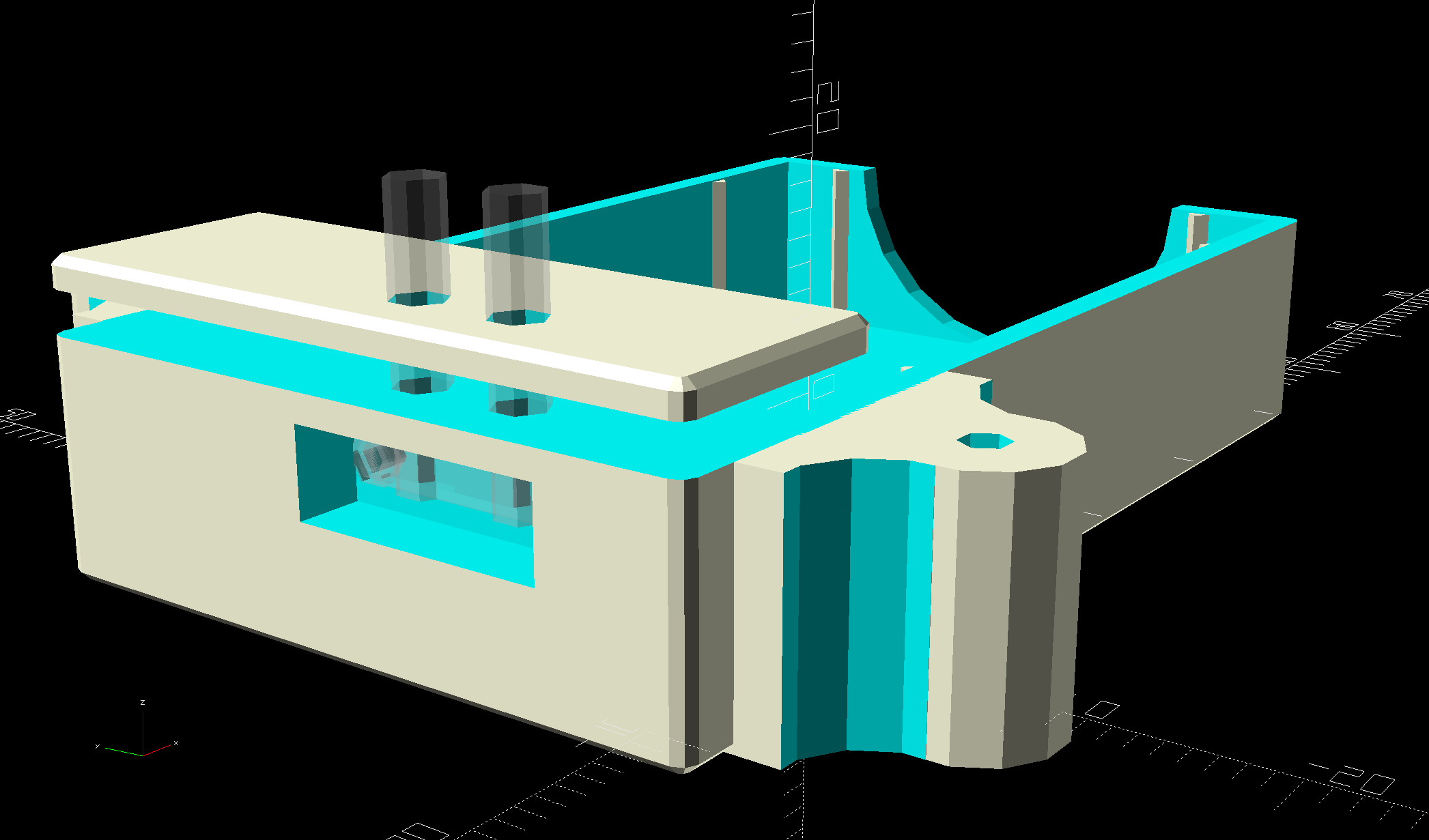
    The stock MPCNC adapter has a single recess suited for Genuine Plotter Pens, but the knurled lock ring on these cheapies sticks out far enough to make them wobbly. This being an inconvenience up with which I need not put, a few lines of OpenSCAD tweak the stock STL:

    MPCNC knife adapter mods - OpenSCAD model
    MPCNC knife adapter mods – OpenSCAD model

    The original STL is ivory, new cuts are cyan, and additions are reddish.

    The two support beams are now 1.6 mm = four thread widths, for improved slicing with a 0.35 mm nozzle and a higher spring constant.

    It’s by-and-large indistinguishable from the old adapter:

    MPCNC - Pen Holder Detail
    MPCNC – Pen Holder Detail

    Which I was using upside-down, because the flange fit better.

    The MPCNC works reasonably well as a pen plotter with a genuine ballpoint pen:

    MPCNC Ballpoint pen plots
    MPCNC Ballpoint pen plots

    The OpenSCAD source code as a GitHub Gist:

    // Adding clearance for eBay collet pen holder
    MPCNC_OD = 12.0; // pen holder OD (matches STL curvature)
    MPCNC_Z = 8.9; // Z offset of pen axis
    Pen_OD = 11.5; // actual pen body OD
    ID = 0;
    OD = 1;
    LENGTH = 2;
    Flange = [11.5,15.7,2.2]; // actual pen body flange
    Locknut = [16.0,16.0,2.8]; // knurled locknut
    Locknut_Offset = 4.5; // flange center to locknut
    Wall = [41.0,4 * 0.4,9.0]; // thicker walls for more spring and better fill
    $fn = 32; // default cylinder sides
    difference() {
    translate([-(101.3 + MPCNC_OD/2),-111.9,0]) // put pen axis above Y axis, flange centered on X axis
    import("/mnt/bulkdata/Project Files/Mostly Printed CNC/Accessories/Tool Holders/MPCNC_525_Drag_Knife-1860310.STL",
    convexity=5);
    if (true) // improve holder-to-mount fit if needed
    translate([0,60/2,8.90])
    rotate([90,0,0])
    cylinder(d=MPCNC_OD,h=60);
    translate([0,0,MPCNC_Z]) // improve flange slot clearance
    rotate([90,0,0])
    cylinder(d=Flange[OD] + 1.0,h=Flange[LENGTH] + 0.5,center=true);
    translate([0,Locknut_Offset – 0.5,MPCNC_Z]) // add locknut clearance
    rotate([-90,0,0])
    cylinder(d=Locknut[OD] + 1.5,h=Locknut[LENGTH] + 1.5,center=false);
    }
    # translate([-(27.0 + Wall.x/2),0,0]) { // embiggen walls for higher spring constant
    translate([0,-24.4,0])
    cube(Wall);
    translate([0,20.6 – Wall.y,0])
    cube(Wall);
    }
  • Pi-Hole with DNS-over-HTTPS

    With none other than Troy Hunt recommending Pi-Hole, I got a Round Tuit:

    unzip 2018-06-27-raspbian-stretch-lite.zip -d /tmp
    sudo dcfldd status=progress bs=1M of=/dev/sde if=/tmp/2018-06-27-raspbian-stretch-lite.img
    

    Raspbian now arrives with ssh disabled, so the first boot requires a keyboard and display:

    Pi-Hole first boot wiring
    Pi-Hole first boot wiring

    Then do some configuration required to get a fresh Raspberry Pi ready for remote access:

    sudo apt-get update
    sudo apt-get upgrade
    sudo apt-get install screen iotop
    sudo raspi-config   # enable ssh
    ssh-keygen -t rsa
    cd ~/.ssh
    cp -a /my/public/key authorized_keys
    chmod go-rwx authorized_keys
    cd
    sudo nano /etc/ssh/sshd_config  # unusual port, no root login, etc
    sudo service ssh restart
    

    As the good folks at Pi-Hole say, “Piping to bash is controversial, as it prevents you from reading code that is about to run on your system.” I took a look, it’s beyond my comprehension, so just get it done:

    curl -sSL https://install.pi-hole.net | bash
    

    Configure Pi-Hole:

    • Static IP: 192.168.1.2/24
    • DNS using, say, Cloudflare’s 1.1.1.1
    • DHCP turned off, which is the default

    Configure the router’s DHCP to hand out the Pi-Hole’s IP, with, say, 9.9.9.9 as a backup.

    Boot a few random PCs and whatnot to verify it works as expected, which it did the second time around, thus this particular post.

    Install the Cloudflare Argo Tunnel dæmon, approximately according to suggestions:

    mkdir Downloads
    cd Downloads/
    wget https://bin.equinox.io/c/VdrWdbjqyF/cloudflared-stable-linux-arm.tgz
    tar zxvf cloudflared-stable-linux-arm.tgz
    sudo mkdir /opt/cloudflare
    sudo cp cloudflared /opt/cloudflare/
    

    Start the daemon from within a screen session, also as suggested:

    sudo /opt/cloudflare/cloudflared proxy-dns --port 54 --upstream https://1.1.1.1/.well-known/dns-query --upstream https://1.0.0.1/.well-known/dns-query
    INFO[0000] Adding DNS upstream                           url="https://1.1.1.1/.well-known/dns-query"
    INFO[0000] Adding DNS upstream                           url="https://1.0.0.1/.well-known/dns-query"
    INFO[0000] Starting metrics server                       addr="127.0.0.1:37777"
    INFO[0000] Starting DNS over HTTPS proxy server          addr="dns://localhost:54"
    

    Contrary to the suggestions, you can configure Pi-Hole to use the DoH tunnel (or whatever it’s called) by tweaking its upstream DNS configuration:

    Pi-Hole - Cloudflare DNS config
    Pi-Hole – Cloudflare DNS config

    Then set up systemd to start the daemon automagically:

    sudo nano /etc/systemd/system/dnsproxy.service
    

    Because I put the daemon in /opt/cloudflare, that file differs slightly from the suggestion:

    [Unit]
    Description=CloudFlare DNS over HTTPS Proxy
    Wants=network-online.target
    After=network.target network-online.target
    
    [Service]
    ExecStart=/opt/cloudflare/cloudflared proxy-dns --port 54 --upstream https://1.1.1.1/.well-known/dns-query --upstream https://1.0.0.1/.well-$
    Restart=on-abort
     
    [Install]
    WantedBy=multi-user.target
    

    And then It Just Worked.

    Controversies over the ethics of ad and tracker blocking will go nowhere here, as I’ve cleaned out enough Windows machines to have absolutely no sympathy with the unholy spawn of adtech (not just the company, which I didn’t know existed until just now, but, yeah, them too).

  • UPC Scanner FAIL

    One of the scanners glowed brightly in the rack just inside the Stop and Shop:

    Stop-and-Shop Scanner Error
    Stop-and-Shop Scanner Error

    A closer look:

    Stop-and-Shop Scanner Error - detail
    Stop-and-Shop Scanner Error – detail

    If I understand this correctly, CCRestart just crashed, so you must restart CCRestart. The entrance of a deep rabbit hole looms behind the Quit button.

    The file extension and the overall UI make it reasonable to assume the scanners run Window CE, just like some voting machines.

    To the best of my knowledge, the screen isn’t touch-sensitive. I passed up the opportunity to poke the buttons below the screen …