The Smell of Molten Projects in the Morning

Ed Nisley's Blog: Shop notes, electronics, firmware, machinery, 3D printing, laser cuttery, and curiosities. Contents: 100% human thinking, 0% AI slop.

Category: Software

General-purpose computers doing something specific

  • Poster Boilerplate: Whoopsie

    Spotted this in a lobby (clicky for more dots):

    Hannaford Reusable Bags - Poster Boilerplate
    Hannaford Reusable Bags – Poster Boilerplate

    I know no more than you do about the situation, but I’d lay long, long odds Hannaford created the poster with a more recent version of Microsoft Word (or whatever) than the recipient organization has available, making the file essentially read-only.

    Not casting shade on ’em; sometimes, you do what you gotta do.

    FWIW, I’d expect LibreOffice and any Microsoft Word version other than the exact one used to create the poster to mangle the formatting differently. Been there, done that.

  • Injured Arm Support Table: Wide Version

    This table must sit across the threshold of a walk-in / sit-down shower, with the shower curtain draped across the table to keep the water inside.

    Starting with another patio side table, as before, I installed a quartet of 5 mm stainless screws to lock the top panels in place and convert the table into a rigid assembly:

    Arm Supports - wide table - overview
    Arm Supports – wide table – overview

    Because the shower floor is slightly higher than the bathroom floor, I conjured a set of foot pads to raise the outside legs:

    Patio Side Table Feet - OpenSCAD model
    Patio Side Table Feet – OpenSCAD model

    The sloping top surface on the pads compensates for the angle on the end of the table legs:

    Arm Supports - leg end angle
    Arm Supports – leg end angle

    I think the leg mold produces legs for several different tables, with the end angle being Close Enough™ for most purposes. Most likely, it’d wear flat in a matter of days on an actual patio.

    Using good 3M outdoor-rated foam tape should eliminate the need for fiddly screw holes and more hardware:

    Arm Supports - leg pads
    Arm Supports – leg pads

    The feet fit reasonably well:

    Arm Supports - leg pad in place
    Arm Supports – leg pad in place

    They may need nonskid tape on those flat bottoms, but that’s in the nature of fine tuning.

    And, as with the narrow table, it may need foam blocks to raise the top surface to arm level. Perhaps a pair of Yoga Blocks will come in handy for large adjustments.

    The OpenSCAD source code as a GitHub Gist:

    // Patio Side Table Feet
    // Ed Nisley – KE4ZNU
    // 2019-03
    /* [Layout Options] */
    Layout = "Build"; // [Show,Build]
    /* [Extrusion Parameters] */
    ThreadWidth = 0.40;
    ThreadThick = 0.25;
    HoleWindage = 0.2;
    Protrusion = 0.1;
    //—–
    // Dimensions
    TapeThick = 1.0; // 3M double-stick outdoor tape
    LegWall = [2.5,3.5]; // leg walls are not the same in X and Y!
    LegBase = [36.0,19.0]; // flat on floor
    LegOuter = [31.0,19.0]; // perpendicular to leg axis
    LegInner = [28.5,11.5]; // … ditto
    LegAngle = 90 – 53; // vertical to leg
    LegRecess = [LegInner.x,LegInner.y,LegInner.x*tan(LegAngle)];
    PadWedge = 2; // to fit end of leg
    PadRadius = 4.0; // rounding radius for nice corners
    PadBase = [LegBase.x + 2*PadRadius,LegBase.y + 2*PadRadius,5.0];
    PadSides = 6*4;
    BathStep = 20; // offset between shower bottom and floor
    /* [Hidden] */
    EmbossDepth = 1*ThreadThick; // recess depth
    DebossHeight = 1*ThreadThick + Protrusion; // text height + Protrusion into part
    //—–
    // Useful routines
    function IntegerMultiple(Size,Unit) = Unit * ceil(Size / Unit);
    module PolyCyl(Dia,Height,ForceSides=0) { // based on nophead's polyholes
    Sides = (ForceSides != 0) ? ForceSides : (ceil(Dia) + 2);
    FixDia = Dia / cos(180/Sides);
    cylinder(r=(FixDia + HoleWindage)/2,
    h=Height,
    $fn=Sides);
    }
    //—–
    // Foot pad
    module FootPad(Riser = 0.0) {
    difference() {
    union() {
    hull()
    for (i=[-1,1], j=[-1,1]) {
    translate([i*(PadBase.x/2 – PadRadius),j*(PadBase.y/2 – PadRadius),0])
    cylinder(r=PadRadius,h=1,$fn=PadSides);
    translate([i*(PadBase.x/2 – PadRadius),
    j*(PadBase.y/2 – PadRadius),
    Riser + PadBase.z – PadRadius – (i-1)*PadWedge/2])
    sphere(r=PadRadius/cos(180/PadSides),$fn=PadSides);
    }
    translate([PadRadius – PadBase.x/2,0,Riser + PadBase.z])
    rotate([0,LegAngle,0])
    translate([LegRecess.x/2,0,(LegRecess.z – Protrusion)/2 ])
    cube(LegRecess – [2*TapeThick,0,2*TapeThick],center=true);
    }
    translate([0,0,-2*PadBase.z]) // remove anything under Z=0
    cube(4*PadBase,center=true);
    cube([17,12,2*DebossHeight],center=true);
    }
    mirror([1,0,0])
    linear_extrude(height=EmbossDepth)
    translate([0,0,0])
    text(text=str(Riser),size=10,spacing=1.05,
    font="Arial:style=Bold",
    valign="center",halign="center");
    }
    //—–
    // Build things
    if (Layout == "Build") {
    if (true) {
    translate([-0.7*PadBase.x,-0.7*PadBase.y,0])
    FootPad(0);
    translate([-0.7*PadBase.x,+0.7*PadBase.y,0])
    FootPad(0);
    }
    translate([+0.7*PadBase.x,-0.7*PadBase.y,0])
    FootPad(BathStep);
    translate([+0.7*PadBase.x,+0.7*PadBase.y,0])
    FootPad(BathStep);
    }
    if (Layout == "Show")
    FootPad();

  • 3D Printing: Native G-Code?

    From a discussion on the Makergear 3D printer forums

    From a new M2 user disillusioned by the learning curve:

    Is there a 3D CAD software out there that natively creates .g or .gcode files It’s not just a 3D printing thing.

    CAD (computer-aided design) software produces a solid model, which a CAM (computer-aided manufacturing) program then converts into the specific dialect(s) of G-Code required by whatever machine tool(s) will create the widget. You can create the solid model using many different CAD programs and convert it into G-Code with many different CAM programs, each with its own collection of features and warts.

    3D printing calls the CAM program a “slicer”, but it’s a different name for the process of converting geometry into machine instructions.

    Even in subtractive manufacturing using lathes and mills, you absolutely must understand how the G-Code interacts with the production hardware.

    I unfortunately don’t want to learn all the nuances and parameters of the slic3r software

    Then you must use a service like Shapeways: you create the model, send it to them, and get a neat widget a few days later. Their laser-sintered powder process provides much better built-in support than you’ll ever get from consumer-grade fused-filament printers, you can select from a wide variety of materials (including metals!), and, as long as you follow their straightforward design guidelines, you’ll never know how the magic happens.

    If you intend to create more than a trivial number of widgets, though, the cost in both cycle time and money will begin gnawing at you. In round numbers, I’ve been designing and printing one widget a week for the last seven years, so adding a printer to my basement shop and learning how to use it has been a major win.

  • Tour Easy: SRAM Grip Bushing

    After installing the X.0 shifter, I sprang for new grips:

    Tour Easy - SRAM X.0 grip shifter - new grip with bushing
    Tour Easy – SRAM X.0 grip shifter – new grip with bushing

    They’re 90 mm long, which turned out to be 4 mm shorter than the grips that came with the bike; a close look showed the original ones were cut down from SRAM’s 110 mm grips.

    Well, I can fix that:

    Tour Easy - SRAM grip bushings
    Tour Easy – SRAM grip bushings

    Ordinarily, you’d just move the brake levers by 4 mm and declare victory. In this case, moving the right lever would be easy, but the left one is firmly glued in place by the radio’s PTT button:

    PTT Button - rounded cap
    PTT Button – rounded cap

    Believe me, solid modeling is easy compared to redoing that!

    The OpenSCAD source code doesn’t amount to much:

    // SRAM grip shifter bushings
    // Ed Nisley KE4ZNU March 2019
    
    Protrusion = 0.1;           // make holes end cleanly
    
    //----------------------
    // Dimensions
    
    ID = 0;
    OD = 1;
    LENGTH = 2;
    
    Bushing = [22.2 + 0.5,31.0,4.0];        // ID = E-Z slip fit
    
    NumSides = 2*3*4;
    
    //----------------------
    // Build it!
    
    difference() {
      cylinder(d=Bushing[OD],h=Bushing[LENGTH],$fn=NumSides);
      translate([0,0,-Protrusion])
        cylinder(d=Bushing[ID],h=Bushing[LENGTH] + 2*Protrusion,$fn=NumSides);
    }

    I loves me my 3D printer …

  • 3D Printing: Peculiar Octopi Problem

    From a discussion on the Makergear 3D printer forums

    A Makergear M2 user had a strange problem:

    Octopi claims the serial connection went down.

    LED2 was blinking red, rapidly, and LED3 was shining with a steadfast red light.

    LED2 shows the extruder heater PID loop is running and LED3 shows the extruder fan is on:
    https://reprap.org/wiki/Rambo_v1.1

    You just never noticed the blinkiness before … [grin]

    Because the extruder heater is still running, the firmware hasn’t detected a (possibly bogus) thermal runaway or any other fatal problem. It’s just waiting for the next line of G-Code, but Octopi isn’t sending it.

    Casually searching the GitHub issues, there’s a report of intermittent serial problems from last year:
    https://github.com/foosel/OctoPrint/issues/2647

    Which points to the FAQ:
    https://community.octoprint.org/t/octop … eption/228

    Look at the Octopi Terminal log to see if the conversation just before the failure matches those descriptions.

    Assuming you haven’t updated the printer firmware or anything on the Octopi, then something physical has gone wrong.

    First and least obviously, the Pi’s MicroSD card has probably started to fail: they’re not particularly durable when used as a mass storage device and “the last couple of years” is more than you should expect. Download a fresh Octopi image, put it on a shiny-new, good-quality card (*), and see if the situation improves.

    Then I’d suspect the Pi’s power supply, even though you’re using the “official rpi power supply”. All of those things contain the cheapest possible electrolytic capacitors, running right on the edge of madness, and produce bizarre errors when they begin to go bad. Get a good-quality wall wart (**), ideally with a UL rating, and see if the situation improves.

    While you’re buying stuff, get a good-quality USB cable (***) to replace the one that (assuming you’re like me) you’ve been saving for the last decade Just In Case™. Use the shortest cable possible, because longer does not equal better.

    After that, the problems get truly weird. Apply some tweakage and report back.

    (*) This is harder to do than you might think. You may safely assume all cards available on eBay and all “Sold by X, Fulfilled by Amazon” cards will be counterfeit crap. I’ve been using Samsung EVO / EVO+ cards (direct from Samsung) with reasonable success:

    https://softsolder.com/2018/10/16/raspb … sk-memory/
    https://softsolder.com/2017/11/22/samsu … ification/
    https://www.samsung.com/us/computing/me … 22y+zq29p/

    The card in question eventually failed, so having a backup card ready to go was a Good Idea™.

    (**) Top-dollar may not bring top quality, but Canakit has a good rep and costs ten bucks through Prime.

    (***) Amazon Basics cables seems well-regarded and work well for what I’ve needed.

  • YAGV Hackage

    I’ve been using YAGV (Yet Another G-Code Viewer) as a quick command-line Guilloché visualizer, even though it’s really intended for 3D printing previews:

    YAGV previewer.png
    YAGV previewer.png

    Oddly (for a command-line program), it (seems to) lack any obvious keyboard shortcut to bail out; none of my usual finger macros work.

    A quick hack to the main /usr/share/yagv/yagv file makes Ctrl-Q bail out, thusly:

    diff yagv /usr/share/yagv/yagv 
    18a19
    > import sys
    364a366,367
    > 		if symbol==pyglet.window.key.Q and modifiers & pyglet.window.key.MOD_CTRL:
    > 			sys.exit()

    I tacked the code onto an existing issue, but yagv may be a defunct project. Tweaking the source works for me.

    The Ubuntu 18.04 LTS repo has what claims to be version 0.4, but the yagv GitHub repository (also claiming to be 0.4) includes code ignoring G-Code comments. Best to build the files from source (which, being Python, they already are), then add my Ctrl-Q hack, because my GCMC Guilloché generator adds plenty of comments.

  • Juki TL-2010Q: COB LED Light Bar

    Mary needed more light under the arm of her Juki TL-2010Q sewing machine, so I proposed a 12 V 6 W COB LED module instead of the high-density LED strips I used on her Kenmore 158s:

    Kenmore 158 Sewing Machine - Cool white LEDs - rear no flash
    Kenmore 158 Sewing Machine – Cool white LEDs – rear no flash

    Because the COB LEDs dissipate 6W, far more power than I’m comfortable dumping into a 3D printed structure, I redefined a length of aluminum shelf bracket extrusion to be a heatsink and epoxied the module’s aluminum back plate thereto:

    Juki TL-2010Q COB LED - test lighting
    Juki TL-2010Q COB LED – test lighting

    Unlike the flexible LED strips, the COB LED modules have no internal ballast resistors and expect to run from a constant-current supply. Some preliminary testing showed we’d want less than the maximum possible light output, so a constant-voltage supply and a few ohms of ballast would suffice:

    Juki TL-2010Q COB LED - ballast resistor test
    Juki TL-2010Q COB LED – ballast resistor test

    With all that in hand, the heatsink extrusion cried out for smooth endcaps to control the wires and prevent snagging:

    TL-2010Q COB LED Light Bars - end caps - Show layout
    TL-2010Q COB LED Light Bars – end caps – Show layout

    The central hole in the left cap passes 24 AWG silicone wires from the power supply, with 28 AWG silicone wires snaking down through the L-shaped rectangular cutouts along the extrusion to the LED module’s solder pads.

    The model includes built-in support:

    TL-2010Q COB LED Light Bars - end caps - Build layout
    TL-2010Q COB LED Light Bars – end caps – Build layout

    Assuming the curved ends didn’t need support / anchors holding them down turned out to be completely incorrect:

    Juki TL-2010Q COB LED - curled endcaps
    Juki TL-2010Q COB LED – curled endcaps

    Fortunately, those delicate potato chips lived to tell the tale and, after a few design iterations, everything came out right:

    Juki TL-2010Q COB LED - heatsink endcap - internal connections
    Juki TL-2010Q COB LED – heatsink endcap – internal connections

    The “connector”, such as it is, serves to make the light bar testable / removable and the ballast resistor tweakable, without going nuts over the details. The left side is an ordinary pin header strip held in place with hot melt glue atop the obligatory Kapton tape, because the heatsink doesn’t get hot enough to bother the glue. The right side is a pair of two-pin header sockets, also intended for PCB use. The incoming power connects to one set and the ballast resistor to the other, thusly:

    Juki TL-2010Q COB LED - light bar connector diagram
    Juki TL-2010Q COB LED – light bar connector diagram

    The diagram is flipped top-to-bottom from the picture, but you get the idea. Quick, easy, durable, and butt-ugly, I’d say.

    The next step was to mount it on the sewing machine and steal some power, but that’s a story for another day.

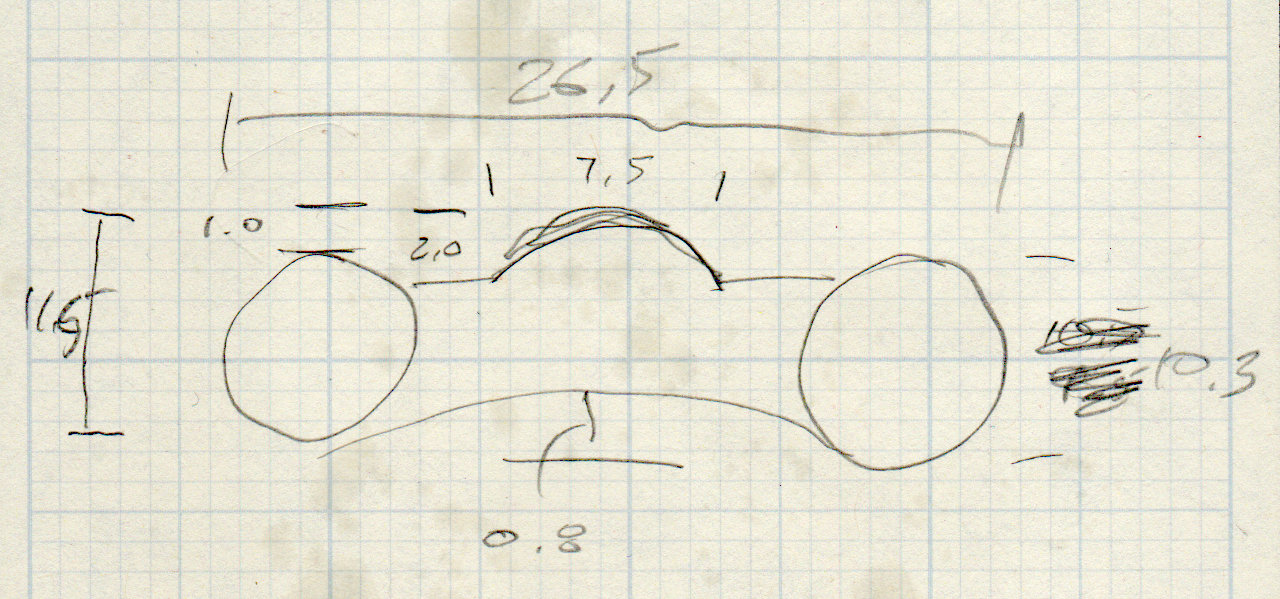
    The relevant dimensions for the aluminum extrusion:

    Aluminum shelf bracket extrusion - dimensions
    Aluminum shelf bracket extrusion – dimensions

    The OpenSCAD source code as a GitHub Gist:

    // Juki TL-2010Q Sewing Machine – COB LED Light Bars
    // Ed Nisley – KE4ZNU
    // 2019-01
    /* [Layout Options] */
    Layout = "Build"; // [Bracket,Endcap,Show,Build]
    Wiring = [1,0]; // left and right wire holes
    BuildSupport = true;
    /* [Extrusion Parameters] */
    ThreadWidth = 0.40;
    ThreadThick = 0.20;
    HoleWindage = 0.2;
    Protrusion = 0.1;
    //—–
    // Shelf bracket used as LED heatsink
    /* [Hidden] */
    LEDPlate = [15.0,2.4]; // 2D coords from end of LED
    BktOuter = [15.9,12.6 + LEDPlate.y]; // 2D coords as seen from end of extrusion
    BktWalls = [1.3,2.2 + LEDPlate.y]; // … extend base to cover LED
    BktCap = [2.5,3.0];
    BracketPoints = [
    [0,0],
    [BktOuter.x,0],
    [BktOuter.x,BktOuter.y],
    [(BktOuter.x – BktCap.x),BktOuter.y],
    [(BktOuter.x – BktCap.x),(BktOuter.y – BktCap.y)],
    [(BktOuter.x – BktWalls.x),(BktOuter.y – BktCap.y)],
    [(BktOuter.x – BktWalls.x),BktWalls.y],
    [BktWalls.x,BktWalls.y],
    [BktWalls.x,(BktOuter.y – BktCap.y)],
    [BktCap.x,(BktOuter.y – BktCap.y)],
    [BktCap.x,BktOuter.y],
    [0,BktOuter.y],
    [0,0]
    ];
    BracketPlugInsert = 10.0; // distance into bracket end
    WireOD = 1.6; // COB LED jumpers – 24 AWG silicone
    WireOC = BktOuter.x – 2*BktWalls.x – WireOD;
    echo(str("Wire OC: ",WireOC));
    CableOD = 4.0; // power entry cable
    CapSides = 2*3*4;
    //—–
    // Useful routines
    module PolyCyl(Dia,Height,ForceSides=0) { // based on nophead's polyholes
    Sides = (ForceSides != 0) ? ForceSides : (ceil(Dia) + 2);
    FixDia = Dia / cos(180/Sides);
    cylinder(r=(FixDia + HoleWindage)/2,
    h=Height,
    $fn=Sides);
    }
    //—–
    // Endcap with smooth rounding
    // Wires = true to punch holes for LED wires
    module Endcap(Wires = true) {
    // arc length to flatten inside of cap
    // not needed to build in normal orientation
    m = BktOuter.x/2 – sqrt(pow(BktOuter.x/2,2) – pow(BktOuter.x – 2*BktCap.x,2)/4);
    difference() {
    translate([0,0,BktOuter.y/2]) // basic endcap shape
    intersection() {
    cylinder(d=BktOuter.x,h=BktOuter.y,$fn=CapSides,center=true);
    rotate([90,0,0])
    rotate(180/CapSides)
    cylinder(d=BktOuter.y,h=BktOuter.x,$fn=CapSides,center=true);
    }
    translate([-BracketPlugInsert,0,0]) // extrusion + LED plate
    Bracket(BracketPlugInsert);
    if (false) // flatten inner end
    translate([-BktOuter.y + m,0,BktOuter.y/2])
    cube([BktOuter.y,BktOuter.x,BktOuter.y],center=true);
    if (Wires) {
    for (j=[-1,1]) // COB LED connections
    translate([WireOD – BktOuter.x/2,j*WireOC/2,(BktWalls.y + WireOD – Protrusion)/2])
    rotate([0,00,0])
    cube([BktOuter.x,WireOD + Protrusion,BktWalls.y + WireOD + Protrusion],center=true);
    translate([0,0,BktOuter.y/2]) // power entry / exit
    rotate([0,90,0])
    translate([0,0,-BktOuter.x])
    rotate(180/6)
    PolyCyl(CableOD,2*BktOuter.x,6);
    }
    }
    }
    // Totally ad-hoc support structures
    module Support(Wiring = false) {
    Spacing = 4*ThreadWidth;
    NumBars = floor((BktOuter.y/2) / Spacing);
    echo(str("Support bars: ",NumBars));
    color("Yellow") {
    render() difference() {
    union() {
    for (i=[1:NumBars]) // inside extrusion
    translate([-i*Spacing,0,(BktWalls.y + WireOD)/2])
    cube([2*ThreadWidth,BktOuter.x – 0*BktWalls.x,BktWalls.y + WireOD],center=true);
    if (true)
    for (j=[-1:1]) // reduce outside curve uplift
    translate([0.3*BktOuter.y,j*BktOuter.x/3,BktOuter.y/10])
    cube([BktOuter.y/3,2*ThreadWidth,BktOuter.y/5],center=true);
    }
    minkowski() { // all-around clearance
    Endcap(Wiring);
    cube(2.0*ThreadThick,center=true);
    }
    if (Wiring) {
    translate([0,0,BktOuter.y/2]) // remove rubble from wire bore
    rotate([0,90,0])
    translate([0,0,-BktOuter.x])
    rotate(180/6)
    PolyCyl(CableOD,2*BktOuter.x,6);
    }
    }
    if (false)
    translate([-(BktOuter.x/4 + ThreadWidth),0,ThreadThick/2]) // adhesion pad
    cube([BktOuter.x/2,BktOuter.x – BktWalls.x,ThreadThick],center=true);
    // translate([BktOuter.x/3,0,ThreadThick/2]) // adhesion pad
    // cube([0.3*BktOuter.x,0.7*BktOuter.x,ThreadThick],center=true);
    if (false)
    for (j = [-1:1]) // tie pad to bottom of cap
    translate([-(4*ThreadWidth)/2,j*(BktOuter.x – 2*ThreadWidth)/2,ThreadThick/2])
    cube([4*ThreadWidth,2*ThreadWidth,ThreadThick],center=true);
    }
    }
    //—–
    // Heatsink extrusion + LED plate
    // Centered on Y with Length extending in +X
    module Bracket(Length = 10)
    translate([0,-BktOuter.x/2,0])
    rotate([90,0,90])
    linear_extrude(height = Length,convexity=3)
    polygon(points=BracketPoints);
    //—–
    // Build things
    if (Layout == "Bracket")
    Bracket();
    if (Layout == "Endcap")
    Endcap();
    if (Layout == "Show") {
    translate([BktOuter.x,0,0])
    Endcap(Wiring[1]);
    translate([-BktOuter.x,0,0])
    rotate(180)
    Endcap(Wiring[0]);
    color("Yellow",0.35)
    translate([-BktOuter.x/2,0,0])
    Bracket(BktOuter.x);
    }
    if (Layout == "Build") {
    translate([BktOuter.y,0,0]) {
    Endcap(Wiring[0]);
    if (BuildSupport)
    Support(Wiring[0]);
    }
    translate([-BktOuter.y,0,0]) {
    Endcap(Wiring[1]);
    if (BuildSupport)
    Support(Wiring[1]);
    }
    }