The Smell of Molten Projects in the Morning

Ed Nisley's Blog: Shop notes, electronics, firmware, machinery, 3D printing, laser cuttery, and curiosities. Contents: 100% human thinking, 0% AI slop.

Category: Software

General-purpose computers doing something specific

  • GCMC: Circular Slide Rule Scales

    The Tektronix Circuit Computer, being a specialized circular slide rule, requires logarithmic scales bent around arcs:

    Scale Tick Layout - Bottom Deck
    Scale Tick Layout – Bottom Deck

    Each decade spans 18°, except for the FL scale’s 36° span to extract the square root of the LC product:

    FL = 1 / (2π · sqrt(LC))

    The tick marks can point inward or outward from their baseline radius, with corresponding scale labels reading either inward or outward.

    There being no (easy) way to algorithmically set the tick lengths, I used a (pair of) tables (a.k.a. vector lists):

    TickScaleNarrow = {
      [1.0,TickMajor],
      [1.1,TickMinor],[1.2,TickMinor],[1.3,TickMinor],[1.4,TickMinor],
      [1.5,TickMid],
      [1.6,TickMinor],[1.7,TickMinor],[1.8,TickMinor],[1.9,TickMinor],
      [2.0,TickMajor],
      [2.2,TickMinor],[2.4,TickMinor],[2.6,TickMinor],[2.8,TickMinor],
      [3.0,TickMajor],
    … and so on …

    The first number in each vector is the tick value in the decade, the log of which corresponds to its angular position. The second gives its length, with three constants matching up to the actual lengths on the Tek scales.

    The Circuit Computer labels only three ticks within each decade in the familiar (to EE bears, anyhow) 1, 2, 5 sequence. Their logs are 0.0, 0.3, and 0.7, spacing them neatly at the 1/3 decade points.

    Pop quiz: If you wanted to label two evenly spaced ticks per decade, you’d mark 1 and …

    Generating the L (inductance) scale on the bottom deck goes like this:

      Radius = DeckRad - ScaleSpace;
    
      MinLog = -9;
      MaxLog = 6;
      Arc = -ScaleArc;
    
      dec = 1;
      offset = 0deg;
      for (logval = MinLog; logval < MaxLog; logval++) {
        a = offset + logval * Arc;
        DrawTicks(Radius,TickScaleNarrow,OUTWARD,a,Arc,dec,INWARD,FALSE);
        dec = (dec == 100) ? 1 : 10 * dec;
      }
    
      a = offset + MaxLog * Arc;
      DrawTicks(Radius,TickScaleNarrow,OUTWARD,a,Arc,100,INWARD,TRUE);

    The L scale covers 1 nH to 1 MH (!), as set by the MinLog and MaxLog values. Arc sets the angular size of each decade from ScaleArc, with the negative sign indicating the values increase in the clockwise direction.

    The first decade starts with a tick labeled 1, so dec = 1. The next decade has dec = 10 and the third has dec = 100. Maybe I should have used the log values 0, 1, and 2, but that seemed too intricate.

    The angular offset is zero because this is the outermost scale, so 1.0 H will be at 0° (the picture is rotated about half a turns, so you’ll find it off to the left). All other scales on the deck have a nonzero offset to put their unit tick at the proper angle with respect to this one.

    The scales have legends for each group of three decades, positioned in the middle of the group:

      logval = MinLog + 1.5;
      a = offset + logval * Arc;
      ArcLegend("nH - nanohenry  x10^-9",r,a,INWARD);
    
      logval += 3;
      a = offset + logval * Arc;
      ArcLegend("μH - microhenry  x10^-6",r,a,INWARD);

    I wish there were a clean way to draw exponents, as the GCMC Hershey font does not include superscripts, but the characters already live at the small end of what’s do-able with a ballpoint pen cartridge. Engraving will surely work better, but stylin’ exponents are definitely in the nature of fine tuning.

    With all that in hand, the scales look just like they should:

    Tektronix Circuit Computer - Bottom Deck - scale detail
    Tektronix Circuit Computer – Bottom Deck – scale detail

    The GCMC source code as a GitHub Gist:

    //—-
    // Define tick layout for scales
    // Numeric value for scale, corresponding tick length
    TickScaleNarrow = {
    [1.0,TickMajor],
    [1.1,TickMinor],[1.2,TickMinor],[1.3,TickMinor],[1.4,TickMinor],
    [1.5,TickMid],
    [1.6,TickMinor],[1.7,TickMinor],[1.8,TickMinor],[1.9,TickMinor],
    [2.0,TickMajor],
    [2.2,TickMinor],[2.4,TickMinor],[2.6,TickMinor],[2.8,TickMinor],
    [3.0,TickMajor],
    [3.2,TickMinor],[3.4,TickMinor],[3.6,TickMinor],[3.8,TickMinor],
    [4.0,TickMajor],
    [4.5,TickMinor],
    [5.0,TickMajor],
    [5.5,TickMinor],
    [6.0,TickMajor],
    [6.5,TickMinor],
    [7.0,TickMajor],
    [7.5,TickMinor],
    [8.0,TickMajor],
    [8.5,TickMinor],
    [9.0,TickMajor],
    [9.5,TickMinor]
    };
    TickScaleWide = {
    [1.0,TickMajor],
    [1.1,TickMinor],[1.2,TickMinor],[1.3,TickMinor],[1.4,TickMinor],
    [1.5,TickMid],
    [1.6,TickMinor],[1.7,TickMinor],[1.8,TickMinor],[1.9,TickMinor],
    [2.0,TickMajor],
    [2.1,TickMinor],[2.2,TickMinor],[2.3,TickMinor],[2.4,TickMinor],
    [2.5,TickMid],
    [2.6,TickMinor],[2.7,TickMinor],[2.8,TickMinor],[2.9,TickMinor],
    [3.0,TickMajor],
    [3.2,TickMinor],[3.4,TickMinor],[3.6,TickMinor],[3.8,TickMinor],
    [4.0,TickMajor],
    [4.2,TickMinor],[4.4,TickMinor],[4.6,TickMinor],[4.8,TickMinor],
    [5.0,TickMajor],
    [5.5,TickMinor],
    [6.0,TickMajor],
    [6.5,TickMinor],
    [7.0,TickMajor],
    [7.5,TickMinor],
    [8.0,TickMajor],
    [8.5,TickMinor],
    [9.0,TickMajor],
    [9.5,TickMinor]
    };
    TickLabels = [1,2,5]; // labels only these ticks, must be integers
    /—–
    // Draw a decade of ticks & labels
    // ArcLength > 0 = CCW, < 0 = CW
    // UnitOnly forces just the unit tick, so as to allow creating the last tick of the scale
    function DrawTicks(Radius,TickMarks,TickOrient,UnitAngle,ArcLength,Decade,LabelOrient,UnitOnly) {
    feedrate(ScaleSpeed);
    local a,r0,r1,p0,p1;
    if (Decade == 1 || UnitOnly) { // draw unit marker
    a = UnitAngle;
    r0 = Radius + TickOrient * (TickMajor + 2*TickGap + ScaleTextSize.y);
    p0 = r0 * [cos(a),sin(a)];
    r1 = Radius + TickOrient * (ScaleSpace – 2*TickGap);
    p1 = r1 * [cos(a),sin(a)];
    goto(p0);
    move([-,-,EngraveZ]);
    move(p1);
    goto([-,-,TravelZ]);
    }
    local ticklist = UnitOnly ? {TickMarks[0]} : TickMarks;
    local tick;
    foreach(ticklist; tick) {
    a = UnitAngle + ArcLength * log10(tick[0]);
    p0 = Radius * [cos(a), sin(a)];
    p1 = (Radius + TickOrient*tick[1]) * [cos(a), sin(a)];
    goto(p0);
    move([-,-,EngraveZ]);
    move(p1);
    goto([-,-,TravelZ]);
    }
    feedrate(TextSpeed); // draw scale values
    local lrad = Radius + TickOrient * (TickMajor + TickGap);
    if (TickOrient == INWARD) {
    if (LabelOrient == INWARD) {
    lrad -= ScaleTextSize.y; // inward ticks + inward labels = offset inward
    }
    }
    else {
    if (LabelOrient == OUTWARD) {
    lrad += ScaleTextSize.y; // outward ticks + outward labels = offset outward
    }
    }
    ticklist = UnitOnly ? [TickLabels[0]] : TickLabels;
    local ltext,lpath,tpa;
    foreach(ticklist; tick) {
    ltext = to_string(Decade * to_int(tick));
    lpath = scale(typeset(ltext,TextFont),ScaleTextSize);
    a = UnitAngle + ArcLength * log10(tick);
    tpa = ArcText(lpath,[0mm,0mm],lrad,a,TEXT_CENTERED,LabelOrient);
    engrave(tpa,TravelZ,EngraveZ);
    }
    }

  • GCMC Radial Text

    The Tektronix Circuit Computer needs text along radial lines:

    Tek CC - original RC arrow layout
    Tek CC – original RC arrow layout

    Fortunately, this doesn’t require nearly as much effort as the text-on-arcs code, because GCMC includes functions to rotate paths around the origin:

    return rotate_xy(TextPath,Angle) + CenterPt;

    The only trick is figuring out how to handle the justification, given the overall path length:

      local pl = TextPath[-1].x;
    
      local ji = (Justify == TEXT_LEFT)     ? 0mm :
                 (Justify == TEXT_CENTERED) ? -pl/2 :
                 (Justify == TEXT_RIGHT)    ? -pl :
                 0mm;

    A testcase showed it worked:

    Radial text testcase
    Radial text testcase

    With that in hand, I took the liberty of slightly simplifying the original Tek layout:

    Tek CC - radial text example
    Tek CC – radial text example

    If lives depended on it, one could duplicate the Tek layout, but they don’t and I didn’t. Fancy typography isn’t a GCMC thing.

    And, yeah, laser printing is way crisper than a pen drawing.

    The GCMC source code as a GitHub Gist:

    comment("RadialText test");
    ctr = [0mm,0mm];
    r = 20mm;
    a = 0deg;
    tp = scale(typeset("Left Inward",TextFont),LegendTextSize);
    tpr = RadialText(tp,ctr,r,a,TEXT_LEFT,INWARD);
    feedrate(TextSpeed);
    engrave(tpr,TravelZ,EngraveZ);
    tp = scale(typeset("Left Outward",TextFont),LegendTextSize);
    tpr = RadialText(tp,ctr,r,a,TEXT_LEFT,OUTWARD);
    feedrate(TextSpeed);
    engrave(tpr,TravelZ,EngraveZ);
    a = 90deg;
    tp = scale(typeset("Right Inward",TextFont),LegendTextSize);
    tpr = RadialText(tp,ctr,r,a,TEXT_RIGHT,INWARD);
    feedrate(TextSpeed);
    engrave(tpr,TravelZ,EngraveZ);
    tp = scale(typeset("Right Outward",TextFont),LegendTextSize);
    tpr = RadialText(tp,ctr,r,a,TEXT_RIGHT,OUTWARD);
    feedrate(TextSpeed);
    engrave(tpr,TravelZ,EngraveZ);
    a = 180deg;
    tp = scale(typeset("Center Inward",TextFont),LegendTextSize);
    tpr = RadialText(tp,ctr,r,a,TEXT_CENTERED,INWARD);
    feedrate(TextSpeed);
    engrave(tpr,TravelZ,EngraveZ);
    tp = scale(typeset("Center Outward",TextFont),LegendTextSize);
    tpr = RadialText(tp,ctr,r,a,TEXT_CENTERED,OUTWARD);
    feedrate(TextSpeed);
    engrave(tpr,TravelZ,EngraveZ);
    a = 270deg;
    RadialLegend("Offset to radius",ctr,r,a,TEXT_CENTERED,INWARD,-0.5);
    goto(ctr);
    move([0,-2*r,EngraveZ]);
    goto([r,0mm,-]);
    circle_cw(ctr);
    //—–
    // Write text on a radial line
    function RadialText(TextPath,CenterPt,Radius,Angle,Justify,Orient) {
    local pl = TextPath[-1].x; // path length
    local ji = (Justify == TEXT_LEFT) ? 0mm : // justification indent
    (Justify == TEXT_CENTERED) ? -pl/2 :
    (Justify == TEXT_RIGHT) ? -pl :
    0mm;
    if (Orient == INWARD) {
    TextPath = rotate_xy(TextPath,180deg);
    ji = -ji;
    }
    TextPath += [Radius + ji,0mm];
    return rotate_xy(TextPath,Angle) + CenterPt;
    }
    //—–
    // Draw a radial legend
    // Offset in units of char height: 0 = baseline on radius, +/- = above/below
    function RadialLegend(Text,Center,Radius,Angle,Justify,Orient,Offset) {
    local tp = scale(typeset(Text,TextFont),LegendTextSize) + [0mm,Offset * LegendTextSize.y];
    local tpr = RadialText(tp,Center,Radius,Angle,Justify,Orient);
    feedrate(TextSpeed);
    engrave(tpr,TravelZ,EngraveZ);
    }

  • GCMC Text on Arcs: Improved Version

    The Tektronix Circuit Computer scale annotations read both inward (from the center) and outward (from the rim):

    Text on Arcs - orientation
    Text on Arcs – orientation

    It’s surprisingly difficult (for me, anyhow) to see the middle FL Scale as reading upside-down, rather than mirror-image backwards.

    This turned into a rewrite of the the read-outward annotation code I used for the vacuum tube reflectors. Eventually the justification and orientation options came out right:

    Text-on-arcs example
    Text-on-arcs example

    The text baseline sits at the specified radius from the center point, regardless of its orientation, so you must offset the text path by half its height in the proper direction before handing it to the ArcText function.

    The testcase shows the invocation ritual:

        ctr = [0mm,0mm];
    
        tp = scale(typeset("Right Inward",TextFont),ScaleTextSize);
        tpa = ArcText(tp,ctr,30mm,45deg,TEXT_RIGHT,INWARD);
        engrave(tpa,TravelZ,EngraveZ);
        tp = scale(typeset("Right Outward",TextFont),ScaleTextSize);
        tpa = ArcText(tp,ctr,30mm,45deg,TEXT_RIGHT,OUTWARD);
        engrave(tpa,TravelZ,EngraveZ);
    
        tp = scale(typeset("Center Inward",TextFont),ScaleTextSize);
        tpa = ArcText(tp,ctr,20mm,45deg,TEXT_CENTERED,INWARD);
        engrave(tpa,TravelZ,EngraveZ);
        tp = scale(typeset("Center Outward",TextFont),ScaleTextSize);
        tpa = ArcText(tp,ctr,20mm,45deg,TEXT_CENTERED,OUTWARD);
        engrave(tpa,TravelZ,EngraveZ);
    
        tp = scale(typeset("Left Inward",TextFont),ScaleTextSize);
        tpa = ArcText(tp,ctr,10mm,45deg,TEXT_LEFT,INWARD);
        engrave(tpa,TravelZ,EngraveZ);
        tp = scale(typeset("Left Outward",TextFont),ScaleTextSize);
        tpa = ArcText(tp,ctr,10mm,45deg,TEXT_LEFT,OUTWARD);
        engrave(tpa,TravelZ,EngraveZ);
    
        goto([0mm,0mm,-]);
        move([40mm,40mm,-]);

    A utility function to draw scale legends stuffs some of that complexity into a bottle:

    function ArcLegend(Text,Radius,Angle,Orient) {
    
      local tp = scale(typeset(Text,TextFont),LegendTextSize);
      local tpa = ArcText(tp,[0mm,0mm],Radius,Angle,TEXT_CENTERED,Orient);
    
      feedrate(TextSpeed);
      engrave(tpa,TravelZ,EngraveZ);
    }

    Which means most of the text uses a simpler invocation:

      r = Radius + TickMajor + 2*TickGap + LegendTextSize.y;
    
      logval = MinLog + 1.5;
      a = offset + logval * Arc;
      ArcLegend("nH - nanohenry  x10^-9",r,a,INWARD);
    
      logval += 3;
      a = offset + logval * Arc;
      ArcLegend("μH - microhenry  x10^-6",r,a,INWARD);
    

    Arc determines the angular span of each decade, with positive values going counterclockwise. MinLog is the logarithm of the scale endpoint, so adding 1.5 puts the text angle one-and-a-half decades from MinLog and multiplying by Arc moves it in the right direction. The offset angle rotates the entire scale with respect to the 0° reference sticking out the X axis over on the right. The top picture has its 0° reference pointing north-northeast.

    The GCMC source code as a GitHub Gist:

    INWARD = -1; // text and tick alignment (used as integers)
    OUTWARD = 1;
    TEXT_LEFT = -1; // text justification
    TEXT_CENTERED = 0;
    TEXT_RIGHT = 1;
    //—–
    // Bend text around an arc
    function ArcText(TextPath,CenterPt,Radius,BaseAngle,Justify,Orient) {
    local pl = TextPath[-1].x; // path length
    local c = 2*pi()*Radius;
    local ta = to_deg(360 * pl / c); // subtended angle
    local ja = (Justify == TEXT_LEFT ? 0deg : // assume OUTWARD
    (Justify == TEXT_CENTERED) ? -ta / 2 :
    (Justify == TEXT_RIGHT) ? -ta :
    0deg);
    ja = BaseAngle + Orient*ja;
    local ArcPath = {};
    local pt,r,a;
    foreach(TextPath; pt) {
    if (!isundef(pt.x) && !isundef(pt.y) && isundef(pt.z)) { // XY motion, no Z
    r = (Orient == OUTWARD) ? Radius – pt.y : Radius + pt.y;
    a = Orient * 360deg * (pt.x / c) + ja;
    ArcPath += {[r*cos(a) + CenterPt.x, r*sin(a) + CenterPt.y,-]};
    }
    elif (isundef(pt.x) && isundef(pt.y) && !isundef(pt.z)) { // no XY, Z up/down
    ArcPath += {pt};
    }
    else {
    error("ArcText – Point is not pure XY or pure Z: " + to_string(pt));
    }
    }
    return ArcPath;
    }

    GCMC treats variables defined inside a function as local, unless they’re already defined in an enclosing scope, whereupon you overwrite the outer variables. This wasn’t a problem in my earlier programs, but I fired the footgun with nested functions using the same local / temporary variables. Now, I ruthlessly declare truly local variables as local, except when I don’t, for what seem good reasons at the time.

  • Among the Forgotten

    Spotted in a museum:

    Kiosk - Floppy Disk Seek Failure
    Kiosk – Floppy Disk Seek Failure

    It’s been quite a while since BIOS boot sequences started with the floppy drive. Combined with a CMOS backup battery failure, I’d say this poor PC has been chugging along for two decades.

    On another floor:

    Kiosk - Windows Updates
    Kiosk – Windows Updates

    Isolating a Windows kiosk from the Interwebs is an excellent design principle, but Windows Update really wants to phone home. The kiosk’s presentation ran Adobe Flash 10, so it’s been confined for maybe a decade.

    Looks like it’s time for another fundraising drive to replace the PCs with Raspberry Pi controllers. The real expense, of course, goes into rebuilding the presentations using whatever tech stack is trendy these days.

  • CNC 3018-Pro: Collet Pen Holder

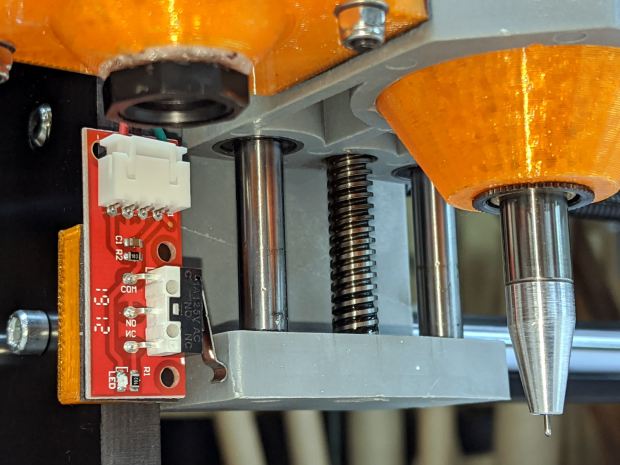
    Along the same lines as the MPCNC pen holder, I now have one for the 3018:

    CNC3018 - Collet pen holder - assembled
    CNC3018 – Collet pen holder – assembled

    The body happened to be slightly longer than two LM12UU linear bearings stacked end-to-end, which I didn’t realize must be a constraint until I was pressing them into place:

    CNC 3018-Pro Collet Holder - LM12UU - solid model
    CNC 3018-Pro Collet Holder – LM12UU – solid model

    In the unlikely event I need another one, the code will sprout a max() function in the appropriate spot.

    Drilling the aluminum rod for the knurled ring produced a really nice chip:

    CNC3018 - Collet pen holder - drilling knurled ring
    CNC3018 – Collet pen holder – drilling knurled ring

    Yeah, a good drill will produce two chips, but I’ll take what I can get.

    There’s not much left of the original holder after turning it down to 8 mm so it fits inside the 12 mm rod:

    CNC3018 - Collet pen holder - turning collet OD
    CNC3018 – Collet pen holder – turning collet OD

    Confronted by so much shiny aluminum, I realized I didn’t need an 8 mm hole through the rod, so I cut off the collet shaft and drilled out the back end to clear the flanges on the ink tubes:

    CNC3018 - Collet pen holder - drilling out collet
    CNC3018 – Collet pen holder – drilling out collet

    I figured things would eventually go badly if I trimmed enough ink-filled crimps:

    Collet holder - pen cartridge locating flanges
    Collet holder – pen cartridge locating flanges

    The OpenSCAD source code as a GitHub Gist:

    // Collet Pen Holder in LM12UU linear bearings for CNC3018
    // Ed Nisley KE4ZNU – 2019-10-30
    Layout = "Build"; // [Build, Show, Base, Mount, Plate]
    /* [Hidden] */
    ThreadThick = 0.25; // [0.20, 0.25]
    ThreadWidth = 0.40; // [0.40, 0.40]
    /* [Hidden] */
    Protrusion = 0.1; // [0.01, 0.1]
    HoleWindage = 0.2;
    inch = 25.4;
    function IntegerMultiple(Size,Unit) = Unit * ceil(Size / Unit);
    ID = 0;
    OD = 1;
    LENGTH = 2;
    //- Adjust hole diameter to make the size come out right
    module PolyCyl(Dia,Height,ForceSides=0) { // based on nophead's polyholes
    Sides = (ForceSides != 0) ? ForceSides : (ceil(Dia) + 2);
    FixDia = Dia / cos(180/Sides);
    cylinder(r=(FixDia + HoleWindage)/2,h=Height,$fn=Sides);
    }
    //- Dimensions
    PenOD = 3.5; // pen cartridge diameter
    Bearing = [12.0,21.0,30.0]; // linear bearing body
    SpringSeat = [0.56,10.0,3*ThreadThick]; // wire = ID, coil = OD, seat depth = length
    WallThick = 4.0; // minimum thickness / width
    Screw = [3.0,6.75,25.0]; // holding it all together, OD = washer
    Insert = [3.0,5.5,8.2]; // brass insert
    //Insert = [4.0,6.0,10.0];
    Clamp = [43.2,44.5,34.0]; // tool clamp ring, OD = clearance around top
    LipHeight = IntegerMultiple(2.0,ThreadThick); // above clamp for retaining
    BottomExtension = 25.0; // below clamp to reach workpiece
    MountOAL = LipHeight + Clamp[LENGTH] + BottomExtension; // total mount length
    echo(str("Mount OAL: ",MountOAL));
    Plate = [1.5*PenOD,Clamp[ID] – 0*2*WallThick,WallThick]; // spring reaction plate
    NumScrews = 3;
    ScrewBCD = Bearing[OD] + Insert[OD] + 2*WallThick;
    echo(str("Retainer max OD: ",ScrewBCD – Screw[OD]));
    NumSides = 9*4; // cylinder facets (multiple of 3 for lathe trimming)
    // Basic mount shape
    module CNC3018Base() {
    translate([0,0,MountOAL – LipHeight])
    cylinder(d=Clamp[OD],h=LipHeight,$fn=NumSides);
    translate([0,0,MountOAL – LipHeight – Clamp[LENGTH] – Protrusion])
    cylinder(d=Clamp[ID],h=(Clamp[LENGTH] + 2*Protrusion),$fn=NumSides);
    cylinder(d1=Bearing[OD] + 2*WallThick,d2=Clamp[ID],h=BottomExtension + Protrusion,$fn=NumSides);
    }
    // Mount with holes & c
    module Mount() {
    difference() {
    CNC3018Base();
    translate([0,0,-Protrusion]) // bearing
    PolyCyl(Bearing[OD],2*MountOAL,NumSides);
    for (i=[0:NumScrews – 1]) // clamp screws
    rotate(i*360/NumScrews)
    translate([ScrewBCD/2,0,MountOAL – Clamp[LENGTH]])
    rotate(180/8)
    PolyCyl(Insert[OD],Clamp[LENGTH] + Protrusion,8);
    }
    }
    module SpringPlate() {
    difference() {
    cylinder(d=Plate[OD],h=Plate[LENGTH],$fn=NumSides);
    translate([0,0,-Protrusion])
    PolyCyl(Plate[ID],2*MountOAL,NumSides);
    translate([0,0,Plate.z – SpringSeat[LENGTH]]) // spring retaining recess
    PolyCyl(SpringSeat[OD],SpringSeat[LENGTH] + Protrusion,NumSides);
    for (i=[0:NumScrews – 1]) // clamp screws
    rotate(i*360/NumScrews)
    translate([ScrewBCD/2,0,-Protrusion])
    rotate(180/8)
    PolyCyl(Screw[ID],2*MountOAL,8);
    }
    }
    //—–
    // Build it
    if (Layout == "Base")
    CNC3018Base();
    if (Layout == "Mount")
    Mount();
    if (Layout == "Plate")
    SpringPlate();
    if (Layout == "Show") {
    Mount();
    translate([0,0,1.25*MountOAL])
    rotate([180,0,0])
    SpringPlate();
    }
    if (Layout == "Build") {
    translate([0,-0.75*Clamp[OD],MountOAL])
    rotate([180,0,0])
    Mount();
    translate([0,0.75*Plate[OD],0])
    SpringPlate();
    }

  • ID3 Tagging From File Names

    The Forester can play MP3 files from a USB flash drive and, given the utter craptitude of radio stations around here, I dumped a bunch of CD tracks onto a drive. For historic reasons, very few of the tracks had ID3 tags, so the Forester’s display showed only gnarly file names for the last few years.

    This burst of Bash line noise runs through the directory of album directories, extracts the relevant information from the directory and track names, then pops the tags in place:

    for d in * ; do for f in $(ls $d) ; do art=$(echo $d | cut -d- -f1 | tr '_' ' ' | sed 's/-/ - /g') ; alb=$(echo $d | cut --complement -d- -f1 | tr '_' ' ' | sed 's/-/ - /g') ; t=$(echo $f | cut -d- -f1) ; s=$(echo ${f%.*} | cut --complement -d- -f1 | tr '_' ' ' | sed 's/-/ - /g') ; id3tag -2 -a"$art" -A"$alb" -s"$s" -t$t $d/$f ; done ; done

    It’s (marginally) easier to see this way:

    for d in * ; do 
     for f in $(ls $d) ; do 
      art=$(echo $d | cut -d- -f1 | tr '_' ' ' | sed 's/-/ - /g')
      alb=$(echo $d | cut --complement -d- -f1 | tr '_' ' ' | sed 's/-/ - /g')
      t=$(echo $f | cut -d- -f1)
      s=$(echo ${f%.*} | cut --complement -d- -f1 | tr '_' ' ' | sed 's/-/ - /g')
      id3tag -2 -a"$art" -A"$alb" -s"$s" -t$t $d/$f
     done
    done

    What’s going on:

    • cut – extracts track number and song title
    • tr – convert underscores to spaces
    • sed – put spaces around hyphens

    The id3tag program can install either ID3V1 or ID3V2 tags on each pass, so I just recalled the command, edited the -1 to -2, and ran the whole mess again.

    After a bit of manual cleanup, things looked pretty good.

    Although the id3ren program seemed as though it could do the trick, it’s really intended to rename files from existing tags. Making it go the other way rapidly became a steel-cage death match; I gave up.

  • Manjaro Linux VNC Setup

    I installed the XFCE flavor of Manjaro Linux (beside Win 8.1 Pro) on a new-to-me Dell Latitude 7250 serving as our new Token Windows box and carry-along-able Linux laptop.

    Manjaro being an offshoot of Arch, they have plenty of guides and references, with How to Set up X11VNC Server being most useful at the moment. This box needs only a VNC server and apparently works with ‑xdamage for faster updates.

    With the laptop plugged into an external display and Manjaro set up to use both displays, the X11VNC server feeds both to the client with the proper positioning, producing a truly panoramic, albeit scaled, view:

    WinFlip - X11VNC dual screen
    WinFlip – X11VNC dual screen

    TightVNC on Windows does much the same thing, although (AFAICT) Windows doesn’t allow different background pictures on the two screens; that’s irrelevant to my mmmm use case.