The Smell of Molten Projects in the Morning

Ed Nisley's Blog: Shop notes, electronics, firmware, machinery, 3D printing, laser cuttery, and curiosities. Contents: 100% human thinking, 0% AI slop.

Category: Software

General-purpose computers doing something specific

  • Bafang BBS02: Motor Reaction Spacer

    Bafang BBS02: Motor Reaction Spacer

    The Terry Symmetry’s rear shift cable passes along the side of the downtube and through a plastic guide channel under the bottom bracket shell. The Bafang BBS02 motor must press against the bottom of the downtube, so the shift cable rubs against the top of the motor.

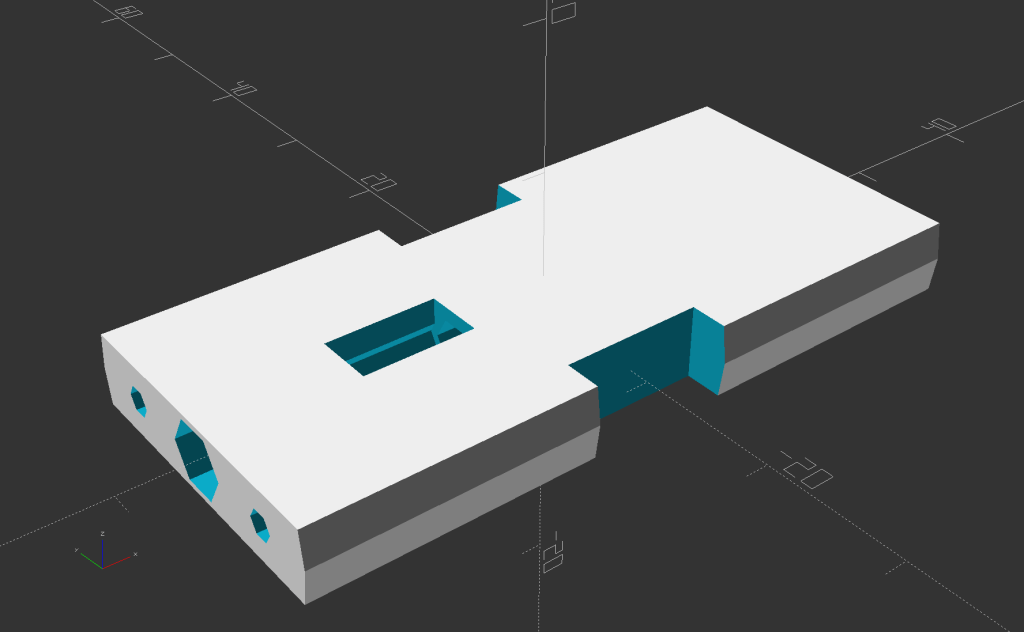
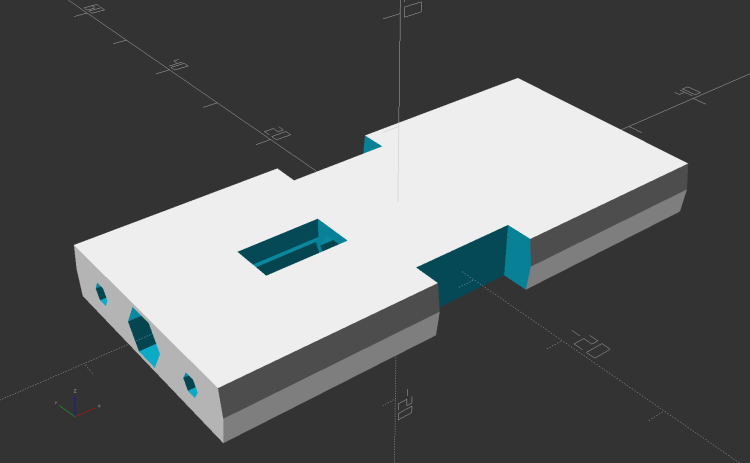
    The solution is a small block shaped around the point of contact to cradle the downtube, the bottom bracket shell lug, and the motor case:

    Terry - Bafang motor spacer - solid model
    Terry – Bafang motor spacer – solid model

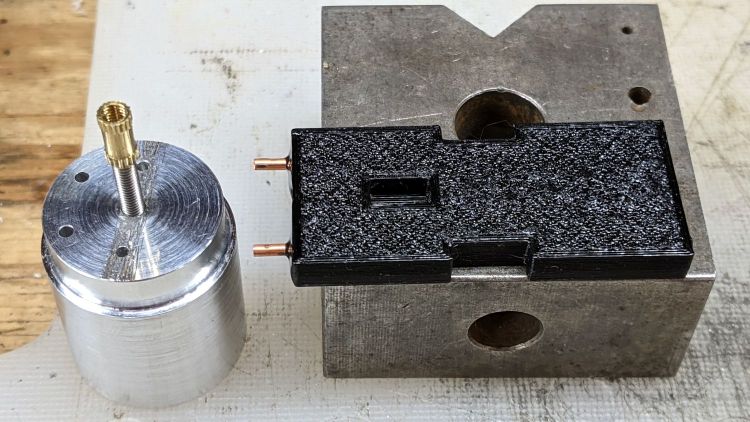
    A strip of double-sided foam tape holds the block to the motor and the reaction force from the motor’s torque presses the block against the downtube:

    Terry Bafang - motor reaction block
    Terry Bafang – motor reaction block

    Seen from the other side, looking parallel to the shift cable, you can see the tight clearance:

    Terry Bafang - shift cable clearance
    Terry Bafang – shift cable clearance

    The block holds the motor 8 mm from the downtube, just enough to give the cable some breathing room.

    The block is slightly taller on its front end, because the motor doesn’t meet the downtube at a right angle:

    Terry - Bafang motor spacer - tube angle - solid model
    Terry – Bafang motor spacer – tube angle – solid model

    I determined the proper angle by taping waxed paper to the top of the motor, sticking a trial (non-angled) block to the downtube, coating its bottom surface with hot-melt glue, then squishing the motor against the block. The cooled glue was flush with the block on the rear and 1.8 mm thick on the front, a 5° angle over the 20 mm block.

    Definitely easier than correctly figuring the geometry from first principles: tweak the model to include the measured thickness, compute the angle, tilt the tube, and print another block that fits like it grew there.

    With the block in place and the motor held against the downtube, tighten the retaining nut against the “fixing plate” by giving it a few gentle whacks with a hammer, then tighten the jam nut.

    The OpenSCAD source code snippet:

    // Motor Reaction Block
    // Holds motor away from downtube enough to miss rear shift wire
    
    MotorOD = 111;              // motor frame dia
    MotorMountRad = 85;         // BB spindle center to motor center
    Space = 8.0;                // motor to frame space
    
    Spacer = [20.0,DownTube[ID]/2,4*Space];
    SpaceAngle = atan(1.8/Spacer.x);            // tilt due to non-right-angle meeting
    echo(str("Spacer angle: ",SpaceAngle));
    
    module MotorSpacer() {
    
        difference() {
            cube(Spacer,center=true);
            translate([0,0,DownTube[ID]/2])
                rotate([0,90 + SpaceAngle,0]) rotate(180/FrameSides)
                    cylinder(d=DownTube[ID],h=DownTube[LENGTH],$fn=FrameSides,center=true);
            translate([DownTube[LENGTH]/2,0,DownTube[ID]/2 - DownTube[LENGTH]*sin(SpaceAngle)/2])       // concentric with ID
                rotate([0,90 + SpaceAngle,0]) rotate(180/FrameSides)
                    cylinder(d=DownTube[OD],h=DownTube[LENGTH],$fn=FrameSides,center=true);
            translate([0,0,-(MotorOD/2 + Space)])
                rotate([90,0,0]) rotate(180/48)
                    cylinder(d=MotorOD,h=2*Spacer.y,$fn=48,center=true);
        }
    
    }
    

    Mary’s Tour Easy didn’t need this block, because all the cables run elsewhere, but I did capture a piece of closed-cell foam between its vestigial downtube and the motor to prevent chafing.

  • Bafang BBS02: Terry Symmetry Battery Mount

    Bafang BBS02: Terry Symmetry Battery Mount

    The Bafang 48 V 11.6 A·h battery for Gee’s Terry Symmetry mounts on the downtube:

    Bafang BBS02 - Terry Symmetry full assembly
    Bafang BBS02 – Terry Symmetry full assembly

    The battery slides onto a plate screwed to the pair of water bottle studs brazed to the tube:

    Terry Bafang battery mount plate - test install
    Terry Bafang battery mount plate – test install

    Water bottle studs are (nominally) 65 mm on center. One stud normally appears under the plate’s center hole, with the other stud under either the upper or lower slot, depending on whether the battery fits better mounted lower or higher on the downtube.

    However, the Symmetry’s downtube is so short the plate must mount with the lowest slot matching the uppermost stud, putting the lower stud beneath the metal compartment with its complete lack of mounting holes.

    Well, I can fix that:

    Terry Bafang battery mount - internal modifications
    Terry Bafang battery mount – internal modifications

    The upper hole in the metal base is 65 mm from the middle of the lower slot in the plastic baseplate, which will be (approximately) centered on the upper stud inside the black plastic mount. The location of that hole is not a free variable: it requires measuring and marking from the slot with the battery plate assembled.

    The lower hole in the base puts the bottom of its plastic mount just about even with the end of the plate.

    I shortened the battery side of the cable, crimped on (genuine!) 45 A Powerpole pins, and shaped the wiring to put the connector inside the metal compartment, out of harm’s way, and shielded from the weather.

    The small bar of white HDPE serves as a cable clamp, held by a pair of M3 BHCS in the conveniently tapped holes.

    With all that settled, the final iteration of the 3D printed mounting blocks took shape:

    Terry - Bafang battery - all stations - solid model
    Terry – Bafang battery – all stations – solid model

    A station number from 1 through 4 identifies the blocks (station 0 is the blank block shape) and, of course, they’re all different. I refactored the OpenSCAD code used for Mary’s Tour Easy to put the feature selection into vectors, rather than convoluted logic:

    Latches = [false,true,true,false,false];                // clearance for battery latch clips
    Notch = [false,true,true,false,false];                  // notch for battery screw pockets
    Recess = ["None","TeeNut","Bottle","Bottle","TeeNut"];  // stud or nut clearance against frame
    
    HarnessCable = [false,true,true,true,true];             // passage for main harness cable
    
    ShiftWire = [false,true,true,true,true];                //  .. shifter wire through sensor
    Ferrules = ["None","Both","Front","None","Back"];       // ferrule and bushing ssockets
    
    GearCable = [false,false,true,true,true];               //  .. gear sensor cable


    Producing the features for a specific block is now a straightforward series of obvious choices. For example, adding the channels to clear the battery latches at stations 1 and 2 looks like this:

            if (Latches[BlkNum])
                for (i=[-1,1])
                    translate([0,i*LatchOC/2,BlockMaxZ - LatchThick/2 + Protrusion])
                        cube([BossSlotOAL,LatchWidth,LatchThick + Protrusion],center=true);


    Both parts of the block show the station number to avoid mixups:

    Terry - Bafang battery - station 2 - solid model
    Terry – Bafang battery – station 2 – solid model

    Each block requires a bit under three hours of printing time, so they’re produced singly:

    Terry - Bafang battery - station 2 build - solid model
    Terry – Bafang battery – station 2 build – solid model

    Building them sideways produces the best surface finish in all the recesses and holes. Small support structures under the rounded corners make them look Good Enough™ for their purpose.

    A test assembly:

    Terry Bafang battery mount - trial installation
    Terry Bafang battery mount – trial installation

    The two middle blocks (stations 3 and 2) sit at the water bottle studs. The rightmost block (station 1) is 130 mm from station 2, with the Bafang gear sensor on the rear derailleur cable.

    An aluminum plate spreads the clamping force from the M4 screws across the bottom, as seen here below the cable stop cap holding the harness cable:

    Terry Bafang - shift stop cap
    Terry Bafang – shift stop cap

    Those 50 mm screws are too long; a soon-to-arrive bag of 45 mm screws should fit perfectly. The final assembly will use nyloc nuts so they won’t vibrate loose.

    The OpenSCAD source code for all the pieces as a GitHub Gist:

    // Terry Symmetry – Bafang e-bike conversion
    // Ed Nisley KE4ZNU 2021-06
    Layout = "BuildClip"; // [Frame,Block,AllBlocks,BuildBlock,DispMount,BrakeMagnet,ShiftCap,BuildShiftCap,Case,NutMold,HeadClip, BuildClip]
    Station = 4; // [0:4]
    Support = false;
    //- Extrusion parameters must match reality!
    /* [Hidden] */
    ThreadThick = 0.25;
    ThreadWidth = 0.40;
    HoleWindage = 0.2;
    Protrusion = 0.1; // make holes end cleanly
    inch = 25.4;
    function IntegerMultiple(Size,Unit) = Unit * ceil(Size / Unit);
    ID = 0;
    OD = 1;
    LENGTH = 2;
    //———-
    // Dimensions
    // Bike frame lies along X axis, rear to +X
    FrameTube = [400,28.9 + HoleWindage,28.9 + HoleWindage]; // X = longer than anything else
    FrameSides = 24;
    SpeedOD = 3.5; // speed sensor cable
    PowerOD = 6.7; // power cable
    Harness = [6.0,13.0,30.0]; // main motor-to-handlebar cable
    GearOD = 3.0; // gear sensor cable
    HandlebarMax = 1*inch; // middle handlebar diameter
    HandlebarMin = 24.0; // .. tape section
    HeadTube = [32.0,35.0,8.0]; // ID=tube OD=lug LENGTH=clear between lugs
    BottleStud = [5.0,10.0,IntegerMultiple(1.2,ThreadThick)]; // frame fitting for bottle screws
    BafangClampID = 22.3; // their handlebar clamp diameter
    ShiftOD = 2.0; // rear shifter cable
    ShiftFerrule = [ShiftOD,6.0,10.0];
    ShiftOffset = 7.5; // .. from downtube
    ShiftAngle = -20; // .. from midline
    BatteryBoss = [5.5,16.0,2.5]; // battery mount boss, center boss is round
    BossSlotOAL = 32.0; // .. end bosses are elongated
    BossOC = 65.0; // .. along length of mount
    LatchWidth = 10.0; // battery latches to mount plate
    LatchThick = 1.5;
    LatchOC = 56.0;
    // Per-block features
    // first element is unadorned block
    Latches = [false,true,true,false,false]; // clearance for battery latch clips
    Notch = [false,true,true,false,false]; // notch for battery screw pockets
    Recess = ["None","TeeNut","Bottle","Bottle","TeeNut"]; // stud or nut clearance against frame
    HarnessCable = [false,true,true,true,true]; // passage for main harness cable
    ShiftWire = [false,true,true,true,true]; // .. shifter wire through sensor
    Ferrules = ["None","Both","Front","None","Back"]; // ferrule and bushing ssockets
    GearCable = [false,false,true,true,true]; // .. gear sensor cable
    // M3 SHCS nyloc nut
    Screw3 = [3.0,5.5,35.0]; // OD, LENGTH = head
    Washer3 = [3.7,7.0,0.7];
    Nut3 = [3.0,6.0,4.0];
    // M4 SHCS nyloc nut
    Screw4 = [4.0,7.0,4.0]; // OD, LENGTH = head
    Washer4 = [4.2,8.9,1.0];
    Nut4 = [4.0,7.8,5.0];
    // M5 SHCS nyloc nut
    Screw5 = [5.0,8.5,5.0]; // OD, LENGTH = head
    Washer5 = [5.5,10.1,1.0];
    Nut5 = [5.0,9.0,5.0];
    Teenut5 = [6.5,17.0,8.0,2.0]; // OD, LENGTH+1 = flange
    // 10-32 Philips nyloc nut
    Screw10 = [5.2,9.8,3.6]; // OD, LENGTH = head
    Washer10 = [5.5,11.0,1.0];
    Nut10 = [5.2,10.7,6.2];
    CableTie = [150,5.0,2.0];
    WallThick = 4.0; // thinnest wall
    BlockMinZ = -(FrameTube.z/2 + WallThick);
    BlockMaxZ = FrameTube.z/2 + max(WallThick,Teenut5[LENGTH]) + BatteryBoss[LENGTH];
    Block = [25.0,78.0,BlockMaxZ – BlockMinZ]; // Y = battery width
    echo(str("Block: ",Block));
    Kerf = 0.5; // cut through middle to apply compression
    CornerRadius = 5.0;
    EmbossDepth = 2*ThreadThick; // lettering depth
    //———————-
    // Useful routines
    module PolyCyl(Dia,Height,ForceSides=0) { // based on nophead's polyholes
    Sides = (ForceSides != 0) ? ForceSides : (ceil(Dia) + 2);
    FixDia = Dia / cos(180/Sides);
    cylinder(d=(FixDia + HoleWindage),h=Height,$fn=Sides);
    }
    // frame downtube
    module Frame() {
    rotate([0,90,0]) rotate(180/FrameSides)
    cylinder(d=FrameTube.z,h=FrameTube.x,center=true,$fn=FrameSides);
    }
    // clamp overall shape
    module ClampBlock(BlkNum = 1) {
    Screw = Screw4;
    Washer = Washer4;
    Nut = Nut4;
    ScrewOC = LatchOC;
    ScrewSides = 8;
    ScrewOrient = 180/ScrewSides;
    ScrewRecess = LatchThick + Screw[LENGTH] + Washer[LENGTH] + 1.0;
    echo(str("Screw length: ",Block.z – ScrewRecess));
    difference() {
    hull()
    for (i=[-1,1], j=[-1,1])
    translate([i*(Block.x/2 – CornerRadius),j*(Block.y/2 – CornerRadius),BlockMinZ])
    cylinder(r=CornerRadius,h=Block.z,$fn=4*3);
    cube([2*Block.x,2*Block.y,Kerf],center=true);
    Frame();
    for (j=[-1,1]) {
    translate([0,j*ScrewOC/2,BlockMinZ – Protrusion])
    rotate(ScrewOrient)
    PolyCyl(Screw[ID],2*Block.z,ScrewSides);
    translate([0,j*ScrewOC/2,BlockMaxZ – ScrewRecess])
    rotate(ScrewOrient)
    PolyCyl(Washer[OD],BlockMaxZ,ScrewSides);
    }
    if (Latches[BlkNum])
    for (i=[-1,1])
    translate([0,i*LatchOC/2,BlockMaxZ – LatchThick/2 + Protrusion])
    cube([BossSlotOAL,LatchWidth,LatchThick + Protrusion],center=true);
    if (Notch[BlkNum])
    translate([0,0,BlockMaxZ – BatteryBoss[LENGTH]/2 + Protrusion])
    cube([BossSlotOAL,BatteryBoss[OD],BatteryBoss[LENGTH] + Protrusion],center=true);
    if (HarnessCable[BlkNum])
    rotate([-155,0,0]) {
    translate([0,FrameTube.y/2 – Harness[ID]/2,0])
    cube([2*Block.x,2*Harness[ID],Harness[ID]],center=true);
    translate([0,FrameTube.y/2 + Harness[ID]/2,0])
    rotate([0,90,0])
    translate([0,0,-Block.x])
    rotate(180/6)
    PolyCyl(Harness[ID],2*Block.x,6);
    }
    if (GearCable[BlkNum])
    rotate([-45,0,0]) {
    translate([0,FrameTube.y/2 – GearOD/2,0])
    cube([2*Block.x,2*GearOD,GearOD],center=true);
    translate([0,FrameTube.y/2 + GearOD/2,0])
    rotate([0,90,0])
    translate([0,0,-Block.x])
    rotate(180/6)
    PolyCyl(GearOD,2*Block.x,6);
    }
    rotate([ShiftAngle,0,0]) {
    if (ShiftWire[BlkNum])
    translate([-Block.x,FrameTube.y/2 + ShiftOffset,0])
    rotate([0,90,0]) rotate(-(90 + ShiftAngle))
    PolyCyl(ShiftOD,2*Block.x,6);
    if (Ferrules[BlkNum] == "Back" || Ferrules[BlkNum] == "Both") {
    i = 1;
    translate([i*(Block.x/2 – ShiftFerrule[LENGTH]),FrameTube.y/2 + ShiftOffset,0])
    rotate([0,i*90,0]) rotate(-i*(90 + ShiftAngle))
    PolyCyl(ShiftFerrule[OD],Block.x,6);
    }
    if (Ferrules[BlkNum] == "Front" || Ferrules[BlkNum] == "Both") {
    i = -1;
    translate([i*(Block.x/2 – ShiftFerrule[LENGTH]),FrameTube.y/2 + ShiftOffset,0])
    rotate([0,i*90,0]) rotate(-i*(90 + ShiftAngle))
    PolyCyl(ShiftFerrule[OD],Block.x,6);
    }
    }
    if (Recess[BlkNum] == "Bottle") {
    rotate(ScrewOrient) {
    PolyCyl(BottleStud[ID],2*Block.z,ScrewSides);
    PolyCyl(BottleStud[OD],FrameTube.z/2 + BottleStud[LENGTH],ScrewSides);
    }
    }
    else if (Recess[BlkNum] == "TeeNut") {
    rotate(ScrewOrient) {
    PolyCyl(Teenut5[ID],2*Block.z,ScrewSides);
    PolyCyl(Teenut5[OD],FrameTube.z/2 + Teenut5[LENGTH+1],ScrewSides);
    }
    }
    translate([0,15,BlockMaxZ – EmbossDepth/2 + Protrusion])
    cube([9.0,8,EmbossDepth],center=true);
    translate([0,17,BlockMinZ + EmbossDepth/2 – Protrusion])
    cube([9.0,8,EmbossDepth],center=true);
    translate([0,-5,BlockMinZ + EmbossDepth/2 – Protrusion])
    cube([9.0,30,EmbossDepth],center=true);
    }
    translate([0,15,BlockMaxZ – EmbossDepth])
    linear_extrude(height=EmbossDepth)
    rotate(90)
    text(text=str(BlkNum),size=5,spacing=1.00,font="Bitstream Vera Sans:style=Bold",
    halign="center",valign="center");
    translate([0,17,BlockMinZ])
    linear_extrude(height=EmbossDepth)
    rotate(-90) mirror([0,1,0])
    text(text=str(BlkNum),size=4.5,spacing=1.00,font="Bitstream Vera Sans:style=Bold",
    halign="center",valign="center");
    translate([0,-5,BlockMinZ])
    linear_extrude(height=EmbossDepth)
    rotate(-90) mirror([0,1,0])
    text(text="KE4ZNU",size=4.5,spacing=1.00,font="Bitstream Vera Sans:style=Bold",
    halign="center",valign="center");
    }
    // complete clamp block
    module Clamp(BlkNum = 1) {
    ClampBlock(BlkNum);
    if (Support)
    color("Yellow") {
    NumRibs = 7;
    RibOC = Block.x/(NumRibs – 1);
    intersection() {
    translate([0,0,BlockMaxZ + Kerf/2])
    cube([2*Block.x,2*Block.y,Block.z],center=true);
    union() {
    translate([0,0,Kerf/2])
    cube([1.1*Block.x,FrameTube.y – 2*ThreadThick,4*ThreadThick],center=true);
    for (i=[-floor(NumRibs/2):floor(NumRibs/2)])
    translate([i*RibOC,0,0])
    rotate([0,90,0]) rotate(180/FrameSides)
    cylinder(d=FrameTube.z – 2*ThreadThick,h=2*ThreadWidth,$fn=FrameSides,center=true);
    /*
    translate([0,FrameTube.y/2 + PowerOD/2,Kerf/2])
    cube([1.1*Block.x,PowerOD – 2*ThreadWidth,4*ThreadThick],center=true);
    for (i=[-floor(NumRibs/2):floor(NumRibs/2)])
    translate([i*RibOC,FrameTube.y/2 + PowerOD/2,PowerOD/4])
    cube([2*ThreadWidth,PowerOD – 2*ThreadWidth,PowerOD/2 – 2*ThreadThick],center=true);
    translate([0,-(FrameTube.y/2 + SpeedOD/2),Kerf/2])
    cube([1.1*Block.x,SpeedOD – 2*ThreadWidth,4*ThreadThick],center=true);
    for (i=[-floor(NumRibs/2):floor(NumRibs/2)])
    translate([i*RibOC,-(FrameTube.y/2 + SpeedOD/2),SpeedOD/4])
    cube([2*ThreadWidth,SpeedOD – 2*ThreadWidth,SpeedOD/2 – 2*ThreadThick],center=true);
    */
    }
    }
    }
    }
    // Half clamp sections for printing
    module HalfClamp(BlkNum = 1, Section = "Upper") {
    render()
    if (Section == "Upper")
    intersection() {
    translate([0,0,BlockMaxZ/2])
    cube([1.1*Block.x,Block.y,BlockMaxZ],center=true);
    translate([0,0,-Kerf/2])
    Clamp(BlkNum);
    }
    else
    intersection() {
    translate([0,0,-BlockMinZ/2])
    cube([1.1*Block.x,Block.y,-BlockMinZ],center=true);
    translate([0,0,-BlockMinZ])
    Clamp(BlkNum);
    }
    }
    // Handlebar mount for controller
    module DispMount() {
    ClampRing = [HandlebarMax,HandlebarMax + 2*WallThick,10.0];
    ClampOffset = (HandlebarMax + BafangClampID)/2 + 6.0;
    DispStudLenth = 16.5;
    NumSides = 24;
    Tilt = 0*atan2((ClampRing[OD] – BafangClampID)/2,ClampOffset);
    echo(str("Tilt: ",Tilt));
    difference() {
    union() {
    hull() {
    cylinder(d=ClampRing[OD],h=ClampRing[LENGTH],$fn=NumSides);
    translate([0,ClampOffset,0])
    cylinder(d=BafangClampID,h=ClampRing[LENGTH],$fn=NumSides);
    }
    translate([0,ClampOffset,0])
    cylinder(d=BafangClampID,h=ClampRing[LENGTH] + DispStudLenth,$fn=NumSides);
    translate([-ClampRing[ID]/4,-(ClampRing[OD]/2),ClampRing[LENGTH]/2])
    rotate([0,90,0]) rotate(180/8)
    cylinder(d=ClampRing[LENGTH]/cos(180/8),h=ClampRing[ID]/2,$fn=8);
    }
    cube([Kerf,4*ClampOffset,4*DispStudLenth],center=true);
    translate([0,0,-Protrusion])
    cylinder(d=ClampRing[ID],h=ClampRing[LENGTH] + 2*Protrusion,$fn=NumSides);
    translate([-ClampRing[ID]/2,-(ClampRing[OD]/2),ClampRing[LENGTH]/2])
    rotate([0,90,0]) rotate(180/8)
    PolyCyl(Screw3[ID],ClampRing[ID],8);
    for (i=[-1,1])
    translate([i*ClampRing[ID]/4,-(ClampRing[OD]/2),ClampRing[LENGTH]/2])
    rotate([0,i*90,0]) rotate(180/8)
    PolyCyl(Washer3[OD],ClampRing[ID],$fn=8);
    translate([-5,25,EmbossDepth/2 – Protrusion/2])
    rotate(Tilt)
    cube([4.5,21.5,EmbossDepth + Protrusion],center=true);
    if (false)
    translate([-6,25,EmbossDepth/2 – Protrusion/2])
    rotate(-Tilt)
    cube([4.0,27,EmbossDepth + Protrusion],center=true);
    }
    translate([-5,25,0])
    linear_extrude(height=EmbossDepth)
    rotate(90 + Tilt) mirror([0,1,0])
    text(text="KE4ZNU",size=3.3,spacing=1.05,font="Bitstream Vera Sans:style=Bold",
    halign="center",valign="center");
    if (false)
    translate([-6,25,0])
    linear_extrude(height=EmbossDepth)
    rotate(90 – Tilt) mirror([0,1,0])
    text(text="softsolder.com",size=2.2,spacing=1.05,font="Bitstream Vera Sans:style=Bold",
    halign="center",valign="center");
    }
    // Mold to reshape speed sensor nut
    SensorNut = [0,14.4,13.0];
    SensorMold = [SensorNut[OD] + 2*WallThick,SensorNut[OD] + 2*WallThick,SensorNut[LENGTH] + WallThick];
    MoldSides = 20;
    RodOD = 1.6;
    module NutMoldBlock() {
    difference() {
    translate([0,0,SensorMold.z/2])
    cube(SensorMold,center=true);
    translate([0,0,WallThick])
    rotate(180/MoldSides)
    PolyCyl(SensorNut[OD],2*SensorNut[LENGTH],MoldSides);
    translate([0,0,-Protrusion])
    rotate(180/8)
    PolyCyl(SpeedOD,2*SensorMold.z,8);
    for (i=[-1,1])
    translate([i*(SensorMold.x/2 – WallThick/2),SensorMold.y,SensorMold.z/2])
    rotate([90,0,0])
    PolyCyl(RodOD,2*SensorMold.y,6);
    }
    }
    module NutMold() {
    gap = 1.0;
    for (j=[-1,1])
    translate([0,j*gap,0])
    intersection() {
    translate([0,j*SensorMold.y,0])
    cube(2*SensorMold,center=true);
    NutMoldBlock();
    }
    }
    // Brake sensor magnet mount
    // Magnetized through thinnest section
    module BrakeMagnet() {
    Magnet = [10.5,3.0,5.5];
    Plate = 2*ThreadThick;
    BrakeRad = 10.0; // brake handle curve Radius
    Holder = [2*BrakeRad,7.0,Magnet.z + Plate];
    difference() {
    intersection() {
    translate([0,-BrakeRad,0])
    rotate(180/24)
    cylinder(r=BrakeRad,h=Holder.z,$fn=24);
    translate([0,BrakeRad – Holder.y,Holder.z/2])
    cube([2*BrakeRad,2*BrakeRad,Holder.z],center=true);
    translate([0,0,-2*BrakeRad/sqrt(2) + Holder.z – 3.0 + BrakeRad])
    rotate([0,45,0])
    cube(2*[BrakeRad,2*BrakeRad,BrakeRad],center=true);
    }
    translate([0,Magnet.y/2 – Holder.y – Protrusion/2,Magnet.z/2 + Plate + Protrusion/2])
    cube(Magnet + [0,Protrusion,Protrusion],center=true);
    }
    }
    // Shift stud cap
    // With passage for harness cable
    CapBlock = [18,18,16.5];
    module ShiftCap() {
    Rounding = 3.5;
    CapM = 3.0;
    StudBase = [12.5,12.5,4.5];
    Stud = [5.0,9.3,15.5];
    difference() {
    hull() {
    translate([0,0,CapBlock.z – 0.5])
    PolyCyl(Washer5[OD],0.5,12);
    for (i=[-1,1], j=[-1,1])
    translate([i*(CapBlock.x/2 – Rounding),j*(CapBlock.y/2 – Rounding),0])
    sphere(r=Rounding,$fn=12);
    translate([-CapBlock.x/2,-Harness[ID]/2 – StudBase.y/2,StudBase.z/2])
    rotate([0,90,0])
    cylinder(d=Harness[ID] + 2*WallThick,h=CapBlock.x,$fn=12);
    }
    translate([0,0,-(FrameTube.z/2 – CapM)])
    Frame();
    PolyCyl(Screw5[ID],2*CapBlock.z,6);
    PolyCyl(Stud[OD],Stud[LENGTH],12);
    translate([0,0,StudBase.z/2])
    cube(StudBase,center=true);
    translate([0,-StudBase.y/2,StudBase.z/2])
    cube(StudBase + [0,-StudBase.y/2,0],center=true);
    translate([-CapBlock.x,-Harness[ID]/2 – StudBase.y/2,StudBase.z/2])
    rotate([0,90,0])
    cylinder(d=1.5*Harness[ID],h=2*CapBlock.x,$fn=12);
    }
    }
    // Head tube clip for harness cable joint
    module HeadClip() {
    CableOD = Harness[OD];
    difference() {
    linear_extrude(height=HeadTube[LENGTH],convexity=10)
    difference() {
    hull() {
    circle(d=HeadTube[ID] + 2*WallThick,$fn=FrameSides);
    translate([0,-(HeadTube[ID] + CableOD)/2])
    rotate(180/(FrameSides/2))
    circle(d=CableOD + 2*WallThick,$fn=FrameSides/2);
    }
    circle(d=HeadTube[ID] + HoleWindage,$fn=FrameSides);
    translate([0,-(HeadTube[ID] + CableOD)/2])
    rotate(180/(FrameSides/2))
    circle(d=CableOD + HoleWindage,$fn=FrameSides/2);
    translate([0,-HeadTube[ID]/2])
    square(0.75*CableOD,center=true);
    translate([0,HeadTube[ID]])
    square(2*HeadTube[ID],center=true);
    }
    translate([0,-(HeadTube[ID]/2 + CableOD + WallThick – CableTie.z/2),HeadTube[LENGTH]/2])
    cube([HeadTube[ID],CableTie.z,CableTie.y],center=true);
    for (i=[-1,1])
    translate([i*(HeadTube[ID]/2 + WallThick – CableTie.z/2),0,HeadTube[LENGTH]/2])
    cube([CableTie.z,HeadTube[ID],CableTie.y],center=true);
    }
    }
    // Programming cable case
    ProgCavity = [60.0,18.0,7.0];
    ProgBlock = [70.0,24.0,13.0];
    ProgCableOD = 4.0;
    module ProgrammerCase() {
    difference() {
    hull() {
    for (i=[-1,1], j=[-1,1])
    translate([i*(ProgBlock.x/2 – CornerRadius),j*i*(ProgBlock.y/2 – CornerRadius),-ProgBlock.z/2])
    cylinder(r=CornerRadius,h=ProgBlock.z,$fn=12);
    }
    translate([-ProgBlock.x,0,0])
    rotate([0,90,0])
    PolyCyl(ProgCableOD,3*ProgBlock.x,6);
    cube(ProgCavity,center=true);
    translate([0,0,ProgBlock.z/2 + ProgCavity.z/2 – EmbossDepth])
    cube(ProgCavity,center=true);
    translate([0,0,-(ProgBlock.z/2 + ProgCavity.z/2 – EmbossDepth)])
    cube(ProgCavity,center=true);
    }
    translate([0,4,ProgBlock.z/2 – EmbossDepth])
    linear_extrude(height=EmbossDepth)
    text(text="Bafang BBS02",
    size=5,spacing=1.00,font="Bitstream Vera Sans:style=Bold",
    halign="center",valign="center");
    translate([0,-4,ProgBlock.z/2 – EmbossDepth])
    linear_extrude(height=EmbossDepth)
    text(text="Programmer",
    size=5,spacing=1.00,font="Bitstream Vera Sans:style=Bold",
    halign="center",valign="center");
    translate([0,4,-ProgBlock.z/2])
    linear_extrude(height=EmbossDepth)
    mirror([1,0])
    text(text="Ed Nisley",
    size=5,spacing=1.00,font="Bitstream Vera Sans:style=Bold",
    halign="center",valign="center");
    translate([0,-4,-ProgBlock.z/2])
    linear_extrude(height=EmbossDepth)
    mirror([1,0])
    text(text="softsolder.com",
    size=5,spacing=1.00,font="Bitstream Vera Sans:style=Bold",
    halign="center",valign="center");
    }
    // Half case sections for printing
    module HalfCase(Section = "Upper") {
    intersection() {
    translate([0,0,ProgBlock.z/4])
    cube([2*ProgBlock.x,2*ProgBlock.y,ProgBlock.z/2],center=true);
    if (Section == "Upper")
    ProgrammerCase();
    else
    translate([0,0,ProgBlock.z/2])
    ProgrammerCase();
    }
    }
    //———-
    // Build them
    if (Layout == "Frame")
    Frame();
    if (Layout == "DispMount")
    DispMount();
    if (Layout == "BrakeMagnet")
    BrakeMagnet();
    if (Layout == "ShiftCap")
    ShiftCap();
    if (Layout == "HeadClip")
    HeadClip();
    if (Layout == "BuildClip")
    rotate([-90,0,0])
    HeadClip();
    if (Layout == "BuildShiftCap")
    translate([0,0,CapBlock.z])
    rotate([180,0,0])
    ShiftCap();
    if (Layout == "Case")
    ProgrammerCase();
    if (Layout == "NutMold")
    NutMold();
    if (Layout == "Upper" || Layout == "Lower")
    HalfClamp(Station,Layout);
    if (Layout == "Block") {
    ClampBlock(Station);
    if (false)
    color("Red", 0.3)
    Frame();
    }
    if (Layout == "AllBlocks") {
    gap = 3*Block.x;
    for (i=[0:4])
    translate([i*gap – 2*gap,0,0])
    Clamp(i);
    if (true)
    color("Red", 0.3)
    Frame();
    }
    if (Layout == "BuildBlock") {
    gap = 5.0;
    translate([gap,0,Block.x/2])
    rotate([0,90,0])
    HalfClamp(Station,"Upper");
    translate([-gap – Block.z/2,0,Block.x/2])
    rotate([0,90,0])
    HalfClamp(Station,"Lower");
    }

  • Bafang BBS02: Terry Head Tube Clip

    Bafang BBS02: Terry Head Tube Clip

    The Bafang BBS02 runs a fat “harness cable” from the motor to the four handlebar components (two brake sensors, throttle, and display), with a lump covering the junction where the four smaller cables emerge. Securing the lump to the head tube seemed like a good way to keep the motion in the (presumably) more flexible smaller cables:

    Terry Bafang - headset cable clip - front
    Terry Bafang – headset cable clip – front

    From the rear:

    Terry Bafang - headset cable clip - rear
    Terry Bafang – headset cable clip – rear

    I later bound the four connectors into a cluster using cable ties to further reduce the clutter and keep them from tapping the top tube.

    The clip captures the cable tie in those indents:

    Terry - Bafang head tube clip - solid model
    Terry – Bafang head tube clip – solid model

    The overhangs require easy cleanup with a square file to get rid of a few droopy threads. Avoid the temptation to print it standing up as an arch, because you want the perimeter threads to go around the whole thing, not across the thinnest sections. Trust me on this.

    The OpenSCAD source code:

    module HeadClip() {
    
    CableOD = Harness[OD];
    
        difference() {
            linear_extrude(height=HeadTube[LENGTH],convexity=10)
                difference() {
                    hull() {
                        circle(d=HeadTube[ID] + 2*WallThick,$fn=FrameSides);
                        translate([0,-(HeadTube[ID] + CableOD)/2])
                            rotate(180/(FrameSides/2))
                                circle(d=CableOD + 2*WallThick,$fn=FrameSides/2);
                    }
                    circle(d=HeadTube[ID] + HoleWindage,$fn=FrameSides);
                    translate([0,-(HeadTube[ID] + CableOD)/2])
                        rotate(180/(FrameSides/2))
                            circle(d=CableOD + HoleWindage,$fn=FrameSides/2);
                    translate([0,-HeadTube[ID]/2])
                        square(0.75*CableOD,center=true);
                    translate([0,HeadTube[ID]])
                        square(2*HeadTube[ID],center=true);
                }
            translate([0,-(HeadTube[ID]/2 + CableOD + WallThick - CableTie.z/2),HeadTube[LENGTH]/2])
                cube([HeadTube[ID],CableTie.z,CableTie.y],center=true);
    
           for (i=[-1,1])
                translate([i*(HeadTube[ID]/2 + WallThick - CableTie.z/2),0,HeadTube[LENGTH]/2])
                    cube([CableTie.z,HeadTube[ID],CableTie.y],center=true);
        }
    }
    

    I briefly thought of holding two pieces together around the head tube with M3 screws, but came to my senses: a cable tie is exactly what you want when holding a cable in place. Right?

  • Bafang BBS02: Terry Cable Stop Cap

    Bafang BBS02: Terry Cable Stop Cap

    The Terry Symmetry had shift cables running along the down tube, with cable housing stop bushings at the top:

    Terry Bafang - OEM shift stop
    Terry Bafang – OEM shift stop

    Without the front derailleur and with the wiring harness cable on the left side, a tidy cap seemed in order:

    Terry Bafang - shift stop cap
    Terry Bafang – shift stop cap

    The oversize passage give the cable a little flex room, although that’s probably unnecessary. I reused the original M5 screw, with a washer to spread the load.

    The solid model is basically a hull around some cylinders:

    Terry - Bafang shift cap - solid model
    Terry – Bafang shift cap – solid model

    The interior matches the stud brazed onto the downtube:

    Terry - Bafang shift cap - interior - solid model
    Terry – Bafang shift cap – interior – solid model

    The only practical way to build the thing required a brim stabilizing it on the platform:

    Terry - Bafang shift cap - slice preview
    Terry – Bafang shift cap – slice preview

    My usual 0.25 mm layers came out a bit crude on the vast overhang, but 0.15 mm layers worked fine.

    The OpenSCAD source code snippet:

    CapBlock = [18,18,16.5];
    
    module ShiftCap() {
    
    Rounding = 3.5;
    CapM = 3.0;
    StudBase = [12.5,12.5,4.5];
    Stud = [5.0,9.3,15.5];
    
        difference() {
            hull() {
                translate([0,0,CapBlock.z - 0.5])
                    PolyCyl(Washer5[OD],0.5,12);
                for (i=[-1,1], j=[-1,1])
                    translate([i*(CapBlock.x/2 - Rounding),j*(CapBlock.y/2 - Rounding),0])
                        sphere(r=Rounding,$fn=12);
                translate([-CapBlock.x/2,-Harness[ID]/2 - StudBase.y/2,StudBase.z/2])
                    rotate([0,90,0])
                        cylinder(d=Harness[ID] + 2*WallThick,h=CapBlock.x,$fn=12);
            }
    
            translate([0,0,-(FrameTube.z/2 - CapM)])
                Frame();
    
            PolyCyl(Screw5[ID],2*CapBlock.z,6);
    
            PolyCyl(Stud[OD],Stud[LENGTH],12);
    
            translate([0,0,StudBase.z/2])
                cube(StudBase,center=true);
    
            translate([0,-StudBase.y/2,StudBase.z/2])
                cube(StudBase + [0,-StudBase.y/2,0],center=true);
    
           translate([-CapBlock.x,-Harness[ID]/2 - StudBase.y/2,StudBase.z/2])
                rotate([0,90,0])
                    cylinder(d=1.5*Harness[ID],h=2*CapBlock.x,$fn=12);
    
        }
    }
    

    Of course, I needed three tries to get the correct dimensions, but that’s what rapid prototyping is all about.

  • Bafang BBS02: Terry Brake Sensor

    Bafang BBS02: Terry Brake Sensor

    The old-school “aero” brake levers on Gee’s Terry Symmetry bike have rubberoid cushion covers, so I slid the Bafang brake sensors inside:

    Terry Bafang brake sensor - front
    Terry Bafang brake sensor – front

    They make the grips somewhat wider, but I can’t figure out a less destructive way of installing the things.

    I glued the magnet inside a holder contoured to fit the space available:

    Terry - Bafang brake sensor - solid model
    Terry – Bafang brake sensor – solid model

    Knocking the corners off makes it much more finger-friendly.

    It’s unobtrusive with the handle released:

    Terry Bafang brake sensor - released
    Terry Bafang brake sensor – released

    When you squeeze the lever, your fingers are nowhere near the magnet:

    Terry Bafang brake sensor - pulled
    Terry Bafang brake sensor – pulled

    The lower edge actually slides along the brake lever housing without touching, but it’s a near thing.

    Those are the same magnets I used for the Bafang brake sensors on Mary’s Tour Easy, once again aligned to aim the strongest volume of the magnetic field toward the sensor. The brake sensors activate just before the pads touch the rims and release with the magnets a few millimeters away from the sensors.

    A complete coat of JB Plastic Bonder urethane adhesive covers each magnet to both isolate it from the weather and conceal the fact that they’re recycled from a power toothbrush.

    Now that I know they work in this position, I must ease adhesive underneath the sensors so they don’t move around under normal hand pressure.

    The OpenSCAD source code snippet:

    module BrakeMagnet() {
    
        Magnet = [10.5,3.0,5.5];
        Plate = 2*ThreadThick;
        BrakeRad = 10.0;            // brake handle curve Radius
        Holder = [2*BrakeRad,7.0,Magnet.z + Plate];
    
    
        difference() {
            intersection() {
                translate([0,-BrakeRad,0])
                    rotate(180/24)
                        cylinder(r=BrakeRad,h=Holder.z,$fn=24);
                translate([0,BrakeRad - Holder.y,Holder.z/2])
                    cube([2*BrakeRad,2*BrakeRad,Holder.z],center=true);
                translate([0,0,-2*BrakeRad/sqrt(2) + Holder.z - 3.0 + BrakeRad])
                    rotate([0,45,0])
                        cube(2*[BrakeRad,2*BrakeRad,BrakeRad],center=true);
            }
            translate([0,Magnet.y/2 - Holder.y - Protrusion/2,Magnet.z/2 + Plate + Protrusion/2])
                cube(Magnet + [0,Protrusion,Protrusion],center=true);
        }
    
    }
    

  • Bafang BBS02: Drop-bar Display Adapter

    Bafang BBS02: Drop-bar Display Adapter

    All of the Bafang BBS02 displays have a compression clamp intended for more-or-less standard 22.2 mm handlebars, as found on typical upright BMX-ish bikes suitable for conversion to e-bikes and, oddly, our Tour Easy recumbents. My friend’s bike has drop-bar handlebars with a 25.4 mm (yes, exactly 1 inch) center section that just isn’t going to fit through that hole.

    The least awful solution involved summoning an adapter from the vasty digital deep:

    Display adapter mount - solid model
    Display adapter mount – solid model

    The hole clamps around the handlebar with an M3 SHCS pulling it snug and the display clamps around the peg to hold everything together:

    Bafang Display adapter - front view
    Bafang Display adapter – front view

    There’s not much to see from the side:

    Bafang Display adapter - left view
    Bafang Display adapter – left view

    Those scuffs arrived on the protective plastic film!

    The OpenSCAD source code includes some cruft from an idea that didn’t work out quite right:

    HandlebarMax = 1*inch;                      // middle handlebar diameter
    HandlebarMin = 24.0;                        //  .. tape section
    
    BafangClampID = 22.3;                       // new handlebar diameter
    
    
    … snippage …
    
    // Handlebar mount for controller
    
    module DispMount() {
    
    ClampRing = [HandlebarMax,HandlebarMax + 2*WallThick,10.0];
    ClampOffset = (HandlebarMax + BafangClampID)/2 + 6.0;
    
    DispStudLenth = 16.5;
    
    NumSides = 24;
    
    Tilt = 0*atan2((ClampRing[OD] - BafangClampID)/2,ClampOffset);
    echo(str("Tilt: ",Tilt));
    
        difference() {
            union() {
                hull() {
                    cylinder(d=ClampRing[OD],h=ClampRing[LENGTH],$fn=NumSides);
                    translate([0,ClampOffset,0])
                        cylinder(d=BafangClampID,h=ClampRing[LENGTH],$fn=NumSides);
                }
                translate([0,ClampOffset,0])
                    cylinder(d=BafangClampID,h=ClampRing[LENGTH] + DispStudLenth,$fn=NumSides);
                translate([-ClampRing[ID]/4,-(ClampRing[OD]/2),ClampRing[LENGTH]/2])
                    rotate([0,90,0]) rotate(180/8)
                        cylinder(d=ClampRing[LENGTH]/cos(180/8),h=ClampRing[ID]/2,$fn=8);
            }
            cube([Kerf,4*ClampOffset,4*DispStudLenth],center=true);
            translate([0,0,-Protrusion])
                cylinder(d=ClampRing[ID],h=ClampRing[LENGTH] + 2*Protrusion,$fn=NumSides);
            translate([-ClampRing[ID]/2,-(ClampRing[OD]/2),ClampRing[LENGTH]/2])
                rotate([0,90,0]) rotate(180/8)
                    PolyCyl(Screw3[ID],ClampRing[ID],8);
            for (i=[-1,1])
                translate([i*ClampRing[ID]/4,-(ClampRing[OD]/2),ClampRing[LENGTH]/2])
                    rotate([0,i*90,0]) rotate(180/8)
                        PolyCyl(Washer3[OD],ClampRing[ID],$fn=8);
    
            translate([-5,25,EmbossDepth/2 - Protrusion/2])
                rotate(Tilt)
                    cube([4.5,21.5,EmbossDepth + Protrusion],center=true);
    
        }
    
        translate([-5,25,0])
            linear_extrude(height=EmbossDepth)
                rotate(90 + Tilt) mirror([0,1,0])
                  text(text="KE4ZNU",size=3.3,spacing=1.05,font="Bitstream Vera Sans:style=Bold",
                       halign="center",valign="center");
    
    }
    

    It’s rock-solid stable: pushing the buttons doesn’t budge it in the least.

  • Dripworks Mainline Pipe Clamp

    Dripworks Mainline Pipe Clamp

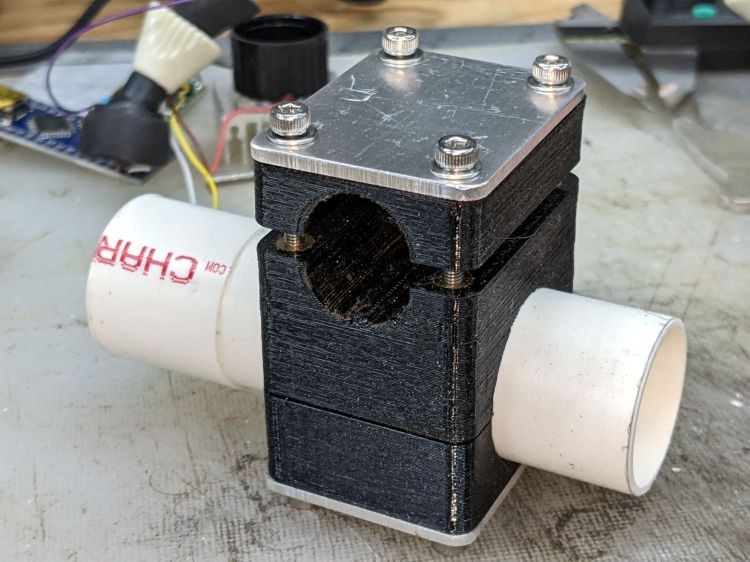
    This is laid in against a need I hope never occurs:

    Dripworks 0.75 inch pipe clamp
    Dripworks 0.75 inch pipe clamp

    It’s intended to clamp around one of the Dripworks mainline pipes carrying water from the pressure regulator to the driplines in the raised beds, should an errant shovel or fork find the pipe.

    It descends from a long line of soaker hose clamps, with a 25 mm ID allowing for a silicone tape wrap as a water barrier.

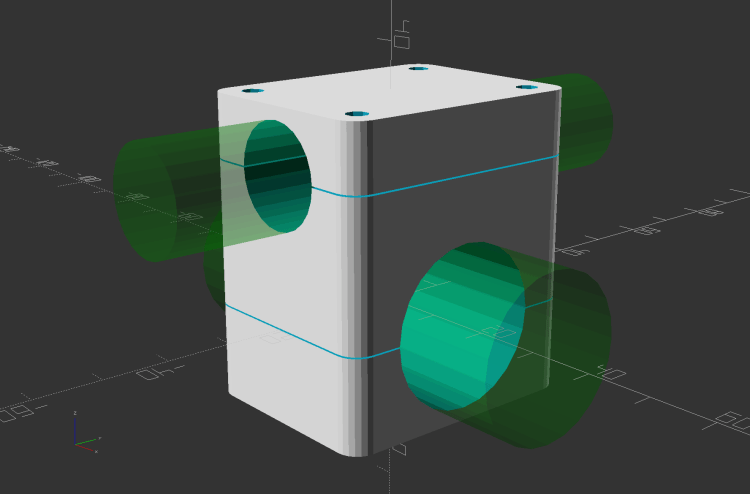
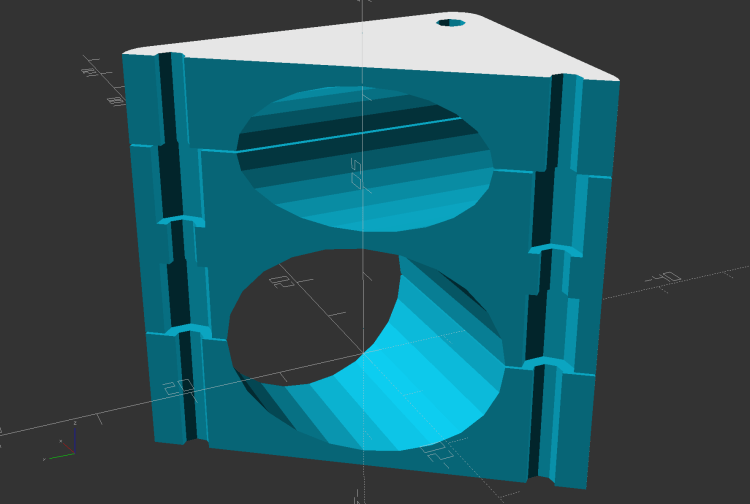
    The solid model has no surprises:

    Dripworks Mainline Clamp - build view
    Dripworks Mainline Clamp – build view

    The OpenSCAD source code as a GitHub Gist:

    // Dripworks 3/4 inch mainline clamp
    // Ed Nisley KE4ZNU 2021-06
    Layout = "Build"; // [Hose,Block,Show,Build]
    HoseOD = 25.0;
    TestFit = false; // true to build test fit slice from center
    //- Extrusion parameters must match reality!
    /* [Hidden] */
    ThreadThick = 0.25;
    ThreadWidth = 0.40;
    HoleWindage = 0.2;
    Protrusion = 0.1; // make holes end cleanly
    inch = 25.4;
    function IntegerMultiple(Size,Unit) = Unit * ceil(Size / Unit);
    ID = 0;
    OD = 1;
    LENGTH = 2;
    //———-
    // Dimensions
    // Hose lies along X axis
    Hose = [200,HoseOD,HoseOD]; // X = longer than anything else
    NumScrews = 2; // screws along each side of cable
    WallThick = 3.0; // Thinnest printed wall
    PlateThick = 1.5; // Stiffening plate thickness
    // 8-32 stainless screws
    Screw = [4.1,8.0,50.0]; // OD = head LENGTH = thread length
    Washer = [4.4,9.5,1.0];
    Nut = [4.1,9.7,3.3];
    Block = [30.0,Hose.y + 2*Washer[OD],HoseOD + 2*WallThick]; // overall splice block size
    echo(str("Block: ",Block));
    ScrewMinLength = Block.z + 2*PlateThick + 2*Washer.z + Nut.z; // minimum screw length
    echo(str("Screw min length: ",ScrewMinLength));
    Kerf = 1.0; // cut through middle to apply compression
    CornerRadius = Washer[OD]/2;
    ScrewOC = [(Block.x – 2*CornerRadius) / (NumScrews – 1),
    Block.y – 2*CornerRadius,
    2*Block.z // ensure complete holes
    ];
    echo(str("Screw OC: x=",ScrewOC.x," y=",ScrewOC.y));
    //———————-
    // Useful routines
    module PolyCyl(Dia,Height,ForceSides=0) { // based on nophead's polyholes
    Sides = (ForceSides != 0) ? ForceSides : (ceil(Dia) + 2);
    FixDia = Dia / cos(180/Sides);
    cylinder(d=(FixDia + HoleWindage),h=Height,$fn=Sides);
    }
    // Hose shape
    // This includes magic numbers measured from reality
    module HoseProfile() {
    NumSides = 12*4;
    rotate([0,-90,0])
    translate([0,0,-Hose.x/2])
    resize([Hose.z,Hose.y,0])
    cylinder(d=Hose.z,h=Hose.x,$fn=NumSides);
    }
    // Outside shape of splice Block
    // Z centered on hose rim circles, not overall thickness through center ridge
    module SpliceBlock() {
    difference() {
    hull()
    for (i=[-1,1], j=[-1,1]) // rounded block
    translate([i*(Block.x/2 – CornerRadius),j*(Block.y/2 – CornerRadius),-Block.z/2])
    cylinder(r=CornerRadius,h=Block.z,$fn=4*8);
    for (i = [0:NumScrews – 1], j=[-1,1]) // screw holes
    translate([-(Block.x/2 – CornerRadius) + i*ScrewOC.x,
    j*ScrewOC.y/2,
    -(Block.z/2 + Protrusion)])
    PolyCyl(Screw[ID],Block.z + 2*Protrusion,6);
    cube([2*Block.x,2*Block.y,Kerf],center=true); // slice through center
    }
    }
    // Splice block less hose
    module ShapedBlock() {
    difference() {
    SpliceBlock();
    HoseProfile();
    }
    }
    //———-
    // Build them
    if (Layout == "Hose")
    HoseProfile();
    if (Layout == "Block")
    SpliceBlock();
    if (Layout == "Show") {
    difference() {
    SpliceBlock();
    HoseProfile();
    }
    color("Green",0.25)
    HoseProfile();
    }
    if (Layout == "Build") {
    SliceOffset = TestFit && !(NumScrews % 2) ? ScrewOC.x/2 : 0;
    intersection() {
    translate([SliceOffset,0,Block.z/4])
    if (TestFit)
    cube([ScrewOC.x/2,4*Block.y,Block.z/2],center=true);
    else
    cube([4*Block.x,4*Block.y,Block.z/2],center=true);
    union() {
    translate([0,0.6*Block.y,Block.z/2])
    ShapedBlock();
    translate([0,-0.6*Block.y,Block.z/2])
    rotate([0,180,0])
    ShapedBlock();
    }
    }
    }