The Smell of Molten Projects in the Morning

Ed Nisley's Blog: Shop notes, electronics, firmware, machinery, 3D printing, laser cuttery, and curiosities. Contents: 100% human thinking, 0% AI slop.

Category: Software

General-purpose computers doing something specific

  • Rear Running Light: Tour Easy Seat Clamp

    Rear Running Light: Tour Easy Seat Clamp

    With the amber front running light blinking away, it’s time to replace the decade-old Planet Bike Superflash behind the seat:

    Superflash on Tour Easy
    Superflash on Tour Easy

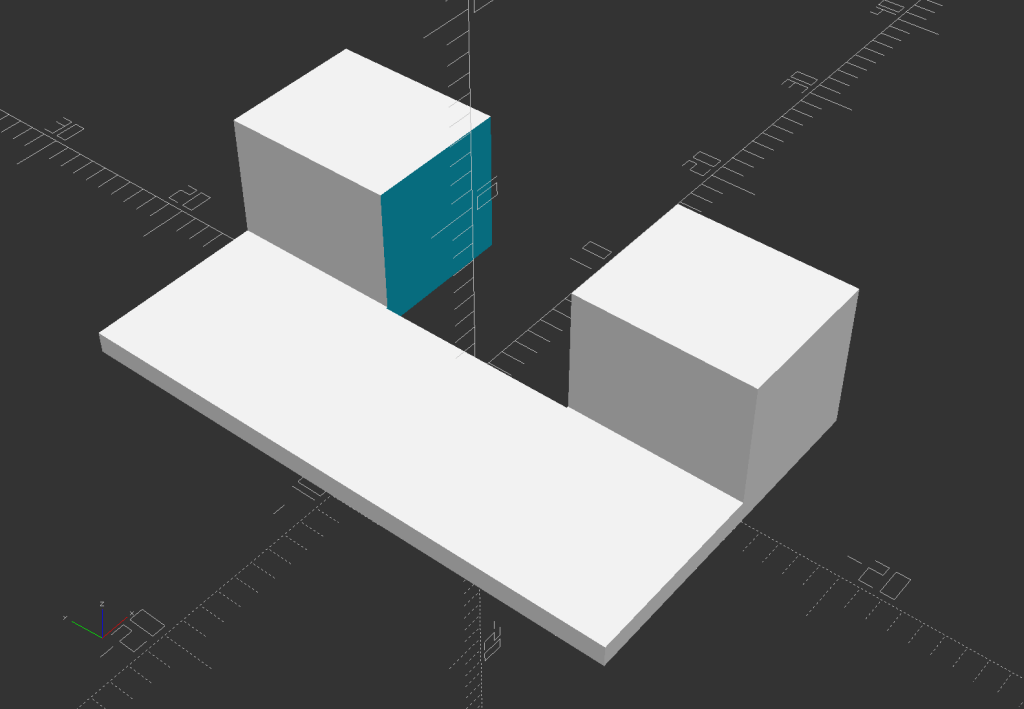
    The new mount descends directly from the clamps holding the fairing strut on the handlebars and various hose clamps:

    Rear Running Light Seat Clamp - solid model
    Rear Running Light Seat Clamp – solid model

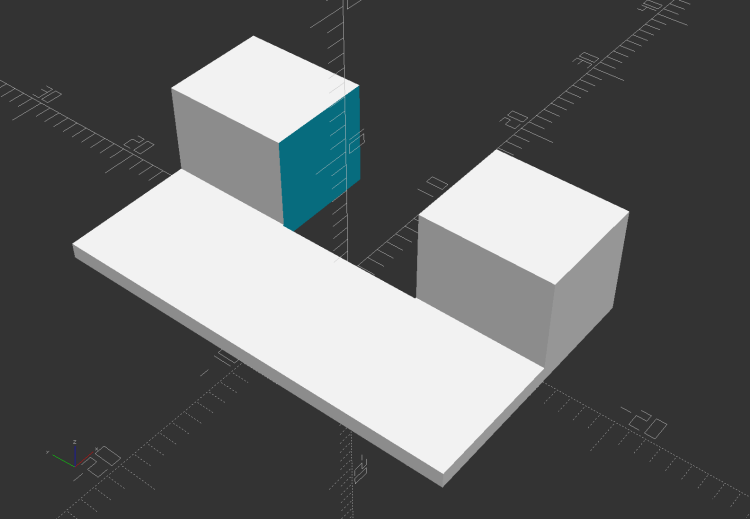
    The central block has two quartets of brass inserts epoxied inside:

    Rear Running Light Seat Clamp - sectioned - solid model
    Rear Running Light Seat Clamp – sectioned – solid model

    That means I can install the light, then mount the whole affair on the bike, without holding everything together while fiddling with overly long screws.

    A trial fit with the not-yet-cut-to-length 25.3 (-ish) PVC pipe body tube:

    Rear Running Light - Tour Easy seat clamp trial fit
    Rear Running Light – Tour Easy seat clamp trial fit

    The aluminum plates have the standard used-car finish: nice polish over deep scratches.

    Although I’ve been thinking of mounting the light below the seat rail, as shown, it can also sit above the rail.

    Mary hauls seedlings and suchlike to the garden in a plastic drawer bungied to the rack, with the SuperFlash serving as an anchor point; this light may need fine tuning for that purpose.

    The OpenSCAD source code as a GitHub Gist:

    // Rear running light clamp for Tour Easy seat strut
    // Ed Nisley – KE4ZNU – 2021-09
    Layout = "Show"; // [Show,Build,Block]
    Section = true;
    /* [Hidden] */
    ThreadThick = 0.25;
    ThreadWidth = 0.40;
    HoleWindage = 0.2;
    Protrusion = 0.1; // make holes end cleanly
    function IntegerMultiple(Size,Unit) = Unit * ceil(Size / Unit);
    ID = 0;
    OD = 1;
    LENGTH = 2;
    inch = 25.4;
    //———————-
    // Dimensions
    // Light case along X axis, seat strut along Y, Z=0 at strut centerline
    LightOD = 25.4 + HoleWindage;
    StrutOD = 5/8 * inch + HoleWindage;
    PlateThick = 1/16 * inch;
    WallThick = 2.0;
    Kerf = ThreadThick;
    Screw = [3.0,6.8,4.0]; // M3 OD=washer, length=nut + washers
    Insert = [3.0,5.4,8.0 + 1.0]; // splined brass insert
    RoundRadius = IntegerMultiple(Screw[OD]/2,0.5); // corner rounding
    ScrewOC = [IntegerMultiple(StrutOD + 2*WallThick + Screw[ID],1.0),
    IntegerMultiple(LightOD + 2*WallThick + Screw[ID],1.0)];
    echo(str("Screw OC: ",ScrewOC));
    BlockSize = [ScrewOC.x + Insert[OD] + 2*WallThick,
    ScrewOC.y + Insert[OD] + 2*WallThick,
    LightOD + StrutOD + 3*WallThick];
    echo(str("Block: ",BlockSize));
    BaseOffset = -(WallThick + LightOD/2); // block bottom to centerline
    StrutOffset = LightOD/2 + WallThick + StrutOD/2; // light centerline to strut centerline
    echo(str("Strut screw min: ",IntegerMultiple(PlateThick + WallThick + StrutOD/2 + Insert[LENGTH]/2,1.0)));
    echo(str("Light screw min: ",IntegerMultiple(PlateThick + WallThick + LightOD/2 + Insert[LENGTH]/2,1.0)));
    NumSides = 2*3*4;
    //———————-
    // Useful routines
    module PolyCyl(Dia,Height,ForceSides=0) { // based on nophead's polyholes
    Sides = (ForceSides != 0) ? ForceSides : (ceil(Dia) + 2);
    FixDia = Dia / cos(180/Sides);
    cylinder(r=(FixDia + HoleWindage)/2,
    h=Height,
    $fn=Sides);
    }
    // Block with light along X axis
    module Block() {
    difference() {
    hull()
    for (i=[-1,1], j=[-1,1])
    translate([i*(BlockSize.x/2 – RoundRadius),j*(BlockSize.y/2 – RoundRadius),BaseOffset])
    cylinder(r=RoundRadius,h=BlockSize.z,$fn=NumSides);
    for (i=[-1,1], j=[-1,1])
    translate([i*ScrewOC.x/2,j*ScrewOC.y/2,BaseOffset – Protrusion])
    rotate(180/8)
    PolyCyl(Screw[ID],BlockSize.z + 2*Protrusion,8);
    for (i=[-1,1], j=[-1,1])
    translate([i*ScrewOC.x/2,j*ScrewOC.y/2,0]) {
    translate([0,0,-Protrusion])
    rotate(180/8)
    PolyCyl(Insert[OD],Insert[LENGTH] + 1*Protrusion,8);
    translate([0,0,(StrutOffset – Insert[LENGTH] – Kerf/2 + Protrusion)])
    rotate(180/8)
    PolyCyl(Insert[OD],Insert[LENGTH] + 1*Protrusion,8);
    }
    translate([-BlockSize.x,0,0])
    rotate([0,90,0])
    cylinder(d=LightOD,h=2*BlockSize.x,$fn=NumSides);
    translate([0,BlockSize.y,StrutOffset])
    rotate([90,0,0])
    cylinder(d=StrutOD,h=2*BlockSize.y,$fn=NumSides);
    translate([0,0,StrutOffset])
    cube([2*BlockSize.x,2*BlockSize.y,Kerf],center=true);
    cube([2*BlockSize.x,2*BlockSize.y,Kerf],center=true);
    }
    }
    //- Build it
    if (Layout == "Block")
    if (Section)
    difference() {
    Block();
    rotate(atan(ScrewOC.y/ScrewOC.x))
    translate([0,BlockSize.y,0])
    cube(2*BlockSize,center=true);
    }
    else
    Block();
    if (Layout == "Show") {
    Block();
    color("Green",0.25)
    translate([-BlockSize.x,0,0])
    rotate([0,90,0])
    cylinder(d=LightOD,h=2*BlockSize.x,$fn=NumSides);
    color("Green",0.25)
    translate([0,BlockSize.y,StrutOffset])
    rotate([90,0,0])
    cylinder(d=StrutOD,h=2*BlockSize.y,$fn=NumSides);
    }
    if (Layout == "Build") {
    translate([-1.2*BlockSize.x,0,-BaseOffset])
    difference() {
    Block();
    translate([0,0,BlockSize.z])
    cube(2*BlockSize,center=true);
    }
    translate([1.2*BlockSize.x,0,StrutOD/2 + WallThick])
    difference() {
    rotate([180,0,0])
    translate([0,0,-StrutOffset])
    Block();
    translate([0,0,BlockSize.z])
    cube(2*BlockSize,center=true);
    }
    translate([0,0,StrutOffset – Kerf/2])
    rotate([180,0,0])
    intersection() {
    Block();
    translate([0,0,StrutOffset/2])
    cube([2*BlockSize.x,2*BlockSize.y,StrutOffset],center=true);
    }
    }

  • Tour Easy: Bafang BBS02 Lower Power

    Tour Easy: Bafang BBS02 Lower Power

    It turns out Mary rarely used assist level 6 and had no use for levels 7 and 8 of my derated BBS02 configuration:

    LC=15
    ALC0=0
    ALC1=5
    ALC2=7
    ALC3=16
    ALC4=25
    ALC5=37
    ALC6=51
    ALC7=67
    ALC8=85
    ALC9=100
    

    Level 9 must be 100% of the maximum motor current so the throttle can apply full power to get out of the way in a hurry.

    The new and even more derated configuration allows small-step assist level selection for our usual riding, at the cost of an unused huge step to level 9 for the throttle:

    [Basic]
    LBP=42
    LC=18
    ALC0=0
    ALC1=4
    ALC2=6
    ALC3=9
    ALC4=15
    ALC5=20
    ALC6=25
    ALC7=30
    ALC8=40
    ALC9=100
    ALBP0=0
    ALBP1=100
    ALBP2=100
    ALBP3=100
    ALBP4=100
    ALBP5=100
    ALBP6=100
    ALBP7=100
    ALBP8=100
    ALBP9=100
    WD=12
    SMM=0
    SMS=1
    [Pedal Assist]
    PT=3
    DA=0
    SL=0
    SSM=4
    WM=0
    SC=20
    SDN=4
    TS=15
    CD=8
    SD=5
    KC=100
    [Throttle Handle]
    SV=11
    EV=42
    MODE=1
    DA=10
    SL=0
    SC=5
    

    The LC=18 line limits the maximum motor current to 18 A, rather than the rated 24 A, which may improve controller MOSFET longevity; reliable evidence is hard to come by. Controller failures seem to happen more often to riders who value jackrabbit acceleration on harsh terrain, so it may make little difference for road cyclists.

    So level 5 now selects 75% × 20% = 15% of the motor’s nominal 750 W:

    Tour Easy Bafang - display 26 mi
    Tour Easy Bafang – display 26 mi

    Call it 115 W: we’re both getting plenty of exercise!

  • Naming Is Hard

    A recent update to the X Windowing System (or whatever it’s called) once again changed the names of its monitors / displays / output devices, so that my startup script no longer confined the tablet to the landscape display.

    In mostly reverse chronological order, here are various commands I’ve puzzled out:

    #xsetwacom --verbose set "HUION Huion Tablet stylus" MapToOutput "DP1-8"
    xsetwacom --verbose set "HUION Huion Tablet stylus" MapToOutput "DP-1-8"
    #xsetwacom --verbose set "HUION Huion Tablet Pen stylus" MapToOutput "DP-1"
    #xsetwacom --verbose set "Wacom Graphire3 6x8 Pen stylus" MapToOutput "DP-1"
    #xsetwacom --verbose set "Wacom Graphire3 6x8 Pen stylus" MapToOutput "HEAD-0"
    #xsetwacom --verbose set "Wacom Graphire3 6x8 Pen eraser" MapToOutput "DP-1"
    #xsetwacom --verbose set "Wacom Graphire3 6x8 Pen eraser" MapToOutput "HEAD-0"
    

    Over the last two years, the display name changed from DP-1 to DP-1-8 to DP1-8, and back to DP-1-8. I grew accustomed to this with the Wacom tablet (HEAD-0‽)and now know where to look, but I still have no idea of the motivation.

    Aaaand the tablet’s stylus name? The Wacom names were stable, but the Huion names apparently come from the Department of Redundancy Department.

  • Arduino MEGA Debugging LEDs

    Arduino MEGA Debugging LEDs

    Kibitzing on a project involving an Arduino Mega (properly MEGA, but who cares?) with plenty of spare I/O pins led me to slap together a block of LEDs:

    Arduino Mega Debugging LEDs
    Arduino Mega Debugging LEDs

    The excessive lead length on the 330 Ω resistors will eventually anchor scope probes syncing on / timing interesting program events.

    Not that you have any, but they’re antique HP HDSP-4836 tuning indicators: RRYYGGYYRR. If you were being fussy, you might use 270 Ω resistors on the yellow LEDs to brighten them up.

    A simple test program exercises the LEDs:

    /*
      Debugging LED outputs for Mega board
      Ed Nisley - KE4ZNU
      Plug the board into the Digital Header pins 34-52 and GND 
    */
    
    byte LowLED = 34;
    byte HighLED = 52;
    byte ThisLED = LowLED;
    
    //-----
    void setup() {
      pinMode(LED_BUILTIN,OUTPUT);
      
      for (byte p = LowLED; p <= HighLED; p+=2)
        pinMode(p, OUTPUT);
    
    //  Serial.begin(9600);
    }
    
    // -----
    void loop() {
      digitalWrite(LED_BUILTIN,HIGH);
      
      digitalWrite(ThisLED, HIGH);
      delay(100);
      digitalWrite(ThisLED, LOW);
     // delay(500);
    
      ThisLED = (ThisLED < HighLED) ? (ThisLED + 2) : LowLED;
    
    //  Serial.println(ThisLED);
    
      digitalWrite(LED_BUILTIN,LOW);
    }


    Nothing fancy, but it ought to come in handy at some point.

  • Google Play Store Ad Bidding Delay

    Google Play Store Ad Bidding Delay

    Being that type of guy, I turn my phone off during the night while it’s charging, turn it on for the next day’s adventures, and check the Google Play App Store to see which apps will get updates.

    The vast machine learning / AI / whatever analyzing my every move still hasn’t figured out my morning ritual, so it desperately tries to sell me crap:

    Google Play Store - app ad delay
    Google Play Store – app ad delay

    My guess: those blank spots are placeholders for app ads, but, while the phone is busy scanning for malicious apps, the ad bidding process doesn’t complete fast enough to update the display before I see it.

    FWIW, I had the Genuine NYS Covid-19 app installed for a while, but I very rarely go anywhere or see anybody, so it seemed to offer no net benefit.

  • Bafang BBS02: Improved Motor Reaction Spacer

    Bafang BBS02: Improved Motor Reaction Spacer

    The original BBS02 reaction spacer for Gee’s Terry Symmetry didn’t work quite the way I expected:

    Bafang BBS02 - reaction block displacement
    Bafang BBS02 – reaction block displacement

    The motor evidently vibrates enough to propel the block forward, shearing the double-sticky foam tape which was never intended to resist force in that plane. I thought the block was located at the point where the motor casing was tangent to the frame tube, so as to equalize the forces in both directions, but … nope.

    A revised design based on measurements informed by new knowledge:

    Terry - Bafang motor spacer - improved - solid model
    Terry – Bafang motor spacer – improved – solid model

    The upper curve is now symmetric and the whole block mounts more rearward under the bottom bracket lug, where some tedious work with a machinists square located the real tangent point:

    Bafang BBS02 - reaction block improvement
    Bafang BBS02 – reaction block improvement

    The motor sure doesn’t look like it’s tangent, but a dry fit showed all the curves laid against the case and tubes.

    The brazing fillet means the step fitting the downtube can’t sit snug against the edge of the lug, but most of the reaction force should go through the section into the lug, near the center of the block.

    A crude marker will keep track of any motion:

    Bafang BBS02 - reaction block marker
    Bafang BBS02 – reaction block marker

    I think the symmetric curve against the motor has enough projection to keep the block from wandering off, even if I haven’t gotten the location exactly right.

    Stipulated: Hope is not a strategy.

    The OpenSCAD source code:

    MotorOD = 111;              // motor frame dia
    MotorOffset = 10.0;         // motor OD tangent wrt lug edge
    ShiftSpace = 6.0;           // motor to frame space
    
    LugLength = 25.0;           // length of section over BB lug
    
    Spacer = [5.0 + LugLength,DownTube[ID]/2,4*ShiftSpace];
    SpaceAngle = 0*atan(1.8/Spacer.x);            // tilt due to non-right-angle meeting
    echo(str("Spacer angle: ",SpaceAngle));
    
    module MotorSpacer() {
    
        difference() {
            translate([LugLength - Spacer.x/2,0,0])
               cube(Spacer,center=true);
            translate([0,0,DownTube[ID]/2])
                rotate([0,90 + SpaceAngle,0]) rotate(180/FrameSides)
                    cylinder(d=DownTube[ID],h=DownTube[LENGTH],$fn=FrameSides,center=true);
            translate([DownTube[LENGTH]/2,0,DownTube[ID]/2 - DownTube[LENGTH]*sin(SpaceAngle)/2])       // concentric with ID
                rotate([0,90 + SpaceAngle,0]) rotate(180/FrameSides)
                    cylinder(d=DownTube[OD],h=DownTube[LENGTH],$fn=FrameSides,center=true);
            translate([MotorOffset,0,-(MotorOD/2 + ShiftSpace)])
                rotate([90,0,0]) rotate(180/48)
                    cylinder(d=MotorOD,h=2*Spacer.y,$fn=48,center=true);
        }
    
    }
    

    Nothing like actual riding to reveal what needs more thought!

  • Tour Easy: Amber Running Light

    Tour Easy: Amber Running Light

    Having seen a few bikes with amber “headlights” and being desirous of reducing the number of batteries on Mary’s bike, this seems like an obvious first step:

    Fairing Mounted Side Marker - First Light
    Fairing Mounted Side Marker – First Light

    It descends from the fairing flashlight mount with an entry to suit a 15 mm truck side marker body:

    LightBodies = [
      ["AnkerLC90",26.6,48.0],
      ["AnkerLC40",26.6,55.0],
      ["J5TactV2",25.0,30.0],
      ["InnovaX5",22.0,55.0],
      ["Sidemarker",15.0,20.0],
      ["Laser",10.0,30.0],
    ];
    

    The rest of the code gets a few cleanups you’d expect when you compile code untouched for a few years using the latest OpenSCAD.

    The markers are allegedly DOT rated, which matters not for my use case: SAEP2PCDOT.

    The mount is grossly overqualified for a wide-beam light with little need for aiming:

    Fairing Mounted Side Marker - test light
    Fairing Mounted Side Marker – test light

    Eventually, the marker should slip into a prealigned cylindrical holder, with a dab of epoxy to keep it there.

    The lights are a buck apiece, so there’s no reason to form a deep emotional attachment. They are the usual poorly molded and badly assembled crap, although the next step up from a nominally reputable supplier is a factor of five more expensive.

    It’s generated for the left side of the fairing, although I think having a pair of them would improve conspicuity:

    Fairing Mounted Side Marker - installed
    Fairing Mounted Side Marker – installed

    Being automotive, it runs from a 12 V supply, which comes from a boost converter driven by the Bafang 6 V headlight output. The absurdity of bucking a 48 V lithium battery to a 6V switched headlight output, then boosting it to 12 V to drive a single amber LED with a 1.5 V forward drop does not escape me.

    It’s possible to slice the lens off (using a lathe), remove / replace the resistor, then glue it back together, which would be worthwhile if you were intending to drive it from, say, an Arduino-ish microcontroller to get a unique blink pattern.

    Given the overall lack of build quality, it might make more sense to slap a condenser lens in front of a Piranha LED.

    Bonus: contrary to what you (well, I) might expect, the black lead is positive and the white lead is negative.