The Smell of Molten Projects in the Morning

Ed Nisley's Blog: Shop notes, electronics, firmware, machinery, 3D printing, laser cuttery, and curiosities. Contents: 100% human thinking, 0% AI slop.

Category: Science

If you measure something often enough, it becomes science

  • PLA vs. PVC Purple Primer: Win!

    After that exchange, I dabbed some Oatey PVC Purple Primer/Cleaner on two PLA slabs:

    PLA test coupon - PVC Purple Primer
    PLA test coupon – PVC Purple Primer

    The active ingredient involved in PLA bonding is tetrahydrofuran, which makes up anywhere from 10 to 40% of the primer (the MSDS gives a broad range). The primer immediately marred the PLA surface, which is exactly what you want in a solvent adhesive.

    After an overnight clamping, I couldn’t pull or peel that joint apart: the two slabs had become one. That’s unlike the paint stripper test that didn’t bond well at all. Good enough for me.

    Obviously, you’d prefer Clear Primer for natural PLA, but Purple Primer is what I had on hand.

    Given that this stuff has no solid content, I think it’s more suitable as a PLA adhesive that the thicker PVC Cement. However, clear cement would be less likely to run along the thread seams and ruin the surface finish outside the joint than water-thin primer.

    Tradeoffs, tradeoffs… but now I can build things from PLA subassemblies!

  • PLA vs. Methylene Chloride: Joint Peel Strength

    The only commonly available PLA adhesive seems to be methylene chloride, which is common only because it’s part of really nasty paint stripper that actually works; I suspect you can’t buy the pure stuff anywhere.

    Anyhow, I picked a pair of flat line width test plates from the PLA scrap pile, dabbed paint stripper on each, and clamped them together overnight:

    PLA test coupon - clamping
    PLA test coupon – clamping

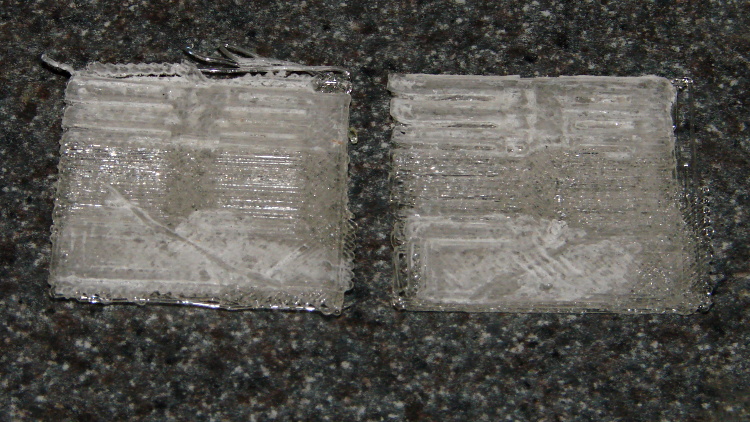
    Unlike acetone on ABS, paint stripper doesn’t actually combine the parts into a single fused unit; I could peel the two plates apart with some effort:

    PLA test coupon - paint stripper adhesion
    PLA test coupon – paint stripper adhesion

    That picture shows the results of two glue-and-peel tests, with much the same result along the top and bottom edges. Some solvent damage appears as a thin white line around the edge of the glued joint, but with some care that wouldn’t be too bad.

    I think paint stripper makes an acceptable adhesive for PLA, at least for joints that aren’t subject to peeling loads. You must design an interlocking mechanical joint, perhaps filled with epoxy, to withstand peeling loads, which isn’t nearly as good as the ABS option of just fusing the parts together.

  • Monthly Science: Larval Engineer

    Part of becoming an engineer involves discovering the difference between what works and what doesn’t, with the goal of doing more of the former and less of the latter. In tech fields, gaining such knowledge requires observations, records, and graphs.

    Our Larval Engineer is off to a good start, having collected her projects & notes into blog format.

    The alert reader may recognize the understated presence of a guiding hand, here and there, in some projects. I needed one, too, back in the day, even if I didn’t appreciate it (by at least the same amount). Fortunately, blogs hadn’t been invented, so you’ll never know.

    Karen at the lathe
    Karen at the lathe

    You may enjoy her story of the Taxi Horn project, which you see here in the lathe.

    Memo to Self: After launch, guiding hands must remain with the gantry. One must Just. Let. Go.

  • Makergear M2: Z-minimum Switch

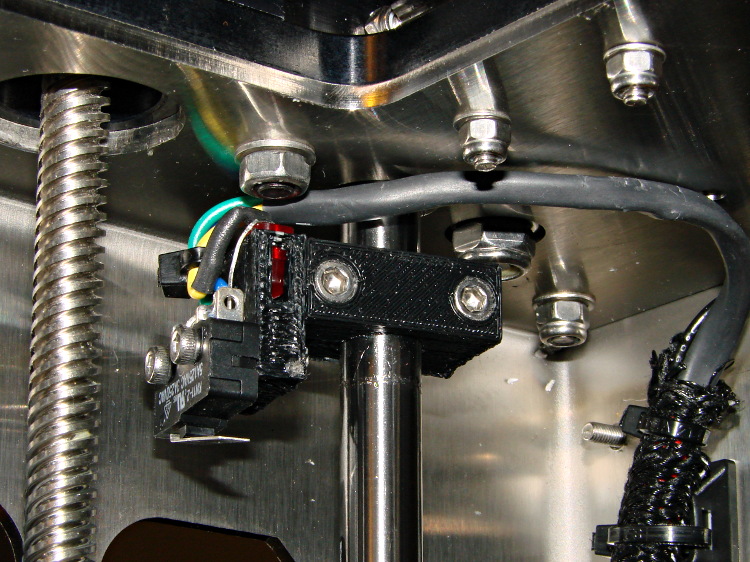
    The best orientation for the Z-minimum switch seems to be slightly angled back:

    M2 - Z min limit switch
    M2 – Z min limit switch

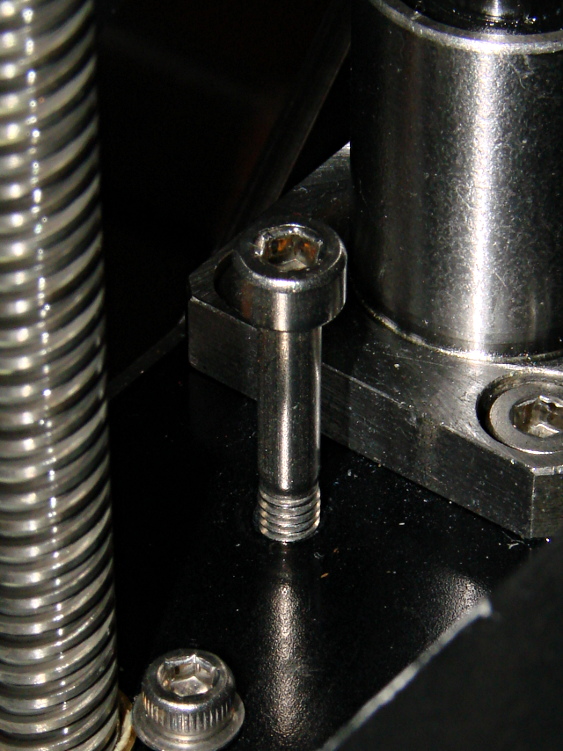
    I used an M4x0.7 socket head cap screw for the height adjustment, with a Nylock nut below the stage:

    M2 - Z min limit screw
    M2 – Z min limit screw

    The assembly instructions show a hex head screw, but the item numbers don’t match the BOM listings. The SHCS lets me hold it firmly in position with the ball-end driver provided in the M2 tool kit while adjusting it:

    • 1/4 turn (the handle is square-ish) = 0.7/4 = 0.175 mm
    • 1/6 turn (the shaft is hex) = 0.12 mm
    • 1/12 turn (you can do it!) = 0.06mm
    • less than that is probably fooling yourself.

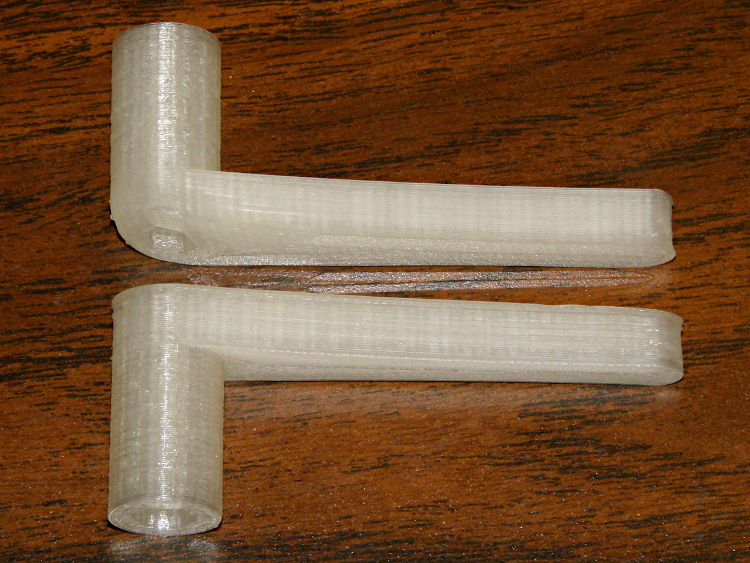
    I printed a pair of tomlombardi’s  7 mm wrenches, which work well for adjusting the Nylock nut underneath the Z axis stage:

    M2 - 7 mm wrenches
    M2 – 7 mm wrenches

    The left end of the top wrench didn’t adhere to the glass plate, but the business end of the wrench came out OK.

    I adjusted the screw to trip the switch with the nozzle 1.0 mm above the platform, then feed that offset in using a G92 Z1.0 instruction in my customized Start G-Code.

    However, the most accurate way to set the switch height involves measuring the as-printed thickness of the skirt extrusion around the object. The average value should be 0.25 mm (for my current slic3r settings, anyhow) and all sides should be equally thick: adjust the screw to change the average and adjust the platform screws to remove any tilt. You’ll quickly accumulate a pile of skirt threads, but they make good tchotchkes when you give a presentation on your new toy:

    M2 skirt extrusions
    M2 skirt extrusions

    You could fiddle with the G92 value to make the average thickness come out right, but I favor making the machine as accurate as possible, so that the software begins from a known-good mechanical setting.

  • Makergear M2: Filament Guide Tube Friction

    While changing to black filament, I measured the force required to pull the (natural PLA) filament through the translucent guide tube arching over the M2’s chassis from the spool to the extruder:

    M2 Electronics Case on chassis
    Makergear M2 3D Printer with cardboard on build platform

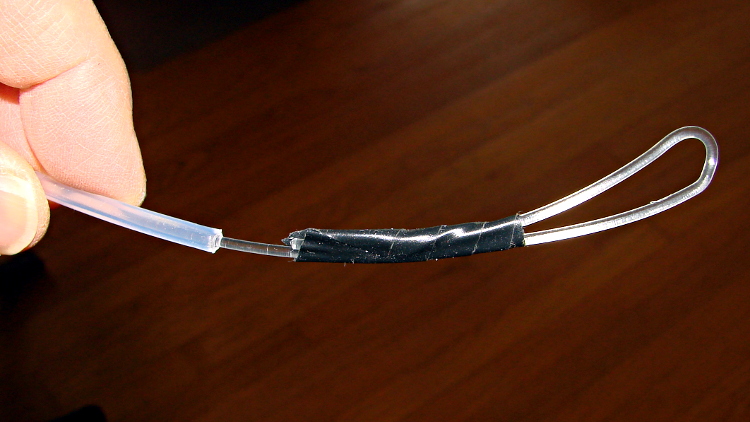
    A strike-anywhere kitchen match (bet you can’t buy those any more!) provided more than enough heat to bend the end of the filament into a loop suitable for the pull scale:

    M2 - Filament loop for pull test
    M2 – Filament loop for pull test

    The results:

    • Tube reasonably straight: 0.5 lb = 2.2 N
    • Tube arched to middle of X axis: 1 lb = 4.5 N
    • Tube sharply bent to X axis nearest spool: 1.5 lb = 6.7 N

    The force increases slightly while tugging filament off the spool, as the spool does not rotate freely on the printed arm jutting out from the frame, but those numbers are in the right ballpark.

    The effective diameter of the extruder drive gear is about 11.5 mm, so overcoming the tube friction requires somewhere between 10 and 40 mN·m of torque. That’s applied at the one point in the whole system most likely to show the result of uneven loading, because it directly affects the pressure of the molten plastic behind the nozzle.

    That’s considerable motivation to get rid of the filament guide tube…

  • Makergear M2: Post and Hole Calibration Test Objects

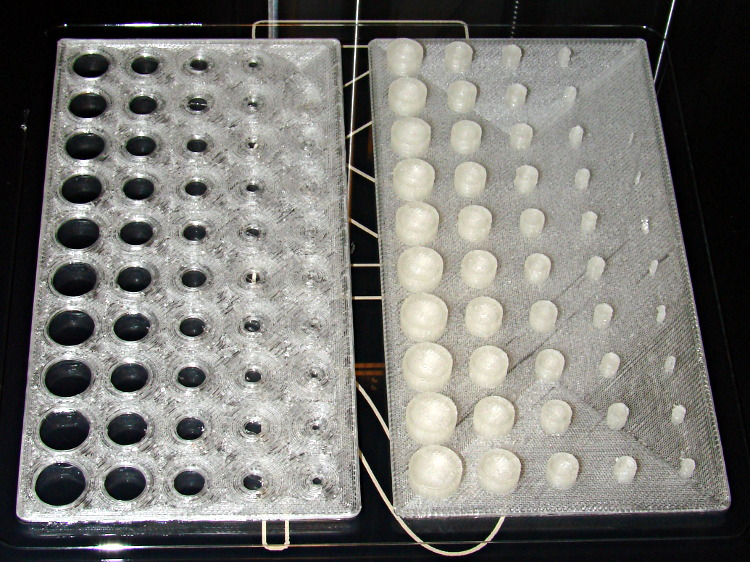
    Despite the profusion of surface-finish and print quality test objects, I really care about the dimensions of a 3D printed object, because I tend to build widgets rather than art objects. These two objects, from walter’s Hole and Column Test Print, produce calibrated holes and columns from 0.20 mm to 10.00 mm in diameter, incrementing by 0.20 mm, that should slip neatly together:

    M2 - walter hole-column test
    M2 – walter hole-column test

    Of course, they didn’t, but they came surprisingly close for a first attempt.

    The 0.20 and 0.40 posts simply aren’t there, because they’re too small to print with a 0.35 mm diameter nozzle. The 0.60 through 1.40 mm posts were present, albeit fugly, and posts larger than that looked increasingly better.

    Although all the holes were present, in the sense that you could see a disturbance in the top and bottom infill pattern, the first visibly open hole appeared at the 0.80 mm spot… and it was immeasurably small. Some holes had misplaced perimeter strands stretching across the openings, which is probably due to excessive speed from my fiddling around with the numbers.

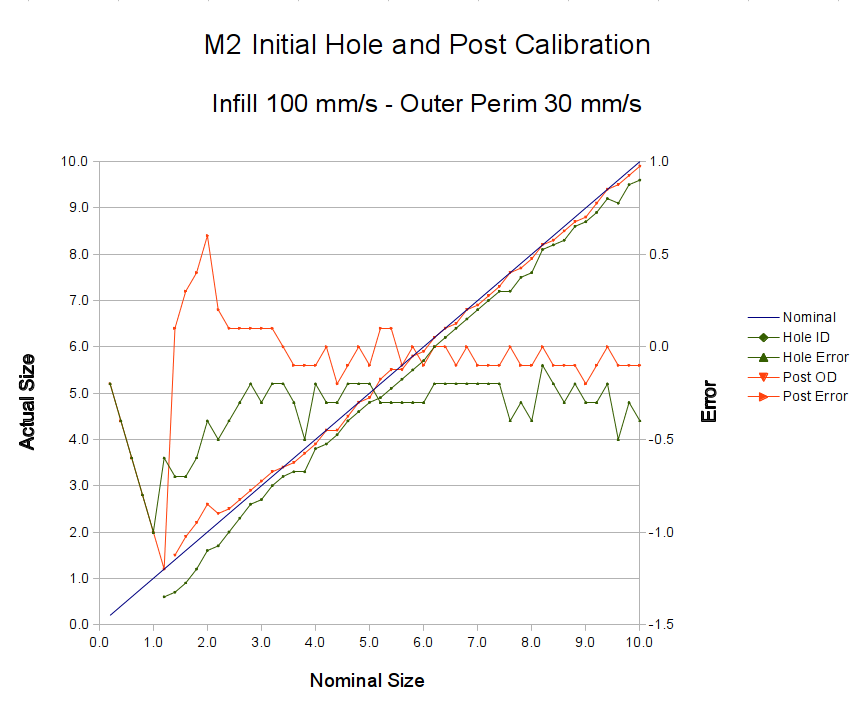
    Measuring them with a digital caliper, with no effort at finding the best orientation, then slapping the data into a Libreoffice spreadsheet, produces an interesting graph:

    M2 - Initial Hole and Post Diameter Calibration
    M2 – Initial Hole and Post Diameter Calibration

    Above about 3 mm diameter: posts are 0.1 mm too small and holes are 0.3 mm too small. Around 2 mm, posts are too big and holes are way too small. What’s important: above maybe 2.5 mm, the error is essentially constant and does not scale with diameter, so a simple Finagle Constant (or two) can solve (most of) the problem.

    Some experiments involving slic3r’s small-perimeter speed seem in order; it was 25 mm/s for these pieces.

    More care in measurement would produce better answers, but the real question is whether you can produce holes and columns with known sizes; the answer (as expected) remains “with some care”. That’s not surprising; I expect to have an M2 + PLA version of the small hole diameter Finagle Constant that I’ve been using with Skeinforge + Thing-O-Matic; the correction will certainly fall in the same ballpark.

    The slic3r configuration:

    ; generated by Slic3r 0.9.8 on 2013-04-01 at 16:20:49
    
    ; layer_height = 0.25
    ; perimeters = 1
    ; top_solid_layers = 3
    ; bottom_solid_layers = 3
    ; fill_density = 0.10
    ; perimeter_speed = 100
    ; infill_speed = 300
    ; travel_speed = 500
    ; scale = 1
    ; nozzle_diameter = 0.35
    ; filament_diameter = 1.70
    ; extrusion_multiplier = 0.9
    ; perimeters extrusion width = 0.40mm
    ; infill extrusion width = 0.40mm
    ; first layer extrusion width = 0.39mm
    

    The source code comes from the Thingiverse customizer as bare G-Code, so there’s not much point in reproducing it here.

  • Makergear M2: Z Axis Numbers

    Now that I understand why the M2 Z axis stepper gets so hot, the question is: does it matter?

    The Z axis stage moves very smoothly along the two guide rails, so there’s little friction and no binding involved. I can’t weigh the thing without dismantling the whole printer, which isn’t going to happen right now, but some crude experiments indicate that 7 pounds = 3 kgf = 30 N isn’t too far from the truth.

    The 8 mm OD leadscrew has a 4-start thread at 3.25 turn/inch = 0.311 inch/turn = 0.13 turn/mm = 7.8 mm/turn.

    [Update: Thanks to Jetguy for pointing out the blindingly obvious fact that it’s really 8 mm/turn = 0.125 turn/mm and you can do the inch conversion yourself if you need it. That doesn’t materially affect the results, given that they have about one significant figure of accuracy to start with.]

    The firmware uses 1/16 microstepping at 400 step/mm = 3077 3200 step/turn.

    Using a pull scale to, yes, pull a string wound around the knob on the Z axis leadscrew shows about 1 pound raises the platform at a slow, constant speed. The polygonal knob is about 35 mm in diameter, so the torque works out to 11 ounce·inch = 80 mN·m. Presumably, holding the platform at a given position would require somewhat less torque, but I can’t measure that with any confidence.

    The motor has very little excess torque: a gentle touch can stall the Z axis motor as it raises the stage. I guesstimate the motor produces 150 mN·m, tops, during low-speed motion at 600 mA.

    Lowering the stage requires no effort at all: it falls under its own weight, prompting me to install those bumpers. The design doesn’t have much compliance, but it’s well-adjusted and works fine.

    Searching with the appropriate keywords produces a 17HD-B8X300-H motor from Kysan:

    • 12 V
    • 400 mA
    • 30 Ω
    • 42 mH
    • 2.6 kg·cm = 260 mN·m

    That’s a close-enough match to suggest my measurements are in the right ballpark. The extremely high resistance and inductance indicate this is the wrong motor for a high-performance microstepping application.

    The firmware has DEFAULT_MAX_ACCELERATION = 30 mm/s2 for the Z axis. It’s 9000 for X and Y, 10000 for the extruder. The extremely low Z acceleration says there’s something badly wrong with this setup.

    There is also a DEFAULT_ACCELERATION = 3000 for all axes. I don’t know how that interacts with the per-axis limit, but I’m certain the Z axis doesn’t come close to that value.

    I do not know how the firmware actually handles motor steps while ramping up and down, but I do intend to clamp a current probe around a motor wire and measure what goes on. Let us assume it works in the usual way all ideal components behave in physics labs.

    Assuming a constant 30 mm/s2 acceleration for the first half of a 0.25 mm Z axis move, the time should be:

    0.25 / 2 = (1/2) * 30 * t2
    t = 90 ms

    At the end of that ramp-up, the Z stage will be trundling along at:

    v2 = 2 * 30 * 0.25/2
    v = 2.8 mm/s

    The move requires exactly 50 steps = 0.25/2 mm * 400 step/mm.

    Assuming the same deceleration during the second half of the move, a 0.25 mm layer change requires about twice that long: 180 ms for 100 steps.

    Along the X axis, a 0.25/2 mm move requires 5.3 ms and reaches a peak speed of 47 mm/s. The total move requires 11 ms and 22.22 steps (= 0.25 mm * 88.88 step/mm, obviously rounded to 22).

    I think a difference of more than an order of magnitude matters, although some actual measurements are definitely appropriate.