The Smell of Molten Projects in the Morning

Ed Nisley's Blog: Shop notes, electronics, firmware, machinery, 3D printing, laser cuttery, and curiosities. Contents: 100% human thinking, 0% AI slop.

Category: PC Tweakage

Remembering which tweaks worked

  • Windows XP Restoration

    Although Thanksgiving is Update Your Parents’ Browser Day, I ended up rebuilding their old Dell Dimension 2350 PC over their New Year visit: it had succumbed to a nasty case of bit rot. It may have had the odd malware infestation, although booting with the invaluable System Rescue CD and unleashing a ClamAV scan didn’t turn up anything exciting.

    I had full partition backups from August 2010, so I set up a new hard drive (well, an old drive from my heap, but new to them) with the restored partitions before they arrived, swapped it into the PC, then attempted to boot the Windows Recovery Console from their Windows CD to restore the MBR. Alas, I didn’t set the Dell Utility partition to type DE, thus throwing off the drive letter sequence, and the subsequent thrashing (including a steel-cage death match with fixboot and chkdsk) wrecked the Windows partition.

    Figuring that situation out from a simple NTLDR missing boot message took a while.

    But after restoring the partition again and doing the WRC dance, we had a perfectly serviceable Windows XP installation that inhaled a year’s worth of Windows updates in a surprisingly short process that required only a single (!) reboot. I tossed a bunch of obsolete & unused software over the side, emptied the Recycle bin, manually deleted a bunch of files in the various temporary directories, updated Firefox, installed LibreOffice, imported the Outlook Express address book from the rotted drive, did not import the email messages, and away they drove.

    I had suggested it was time for a new PC, but … maybe next time.

    Notes:

    • My USB-to-SATA adapter cable injected occasional read errors (which partimage caught), but a klunky drop-in-the-slot vertical desktop adapter worked OK.
    • A CHKDSK fixed one or more files message doesn’t really prepare you for the discovery that it obliterated the entire directory structure and left a vacant drive behind.
    • The PC had 512 MB of DDR RAM in two 256 MB sticks. I swapped in a 512 MB stick (harvested from an old PC on its way to the recycler) and, as you’d expect, 768 MB of RAM dramatically improved the poor thing’s attitude.
    • System Rescue CD is invaluable for this sort of thing.
    • What is it with Firefox being stuck at V3 forever, then ratcheting instantly to V9? Version envy?
  • Skeinforge: Simplified Plugin Selection Page

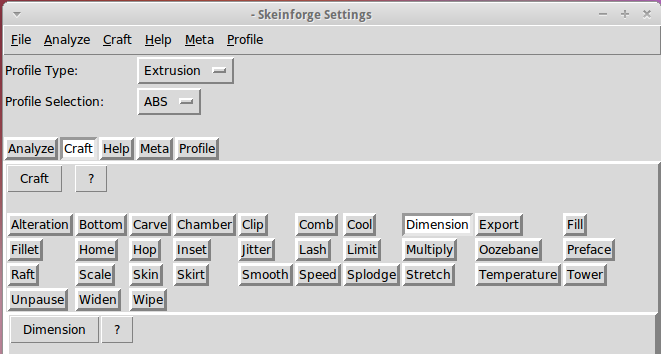
    The Skeinforge Craft window presents a formidable array of buttons, one for each possible plugin:

    Skeinforge standard
    Skeinforge standard

    I’ve disabled many of those plugins because, for example, limiting Z-axis speed isn’t relevant on my printer. If you’re sure you won’t use some of the plugins, remove them by editing /where-it's-installed/skeinforge_application/skeinforge_plugins/profile_plugins/extrusion.py thusly…

    In getCraftSequence(), located at about the midpoint of that file, duplicate the line that lists the plugins and add an octothorpe (OK, a hash) to make one line a Python comment, then remove the plugins you don’t care about from the other line:

    def getCraftSequence():
    	'Get the extrusion craft sequence.'
    #	return 'carve scale bottom preface widen inset fill multiply speed temperature raft skirt chamber tower jitter clip smooth stretch skin comb cool hop wipe oozebane splodge home lash fillet limit unpause dimension alteration export'.split()
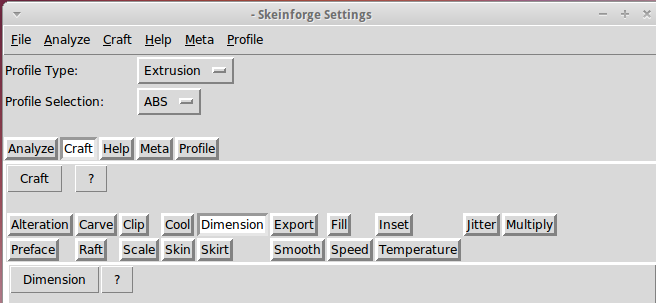
    	return 'carve scale preface inset fill multiply speed temperature raft skirt jitter clip smooth skin cool dimension alteration export'.split()
    

    This being Python, do not change the indentation. If you get overenthusiastic and toss something useful overboard or just pine for the Good Old Days, swap the octothorpe to your modified line to restore the original plugin assortment.

    Save the result and you’ll see only the useful buttons:

    Skeinforge simplified
    Skeinforge simplified

    There, now, wasn’t that easy?

  • Enabling Remote Desktop Sharing in Xubuntu

    I set up Xubuntu 11.10 on the Dell 531S driving the Thing-O-Matic, as the Unity UI seems surprisingly like crippleware: every feature that isn’t mandatory is prohibited. However, Xubuntu’s XFCE UI also has a long list of things that should be easy and aren’t, such as enabling remote desktop sharing. Gotta have that so I can fire up the printer and monitor progress from upstairs.

    It turns out that the Vino server is installed, but not enabled, so you must start by firing up vino-preferences in a terminal to set some preferences:

    This is a local machine behind a firewall, so a moderately secure password with no confirmation will suffice. Your paranoia may vary.

    Then drill down through the menu from Settings Settings ManagerSession and Startup to the Application Autostart tab, then Add the Vino VNC Server to the list: /usr/lib/vino/vino-server. You can start it manually if you have the hots for immediate sharing.

    This seems to be impossible in Unity, trivially easy in GNOME, and unduly mysterious in XFCE.

  • VLC Startup Settings: Audio Sync

    While thrashing around with that DVD player, I finally figured out that VLC stores its configuration settings in ~/.config/vlc/vlcrc. I don’t know if it’s supposed to update that file automagically after twiddling the GUI config settings, but it doesn’t; I must manually edit the file to get a sticky change.

    Anyhow, the vital setting for that particular drive turns out to be audio synchronization, as set by the audio-desync parameter. The audio must lag the video by 400 ms, thusly:

    # Audio desynchronization compensation (integer)
    audio-desync=-400
    

    And then it Just Works…

  • External USB Case: DVD Overcurrent

    Well, it turns out that the DVD drive I stuffed into that case really does require a whole bunch of current. I tried playing a DVD and got erratic results, including weird keyboard (!) failures. Finally, I hitched a bench supply to the coaxial power jack on the case and caught it in the act:

    Laptop DVD - current display
    Laptop DVD – current display

    That jack normally connects to the power-only USB cable, which implies an upper limit of 100 mA. A bit of poking around inside shows that the coaxial power jack simply parallels the USB jack’s VCC line, so there’s no fancy negotiation or current sharing going on.

    When the keyboard went nuts it was sharing an unpowered USB hub with this thing, which means that the overcurrent dragged down the hub’s supply. I was permuting all the choices to see if the failures suggested anything; eventually it did.

    A bit of rummaging in the Basement Laboratory Warehouse Wing uncovered a 5.0 V 3.7 A wall wart switching power supply that is grossly in excess of the drive’s 1.5 A rating. Amazingly, it even had the correct coaxial power plug on the end of the cable, which never happens.

    Alas, because the external supply back-powers the USB data cable, it lights up the Q150’s power button when the PC is turned off. I think I can insert an isolation diode into the USB power trace to isolate it from the jack, somewhat along the lines of that hack. However, that seems to require removing the USB connector to uncover a very well protected top trace. For now, I’ll just unplug the drive.

  • Ubuntu 11.10 vs. Epson R380 Printer: FAIL

    After getting everything configured, I hauled the Atom to the Basement Laboratory Computational Center, set the IP address, brought it up as the new file server, backed up the changed files, and everything worked fine. Then I plugged in all three printers, lit up the CUPS configuration screen, and configured the, uh-oh, two printers it could find.

    Turns out that the Epson R380 printer, being a member of the Epson R300 series of printers, doesn’t work with the USB subsystem in Ubuntu 11.10, for reasons that’ll surely get sorted out in a few months. Until then, it’s a showstopper for me.

    So I shut everything down, yanked out the Atom, plugged in the old AMD box, reconnected everything, restored the changed files from backup, and we’re back to where we were a few days ago. I’ll swap in the old drive and slide the Atom underneath the Thing-O-Matic again.

    Drat!

  • NFS V4 Tweaks

    Come to find out that Ubuntu 11.10 uses NFS V4 by default, which means the various clients scattered around here, all of which use NFS V3 by default, report all files have user & group 232 – 2: an awkward and unforgettable unsigned 4294967294. That’s -2 in 2’s complement notation with 32 bit hex numbers, corresponding to the unsigned 16-bit 65534 = -2 for the nobody user & group.

    Fix that by editing /etc/default/nfs-common to set NEED_IDMAPD=yes. Unmount the NFS share, do sudo start idmapd, remount, and it’s all good. The next time the client boots, the idmapd daemon starts automagically, and that’s all good, too.

    Adding the -t nfs4 filetype in /etc/fstab seems to be not necssary.

    How I got into this mess: the Intel Atom D525 that had been driving the Thing-O-Matic has a bog-standard Intel graphics chip that, despite (or perhaps because of) having an open-source video driver, reports doing only OpenGL 1.4. OpenSCAD, however, requires OpenGL 2.0 and those hacks don’t allow it to run properly, which makes it awkward for demos. The AMD that’s currently the file server has, IIRC, better graphics that might improve the situation; I think it sports a somewhat peppier processor, too. The fact that it’s running Ubuntu 8.10 says that it’s time for an update.

    Soooo, I swapped in a new 1.5 TB SATA drive, installed hot-from-the-oven Ubuntu 11.10, replaced Unity with XFCE, inhaled all the current data from the file server’s external USB backup drive, configured ssh / nfs / etc, and I’m now doing some simpleminded tests before I swap the IP addresses.

    Now, if the AMD has craptastic graphics hardware, it’s unhappy dance time…