The Smell of Molten Projects in the Morning

Ed Nisley's Blog: Shop notes, electronics, firmware, machinery, 3D printing, laser cuttery, and curiosities. Contents: 100% human thinking, 0% AI slop.

Category: Machine Shop

Mechanical widgetry

  • 3D Printed Smashed Glass Coasters: Fragment Layout

    3D Printed Smashed Glass Coasters: Fragment Layout

    I selected and laid out the smashed glass fragments for the first few coasters by hand:

    Smashed Glass - 4in - group A - tweaked
    Smashed Glass – 4in – group A – tweaked

    Which worked reasonably well for coasters with a rim around the perimeter to hold in the epoxy covering the entire top surface:

    Printed Coaster Layout - solid model
    Printed Coaster Layout – solid model

    The problem with smooth-top coasters is this:

    Printed Coasters - epoxy fill
    Printed Coasters – epoxy fill

    A slightly sweaty or wet mug can get a firm suction lock on that smooth top, lift the coaster off the table, then drop it into a plate of food.

    So I put a rim around each fragment to separate the epoxy surfaces and break the suction lock:

    Printed Coaster Layout - 5 inch Set B
    Printed Coaster Layout – 5 inch Set B

    Each recess has a narrow inner lip as a border inside the raised perimeter, which may not be strictly necessary, but IMO nicely sets off the fragments:

    Smashed Glass 3D Printed Coaster - Set B
    Smashed Glass 3D Printed Coaster – Set B

    Each fragment must be spaced far enough from its three neighbors to allow for those lips and perimeter walls, which requires more fussing than I’m willing to apply on a regular basis.

    So fetch & install Deepnest to fuss automagically. The program hasn’t been updated in years and the Linux version segfaults on my Manjaro boxen, but the Windows version runs fine on the Mini-PC I use for LightBurn:

    Deepnest Fragment Set E - in progress
    Deepnest Fragment Set E – in progress

    The Mini-PC runs maxi-hot, though, so at some point I must install Deepnest on the Token Windows Laptop for more grunt.

    Deepnest requires a large shape representing the “sheet” in which to arrange the other pieces, so:

    • Import the fragments outlines into LightBurn
    • Create a suitable circle
    • Export circle + fragments as an SVG file
    • Import into Deepnest
    • Set 5 mm spacing & other suitable parameters
    • Let it grind until a nice arrangement pops out
    • Save as Yet Another SVG file

    The output SVG has the fragment outlines arranged to fit within the circle, but does not include the circle. That’s fine, because the next step involves creating a conformal perimeter around the entire group of fragments and preparing it for input to OpenSCAD to create a solid model:

    Printed Coaster Layout - 5 inch Set C - solid model
    Printed Coaster Layout – 5 inch Set C – solid model

    So. Many. Smashed. Glass.

  • 3D Printed Smashed Glass Coasters: Fragment Outlines

    3D Printed Smashed Glass Coasters: Fragment Outlines

    Because all smashed glass fragments are different, the problem boils down to locating their borders in order to create recesses to hold them.

    The fragments, being slightly green-tinted glass, have very low contrast against any background color. This picture shows the result of applying GIMP’s Select by color tool with a reasonable color tolerance:

    Printed Fragment Coaster - 5 inch - GIMP mask
    Printed Fragment Coaster – 5 inch – GIMP mask

    Fiddling with the tolerance trades off more trash outside the fragments with less accurate selection inside them. While it’s possible to clean up the ensuing mess, it’s incredibly tedious and more trouble than just tracing the edges manually using a stylus and graphic tablet. For the record, a white background produces similar results.

    I began tracing the fragments with meticulous attention to following their exact outline, which certainly produced angular shapes:

    Smashed Glass paths - quick mask
    Smashed Glass paths – quick mask

    It also takes approximately forever and is way tedious.

    The intent was to apply a uniform offset to those outlines in OpenSCAD, but it turned out the fragment edges aren’t exactly perpendicular to the scanner platform and the protruding glass extends beyond any reasonable offset; determining how unreasonable the offset must be requires cutting a fitting template:

    Printed Coasters - fit test
    Printed Coasters – fit test

    Incidentally, the dark smudge in the bottom fragment isn’t dirt, it’s the Ford logo above the identification numbers for that particular window:

    Printed Coasters - glass fragment logo
    Printed Coasters – glass fragment logo

    You’ll note the rather sloppy fit inside the template.

    However, the little glass shard sticking out on the upper right side does not match a corresponding template notch. You’re looking at the top of the fragment, but the scanner was looking at the bottom and that shard angles outward toward the top, where it was out of focus and I didn’t notice it.

    Although that fragment fit its recess, such things eventually cause problems:

    Printed Coasters - fragment misalignment
    Printed Coasters – fragment misalignment

    The chipboard template isn’t as tall as the printed recess, which means some of those protruding shards can wiggle through.

    Protip: Avoid the temptation to just press a fragment into its ill-fitting recess, as shattered glass doesn’t have much strength. AFAICT, only air pressure holds the shards in place (they’re not windshields and not laminated), so you must handle them like they’re made of ahem glass.

    The scans produce 300 DPI images, so each pixel is 0.085 mm across and half a millimeter is about 6 pixels wide. I tried tracing the fragments with the center of a 12 pixel circular GIMP brush, so the outer edge of the brush painted a 0.5 mm margin around the fragment, but keeping the middle of the brush on the edge was entirely too fussy.

    I eventually settled on a 6 pixel brush, painted it just outside the margin, and paid more attention to shadows that might be shards protruding toward the top:

    Printed Clutter Collector - fragment GIMP selection
    Printed Clutter Collector – fragment GIMP selection

    That works out well with the fragments on the desk to resolve any issues.

    The garish red in those screenshots is GIMP’s Quick Mask mode allowing you (well, me) to paint the selection with either black or white to mask or select the pixels.

    After painting the entire perimeter of the fragment, use the Bucket Fill tool to pour white into the interior and select the entire fragment. This is much easier than scribbling over the fragment, which is what I did until I realized I was working too hard.

    Get out of Quick Mask mode, convert the selection to a Path, then export the path (or paths) to an SVG file.

    The initial test piece was a round coaster:

    Smashed glass printed coaster - detail
    Smashed glass printed coaster – detail

    But a conformal perimeter is much more interesting:

    Smashed Glass 3D Printed Coaster - Set B
    Smashed Glass 3D Printed Coaster – Set B

    However, an interesting perimeter requires an interesting fragment layout …

  • 3D Printed Smashed Glass Coasters: Optimization

    3D Printed Smashed Glass Coasters: Optimization

    A pair of 3D printed smashed glass coasters for a friend:

    Printed Coasters - in use
    Printed Coasters – in use

    The black PETG coaster under the French Press:

    Printed Coasters - black PETG finished
    Printed Coasters – black PETG finished

    The white PETG coaster under the mug:

    Printed Coasters - white PETG finished
    Printed Coasters – white PETG finished

    They’re considerably improved from the first attempt:

    Smashed glass printed coaster - front view
    Smashed glass printed coaster – front view

    More details to follow …

  • Baseboard Radiator Sleds

    Baseboard Radiator Sleds

    Cleaning the baseboard radiator fins before moving the houseplants back to their winter abode by the living room window made sense, so I took the trim covers off and vacuumed a remarkable accumulation of fuzz off the top and out from between the fins. The covers had an equally remarkable accumulation of sawdust along their bottom edge, apparently deposited when the previous owners had the floor sanded before they moved in a decade ago.

    If you happen to live in a house with baseboard radiators, I’m guessing you never looked inside, because nobody (else) does.

    Anyhow, the radiator fins should rest on plastic carriers atop the bent-metal struts also supporting the trim covers, so that they slide noiselessly when the copper pipe expands & contracts during the heating cycle. Over the last six decades, however, the plastic deteriorated and most of the carriers were either missing or broken to the point of uselessness:

    Baseboard Radiator Sled - old vs new
    Baseboard Radiator Sled – old vs new

    The shapes on the bottom are replacements made with a 3D printed base (“sled”) and a chipboard wrap around the radiator preventing the fins from contacting the strut:

    Baseboard Radiator Sled - OpenSCAD show
    Baseboard Radiator Sled – OpenSCAD show

    Although it was tempting to 3D print the whole thing, because plastic, I figured there was little point in finesse: chipboard would work just as well, was much faster to produce, and I need not orient the shapes to keep the printed threads in the right direction.

    The Prusa MK4 platform was just big enough for the number of sleds I needed:

    Baseboard Radiator Sled - printed
    Baseboard Radiator Sled – printed

    The sleds along the left and right edges lost traction as the printing progressed, but everything came out all right.

    The OpenSCAD program also produces 2D SVG shapes for the chipboard wraps and adhesive rectangles sticking them to the sleds:

    Baseboard Radiator Sled - OpenSCAD SVGs
    Baseboard Radiator Sled – OpenSCAD SVGs

    Import those into LightBurn, duplicate using the Grid Array, Fire The Laser, then assemble:

    Baseboard Radiator Sled - assembly
    Baseboard Radiator Sled – assembly

    The slits encourage the chipboard to bend in the right direction at the right place, so I didn’t need any fancy tooling to get a decent result.

    A few rather unpleasant hours crawling around on the floor got the struts bent back into shape and the sleds installed under the fins:

    Baseboard Radiator Sled - installed
    Baseboard Radiator Sled – installed

    Protip: Gloves aren’t just a good idea, they’re essential.

    The trim cover presses the angled chipboard where it should go against the fins. The covers carry shadows of the plastic carriers, suggesting the clearance was tighter than it should have been and thermal cycling put more stress on the plastic than expected. We’ll never know.

    Although I’ll make more for the other baseboards as the occasion arises, I hope to never see these again …

    The OpenSCAD source code as a GitHub Gist:

    // Baseboard radiator sled
    // Ed Nisley – KE4ZNU
    // 2025-10-11
    include <BOSL2/std.scad>
    Layout = "Sled"; // [Show,Build3D,Build2D,Sled,Wrap,Glue]
    /* [Hidden] */
    HoleWindage = 0.2;
    Protrusion = 0.1;
    Gap = 5.0;
    Radiator = [25.0,62.0,50.0]; // X = support base, YZ = radiator element
    SledBase = [Radiator.x + 10.0,Radiator.y,1.0]; // support under wrap
    Runner = [SledBase.x – 2.0,3.0,1.6]; // bars contacting radiator support
    GlueOA = [SledBase.x,SledBase.y] – [2.0,2.0]; // glue sheet
    Wrap = [SledBase.x,Radiator.y + 1.0,Radiator.z + 1.0]; // chipboard wrap around radiator
    WrapFlat = [Wrap.x,Wrap.y + 2*Wrap.z];
    WrapThick = 1.2;
    WrapSlit = 0.4;
    //—–
    // Sled base
    module Sled() {
    cuboid(SledBase,rounding=2.0,edges="Z",anchor=BOTTOM)
    position(TOP)
    for (j=[-1,1])
    fwd(j*SledBase.y/3)
    cuboid(Runner,rounding=Runner.z/2,edges="Z",anchor=BOTTOM);
    }
    //—–
    // Glue sheet
    // Export as SVG for laser cutting
    module Glue() {
    rect(GlueOA,rounding=2.0);
    }
    //—–
    // Radiator wrap
    // Export as SVG for laser cutting
    module Wrap() {
    difference() {
    rect(WrapFlat,rounding=2.0);
    for (j=[-1,1])
    fwd(j*Wrap.y/2)
    rect([Wrap.x/2,WrapSlit]);
    }
    }
    //—–
    // Build things
    if (Layout == "Sled")
    Sled();
    if (Layout == "Glue")
    Glue();
    if (Layout == "Wrap")
    Wrap();
    if (Layout == "Show") {
    xrot(180)
    Sled();
    color("Yellow",0.6)
    Glue();
    up(1)
    color("Brown") {
    cuboid([Wrap.x,Wrap.y,WrapThick],anchor=BOTTOM);
    for (j=[-1,1])
    fwd(j*Wrap.y/2)
    cuboid([Wrap.x,WrapThick,Wrap.z],anchor=BOTTOM);
    }
    }
    if (Layout == "Build3D") {
    Sled();
    }
    if (Layout == "Build2D") {
    left(GlueOA.x/2 + Gap/2)
    Glue();
    right(Wrap.x/2 + Gap/2)
    Wrap();
    }
  • Dryer Vent Filter Snout

    Dryer Vent Filter Snout

    The first step in adding a filter bag to the dryer vent requires a convenient way to attach it. Because we live in the future, a couple of hours of 3D printing produced something that might work:

    Clothes Dryer Vent Filter Snout - installed
    Clothes Dryer Vent Filter Snout – installed

    It’s made of TPU, which is bendy enough to ease two tabs into the two outermost slots you can see and a corresponding pair of tabs into slots on the wall side.

    The solid model shows the part snapped inside the vent:

    Clothes Dryer Vent Filter Snout - OpenSCAD show
    Clothes Dryer Vent Filter Snout – OpenSCAD show

    The flared bottom takes something like three hours to print (TPU likes slooow extrusion), so I did the top ring first to verify the tab fit:

    Clothes Dryer Vent Filter Snout - OpenSCAD build
    Clothes Dryer Vent Filter Snout – OpenSCAD build

    Both parts come from hull() surfaces wrapped around quartets of thin circles at the proper positions; the difference() of two slightly different hulls produces thin shells.

    A thin layer of JB PlasticBonder urethane adhesive, which bonds TPU like glue, holds the two parts together. I used the tan variant and, while it’s not a perfect match, it definitely looks better than black. Not that it matters in this case.

    Mary will sew up a bag with a drawstring holding it to the snout. If everything survives the performance tests, printing the whole snout in one four-hour job will both make sense and eliminate an uneven joint that’s sure to be a lint-catcher.

    The OpenSCAD source code as a GitHub Gist:

    // Clothes dryer vent filter snout
    // Ed Nisley – KE4ZNU
    // 2025-10-07
    include <BOSL2/std.scad>
    Layout = "Ring"; // [Show,Build,Ring,Taper]
    /* [Hidden] */
    ID = 0;
    OD = 1;
    LENGTH = 2;
    HoleWindage = 0.2;
    Protrusion = 0.1;
    NumSides = 4*3*2*4;
    $fn=NumSides;
    Gap = 5.0;
    // Centers of corner rounding circles
    InnerWidth = 3.0; // wall inside snout
    InnerRadius = 6.0; // inner corner rounding
    RR = [130.0/2 – InnerRadius,91.0/2 – InnerRadius]; // right rear corner
    RF = [112.0/2 – InnerRadius,-(91.0/2 – InnerRadius)]; // right front corner
    CornerCtrs = [[RR.x,RR.y],[RF.x,RF.y],[-RF.x,RF.y],[-RR.x,RR.y]]; // clockwise from RR
    InsertHeight = 7.0; // overall height inside the snout
    TabOC = [73.0,91.0]; // tabs locking into snout
    TabCtrs = [[TabOC.x/2,TabOC.y/2],[TabOC.x/2,-TabOC.y/2],[-TabOC.x/2,-TabOC.y/2],[-TabOC.x/2,TabOC.y/2]];
    TabRadius = 5.0;
    TabHeight = 3.0;
    TaperHeight = 20.0; // Taper holding filter bag
    TaperRadius = 10.0; // outward to capture bag string
    TaperWidth = 2.0; // wall width
    TaperCtrs = CornerCtrs + [[0,-(TaperRadius – InnerWidth)],[0,0],[0,0],[0,-(TaperRadius – InnerWidth)]];
    //—–
    // Clear inside vent opening as 2D shape
    module Opening() {
    hull()
    for (p = CornerCtrs)
    translate(p)
    circle(r=InnerRadius);
    }
    //—–
    // Insert ring locking into vent snout
    module Ring() {
    difference() {
    union() {
    linear_extrude(h=InsertHeight)
    offset(delta=InnerWidth)
    hull()
    for (p = CornerCtrs)
    translate(p)
    circle(r=InnerRadius);
    up(InsertHeight – TabHeight)
    linear_extrude(h=TabHeight)
    for (p = TabCtrs)
    translate(p)
    circle(r=TabRadius);
    }
    down(Protrusion)
    linear_extrude(h=2*InsertHeight)
    Opening();
    }
    }
    //—–
    // Taper glued to ring
    module Taper() {
    difference() {
    hull() {
    up(TaperHeight)
    linear_extrude(h=Protrusion)
    offset(delta=InnerWidth)
    hull()
    for (p = CornerCtrs)
    translate(p)
    circle(r=InnerRadius);
    linear_extrude(h=Protrusion)
    offset(delta=TaperRadius)
    hull()
    for (p = TaperCtrs)
    translate(p)
    circle(r=TaperRadius);
    }
    hull() {
    up(TaperHeight)
    linear_extrude(h=2*Protrusion)
    offset(delta=InnerWidth)
    hull()
    for (p = CornerCtrs)
    translate(p)
    circle(r=InnerRadius – InnerWidth);
    down(Protrusion)
    linear_extrude(h=2*Protrusion)
    offset(delta=TaperRadius – TaperWidth)
    hull()
    for (p = TaperCtrs)
    translate(p)
    circle(r=TaperRadius);
    }
    }
    }
    //—–
    // Build things
    if (Layout == "Ring")
    Ring();
    if (Layout == "Taper")
    Taper();
    if (Layout == "Show") {
    up(TaperHeight)
    Ring();
    Taper();
    }
    if (Layout == "Build") {
    back(55)
    up(InsertHeight)
    yrot(180)
    Ring();
    fwd(55)
    up(TaperHeight)
    yrot(180)
    Taper();
    }
  • Polydryer Humidity: October

    Polydryer Humidity: October

    Another month of data from all those Polydryer boxes:

    7 Oct 20258 Oct
    Filament%RHWeight – gWt gain – g%RH
    PETG White2826.61.619
    PETG Black2526.61.620
    PETG Orange2926.61.621
    PETG Blue2326.71.715
    PETG-CF Blue2626.61.623
    PETG-CF Black2326.41.420
    PETG-CF Gray3026.51.526
    TPU2826.31.327
    Empty 1 → White3526.71.737
    Empty 23627.12.124

    The “PETG White” spool in the top line is nearly empty, so I loaded a new spool into the “Empty 1” box.

    The “Empty 1” 35% value on 7 Oct matches the other empty box, the desiccant having pulled the humidity down from the 51% basement level. The weight of the water pulled out seems low compared to “Empty 2”, as they both started with a fresh batch of basement air while changing the desiccant in September.

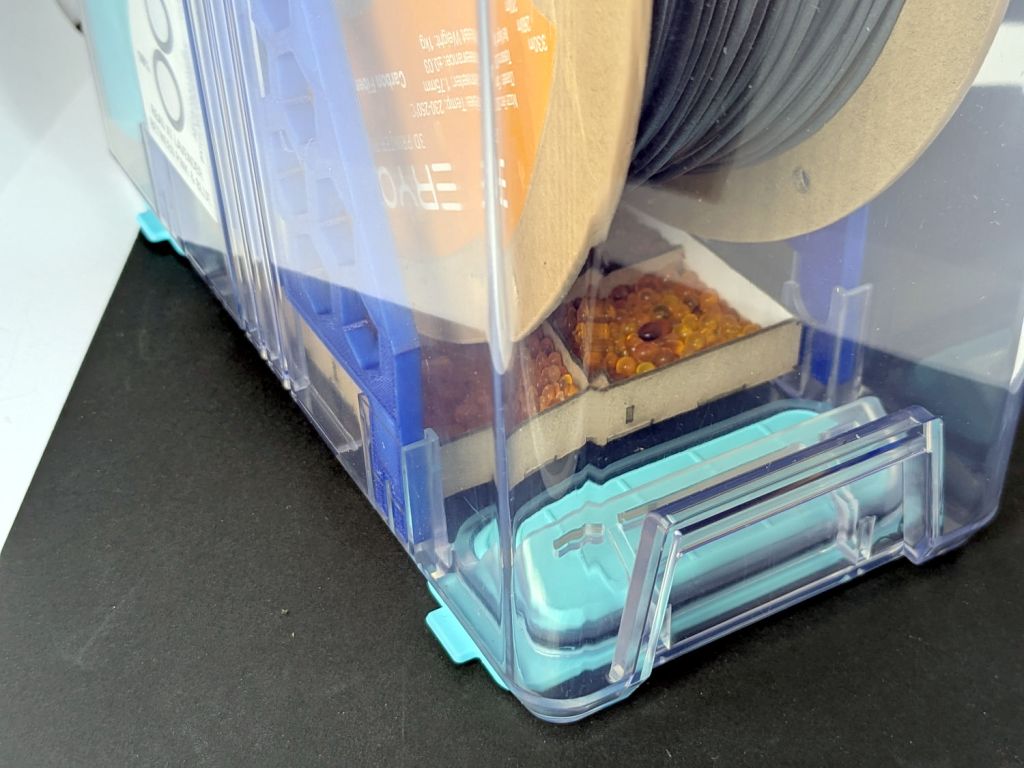
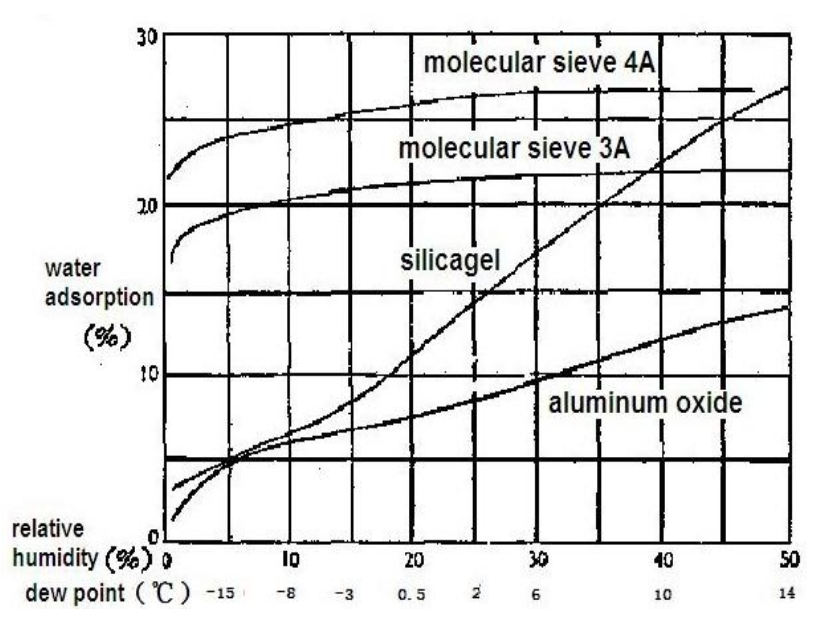
    They’re again filled with 25 g of alumina beads, although I’m beginning to think silica gel does a better job.

    A picture of the boxes, thus avoiding WordPress reminding me pictures improve SEO:

    PolyDryer PC4 Fitting - Prusa MMU3 setup
    PolyDryer PC4 Fitting – Prusa MMU3 setup
  • New Dryer Vent

    New Dryer Vent

    After the deck stain cured for a few days, I replaced the dryer vent:

    Dryer vent
    Dryer vent

    The alert reader will note it’s held to the siding with four stainless steel 4 mm socket-head cap screws, for which I’m not going to apologize one little bit.

    They fit into a quartet of threaded wood inserts driven into the siding, because the previous vent had small steel screws that pulled out many years ago.

    I used a 4-¼ inch oscillating hole saw to embiggen the original 4.000 inch hole through the wall that doesn’t fit contemporary “4 inch” dryer vent pipe. The 4.000 inch hole in the interior seal plate also needed embiggening.

    We must add a filter bag of some sort, as the dryer really wants to coat the deck in fuzz, but that’s in the nature of fine tuning.

    There are no other pictures, as this was a ten minute job that burned an entire afternoon …