Ed Nisley's Blog: Shop notes, electronics, firmware, machinery, 3D printing, laser cuttery, and curiosities. Contents: 100% human thinking, 0% AI slop.
It’s a W5W “parking light” in the same fixture as the melty halogen high-beam bulbs (used as daytime running lights at half power), so it gets toasted on those occasions when we drive somewhere.
The adhesive holding the LED strip to the aluminum shell fossilized and came loose:
White W5W Parking Light – failed adhesive
Now that I know what to look for, I’d get LED bulbs with chips soldered directly to the PCB, although it’s not obvious what holds the PCB to the aluminum frame.
As long as the voltage limit is over about 10 V, it will (likely) never matter, as the LED forward drop doesn’t vary much with temperature. Setting it to something sensible keeps it out of the way.
The middle trimpot apparently sets a voltage for a comparator to light an LED when the battery current drops below that level as it reaches full charge.
Although the regulator touts its high efficiency, it does run hot and a heatsink seemed in order:
LED Garage Light – heatsink
Stipulated: the fins run the wrong way and it’s sitting in the updraft from the main heatsink. It’s Good Enough™.
The switch on the top comes from the collection of flashlight tailcap switches and controls the 12 V input power. It’s buried up to its button in a generous dollop of JB Kwik epoxy, which seemed the least awful way to get that done.
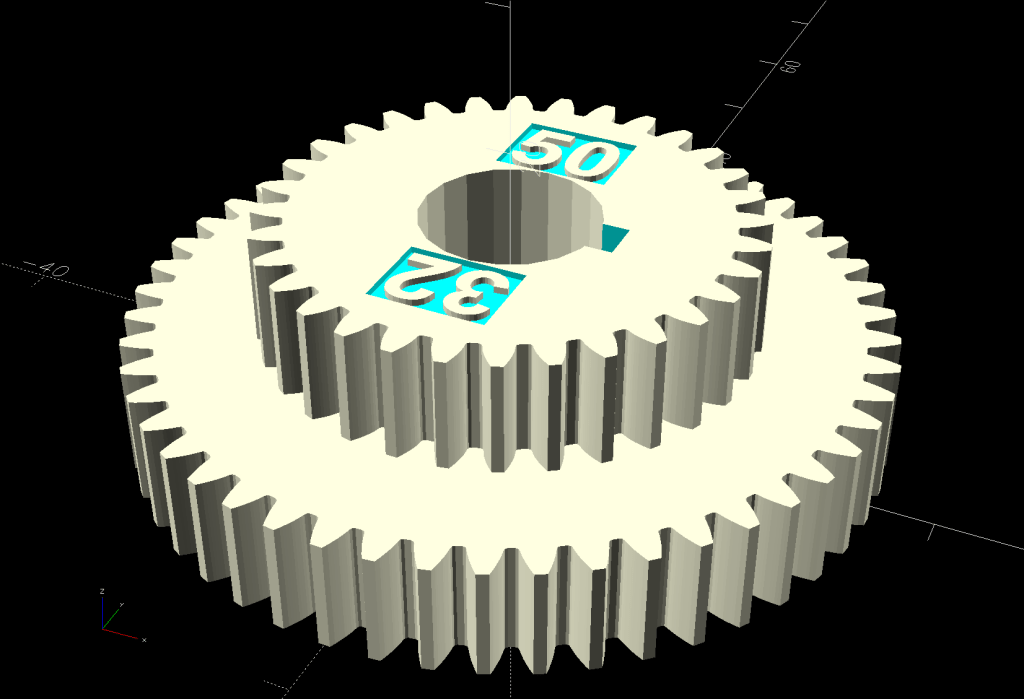
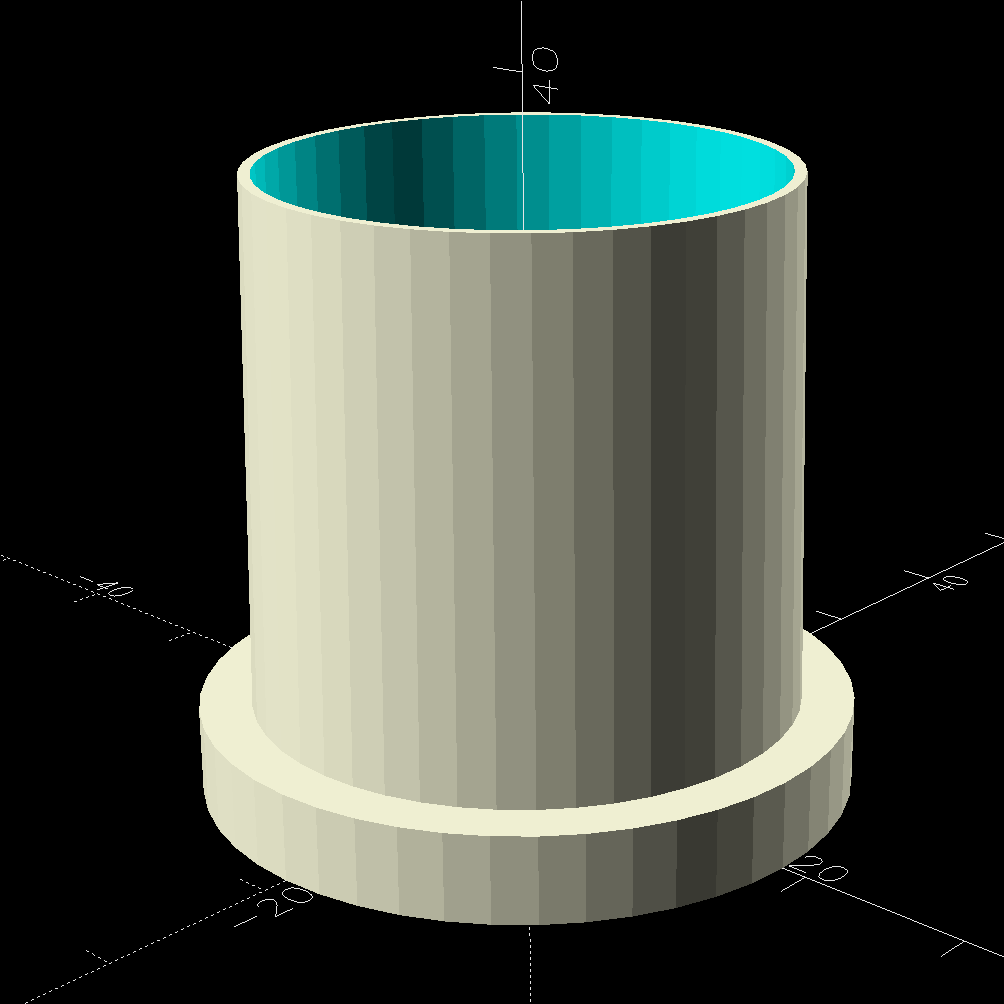
The solid model looks about like you’d expect:
LED Lamp Driver case – switch housing – show solid model
The OpenSCAD code exports the (transparent) lid as an SVG so I can import it into LightBurn and laser-cut some thin acrylic. Two tape snippets hold the lid in place pending more power-on hours, after which I’ll apply a few dots of cyanoacrylate adhesive and call it done.
The case builds in two pieces that glue together to avoid absurd support structures:
LED Lamp Driver case – switch housing – build solid model
A 3D printed adapter goes between the desk lamp arm and the lamp heatsink bolt:
LED Lamp Driver case – arm adapter – solid model
The OpenSCAD source code files for the case and adapter arm as a GitHub Gist:
This file contains hidden or bidirectional Unicode text that may be interpreted or compiled differently than what appears below. To review, open the file in an editor that reveals hidden Unicode characters.
Learn more about bidirectional Unicode characters
This file contains hidden or bidirectional Unicode text that may be interpreted or compiled differently than what appears below. To review, open the file in an editor that reveals hidden Unicode characters.
Learn more about bidirectional Unicode characters
The Industrial Age bobbin winder for Mary’s HQ Sixteen long-arm machine bunched the thread on one end of the bobbin, rather than distributing it in even layers as it should. Tinkering with the thread tension setting being unavailing, I settled in for some debugging.
After filling two bobbins from a spool of the thread Mary uses for practice quilts, I decided I should reuse the thread. Mounting the filled bobbin on a 6 mm horizontal shaft attached to the vertical pin normally locating the spool let the thread pay out in the proper orientation, with a duct-tape lashup holding the shaft in place:
HQ Sixteen bobbin unwind adapter – expedient version
I added the stack of washers to keep the bobbin away from the duct tape after having the tape’s adhesive migrate onto the spinning bobbin.
The thread from the spool or, in my case, a filled bobbin, passes between a pair of tension disks on its way to the bobbin spun by the motor:
HQ Sixteen bobbin winder – thread path
A conical spring presses the tension disks together, with the thread clamped between them:
HQ Sixteen bobbin winder – tension disk overview
The instructions suggest using “the lightest tension possible”, but backing the nut off to hang by its fingernails had no effect. The spring has a bent end passing through the slotted shaft, so rotation of the disks won’t unscrew the nut.
The washer under the mounting screw left slight scars in the black oxide finish on the fixture, presumably from previous attempts to adjust the thing:
HQ Sixteen bobbin winder – tension disk base
The threaded shaft is not exactly parallel to the base, because the upright arm is slightly over-bent, but I think that has no effect on the outcome, because the thread path doesn’t depend on the disk angle.
Because the thread accumulated on the outer side of the bobbin (to the right in that picture), I loosened the mounting screw and shoved the fixture all the way to the left. That should, if anything, bias the thread accumulation to the other (inner) side of the bobbin.
As it turned out, relocating the tension disks caused the thread to distribute evenly across the bobbin, with only occasional hesitations and no significant accumulations; Mary pronounced the result entirely satisfactory.
The motor dataplate says it runs at 7000 RPM, so the 3/4 inch O-ring drives the 4 inch wheel at about 1300 RPM. This was sufficiently terrifying I immediately set up a triac speed control (intended for a router) to throttle it down, but with the bobbins now filling properly we run the motor at full speed and it fills a bobbin in 23 seconds flat.
After we filled half a dozen bobbins with blue thread for the quilt project, I conjured an adapter from the vasty digital deep for a snippet of 6 mm rod with a D-shaped end:
Bobbin Unwind Adapter – solid model – show
The adapter builds on one leg, with a brim for stability:
HQ Sixteen bobbin unwind adapter – on platform
And looks like it belongs there:
HQ Sixteen bobbin unwind adapter – installed
It’s now in the box of HQ Sixteen bobbins, where we both hope it will remain undisturbed forevermore.
Although the vertical pin locating the spools (and holding the adapter) is nominally 6 mm, burrs in the chrome plating prevented the bobbin’s 6 mm bore from sliding over it. In retrospect, that prevented me from just dropping the bobbin on the pin and unwinding the thread over the side of the bobbin, which likely avoided some serious-to-lethal thread tangles.
After all that debugging, I had several bobbins full of well-worn thread, so:
This file contains hidden or bidirectional Unicode text that may be interpreted or compiled differently than what appears below. To review, open the file in an editor that reveals hidden Unicode characters.
Learn more about bidirectional Unicode characters
After approximately forever, the shackle on the Corbin K436 padlock securing the tandem-length cable we use for the Tour Easy ‘bents refused to push into the body. Lubrication being unavailing, I soaked it in acetone and shook it around for a day to get the inevitable crud out, then pondered the problem.
Peering into the hole where the shackle enters the body showed the situation:
Corbin padlock – cam damage
Half a century (more or less: it didn’t accumulate those nicks & dings & tarnish last year) of pushing the shackle into the lock eroded the locking cam, to the extent that the cam no longer slides sideways to let the shackle slide the rest of the way into the body.
So I introduced the shackle to Mr Bench Grinder and reshaped the end to hit the cam farther down on its angled side:
Corbin padlock – reshaped shackle
While that certainly reduces the strength of the shackle, there’s a similar notch engaging a similar cam on the other end of the shackle, so it remains as secure as it must be for our simple needs.
Spraying silicone lube into the body and applying a dab of silicone grease to the cam restored the lock to (nearly) new condition.
So the engraved ring on the two in the front row carries a cheerful Sharpie color to make them stand out. I wanted to use fluorescent acrylic, but I don’t have any 4 mm sheets and stacking a pair of 3 mm sheets → 6 mm will be too thick for the pencil tip.
What looks like dirt on the red guide comes from internal reflections or the lack thereof: it’s perfectly transparent in person, honest.
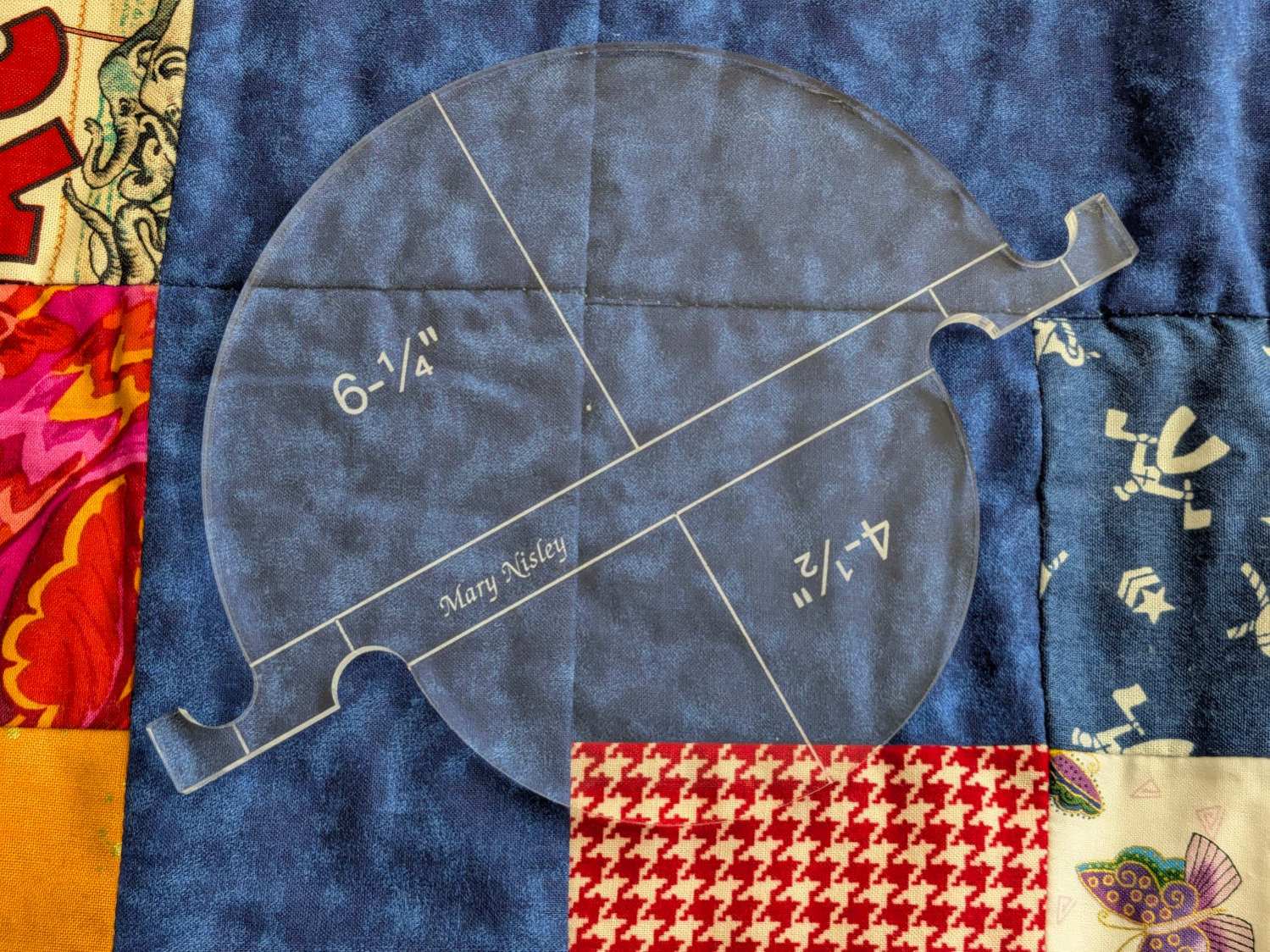
Mary’s current quilt project has a corner design with an essentially infinite number of 45° triangles, which another custom ruler will simplify:
45° Quilting Ruler – finished
That’s the end result of several iterations, proceeding from doodles to sketches to increasingly accurate laser-cut prototypes:
45° Quilting Ruler – prototypes
A “ruler” in quilting parlance is a thing guiding the sewing machine’s “ruler foot” across the fabric (or, for sit-down machines, the fabric under the foot) in specific directions:
45° Quilting Ruler – in use
That’s a practice quilt on scrap fabric: quilters need prototypes, too!
The foot is 0.5 inch OD, within a reasonable tolerance, which accounts for the slot width in the ruler. It’s also intended to run against 1/4 inch thick rulers, which accounts for the thickness of that slab of acrylic.
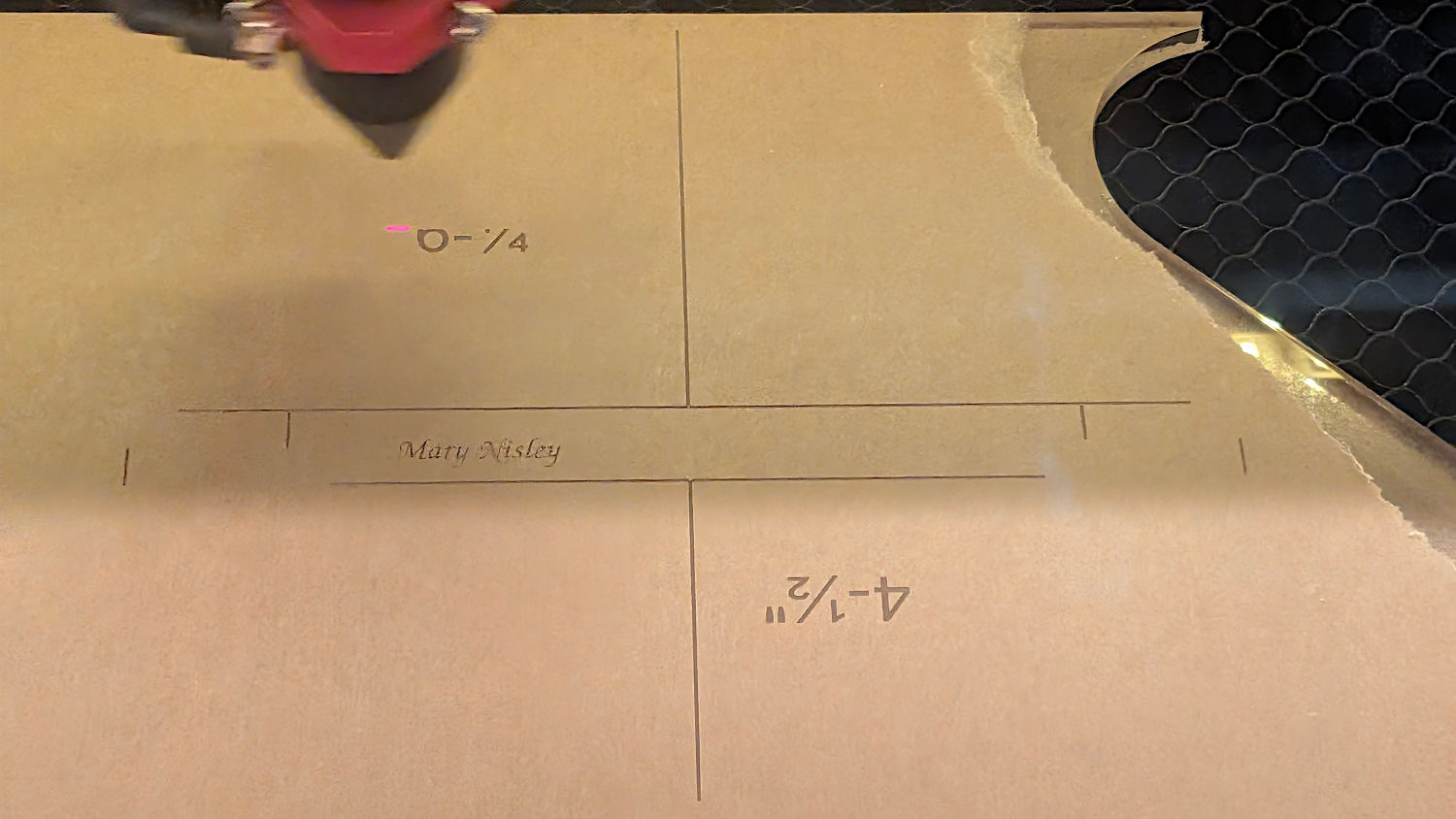
The engraved lines & arcs are on the bottom of the ruler to eliminate parallax errors against the fabric, so the bottom is upward and the text is mirrored for the laser:
45° Quilting Ruler – cutting
Although fluorescent green acrylic may have higher visibility, clear seems adequate for the fabric in question:
45° Quilting Ruler – colored fabric
I very carefully trimmed the arcs against the ruler outline using LightBurn’s Cut Shapes, which turned out to be a Bad Idea™, because the high-current pulse as the laser fires causes a visible puncture wound at the still-to-be-cut edge:
45° Quilting Ruler – edge damage
Those are not straight lines and the plastic isn’t bent!
A closer look:
45° Quilting Ruler – edge damage – detail
The arcs without wounds started from their other end and stopped at the edge, which is perfectly fine.
The wounds are unsightly, not structural, but the next time around I’ll extend the markings a millimeter beyond the edges into the scrap material.
The overall design looks busier than it is, because I put different features on different layers in case they needed different settings:
Mary picked up a pair of Star quilting rulers from the Quilting Guild’s “exchange” table:
Star quilting ruler – finished
They’re 1/4 inch laser-cut acrylic slabs dating back to the turn of the millennium, when laser cuttery wasn’t nearly as common as today. Apparently, the (now long gone) Gadget Girls had a problem with their laser: the larger star had eight of its ten lines not cut completely through the acrylic. The protective paper on the back had small perforations along a few of the lines, but nothing for most of them.
Well, I can fix that.
Lay the slab on the platform and lock it in place so it cannot move:
Star quilting ruler – laser setup
That’s with the original bottom side facing upward, so the laser beam will hit the uncut part of the lines.
Focus the laser atop some scrap 1/4 inch acrylic, then verify the red dot pointer is exactly concentric with the CO₂ beam by firing a test pulse, as in this punched card:
Red dot vs printed target vs laser spot alignment
Adjust as needed.
Jog the laser to put the red dot pointer exactly at a star point:
Star quilting ruler – laser point alignment
Hit Get Position in the Laser window so LightBurn knows where the laser head is located.
I’ve added the targets I normally use for LightBurn’s Print and Cut alignment to its Art Library, so I dragged one to the workspace, then hit Move to Laser Position to snap the target directly onto that point of the star.
Repeat for vertices along the star, then draw a multi-segment line = path between the target centers:
Star Ruler Re-cutting – LightBurn layout
That’s one continuous path from the upper right, counterclockwise around the star, ending in the center right. The missing pair of lines (and the vertex between them) were already cut, so I didn’t need to locate them.
The camera view shows the alignment, although IMO the camera simply isn’t capable of such finicky alignment:
Star Ruler Re-cutting – LightBurn layout overlay
As a confidence builder, I selected each target, moved the laser to that point, then fired a test pulse to verify the hole hit the vertex. In most cases, I couldn’t see the hole because it was within the original cut.
My 60 W laser can’t cut through 1/4 inch = 6 mm acrylic in a single pass, so I use a 10 mm/s @ 60% pass to get most of the way through and a 20 mm/s @ 60% pass to complete the cut. That seemed excessive for a mostly cut path, but a single 20 mm/s @ 60% pass didn’t completely clear the uncut sections.
So I used the normal two-pass cut and the star lifted right out:
Star quilting ruler – victory
Happy dance!
Although it is not obvious from the pictures, the star is not symmetric: it fits into the sheet in only one of its ten possible orientations. I will never know if that was a deliberate stylin’ decision or the result of hand layout before CAD spread throughout the land.
I managed to locate the vertices so accurately that the repeated cuts left edges indistinguishable from the original cuts on the two free sides, which was a pleasant surprise.
Mary promises to do something with those stars when she’s done with her current project(s). She may want the slab of acrylic around the large star trimmed into a smaller and more manageable decagon, in which case I will suddenly have a bounty of thick fluorescent green acrylic.