Ed Nisley's Blog: Shop notes, electronics, firmware, machinery, 3D printing, laser cuttery, and curiosities. Contents: 100% human thinking, 0% AI slop.
To that end, here’s a checklist for creating a new Eagle device corresponding to a HAL module.
Remember: although this process has a tremendous number of moving parts, you do it exactly once when you need a device that doesn’t already exist. After that, you just click to add an existing device to your schematic, wire it up, then the tedious write-only HAL overhead happens automagically.
Cross-check the documentation with the actual component code!
The man page lists the names, pins, parameters, and suchlike, but may have typos. This isn’t a criticism, it’s a fact of life.
Before investing a ton o’ time creating an Eagle device, load the module and find out what’s really there:
halrun
halcmd: loadrt conv_float_s32
halcmd: show all
Loaded HAL Components:
ID      Type  Name                                      PID   State
     4  RT    conv_float_s32                                  ready
     3  User  halcmd2395                                 2395 ready

Component Pins:
Owner   Type  Dir         Value  Name
     4  float IN              0  conv-float-s32.0.in
     4  s32   OUT             0  conv-float-s32.0.out
     4  bit   OUT         FALSE  conv-float-s32.0.out-of-range

... snippage ...

Parameters:
Owner   Type  Dir         Value  Name
     4  bit   RW          FALSE  conv-float-s32.0.clamp
     4  s32   RO              0  conv-float-s32.0.time
     4  s32   RW              0  conv-float-s32.0.tmax

... snippage ...

Exported Functions:
Owner   CodeAddr  Arg       FP   Users  Name
 00004  fc0a9000  fc0630b8  YES      0   conv-float-s32.0
... snippage ...
Achtung!
The module name uses underscores as separators: loadrt conv_float_s32
The function name uses h-y-p-h-e-n-s as separators: conv-float-s32.0
Unlike in the Linux kernel, the two characters are not equivalent
Add the HAL Module to the Conversion Script
The hal-write.ulp script contains a table of all the module names, so you must update the script in parallel with the hal-config.lbr Eagle library.
However, you can create an Eagle device that is not a HAL module by omitting it from the script. In that case, the Eagle device name will become part of the net names that define and interconnect the pins, but the script will not create a statement to load a module. For example, the hal_input userspace program creates a set of pins for each input device that start with input.n, but there’s no corresponding HAL module. I’ll put up an example of all this in a bit.
Create a Schematic Symbol
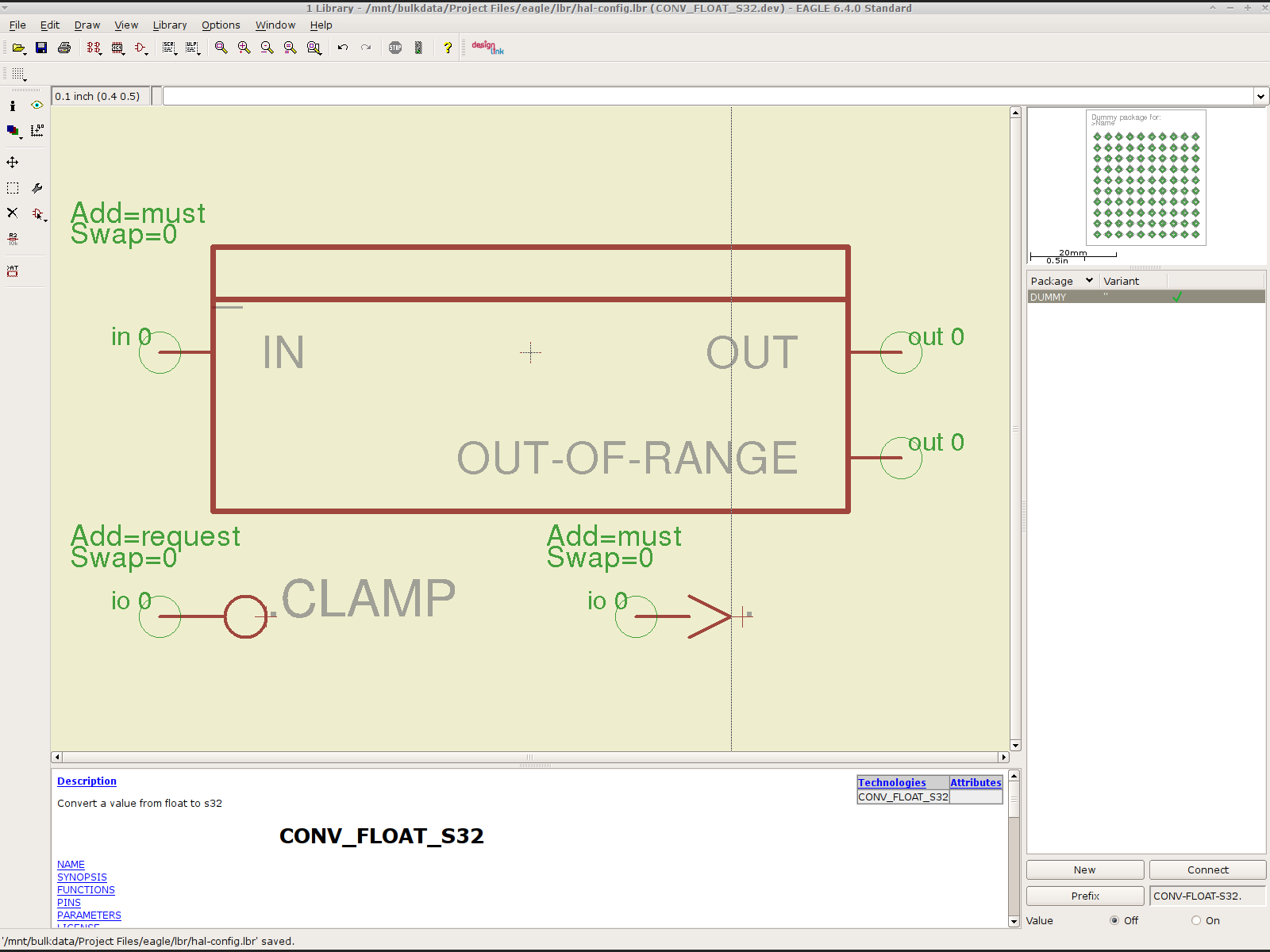
The name of the symbol is not critical: CONVERT.sym
use either dashes or hyphens as you prefer
The >NAME string must be on layer 95-Names
No need for a >VALUE string, but put it on layer 96-Values if present
HAL pins become symbol pins
Use the HAL pin name, with hyphens
Set Visibility to Pin
Set Direction to in / out / io to match the HAL description
Set Function to None to indicate an ordinary net connection
Verify the pins against the HAL device!
Create a HAL Schematic Device
The new device name must match the HAL module name, with underscores, as entered in the conversion script table
CONV_FLOAT_S32.dev
Set the Prefix to the HAL function name, plus a trailing period, with hyphens
CONV-FLOAT-S32.
Create the Description using copy-and-paste from the HTML source: use the man page in the LinuxCNC doc
Ctrl-U in Firefox reveals the HTML source, Ctrl-A and Ctrl-C, flip windows, then Ctrl-V
Delete all the boilerplate at the top, leave the centered Title, ditch the reference links
Add the symbol you created earlier or reuse an existing symbol
Set the symbol NAME to a single underscore: _
Change the Add level to must
Add a PIN_FUNCTION symbol to the device
Change the symbol name from G$1 (or whatever) to a single period: .
Change the Add Level to must
Add PIN_PARAMETER symbols as needed
Change the symbol name from G$1 (or whatever) to the parameter name preceded by a single period: .CLAMP
Change the Add Level to request
Change the Direction as needed
Add the DUMMY physical package, then connect all the pins to pads
Create a non-HAL Schematic Device
The new device name may be anything that’s not in the conversion script table
The Prefix must match the desired pin names, plus a trailing period. For hal_input pins:
INPUT.
Create the Description as above
Add the symbol you created earlier
Set the symbol NAME to a single underscore: _
Change the Add level to must
Do not add a PIN_FUNCTION symbol, because it has no corresponding module
Add PIN_PARAMETER symbols as needed
Change the symbol name from G$1 (or whatever) to the parameter name preceded by a single period: .CLAMP
Change the Add Level to request
Change the Direction as needed
Add the DUMMY physical package, then connect all the pins to pads
Devices may have multiple Symbols, with different Add Level options; can seems appropriate. As nearly as I can tell, you must name each Symbol as a suffix to the full name to differentiate them within the Device; I use a hyphen before the suffix, so that -KEYS generates INPUT.0-KEYS. Those suffixes don’t appear elsewhere in the generated HAL configuration file.
Save the library, update it in the schematic editor (Library → Update ...), and you’re set.
Although it’s tempting, do not include a version number in the library file name, because Eagle stores the file name inside the schematic file along with the devices from that file. As a result, when you bump the library version number and use devices from the new library file, the schematic depends on both library files and there’s no way within Eagle to migrate devices from one library to the other; you must delete the existing devices from the schematic and re-place them from the new library. Or you can do like I did: hand-edit the XML fields inside the library file.
Eagle HAL Device
You’ll almost certainly drive this procedure off the rails, so let me know what I’ve screwed up. It does, in fact, work wonderfully well and, as far as I’m concerned, makes HAL usable, if only because HAL is a write-only language to start with and now you need not read it to modify it.
Just to see what’s inside, I took those HB-415M drivers apart. They’re not all identical inside:
HB-415M Driver – interior top
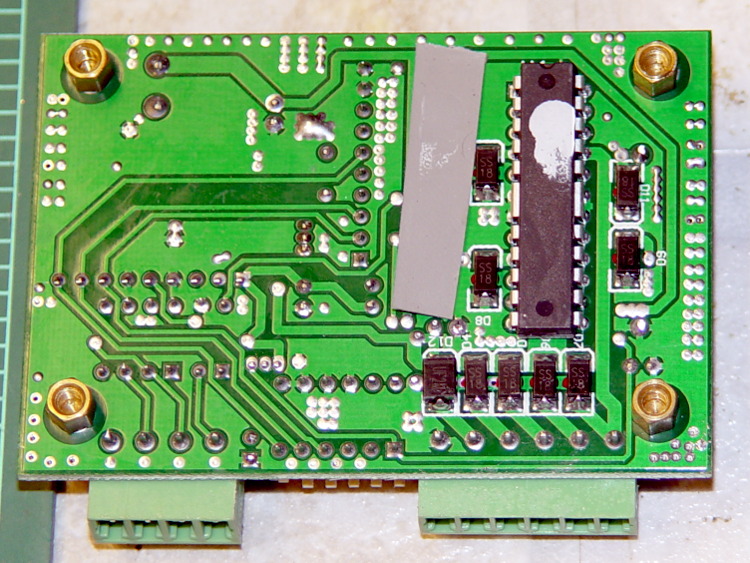
The other side shouldn’t come as much of a surprise:
HB-415M Driver heatsinking
Now, admittedly, I’ve applied a heatsink to the top of an epoxy package, but that DIP package has thermal tabs that should connect to the heatsink through a low-thermal-resistance path. A dab (!) of heatsink grease and what might be a thermally conductive plastic sheet atop the package seem, well, insufficient.
The driver chip sports an Allegro A3992 marking that might be genuine. The datasheet goes into some detail as to how you should lay out the PCB; none of its recommendations made it into the finished product. In particular, the hulking current sense resistors surely have more inductance than you’d like.
The resistor color code seems odd: black red red silver brown.
HB-415M current sense resisors
Using black as the first band is unexpected, but it’s probably the only way to indicate a low-value resistance without printing the numbers: 0.22 Ω ±1%.
Strange though it may seem, the kitchen faucet handle broke while Mary was using it. The rear wall of the socket that fits over the cartridge valve stem fractured:
American Standard Faucet Handle – broken mount
Having no water in the kitchen is not to be tolerated, so I applied a redneck fix while pondering the problem:
Kitchen Faucet – redneck handle repair
Based on that comment, I called the American Standard hotline (800-442-1920), described the situation, and they’re sending a replacement handle and cartridge. Evidently the new handle won’t fit the old cartridge, which makes me feel better about not stockpiling repair parts, even while I now wonder what the new cartridge part number might be and how you’d tell them apart.
Anyhow, the redneck fix wouldn’t suffice for the next week; I needed something slightly more permanent. The broken wall fit neatly in place on the mount, but:
It must withstand far more force than a simple glue joint can provide
I can’t machine square holes
Wrapping a metal sleeve around the mount seemed like too much work
You undoubtedly saw this coming a while ago:
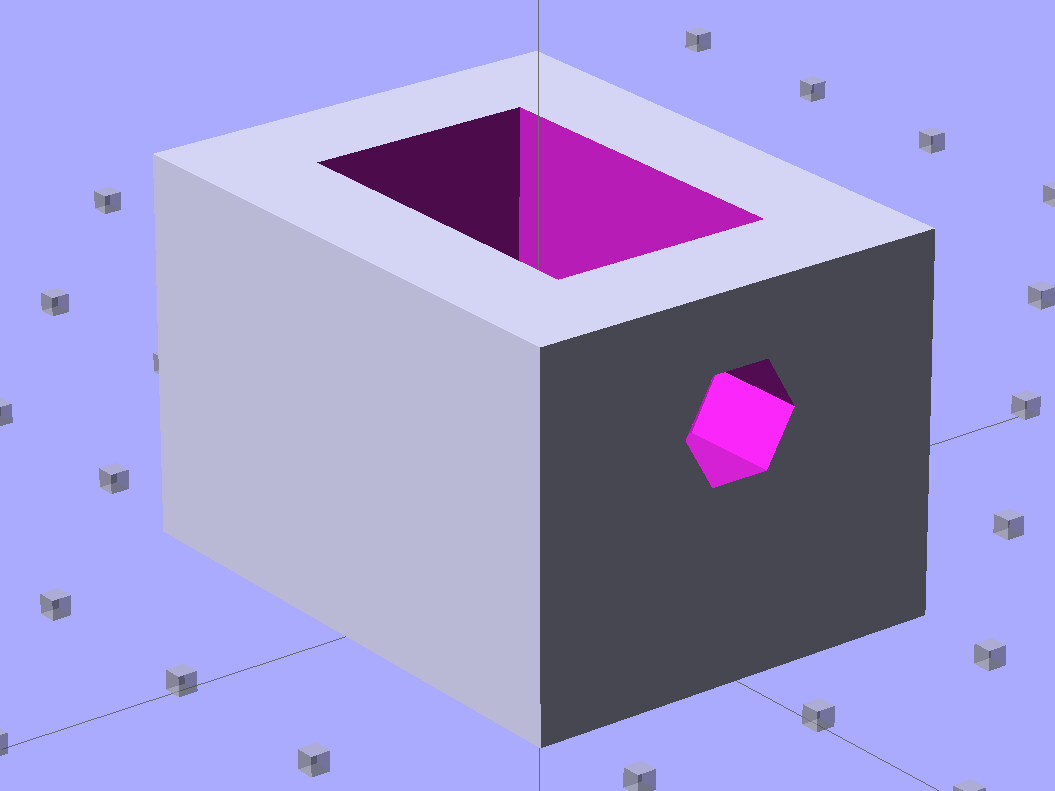
Am Std Faucet Handle Sleeve – solid model
The mount tapers slightly from the handle body toward the open end to provide draft for the molding process. I applied a hull() operator to two thin rectangles spaced the right distance apart along the Z axis to create a positive model of the mount, which then gets subtracted from the blocky outer rectangle. The hole clears a 10-32 screw that fits the standard setscrew threads (normally hidden behind the handle’s red-and-blue button).
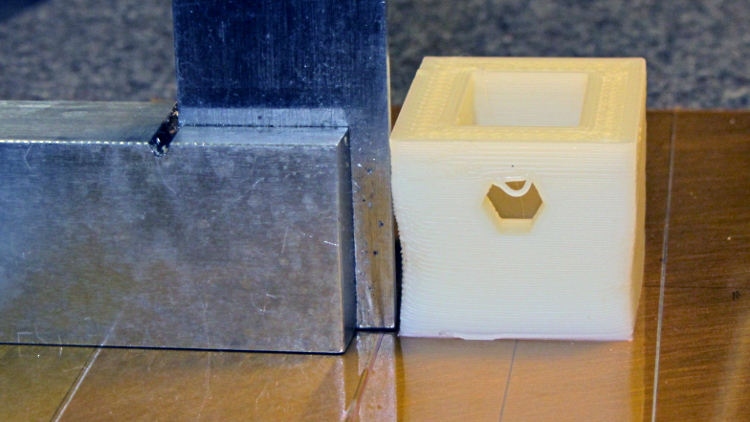
Unlike most printed parts I’ve done recently, the sleeve suffered from severe shrinkage along the outside walls:
Faucet handle sleeve – build distortion
The inside maintained the right shape, so I cleared the nubs with a file and pressed it in place around the mount with the rear wall snapped into position. The black plastic socket evidently isolates the handle from the valve stem and I used a stainless 10-32 screw to prevent the nightmare scenario of having the sleeve slide downward along the tapered mount and block the setscrew. Overall, it came out fine:
American Standard faucet handle – compression sleeve
However, the chunky sleeve didn’t clear the opening in the escutcheon cap, which put the cap on the windowsill for the next week. The result works much better than the redneck fix and looks almost presentable. It’s certainly less conspicuous:
American Standard faucet handle – temporary repair
I hope the new handle has a much more robust socket…
The OpenSCAD source code:
// Quick fix for broken American Standard Elite 4454 faucet handle
// Ed Nisley KE4ZNU February 2013

//- Extrusion parameters must match reality!
//  Print with +2 shells and 3 solid layers

ThreadThick = 0.25;
ThreadWidth = 2.0 * ThreadThick;

HoleFinagle = 0.4;
HoleFudge = 1.00;

function IntegerMultiple(Size,Unit) = Unit * ceil(Size / Unit);
function HoleAdjust(Diameter) = HoleFudge*Diameter + HoleFinagle;

Protrusion = 0.1;           // make holes end cleanly

//----------------------
// Dimensions

Wall = 5.0;

Slice = ThreadThick;                // minimal thickness for hull object

ShaftEnd = [11.6,17.8,Slice];
ShaftBase = [12.1,18.8,Slice];
ShaftLength = 19.0;

Block = [(ShaftBase[0] + 2*Wall),(ShaftBase[1] + 2*Wall),ShaftLength - Protrusion];

ScrewOffset = 6.5;          // from End
ScrewDia = 5.0;             // clearance

//----------------------
// Useful routines

module ShowPegGrid(Space = 10.0,Size = 1.0) {

    Range = floor(50 / Space);

    for (x=[-Range:Range])
        for (y=[-Range:Range])
            translate([x*Space,y*Space,Size/2])
            %cube(Size,center=true);

}

module PolyCyl(Dia,Height,ForceSides=0) {           // based on nophead's polyholes
  Sides = (ForceSides != 0) ? ForceSides : (ceil(Dia) + 2);
  FixDia = Dia / cos(180/Sides);
  cylinder(r=HoleAdjust(FixDia)/2,h=Height,$fn=Sides);
}

//----------------------
// Model the handle's tapered shaft

module Shaft() {

    hull() {
        translate([0,0,ShaftLength - Slice/2])
            cube(ShaftEnd, center=true);
        translate([0,0,Slice/2])
            cube(ShaftBase, center=true);
    }

}

//----------------------
// Build it!

ShowPegGrid();

difference() {
    translate([0,0,ShaftLength/2])
        cube(Block,center=true);
    Shaft();
    translate([0,0,ShaftLength - ScrewOffset])
        rotate([-90,0,0])
            PolyCyl(ScrewDia,ShaftBase[1],6);
}
A (formerly Belkin, now Razer, which is evidently unrelated to Mazer Rackham) Nostromo N52 SpeedPad might not be a perfect CNC pendant, but it does have plenty of buttons and an (oddly oriented) XY joypad that might be useful for, say, a 3D printer controller running LinuxCNC.
Belkin Nostromo N52 SpeedPad
Following the same path as with the Logitech Dual Action Gamepad that became the Joggy Thing, we find that the N52 reports itself as a keyboard and a mouse:
udevadm info --query=all --attribute-walk --name=/dev/bus/usb/002/004

Udevadm info starts with the device specified by the devpath and then
walks up the chain of parent devices. It prints for every device
found, all possible attributes in the udev rules key format.
A rule to match, can be composed by the attributes of the device
and the attributes from one single parent device.

  looking at device '/devices/pci0000:00/0000:00:02.0/usb2/2-10':
    KERNEL=="2-10"
    SUBSYSTEM=="usb"
    DRIVER=="usb"
    ATTR{configuration}==""
    ATTR{bNumInterfaces}==" 2"
    ATTR{bConfigurationValue}=="1"
    ATTR{bmAttributes}=="80"
    ATTR{bMaxPower}==" 90mA"
    ATTR{urbnum}=="1354"
    ATTR{idVendor}=="050d"
    ATTR{idProduct}=="0815"
    ATTR{bcdDevice}=="0210"
    ATTR{bDeviceClass}=="00"
    ATTR{bDeviceSubClass}=="00"
    ATTR{bDeviceProtocol}=="00"
    ATTR{bNumConfigurations}=="1"
    ATTR{bMaxPacketSize0}=="8"
    ATTR{speed}=="1.5"
    ATTR{busnum}=="2"
    ATTR{devnum}=="4"
    ATTR{version}==" 1.10"
    ATTR{maxchild}=="0"
    ATTR{quirks}=="0x0"
    ATTR{authorized}=="1"
    ATTR{manufacturer}=="Honey Bee "
    ATTR{product}=="Nostromo SpeedPad2 "

... snippage ...
Note the trailing blank in the manufacturer and product values.
Create a new rules file /etc/udev/rule/90-Nostromo.rules to change the group and permissions:
# Belkin Nostromo N52 SpeedPad controller for LinuxCNC
# Ed Nisley - KE4ZNU - February 2013

ATTRS{product}=="Nostromo SpeedPad2",GROUP="plugdev",MODE="0660"
Note that the file name must start with a number around 90- to avoid being clobbered by a rule in /lib/udev/rules.d/50-udev-default.rules that (re)sets the permissions to 0640; the doc suggests that rules without numbers happen after all the number rules, so perhaps you could just use meaningful names. That took an embarrassingly long time to figure out…
There’s no need for the trailing blank in that rule, as the match proceeds left-to-right and stops at the end of the test string.
You must, perforce, be in the plugdev group. If not, add yourself.
You need not unplug the N52 to test the rule. Just use:
The + prefix tells HAL to capture the named device and prevent its events from reaching X. The KRL codes suggest which functions you’re interested in for that particular device. The suffix digit selects successive devices for multiple gadgets matching the same name string.
Apparently, the N52 reports it can produce all the usual keyboard and mouse values & buttons, even if they’re not connected to physical hardware. I suspect it has generic keyboard / mouse controllers inside, with just a few of the usual matrix crosspoints connected to switches.
The basic key mapping, sorted by the Nostromo functions:
Type
Dir
Name
Nostromo key
bit
OUT
input.0.key-tab
F1
bit
OUT
input.0.key-q
F2
bit
OUT
input.0.key-w
F3
bit
OUT
input.0.key-e
F4
bit
OUT
input.0.key-r
F5
bit
OUT
input.0.key-capslock
F6
bit
OUT
input.0.key-a
F7
bit
OUT
input.0.key-s
F8
bit
OUT
input.0.key-d
F9
bit
OUT
input.0.key-f
F10
bit
OUT
input.0.key-leftshift
F11
bit
OUT
input.0.key-z
F12
bit
OUT
input.0.key-x
F13
bit
OUT
input.0.key-c
F14
bit
OUT
input.0.key-space
F15
bit
OUT
input.0.key-leftalt
Orange button
bit
OUT
input.0.key-right
Pad bottom
bit
OUT
input.0.key-down
Pad front
bit
OUT
input.0.key-up
Pad rear
bit
OUT
input.0.key-left
Pad top
bit
OUT
input.1.btn-middle
Wheel press
s32
OUT
input.1.rel-wheel-counts
Scroll wheel
bit
IN
input.1.led-numl
Red LED
bit
IN
input.1.led-capsl
Green LED
bit
IN
input.1.led-scrolll
Blue LED
The bit pins also have inverted values available on the corresponding -not pins. The LEDs have an -invert that flips the sense of the input pin. The rel-wheel pin has other useful tidbits as suffixes; the count changes by ±1 for each wheel detent.
The Tab key and all the letters auto-repeat, the various Shift and Alt keys do not. That seems to make no difference to the bit values reported by HAL.
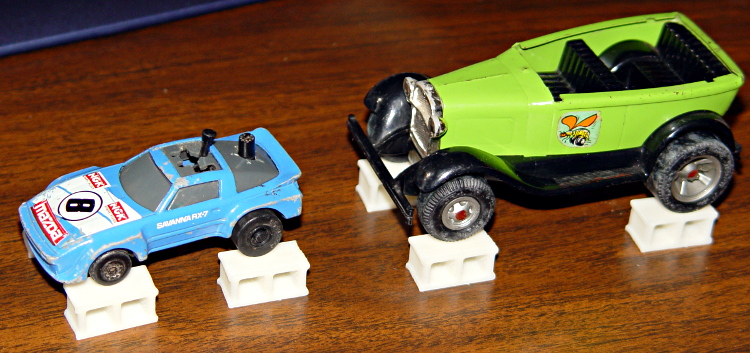
For reasons that undoubtedly make sense to him, my buddy Aitch is moving to coastal NC. Seeing as how we lived in Raleigh for half a decade, I figure he needs some hints on how to blend in…
Toy cars up on blocks
The solid model looks about the way you’d expect:
Concrete block – solid model
The webs are slightly thinner than in real life, but it looks OK to me. The web came out slightly over 3 thread widths = 1.5 mm, to ensure they get a bit of fill rather than being two distinct threads. I originally tried making the web exactly 3 threads wide, which produced tiny dots of fill on the sides and corners. They printed with 0.20 infill; they’d print faster with 1.00 infill or all-solid layers.
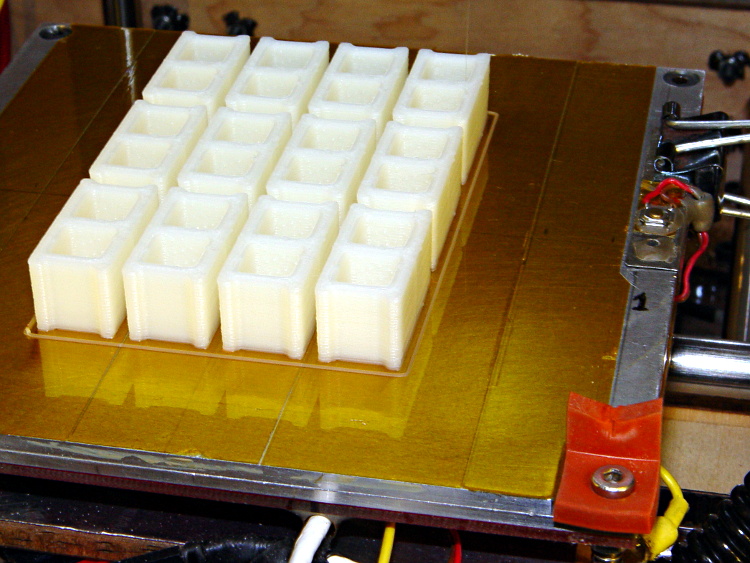
You’ll want to create a pile o’ blocks at once, of course, although this array took about two hours:
Concrete blocks – build platform
The OpenSCAD source code:
// Scale model concrete block
// Ed Nisley KE4ZNU February 2013

// Extrusion parameters must match reality!
// Print with +0 shells and 3 solid layers

ThreadThick = 0.25;
ThreadWidth = 2.0 * ThreadThick;

function IntegerMultiple(Size,Unit) = Unit * ceil(Size / Unit);

Protrusion = 0.1;           // make holes end cleanly

//----------------------
// Dimensions

Scale = (1/25) * (3*ThreadWidth);

BlockWidth = Scale * 190;
BlockLength = Scale * 390;
BlockHeight = BlockWidth;

WebWidth = Scale * 30;

CoreSize = [(BlockWidth - 2*WebWidth),(BlockLength - 4*WebWidth)/2,BlockHeight];

CornerRadius = WebWidth/2;

//----------------------
// Useful routines

module ShowPegGrid(Space = 10.0,Size = 1.0) {

    Range = floor(50 / Space);

    for (x=[-Range:Range])
        for (y=[-Range:Range])
            translate([x*Space,y*Space,Size/2])
            %cube(Size,center=true);

}

//-------------------
// Component parts

module Core(Size,Radius) {
    translate([0,0,(Size[2] - Protrusion)/2])
        minkowski() {
            cube([(Size[0] - 2*Radius),(Size[1] - 2*Radius),Size[2]],center=true);
            cylinder(r=Radius,h=Protrusion,$fn=8);
        }
}

//----------------------
// Build it!

ShowPegGrid();

difference() {
    translate([0,0,BlockHeight/2])
        cube([BlockWidth,BlockLength,BlockHeight],center=true);
    for (i = [-1,1])
        translate([0,i*(CoreSize[1] + WebWidth)/2,0])
           Core(CoreSize,CornerRadius);
    for (i = [-1,1])
        translate([0,i*3*(CoreSize[1] + WebWidth)/2,0])
           Core(CoreSize,CornerRadius);
}
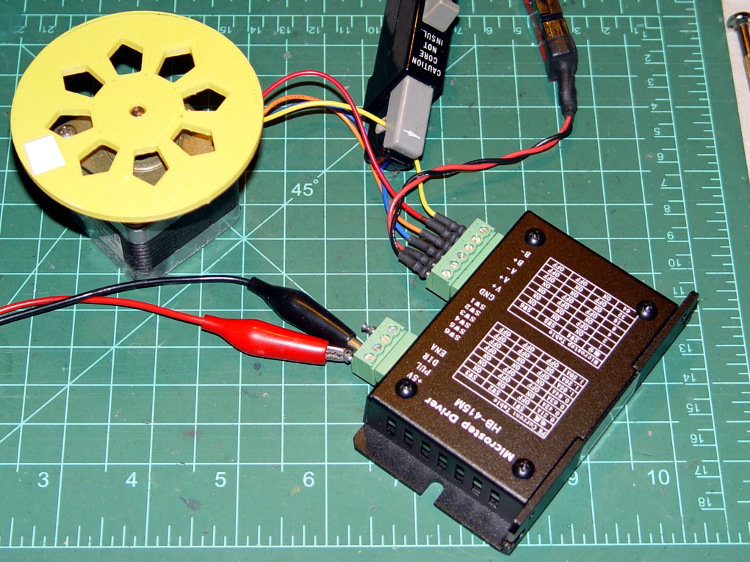
As mentioned there, the usual eBay vendor shipped HB-415M drivers instead of the advertised 2M415 drivers. Based on the Chinese datasheet and some poking around, I got a test setup working with a bench supply, a signal generator, and a NEMA 17 stepper motor with 2 Ω windings.
First observation: the ENA input is active high. Pulling it low to turn on the optocoupler disables the drive output, which is exactly the opposite of what’s shown in the datasheet, which means that the driver will run quite happily with nothing connected to the ENA pin. The optoisolator current runs about 11 mA from a 5 V supply, close enough to the 10 mA typical spec, but the signal generator thinks it’s providing a TTL pulse output.
Second observation: the driver’s actual winding current doesn’t match the DIP switch setting.
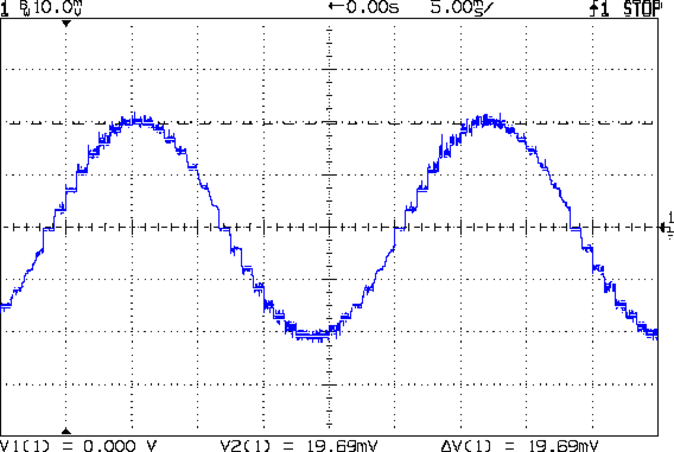
Here’s the 1/8 microstep winding current for the 1.50 A peak setting, with a 0.5 A/div vertical calibration:
HB-415M 8-step 1.5A 20V
Sure looks like 1 A peak, doesn’t it?
The ratio seems close to 0.707 and remains consistent across all current settings, so I’d lay long money that the designer confused “peak” and “RMS” values, then figured the current sense resistor or chose the internal coefficients to produce the corresponding RMS current for the peak value.
The reduced current produces not very much torque at all; negotiations are in progress for a partial refund based on eBay’s “item not as described” process…
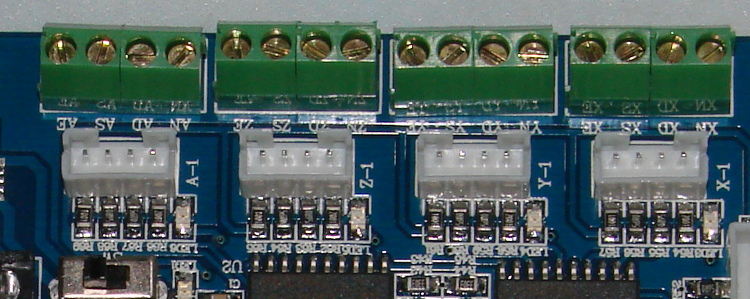
Turns out that the anonymous parallel port breakout board isn’t compatible with an optoisolated stepper driver: each output has a 1 kΩ series resistor that limits the current well below the driver optocoupler’s expectations. The driver has an internal 300 Ω resistor on each input, too, which doesn’t help in this situation.
A detailed look at the resistors lined up in front of the connectors:
Anonymous parallel breakout board – series resistors
The breakout board would work fine with non-isolated drivers, like the Pololu breakout boards, so it’s not really at fault. The fact that there’s no doc anywhere to be found means you (well, I) couldn’t discover this without buying it first, but … I suppose it’ll come in handy for something.
One could short across the resistors, but I intended to use this board for the initial bringup and all that soldering defeats the purpose.






 The Smell of Molten Projects in the Morning