The Smell of Molten Projects in the Morning

Ed Nisley's Blog: Shop notes, electronics, firmware, machinery, 3D printing, laser cuttery, and curiosities. Contents: 100% human thinking, 0% AI slop.

Category: Machine Shop

Mechanical widgetry

  • Threaded Brass Inserts: Test to Destruction

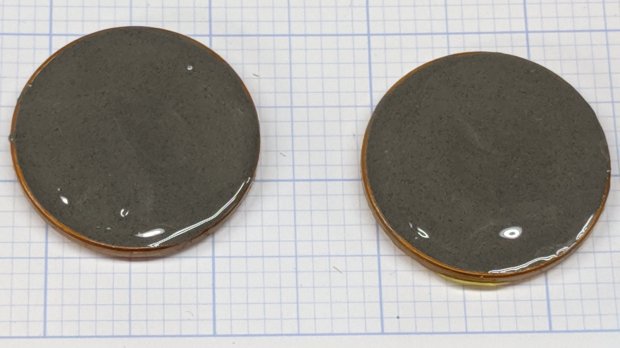
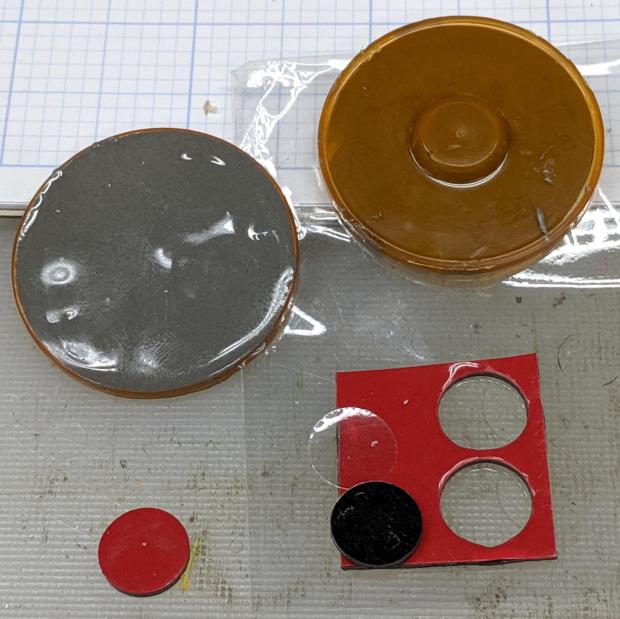
    With an outmoded LM12UU linear bearing drag knife mount on hand, I threaded an M4 screw into each brass insert, lined it up on a hole in a homebrew (by a long-gone machinist, not me) steel bench block, and applied pressure with the drill press until the insert tore out:

    Brass Insert Retention test - A B
    Brass Insert Retention test – A B

    The retina-burn orange ring is printed in PETG with my usual slicer settings: three perimeter threads, three top and bottom layers, and 15% 3D honeycomb infill. That combination is strong enough and stiff enough for essentially everything I do around here.

    The insert on the left came out of its hole carrying its layer of epoxy: the epoxy-to-hole bond failed first. Despite that, punching it out required enough force to convince me it wasn’t going anywhere on its own.

    The column of plastic around the insert standing up from the top fits into the central hole (hidden in the picture) in the bench block. Basically, the edge of the hole applied enough shear force to the plastic to break the infill before the epoxy tore free, with me applying enough grunt to the drill press quill handle to suggest I should get a real arbor press if I’m going to keep doing this.

    The third insert maintained a similar grip, as seen from the left:

    Brass Insert Retention test - C left
    Brass Insert Retention test – C left

    And the right:

    Brass Insert Retention test - C right
    Brass Insert Retention test – C right

    The perimeter threads around the hole tore away from the infill, with the surface shearing as the plastic column punched through.

    Bottom line: a dab of epoxy anchors an insert far better than the 3D printed structure around it can support!

  • MPCNC Collet Pen Holder: LM12UU Edition

    Encouraged by the smooth running of the LM12UU drag knife mount, I chopped off another length of 12 mm shaft:

    LM12UU Collet Pen Holder - sawing shaft
    LM12UU Collet Pen Holder – sawing shaft

    The MicroMark Cut-off saw was barely up to the task; I must do something about its craptastic “vise”. In any event, the wet rags kept the shaft plenty cool and the ShopVac hose directly behind the motor sucked away all of the flying grit.

    The reason I used an abrasive wheel: the shaft is case-hardened and the outer millimeter or two is hard enough to repel a carbide cutter:

    LM12UU Collet Pen Holder - drilling shaft
    LM12UU Collet Pen Holder – drilling shaft

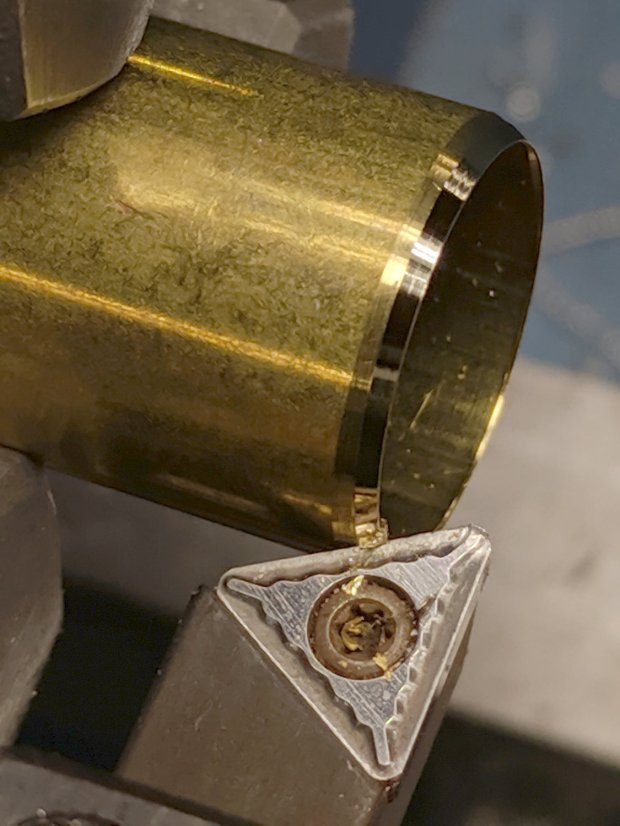
    Fortunately, the middle remains soft enough to drill a hole for the collet pen holder, which I turned down to a uniform 8 mm (-ish) diameter:

    LM12UU Collet Pen Holder - turning collet body
    LM12UU Collet Pen Holder – turning collet body

    Slather JB Kwik epoxy along the threads, insert into the shaft, wipe off the excess, and it almost looks like a Real Product:

    LM12UU Collet Pen Holder - finished body
    LM12UU Collet Pen Holder – finished body

    The far end of the shaft recesses the collet a few millimeters to retain the spring around the pen body, which will also require a knurled ring around the outside so you (well, I) can tighten the collet around the pen tip.

    Start the ring by center-drilling an absurdly long aluminum rod in the steady rest:

    M12UU Collet Pen Holder - center drilling
    M12UU Collet Pen Holder – center drilling

    Although it’s not obvious, I cleaned up the OD before applying the knurling tool:

    LM12UU Collet Pen Holder - knurling
    LM12UU Collet Pen Holder – knurling

    For some unknown reason, it seemed like a Good Idea to knurl without the steady rest, perhaps to avoid deepening the ring where the jaws slide, but Tiny Lathe™ definitely wasn’t up to the challenge. The knurling wheels aren’t quite concentric on their bores and their shafts have plenty of play, so I got to watch the big live center and tailstock wobbulate as the rod turned.

    With the steady rest back in place, drill out the rod to match the shaft’s 12 mm OD:

    LM12UU Collet Pen Holder - drilling shaft
    LM12UU Collet Pen Holder – drilling shaft

    All my “metric” drilling uses hard-inch drills approximating the metric dimensions, of course, because USA.

    Clean up the ring face, file a chamfer on the edge, and part it off:

    LM12UU Collet Pen Holder - parting ring
    LM12UU Collet Pen Holder – parting ring

    Turn some PVC pipe to a suitable length, slit one side so it can collapse to match the ring OD, wrap shimstock to protect those lovely knurls, and face off all the ugly:

    LM12UU Collet Pen Holder - knurled ring facing
    LM12UU Collet Pen Holder – knurled ring facing

    Tweak the drag knife’s solid model for a different spring from the collection and up the hole OD in the plate to clear the largest pen cartridge in the current collection:

    Collet Holder - LM12UU - solid model
    Collet Holder – LM12UU – solid model

    Convince all the parts to fly in formation, then measure the spring rate:

    LM12UU Collet Pen Holder - spring rate test
    LM12UU Collet Pen Holder – spring rate test

    Which works out to be 128 g + 54 g/mm:

    LM12UU Collet Pen Holder - test plot - overview
    LM12UU Collet Pen Holder – test plot – overview

    I forgot the knurled ring must clear the screws and, ideally, the nyloc nuts. Which it does, after I carefully aligned each nut with a flat exactly tangent to the ring. Whew!

    A closer look at the business end:

    LM12UU Collet Pen Holder - test plot - detail
    LM12UU Collet Pen Holder – test plot – detail

    The shaft has 5 mm of travel, far more than enough for the MPCNC’s platform. Plotting at -1 mm applies 180 g of downforce; the test pattern shown above varies the depth from 0.0 mm in steps of -0.1 mm; anything beyond -0.2 mm gets plenty of ink.

    Now I have a pen holder, a diamond scribe, and a drag knife with (almost) exactly the same “tool offset” from the alignment camera, thereby eliminating an opportunity to screw up.

    The OpenSCAD source code as a GitHub Gist:

    // Collet pen cartridge holder using LM12UU linear bearing
    // Ed Nisley KE4ZNU – 2019-04-26
    // 2019-06 Adapted from LM12UU drag knife holder
    Layout = "Build"; // [Build, Show, Puck, Mount, Plate]
    /* [Extrusion] */
    ThreadThick = 0.25; // [0.20, 0.25]
    ThreadWidth = 0.40; // [0.40]
    /* [Hidden] */
    Protrusion = 0.1; // [0.01, 0.1]
    HoleWindage = 0.2;
    inch = 25.4;
    function IntegerMultiple(Size,Unit) = Unit * ceil(Size / Unit);
    ID = 0;
    OD = 1;
    LENGTH = 2;
    //- Adjust hole diameter to make the size come out right
    module PolyCyl(Dia,Height,ForceSides=0) { // based on nophead's polyholes
    Sides = (ForceSides != 0) ? ForceSides : (ceil(Dia) + 2);
    FixDia = Dia / cos(180/Sides);
    cylinder(r=(FixDia + HoleWindage)/2,h=Height,$fn=Sides);
    }
    //- Dimensions
    // Basic shape of DW660 snout fitting into the holder
    // Lip goes upward to lock into MPCNC mount
    Snout = [44.6,50.0,9.6]; // LENGTH = ID height
    Lip = 4.0; // height of lip at end of snout
    // Holder & suchlike
    Spring = [8.8,10.0,3*ThreadThick]; // compression spring loading knife blade
    PenShaft = 4.5; // hole to pass pen cartridge
    WallThick = 4.0; // minimum thickness / width
    Screw = [4.0,8.5,25.0]; // thread ID, washer OD, length
    Insert = [4.0,6.0,10.0]; // brass insert
    Bearing = [12.0,21.0,30.0]; // linear bearing body
    Plate = [PenShaft,Snout[OD] – WallThick,WallThick]; // spring reaction plate
    echo(str("Plate: ",Plate));
    SpringSeat = [0.56,7.2,2*ThreadThick]; // wire = ID, coil = OD, seat depth = length
    PuckOAL = max(Bearing[LENGTH],(Snout[LENGTH] + Lip)); // total height of DW660 fitting
    echo(str("PuckOAL: ",PuckOAL));
    Key = [Snout[ID],25.7,(Snout[LENGTH] + Lip)]; // rectangular key
    NumScrews = 3;
    //ScrewBCD = 2.0*(Bearing[OD]/2 + Insert[OD]/2 + WallThick);
    ScrewBCD = (Snout[ID] + Bearing[OD])/2;
    echo(str("Screw BCD: ",ScrewBCD));
    NumSides = 9*4; // cylinder facets (multiple of 3 for lathe trimming)
    module DW660Puck() {
    translate([0,0,PuckOAL])
    rotate([180,0,0]) {
    cylinder(d=Snout[OD],h=Lip/2,$fn=NumSides);
    translate([0,0,Lip/2])
    cylinder(d1=Snout[OD],d2=Snout[ID],h=Lip/2,$fn=NumSides);
    cylinder(d=Snout[ID],h=(Snout[LENGTH] + Lip),$fn=NumSides);
    translate([0,0,(Snout[LENGTH] + Lip) – Protrusion])
    cylinder(d1=Snout[ID],d2=2*WallThick + Bearing[OD],h=PuckOAL – (Snout[LENGTH] + Lip),$fn=NumSides);
    intersection() {
    translate([0,0,0*Lip + Key.z/2])
    cube(Key,center=true);
    cylinder(d=Snout[OD],h=Lip + Key.z,$fn=NumSides);
    }
    }
    }
    module MountBase() {
    difference() {
    DW660Puck();
    translate([0,0,-Protrusion]) // bearing
    PolyCyl(Bearing[OD],2*PuckOAL,NumSides);
    for (i=[0:NumScrews – 1]) // clamp screws
    rotate(i*360/NumScrews)
    translate([ScrewBCD/2,0,-Protrusion])
    rotate(180/8)
    PolyCyl(Insert[OD],2*PuckOAL,8);
    }
    }
    module SpringPlate() {
    difference() {
    cylinder(d=Plate[OD],h=Plate[LENGTH],$fn=NumSides);
    translate([0,0,-Protrusion]) // pen cartridge hole
    PolyCyl(PenShaft,2*Plate[LENGTH],NumSides);
    translate([0,0,Plate[LENGTH] – Spring[LENGTH]]) // spring retaining recess
    PolyCyl(Spring[OD],Spring[LENGTH] + Protrusion,NumSides);
    for (i=[0:NumScrews – 1]) // clamp screws
    rotate(i*360/NumScrews)
    translate([ScrewBCD/2,0,-Protrusion])
    rotate(180/8)
    PolyCyl(Screw[ID],2*PuckOAL,8);
    if (false)
    for (i=[0:NumScrews – 1]) // coil positioning recess
    rotate(i*360/NumScrews)
    translate([ScrewBCD/2,0,-Protrusion])
    rotate(180/8)
    PolyCyl(SpringSeat[OD],SpringSeat[LENGTH] + Protrusion,8);
    }
    }
    //—–
    // Build it
    if (Layout == "Puck")
    DW660Puck();
    if (Layout == "Plate")
    SpringPlate();
    if (Layout == "Mount")
    MountBase();
    if (Layout == "Show") {
    MountBase();
    translate([0,0,1.6*PuckOAL])
    rotate([180,0,0])
    SpringPlate();
    }
    if (Layout == "Build") {
    translate([0,Snout[OD]/2,PuckOAL])
    rotate([180,0,0])
    MountBase();
    translate([0,-Snout[OD]/2,0])
    SpringPlate();
    }

  • Algorithmic Art

    This evening I’ll be showing off my Algorithmic Art at the HV Open Mad Science Fair.

    There’ll be glowing glassware:

    Vacuum Tube LEDs - halogen lamp - purple phase
    Vacuum Tube LEDs – halogen lamp – purple phase

    Ancient electronics with modern hardware:

    21HB5A - Guilloche platter
    21HB5A – Guilloche platter

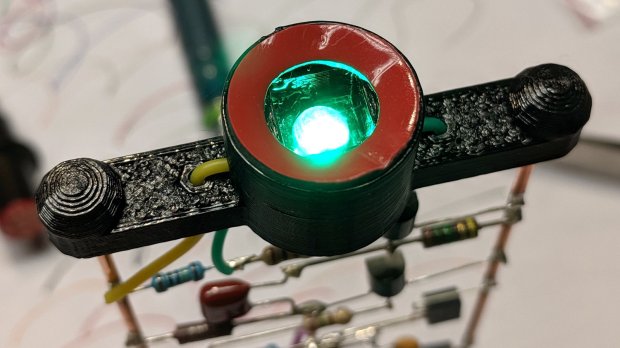
    Blinking LEDs atop Brutalist analog electronics:

    Astable RGB LED - green phase
    Astable RGB LED – green phase

    A classic HP 7475A plotter hammering math onto paper from a Raspberry Pi running Chiplotle:

    HP 7475A Plotter - LED paper illumination
    HP 7475A Plotter – LED paper illumination

    Some take-home art:

    Superformula Plots - A-size paper
    Superformula Plots – A-size paper

    And, as always, a good time will be had by all!

  • ShopVac Repairs

    A stainless steel 10 gallon (*) 5 Peak HP (**) ShopVac followed me home from the side of the road. It seemed to be in easily repairable condition and looks like a definite improvement for my collection.

    One handle had a broken screw boss, probably from the same event producing the crack across the top, over on the right:

    ShopVac - broken screw boss
    ShopVac – broken screw boss

    The self-tapping screw (taken from the other end of the handle) looked to be about #10, so I melted a 10-32 brass insert into roughly the right position with a soldering gun:

    ShopVac - brass insert in handle boss
    ShopVac – brass insert in handle boss

    An aluminum sheet bandsawed into shape will reinforce the crack, with a generous dollop of hot melt glue holding everything in place:

    ShopVac - repaired handle - bottom view
    ShopVac – repaired handle – bottom view

    I don’t plan to carry it around by the handle, so perhaps it’ll outlast your expectations.

    From the top, it looks pretty much the way it should:

    ShopVac - repaired handle - installed
    ShopVac – repaired handle – installed

    The front caster mount lost both of the 1/4-20 bolts previously holding it to the canister, so I installed a pair of nice stainless steel bolts and nyloc nuts:

    ShopVac - new front foot bolts
    ShopVac – new front foot bolts

    The motor runs fine, a new bag & filter arrived the next day, and it’s all good.

    Disclaimers from ShopVac’s Fine Print section:

    * Tank capacity refers to actual tank volume, and does not reflect capacity available during operation.

    ** “Peak Horsepower” (PHP) is a term used in the wet-dry vacuum industry for consumer comparison purposes. It does not denote the operational horsepower of a wet-dry vacuum but rather the horsepower output of a motor, including the motor’s inertial contribution, achieved in laboratory testing. In actual use, Shop-Vac® motors do not operate at the peak horsepower shown.

    https://www.shopvac.com/

    Translation: they lie.

  • Weatherproof Outlet Cover Re-Chaining

    The yard camera now resides outdoors and plugs into one of three outlets on the patio, all of which have weatherproof covers attached by a bead chain to the trim plate:

    Patio Outlet - new chain installed
    Patio Outlet – new chain installed

    That’s the after-repair condition, as two of the three chains were broken when we bought the house.

    Stipulated: the covers needed scrubbing, but sometimes ya gotta stay focused on the Main Goal.

    Two feet of 3.4 mm brass bead chain (because spares: ya gotta have stuff) arrived from eBay, I dismounted all three covers, and discovered the bell-shaped brass caps on the old chains were perfectly serviceable after six decades:

    Patio Outlet - chain retainers
    Patio Outlet – chain retainers

    The outlets are wired to circuit breaker 28, of course.

    Having enough chain to go around, each cover now sports a slightly longer leash than before:

    Patio Outlet - chain assembly
    Patio Outlet – chain assembly

    Reinstall in reverse order, the camera rebooted as it should, and it’s all good out there:

    Pressure-washing Patio Railing
    Pressure-washing Patio Railing

    That was easy …

  • Wrapping GCMC Text Around Arcs

    GCMC includes a typeset function converting a more-or-less ASCII string into the coordinate points (a “vectorlist” containing a “path”) defining its character strokes and pen motions. The coordinates are relative to an origin at the lower-left corner of the line, with the font’s capital-X height set to 1.0, so you apply a scale function to make them whatever size you want and hand them to the engrave library routine, which squirts the corresponding G-Code into the output file.

    Such G-Code can annotate plots:

    Guilloche 213478839
    Guilloche 213478839

    Given that the plots appear on relentlessly circular CDs and hard drive platters, It Would Be Nice to wrap text around a circular arc, thusly:

    Diamond Scribe - LM3UU - arc text - first light
    Diamond Scribe – LM3UU – arc text – first light

    The scaled coordinates cover a distance L along a straight line, so putting them on an arc will cover the same distance. The arc is part of a circle with radius R and a circumference 2πR, so … polar coordinates to the rescue!

    The total text length L corresponds to the total angle A along the arc:

    A = 360° L / 2πR

    It’s entirely possible to have a text line longer than the entire circumference of the circle, whereupon the right end overlaps the left. Smaller characters fit better on smaller circles:

    Arc Lettering - Small radius test - NCViewer
    Arc Lettering – Small radius test – NCViewer

    The X coordinate of each point in the path (always positive from the X origin) in the path gives its angle (positive counterclockwise) from 0°:

    a = 360° x / 2πR (say "eks")

    You can add a constant angle of either sign to slew the whole text arc around the center point.

    The letter baseline Y=0 sits at radius R, so the Y coordinate of each point (positive above and negative below the Y=0 baseline) gives its radius r:

    r = R - y

    That puts the bottom of the text outward, so it reads properly when you’re facing the center point.

    Homework: Tweak the signs so it reads properly when you’re standing inside the circle reading outward.

    Converting from polar back to XY:

    x = r × cos(a) (say "times")
    y = r × sin(a)

    You can add an XY offset to the result, thereby plunking the point wherever you want.

    This obviously works best for small characters relative to the arc radius, as the lines connecting the points remain resolutely straight. That’s probably what you wanted anyway, but letters like, say, “m” definitely manspread.

    Overall, it looks pretty good:

    Arc Lettering - test plot overview - NCViewer
    Arc Lettering – test plot overview – NCViewer

    A doodle helped lay out the geometry:

    Arc Lettering - geometry doodles
    Arc Lettering – geometry doodles

    The GCMC source code as a GitHub Gist:

    // Map text to circular arcs
    // Ed Nisley KE4ZNU – 2019-06
    //—–
    // Command line parameters
    // -D OuterDia=number
    if (!isdefined("OuterDia")) {
    OuterDia = 120mm – 2mm; // CD = 120, 3.5 inch drive = 95
    }
    OuterRad = OuterDia / 2.0;
    comment("Outer Diameter: ",OuterDia);
    comment(" Radius: ",OuterRad);
    //—–
    // Library routines
    include("tracepath.inc.gcmc");
    include("engrave.inc.gcmc");
    //—–
    // Bend text around an arc
    function ArcText(TextPath,Center,Radius,BaseAngle,Align) {
    PathLength = TextPath[-1].x – TextPath[1].x;
    Circumf = 2*pi()*Radius;
    TextAngle = to_deg(360 * PathLength / Circumf);
    AlignAngle = BaseAngle + (Align == "Left" ? 0 :
    Align == "Center" ? -TextAngle / 2 :
    Align == "Right" ? -TextAngle :
    0);
    ArcPath = {};
    foreach(TextPath; pt) {
    if (!isundef(pt.x) && !isundef(pt.y) && isundef(pt.z)) { // XY motion, no Z
    r = Radius – pt.y;
    a = 360deg * (pt.x / Circumf) + AlignAngle;
    ArcPath += {[r*cos(a) + Center.x, r*sin(a) + Center.y,-]};
    }
    elif (isundef(pt.x) && isundef(pt.y) && !isundef(pt.z)) { // no XY, Z up/down
    ArcPath += {pt};
    }
    else {
    error("Point is not pure XY or pure Z: " + to_string(pt));
    }
    }
    return ArcPath;
    }
    //—–
    // Set up for drawing
    TravelZ = 1.0mm; // no clamps above workpiece!
    PlotZ = -1.0mm; // tune for best results
    TextSpeed = 100mm; // minimal shaking
    DrawSpeed = 500mm; // smooth curve drawing
    TextFont = FONT_HSANS_1_RS;
    TextSize = [2.0mm,2.0mm];
    TextLeading = 5.0mm; // line spacing
    DiskCenter = [0mm,0mm]; // middle of the platter
    if (1) {
    comment("Circles begin");
    TextRadius = OuterRad;
    for (r = OuterRad; r >= 25mm; r -= TextLeading) {
    feedrate(DrawSpeed);
    goto([-,-,TravelZ]);
    goto([r,0,-]);
    move([-,-,PlotZ]);
    circle_cw([0,0]);
    goto([-,-,TravelZ]);
    tp = scale(typeset("Radius: " + to_string(r),TextFont),TextSize);
    tpa = ArcText(tp,DiskCenter,r,115deg,"Left");
    feedrate(TextSpeed);
    engrave(tpa,TravelZ,PlotZ);
    }
    }
    if (1) {
    comment("Depth variations begin");
    TextRadius = OuterRad;
    feedrate(TextSpeed);
    for (pz = 0.0mm; pz >= -0.6mm; pz -= 0.10mm) {
    comment(" depth: " + to_string(pz));
    ts = "Depth: " + to_string(pz) + " at " + to_string(TextSpeed) + "/s";
    tp = scale(typeset(ts,TextFont),TextSize);
    tpa = ArcText(tp,DiskCenter,TextRadius,-5deg,"Right");
    engrave(tpa,TravelZ,pz);
    TextRadius -= TextLeading;
    }
    }
    if (1) {
    comment("Feedrate variations begin");
    TextRadius = OuterRad;
    for (ps = 50mm; ps <= 350mm; ps += 50mm) {
    feedrate(ps);
    comment(" speed: " + to_string(ps) + "/s");
    ts = "Speed: " + to_string(ps) + "/s at " + to_string(PlotZ);
    tp = scale(typeset(ts,TextFont),TextSize);
    tpa = ArcText(tp,DiskCenter,TextRadius,5deg,"Left");
    engrave(tpa,TravelZ,PlotZ);
    TextRadius -= TextLeading;
    }
    }
    if (1) {
    comment("Off-center text arcs begin");
    feedrate(TextSpeed);
    tc = [-40mm/sqrt(2),-40mm/sqrt(2)]; // center point
    r = 8mm;
    s = [1.5mm,1.5mm];
    ts = "Radius: " + to_string(r) + " Size: " + to_string(s);
    tp = scale(typeset(ts,TextFont),s);
    tpa = ArcText(tp,tc,r,0deg,"Center");
    engrave(tpa,TravelZ,PlotZ);
    r = 5mm;
    s = [1.0mm,1.0mm];
    ts = "Radius: " + to_string(r) + " Size: " + to_string(s);
    tp = scale(typeset(ts,TextFont),s);
    tpa = ArcText(tp,tc,r,0deg,"Center");
    engrave(tpa,TravelZ,PlotZ);
    r = 15mm;
    s = [3.0mm,3.0mm];
    ts = "Radius: " + to_string(r) + " Size: " + to_string(s);
    tp = scale(typeset(ts,TextFont),s);
    tpa = ArcText(tp,tc,r,0deg,"Center");
    engrave(tpa,TravelZ,PlotZ);
    }
    if (1) {
    comment("Attribution begins");
    tp = scale(typeset("Ed Nisley – KE4ZNU – softsolder.com",TextFont),TextSize);
    tpa = ArcText(tp,DiskCenter,15mm,0deg,"Center");
    feedrate(TextSpeed);
    engrave(tpa,TravelZ,PlotZ);
    }
    goto([-,-,10mm]);
    goto([0mm,0mm,-]);
    comment("Done!");
    view raw ArcLetter.gcmc hosted with ❤ by GitHub
    #!/bin/bash
    # Arc Lettering Generator
    # Ed Nisley KE4ZNU – 2019-06
    Diameter='OuterDia=116mm'
    Flags='-P 3 –pedantic'
    # Set these to match your file layout
    LibPath='/opt/gcmc/library'
    Prolog='/mnt/bulkdata/Project Files/Mostly Printed CNC/Firmware/gcmc/prolog.gcmc'
    Epilog='/mnt/bulkdata/Project Files/Mostly Printed CNC/Firmware/gcmc/epilog.gcmc'
    Script='/mnt/bulkdata/Project Files/Mostly Printed CNC/Patterns/Arc Lettering/ArcLetter.gcmc'
    ts=$(date +%Y%m%d-%H%M%S)
    fn='ArcLetter_'${ts}'.ngc'
    echo Output: $fn
    rm -f $fn
    echo "(File: "$fn")" > $fn
    gcmc -D $Diameter $Flags \
    –include "$LibPath" –prologue "$Prolog" –epilogue "$Epilog" \
    "$Script" >> $fn
    view raw ArcLetter.sh hosted with ❤ by GitHub

  • Whirlpool Refrigerator Drawer Support Re-Re-Re-Gluing

    Spring cleaning provided the opportunity for Yet Another Episode in my long-standing battle with the Whirlpool refrigerator entropy generator:

    Whirlpool Refrigerator - drawer support gluing
    Whirlpool Refrigerator – drawer support gluing

    That little thing supports half the weight of the two drawers across the bottom of the refrigerator; how such a thin plastic member was supposed to be adequate to the task continues to escape me.

    If we had to pay real money for all the repairs I’ve made to that piece of crap, we’d have replaced it long ago. The only thing that hasn’t failed so far is the compressor, so driving it until it drops continues to make sense; replacing a working anything seems like a bad idea.