Ed Nisley's Blog: Shop notes, electronics, firmware, machinery, 3D printing, laser cuttery, and curiosities. Contents: 100% human thinking, 0% AI slop.
Our Larval Engineer, evidently planning to serve some genuine home-style pizza to her compadres, asked for the Official Recipe.
It goes a little something like this…
T minus 2.5 hours
Blend (manually!) in mixer bowl:
1 Tbsp yeast (that’s two packets = crazy spendy → buy in bulk)
1 Tbsp brown sugar (or whatever sweet you have)
1-1/2 C warm water (1 minute in our microwave)
Add on top of liquid:
3 C whole wheat flour
1 C white flour
1 tsp salt
The original recipe called for:
4 Tbsp olive oil (or safflower, not vegetable / canola)
1/2 C additional flour only if you add oil
Don’t stir, just pause 5 minutes until the yeast gets up & running.
Run mixer until dough becomes rubbery and cleans the bowl.
No mixer? Stir, stir, stir, then knead, knead, knead.
Ed & Karen kneading bread dough – Raleigh 1995-ish
(As you can see, she has experience kneading bread…)
Cleave in twain, about 1 lb per lump.
Oil mixer bowl & one lump, let rise.
Flatten other lump in plastic bag & freeze for next week.
Put 1 unit homebrew pizza sauce on counter to thaw.
T minus 45 minutes
Roll crust to fit pan, generously flour bottom, let rise on countertop.
Grate cheese:
2 oz Sharp Provolone
2 oz Mozzarella
3 oz Monterey Jack
Cube meat:
2 oz Ham
4 oz Turkey / pork / what have you
Chop veggies:
handful Broccoli tips (save stalks for tomorrow’s stir fry)
1/2 Sweet pepper (Green / red)
3 Bunching onions (or small scallions, whatever)
1 big Mushroom (or 4 tiddly buttons)
T minus 15 minutes
Fire the Oven! to 500 F
Flour bottom of crust, flop on pan
Spread pizza sauce generously over crust, counter, walls, self
Distribute meat / veggies
Top with cheese
Slide onto middle shelf of oven
Set timer to 10 minutes if preheated, 12 minutes if not quite hot yet
Clean utensils / counter / walls / self
T minus zero
Remove from oven (top should be brown & bubbling)
Pause for coagulation
Cut
Distribute
Nom on!
The original recipe was about the same, plus foo-foo steps like putting oil in the dough, spreading cornmeal on the pan, oiling the crust before applying the sauce, and suchlike. You’ll need the book for all the details:
I’m sure something different has come along in the last third of a century, but you’ll never hear it from me. Mostly, build a few, tweak the ingredients to suit your style / what’s on hand, and it’ll be all good.
I assume you’ll pick a workable dots/mm resolution and suchlike for your setup, so they’re hardcoded into the script. You could add them to the command line if you like.
Starting from the same jellyfish.svg file as before, I came up with a slightly different jellyfish-high.png grayscale height map image with more dots (246×260 dots at 3 dot/mm = 82×87 mm). The original 160×169 file required about half an hour to render and, as you’d expect, increasing the number of dots by 1.5 (nearly √2) doubled the time to just over an hour:
Manually tweaked jellyfish-high.png
The first convert step turns that into the basic height map jellyfish_prep.png file:
jellyfish-high_prep.png
The next two convert steps produce two ASCII PGM files:
jellyfish-high_map.pgm
jellyfish-high_plate.pgm
The _map file has the grayscale height map data, which is identical to the prepared PNG image:
jellyfish-high_map
The _plate file defines the outline of the cookie cutter with a completely white interior, which is why the original cookie height map image can’t contain any pure white areas inside the outline (they’d become black here and produce islands). It seems the OpenSCAD minkowski() function runs significantly faster when it doesn’t process a whole bunch of surface detail; all we care about is the outline, so that’s all it gets:
jellyfish-high_plate
I originally composited the height maps on a known-size platen and worked with those dimensions, but it’s easier to just extract the actual image dimensions and feed them into the code as needed. As with all ImageMagick programs, identify has a myriad options.
Those two lines of Bash gibberish reformat the ASCII PGM files into the ASCII DAT arrays required by OpenSCAD’s surface() function.
The MakeSurface.scad script eats a DAT height map file and spits out a corresponding STL file. The Height parameter defines the overall Z-axis size of the slab; the maximum 255 corresponds to pure white in the image file:
// Generate object from image height map
// Ed Nisley - KE4ZNU
// October 2012
// This leaves the rectangular slab below Z=0 over the full image area
//		... reduced in thickness by the Height/255 ratio

FileName = "noname.dat";				// override with -D FileName="whatever.dat"
Height = 255;						// overrride with -D Height=number
DotsPerMM = 2;						// overrride with -D DotsPerMM=number

ScaleXYZ = [1/DotsPerMM,1/DotsPerMM,Height/255];

echo("File: ",FileName);
echo("Height: ",Height);
echo("Dots/mm: ",DotsPerMM);
echo("Scale: ",ScaleXYZ);

module ShowPegGrid(Space = 10.0,Size = 1.0) {
  Range = floor(50 / Space);
	for (x=[-Range:Range])
	  for (y=[-Range:Range])
		translate([x*Space,y*Space,Size/2])
		  %cube(Size,center=true);
}

//- Build it

ShowPegGrid();

scale(ScaleXYZ)
	surface(FileName,center=true,convexity=10);
The grid defining the build platform doesn’t show up in the output file; it’s there just for manual fiddling inside the GUI. When run from the command line, OpenSCAD simply creates the output file.
The _map.stl file has the height map data that will form the cookie press:
jellyfish-high_map – Model
The _plate.stl file is basically a digital bar cookie that will define the cutter:
jellyfish-high_plate – Model
It’s possible to produce the cutter in one shot, starting from the DAT files, but having the two STL files makes it (barely) feasible to experiment interactively within the OpenSCAD GUI.
This OpenSCAD program produces the cutter and press:
// Cookie cutter from grayscale height map using Minkowski sum
// Ed Nisley KE4ZNU - November 2012

//-----------------
// Cookie cutter files

BuildPress = true;
BuildCutter = true;

fnPress = "nofile.stl";					// override with -D 'fnPress="whatever.stl"'
fnPlate = "nofile.stl";					// override with -D 'fnPlate="whatever.stl"'

ImageX = 10;						// overrride with -D ImageX=whatever
ImageY = 10;

MaxConvexity = 5;					// used for F5 previews in OpenSCAD GUI

echo("Press File: ",fnPress);
echo("Plate File: ",fnPlate);
echo("Image X: ",ImageX," Y: ",ImageY);

//- Extrusion parameters - must match reality!

ThreadThick = 0.25;
ThreadWidth = 2.0 * ThreadThick;

//- Cookie cutter parameters

TipHeight = IntegerMultiple(8,ThreadThick);		// cutting edge
TipWidth = 4*ThreadWidth;

WallHeight = IntegerMultiple(7,ThreadThick);		// center section
WallWidth = 8*ThreadWidth;

LipHeight = IntegerMultiple(2.0,ThreadThick);		// cutter handle
LipWidth = IntegerMultiple(8.0,ThreadWidth);

CutterGap = IntegerMultiple(2.0,ThreadWidth);		// gap between cutter and press

PlateThick = IntegerMultiple(3.0,ThreadThick);		// solid plate under press relief

//- Build platform

PlatenX = 100;						// build platform size
PlatenY = 120;
PlatenZ = 120;						// max height for any object
PlatenFuzz = 2;

MaxSize = max(PlatenX,PlatenY);				// larger than any possible dimension ...

ZFuzz = 0.20;						// height of numeric junk left by grayscale conversion
ZCut = 1.20;						// thickness of block below Z=0

//- Useful info

function IntegerMultiple(Size,Unit) = Unit * ceil(Size / Unit);

Protrusion = 0.1;					// make holes and unions work correctly

//-----------------
// Import height map STL, convert to cookie press image

module PressSurface() {

	translate([0,0,-ZFuzz])
		difference() {
			import(fnPress,convexity=MaxConvexity);
			translate([-(ImageX + PlatenFuzz)/2,-(ImageY + PlatenFuzz)/2,-ZCut])
				cube([(ImageX + PlatenFuzz),(ImageY + PlatenFuzz),ZCut+ZFuzz],center=false);
		}
}

//-----------------
// Import plate STL, slice off a slab to define outline

module Slab(Thick=1.0) {
	intersection() {
		translate([0,0,Thick/2])
			cube([(PlatenX+PlatenFuzz),(PlatenY+PlatenFuzz),Thick],center=true);
		translate([0,0,-1])
			import(fnPlate,convexity=MaxConvexity);
	}
}

//- Put peg grid on build surface

module ShowPegGrid(Space = 10.0,Size = 1.0) {

  Range = floor(50 / Space);

	for (x=[-Range:Range])
	  for (y=[-Range:Range])
		translate([x*Space,y*Space,Size/2])
		  %cube(Size,center=true);

}

//- Build it

ShowPegGrid();

if (BuildPress) {
	echo("Building press");
	union() {
		minkowski() {					// fingernail ridge around press
			Slab(LipHeight - 1);			//  ... same thickness as cutter lip
			cylinder(r=CutterGap/2,h=1);
		}
		translate([0,0,(LipHeight - Protrusion)])	// solid plate under press
			Slab(PlateThick - LipHeight + Protrusion);
		translate([0,0,PlateThick])			// cookie press height map
			intersection() {
				import(fnPress,convexity=MaxConvexity);
				translate([0,0,-Protrusion])
					Slab(PlatenZ + Protrusion);
			}

	}
}

if (BuildCutter) {
	echo("Building cutter");
	difference() {
		union() {					// stack cutter layers
			translate([0,0,(WallHeight + LipHeight - 1)])
				minkowski() {
					Slab(TipHeight - 1);
					cylinder(r=(TipWidth + CutterGap),h=1);
				}
			translate([0,0,LipHeight - 1])
				minkowski() {
					Slab(WallHeight - 1);
					cylinder(r=(WallWidth + CutterGap),h=1);
				}
			minkowski() {
				Slab(LipHeight - 1);
				cylinder(r=(LipWidth + CutterGap),h=1);
			}
		}
		minkowski() {					// punch out opening for cookie press
			translate([0,0,-2])
				Slab(PlatenZ);
			cylinder(r=CutterGap,h=1);
		}
	}
}
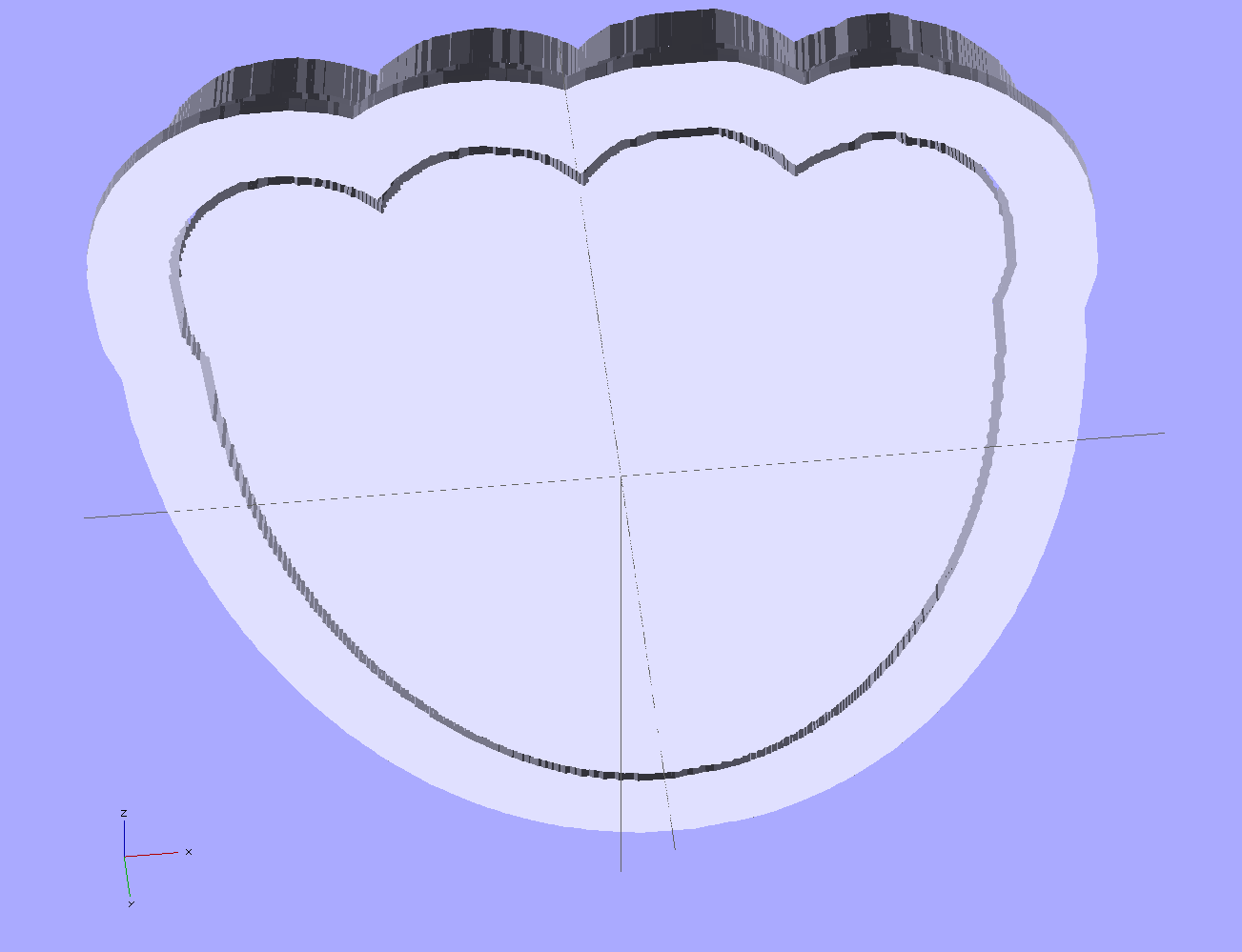
The top view shows the height map press nested inside the cutter blade, but it’s not obvious they’re two separate pieces:
jellyfish-high – Cutter and Press – top view
The bottom view shows the 1 mm gap between the two objects:
jellyfish-high – Cutter and Press – bottom view
Now, to print the thing [Update:like that] so I can make some cookies…
Further musings:
Printing separately would allow a tighter fit between the press and the cutter: an exact fit won’t work, but 2 mm may be too much.
A knob glued on the flat surface of the press would be nice; the fingernail ridge may get annoying.
PLA seems more socially acceptable than ABS for foodie projects. Frankly, I doubt that it matters, at least in this application.
Somehow, one of the brackets that supports the small shelf inside the freezer of our Whirlpool refrigerator went missing over the many intervening years and repairs; we never used that shelf and stashed it in a closet almost immediately after getting the refrigerator, so not having the bracket didn’t matter. We recently set up a chest freezer in the basement for all the garden veggies that used to fill all the space available and decided to (re-)install the shelf, which meant we needed a bracket.
It’s impossible to figure out exactly which “shelf stud” in that list would solve the problem, but one of the upper-left pair in that set seems to be about right. On the other paw, I don’t need all the other brackets and doodads and screws, sooo… I can probably make one.
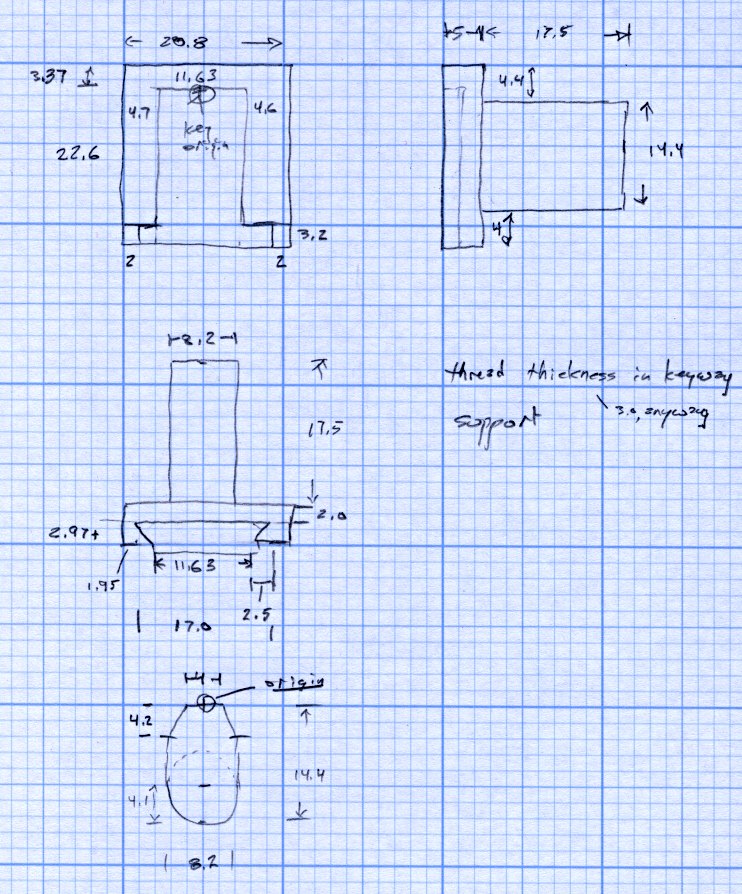
Start with a few measurements, then doodle up the general idea:
Refrigerator Bracket – dimension doodlet’s time to conjure up a solid model:
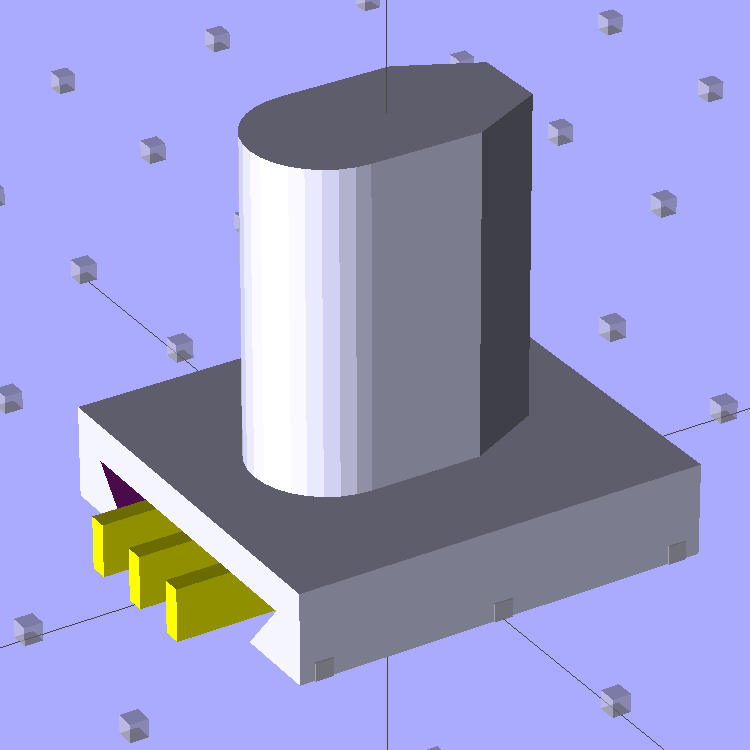
A bit of OpenSCAD solid modeling:
Refrigerator Bracket Pin – solid model
The yellow bars support the ceiling of that big dovetail, which would otherwise sag badly. The OEM bracket has nicely rounded corners on the base and a bit of an overall radius at the end of the post; this was pretty close and easier to do.
Now it’s time to Fire the Thing-O-Matic…
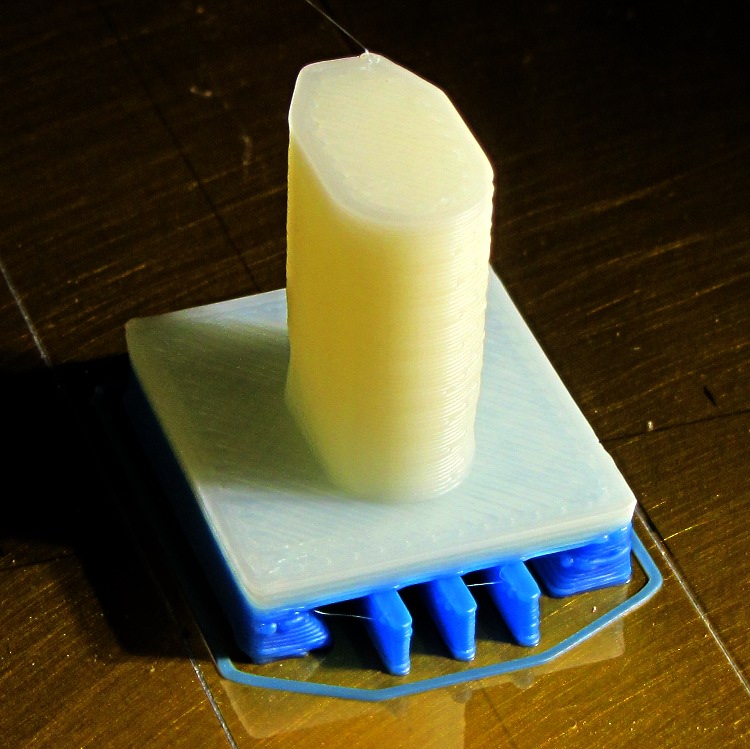
I switched from blue to white filament during the print, because I figured I’d print another one after I got the sizes right, so it emerged with an attractive blue base:
Bracket on build platform
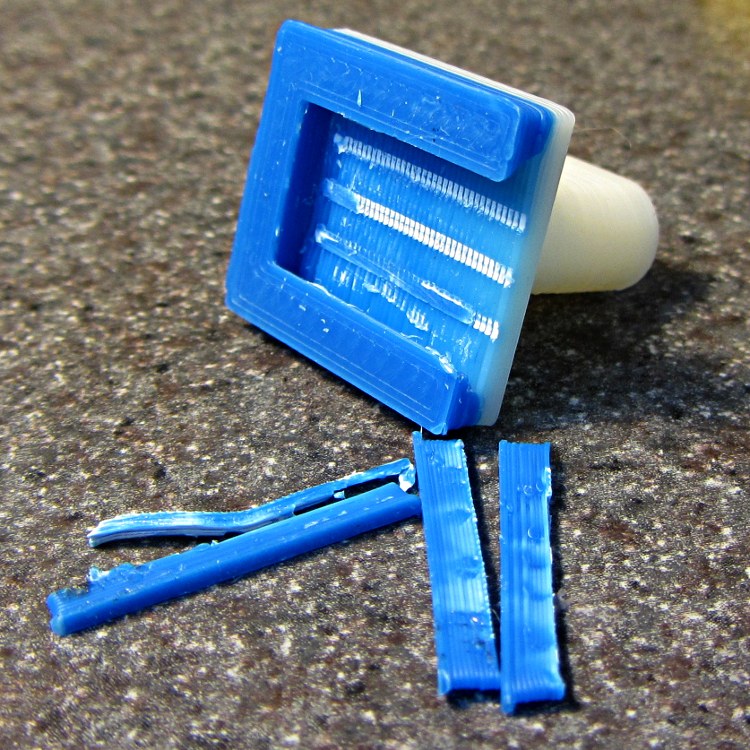
A better view of the support structure:
Bracket – dovetail support structure
Two of the bars snapped off cleanly, but the third required a bit of scraping:
Bracket – support scars
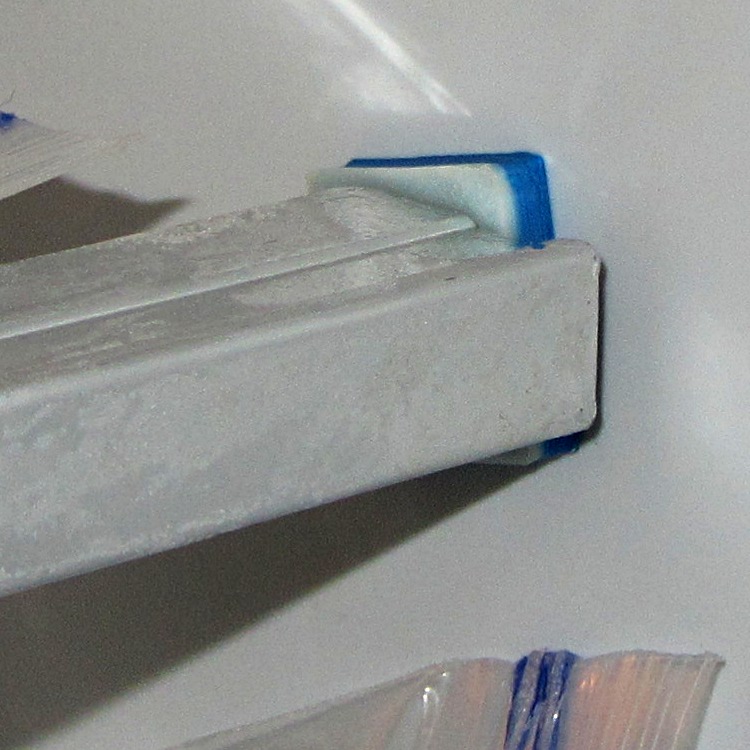
Somewhat to my surprise, Prototype 001 slipped snugly over the matching dovetail on the freezer wall, with about the same firm fit as the OEM brackets:
Refrigerator bracket – installed
And it works perfectly, apart from that attractive blue base that I suppose we’ll get used to after a while:
Refrigerator bracket – in use
I have no idea whether ABS is freezer-rated. It seems strong enough and hasn’t broken yet, so we’ll declare victory and keep the source code on tap.
The whole project represents about an hour of hammering out OpenSCAD code for the solid model and another hour of printing, which means I’d be better off to just buy the parts kit and throw away the unused bits. Right?
I loves me my Thing-O-Matic…
The OpenSCAD source code:
// Shelf support bracket
// for Whirlpool freezer
// Ed Nisley KE4ZNU Octoboer 2012

//include </mnt/bulkdata/Project Files/Thing-O-Matic/MCAD/units.scad>
//include </mnt/bulkdata/Project Files/Thing-O-Matic/Useful Sizes.scad>

// Layout options

Layout = "Build";
 // Overall layout: Show Build
 // Printing plates: Build
 // Parts: Post Base Keystone Support

ShowGap = 10; // spacing between parts in Show layout

//- Extrusion parameters must match reality!
// Print with +1 shells and 3 solid layers

ThreadThick = 0.25;
ThreadWidth = 2.0 * ThreadThick;

HoleWindage = 0.2;

function IntegerMultiple(Size,Unit) = Unit * ceil(Size / Unit);

Protrusion = 0.1; // make holes end cleanly

//----------------------
// Dimensions

PostLength = 17.5;
PostWidth = 8.2;
PostHeight = 14.4;
PostOffset = 4.4;

PostTopWidth = 4.0;
PostTopHeight = 4.2;

BaseLength = 22.6;
BaseWidth = 20.8;
BaseThick = 5.0;

KeystoneOffset = 3.4;
KeyThick = IntegerMultiple(3.0,ThreadThick);
KeyBase = 2.5;
SlotOpening = 11.63;
//----------------------
// Useful routines

module PolyCyl(Dia,Height,ForceSides=0) { // based on nophead's polyholes

Sides = (ForceSides != 0) ? ForceSides : (ceil(Dia) + 2);

FixDia = Dia / cos(180/Sides);

cylinder(r=(FixDia + HoleWindage)/2,
 h=Height,
 $fn=Sides);
}

module ShowPegGrid(Space = 10.0,Size = 1.0) {

 Range = floor(50 / Space);

 for (x=[-Range:Range])
 for (y=[-Range:Range])
 translate([x*Space,y*Space,Size/2])
 %cube(Size,center=true);

}

//-------------------
// Component parts

//--- Post

module Post(h=PostLength) {

PostTopAngle = atan((PostWidth - PostTopWidth)/(2*PostTopHeight));
PostBottomRadius = PostWidth/2;

PostPolyTop = [PostTopWidth/2,0];
PostPolyBottom = [PostWidth/2,-PostTopHeight];

hull() {
 linear_extrude(height=h) {
 polygon(points=[
 [-PostPolyTop[0],PostPolyTop[1]],
 PostPolyTop,
 PostPolyBottom,
 [-PostPolyBottom[0],PostPolyBottom[1]]
 ]);
 translate([0,-PostHeight + PostBottomRadius])
 circle(r=PostBottomRadius,$fn=4*8);
 }
 }
}

//--- Base block

module Base() {

 linear_extrude(height=BaseThick)
 square([BaseWidth,BaseLength],center=true);

}

//-- Keystone slot

module Keystone() {

Tx = SlotOpening/2 + KeyBase;

 rotate([90,0,0])
 linear_extrude(height=BaseLength)
 polygon(points=[
 [-Tx,KeyThick],
 [ Tx,KeyThick],
 [ SlotOpening/2,0],
 [ SlotOpening/2,-Protrusion],
 [-SlotOpening/2,-Protrusion],
 [-SlotOpening/2,0]
 ]);
}

//--- Support structure

module Support() {

SupportLength = BaseLength - 2*ThreadWidth;
SupportWidth = 2*ThreadWidth;
SupportHeight = KeyThick - Protrusion;

SupportPeriod = 7.0*ThreadWidth;

SupportBeams = 3; // must be odd -- choose to fit
SIndex = floor((SupportBeams - 1)/2);

for (i=[-SIndex:SIndex])
 translate([(i*SupportPeriod - SupportWidth/2),-(SupportLength + ThreadWidth),0])
 color("Yellow") cube([SupportWidth,SupportLength,SupportHeight]);
}

//--- The whole thing!

module Bracket(ShowSupp) {

 union() {
 difference() {
 Base();
 translate([0,(BaseLength/2 - KeystoneOffset),0])
 Keystone();
 }
 translate([0,(BaseLength/2 - PostOffset),BaseThick - Protrusion])
 Post(h=(PostLength + Protrusion));
 }

 if (ShowSupp)
 translate([0,(BaseLength/2 - KeystoneOffset),0])
 Support();

}

//----------------------
// Build it!

ShowPegGrid();

if (Layout == "Show")
 Bracket(false);

if (Layout == "Build")
 Bracket(true);

if (Layout == "Post")
 Post();

if (Layout == "Base")
 Base();

if (Layout == "Keystone")
 Keystone();

if (Layout == "Support") {
 Support();
% Keystone();
}
After that rebuild, the first five recharges went like this: 21, 21, 21, 23, and 20 days. The last interval included seven days of vacation, during which the battery suffered just the usual self-discharge common to NiMH cells.
That’s about what the OEM battery delivered, back when it was new, so the new 600 mA·h cells seem to be about the right capacity. Obviously, the end of the OEM battery wasn’t nearly so pretty.
In round numbers, the wireless charger requires one hour to restore the energy drawn by one two-minute brushing: the thing charges for about 21 hours. There’s additional loss from three weeks of self-discharge in there: if 7 days of non-use = 1 brushing, then the usual 21 days = 3 brushings -> 14% loss due to self-discharge.
I’d take a large grain of salt with those numbers…
I’ve been doing some amateur surveying in preparation for the long-awaited driveway paving project, just to see where the property boundaries might be, and this Bosch GLR225 laser rangefinder makes it wonderfully easy to measure distances:
Bosch GLR225 Laser Rangefinder
It’s good up to 230 feet = 70 meters, which means you can measure a sizable chunk of property in one shot. It reads down to 2 inches with 1/16 inch accuracy / resolution (call it 50 mm and 1.5 mm), so one could use it for setups in the shop. It can solve right triangles, which means you can measure distances with an obstruction in the middle, and has a few other tricks. Other rangefinders evidently have more tricks, but I favor writing direct measurements on paper and making computations based those values, rather than using mysterious results direct from the field that can’t be easily verified at the desk.
I tried measuring the nominal 212 foot distance to the Hudson River from the center of the Walkway, but it reported an error. Most likely, specular reflections from water don’t work well, at least not at that distance.
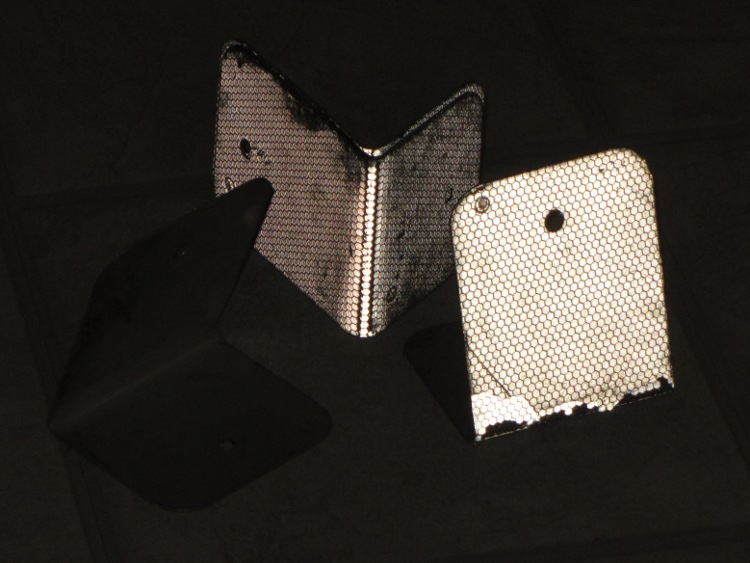
You can buy retroreflective targets, but the Basement Laboratory Warehouse Wing disgorged what looks like roadside border markers, pre-bent into a useful shape:
Laser targets – normal
Seen by reflected light, they’re much more impressive:
Laser targets – flash
They came with the house, so I don’t know their provenance. What I do know is that I can’t hold the rangefinder steady enough to keep the spot on the target at much more than 100 feet. If I get around to doing much more surveying, I must conjure up a tripod mount; the base has a 1/4-20 socket in an awkward location and can measure relative to the screw centerline. Perhaps a rifle stock with a spotting scope would be handy, too, although I’d certainly acquire another black spot on my record.
If you were going to use it in the shop, you’d want a rotating pivot aligned at the intersection of the tripod socket and sensor port to get a known center point.
You can get one on eBay at a substantial discount, of course…
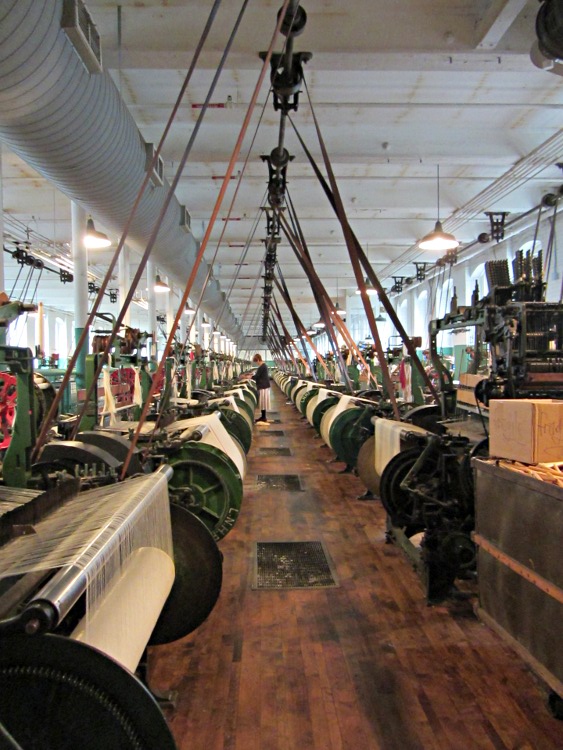
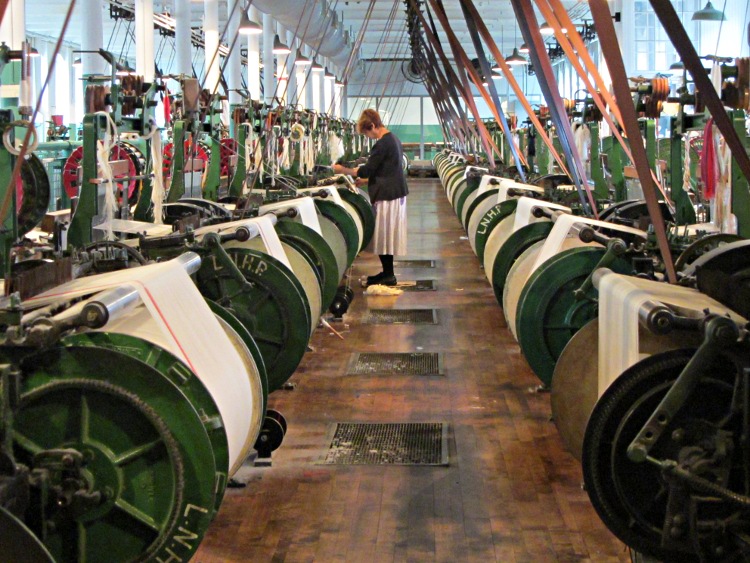
We stopped at Lowell MA to visit the New England Quilt Museum (photography prohibited) and the Boott Cotton Mills Museum (photography encouraged). The NPS, among others, managed to salvage the buildings and restore some of the machinery, to the extent that one room on one floor of one building has some running cotton mills:
Boott Cotton Mill Museum
A bit more detail:
Boott Cotton Mill Museum – line detail
The original mills used water power, as did much of New England’s industry, but moments after Watt worked the bugs out of that newfangled steam engine, water power was history. The museum uses a huge old electric motor, mounted on the ceiling, to drive the line shafts above the mills; the vibration shakes the entire building and they hand out ear plugs at the door, despite having only half a dozen mills operating at any time. The working environment, horrific though it was, attracted employees (largely young women) from across the region; it was a better deal than they had on the family farm.
Employees were, of course, prohibited from using cotton to plug their ears…
They sell the cloth in the museum shop and we’ll eventually have some kitchen towels.
One of the ribs in the six-passenger umbrella we keep in the van snagged on something and snapped its fitting on the spreader strut:
Umbrella strut – broken connector
This being wonderful engineering plastic that cannot be solvent-bonded, epoxy is the only adhesive that will work. However, those joints undergo tremendous stress in a deployed umbrella, so a bare epoxy joint won’t have enough strength for the job. What to do?
Wonder of wonders, when I got the umbrella into the Basement Laboratory Repair Wing, I discovered:
The not-quite-round strut fitting stub slipped right into a short brass tube from the heap and
Just enough of the fitting remained on the rib to anchor the tubing
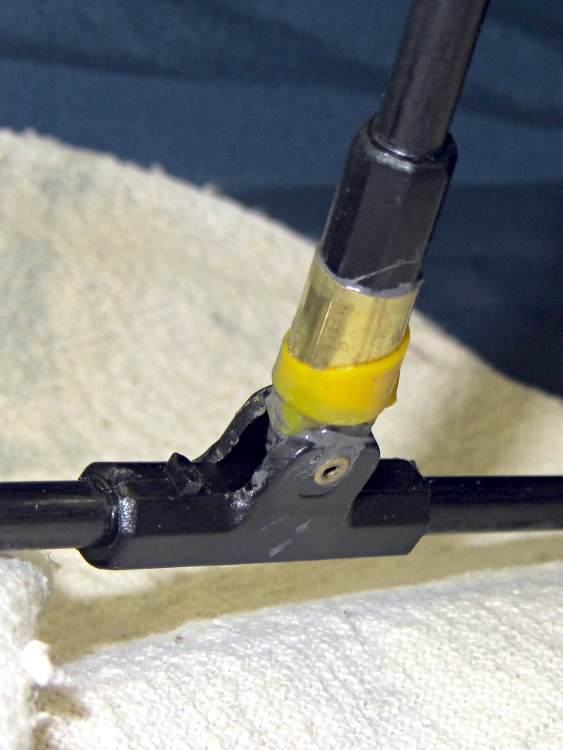
A silicone tape wrap kept most of the epoxy inside while it cured:
Umbrella strut – epoxy curing
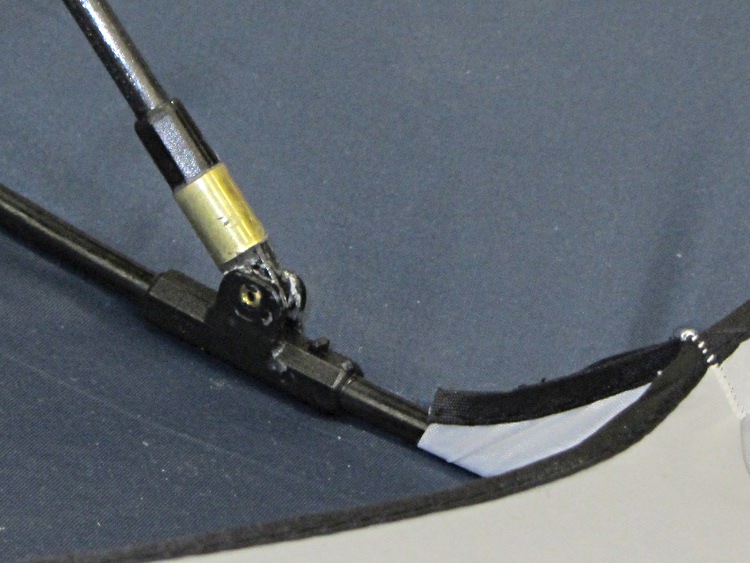
Clearing off a few blobs made it all good:
Umbrella strut – brass tubing splint
We don’t play golf, but such a big umbrella keeps most of the rain off two people; it’s a tchotchke from back when Mary worked at IBM (hence the color scheme). We call it our “six-passenger” umbrella because it looks about that big when we deploy it…









 The Smell of Molten Projects in the Morning