The Smell of Molten Projects in the Morning

Ed Nisley's Blog: Shop notes, electronics, firmware, machinery, 3D printing, laser cuttery, and curiosities. Contents: 100% human thinking, 0% AI slop.

Category: Electronics Workbench

Electrical & Electronic gadgets

  • Warm-White LED Strip: FAIL

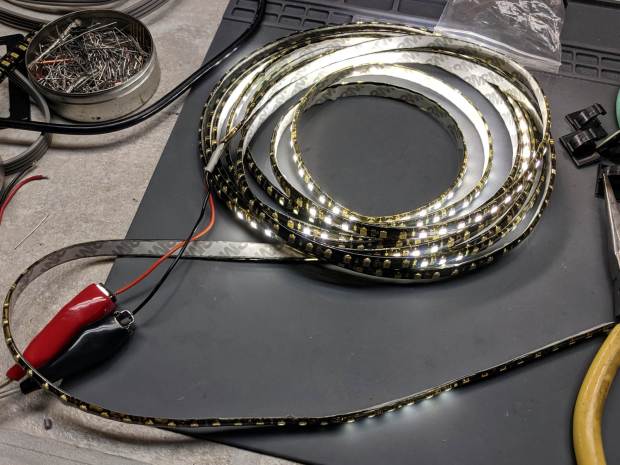
    The roll of warm-white LEDs I used for the first sewing machine lights has evidently aged out:

    Failed warm-white LED strip
    Failed warm-white LED strip

    They’ve been wrapped on their original roll, tucked in an antistatic bag, for the last five years, so it’s not as if they’ve been constantly abused.

    All the cool-white LEDs on an adjacent roll in the same bag still work perfectly, so you’re looking at inherent vice.

    I harvested the three longest functional sections and dumped the remainder in the electronics recycling box.

    COB LEDs provide much more light, if only because they run at higher power densities, and seem to be much better cost-performers:

    Juki TL-2010Q COB LED - installed - rear view
    Juki TL-2010Q COB LED – installed – rear view

    Admittedly, I haven’t looked at the RGB LED strips in a while, either.

  • Baofeng UV-5R Squelch Settings

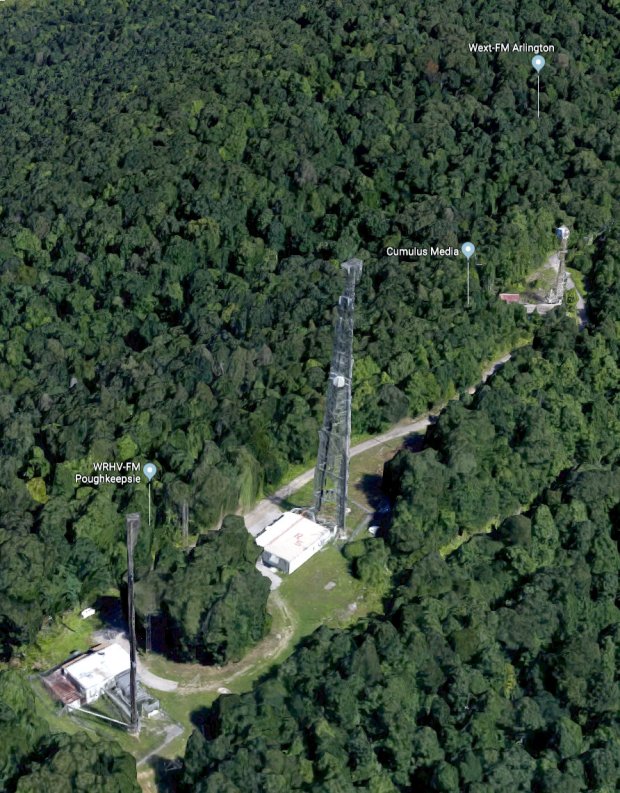
    The Baofeng UV-5R radios on our bikes seem absurdly sensitive to intermodulation interference, particularly on rides across the Walkway Over the Hudson, which has a glorious view of the repeaters and paging transmitters atop Illinois Mountain:

    Walkway Over The Hudson - Illinois Mountain Antennas
    Walkway Over The Hudson – Illinois Mountain Antennas

    A better view of the assortment on the right:

    Illinois Mountain - North Antennas
    Illinois Mountain – North Antennas

    And on the left:

    Illinois Mountain - South Antennas
    Illinois Mountain – South Antennas

    Not shown: the Sheriff’s Office transmitter behind us on the left and the Vassar Brothers Hospital / MidHudson pagers on either side at eye level. There’s plenty of RFI boresighted on the Walkway.

    Anyhow, none of the Baofeng squelch settings had any effect, which turned out to be a known problem. The default range VHF covered a whopping 6 dB and the UHF wasn’t much better at 18 dB, both at very low RF power levels.

    We use the radios in simplex mode, generally within line of sight, so I changed the Service Settings to get really aggressive squelch:

    Baofeng UV-5R - Improved Squelch Settings
    Baofeng UV-5R – Improved Squelch Settings

    I have no way to calibrate the new signal levels, but I’d previously cranked the squelch up to 9 (it doesn’t go any higher) and, left unchanged, the new level makes all the previous interference Go Away™. Another ride over the Walkway with the squelch set to 4 also passed in blissful silence.

    If the BF-F9 levels mean anything on a UV-5R, that’s about -100 dBm, 20 dB over the previous -120 dBm at squelch = 9.

    The new squelch levels may be too tight for any other use, which doesn’t matter for these radios. As of now, our rides are quiet.

    [Update: Setting the squelch to 5 may be necessary for the Walkway, as we both heard a few squawks and bleeps while riding eastbound on a Monday afternoon. ]

  • Vacuum Tube LEDs: Failed Tape, Failed USB Cable

    While packing the vacuum tube LEDs for the HV Open Mad Science Fair, I noticed the knockoff Arduino Nano inside one had come unstuck from the base. It seems the double-stick foam tape I’d used had lost its sticky:

    Vacuum Tube LEDs - unstuck foam tape
    Vacuum Tube LEDs – unstuck foam tape

    Replacing it with my now-standard black 3M outdoor rated tape ought to solve the problem forever more.

    For whatever it’s worth, the SK6812 RGBW LEDs have had exactly zero failures in the last two years or so; I finally turned off the test fixture.

    Before reassembling the light, I plugged the USB cable into the bench supply and watched the Nano reset erratically. Careful poking showed the USB cable was intermittent, so I carved it up:

    Failed USB cable - autopsy
    Failed USB cable – autopsy

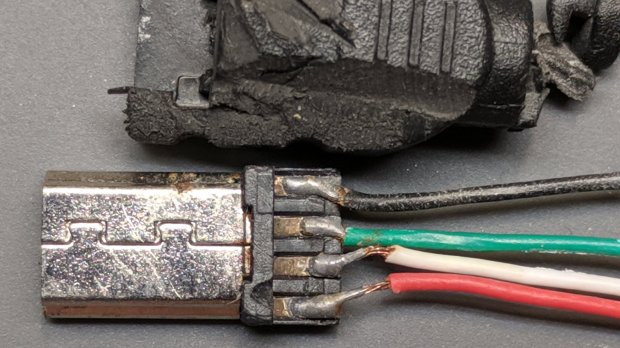
    As far as I can tell, the black wire (supply common) was cut mostly all the way through, with just a few strands remaining, before I peeled the insulation back.

    A closer look at the solder joints doesn’t inspire much confidence in their QC:

    Failed USB cable - solder joints
    Failed USB cable – solder joints

    If those pads tarnished along with their solder blobs, the overmolded plastic isn’t the right stuff for the job. If they started life like that … ick.

    I must up my cable spend, although I have no confidence doing so will improve the quality.

  • Exhibit Hand-Out Cards: QR Version

    I’ve finally had it beaten into my head: any public exhibition requires paper handouts, if only for younger folks who are too shy to ask questions. Paper may seem obsolete, but it serves as a physical reminder long after the sensory overload of a busy event fades away.

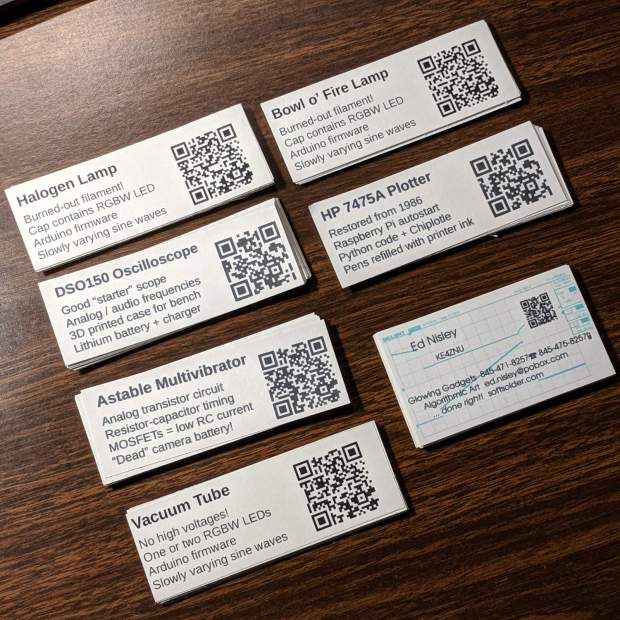
    Hence, I made up cards describing my exhibits at the HV Open Mad Science Fair, each sporting a QR code aimed at far more background information than anybody should care about:

    Mad Science Fair - handout cards
    Mad Science Fair – handout cards

    The QR codes come from one-liners:

    qrencode https://softsolder.com/?s=dso150 -s 5 -d 300 -o dso150.png

    So, go ahead, shoot ’em with your phone:

    • Blog search QR code: astable
    • Blog search QR code: bowl-of-fire
    • Blog search QR code: dso150
    • Blog search QR code: halogen
    • Blog search QR code: hp7475a
    • Blog search QR code: tubes

    Memo to Self: put the cards in the Big Box o’ Stuff the night before.

  • Astable Multivibrator Blinkies: Radome Attachment

    Ping-Pong ball radomes tend to fall off their perches at the slightest touch:

    RGB LED - radome test
    RGB LED – radome test

    Because I planned to take my collection along to HV Open’s Mad Science Fair, I finally used a Round Tuit for some adhesive action.

    The general plan was to punch a ring from double-sided tape, thusly:

    Astable - Radome adhesive - poor surface
    Astable – Radome adhesive – poor surface

    The OD required touching up the edge of a brass tube punch I’d made a while ago:

    Astable - Radome adhesive - punch sharpening
    Astable – Radome adhesive – punch sharpening

    It worked exactly as expected:

    Astable - Radome adhesive - punching
    Astable – Radome adhesive – punching

    Unfortunately, the 3D printed spider’s “spherical” socket has such a rough surface that the adhesive had too few contact points to hold the ball in place.

    My fallback has become 3M outdoor-rated double-stick foam tape, so:

    Astable - Radome adhesive - 3M foam tape
    Astable – Radome adhesive – 3M foam tape

    This leaves a small black ring visible between ball and socket. Recessing the foam tape by half its thickness should improve its ahem optics, although it’s probably not worth the effort with black PETG.

  • Dell UG679 Lithium Battery Teardown

    The battery pack on my ancient Dell E1405 laptop finally died, so I tore it apart to see what horrors might lurk within:

    Dell UG679 Lithium Battery - teardown
    Dell UG679 Lithium Battery – teardown

    The case snaps apart without too much effort, although the delicate single-use latches won’t survive the operation. These certainly didn’t, which didn’t bother me at all, as I already had a replacement battery on order.

    One of the cells (in the front) seems to have leaked ever so slightly inside its wrapper:

    Dell UG679 Lithium Battery - leaky cell
    Dell UG679 Lithium Battery – leaky cell

    The three cells in that 3P section seem to have failed open: they pass no current at all.

    The other pair of 3P slices, charged at 4.2 V with a 700 mA current limit until the current dropped under 10 mA, still have some life:

    Dell UG679 3P sections
    Dell UG679 3P sections

    Perhaps recycling individual cells into LED glowies would be nice, as they have enough capacity remaining to run an Arduino for quite a while, and a 1S USB charger would make for a self-contained package.

  • Algorithmic Art

    This evening I’ll be showing off my Algorithmic Art at the HV Open Mad Science Fair.

    There’ll be glowing glassware:

    Vacuum Tube LEDs - halogen lamp - purple phase
    Vacuum Tube LEDs – halogen lamp – purple phase

    Ancient electronics with modern hardware:

    21HB5A - Guilloche platter
    21HB5A – Guilloche platter

    Blinking LEDs atop Brutalist analog electronics:

    Astable RGB LED - green phase
    Astable RGB LED – green phase

    A classic HP 7475A plotter hammering math onto paper from a Raspberry Pi running Chiplotle:

    HP 7475A Plotter - LED paper illumination
    HP 7475A Plotter – LED paper illumination

    Some take-home art:

    Superformula Plots - A-size paper
    Superformula Plots – A-size paper

    And, as always, a good time will be had by all!