The Smell of Molten Projects in the Morning

Ed Nisley's Blog: Shop notes, electronics, firmware, machinery, 3D printing, laser cuttery, and curiosities. Contents: 100% human thinking, 0% AI slop.

Category: Electronics Workbench

Electrical & Electronic gadgets

  • CAMtool V3.3 vs. The Fat Fingers of Death

    As is my custom, the day before showtime I talked my way through a final full-up dress rehearsal, with the HP 7475A plotter and the CNC 3018XL running their demo plots. As if to justify my attention to detail, the 3018 refused to home, with its X axis motor grinding in a manner suggesting something had gone terribly wrong with its driver.

    OK, I can fix that™.

    Turn off the power, verify the leadscrew turns smoothly by hand, check all the connections & connectors, then pull the DRV8825 PCB to see if anything looks obviously wrong. It didn’t, so I carefully re-plugged the driver and moved the whole affair to the Electronics Workbench for further study.

    I turned on the scope and Tek current probes, then turned on the 3018 power supplies, whereupon a great cloud of Magic Smoke emerged from the CAMtool board and filled the Basement Laboratory with the acrid smell of Electrical Death.

    It seems I carefully and meticulously re-plugged the DRV8825 PCB into its socket exactly one pin too high, which, among other Bad Things, connects the +24 V motor power supply to the driver GND pin.

    Obviously, this did not end well:

    CAMtool V3.3 - blown stepper fuse
    CAMtool V3.3 – blown stepper fuse

    The fuse, put under considerable stress, vented smoke & debris in all directions across the board; note the jets above the white motor connector. Surprisingly, the 1 kΩ resistor just below it is in fine shape, as is the rather blackened electrolytic cap.

    The fuse measures the same 150-ish mΩ as the fuses in the other two axes, but I doubt it’s actually a fuse any more.

    Astonishingly, the Arduino clone on the board worked fine, so I could extract the GRBL configuration.

    Memo to Self: Never plug things in with your head upside down!

  • Anonymous Bike Taillight Current

    Along with the (defunct) Blackburn Flea, the bike pack also disgorged an anonymous taillight with a battery resistant to recharging through the USB port. Gentle suasion cracked the solvent-glued joint around the case:

    Bike taillight - cracking case
    Bike taillight – cracking case

    As with most modern electronics, a battery occupies most of the interior volume:

    Bike taillight - opening case
    Bike taillight – opening case

    For posterity, the connections:

    Bike taillight - connections
    Bike taillight – connections

    I unsoldered the cell and charged it from a bench supply:

    Bike taillight - external recharge
    Bike taillight – external recharge

    The voltage started out low with the current held to about 100 mA, eventually rose to 4.1 V, and stayed there while the current dropped to zero. Unlike the Blackburn cell, it appears not too much worse for the experience, although I haven’t measured the actual capacity.

    Clipping the Tek current probe around the LED supply wire produced this waveform for the “dim” setting:

    Anonymous Taillight - Low - 200 mA-div
    Anonymous Taillight – Low – 200 mA-div

    Adding a voltage probe across the LEDs and clicking to the “high” setting:

    Anonymous Taillight - High - 200 mA-div
    Anonymous Taillight – High – 200 mA-div

    The intense ringing at the start of the pulse seems an artifact of the measurement setup, but ya never know; these days, RFI can come from anywhere.

    In any event, the COB LED strip draws 800 mA from a fully charged battery, about 26 mA for each of the 30 LEDs. The 5% duty cycle in the “dim” setting is decently bright and 18% in “high” is entire adequate.

    A trio of blinks works for daytime rides, although the fastest one seems seizure-inducing.

    I’ve strapped it around a rack strut and run it at the slowest blink, on the principle you can never have too many blinky lights

  • SK6812 RGBW Test Fixture: Row-by-Row Color Mods

    The vacuum tube LED firmware subtracts the minimum value from the RGB channels of the SK6812 RGBW LEDs and displays it in the white channel, thereby reducing the PWM value of the RGB LEDs by their common “white” component. The main benefit is reducing the overall power by about two LEDs. More or less, kinda sorta.

    I tweaked the SK6812 test fixture firmware to show how several variations of the basic RGB colors appear:

          for (int col=0; col < NUMCOLS ; col++) {              // for each column
            byte Value[PIXELSIZE];                              // figure first row colors
            for (byte p=0; p < PIXELSIZE; p++) {                //  ... for each color in pixel
              Value[p] = StepColor(p,-col*Pixels[p].TubePhase);
            }
            // just RGB
            int row = 0;
            uint32_t UniColor = strip.Color(Value[RED],Value[GREEN],Value[BLUE],0);
            strip.setPixelColor(col + NUMCOLS*row++,UniColor);
    
            byte MinWhite = min(min(Value[RED],Value[GREEN]),Value[BLUE]);
    
            // only common white
            UniColor = strip.Color(0,0,0,MinWhite);
            strip.setPixelColor(col + NUMCOLS*row++,UniColor);
    
            // RGB minus common white + white
            UniColor = strip.Color(Value[RED]-MinWhite,Value[GREEN]-MinWhite,Value[BLUE]-MinWhite,MinWhite);
            strip.setPixelColor(col + NUMCOLS*row++,UniColor);
    
             // RGB minus common white
            UniColor = strip.Color(Value[RED]-MinWhite,Value[GREEN]-MinWhite,Value[BLUE]-MinWhite,0);
            strip.setPixelColor(col + NUMCOLS*row++,UniColor);
    
            // inverse RGB
            UniColor = strip.Color(255 - Value[RED],255 - Value[GREEN],255 - Value[BLUE],0);
            strip.setPixelColor(col + NUMCOLS*row++,UniColor);

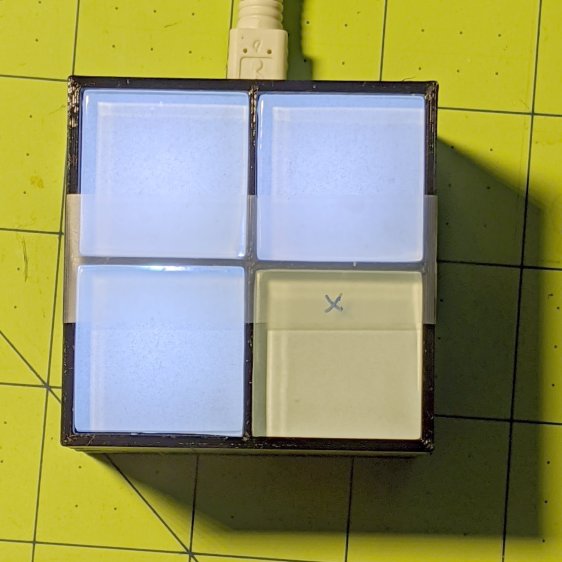
    Which looks like this:

    SK6812 Test Fixture - RGBW color variations - diffuser
    SK6812 Test Fixture – RGBW color variations – diffuser

    The pure RGB colors appear along the bottom row, with the variations proceeding upward to the inverse RGB in the top row. The dust specks show it’s actually in focus.

    The color variations seem easier to see without the diffuser:

    SK6812 Test Fixture - RGBW color variations - bare LEDs
    SK6812 Test Fixture – RGBW color variations – bare LEDs

    The white LEDs are obviously “warm white”, which seems not to make much difference.

    Putting a jumper from D2 to the adjacent (on an Nano, anyway) ground pin selects the original pattern, removing the jumper displays the modified pattern:

    SK6812 test fixture - pattern jumper
    SK6812 test fixture – pattern jumper

    For whatever it’s worth, those LEDs have been running at full throttle for two years with zero failures!

    The Arduino source code as a GitHub Gist:

    // SK6812 RGBW LED array exerciser
    // Ed Nisley – KE4ANU – February 2017
    // 2020-01-25 add row-by-row color modifications
    #include <Adafruit_NeoPixel.h>
    //———-
    // Pin assignments
    const byte PIN_NEO = A3; // DO – data out to first Neopixel
    const byte PIN_HEARTBEAT = 13; // DO – Arduino LED
    const byte PIN_SELECT = 2; // DI – pattern select input
    //———-
    // Constants
    #define UPDATEINTERVAL 20ul
    const unsigned long UpdateMS = UPDATEINTERVAL – 1ul; // update LEDs only this many ms apart minus loop() overhead
    // number of steps per cycle, before applying prime factors
    #define RESOLUTION 100
    // phase difference between LEDs for slowest color
    #define BASEPHASE (PI/16.0)
    // LEDs in each row
    #define NUMCOLS 5
    // number of rows
    #define NUMROWS 5
    #define NUMPIXELS (NUMCOLS * NUMROWS)
    #define PINDEX(row,col) (row*NUMCOLS + col)
    //———-
    // Globals
    // instantiate the Neopixel buffer array
    Adafruit_NeoPixel strip = Adafruit_NeoPixel(NUMPIXELS, PIN_NEO, NEO_GRBW + NEO_KHZ800);
    uint32_t FullWhite = strip.Color(255,255,255,255);
    uint32_t FullOff = strip.Color(0,0,0,0);
    struct pixcolor_t {
    byte Prime;
    unsigned int NumSteps;
    unsigned int Step;
    float StepSize;
    float TubePhase;
    byte MaxPWM;
    };
    // colors in each LED
    enum pixcolors {RED, GREEN, BLUE, WHITE, PIXELSIZE};
    struct pixcolor_t Pixels[PIXELSIZE]; // all the data for each pixel color intensity
    unsigned long MillisNow;
    unsigned long MillisThen;
    //– Figure PWM based on current state
    byte StepColor(byte Color, float Phi) {
    byte Value;
    Value = (Pixels[Color].MaxPWM / 2.0) * (1.0 + sin(Pixels[Color].Step * Pixels[Color].StepSize + Phi));
    // Value = (Value) ? Value : Pixels[Color].MaxPWM; // flash at dimmest points
    // printf("C: %d Phi: %d Value: %d\r\n",Color,(int)(Phi*180.0/PI),Value);
    return Value;
    }
    //– Helper routine for printf()
    int s_putc(char c, FILE *t) {
    Serial.write(c);
    }
    //——————
    // Set the mood
    void setup() {
    pinMode(PIN_HEARTBEAT,OUTPUT);
    digitalWrite(PIN_HEARTBEAT,LOW); // show we arrived
    pinMode(PIN_SELECT,INPUT_PULLUP);
    Serial.begin(57600);
    fdevopen(&s_putc,0); // set up serial output for printf()
    printf("WS2812 / SK6812 array exerciser\r\nEd Nisley – KE4ZNU – February 2017\r\n");
    /// set up Neopixels
    strip.begin();
    strip.show();
    // lamp test: run a brilliant white dot along the length of the strip
    printf("Lamp test: walking white\r\n");
    strip.setPixelColor(0,FullWhite);
    strip.show();
    delay(250);
    for (int i=1; i<NUMPIXELS; i++) {
    digitalWrite(PIN_HEARTBEAT,HIGH);
    strip.setPixelColor(i-1,FullOff);
    strip.setPixelColor(i,FullWhite);
    strip.show();
    digitalWrite(PIN_HEARTBEAT,LOW);
    delay(250);
    }
    strip.setPixelColor(NUMPIXELS – 1,FullOff);
    strip.show();
    delay(250);
    // fill the array, row by row
    printf(" … fill\r\n");
    for (int i=NUMROWS-1; i>=0; i–) { // for each row
    digitalWrite(PIN_HEARTBEAT,HIGH);
    for (int j=NUMCOLS-1; j>=0 ; j–) {
    strip.setPixelColor(PINDEX(i,j),FullWhite);
    strip.show();
    delay(100);
    }
    digitalWrite(PIN_HEARTBEAT,LOW);
    }
    // clear to black, column by column
    printf(" … clear\r\n");
    for (int j=NUMCOLS-1; j>=0; j–) { // for each column
    digitalWrite(PIN_HEARTBEAT,HIGH);
    for (int i=NUMROWS-1; i>=0; i–) {
    strip.setPixelColor(PINDEX(i,j),FullOff);
    strip.show();
    delay(100);
    }
    digitalWrite(PIN_HEARTBEAT,LOW);
    }
    delay(1000);
    // set up the color generators
    MillisNow = MillisThen = millis();
    printf("First random number: %ld\r\n",random(10));
    Pixels[RED].Prime = 3;
    Pixels[GREEN].Prime = 5;
    Pixels[BLUE].Prime = 7;
    Pixels[WHITE].Prime = 11;
    printf("Primes: (%d,%d,%d,%d)\r\n",
    Pixels[RED].Prime,Pixels[GREEN].Prime,Pixels[BLUE].Prime,Pixels[WHITE].Prime);
    unsigned int PixelSteps = (unsigned int) ((BASEPHASE / TWO_PI) *
    RESOLUTION * (unsigned int) max(max(max(Pixels[RED].Prime,Pixels[GREEN].Prime),Pixels[BLUE].Prime),Pixels[WHITE].Prime));
    printf("Pixel phase offset: %d deg = %d steps\r\n",(int)(BASEPHASE*(360.0/TWO_PI)),PixelSteps);
    Pixels[RED].MaxPWM = 255;
    Pixels[GREEN].MaxPWM = 255;
    Pixels[BLUE].MaxPWM = 255;
    Pixels[WHITE].MaxPWM = 32;
    for (byte c=0; c < PIXELSIZE; c++) {
    Pixels[c].NumSteps = RESOLUTION * (unsigned int) Pixels[c].Prime;
    Pixels[c].Step = (3*Pixels[c].NumSteps)/4;
    Pixels[c].StepSize = TWO_PI / Pixels[c].NumSteps; // in radians per step
    Pixels[c].TubePhase = PixelSteps * Pixels[c].StepSize; // radians per tube
    printf("c: %d Steps: %5d Init: %5d",c,Pixels[c].NumSteps,Pixels[c].Step);
    printf(" PWM: %3d Phi %3d deg\r\n",Pixels[c].MaxPWM,(int)(Pixels[c].TubePhase*(360.0/TWO_PI)));
    }
    }
    //——————
    // Run the mood
    void loop() {
    MillisNow = millis();
    if ((MillisNow – MillisThen) > UpdateMS) {
    digitalWrite(PIN_HEARTBEAT,HIGH);
    unsigned int AllSteps = 0;
    for (byte c=0; c < PIXELSIZE; c++) { // step to next increment in each color
    if (++Pixels[c].Step >= Pixels[c].NumSteps) {
    Pixels[c].Step = 0;
    printf("Color %d steps %5d at %8ld delta %ld ms\r\n",c,Pixels[c].NumSteps,MillisNow,(MillisNow – MillisThen));
    }
    AllSteps += Pixels[c].Step; // will be zero only when all wrap at once
    }
    if (0 == AllSteps) {
    printf("Grand cycle at: %ld\r\n",MillisNow);
    }
    if (digitalRead(PIN_SELECT)) {
    for (int col=0; col < NUMCOLS ; col++) { // for each column
    byte Value[PIXELSIZE]; // figure first row colors
    for (byte p=0; p < PIXELSIZE; p++) { // … for each color in pixel
    Value[p] = StepColor(p,-col*Pixels[p].TubePhase);
    }
    // just RGB
    int row = 0;
    uint32_t UniColor = strip.Color(Value[RED],Value[GREEN],Value[BLUE],0);
    strip.setPixelColor(col + NUMCOLS*row++,UniColor);
    byte MinWhite = min(min(Value[RED],Value[GREEN]),Value[BLUE]);
    // only common white
    UniColor = strip.Color(0,0,0,MinWhite);
    strip.setPixelColor(col + NUMCOLS*row++,UniColor);
    // RGB minus common white + white
    UniColor = strip.Color(Value[RED]-MinWhite,Value[GREEN]-MinWhite,Value[BLUE]-MinWhite,MinWhite);
    strip.setPixelColor(col + NUMCOLS*row++,UniColor);
    // RGB minus common white
    UniColor = strip.Color(Value[RED]-MinWhite,Value[GREEN]-MinWhite,Value[BLUE]-MinWhite,0);
    strip.setPixelColor(col + NUMCOLS*row++,UniColor);
    // inverse RGB
    UniColor = strip.Color(255 – Value[RED],255 – Value[GREEN],255 – Value[BLUE],0);
    strip.setPixelColor(col + NUMCOLS*row++,UniColor);
    }
    }
    else {
    for (int k=0; k < NUMPIXELS; k++) { // for each pixel
    byte Value[PIXELSIZE];
    for (byte c=0; c < PIXELSIZE; c++) { // … for each color
    Value[c] = StepColor(c,-k*Pixels[c].TubePhase); // figure new PWM value
    // Value[c] = (c == RED && Value[c] == 0) ? Pixels[c].MaxPWM : Value[c]; // flash highlight for tracking
    }
    uint32_t UniColor = strip.Color(Value[RED],Value[GREEN],Value[BLUE],Value[WHITE]);
    strip.setPixelColor(k,UniColor);
    }
    }
    strip.show();
    MillisThen = MillisNow;
    digitalWrite(PIN_HEARTBEAT,LOW);
    }
    }

  • Raspberry Pi Shutdown / Start Button

    While adding the usual Reset button to a Raspberry Pi destined for a Show-n-Tell with the HP 7475A plotter, I browsed through the latest dtoverlay README and found this welcome surprise:

    Name:   gpio-shutdown
    Info:   Initiates a shutdown when GPIO pin changes. The given GPIO pin
            is configured as an input key that generates KEY_POWER events.
            This event is handled by systemd-logind by initiating a
            shutdown. Systemd versions older than 225 need an udev rule
            enable listening to the input device:
    
                    ACTION!="REMOVE", SUBSYSTEM=="input", KERNEL=="event*", \
                            SUBSYSTEMS=="platform", DRIVERS=="gpio-keys", \
                            ATTRS{keys}=="116", TAG+="power-switch"
    
            This overlay only handles shutdown. After shutdown, the system
            can be powered up again by driving GPIO3 low. The default
            configuration uses GPIO3 with a pullup, so if you connect a
            button between GPIO3 and GND (pin 5 and 6 on the 40-pin header),
            you get a shutdown and power-up button.
    Load:   dtoverlay=gpio-shutdown,<param>=<val>
    Params: gpio_pin                GPIO pin to trigger on (default 3)
    
            active_low              When this is 1 (active low), a falling
                                    edge generates a key down event and a
                                    rising edge generates a key up event.
                                    When this is 0 (active high), this is
                                    reversed. The default is 1 (active low).
    
            gpio_pull               Desired pull-up/down state (off, down, up)
                                    Default is "up".
    
                                    Note that the default pin (GPIO3) has an
                                    external pullup.
    
            debounce                Specify the debounce interval in milliseconds
                                    (default 100)

    So I added two lines to /boot/config.txt:

    dtoverlay=gpio-shutdown
    dtparam=act_led_trigger=heartbeat

    The fancy “Moster heatsink” case doesn’t leave much room for wiring:

    RPi Shutdown Restart Switch - GPIO 3
    RPi Shutdown Restart Switch – GPIO 3

    The switch button is slightly shorter than the acrylic sheet, so it’s recessed below the surface and requires a definite push to activate. It’s not as if it’ll get nudged by accident, but ya never know.

    I’ll eventually migrate this change to all the RPi boxes around the house, because it just makes more sense than any of the alternatives. Heck, it’ll free up a key on the streaming radio player keypads, although I must move the I²C display to Bus 0 to avoid contention on Pin 3.

    For reference, the Raspberry Pi header pinout:

    Raspberry Pi pinout
    Raspberry Pi pinout

    I don’t know if I²C Bus 0 has the same 1.8 kΩ pullups as Bus 1, though; a look at the bus currents will be in order.

  • Baofeng Bike Helmet Headset Wiring Repair

    The audio output wire from the Baofeng UV-5R to my bike helmet headset adapter broke after a year and a half, far longer than I expected:

    Baofeng - broken spkr wire
    Baofeng – broken spkr wire

    It’s the green one, over on the left, pulled out of the heatstink tubing that should have provided some strain relief, having broken at the solder joint to the resistor.

    A quick & easy fix, after which I reapplied even more tape to hold everything in place.

    Maybe it’ll last two years this time around …

  • Photo Lamp Mount: Moah Plastic!

    One of the cold shoe mounts I made for the photo lamps cracked:

    Photo Lamp Mount - fractured
    Photo Lamp Mount – fractured

    It’s done in PETG with my more-or-less standard two perimeter threads and 15% 3D honeycomb infill, which is Good Enough™ for most of my parts. In this case, there’s obviously not nearly enough plastic in there!

    Redoing it with three perimeters and 50% infill should improve the situation, even though it looks identical on the outside:

    Photo Lamp Mount - reinstalled
    Photo Lamp Mount – reinstalled

    I didn’t replace the other mount. If it breaks, it’ll get the same 50% infill as this one. If this one breaks, I’ll try 75%.

    An easy fix!

  • Blackburn Flea Bike Headlight

    A Blackburn Flea bike headlight and its USB charger emerged from the packs on our Young Engineer’s Tour Easy, but the battery was completely defunct. With nothing to lose, I applied a small screwdriver to crack the case:

    Blackburn Flea - opening case
    Blackburn Flea – opening case

    The battery is a single cylindrical lithium cell:

    Blackburn Flea - battery
    Blackburn Flea – battery

    The USB charger seemed defunct, as it produced only a few dozen millivolts when connected and plugged into its wall wart. Cracking its case revealed a tiny buck power supply with no obvious damage, but also no output.

    So I manually charged the cell:

    Blackburn Flea - external recharge
    Blackburn Flea – external recharge

    Definitely not recommended practice, but a bench supply set to 4.1 V and current-limited to 100 mA gets the job done: the current stays at 100 mA while the voltage rises to 4.1 V, then the current drops to just about zero over the next few hours with cell held at 4.1 V.

    Unfortunately, the cell really was defunct, even after a few cycles, so I conjured a not-dead-yet lithium cell from the heap:

    Blackburn Flea - measurement setup
    Blackburn Flea – measurement setup

    Given a good supply, the Flea still works perfectly:

    Blackburn Headlight - Kyocera Li-ion - 50 mA-div
    Blackburn Headlight – Kyocera Li-ion – 50 mA-div

    The yellow trace shows the battery holding at 4 V while the LED current runs at 150 mA (3 div × 50 mA/div). You wouldn’t want to run ordinary 5 mm LEDs at nearly 40 mA, but Blackburn surely specified good parts.

    Replacing the Flea’s internal cell seems impossible, given its peculiar form factor, and grafting the PCB to an external cell makes no sense, given that it’d then need a custom bike mount.

    So another chunk of electronics goes in the e-waste box.

    Ride on!