The Smell of Molten Projects in the Morning

Ed Nisley's Blog: Shop notes, electronics, firmware, machinery, 3D printing, laser cuttery, and curiosities. Contents: 100% human thinking, 0% AI slop.

Category: Electronics Workbench

Electrical & Electronic gadgets

  • Discrete LM3909 Blue LED: Off at 1.0 V

    Discrete LM3909 Blue LED: Off at 1.0 V

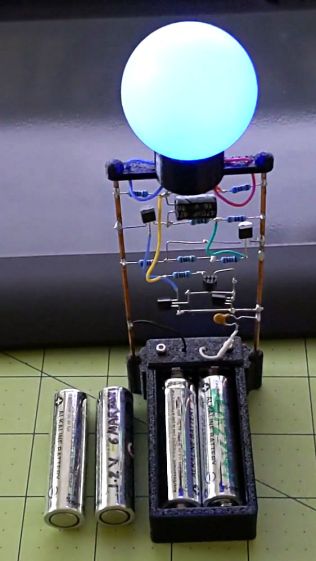
    The blue LED inside the radome got fainter as the alkaline AA cells faded away, but remained visible in a dark room until the discrete LM3909 circuitry stopped oscillating with the battery at 1.0 V. One of the cells had flatlined, with the other supplying what little current was needed.

    The circuitry restarted with a pair of weak alkalines applying 2.4 V across the bus bars:

    LM3909 Blue - 2.4 V alkaline
    LM3909 Blue – 2.4 V alkaline

    The LED waveform shows it needs about 2 V:

    LM3909 Blue - 2.4 V alkaline
    LM3909 Blue – 2.4 V alkaline

    It’s barely visible in normal room light and strikingly bright at night.

  • Juki JC-001 Foot Control: Resolving Uncommanded Thread Cutting

    Juki JC-001 Foot Control: Resolving Uncommanded Thread Cutting

    Mary’s most recent quilt arranges her color choices in Judy Niemeyer’s Stellar Snowflake pattern:

    Stellar Snowflake Quilt - in progress
    Stellar Snowflake Quilt – in progress

    Her Juki TL-2010Q sewing machine has a built-in thread cutter activated by pressing down on the heel end (to the left) of the foot control:

    Juki JC-001 Foot Control - overview
    Juki JC-001 Foot Control – overview

    The machine had previously performed “uncommanded” thread cuts on other projects, but the many short segments in this pattern triggered far too many cuts. I aimed a camera at her foot on the pedal and she was definitely not pressing down with her heel when the cutter fired.

    In point of fact, the thread cutter fired when she was just starting a new segment, where she was gently pressing down on the toe end (to the right) of the pedal to start at the slowest possible speed.

    For completeness, the underside of the pedal:

    Juki JC-001 Foot Control - bottom
    Juki JC-001 Foot Control – bottom

    There are no screws holding it together. The top cover pivots on a pair of plastic pegs sticking out from the base near the middle of the cable spool. Disassembly requires jamming a pair of husky Prydrivers in there and applying enough brute force to pry both sides outward farther than you (well, I) think they should bend. This will scar the bottom of the case, but nobody will ever notice.

    The foot control cable plugs into the machine through what looks like an ordinary two-conductor coax plug, just like the ones on wall warts delivering power to gadgets around the house. In this day and age, the communications protocol could be anything from a simple resistor to a full-frontal 1-Wire encrypted data exchange.

    Based on the old Kenmore foot pedals, I expected a resistive control and, indeed, a simple test gave these results:

    • Idle = 140 kΩ
    • Heel pressed (cut) = 46 kΩ
    • Toe slight press (slow running) = 20 kΩ
    • Toe full press (fast running) = 0.2 kΩ

    We can all see where this is going, but just to be sure I pried the top off the control to reveal the insides:

    Juki JJC-001 Foot Control - interior
    Juki JJC-001 Foot Control – interior

    The two cylindrical features capture the ends of a pair of stiff compression springs pressing the top of the pedal upward.

    The small, slightly stretched, extension spring in the middle pulls the slider to the left (heelward), with a ramp in the top cover forcing it to the right (toeward) as the speed increases.

    The top cover includes a surprisingly large hunk of metal which may provide enough mass to make the pedal feel good:

    Juki JC-001 Foot Control - top underside
    Juki JC-001 Foot Control – top underside

    The ramp is plastic and the slider has a pair of nylon (-ish) rollers, so there’s not much friction involved in the speed control part of motion. Yes, this is oriented the other way, with the heel end over on the right.

    The metal insert pivots in the serrated plastic section near the middle, with the two husky extension springs visible on the left holding it against the plastic cover. The two rectangular features on the left rest under the plastic flanges on the right of the base to prevent the metal insert from moving upward, so pressing the heel end down pulls the cover away from the insert to let the slider rollers move toward the right end of the ramp, into roughly the position shown in the interior view.

    A closeup look at the slider shows the rollers and the PCB holding all of the active ingredients:

    Juki JC-001 Foot Control - Resistor Slider
    Juki JC-001 Foot Control – Resistor Slider

    I think the trimpot adjusts the starting resistance for the slider’s speed control travel. It is, comfortingly, roughly in the middle of its range.

    A top view shows the fixed 140 kΩ resistor (brown yellow black orange, reading from the right) setting the idle resistance:

    Juki JC-001 Foot Control - PCB top view
    Juki JC-001 Foot Control – PCB top view

    Measuring the resistance while gently teasing the slider showed that it’s possible to produce a resistance higher than 20 kΩ and lower than 140 kΩ, although it requires an exceedingly finicky touch and is completely unstable.

    Before looking inside the pedal, we thought the cutter was triggered by an actual switch closure with the heel end most of the way downward against those stiff springs, which meant the failure came from a switch glitch. Now, we think the earlier and infrequent uncommanded thread cuts trained Mary to start very carefully to be very sure she wasn’t glitching the cutter’s hypothetical switch. Of course, her gradually increasing toe pressure moved the slider very slowly through its idle-to-running transition: she was optimizing her behavior to produce exactly the resistance required to trigger the cutter.

    She now sets the machine’s speed control midway between Turtle and Hare to limit its top speed, presses the pedal with more confidence to minimize the time spent passing through the danger zone, and has had far few uncommanded thread cuts. We think it’s now a matter of retraining her foot to stomp with conviction; there’s no hardware or software fix.

    I’m sure Juki had a good reason to select the resistances they did, but I would have gone for a non-zero minimum resistance at the fast end of travel and a zero-resistance switch to trigger the cutter.

  • Mesa 5i25 Superport: Reflash and Step-Direction Pin Swap

    Mesa 5i25 Superport: Reflash and Step-Direction Pin Swap

    For reasons lost in the mists of time, the DB-25 pinout used in the Sherline CNC Driver Box is kinda-sorta the same as everybody else’s DB-25 pinout, with minor difference of swapping the Step and Direction pins on each axis. This made no difference with the LinuxCNC parallel port driver, because (nearly) all pins are alike to it, but having recently found the Mesa 5i25 Everything I/O card and being desirous of upgrading to the latest & Greatest LinuxCNC, I figured why not throw all the balls in the air at once?

    Although it’s theoretically possible to recompile the FPGA source code to swap the pins, the least horrible alternative was converting a null modem (remember null modems?) into a passthrough pinswapper:

    DB-25 Parallel Adapter - Step-Direction pin swap
    DB-25 Parallel Adapter – Step-Direction pin swap

    Make sure you put jumper W2 in the DOWN position to route pins 22-25 to DC ground, rather than +5 V. W1 does the same for the internal header, herein unused, but it’s in the same position just for neatness.

    Similarly, put both W3 and W4 in their UP position to enable +5 V tolerance, connect the pullups to +5 V, and enable the pullups, thereby keeping the Sherline logic happy.

    Jumper W5 must be UP in order to have the thing work.

    The relevant diagram:

    Mesa 5i25 - jumper locations
    Mesa 5i25 – jumper locations

    Flashing the 5i25 with the Probotix PBX-RF firmware produced the best fit to a simple parallel port:

    sudo mesaflash --verbose --device 5i25 --write 5i25/configs/hostmot2/5i25_prob_rfx2.bit
    sudo mesaflash --verbose --device 5i25 --reload
    

    The mesaflash utility and all the BIT files come from their 5i25.zip file with all the goodies.

    The Gecko G540 pinout came in a close second and, should the Sherline box go toes-up, I’ll probably replace it with a G540 and (definitely) rewire the steppers from Sherline’s unipolar drive to bipolar drive mode.

    The 5i25 pinout now looks like this:

    halrun
    
    halcmd: loadrt hostmot2
    Note: Using POSIX realtime
    hm2: loading Mesa HostMot2 driver version 0.15
    
    halcmd: loadrt hm2_pci
    hm2_pci: loading Mesa AnyIO HostMot2 driver version 0.7
    hm2_pci: discovered 5i25 at 0000:04:02.0
    hm2/hm2_5i25.0: Low Level init 0.15
    hm2/hm2_5i25.0: 34 I/O Pins used:
    hm2/hm2_5i25.0:     IO Pin 000 (P3-01): IOPort
    hm2/hm2_5i25.0:     IO Pin 001 (P3-14): PWMGen #0, pin Out0 (PWM or Up) (Output)
    hm2/hm2_5i25.0:     IO Pin 002 (P3-02): StepGen #0, pin Step (Output)
    hm2/hm2_5i25.0:     IO Pin 003 (P3-15): IOPort
    hm2/hm2_5i25.0:     IO Pin 004 (P3-03): StepGen #0, pin Direction (Output)
    hm2/hm2_5i25.0:     IO Pin 005 (P3-16): PWMGen #0, pin Out1 (Dir or Down) (Output)
    hm2/hm2_5i25.0:     IO Pin 006 (P3-04): StepGen #1, pin Step (Output)
    hm2/hm2_5i25.0:     IO Pin 007 (P3-17): IOPort
    hm2/hm2_5i25.0:     IO Pin 008 (P3-05): StepGen #1, pin Direction (Output)
    hm2/hm2_5i25.0:     IO Pin 009 (P3-06): StepGen #2, pin Step (Output)
    hm2/hm2_5i25.0:     IO Pin 010 (P3-07): StepGen #2, pin Direction (Output)
    hm2/hm2_5i25.0:     IO Pin 011 (P3-08): StepGen #3, pin Step (Output)
    hm2/hm2_5i25.0:     IO Pin 012 (P3-09): StepGen #3, pin Direction (Output)
    hm2/hm2_5i25.0:     IO Pin 013 (P3-10): IOPort
    hm2/hm2_5i25.0:     IO Pin 014 (P3-11): Encoder #0, pin A (Input)
    hm2/hm2_5i25.0:     IO Pin 015 (P3-12): Encoder #0, pin B (Input)
    hm2/hm2_5i25.0:     IO Pin 016 (P3-13): Encoder #0, pin Index (Input)
    hm2/hm2_5i25.0:     IO Pin 017 (P2-01): IOPort
    hm2/hm2_5i25.0:     IO Pin 018 (P2-14): PWMGen #1, pin Out0 (PWM or Up) (Output)
    hm2/hm2_5i25.0:     IO Pin 019 (P2-02): StepGen #4, pin Step (Output)
    hm2/hm2_5i25.0:     IO Pin 020 (P2-15): IOPort
    hm2/hm2_5i25.0:     IO Pin 021 (P2-03): StepGen #4, pin Direction (Output)
    hm2/hm2_5i25.0:     IO Pin 022 (P2-16): PWMGen #1, pin Out1 (Dir or Down) (Output)
    hm2/hm2_5i25.0:     IO Pin 023 (P2-04): StepGen #5, pin Step (Output)
    hm2/hm2_5i25.0:     IO Pin 024 (P2-17): IOPort
    hm2/hm2_5i25.0:     IO Pin 025 (P2-05): StepGen #5, pin Direction (Output)
    hm2/hm2_5i25.0:     IO Pin 026 (P2-06): StepGen #6, pin Step (Output)
    hm2/hm2_5i25.0:     IO Pin 027 (P2-07): StepGen #6, pin Direction (Output)
    hm2/hm2_5i25.0:     IO Pin 028 (P2-08): StepGen #7, pin Step (Output)
    hm2/hm2_5i25.0:     IO Pin 029 (P2-09): StepGen #7, pin Direction (Output)
    hm2/hm2_5i25.0:     IO Pin 030 (P2-10): IOPort
    hm2/hm2_5i25.0:     IO Pin 031 (P2-11): Encoder #1, pin A (Input)
    hm2/hm2_5i25.0:     IO Pin 032 (P2-12): Encoder #1, pin B (Input)
    hm2/hm2_5i25.0:     IO Pin 033 (P2-13): Encoder #1, pin Index (Input)
    hm2/hm2_5i25.0: registered
    hm2_5i25.0: initialized AnyIO board at 0000:04:02.0

    P3 is the DB-25 on the back panel and P2 is the internal IDC header.

  • X10 RR501 Transceiver: Heat Death

    X10 RR501 Transceiver: Heat Death

    Must be something in the air:

    X10 RR501 Transceiver - overheated Zener
    X10 RR501 Transceiver – overheated Zener

    Another overheated Zener in another shunt power supply!

    This BZY97C is still a diode, although I didn’t test its 68 V breakdown spec. I have no idea what they’re doing with that much juice inside an X10 RF box and have nowhere near enough interest to find out.

    It still doesn’t work after a Laying On of Hands: out it goes.

  • Fuvaly Bucked Lithium AA Cells

    Behold lithium battery technology, a USB charger, and a buck voltage converter mashed into an AA alkaline package:

    Fuvaly Bucked Lithium AA - label
    Fuvaly Bucked Lithium AA – label

    Those are two of a quartet bought from a randomly named Amazon seller to appease my ancient venerable classic Sony DSC-H5’s need for more voltage than new and freshly charged NiMH AA cells can provide for more than a few tens of minutes.

    The label claims 1500 mA·h, not the 1120 mA·h I measured:

    Fuvaly Bucked Li AA - mAh - 2021-02
    Fuvaly Bucked Li AA – mAh – 2021-02

    My numbers would be higher with a load less than 500 mA. I doubt the 2.5 A maximum current rating.

    The claim of 2.25 W·h is rather optimistic:

    Fuvaly Bucked Li AA - 2021-02
    Fuvaly Bucked Li AA – 2021-02

    Back of the envelope: 2.25 W·h at 1.5 V equals 1.5 A·h, all right. If you squint carefully, though, the output voltages run around 1.4 V, some of which is surely IR drop in my battery holder & test wiring, but it still knocks nearly 10% off the wattage and doesn’t seem to add to the runtime.

    The camera’s battery charge indicator will obviously show Full right up until it shuts off, but I’ve always carried a spare pair of cells in my pocket anyway.

    Recharging them with a USB meter in series required 425 to 600 mA·h at about 4.8 V, so about 2.5 W·h.

    Enlarging the instructions from the back of the box, should they become useful:

    Fuvaly Bucked Lithium AA - Instructions
    Fuvaly Bucked Lithium AA – Instructions

    Nowhere does the package mention the “brand name”, manufacturer, specifications, or much of anything substantial. I suppose anybody selling white-label products appreciates this level of detail.

  • Audio Amp vs. Bananas

    Audio Amp vs. Bananas

    A low-end audio power amp destined for a pair of ancient-yet-still-serviceable speakers arrived, but attempting to poke wires through the side holes of the banana jacks showed they were oriented in random directions. Back in the day, banana jacks had D-shaped shafts fitted into D-shaped panel holes, but those days are gone.

    A few minutes with screwdriver, wrench, and (tiny) punch sufficed to line up the holes for E-Z poking:

    Fosi audio amp - jack alignment
    Fosi audio amp – jack alignment

    Despite the new convenience, I decided to solder banana plugs to the speaker wires, leading to the discovery my few remaining plugs came from the very bottom of the usability barrel:

    Cheap banana plug - solder side
    Cheap banana plug – solder side

    I have no idea how one might affix a wire to that blank stub, but poking a small center drill into the brass lump produces an easily solderable recess:

    Cheap banana plug - center drilled
    Cheap banana plug – center drilled

    Dab with flux, tin, insert wire, add solder, repeat with all four plugs, and I’m set with a boomin’ system.

  • LED Bulb: Mechanical FAIL

    LED Bulb: Mechanical FAIL

    Replacing the second torchiere lamp shade required unscrewing its 100 W equivalent LED bulb, which required far too many turns and eventually felt sufficiently wrong to reveal the problem:

    LED Bulb - unscrewed base
    LED Bulb – unscrewed base

    The entire metal base shell unscrewed from the plastic housing and twisted off the lead from what looks like a PTC fuse in series with the center contact; the cute little pigtail effect suggests I’ve wrecked the epoxy-to-wire seal.

    It had a five year warranty which, alas, expired three years ago. This style of bulb has fallen out of favor, so I may as well get some Quality Shop Time out of it.

    I don’t know how the factory machinery attached the lead to the contact button, but I’m going to go primal on it with some solder. The trick will be soldering it after assembly, so the first step is to drill through the middle of the button.

    Grab it nose-down in the Sherline’s three-jaw chuck, flip it over, grab the chuck in the drill press vise, line it up, center-drill the button, then drill right through that sucker:

    LED Bulb - base drilling setup
    LED Bulb – base drilling setup

    Of course, the contact came loose from the base, because I pretty much drilled right through the rivet flange holding it in place:

    LED Bulb - removed center contact
    LED Bulb – removed center contact

    Nothing a dab of epoxy can’t fix, though. I scuffed up the outside of the contact to remove the nickel (?) plating and expose the underlying brass to improve its solderability.

    After the epoxy cured, align wire with hole, screw the base onto the lamp shell, and it’s ready for soldering:

    LED Bulb - base ready for solder
    LED Bulb – base ready for solder

    The hole is way too large for the wire, but I wasn’t about to wreck a tiny drill on what might have been a weld nugget. In any event, the bigger the blob, the better the job:

    LED Bulb - soldered base
    LED Bulb – soldered base

    Just like light bulb bases used to look, back in the day.

    With a bit of luck, it’ll sit in that socket for another seven years.

    It could happen, ya never know.