Ed Nisley's Blog: Shop notes, electronics, firmware, machinery, 3D printing, laser cuttery, and curiosities. Contents: 100% human thinking, 0% AI slop.
One of the battery packs powering the GPS+audio interface on our bikes has completely failed, with zero volts at the output and no charge indication. The other five chug along as well as can be expected:
Initial-brand DVD External Packs – 2013-11
The push-to-test button on Pack 4 has become increasingly erratic over the last few months, rendering the charge status LEDs mostly useless, so it has two curves: the lower capacity came directly from the bike, the higher hot off the charger.
For reference, here’s what they looked like in May 2012:
External Li-Ion packs – 2012-05
And right after they arrived:
Initial External Li-Ion packs
Given their nearly constant use and charge cycling, I’m impressed.
The trio of batteries I built for the Sony DSC-F505V two years ago faded away; that camera seems particularly hard on the batteries, perhaps because they’re two cells in parallel that don’t share well. Two of the three seem pretty well gone:
Sony NP-FS11 2011 Packs – 2013-11 tests
Back then, I bought 12 cells, built six into those batteries, and left six charged cells sitting in a bag. After rebuilding the two worst batteries with those new-old-stock cells, it seems they maintained a substantial fraction of their charge while resting in the cool and the dark:
Sony NP-FS11 2011 Cells – 2013 packs – 2013-11-24
However, the camera would regard them as discharged, because it infers charge state from voltage. Squinting at the curves, their condition after a few minutes is roughly equal to a new & freshly charged battery produces over on the right when it’s nearly discharged.
The other curves show the result after their first charge in two years: basically, full capacity. The fact that both pairs of curves come pretty close to overlaying means they’re still well matched.
Sony NP-FS11 batteries – rebuilt
The third cell isn’t up to their spec, but it’s close enough to not bother rebuilding right now: 1.2 vs 1.4 A·h.
The Kapton tape pull tabs work wonderfully well, as the rebuilt batteries fit the compartment rather more snugly than the un-hacked cases.
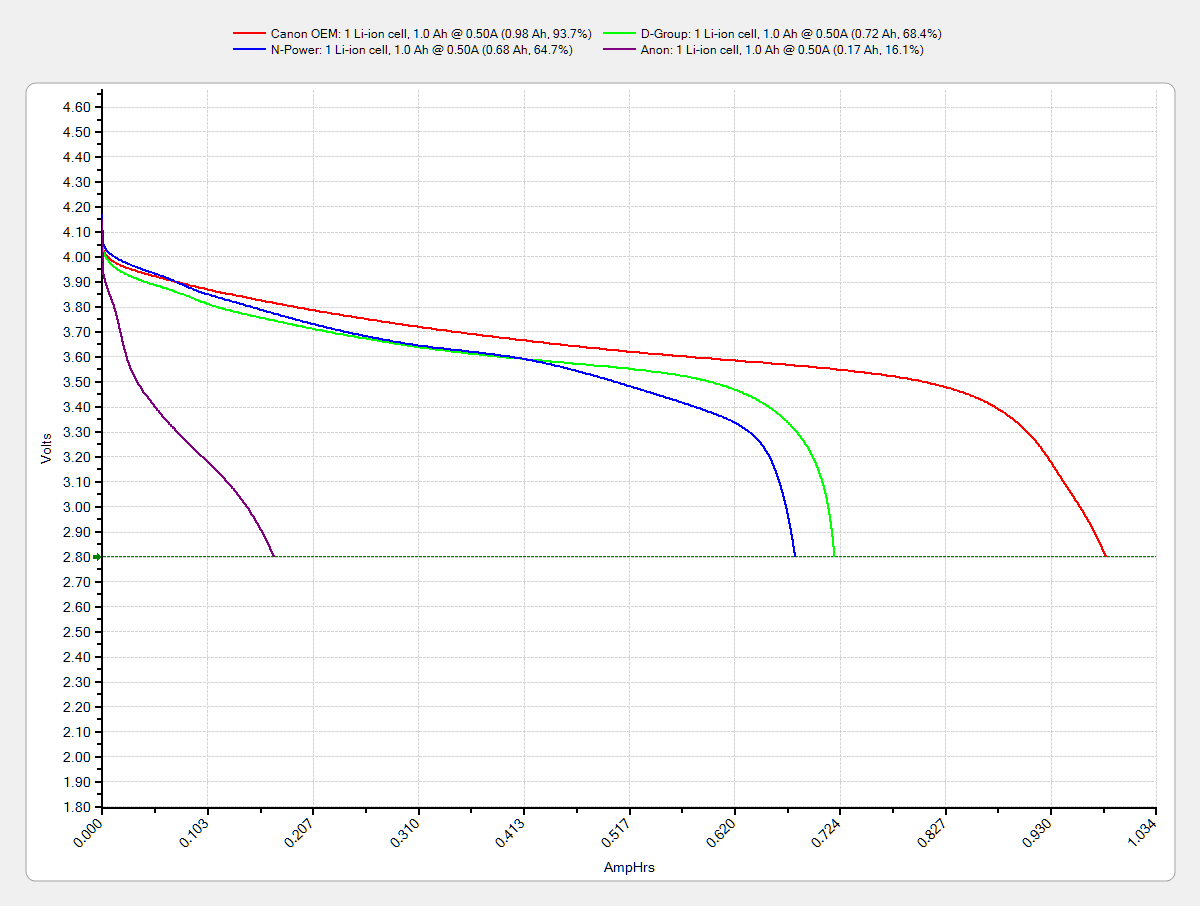
One of the junker NB-5L eBay batteries for my Canon SX-230HS pocket camera gave up, but the other two have some usable capacity left. The OEM Canon battery seems to be doing fine, perhaps because it sees a relatively low duty cycle:
The whole point of the Hall effect current sensor was to get a reasonably efficient linear LED driver that could control the LED current until the battery voltage matched the LED forward drop. Based on the preliminary firmware, it works pretty well.
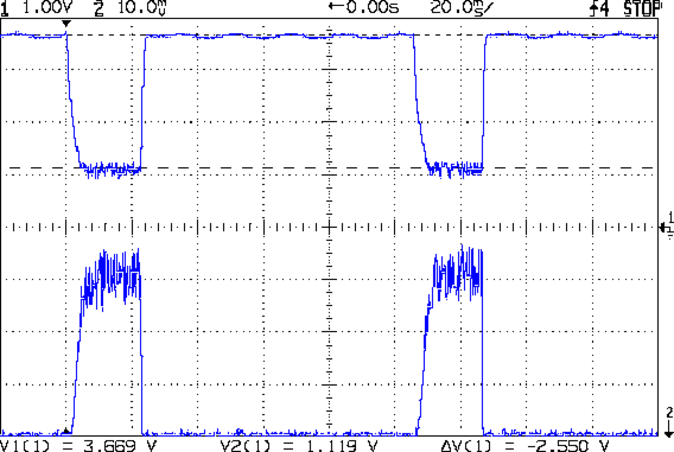
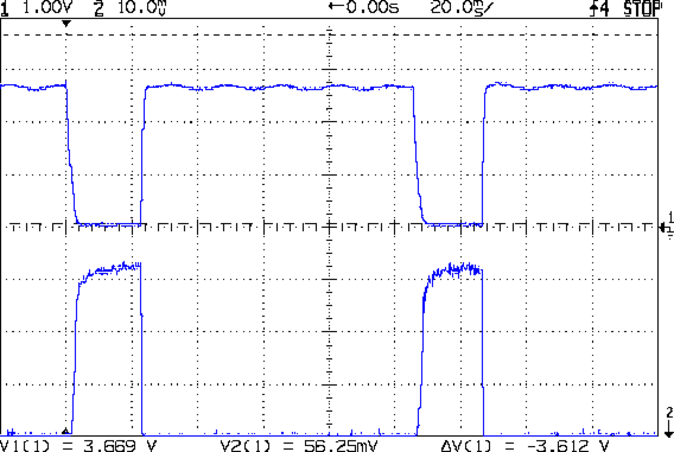
With a setpoint of 160 mA, the current stabilizes around 150 mA due to the Arduino’s 0.4% PWM resolution. It steps back and forth between 150 and 190 mA as the loop bumps the PWM by one count; these scope shots came from the lower current passes.
At 8.4 V from the bench supply, the MOSFET sees about 2 V. The top trace is the drain voltage, the bottom is LED current at 50 mA/div:
VIN 8.4 V – VD ILED 50 mA-div
At 7.4 V, close to the nominal voltage during most of the discharge curve, the drain sees about 1 V:
VIN 7.4 V – VD ILED 50 mA-div
And at 6.4 V, even though the drain voltage hits zero, the current remains around 150 mA:
VIN 6.4 V – VD ILED 50 mA-div
Admittedly, down there the loop doesn’t have much in the way of control authority, but I planned to turn the lights out at about that point, anyway.
The driver efficiency is 86% at 7.4 V and it’s pretty nearly 100% at 6.4 V.
Of course, the Hall effect circuitry and Arduino Pro Mini soak up another 40 mA or so, so (assuming a 10% duty cycle) the overall efficiency is down around 70%, but that’s including the debugging LEDs and suchlike, so some tweaking is in order.
While reducing the clutter atop the Electronics Workbench, I ran off four more probe flange reinforcements, just so I’m ready for the next crunch:
HP scope probe flange disks
They’re almost identical to the previous version, although I tweaked the taper to end slightly inside the cylindrical cup, thereby eliminating the coincident faces and leaving a minute rim that doesn’t matter:
HP Scope Probe Flange Repair – bottom
Given that I’ve had the ‘scope for nigh onto two decades and have only broken one probe flange, I think four reinforcements will be a lifetime supply: with any luck, the scope will blow a capacitor before I do.
The OpenSCAD source code:
// Tek Scope Probe Flange
// Ed Nisley KE4ZNU November 2013

//- Extrusion parameters must match reality!
//  Print with 2 shells and 3 solid layers

ThreadThick = 0.20;
ThreadWidth = 0.40;

HoleWindage = 0.2;

Protrusion = 0.1;            // make holes end cleanly

function IntegerMultiple(Size,Unit) = Unit * ceil(Size / Unit);

//----------------------
// Dimensions

FlangeOD = 16.0;
FlangeID = 8.75;
FlangeThick = IntegerMultiple(1.25,ThreadThick);

DiskOD = FlangeOD + 4*ThreadWidth;
DiskThick = FlangeThick + 4*ThreadThick;

NumSides = 8*4;

//----------------------
// Useful routines

module PolyCyl(Dia,Height,ForceSides=0) {            // based on nophead's polyholes

Sides = (ForceSides != 0) ? ForceSides : (ceil(Dia) + 2);

FixDia = Dia / cos(180/Sides);

cylinder(r=(FixDia + HoleWindage)/2,
h=Height,
$fn=Sides);
}

module ShowPegGrid(Space = 10.0,Size = 1.0) {

Range = floor(50 / Space);

for (x=[-Range:Range])
for (y=[-Range:Range])
translate([x*Space,y*Space,Size/2])
%cube(Size,center=true);

}

//----------------------
// Build it

ShowPegGrid();

difference() {
union() {
translate([0,0,2*ThreadThick])
cylinder(r=DiskOD/2,h=DiskThick,$fn=NumSides);    // cylinder around flange

cylinder(r1=(DiskOD - 2*ThreadWidth)/2,                // flange reinforcing plate
r2=DiskOD/2,
h=(2*ThreadThick + Protrusion),
$fn=NumSides);
}
translate([0,0,(DiskThick - FlangeThick)])                // flange clearance
PolyCyl(FlangeOD,2*FlangeThick,NumSides);

translate([0,0,-DiskThick/2])                            // probe nose clearance
PolyCyl(FlangeID,2*DiskThick,NumSides);
}
//-- Read AI channel
//      averages several readings to improve noise performance
//		returns value in volts assuming known VCC ref voltage

#define NUM_T_SAMPLES    10

float ReadAI(byte PinNum) {

  word RawAverage;

  digitalWrite(PIN_SYNC,HIGH);					// scope sync

  RawAverage = (word)analogRead(PinNum);		// prime the averaging pump

  for (int i=2; i <= NUM_T_SAMPLES; i++) {
    RawAverage += (word)analogRead(PinNum);
  }

  digitalWrite(PIN_SYNC,LOW);

  RawAverage /= NUM_T_SAMPLES;

  return Vcc * (float)RawAverage / 1024.0;

}
The PIN_SYNC output produces the upper trace, with the LED current in the lower trace at 50 mA/div:
Arduino Analog 10x sample avg – ILED 50 mA-div
In round numbers, ten samples require 1.1 ms and cover about 35 PWM pulses (using 32 kHz PWM, as you really should if you need an actual analog voltage).
Because the samples occur asynchronously with respect to the PWM pulses, the computed average comes out surprisingly close to the actual average. Fewer samples would probably be just as good, but I’m in no hurry.
VG 1193 mV – ID 50 mA-div – 1 ms PWM filter – overview
The top trace is the gate drive at 200 mV/div, the bottom trace is the LED current at 50 mA/div. Expanding the timebase gives a closer look at the fuzz:
VG 1193 mV – ID 50 mA-div – 1 ms PWM filter
Yup, that’s what deriving an analog voltage from a PWM output looks like. Verily, you’re seeing a 32 kHz PWM passed through a 1 ms = 160 Hz low-pass RC filter; the PWM frequency is 2 decades + 1 octave above the filter, so the 5 Vpp digital signal should be down 46 dB. Squinting at the ripple, it’s maybe 40 mV = -42 dB, which is certainly close enough, all things considered.
The MOSFET controlling the LED current operates in its linear region (the whole point of this exercise!) and acts as a Class A amplifier. The datasheet says the forward transconductance is 21 S at VDS = 5 V and ID = 8 A, which certainly isn’t what we have here (about 1 V and 150 mA); you’d expect a 40 mV ripple to produce 840 mA of sawtooth. Under these conditions, the transconductance seems to be 2.5 S = 100 mA/40 mV.
Anyhow, because the gate drive comes from an Arduino PWM output, it has 0.4% resolution and the voltage steps by a bit under 20 mV per PWM increment. Here’s what increasing the PWM output by one count looks like:
VG 1213 mV – ID 50 mA-div – 1 ms PWM filter – overview
Expanding the timebase:
VG 1213 mV – ID 50 mA-div – 1 ms PWM filter
The gate drive is 20 mV higher and the current is 50 mA higher, so the transconductance again works out to 2.5 S.
Note bene: The smallest gate voltage increment produces 50 mA more LED current. It works the same way in the other direction, too, putting a lower limit on the allowable LED current: when the ripple becomes larger than the nominal current, what’s the point?
So, not surprisingly, precise LED current control isn’t possible with an Arduino’s PWM output, at least under these conditions. Using 16 bit PWM would increase the resolution (by a factor of 256), but the PWM ripple means the LED current varies by nearly 2/3 of the setpoint: 100 mApp for a 160 mA nominal LED current.
You could apply a more drastic low-pass filter, but remember that the whole point is to blink the LEDs, not gradually turn them on and off. Eyeballometrically, the LED current risetime = 7 ms, which is very roughly what you’d expect from the 1 ms filter time constant: 5 τ = 99.3%. Doubling the filter time constant wouldn’t be a step in the right direction…
To do this right, you need a real DAC with maybe 10 or 12 bit output (and careful attention to analog layout), which would be absurd in a circuit with an Arduino Pro Mini jammed on top.
Given that it’s just blinking LEDs, none of this really matters: the LEDs are shatteringly bright and blink most satisfactorily. It’s a keeper, even with all that ripple…






 The Smell of Molten Projects in the Morning