The Smell of Molten Projects in the Morning

Ed Nisley's Blog: Shop notes, electronics, firmware, machinery, 3D printing, laser cuttery, and curiosities. Contents: 100% human thinking, 0% AI slop.

Category: Electronics Workbench

Electrical & Electronic gadgets

  • Read-Only MicroSDHC Card

    I iterated this sequence three times before I caught on:

    • ssh into Raspberry Pi
    • Edit /etc/rc.local, save changes
    • Reboot, observe the changes had no effect
    • cat /etc/rc.local shows no changes

    Then I:

    • Edited / saved
    • Listed the file to verify the changes
    • Rebooted, observe no effect from changes
    • Listed the file again: the changes were gone

    Huh.

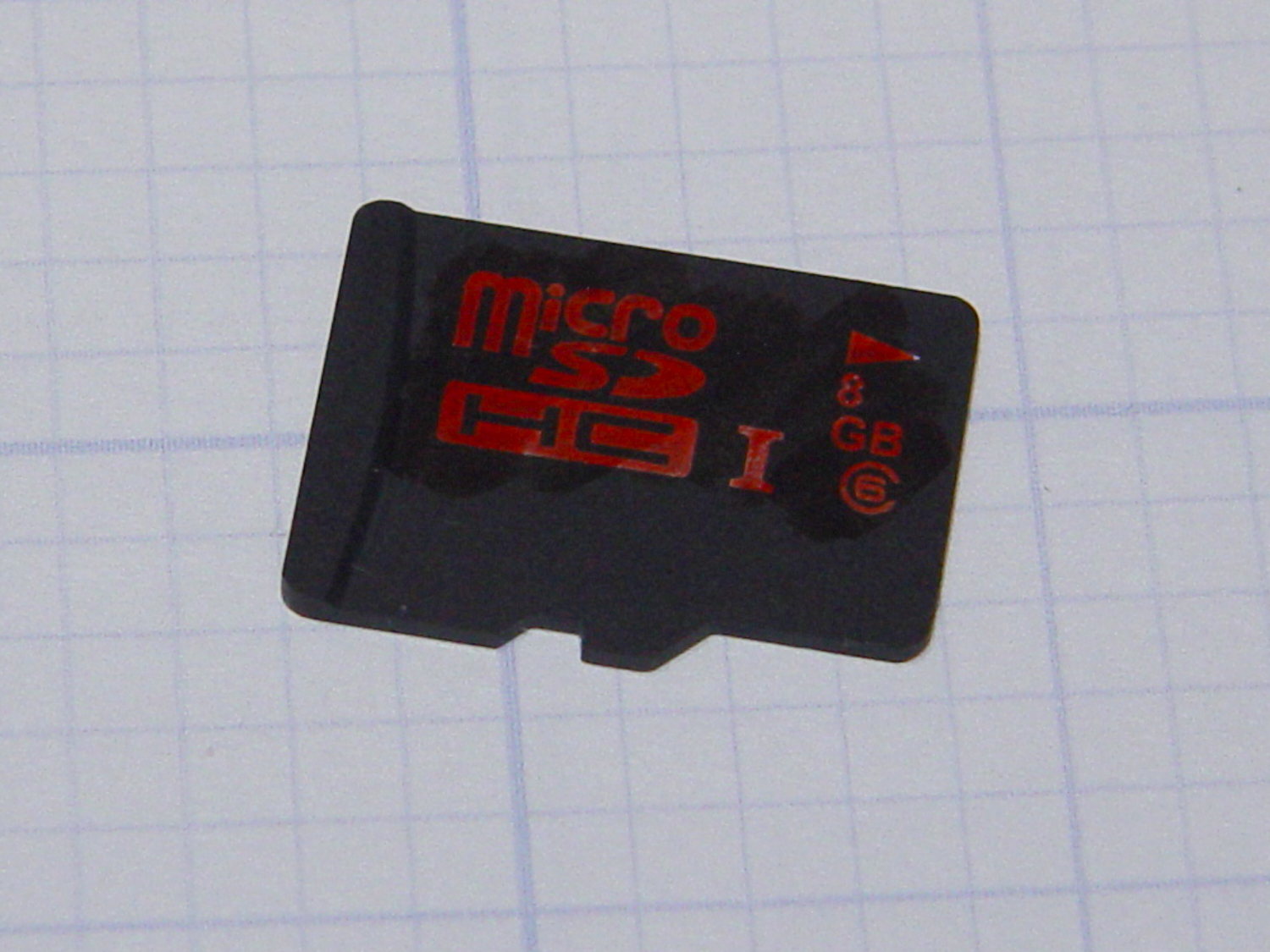
    Defunct 8 GB MicroSDHC card
    Defunct 8 GB MicroSDHC card

    It turns out the card went read-only without warning, so I was displaying the contents of the file cache buffers after the edit, not the data stored on the card. Rebooting started with empty caches, read the previous file contents, and behaved accordingly.

    The F3 utilities now live in the Ubuntu repository and no longer require compiling from source. The result:

    sudo f3probe --time-ops /dev/sdb
    F3 probe 6.0
    Copyright (C) 2010 Digirati Internet LTDA.
    This is free software; see the source for copying conditions.
    
    WARNING: Probing normally takes from a few seconds to 15 minutes, but
             it can take longer. Please be patient.
    
    Probe finished, recovering blocks... Done
    
    Bad news: The device `/dev/sdb' is damaged
    
    Device geometry:
    	         *Usable* size: 0.00 Byte (0 blocks)
    	        Announced size: 7.35 GB (15415296 blocks)
    	                Module: 8.00 GB (2^33 Bytes)
    	Approximate cache size: 0.00 Byte (0 blocks), need-reset=no
    	   Physical block size: 512.00 Byte (2^9 Bytes)
    
    Probe time: 164.4ms
     Operation: total time / count = avg time
          Read: 107.1ms / 4098 = 26us
         Write: 56.6ms / 2049 = 27us
         Reset: 0us / 0 = 0us
    

    That card has been kicking around for a while and started out as a no-name generic in some random gadget. Of course, those fancy Sony MicroSD cards weren’t shining examples of durability, either.

    I’m mildly astonished the streaming player worked perfectly with what amounts to a read-only filesystem, but that’s what caching is all about: there was no need to write the data to “disk”.

  • USB Gooseneck Extension Innards

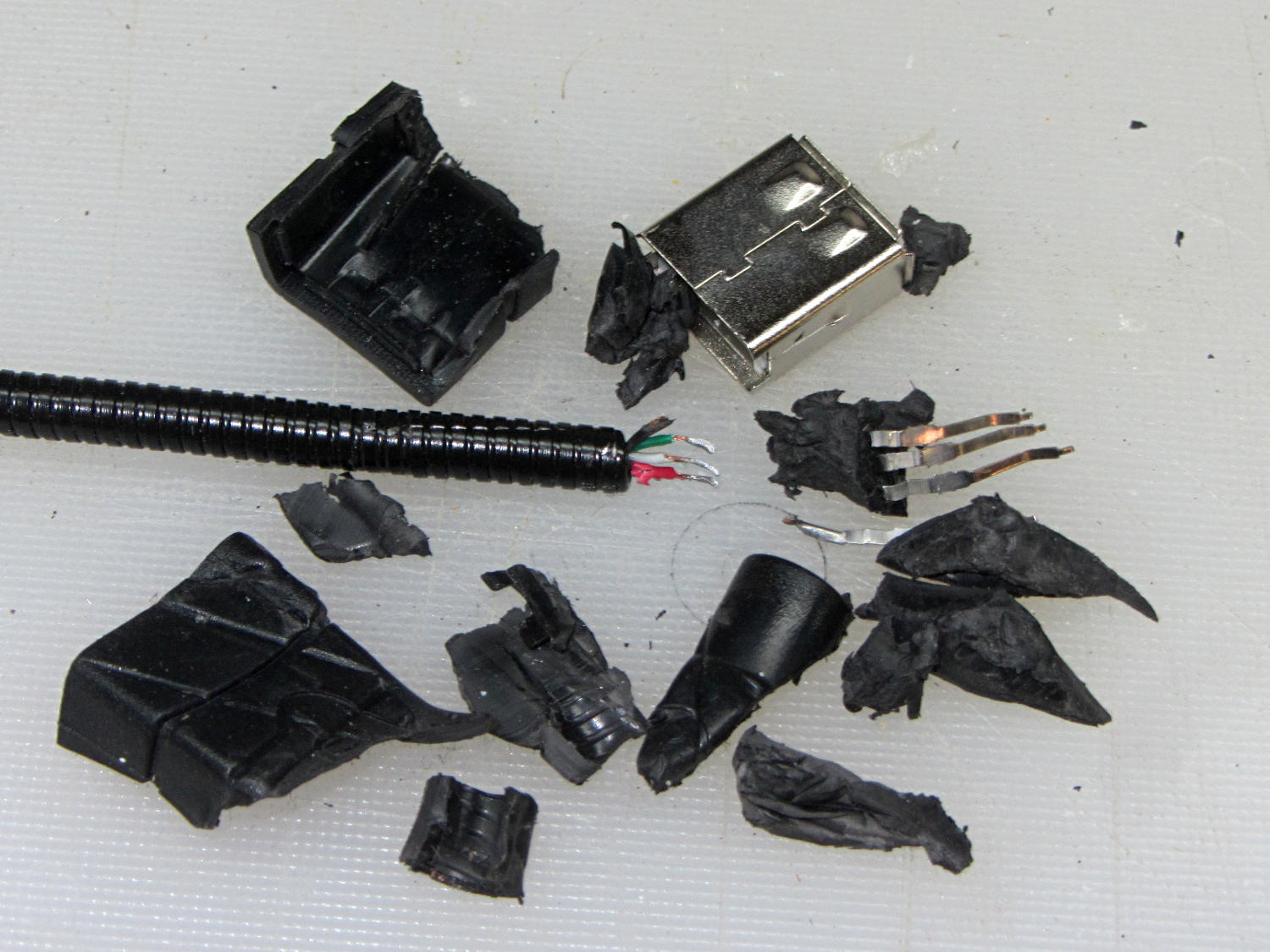
    The bandsaw needs more light on the blade, but a fixed lamp will certainly get in the way of something. Pondering the solution space of available parts suggests a COB LED on a flexible gooseneck, which led to some 30 cm USB extenders, then smashing one of the connectors to reveal the wiring inside:

    USB Gooseneck Extender - disassembled
    USB Gooseneck Extender – disassembled

    It was (probably) assembled by soldering the USB terminals to the wires, mounting it in a fixture, then injection-molding the shell around everything. The injected plastic fills the end of the gooseneck and immobilizes the wires.

    I’d like slightly longer wire ends, although they’re workable if I don’t make any further mistakes. Perhaps I can heatsink the gooseneck, slit 10 mm of the metal sheath with an abrasive wheel, and peel off the pieces without damaging the wires. It could happen!

    Speaking of mistakes, wiring an ordinary USB connector with +12 VDC for an LED seems fraught with peril…

  • Raspberry Pi WiFi Adapters

    One might be forgiven for thinking these two USB Wifi adapters are essentially identical:

    USB Wifi adapters
    USB Wifi adapters

    Turns out the SunFounder RT5370 (on the top, with the stylin’ curved case) has better performance than the Wifi With Antenna (on the bottom, with full-frontal chunk goin’ on), by a not inconsiderable 5 to 10 dB. Boosting the received power level in the fringe areas of our house from -70 dBm to -63 dBm makes all the difference between not working and steady streaming.

    The built-in WiFi antenna on a Raspberry Pi 3 ticks along 10 dB lower, with -80 dBm (10 pW!) at the receiver making for poor communication: a Pi 3 works perfectly within reasonable line-of-sight of the router (even through our wood floor) and wakes up blind in fringe areas. Hacking an external antenna probably helps, but definitely isn’t a net win compared to ten bucks worth of USB adapter.

    The wavemon utility (it’s in the Raspbian repo) comes in handy for figuring that sort of thing.

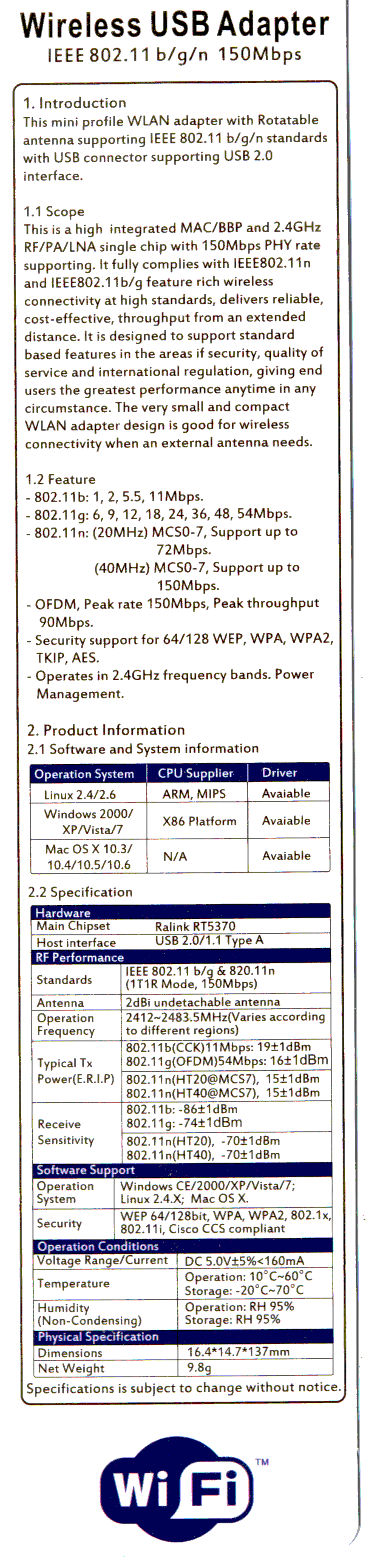
    There is, of course, no way to determine anything important about the adapters from their product descriptions, which are essentially identical, right down to the price. Neither have any product identification on their cases. The back of the package for the SunFounder gadget gives some specs, none of which may mean anything (clicky for more dots):

    SunFounder RT5370 USB WiFi Adapter Specs
    SunFounder RT5370 USB WiFi Adapter Specs

    I ordered another SunFounder adapter, Just In Case it comes in handy, with the hope that both behave the same way.

  • Raspberry Pi 3 Reset Switch

    The (relatively) new Raspberry Pi 3 PCB layout puts the Run header in a different location than in the Pi 2, but a minute of filing gnaws a suitable opening:

    Raspberry Pi 3 - Reset Switch
    Raspberry Pi 3 – Reset Switch

    As before, a hot-melt glue blob holds the switch in place. I’d prefer a black case, if only to hide the blob, but clear-ish is what’s available right now.

    Remember those orderly shutdowns, even at the cost of a keypad button!

  • Raspberry Pi Streaming Radio Player: Ignoring a Missing Volume Knob

    The Dell AC511 USB SoundBars have volume control knobs, which this udev rule turns into the /dev/input/volume device:

    ATTRS{name}=="Dell Dell AC511 USB SoundBar", SYMLINK+="input/volume"
    

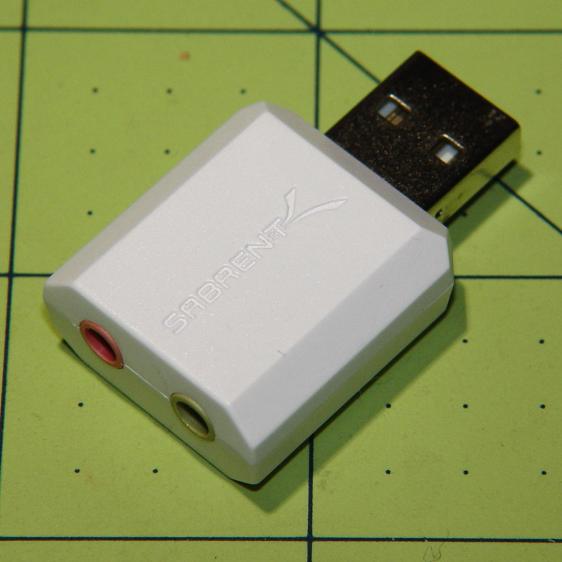
    I recently wanted to use an ordinary USB “sound card” that did not, of course, have a volume knob:

    Sabrent USB Audio Adapter
    Sabrent USB Audio Adapter

    This hack skips the configuration that makes the knob’s events visible to the Python program:

    import os.path
    
    ... snippage ...
    
    # if volume control knob exists, then set up its events
    
    VolumeDevice = '/dev/input/volume'
    
    vp = select.poll()
    if os.path.exists(VolumeDevice):
      v = InputDevice(VolumeDevice)
      v.grab()
      vp.register(v.fileno(),select.POLLIN + select.POLLPRI + select.POLLERR)
    

    It turns out that if you never register a device with the event polling interface, then the interface never reports any events and the rest of the code remains blissfully undisturbed: the non-existent knob doesn’t do anything, while the volume control buttons on the keypad continue to function as usual.

    The end result of this fiddling puts a Raspberry Pi 2 Model B to work as a streaming player on my Electronics Workbench, untethering the laptop from those powered speakers:

    RPi 2 Streaming Player - USB sound gadget
    RPi 2 Streaming Player – USB sound gadget

    It’s a shame that USB audio gadget is so big, because it crowds out standard USB plugs to the side.

    The most satisfactory LED configuration for a translucent case with an external WiFi adapter seems to be:

    dtparam=pwr_led_trigger=cpu0
    dtparam=act_led_trigger=mmc0
    

    The rest of the code remains unchanged as shown in that GitHub Gist.

    Bomb the bass!

  • ATX Lithium Ion 18650 Cell Capacity

    The 2016-11A and 2016-11B cells produced the overlapping red and green curves, with the gritty section due to crappy battery pack connections:

    Li-Ion 18650 cells - ATX prot - bare - Ah scale - 2016-12-17
    Li-Ion 18650 cells – ATX prot – bare – Ah scale – 2016-12-17

    The lower curve comes from an old unprotected cell harvested from a defunct media player and retrieved from the to-be-recycled pile.

    I picked 1 A as a reasonable value for their intended use in flashlights and maybe a helmet camera. Unlike some other cells in the recent past, these deliver 3.0 A·h, reasonably close to their rated 3.4 A·h capacity at a (presumably) lower current.

    Replotting the voltage vs. energy delivered doesn’t show any surprises:

    Li-Ion 18650 cells - ATX prot - bare - Wh scale - 2016-12-17
    Li-Ion 18650 cells – ATX prot – bare – Wh scale – 2016-12-17

    The voltage declines more-or-less linearly, without the relatively flat discharge curve for smaller cells, which explains why the J5 V2 flashlight becomes seriously dim after a few hours. On the upside, that allows a reasonably accurate state-of-charge display.

    Assuming the Sony HDR-AS30V camera burns 0.1 W·h/min while recording (which is a fancy way of saying it dissipates 6 W), then it should run for (10 W·h)/(0.1W·h/min) = 100 min from one of these cells fitted as an outrigger. The best of the NP-BX1 cells for the camera delivers something like 90 minutes from a measured capacity of 4 A·h at 500 mA; I don’t know what to make of those numbers. Perhaps the camera runs the NP-BX1 cells below the 2.8 V cutoff I’ve been assuming?

  • Fordham FG-801 Function Generator Recalibration

    While I had the case open, I checked the FG-801’s calibration:

    Fordham FG-801 Fn Gen - circuit board
    Fordham FG-801 Fn Gen – circuit board

    Look at all those parts!

    The raw filtered DC power supplies run a bit high and the output voltages & frequencies were off by a little, but not too much after all these years.

    Page 11 of the instruction manual gives the setup and calibration adjustments (clicky for more dots):

    Fordham FG-801 Manual - Page 11
    Fordham FG-801 Manual – Page 11

    Page 12 gives some values that should be true:

    Fordham FG-801 Manual - Page 12
    Fordham FG-801 Manual – Page 12

    For whatever reason, the manual isn’t available on The InterWebs, so here it is for your amusement:

    Fordham FG-801 Sweep Function Generator – Instruction Manual.pdf