Ed Nisley's Blog: Shop notes, electronics, firmware, machinery, 3D printing, laser cuttery, and curiosities. Contents: 100% human thinking, 0% AI slop.
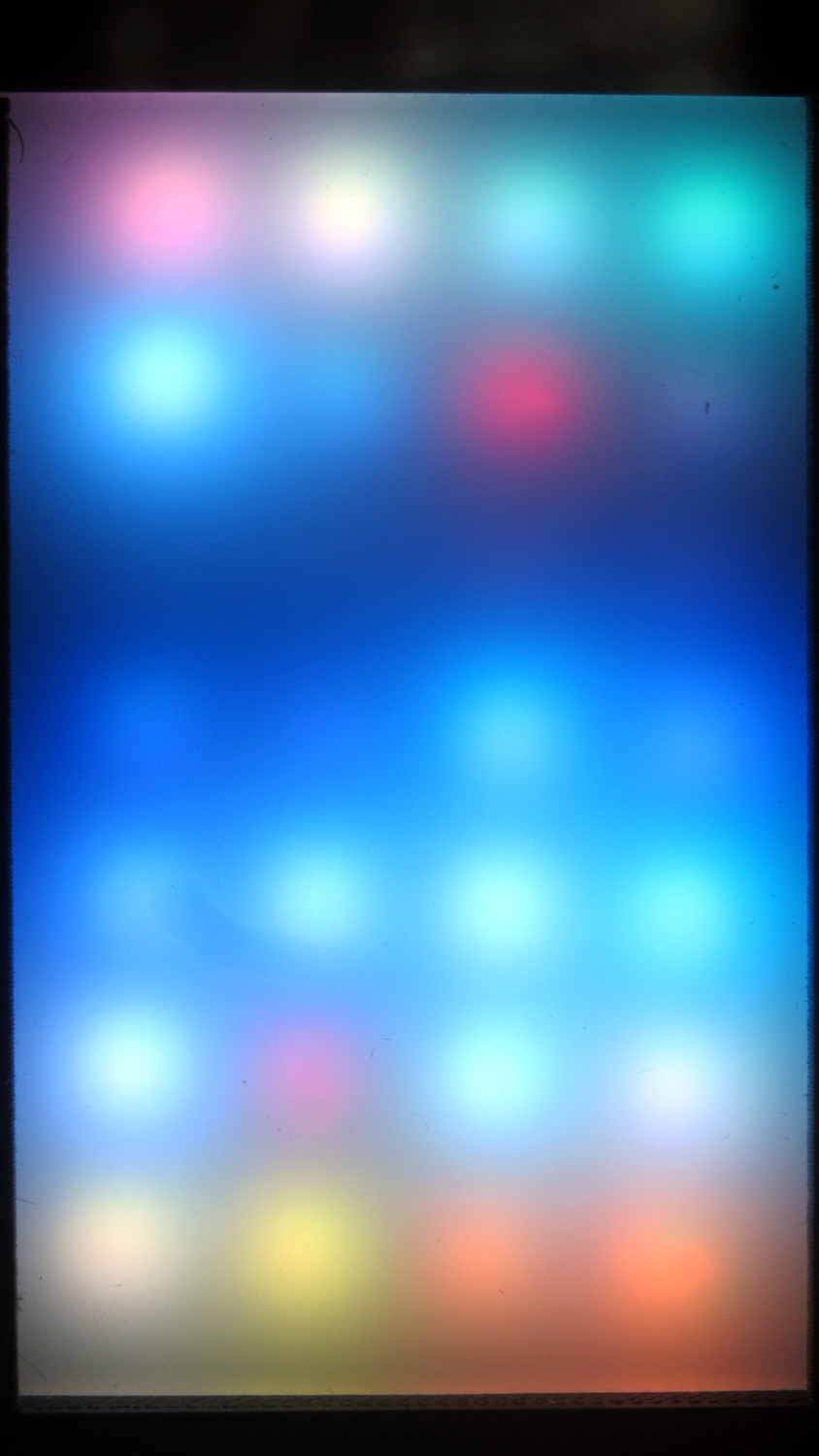
The red pixel in the second row from the top sends pinball panic to the six downstream LEDs (left and upward). Of course, it’s not consistently bad and sometimes behaves perfectly. The dark row below it contains perfectly good LEDs: they’re in a dark-blue part of the cycle.
The first WS2812 failed after about a week. This one lasted 7 weeks = 50-ish days.
The encapsulation seal went bad on this one and, for whatever it’s worth, the remainder still pass the Sharpie test. Perhaps the LEDs fail only after heat (or time-at-temperature) breaks the seal. Assuming, equally of course, the seal left the factory in good order, which seems a completely unwarranted assumption.
The general idea is to build a specialized sine-wave source as part of a test fixture to measure quartz crystal / tuning fork resonators in the 10 kHz to 100 kHz band. AD9850 / AD9851DDS modules are cheap & readily available, albeit with crappy two-layer PCB layouts and no attention to signal integrity:
AD8950 DDS module
Documentation seems scanty, at best. The Elecfreaks page may be as good as it gets, with a summary:
Serial mode just need connect GND,D7 WCLK, FQUP, REST, VCC, I-R
More doodling will be required.
Because the AD9850 has an upper clock limit of 125 MHz, of course those boards sport a 125 MHz oscillator-in-a-can. The AD9851 has a 180 MHz limit and an internal 6× multiplier, so it gets a more reasonable 30 MHz oscillator and can run at either 30 MHz or 180 MHz.
The included 70 MHz (?) reconstruction filter won’t do much to improve a 60 kHz signal. A much much lower outboard lowpass filter will be in order.
As far as the AD9850 goes, the output frequency comes from a 32 bit value determining the phase increment:
f = Δφ · osc / 232
Where
f = output frequency
Δφ = phase increment
osc = oscillator frequency (30, 125, or 180 MHz)
232 = DDS phase counter width
The smallest frequency difference between successive phase increments is thus osc/232, which is 0.029 103 83 Hz at 125 MHz. Obviously, you can’t get nice round frequencies like 60.000 kHz, except by accident, but you can get close.
Alas, the resolution conflicts with tuning fork characterization, where you (well, I) want to step the frequency in nice round 0.1 Hz units across a 2 Hz range around 60.000 kHz. Because the crystal characterization requires closely spaced frequencies, where the difference between the test frequencies matters, you shouldn’t work from the nicely rounded frequencies on a display.
For example, successive values of Δφ produce these frequencies near 60 kHz:
2 061 580 → 59.999 874 793
2 061 581 → 59.999 903 897
2 061 582 → 59.999 933 006
2 061 583 → 59.999 962 104
2 061 584 → 59.999 991 208
2 061 585 → 60.000 020 312
2 061 586 → 60.000 049 416
2 061 587 → 60.000 078 520
In an ideal world, you could pick an oscillator frequency to produce nice increments. For, oh, say, 0.025 Hz increments, all you need is osc = 0.025 × 232 = 107.374 182 MHz. Riiiight.
The computations require more numeric resolution than built-in Arduino data types and math operations can provide. Floating point numbers have 6-ish significant digits (double is the same as float), which cannot represent the Δφ values or frequencies. Unsigned integers top out at 32 bits (unsigned long long int is not a thing), enough for 9 significant digits that can hold the Δφ values, but integer multiplication and division do not produce 64 bit results and overflow / underflow without warning.
Other than that, an Arduino would be just about ideal: the generator needs a small display, a knob, and a few buttons.
Perhaps storing precomputed Δφ values for specific frequencies in a table, then computing nearby frequencies as offsets from that value would suffice. This will require doodling some absurd significant figures.
This eBay seller shipped delicate parts without padding, did not ship replacements as promised, has repeatedly offered a refund without actually doing so, and has attempted eBay feedback extortion.
Chronology:
11 Jan – broken parts received in unpadded envelope. Contacted through eBay, sent photos
13 Jan – “we can resend you and it will take 35-45 days,so is it ok for you ?”
(I asked for a refund, which was ignored)
16 Jan – replacements allegedly send by untracked mail, not received by 15 March = 60 days
(and still missing: draw your own conclusions)
18 Jan – “if you still haven’t received within the promised , please feel free to contact me ,i can solve the problem for you”
28 Feb – “If you agree with me, I will send your money to your paypal account, […] And meanwhile I will also send you one ebay feedback revision request, […], revise your negative feedback into positive feedback with all 5 star point.”
(I pointed out that feedback extortion is contrary to eBay policy and asked for a refund)
7 Mar – “I am really sorry for this issue. And please trust me. I’m a responsible eBay seller. I will be in charge of this problem. I will do my best to solve the problem and meet your satisfaction.”
7 Mar – “So could you please do me a little favor to send me a photo?”
(Photos first sent 11 Jan, re-sent 8 Mar)
9 Mar – “I’m so sorry about that issue . we can refund partial money for you. So is it ok for u”
(I disagreed and, again, asked for a complete refund)
10 Mar – “i will refund you soon, may i refund to your paypal?”
(I insisted on a refund through eBay for tracking)
10 Mar – “Please give me some time, I will check it for you.”
14 Mar – The seller will send you a $ 5.13 USD refund after they receive the returned item.
(At which point I escalated this to a claim with this summary)
The attempted feedback extortion on 28 Feb calls for a complete refund and punitive action.
Returning $5.13 worth of parts to China is obviously absurd and the seller knows that, having avoided mentioning that “requirement” while previously offering refunds.
After two and a half months, it’s long past time for a complete refund.
Thank you.
Those brief snippets don’t convey the flavor of the seller’s correspondence, again with (commentary in parentheses):
12 January 2017
can you use?
(No, I cannot)
13 January 2017
Dear buyer ,
thanks for your patience and understanding .
we can resend you and it will take 35-45 days,so is it ok for you ?looking forward to your reply .
Best wishes.
(No, I want a refund)
16 January 2017
Hello, my dear friend,
Thanks for your kind communication.
I place order for you now and it will be resent in 24 hours. I will call post office to deliver quickly. Hope you can get it soon. If you still haven’t received within the promised , please feel free to contact me ,I can solve the problem for you. Thank you.
Best wishes.
(I asked for the tracking number)
17 January 2017
dear buyer,
we have tracking number but it shows only the information in China, there is no information abroad, as it is an economical shipping, we have to reduce our loss, so is it ok? looking forward to your reply.
Best wishes.
(This was when I realized they were in scammer mode)
18 January 2017
if you still haven’t received within the promised , please feel free to contact me ,i can solve the problem for you. Thank you.
Best wishes.
(The “promised” was far beyond eBay’s claim limit. I said I would file a claim in late February)
28 February 2017
Hello Buyer:
I just got your negative feedback.
From your feedback, I know that you are not satisfied with the item. I am so sorry for that. And I am also so depressed with your negative feedback. It really hurt me a lot.
So I think I can give you fully money back, and you can just keep that item for compensation.
But I really hope you can revise your negative feedback into positive feedback with all 5 star seller performance. That is very important.
If you agree with me, I will send your money to your paypal account, And you can log in your paypal and accept that money. And meanwhile I will also send you one ebay feedback revision request, you can view it in your ebay message box, revise your negative feedback into positive feedback with all 5 star point.
That is the most important for me.
Is everything OK for you?
I really hope your kindly understanding.
Looking forward your answer.
God Bless you and all your family.
Best Wishes
(I filed a claim and posted negative feedback, as I wasn’t thrilled with the purchase)
8 March 2017
Dear buyer,
Thank you for your message. I’m so sorry about that issue . we can refund partial money for you. So is it ok for u?Looking forward to your reply .
Best wishes.
(I dsagreed and asked for their long-promised full refund)
9 March 2017
Dear buyer,
Please give me some time, I will check it for you. Thank you for you email.
Best wishes
(Time was not on my side)
As it turned out, the eBay claim period ended a few days earlier than I expected and eBay’s customer support recommended filing a dispute on Paypal. I asked how to handle issues like this in the future and was told, very firmly, to open an issueimmediately when a problem occurs on an order from a foreign seller. A formal eBay issue, rather than just “send a message to the seller”, starts the resolution clock and provide a powerful incentive to Make Things Happen.
It didn’t start reliably and a JFET would probably produce better results. As it turns out, my transistor assortment currently lacks JFETs, a situation shortly to be resolved by an ePacket from halfway around the planet.
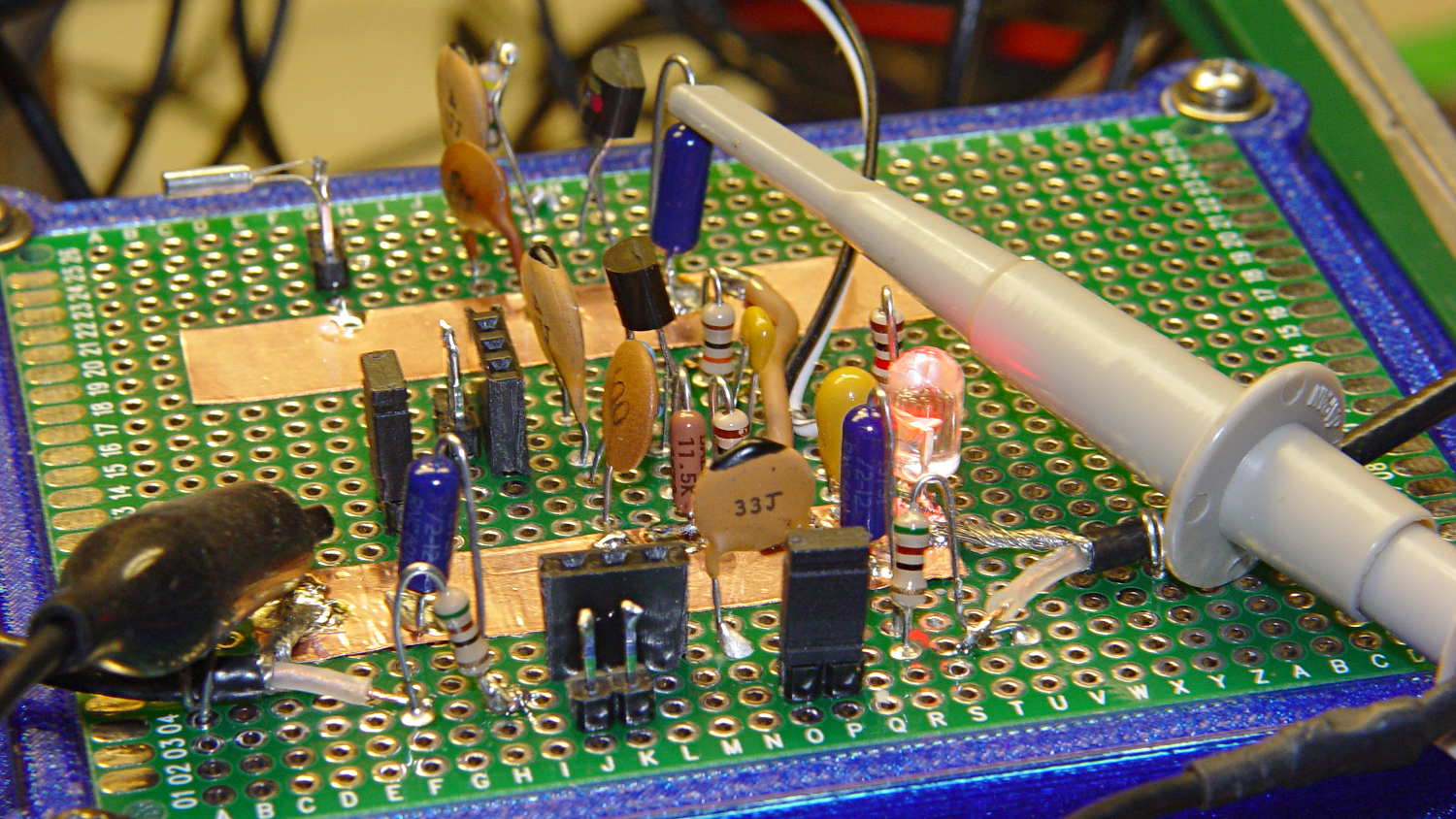
The proto board has two oscillator circuits behind the crystal test fixture, with the 32 kHz resonator hanging from the header pins on the lashup toward the rear:
Quartz resonators – Colpitts oscillator test fixtures
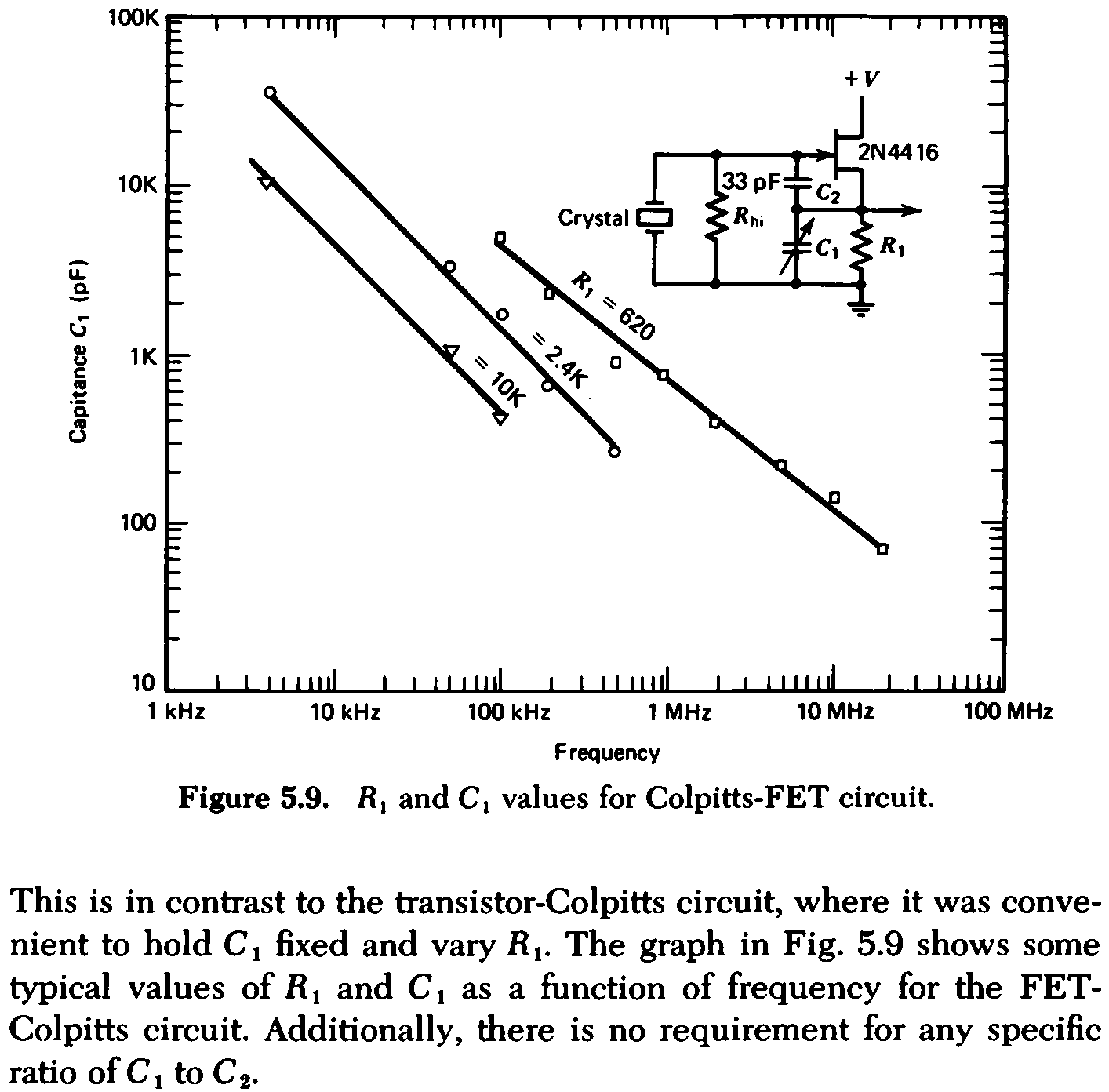
The value of of the recommended shunt resistor Rhi shows why I figured the Darlington and its bias resistors wouldn’t work:
Colpitts Crystal Shunt Resistance Values
The other Colpitts circuit worked just fine for a 3.58 MHz crystal and reasonably well for a 60 kHz tuning fork, so some fine tuning should improve the results.
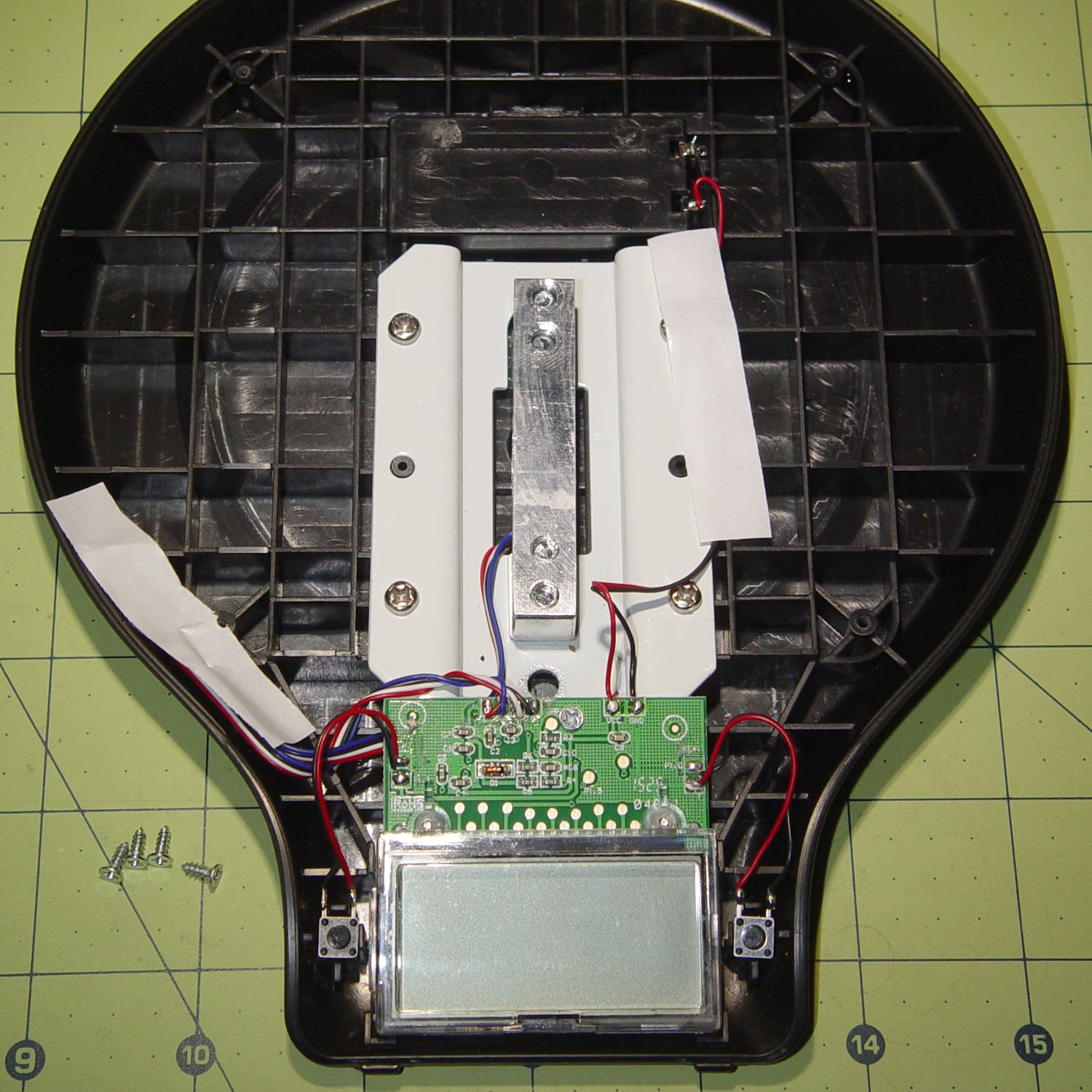
An unfortunate incident put enough water inside our kitchen scale to, ummm, render it inoperative. After a day of drying proved unavailing, I had nothing to lose by disassembling it.
The central label on the back conceals two screws holding the platform to the aluminum beam:
Amazon EK3211 Scale – platform underside
The metal plate twist-locks into the plastic platform. The hot-melt glue holding it in position suggests my construction techniques aren’t all that far off the mark.
The beam cantilevers from a metal structure spreading the load across the plastic base:
Amazon EK3211 Scale – interior overview
These are “after” pictures. Suffice it to say the interior was wet, including water droplets between the LCD panel and its plastic cover. Everything came apart easily, including the LCD with its attached zebra connector, and dried out thoroughly over the next day; I parked the panel atop my monitor for some gentle heating.
After reassembly, it still didn’t work, which turned out to be due to both wires from the battery snapping off at their PCB solder joints. I didn’t think I’d handled it that roughly, but ya never know.
With the wires soldered in place, the scale lit right up again:
Amazon EK3211 Scale – display PCB switches
The display flashed CAL at one point during the proceedings, although the rather thin manual had nothing to say about recalibration and the PCB didn’t have any obvious test points / jumpers / labels to that effect.
Two days of relentless spelunking produced my test weights:
Amazon EK3211 Scale – test weights
Given the provenance of those weights, a 0.2% error might not be the scale’s fault, even if it cost barely 10 bucks.
The white OLED displays measure 1.3 inches diagonally:
RPi OLED Display – white on black
They’re plug-compatible with their 0.96 inch blue and yellow-blue siblings.
All of them are absurdly cute and surprisingly readable at close range, at least if you’re as nearsighted as I am.
Some preliminary fiddling suggests a Primary Red filter will make the white displays more dark-room friendly than the yellow-blue ones. Setting the “contrast” to 1 (rather than the default 255) doesn’t (seem to) make much difference, surely attributable to human vision’s logarithmic brightness sensitivity.
I must conjure some sort of case atop a bendy wire mount for E-Z visibility.