The Smell of Molten Projects in the Morning

Ed Nisley's Blog: Shop notes, electronics, firmware, machinery, 3D printing, laser cuttery, and curiosities. Contents: 100% human thinking, 0% AI slop.

Author: Ed

  • External USB Case vs OEM DVD Drive Mounting Bracket

    That little Lenovo Q150 doesn’t include an optical drive and, mostly, I don’t need one, but sometimes it’s handy to boot from a CD. I picked up a used DVD burner that also fits my Dell E1405 laptop (should I need a spare) and a tiny USB laptop drive case from the usual eBay sources for a grand total of $17 delivered.

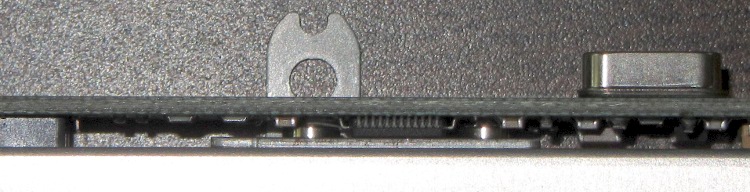
    The drive had a mounting bracket on the back that obviously had to come off, because the bracket screws snuggled right in among the USB adapter electronics:

    E1405 DVD drive bracket vs USB electronics
    E1405 DVD drive bracket vs USB electronics

    In fact, that flat tab with a hole would have clunked up against the back of the case and prevented it from sliding all the way in, but the screws also foiled Plan B: flip the bracket around so the tab goes under the drive where it couldn’t get lost if I needed it again.

    So now the bracket & screws live in a little bag in the Box o’ USB Stuff.

    The DVD drive works fine with just a single USB cable, although the case came with a power-only USB cable, so the latter also lives in the bag with the bracket. Maybe I’ll need it in the unlikely event I actually burn a DVD in that drive?

  • Shower Faucet Handle Tightening

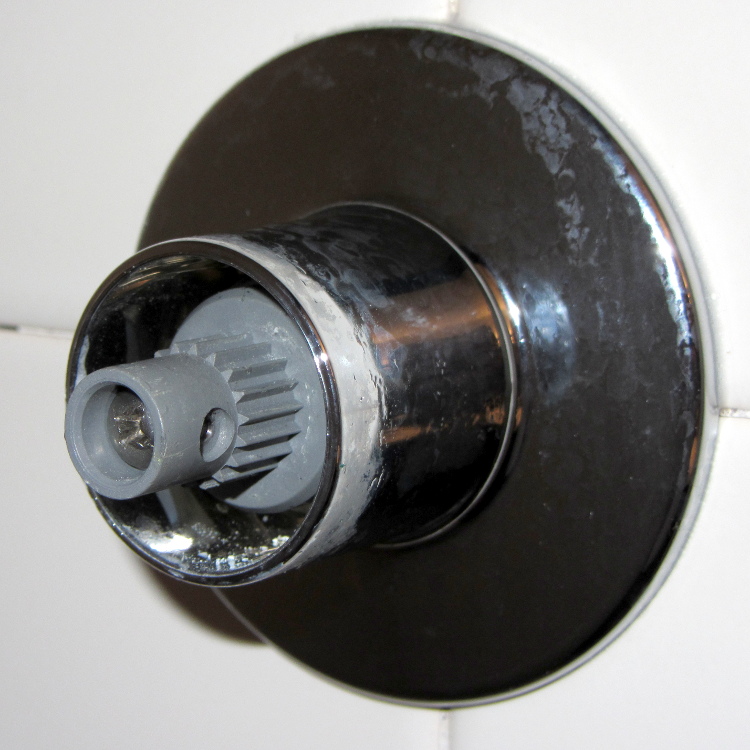
    Some years back I replaced the shower stall faucets; they’d lasted about half a century, which is good enough. The new faucets were American Standard Cadet/Colony (their choice of name, the current Colony valves seem similar) with a nice, smooth exterior. Of late, both handles had become slightly loose and I finally got around to tightening them.

    Shower faucet valve stem
    Shower faucet valve stem

    The handle setscrews accept a 5/64 inch hex key and pop easily off the stems, revealing the splined plastic (noncorrosive!) mount on the valve stem. The Philips screw in that is what’s loose and allows the whole handle to wiggle just a bit; tightening the setscrew doesn’t help.

    Of course, tightening the screw in the cold water stem tends to open the valve, so you must firmly wedge the splined mount. I’m sure there’s a special wrench for that, but I just held it tightly; next time I’ll try a strap wrench.

    One would ordinarily dose the screws with threadlocker, so as to never have to endure this dance again, but these screws have coarse threads that engage another plastic doodad that engages two wings on the splined mount. So I guess I must retighten them twice a decade or so.

    The handle interiors sport a bit of corrosion (which does not respond to vinegar, so it’s not hard water mineralization), but nothing terrible. The setscrew, mirabile dictu, seems to be stainless steel…

    Shower faucet handle - splines
    Shower faucet handle – splines
  • Corelle Fragments

    I fumble-fingered a plate, it fell between my tummy and the counter, and hit the floor edge-on. There’s a lot of energy stored in that stretched-glass ceramic layer! [Update: The glass is under compression.]

    Shattered Corelle plate on floor
    Shattered Corelle plate on floor

    The fragments tend to be slivers rather than chunks, all with better-than-razor-sharp edges:

    Corelle slivers
    Corelle slivers

    A bit more detail on Corelle in that post

  • Reversal Zits: Early Action Variations

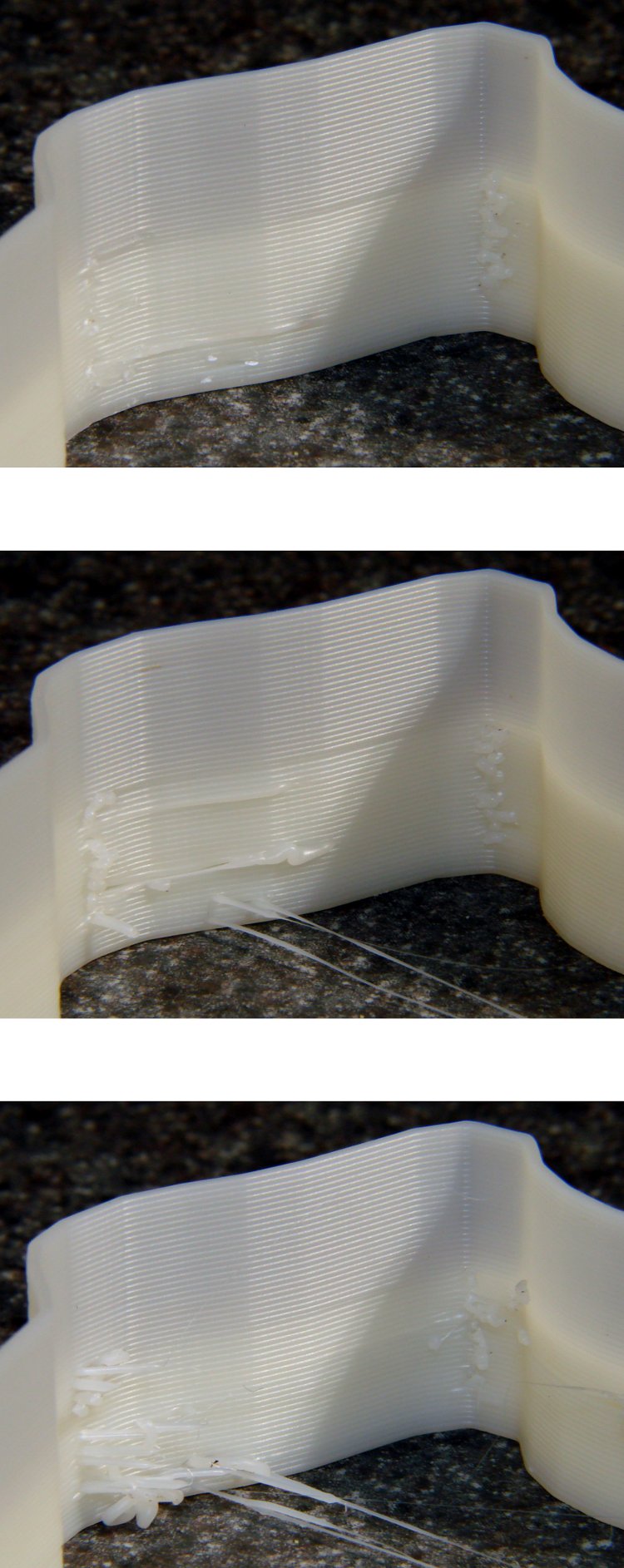
    While cranking out some Tux Cookie Cutters, I varied the Reversal settings to see what effect they’d have on a single object with a smooth perimeter. I’d previously settled on 25 rpm for 125 ms with no early action, so this series tests three different times with early action turned on.

    Position 1, where the perimeter threads join. Yes, I have Jitter activated and cranked up to something like 10, but it obviously has no effect on this object:

    Position 1 - Reversal 125 100 50 - early
    Position 1 – Reversal 125 100 50 – early

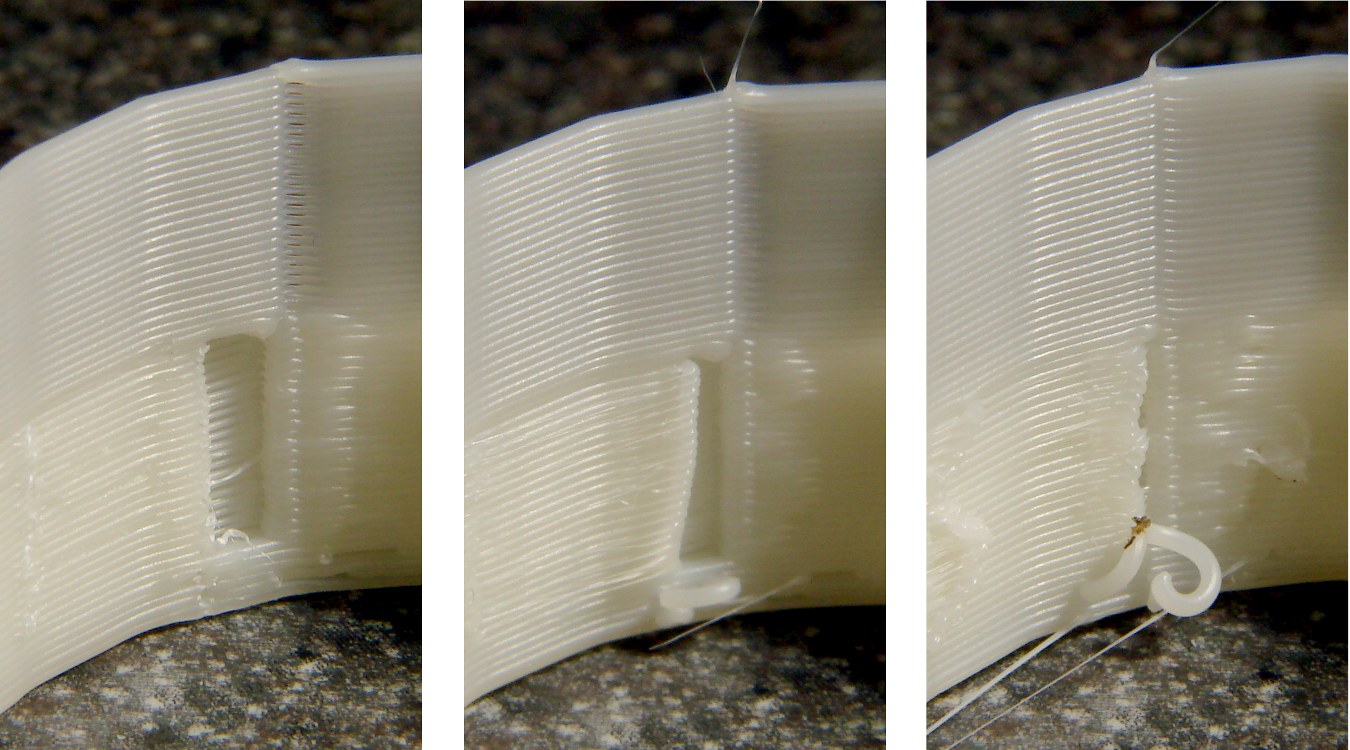
    Position 2, where the nozzle enters from the outside to start a new thread. The snot hanging off the end makes for an ugly wad:

    Position 2 - Reversal 125 100 50 - early
    Position 2 – Reversal 125 100 50 – early

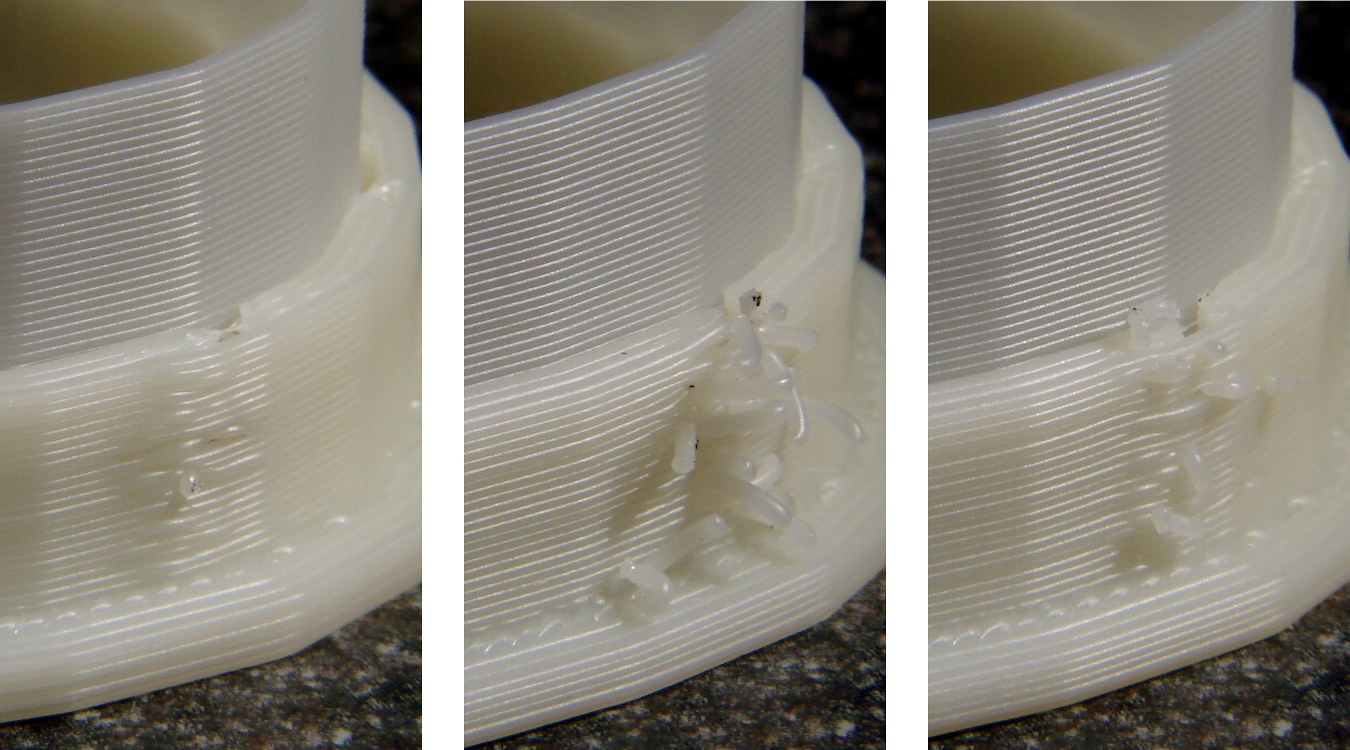
    Position 3, another nozzle entry point:

    Position 3 - Reversal 125 100 50 - early
    Position 3 – Reversal 125 100 50 – early

    Early Reversal action simply doesn’t work well. With retraction times sufficient to prevent drooling, stopping the extruder before the end of the thread produces unacceptable gaps and starting it before reaching the thread produces hanging snots when the nozzle passes over an existing wall.

    Shorter retraction times produce strands all over the object, because the extruder still contains pressurized plastic and drools.

    I’d previously discovered, although I didn’t write up, that unbalanced Reversal times didn’t provide any benefit: inhale and exhale times must be essentially equal to prevent either starving the first part of each thread or serious drooling. So there’s really only one degree of freedom: the total volume of plastic = rpm x duration.

    Perhaps having separate early action times would help: adjust the shutdown and startup delay times independently of the total Reversal inhale/exhale time. Right now, those delays are simply the inhale/exhale times, evidently assuming clean cutoffs and startups, which obviously isn’t the case.

    And, alas, the Reversal Threshold bug remains unfixed, so you (well, I) can’t tell Reversal to not operate across short motions like the end of one thread and the not-quite-adjacent start of the next.

  • Another Tread Gash: Tire Liners FTW Again!

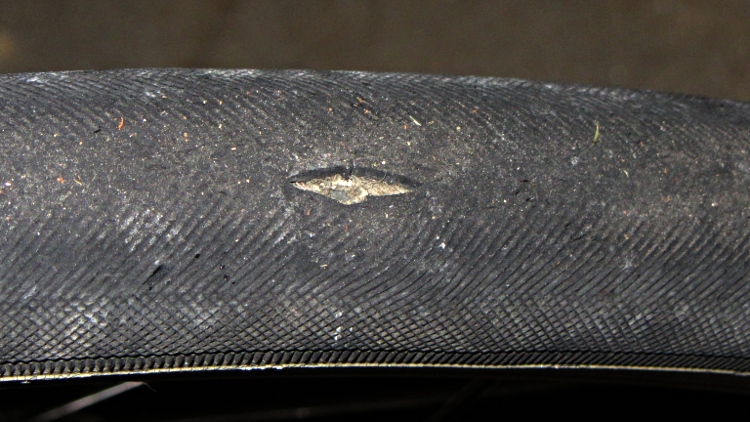
    Found this in the front tire of my Shop Assistant’s bike.

    Front tire gash
    Front tire gash

    It’s a Primo Comet Kevlar, not that the Kevlar belts can cope with an assault like that. The smooth surface at the bottom of the gash is the tire liner, of course.

    She won’t be using the bike for a while, though, so I’ll keep our stock of new tires for our bikes. I’m sure they’ll come in handy this season.

    Sheesh!

  • DNS Optimization

    A discussion on the MHV LUG mailing list pointed to the Gibson Research DNSBench utility. Letting it chew on all the nameservers it can find, then mulling over the results for a bit, produced this short list:

    • NY Public Library: 68.88.88.2
    • Level 3 Comm: 4.2.2.3 or .5
    • Yale: 130.132.1.10 or 11
    • NTT: 129.250.48.98

    Feed those into Network Manager (or /etc/resolv.conf) in some permuted order and away you go… at least if you’re near Poughkeepsie and using Optimum Online. Change anything and the results will differ.

    I’d been using OpenDNS at 208.67.22[02].22[02], but the new ones test out as marginally faster and are certainly more diverse. Who knew NYPL ran a DNS?

  • Thing-O-Matic: Axis Calibration vs. ABS Shrinkage

    In the process of adapting my HT GPS interface to a Wouxun KG-UV3D radio, I printed some trial-fit pieces that consistently came out a little short. A bit of division showed that the larger pieces tended to be small in the X & Y axes by about 0.5%. This makes no difference for most 3D printed objects, but in this case the pieces must match up precisely with the radio’s existing battery interface layout. Half a percent matters a lot across a 75 mm part.

    The advice found with most calibration pieces seems to boil down to fudging the printer’s steps/mm setting to make the answer come out right. The default Thing-O-Matic calibration (in machines/thingomatic.xml, wherever that’s hidden in your installation) looks like this:

    <axis id="x" length="106" maxfeedrate="6000" homingfeedrate="2500" stepspermm="47.069852" endstops="min"/>  <!-- Pulley dia: 10.82mm / 1/8 step = 1/(10.82 * pi / 1600) -->
    <axis id="y" length="120" maxfeedrate="6000" homingfeedrate="2500" stepspermm="47.069852" endstops="min"/>  <!-- Pulley dia: 10.82mm / 1/8 step = 1/(10.82 * pi / 1600) -->
    

    You will, of course, have twiddled the maxfeedrate, homingfeedrate, and maybe even the comments to make the answers work on your machine.

    Nophead slapped me upside the head when I made the same mistake that produced the stock stepspermm values: the pulley moves the belt by a fixed number of teeth on each revolution, so you just multiply by the belt tooth pitch to find the distance per revolution. Divide that into the number of (micro)steps per revolution and you get the exact stepspermm value. The stock MBI pulleys have 17 teeth and the belt has a 2 mm tooth pitch, so:

    47.05882 step/mm = 1600 step / (17 * 2 mm)

    That differs from the stock value by not very much at all:

    0.999766 = 47.05882 / 47.069852

    Given that these steppers aren’t losing steps (don’t start with me, you know how I get), I’m quite confident that the X and Y stages move by exactly the commanded distance every time.

    The printer uses a heated build plate and the first layer is 0.33 mm, give-or-take about 0.05 mm, and the objects come out with essentially straight vertical walls. However, the walls aren’t quite perfect, tending to be a bit larger where they contact the plate, and I finally asked the obvious question (abs plastic shrinkage), which produces, among many other hits, that useful table.

    The money quote is that ABS shrinks just about exactly 0.5% as it cools. That’s modulo the starting temperature, the molding process, and so forth and so on, but it’s a pretty nice match.

    Therefore, fudging the printer’s scale isn’t appropriate, because that affects everything you might do with it. Such as, for example, the initial homing sequence, which depends on fairly precise locations that must match up with reality and have no shrinkage problems whatsoever.

    Skeinforge’s Scale plugin applies a factor to the object, so that’s (probably) a more appropriate location for this adjustment. The myriad SF settings get broken down by Craft (extrusion, milling, whatever) and material (ABS, PLA, whatever), so if you can keep all that straight, then you can apply the appropriate Scale for each process and material.

    The Scale doc may seem a tad sparse, but the plugin does have separate settings for the XY plane and the Z height. The latter (probably) doesn’t need scaling, because the nozzle height sets the actual extrusion level; the top layer or two will stretch to make the vertical size come out right as the object cools while it’s a-building.

    I’ll toss a 1.005 scale factor into the XY mix and see what horrors that unleashes by way of unintended consequences.

    More on the radio interface & suchlike in a while…