The Smell of Molten Projects in the Morning

Ed Nisley's Blog: Shop notes, electronics, firmware, machinery, 3D printing, laser cuttery, and curiosities. Contents: 100% human thinking, 0% AI slop.

Author: Ed

  • EMC2 Logitech GamePad: Triggger Button Name Change

    I just updated EMC2 on the Sherline CNC mill from 2.4.6 to 2.4.7 (which mis-identifies itself as 2.4.6 on the splash screen) and the Axis UI failed to start. A bit of digging shows that the name of Button 1 (the left button in the right-hand quad, clearly labeled 1) has inexplicably changed from btn-trigger to btn-joystick.

    Logitech Gamepad Pendant
    Logitech Gamepad Pendant

    Most likely the change has nothing to do with EMC2, because (I think) those names bubble up from the HID driver that actually talks to the hardware and that stuff has also been updated; this is all on Ubuntu 10.04 LTS. But in any event, the name is now different.

    That requires a tweak to the Eagle schematics, which will regenerate Logitech_Gamepad.hal, but you can just edit the latter file and change btn-trigger to btn-joystick.

    As nearly as I can tell, changing the pin name in the Logitech library component, saving the library, then updating the library in the schematic doesn’t do squat. Evidently, Eagle keeps track of which components you’ve used and won’t update them unless you do some manual gymnatistics, which makes a certain amount of sense.

    That means one must:

    • Delete both “gates” of the old component (INPUT.0.BUTTONS first, then INPUT.0)
    • Make sure you’re on Page 2 where the basic gate will go
    • Add the revised LOGITECH_DUAL_ACTION_GAMEPAD to get the INPUT.1 “gate”
    • Rename it to INPUT.0
    • Use Move to jiggle it around a bit to ensure its pins get hitched up to the existing nets
    • Switch to Page 1 where the button nets lie in wait
    • Type invoke input.0 into the Eagle command line
    • Pick -BUTTONS from the list to select that “gate”
    • Position that gate appropriately
    • Use Move to jiggle the gate
    • Save everything
    • Run the Eagle2Hal ULP to get a new HAL output file
    • Put that file where it’ll do the most good

    There, now, wasn’t that obvious?

    The modified Logitech_Gamepad.hal file:

    # HAL config file automatically generated by Eagle-CAD ULP:
    # [/mnt/bulkdata/Project Files/eagle/ulp/hal-write-2.4.ulp]
    # (C) Martin Schoeneck.de 2008
    # Mods Ed Nisley 2010
    # Path        [/mnt/bulkdata/Project Files/eagle/projects/EMC2 HAL Configuration/]
    # ProjectName [Logitech Gamepad - 2.4.7]
    # File name   [/mnt/bulkdata/Project Files/eagle/projects/EMC2 HAL Configuration/Logitech Gamepad - 2.4.7.hal]
    # Created     [10:40:31 11-Nov-2011]
    
    ####################################################
    # Load realtime and userspace modules
    loadrt constant		count=16
    loadrt and2		count=17
    loadrt flipflop		count=4
    loadrt mux2		count=5
    loadrt mux4		count=1
    loadrt not		count=8
    loadrt or2		count=10
    loadrt scale		count=7
    loadrt timedelay		count=1
    loadrt toggle		count=1
    loadrt wcomp		count=6
    
    ####################################################
    # Hook functions into threads
    addf toggle.0		servo-thread
    addf wcomp.1		servo-thread
    addf wcomp.2		servo-thread
    addf wcomp.3		servo-thread
    addf and2.0		servo-thread
    addf and2.4		servo-thread
    addf and2.3		servo-thread
    addf and2.2		servo-thread
    addf and2.1		servo-thread
    addf constant.6		servo-thread
    addf constant.5		servo-thread
    addf constant.4		servo-thread
    addf constant.3		servo-thread
    addf constant.2		servo-thread
    addf constant.1		servo-thread
    addf constant.0		servo-thread
    addf constant.7		servo-thread
    addf constant.8		servo-thread
    addf scale.1		servo-thread
    addf scale.2		servo-thread
    addf scale.3		servo-thread
    addf mux4.0		servo-thread
    addf mux2.0		servo-thread
    addf scale.4		servo-thread
    addf scale.0		servo-thread
    addf wcomp.5		servo-thread
    addf wcomp.4		servo-thread
    addf wcomp.0		servo-thread
    addf flipflop.1		servo-thread
    addf flipflop.0		servo-thread
    addf and2.5		servo-thread
    addf and2.6		servo-thread
    addf and2.7		servo-thread
    addf and2.8		servo-thread
    addf flipflop.2		servo-thread
    addf flipflop.3		servo-thread
    addf or2.4		servo-thread
    addf or2.8		servo-thread
    addf or2.7		servo-thread
    addf or2.6		servo-thread
    addf or2.5		servo-thread
    addf or2.3		servo-thread
    addf or2.2		servo-thread
    addf or2.1		servo-thread
    addf or2.0		servo-thread
    addf not.1		servo-thread
    addf not.2		servo-thread
    addf not.3		servo-thread
    addf not.4		servo-thread
    addf not.5		servo-thread
    addf not.6		servo-thread
    addf not.7		servo-thread
    addf not.0		servo-thread
    addf constant.9		servo-thread
    addf mux2.1		servo-thread
    addf mux2.2		servo-thread
    addf mux2.3		servo-thread
    addf mux2.4		servo-thread
    addf constant.10		servo-thread
    addf constant.11		servo-thread
    addf scale.5		servo-thread
    addf scale.6		servo-thread
    addf constant.12		servo-thread
    addf constant.13		servo-thread
    addf timedelay.0		servo-thread
    addf constant.14		servo-thread
    addf constant.15		servo-thread
    addf and2.16		servo-thread
    addf and2.15		servo-thread
    addf and2.14		servo-thread
    addf and2.13		servo-thread
    addf and2.12		servo-thread
    addf and2.11		servo-thread
    addf and2.10		servo-thread
    addf and2.9		servo-thread
    addf or2.9		servo-thread
    
    ####################################################
    # Set parameters
    
    ####################################################
    # Set constants
    setp constant.0.value	+0.02
    setp constant.1.value	-0.02
    setp constant.2.value	60
    setp constant.3.value	1.00
    setp constant.4.value	0.10
    setp constant.5.value	0.50
    setp constant.6.value	0.10
    setp constant.7.value	+0.5
    setp constant.8.value	-0.5
    setp constant.9.value	0.0
    setp constant.10.value	[TRAJ]MAX_LINEAR_VELOCITY
    setp constant.11.value	[TRAJ]MAX_ANGULAR_VELOCITY
    setp constant.12.value	-1.0
    setp constant.13.value	0.1
    setp constant.14.value	0.020
    setp constant.15.value	0.000
    
    ####################################################
    # Connect Modules with nets
    net a-button-minus or2.2.in0 input.0.btn-joystick and2.15.in0
    net a-button-plus or2.2.in1 input.0.btn-thumb2 and2.16.in0
    net a-buttons-active or2.2.out or2.3.in0 or2.4.in1
    net a-disable not.7.out and2.5.in1
    net a-enable or2.4.in0 flipflop.3.out not.7.in mux2.4.sel
    net a-jog wcomp.2.in input.0.abs-z-position mux2.4.in1
    net a-knob-active not.2.out and2.7.in1
    net a-knob-inactive wcomp.2.out not.2.in and2.6.in1
    net a-select and2.8.in0 and2.7.out
    net a-set flipflop.3.set and2.8.out
    net angular_motion or2.4.out mux2.0.sel
    net any-buttons-active mux4.0.sel0 or2.8.out
    net az-buttons-active or2.3.out or2.8.in1 or2.9.in0
    net az-reset flipflop.2.reset and2.6.out flipflop.3.reset
    net button-crawl scale.4.out mux4.0.in3
    net button-fast scale.2.out mux4.0.in1 scale.4.in
    net jog-crawl toggle.0.out mux4.0.sel1
    net jog-speed halui.jog-speed mux4.0.out
    net knob-crawl mux4.0.in2 scale.3.out
    net knob-fast mux4.0.in0 scale.1.out scale.3.in
    net n_1 constant.10.out mux2.0.in0
    net n_2 and2.0.in0 input.0.btn-top2
    net n_3 and2.0.in1 input.0.btn-base
    net n_4 and2.0.out halui.abort
    net n_5 halui.mode.manual input.0.btn-base3
    net n_6 wcomp.0.max wcomp.1.max wcomp.2.max wcomp.3.max constant.0.out
    net n_7 halui.program.resume input.0.btn-base4
    net n_8 wcomp.0.min wcomp.1.min wcomp.2.min wcomp.3.min constant.1.out
    net n_9 mux2.0.in1 constant.11.out
    net n_10 constant.12.out scale.5.gain scale.6.gain
    net n_11 or2.0.in0 input.0.btn-base5
    net n_12 or2.0.in1 input.0.btn-base6
    net n_13 constant.9.out mux2.1.in0 mux2.2.in0 mux2.3.in0 mux2.4.in0
    net n_14 mux2.1.out halui.jog.0.analog
    net n_15 toggle.0.in or2.0.out
    net n_16 constant.2.out scale.0.gain
    net n_17 constant.5.out scale.1.gain
    net n_18 constant.3.out scale.2.gain
    net n_19 constant.4.out scale.3.gain
    net n_20 scale.4.gain constant.6.out
    net n_21 halui.jog.1.analog mux2.2.out
    net n_22 mux2.2.in1 scale.5.out
    net n_23 scale.6.out mux2.3.in1
    net n_24 constant.13.out halui.jog-deadband
    net n_25 wcomp.4.max constant.7.out wcomp.5.max
    net n_26 constant.8.out wcomp.4.min wcomp.5.min
    net n_27 mux2.3.out halui.jog.2.analog
    net n_28 halui.jog.3.analog mux2.4.out
    net n_29 timedelay.0.out and2.9.in1 and2.10.in1 and2.12.in1 and2.11.in1 and2.13.in1 and2.14.in1 and2.16.in1 and2.15.in1
    net n_30 and2.9.out halui.jog.0.minus
    net n_31 or2.9.out timedelay.0.in
    net n_32 constant.14.out timedelay.0.on-delay
    net n_33 constant.15.out timedelay.0.off-delay
    net n_34 and2.10.out halui.jog.0.plus
    net n_35 and2.11.out halui.jog.1.minus
    net n_36 halui.jog.1.plus and2.12.out
    net n_37 and2.13.out halui.jog.2.minus
    net n_38 and2.14.out halui.jog.2.plus
    net n_39 and2.15.out halui.jog.3.minus
    net n_40 and2.16.out halui.jog.3.plus
    net vel-per-minute scale.0.out scale.1.in scale.2.in
    net vel-per-second mux2.0.out scale.0.in
    net x-buttons-active or2.7.in0 or2.5.out
    net x-disable not.4.out and2.4.in1
    net x-enable not.4.in flipflop.0.out mux2.1.sel
    net x-hat-jog wcomp.4.in input.0.abs-hat0x-position
    net x-hat-minus wcomp.4.under or2.5.in1 and2.9.in0
    net x-hat-plus or2.5.in0 wcomp.4.over and2.10.in0
    net x-jog wcomp.0.in input.0.abs-x-position mux2.1.in1
    net x-knob-active not.0.out and2.1.in0
    net x-knob-inactive wcomp.0.out not.0.in and2.2.in0 and2.3.in0
    net x-set and2.1.out flipflop.0.set
    net xy-buttons-active or2.7.out or2.8.in0 or2.9.in1
    net xy-reset flipflop.0.reset and2.2.out flipflop.1.reset
    net y-buttons-active or2.6.out or2.7.in1
    net y-disable not.5.out and2.1.in1
    net y-enable flipflop.1.out not.5.in mux2.2.sel
    net y-hat-jog wcomp.5.in input.0.abs-hat0y-position
    net y-hat-minus wcomp.5.under or2.6.in1 and2.12.in0
    net y-hat-plus or2.6.in0 wcomp.5.over and2.11.in0
    net y-jog wcomp.1.in input.0.abs-y-position scale.5.in
    net y-knob-active not.1.out and2.3.in1
    net y-knob-inactive not.1.in wcomp.1.out and2.2.in1
    net y-select and2.4.in0 and2.3.out
    net y-set flipflop.1.set and2.4.out
    net z-button-minus or2.1.in0 input.0.btn-thumb and2.13.in0
    net z-button-plus or2.1.in1 input.0.btn-top and2.14.in0
    net z-buttons-active or2.1.out or2.3.in1
    net z-disable not.6.out and2.8.in1
    net z-enable not.6.in flipflop.2.out mux2.3.sel
    net z-jog wcomp.3.in input.0.abs-rz-position scale.6.in
    net z-knob-active not.3.out and2.5.in0
    net z-knob-inactive not.3.in wcomp.3.out and2.7.in0 and2.6.in0
    net z-set and2.5.out flipflop.2.set
    
  • Canon SX230HS Lens Cap

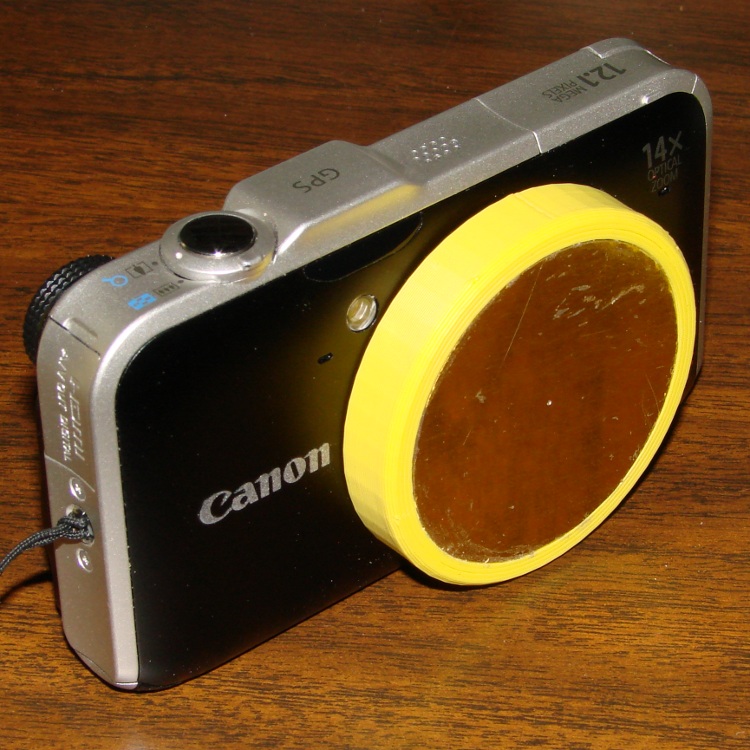
    The SX230HS camera lives in my pants pocket, where it gets pressed between my leg and anything I lean against. Turns out that the lens turret end cap isn’t quite thick enough to not bend inward against the leaves that cover the lens, which causes them to hang up. The solution boils down to a hideous external lens cap:

    Canon SX230HS with lens cap
    Canon SX230HS with lens cap

    It’s built from forget-me-not yellow filament for an obvious reason…

    The sheet-metal plate bears against the non-moving rim around the turret. I marked the plate’s diameter with a compass, extracted it from the sheet with left-cutting tin snips, filed off the slivers, rounded the edge, and it snapped right into the recess where a touch of acrylic caulk holds it firmly in place.

    A thin plastic cover would be too flexible and a thicker plastic cover would be too thick; this must fit into an already-snug cloth pouch where a few additional millimeters of girth actually matter. My previous camera taught me that pocket fuzz gets into everything, so a pouch isn’t optional.

    The interior isn’t too inspiring, but you can see what two layers of plastic look like across the bottom:

    SX230HS lens cap - interior
    SX230HS lens cap – interior

    The front has the shallow recess that captures the metal plate. Because the front builds against the aluminum build platform, I added a support structure inside the recess:

    SX230HS lens cap - support in place
    SX230HS lens cap – support in place

    The solid model gives a better view:

    Lens cap - solid model - bottom view
    Lens cap – solid model – bottom view

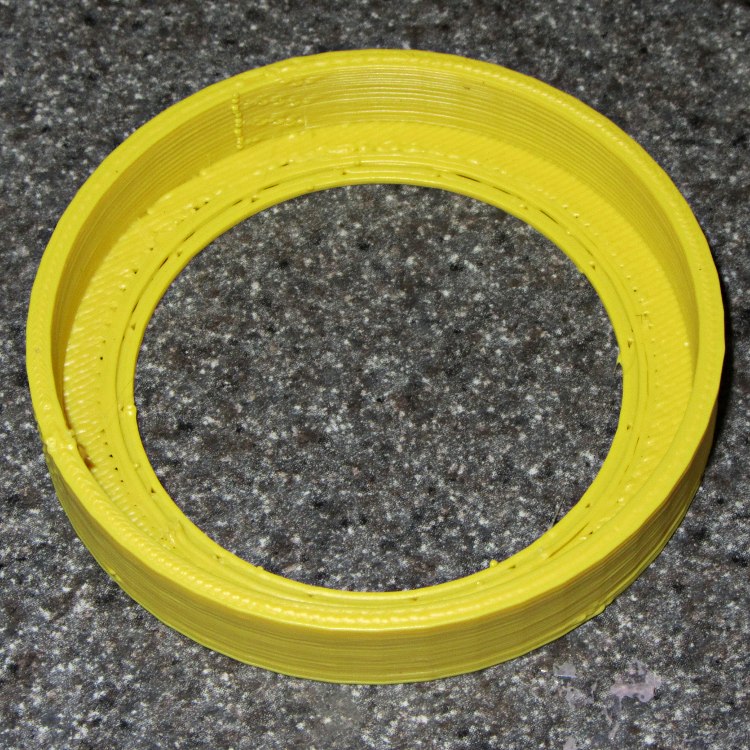
    It’s basically a ring with tabs under the recess. The ring OD matches the lens caps’s ID, with a height equal to the recess depth, so only the tabs contact the cap. I removed them by twisting each tab with a needle-nose pliers until the whole thing popped loose:

    SX230HS lens cap - support structure
    SX230HS lens cap – support structure

    A bit of scraper and scalpel cleanup and it’s all good. The detail pix show the first trial of the lens cap, which lacks the nice bevel around the front rim.

    The camera is smart enough to notice when something blocks the lens: it immediately shuts down and displays a lens failure error message. That’s probably not a Good Thing on a regular basis, but it doesn’t seem to do any harm.

    FWIW, my previous pocket camera, a Casio EX-Z850 , sported a recessed and somewhat thicker turret end cap that didn’t have this problem. Mary says she’ll make a case for this camera, too, but until then I’m using a pouch from a dinky VOIP phone that just barely holds the camera.

    The OpenSCAD source code:

    // Lens cap for Canon SX230HS
    // Ed Nisley KE4ZNU - Nov 2011
    
    //-------
    //- Extrusion parameters must match reality!
    //  Print with +1 shells, 3 solid layers, 0.2 infill
    
    ThreadThick = 0.33;
    ThreadWidth = 2.0 * ThreadThick;
    
    HoleFinagle = 0.20;
    HoleFudge = 1.00;
    
    function HoleAdjust(Diameter) = HoleFudge*Diameter + HoleFinagle;
    
    Protrusion = 0.1;			// make holes end cleanly
    
    function IntegerMultiple(Size,Unit) = Unit * ceil(Size / Unit);
    
    //-------
    // Dimensions
    
    LensDia = 53.0;
    LensRad = LensDia/2;
    LensLength = 8.0;
    
    PlateThick = IntegerMultiple(0.75,ThreadThick);
    PlateDia = 48.0;
    
    Shell = 2*ThreadWidth;
    Spacer = 2*ThreadThick;
    
    CapOD = LensDia + 2*Shell;
    CapLength = LensLength + Spacer + PlateThick;
    CapSides = 48;
    
    CenterHoleDia = 44.0;
    
    BevelWidth = PlateThick;
    
    NumStruts = 16;
    SupportStrutLen = (PlateDia - ThreadWidth)/2;		// small gap to cap
    
    //-------
    
    module PolyCyl(Dia,Height,ForceSides=0) {			// based on nophead's polyholes
    
      Sides = (ForceSides != 0) ? ForceSides : (ceil(Dia) + 2);
    
      FixDia = Dia / cos(180/Sides);
    
      cylinder(r=HoleAdjust(FixDia)/2,h=Height,$fn=Sides);
    }
    
    module ShowPegGrid(Space = 10.0,Size = 1.0) {
    
      Range = floor(50 / Space);
    
    	for (x=[-Range:Range])
    	  for (y=[-Range:Range])
    		translate([x*Space,y*Space,Size/2])
    		  %cube(Size,center=true);
    
    }
    
    //-------
    
    ShowPegGrid();
    
    difference() {
      PolyCyl(CapOD,CapLength,CapSides);
    
      translate([0,0,(Spacer + PlateThick)])					// lens shell
    	PolyCyl(LensDia,(LensLength + Protrusion),CapSides);
    
      translate([0,0,-Protrusion])								// center hole
    	PolyCyl(CenterHoleDia,(CapLength + Protrusion));
    
      translate([0,0,-Protrusion])								// bevel
    	difference() {
    	  cylinder(r=(CapOD/2 + 2*(BevelWidth + Protrusion)),
    			   h=(2*BevelWidth + Protrusion),
    			   $fn=CapSides);
    	  cylinder(r1=(CapOD/2 - BevelWidth - Protrusion),
    			   r2=(CapOD/2 + BevelWidth),
    			   h=(2*BevelWidth + Protrusion),
    			   $fn=CapSides);
    	}
    
      difference() {
    	translate([0,0,-Protrusion])							// cover plate recess
    	  PolyCyl(PlateDia,(PlateThick + Protrusion));
    	for (Index=[0:(NumStruts - 1)])							// support struts
    	  rotate(Index*360/NumStruts)
    		translate([-ThreadWidth,-SupportStrutLen,0])
    		  cube([2*ThreadWidth,SupportStrutLen,PlateThick]);
      }
    }
    
    difference() {									// support ring
      PolyCyl(CenterHoleDia,PlateThick);
      translate([0,0,-Protrusion])
    	PolyCyl((CenterHoleDia - 4*ThreadWidth),(PlateThick + 2*Protrusion));
    }
    
  • DIY Vanilla Extract: The Beginning

    DIY Vanilla Extract
    DIY Vanilla Extract

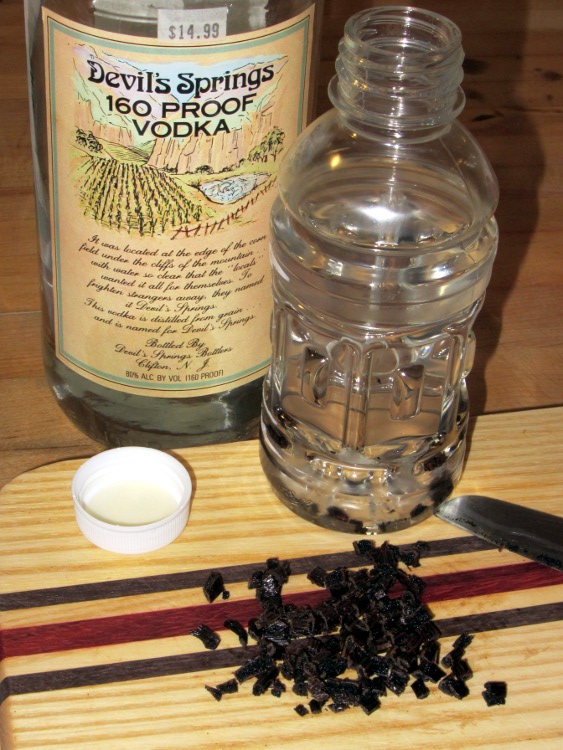
    Having bought some low-budget Walmart vanilla extract that smells nothing at all like vanilla, I figured it’s time to get serious about this stuff. Recipes for DIY vanilla extract abound on the Internet, but as nearly as I can tell, the basic idea is to put vanilla beans in contact with ethanol, shake occasionally for a couple of months, then enjoy. Uh, by the teaspoonful, that is.

    Quite some years ago I discovered that NYS prohibits the sale of grain alcohol, so you must buy stiff vodka to get high-test ethanol. That glass bottle contains the cheapest 160 proof vodka I could find in the waning years of the last millennium; I figured it was likely to have fewer additives around its 80% ethyl alcohol than anything else in the liquor store. After more than a decade on the Basement Laboratory’s Solvents Shelf (I don’t use a lot of ethanol), a dollop in a saucer burns with an ethereal blue flame: it’s in fine shape.

    The plastic bottle originally held some weird alien fruity liquid (which, IIRC, I  picked up while doing amateur radio duty at a charity event) and has the desirable attribute of a tight sealing lid. It’d be better to use glass and I suppose amber beats clear, but this stuff will spend its entire life in a dark cupboard with all the other spices. Although some recipes call for sterilizing the bottle in boiling water, I figure any bug that can survive 80% ethanol will shrug off hot water… and the vanilla beans probably aren’t all that sterile, anyway.

    A cup of neat vodka, three slit-and-chopped vanilla beans, and away we go. It should be ready for the Christmas baking season.

    If this works, I’ll get a substantial quantity of vanilla beans from the usual eBay supplier and make some really stiff extract. Two bucks a bean at the local grocery store: ouch.

  • Magic Magnetic Protection

    If this is true, I can scrap out my roll of mu metal shielding:

    Magnetic card protection sleeve
    Magnetic card protection sleeve

    I think they mean the sleeve protects the magnetic stripe from mechanical damage, but wedging those two sentences together certainly suggests the envelope has serious anti-magnetic mojo…

  • Self-resonant Frequencies of Some Ceramic Capacitors

    In that version of the GPS+voice interface, I sprinkled 100 nF and 100 pF SMD caps across the input lines in the hope that they’d reduce EMI on the audio board. The board worked fine for years, but now that it’s time to build another board & box, I figured it’d be good to know a bit more about their actual response.

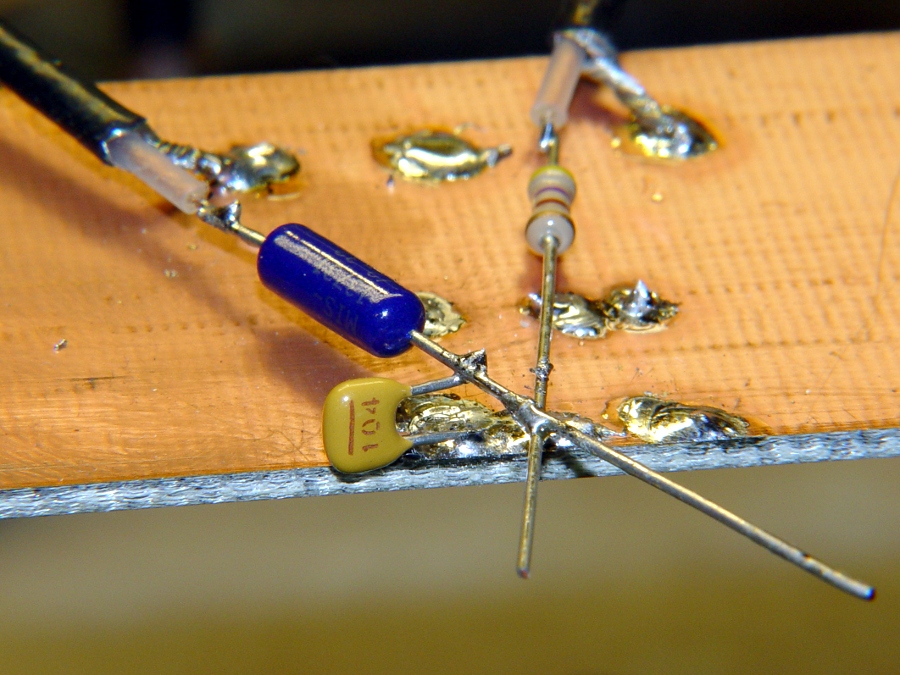
    So I cobbled up a test fixture with a 3 dB pad from the tracking generator output and a 20 dB pad to the spectrum analyzer input (both of those are bogus, because the cap impedance varies wildly, but work with me on this):

    Ceramic 100 nF cap on copper
    Ceramic 100 nF cap on copper

    Pulled an assortment of 100 nF ceramic caps from the stockpile:

    100 nF ceramic capacitor assortment
    100 nF ceramic capacitor assortment

    And rubbed them against the HP8591 spectrum analyzer & tracking generator:

    Cap Comparison - Detail
    Cap Comparison – Detail

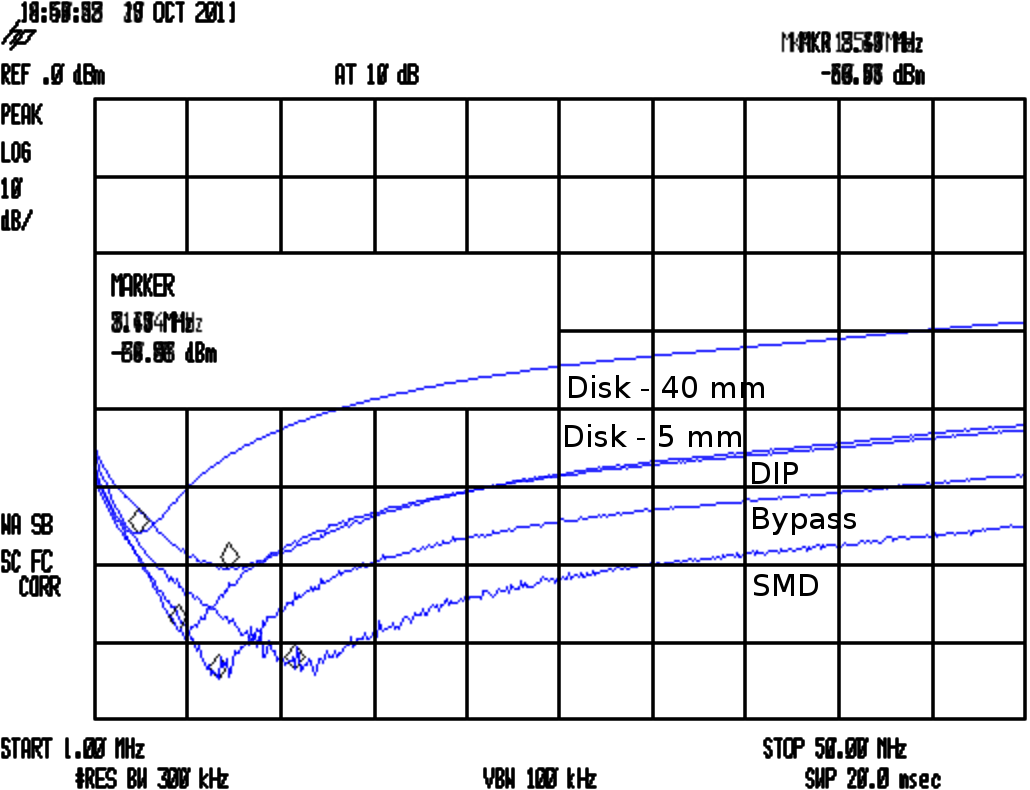
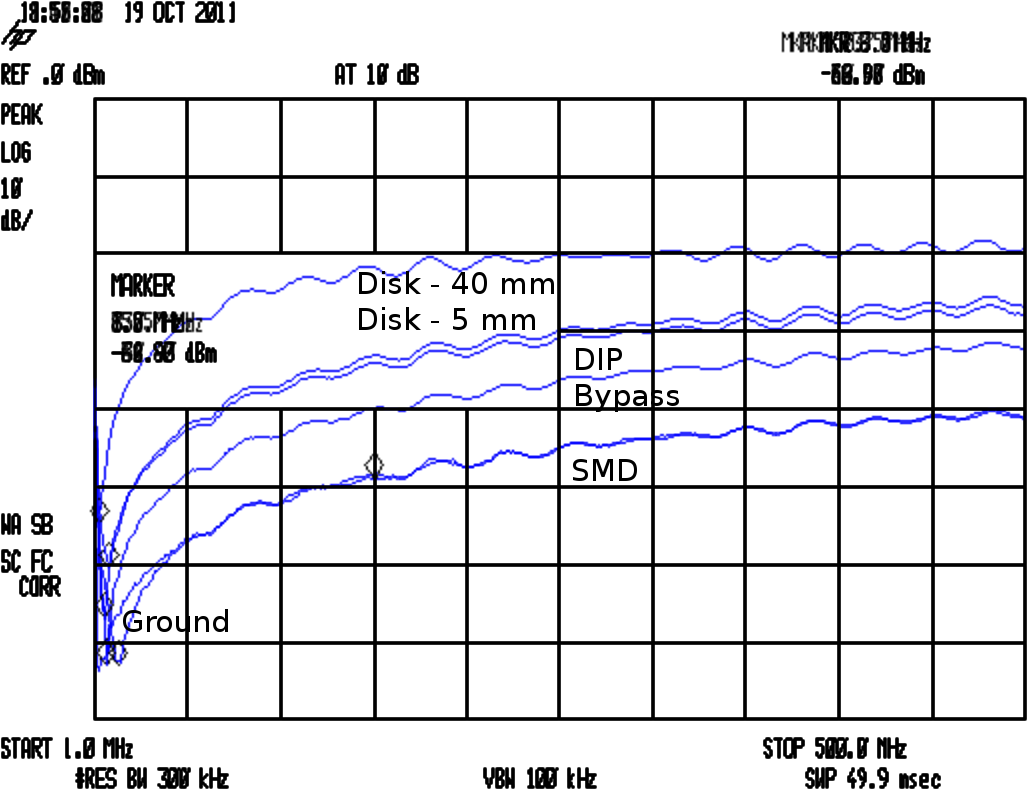
    Their self-resonant frequencies are much lower than I expected:

    Cap Comparison
    Cap Comparison

    The attenuators produce about 17 dB of loss with no cap in the circuit, so the disk caps are pretty much asleep at the switch from VHF on up. The small bypass cap in the top photo is OK and the SMD cap is pretty good, but they’re all well past their self-resonant frequency and acting like inductors.

    The relevant equations:

    • FR = 1/(2π √(LC))
    • XC = 1/(2π f C)
    • Q = FR / BW
    • ESR = XC / Q

    The drill goes a little something like this:

    • Find resonant frequency FR and 3 db bandwidth BW
    • Knowing FR and C, find parasitic L
    • Knowing FR and BW, find Q
    • Knowing XC and Q, find ESR

    In round numbers, the 100 nF SMD cap has L=2 nH and ESR=60 mΩ.

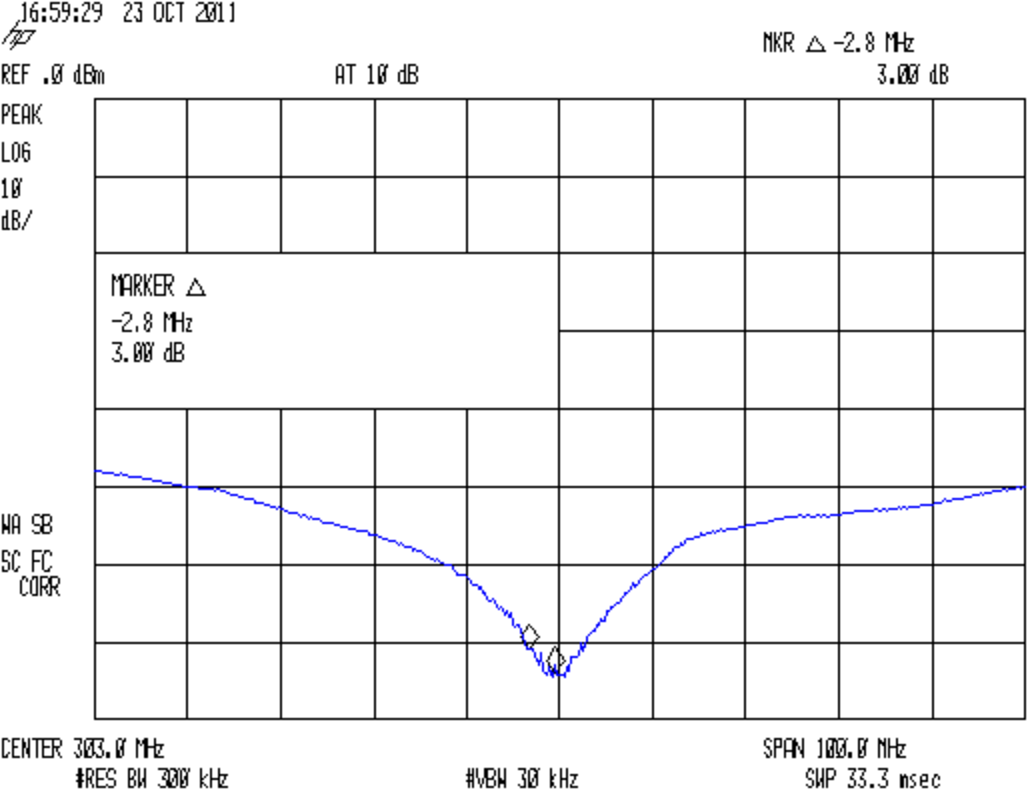
    Now, it turns out a 100 pF SMD cap resonates up at 300 MHz, between the VHF and UHF amateur bands:

    SMD - 100 pF Bandwidth
    SMD – 100 pF Bandwidth

    So I think the way to do this is to pick the capacitance to put the self-resonant frequency in the VHF band, parallel another cap to put a second dip in the UHF band, and run with it. A back of the envelope calculation suggests 470 pF and 47 pF, but that obviously depends on a bunch of other imponderables and I’ll just interrogate the heap until the right ones step forward.

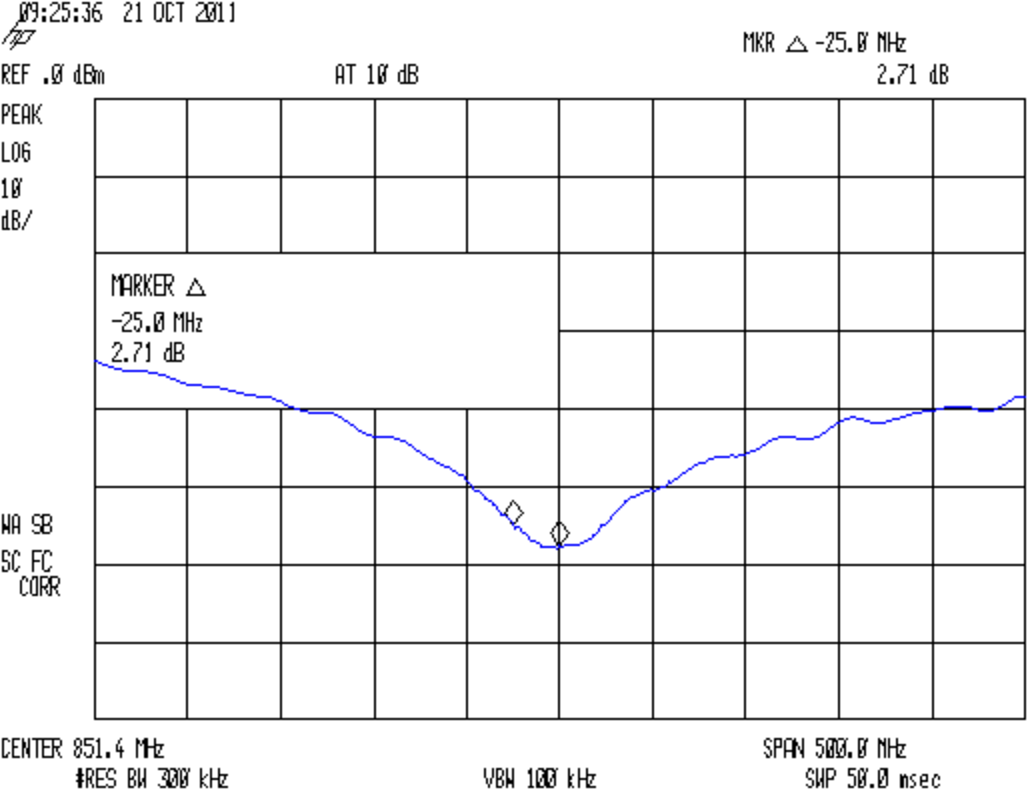
    Just to show the test fixture isn’t a complete piece of crap, here’s a 12 pF cap resonating up around 850 MHz:

    SMD - 12 pF Bandwidth
    SMD – 12 pF Bandwidth

    For the combination of components, sweep speeds, bandwidths, and suchlike in effect, the spectrum analyzer’s noise floor is down around -75 dBm. I think the 12 pF cap is actually better than it looks, but I didn’t fiddle around with a narrower resolution bandwidth.

  • Auto Escape Hammer LED Flashlight Hackage

    A cheap auto escape hammer (IIRC, free in the bottom of a tag-sale box filled with stuff I could actually use) has been kicking around the back of the bench for far too long; it had a feeble single-cell incandescent bulb flashlight with the cheapest possible non-switch. I ripped all that out, carved out enough plastic to fit a CR123 lithium cell, hot-melt-glued a real pushbutton switch and 10 mm white LED in place, and soldered it up:

    Lithium cell hacked into auto escape tool
    Lithium cell hacked into auto escape tool

    The CR123 puts out enough juice to light up the LED, but it’d be happier with a bit more current. There’s no limiting resistor, so the LED gets what it gets.

    Augment the screws with a few snippets of Kapton tape, use some real 3M Velcro tape, and it’s all good (albeit ugly on a stick):

    Hacked auto escape hammer
    Hacked auto escape hammer

    Now, there’s no way to test the hammer part of it (perhaps I could visit a junkyard and whack out a few windows for practice?), but at least now we have a disposable flashlight in the van…

  • Great Northeast October Snowstorm

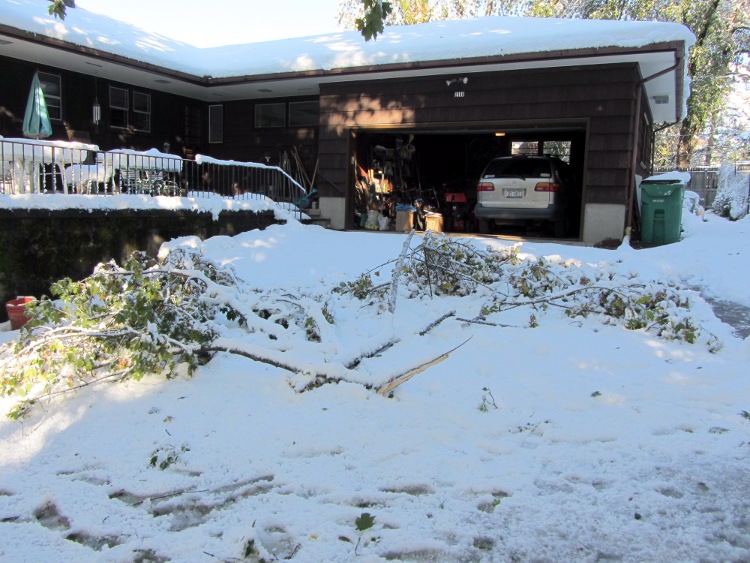
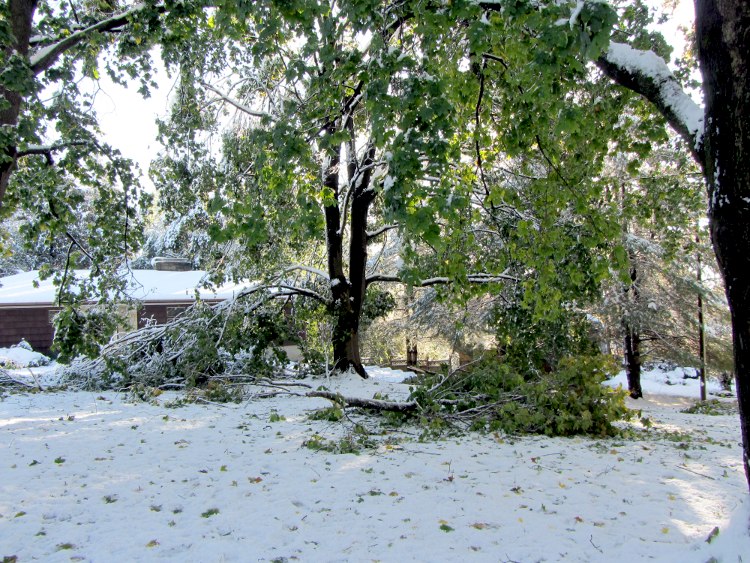
    Our yard accumulated about 14 inches of heavy wet snow that made a mess of the maple trees. Before I could get the snowblower out of the garage, I had to cut up a stack of branches:

    Branches at garage
    Branches at garage

    Yes, there really is that much of a slope leading up to the garage; clearing the driveway immediately after every snowstorm is not optional.

    Many of the branches in the back yard broke off and simply leaned against the ones still arched over the driveway:

    Branches in back yard
    Branches in back yard

    The front yard was a mess:

    Branches in front yard
    Branches in front yard

    In addition to all that, we had branches down beside the house, in the garden, around the beehive, and, in general, everywhere. Obviously, we have too many maples, but they’re what the previous owners planted (or at least didn’t uproot while that was possible).

    The generator bridged 25 hours without power to save the refrigerator & freezer contents and keep the house between 55-60 °F. We survived five days with no phone (shrug) or Internet (eeek!); the cell phone was, as usual, useless because the house sits on a local maximum in a shallow valley below line-of-sight from all the surrounding towers.

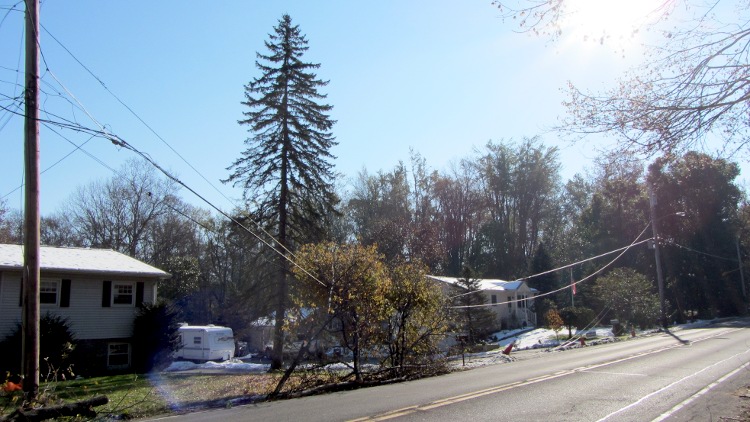
    The last break in the phone & Internet cables occurred just north of us:

    Branches on wires
    Branches on wires

    Those branches came from a tree across the road that put down roots on a slab of rock that just didn’t provide enough griptivity:

    Tree down on Rt 376
    Tree down on Rt 376

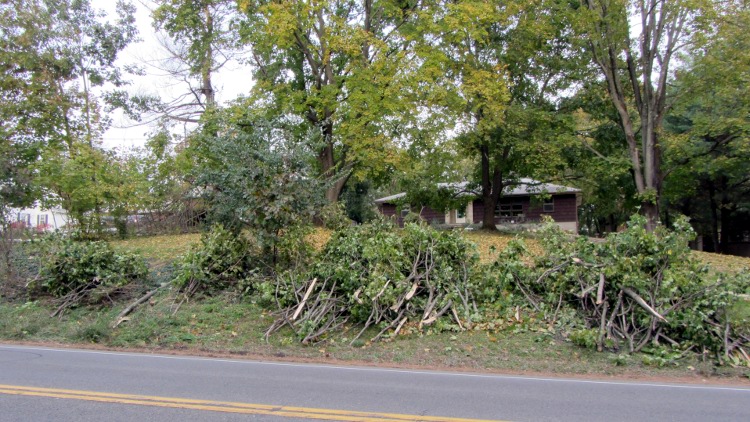
    After three days of diligent bow-saw work and mule-mode dragging, we cleared the yards. The back yard clutter went over the cliff toward our bottomlands adjoining the Wappingers Creek and the front yard timber now sits ready for what we hope will be the town’s pickup:

    Branches ready for pickup
    Branches ready for pickup

    Our experience was a nuisance, rather than a disaster, unlike that of many folks in the area.

    Now it’s time for the annual fall leaf-shredding adventure

    [Update: Turns out the NYS DOT drew the short straw:

    NYS DOT crew grinding branches
    NYS DOT crew grinding branches

    Took them the better part of 15 minutes; the larger branches nearly stalled that giant chipper. A tip o’ the hard hat!]