Ed Nisley's Blog: Shop notes, electronics, firmware, machinery, 3D printing, laser cuttery, and curiosities. Contents: 100% human thinking, 0% AI slop.
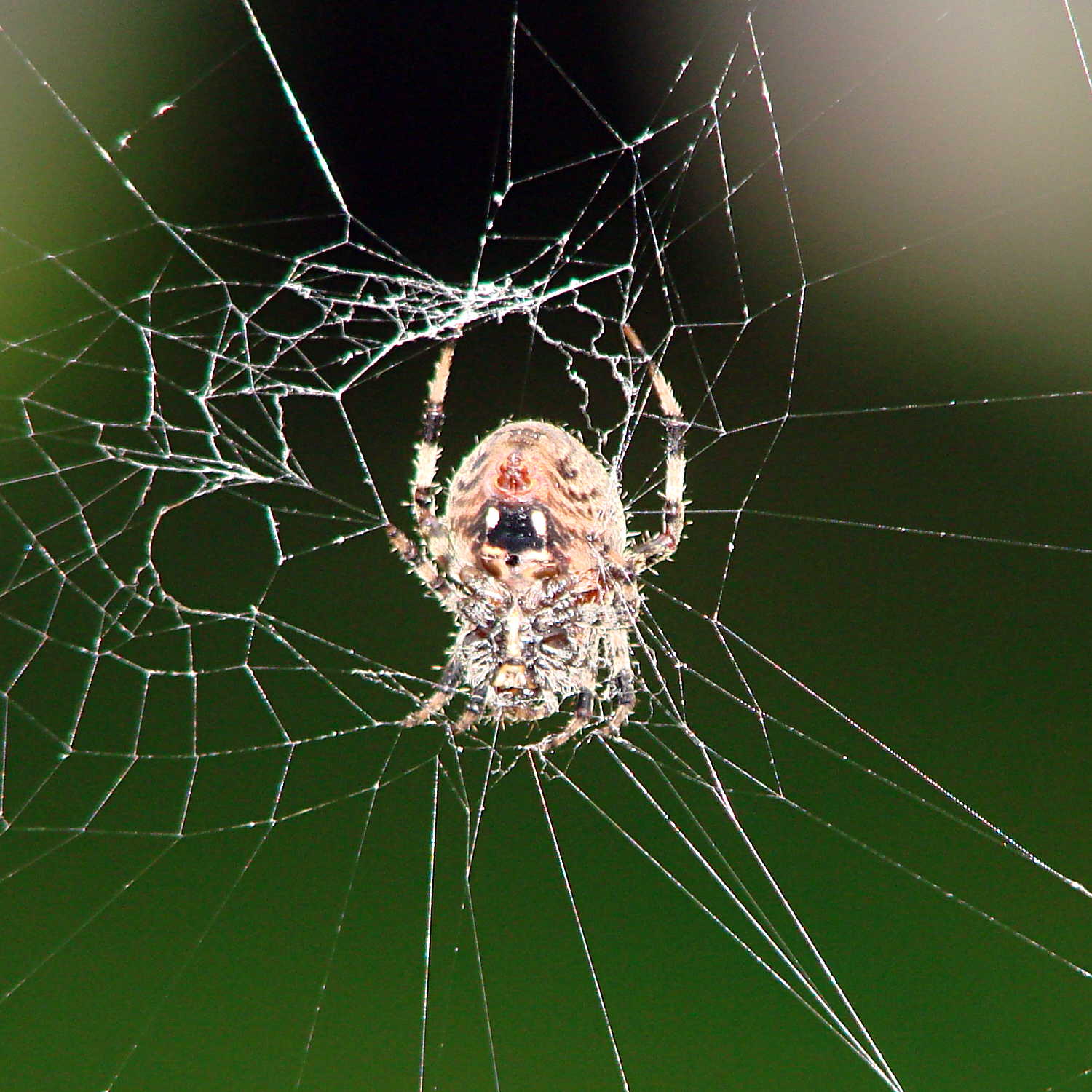
The season of giantorb-weavingspiders comes again to Poughkeepsie, with this one stretching a web across the decorative grasses bracketing the (unused) front door:
Orb spider – at rest
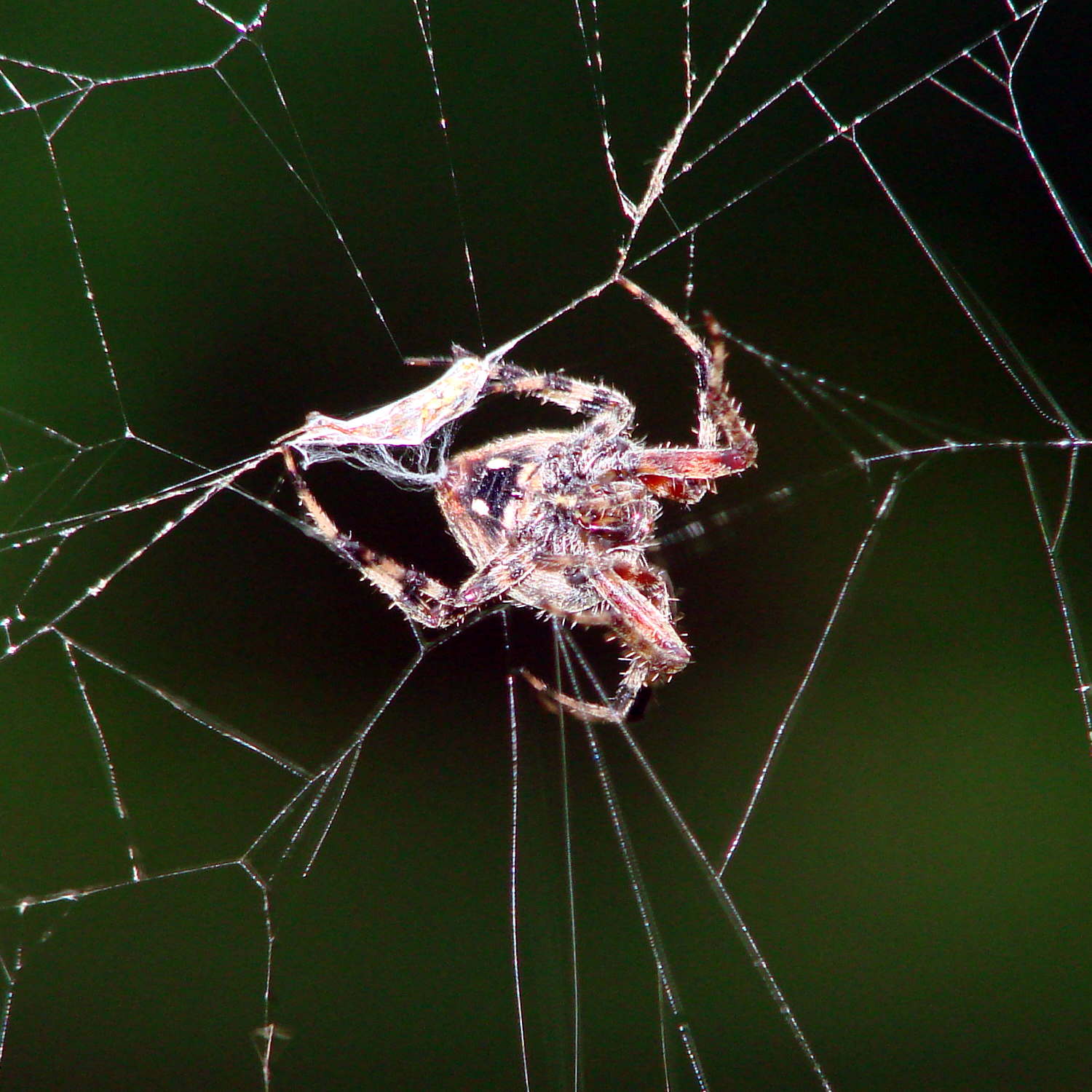
While I screwed around with the camera, she dashed off to one side and began wrapping a package:
Orb spider – wrapping insect
Her spinnerets release a torrent of silk during that operation!
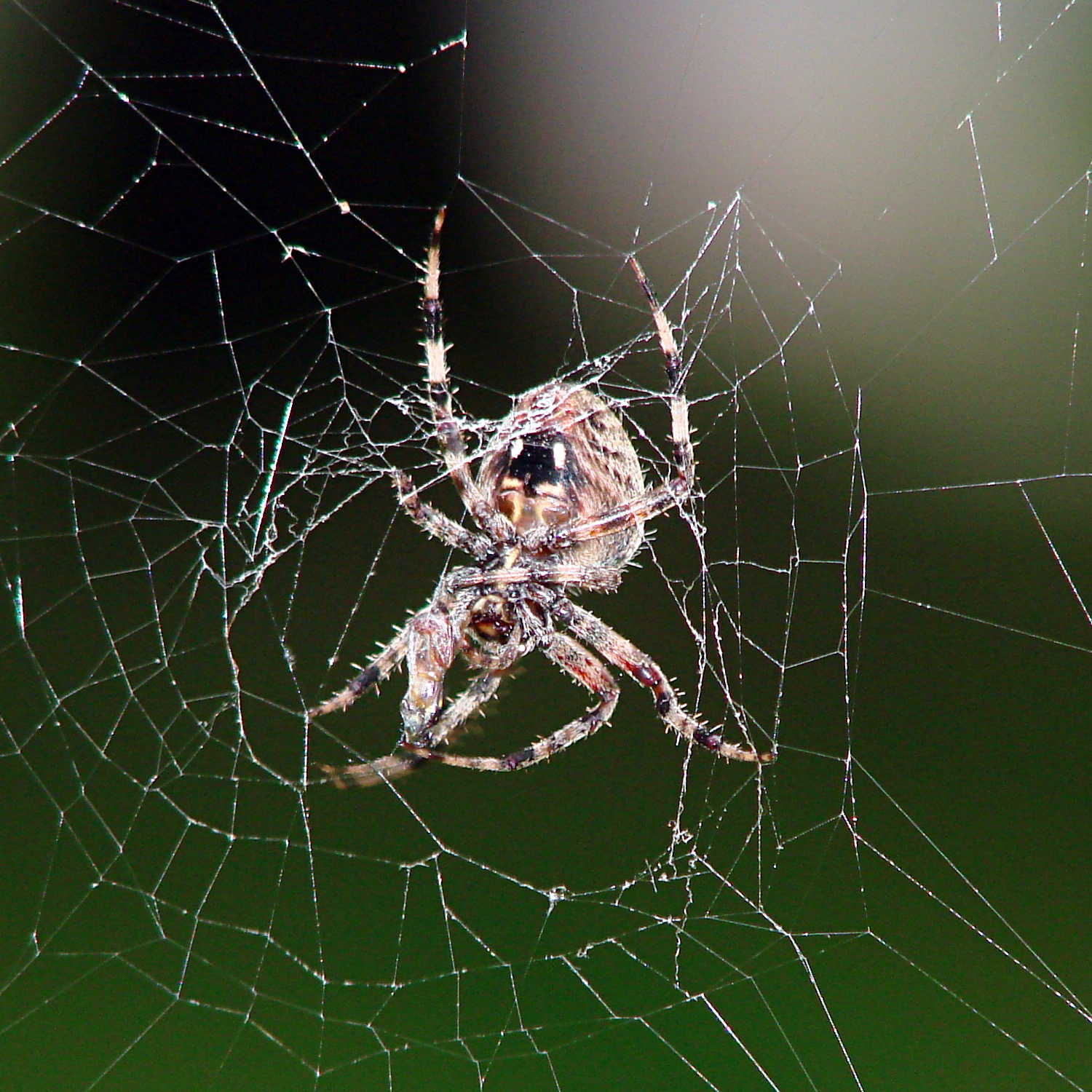
Dragging it back to the middle of her orb, she settled down for breakfast.
Orb spider – ready for breakfast
So did I…
Hand held with the Sony DSC-H5, facing westward in dawn light, using the flash to bring the image up out of the mud. A touch of unsharp mask and some contrast stretching; nothing too drastic.
Given that the motor current amounts to maybe 3 A, absolute maximum, with a locked rotor, those skinny wires on the slit ferrite toroid won’t pose a problem:
HV Interface board – detail
I really like how that 3D printed armor worked out, even if I still haven’t poured any goop around the windings to lock them down; they’re held in by raw faith and friction.
The current sense circuitry appears along the bottom of the AC Power Interface schematic:
AC Power Interface
The differential amplifier lives on the Low Voltage Interface board, forming the clump of parts just in front of the LM324 op amp on the left:
Low Voltage Interface Board – detail
Which has the usual handful of components required to get anything done in the analog realm:
Current Sense Amp – schematic
The power supplies come directly from the ATX connector. I’m ignoring the whole decoupling issue, because the supplies have essentially no load (and it’s all DC, anyway).
The trim pot sets the offset voltage to bring the Hall effect sensors’s VCC/2 offset down close to zero; the 100 mV figure is nominal, not actual, but should be a bit over 0 V to allow for a wee bit o’ drift. This time around, I’ll measure and subtract the actual offset, rather than (try to) auto-zero it.
The voltage gain runs just under 3, set by 1% resistors from the heap. The overall gain works out to about 1.9 V/A or 525 mA/V, setting the high end at 5 V to a scant 2.6 A. Subject to actual calibration with more attention to detail, that’s close enough; we’re more interested in the around-an-amp range where the motor operates under nominal load.
The nose-to-tail Schottky diodes clamp the op amp output to avoid annoying the Arduino’s ADC input. It has protection circuitry, too, but there’s no point in stressing it.
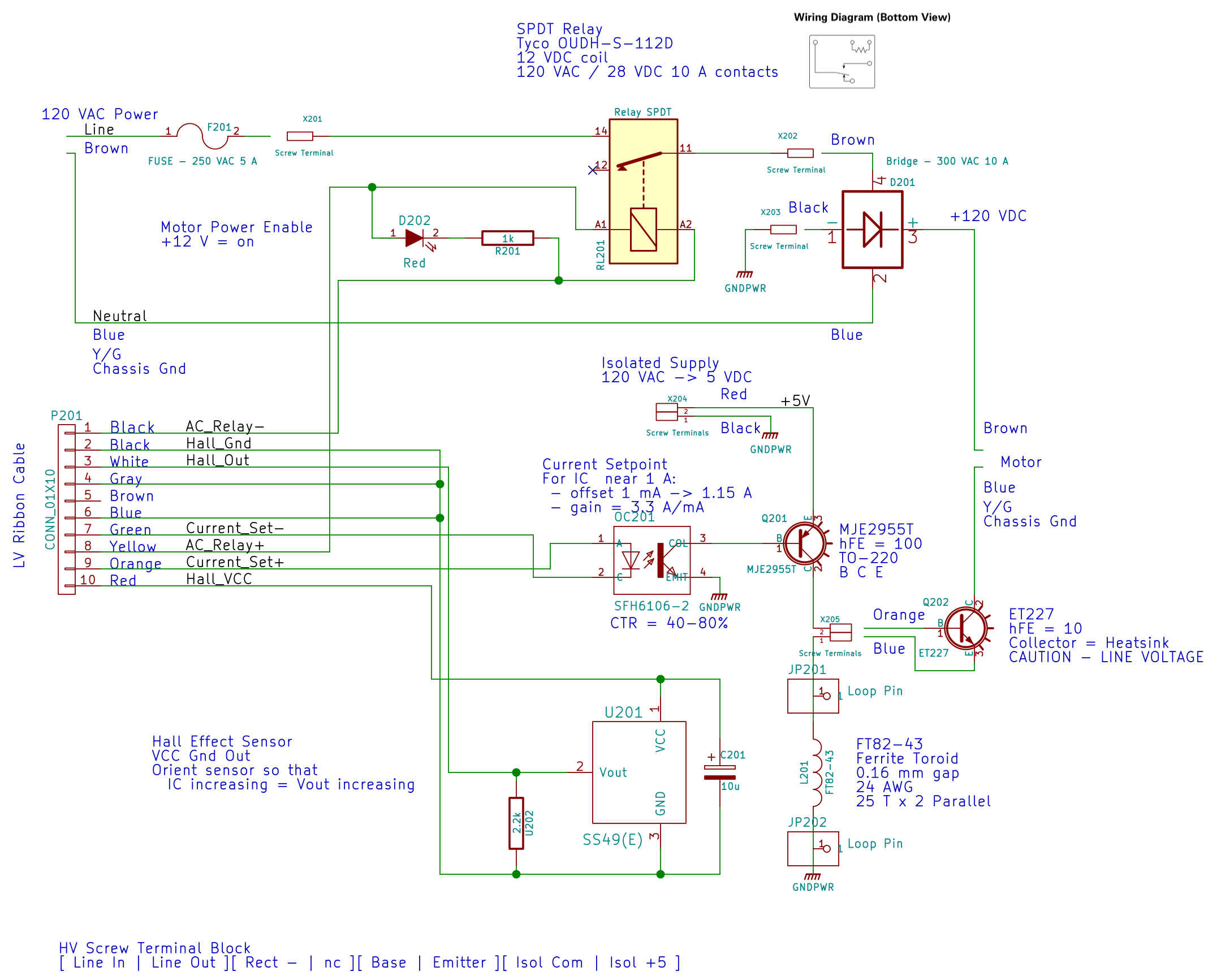
Because the ET227 transistor operates at power line voltages through a full wave rectifier, the base drive circuit requires an optoisolator. The ET227 is a low-gain device with hFE < 10, so it takes about 100 mA of base drive to control an amp of motor current, soooo the optoisolator needs a current amplifier.
I used an MJE2955T PNP transistor, with the emitter powered from an isolated +5 V supply to let the optoisolator pull current from the base. You could use an NPN transistor as a Darlington amp, but wiring the collectors together means the driver dissipates way too much power; the PNP seemed all-around easier.
That circuitry sprawls across the middle of the schematic:
AC Power Interface
The ET227 base runs at about 900 mV, so the MJE2955 PNP transistor will dissipate half a watt and needs a little heatsink, seen over on the right (with the hulking ET227 heatsink at the edge):
HV Interface board – detail
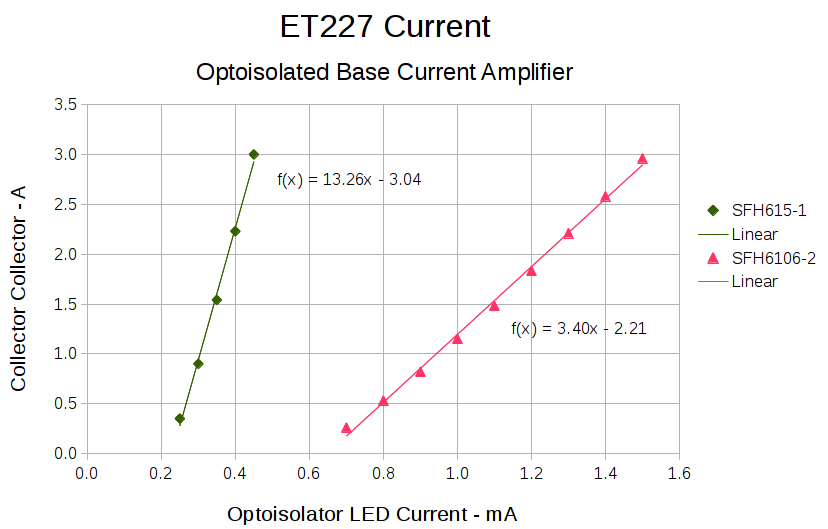
With all those parts safely secured, I ran some end-to-end current measurements from the optoisolator’s LED to the ET227’s collector current, with a safe 10 VDC applied to the collector:
ET227 – base drive – optoisolators
It’s worth noting that the two optoisolators have different pinouts. The DIP socket has wiring for both of ’em, so I could swap the two without rewiring the board. No, I didn’t notice that the first time around.
The curves are nicely linear above 250 mA, which is about what you’d expect for bipolar transistors driven from a current source. Below that, the current into the 13 Ω base-emitter resistor starts to overwhelm the actual base junction current and makes the curves all bendy. Given that the motor doesn’t start spinning the sewing machine with less than half an amp, that region doesn’t matter.
It’s also worth noting that the ET227 normally sees tens of amps (!) into the base terminal to control up to 200 A pulsed collector current with up to 1 kV collector voltage. That puppy loafs along here…
The ratio between the isolator gains doesn’t match the ratio between the spec sheet values, so maybe they’re mismarked or I (once again) have an outlier. In any event, there’s no point in getting too fussy, because the transistor gains depend strongly on temperature. I picked the lower-gain SFH6106-2 for more headroom, but it probably doesn’t make much difference.
The voltage-to-current circuitry driving the optoisolator’s LED lives on the Low Voltage Interface board, with the MCP4725 DAC breakout board above the Arduino Pro Mini and the rest just beyond the LM324 op amp over on the left:
Low Voltage Interface Board – detail
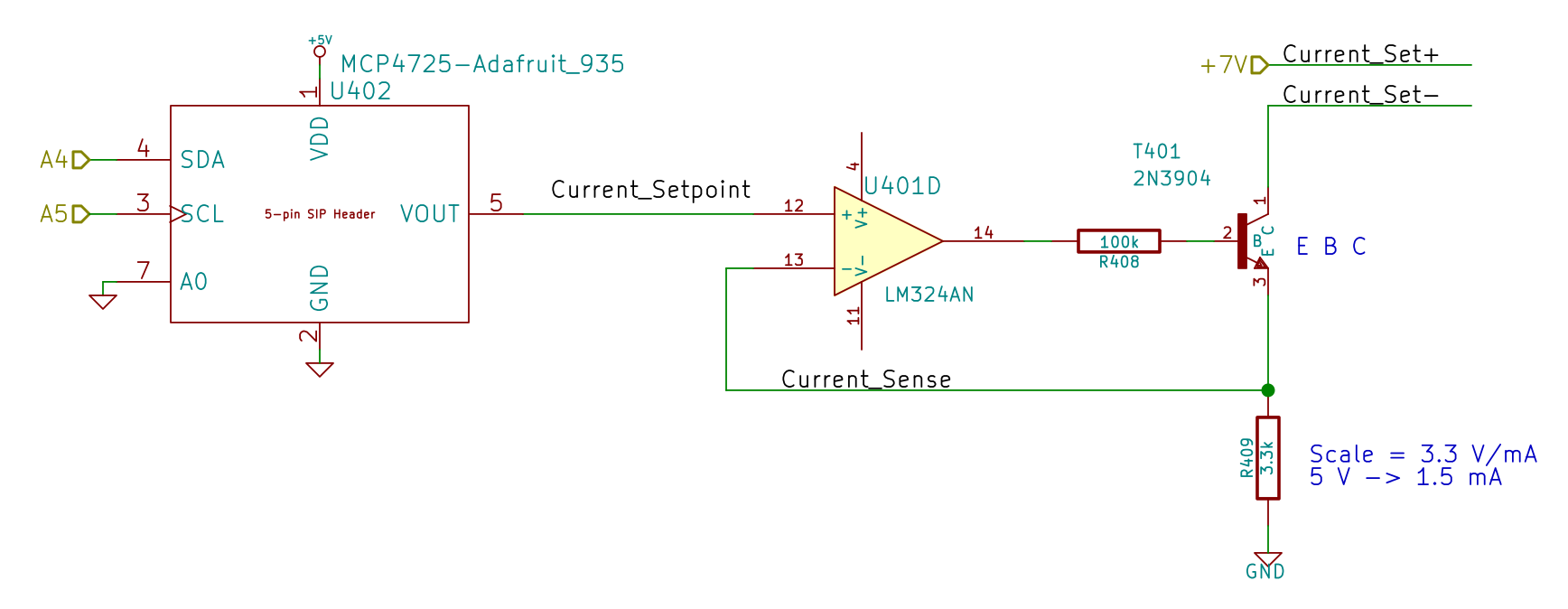
There’s nothing much to it:
Current Control DAC and Driver – schematic
I finally broke down and got some of Adafruit’s nice MCP4725 I2C DAC breakout boards: 12 bits, rail-to-rail output, no PWM ripple. What’s not to like?
R409 scales the gain so that +5 V tops out around 1.5 mA, which should deliver a collector current around 3 A: far more than seems absolutely necessary. R408 lets the op amp develop some voltage while trickling a few dozen microamps into the 2N3904’s base; the hFE runs around 50, so the error due to base current amounts to maybe 2% and, remember, the final current depends on the temperature anyway.
Given that the GX270 case has a power pushbutton on the front panel, it seemed only reasonable to let it control the ATX power supply just like it used to. Most of the parts clumped in front of the panel’s ribbon cable handle that logic:
Low Voltage Interface Board – detail
The pushbutton on the far left parallels the front-panel button so I don’t have to reach around the box just to turn it on.
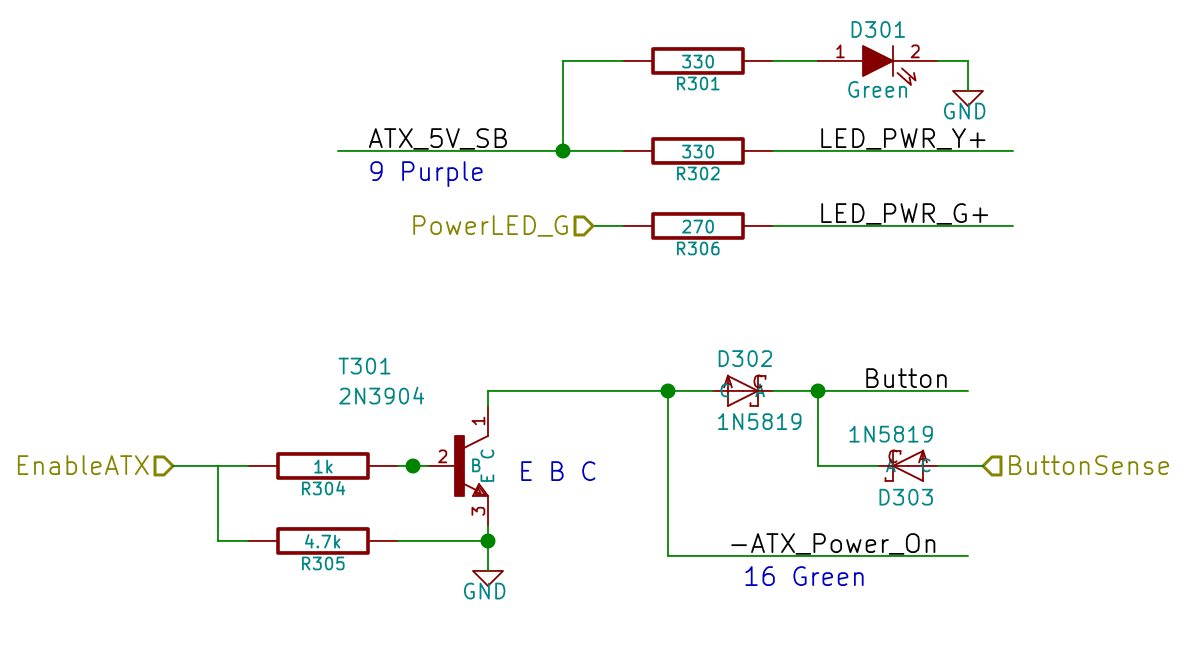
The schematic shows the relevant bits:
LV Power Interface – Power Button
The ATX +5 V Standby output remains turned on all the time, so I wired that to the power button’s yellow LED, to show that the plug is in the wall.
The pushbutton pulls the ATX Power_On line down, which turns on the supply outputs, which fires up the Arduino, which turns on the transistor, which holds the Power_On line down. D302 isolates the transistor from the button, so the code can sense the button’s on/off state with the power on. D303 isolates the Power_On line from the sense input to prevent the pullup on the Power_On line from back-powering the Arduino through its input protection diodes when the power is off.
The Arduino code starts by arranging the I/O states, turning the transistor on, pulsing the green power LED until until the button releases, then leaving the green LED on:
	pinMode(PIN_PWR_G,OUTPUT);
	digitalWrite(PIN_PWR_G,HIGH);				// visible on front panel

	pinMode(PIN_ENABLE_ATX,OUTPUT);				// hold ATX power supply on
	digitalWrite(PIN_ENABLE_ATX,HIGH);

	pinMode(PIN_ENABLE_AC,OUTPUT);				// turn on AC power
	digitalWrite(PIN_ENABLE_AC,HIGH);

	pinMode(PIN_BUTTON_SENSE,INPUT_PULLUP);		// wait for power button release
	while (LOW == digitalRead(PIN_BUTTON_SENSE)) {
		delay(50);
		TogglePin(PIN_PWR_G);					// show we have control
	}
	digitalWrite(PIN_PWR_G,HIGH);
Every time around the main loop, this chunk of code checks the button input:
	if (LOW == digitalRead(PIN_BUTTON_SENSE)) {
		printf("Shutting down!\r\n");
		digitalWrite(PIN_ENABLE_AC,LOW);
		digitalWrite(PIN_ENABLE_ATX,LOW);
		while(true) {
			delay(20);
			TogglePin(PIN_PWR_G);				// show we have shut down
		}
	}
The never-ending loop blinks the green LED until the power goes down, which happens when the button releases. That terminates the loop with extreme prejudice., which is the difference between embedded programming and high-falutin’ Webbish stuff.
So the good folks in the wordpress.com support infrastructure have been manually exporting my blog and sending me a link to the ZIP file, pursuant to the still unresolved failure-while-exporting issue. A bit of back-and-forth around the latest backup / export produced an interesting data point:
The message about the export file not being found is simply an indicator that the huge export could not finish compiling before a more general time limit was reached — in this case because your site is easily in the top .1% for size. I will pass your suggestion for improved exporting along.
I’m sure that’s among the freebie blogs on wordpress.com, but I never thought of myself as a member of the 0.1% club.
Huh. Snuck up on me while I wasn’t paying attention. If I could do that with money, I’d be on to something.
I’ve never participated in their post-a-day challenges, because that’s what I do around here. Should you find something interesting, every now and again, that’s a bonus.
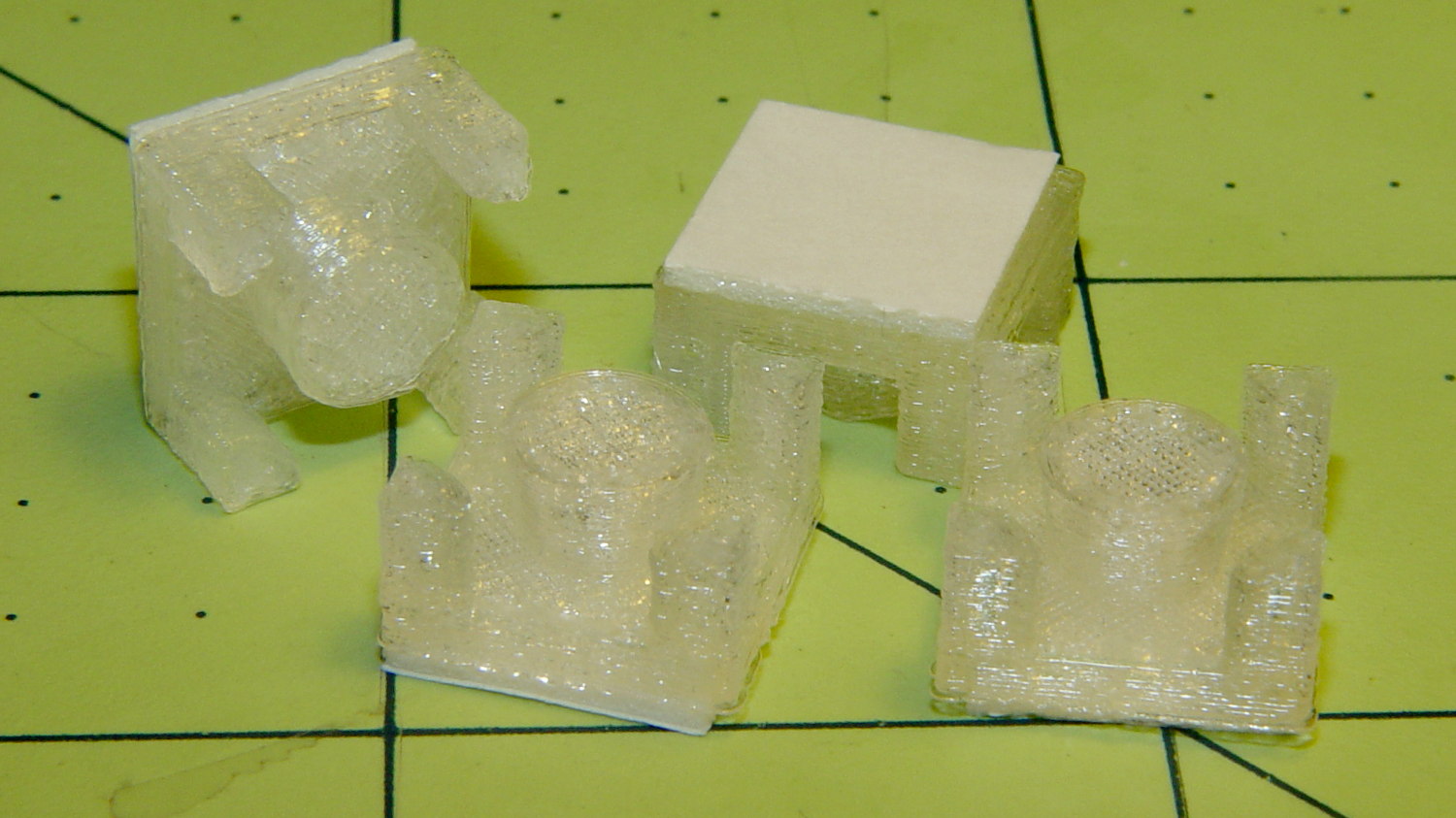
Commercial LED strip lights for sewing machines mount their cables with little stick-on anchors and cable ties. I wasn’t happy with the cable tie thing and finally figured this out:
Kenmore 158 – LED strip light cable clips
The clips have that size & shape because they fit exactly atop some pre-cut foam squares from the Tape Lookaside Buffer:
LED strip light cable clips
You can see the shape better in the solid model:
LED Cable Clips
The central bollard has a slight taper to retain the cable, the quarter-posts are straight, and they’re both twice the cable diameter tall. The clearance between the center and corner posts at the top matches the cable diameter, so there’s a bit of bending room at the bottom, and, with the cable bent around the center, it won’t fall out on its own.
The cute coaxial cable I’m misusing for the LED strips measures just shy of 2 mm, making these into little bitty things. The corner posts seem surprisingly strong, despite 3D printing’s reputation for crappy quality; I haven’t been able to break one off with more effort than seemed warranted.
The OpenSCAD source code:
// LED Cable Clips
// Ed Nisley - KE4ZNU - October 2014

//- Extrusion parameters must match reality!

ThreadThick = 0.20;
ThreadWidth = 0.40;

HoleWindage = 0.2;			// extra clearance

Protrusion = 0.1;			// make holes end cleanly

AlignPinOD = 1.70;			// assembly alignment pins: filament dia

function IntegerMultiple(Size,Unit) = Unit * ceil(Size / Unit);

//----------------------
// Dimensions

Base = [12.0,12.0,IntegerMultiple(2.0,ThreadThick)];	// base over sticky square

CableOD = 2.0;

BendRadius = 3.0;

Bollard = [BendRadius,(sqrt(2)*Base[0]/2 - CableOD - BendRadius),2*CableOD];
B_BOT = 0;
B_TOP = 1;
B_LEN = 2;

NumSides = 5*4;

//----------------------
// Useful routines

module PolyCyl(Dia,Height,ForceSides=0) {			// based on nophead's polyholes

  Sides = (ForceSides != 0) ? ForceSides : (ceil(Dia) + 2);

  FixDia = Dia / cos(180/Sides);

  cylinder(r=(FixDia + HoleWindage)/2,
           h=Height,
           $fn=Sides);
}

module ShowPegGrid(Space = 10.0,Size = 1.0) {

  RangeX = floor(100 / Space);
  RangeY = floor(125 / Space);

	for (x=[-RangeX:RangeX])
	  for (y=[-RangeY:RangeY])
		translate([x*Space,y*Space,Size/2])
		  %cube(Size,center=true);

}

//----------------------
// Build it

ShowPegGrid();

intersection() {
	translate([0,0,(Base[2] + Bollard[2])/2])			// overall XYZ outline
		cube(Base + [0,0,Bollard[2]],center=true);

	union() {
		translate([0,0,Base[2]/2])						// oversize mount base
			scale([2,2,1])
				cube(Base,center=true);

		for (i=[-1,1] , j=[-1,1]) {						// corner bollards
			translate([i*Base[0]/2,j*Base[1]/2,(Base[2] - Protrusion)])
				rotate(180/NumSides)
				cylinder(r=Bollard[B_BOT],h=(Bollard[B_LEN] + Protrusion),center=false,$fn=NumSides);

		translate([0,0,(Base[2] - Protrusion)])			// center tapered bollard
			cylinder(r1=Bollard[B_BOT],r2=Bollard[B_TOP],h=(Bollard[B_LEN] + Protrusion),center=false,$fn=NumSides);
		}
	}
}
Now that I think of it, maybe a round clip would look nicer. The central bollard would stay, but the circular outside rim could have three cutouts. When these fall off, I’ll give that a try.
They may be square and clunky, but they look much better than Gorilla Tape…
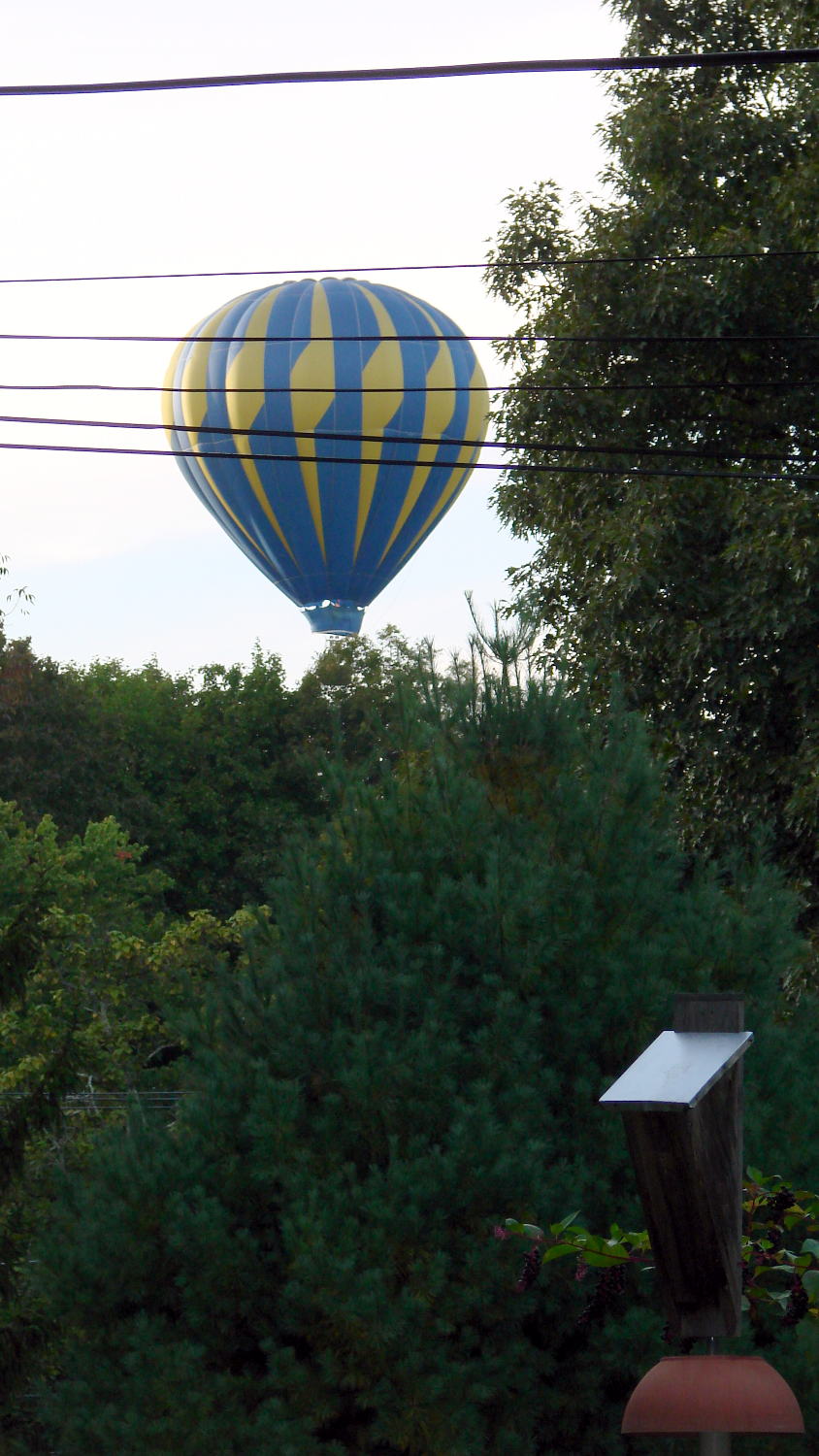
This airship drifted by just north of the house, aimed toward one of the nearby back yards on the hillside:
Hot Air Balloon – Red Oaks Mill
It was not at all clear they intended to land, just that it was happening anyway. Burners roaring, the bag just cleared the ridge and vanished into the west…
Further, we know not.
Back in 2006, I spotted a balloon making a water landing:
Water Landing
They managed enough lift to cross the driveway, then deflate it on the yard in front of the house, to the delight of passersby…






 The Smell of Molten Projects in the Morning