The Smell of Molten Projects in the Morning

Ed Nisley's Blog: Shop notes, electronics, firmware, machinery, 3D printing, laser cuttery, and curiosities. Contents: 100% human thinking, 0% AI slop.

Author: Ed

  • Makergear M2: Initial PrusaSlicer Configuration

    Makergear M2: Initial PrusaSlicer Configuration

    After replacing the nozzle and the filament drive body on the M2, I figured I might as well throw all the balls in the air and switch to PrusaSlicer for all my slicing needs. It’s built from the Slic3r project, gaining features used by Prusa’s printers / filaments and a considerably improved UI, with a full-time paid staff working on it:

    PrusaSlicer screenshot
    PrusaSlicer screenshot

    Of course, I immediately turned on Expert mode.

    CAUTION: My heavily customized start_gcode will crash your M2, because you haven’t relocated the Z-axis switch, haven’t calibrated Z=0 at the platform surface, and don’t put the XY=0 origin in the center of the platform.

    You have been warned: consider this as a serving suggestion, not a finished product.

    Because everything I design looks more-or-less like a bracket, I absolutely don’t care about surface finish, and I’m content to use only a few colors of PETG from a single supplier, a single Slic3r configuration has sufficed for nearly everything I print. A few manual tweaks for specific models, perhaps to change the number of perimeters or the infill percentage, handle the remaining cases.

    With all that in mind, here’s the current result of File → Export → Export Config as a GitHub Gist:

    # generated by PrusaSlicer 2.2.0+linux-x64 on 2021-01-01 at 13:33:03 UTC
    avoid_crossing_perimeters = 0
    bed_custom_model =
    bed_custom_texture =
    bed_shape = -100x-125,100x-125,100×125,-100×125
    bed_temperature = 90
    before_layer_gcode =
    between_objects_gcode =
    bottom_fill_pattern = hilbertcurve
    bottom_solid_layers = 3
    bottom_solid_min_thickness = 0
    bridge_acceleration = 0
    bridge_angle = 0
    bridge_fan_speed = 100
    bridge_flow_ratio = 1
    bridge_speed = 50
    brim_width = 0
    clip_multipart_objects = 1
    colorprint_heights =
    complete_objects = 0
    cooling = 1
    cooling_tube_length = 5
    cooling_tube_retraction = 91.5
    default_acceleration = 0
    default_filament_profile = ""
    default_print_profile =
    deretract_speed = 0
    disable_fan_first_layers = 6
    dont_support_bridges = 1
    draft_shield = 0
    duplicate_distance = 6
    elefant_foot_compensation = 0
    end_filament_gcode = "; Filament-specific end gcode \n;END gcode for filament\n"
    end_gcode = ;– PrusaSlicer End G-Code for M2 starts –\n; Ed Nisley KE4NZU – 15 November 2013\nG1 Z160 F2000 ; lower bed\nG1 X135 Y100 F30000 ; nozzle to right, bed front\nM104 S0 ; drop extruder temperature\nM140 S0 ; drop bed temperature\nM106 S0 ; bed fan off\nM84 ; disable motors\n;– PrusaSlicer End G-Code ends –\n\n
    ensure_vertical_shell_thickness = 1
    external_perimeter_extrusion_width = 0
    external_perimeter_speed = 50%
    external_perimeters_first = 0
    extra_loading_move = -2
    extra_perimeters = 1
    extruder_clearance_height = 20
    extruder_clearance_radius = 20
    extruder_colour = ""
    extruder_offset = 0x0
    extrusion_axis = E
    extrusion_multiplier = 0.95
    extrusion_width = 0.4
    fan_always_on = 0
    fan_below_layer_time = 15
    filament_colour = #29B2B2
    filament_cooling_final_speed = 3.4
    filament_cooling_initial_speed = 2.2
    filament_cooling_moves = 4
    filament_cost = 25
    filament_density = 0.95
    filament_deretract_speed = nil
    filament_diameter = 1.72
    filament_load_time = 0
    filament_loading_speed = 28
    filament_loading_speed_start = 3
    filament_max_volumetric_speed = 0
    filament_minimal_purge_on_wipe_tower = 15
    filament_notes = ""
    filament_ramming_parameters = "120 100 6.6 6.8 7.2 7.6 7.9 8.2 8.7 9.4 9.9 10.0| 0.05 6.6 0.45 6.8 0.95 7.8 1.45 8.3 1.95 9.7 2.45 10 2.95 7.6 3.45 7.6 3.95 7.6 4.45 7.6 4.95 7.6"
    filament_retract_before_travel = nil
    filament_retract_before_wipe = nil
    filament_retract_layer_change = nil
    filament_retract_length = nil
    filament_retract_lift = nil
    filament_retract_lift_above = nil
    filament_retract_lift_below = nil
    filament_retract_restart_extra = nil
    filament_retract_speed = nil
    filament_settings_id = "M2 Esun PETG"
    filament_soluble = 0
    filament_toolchange_delay = 0
    filament_type = PET
    filament_unload_time = 0
    filament_unloading_speed = 90
    filament_unloading_speed_start = 100
    filament_vendor = (Unknown)
    filament_wipe = nil
    fill_angle = 45
    fill_density = 25%
    fill_pattern = 3dhoneycomb
    first_layer_acceleration = 0
    first_layer_bed_temperature = 90
    first_layer_extrusion_width = 0
    first_layer_height = 0.25
    first_layer_speed = 15
    first_layer_temperature = 250
    gap_fill_speed = 25
    gcode_comments = 0
    gcode_flavor = marlin
    gcode_label_objects = 0
    high_current_on_filament_swap = 0
    host_type = octoprint
    infill_acceleration = 0
    infill_every_layers = 1
    infill_extruder = 1
    infill_extrusion_width = 0
    infill_first = 1
    infill_only_where_needed = 0
    infill_overlap = 15%
    infill_speed = 60
    interface_shells = 0
    layer_gcode =
    layer_height = 0.25
    machine_max_acceleration_e = 10000,5000
    machine_max_acceleration_extruding = 10000,1250
    machine_max_acceleration_retracting = 10000,1250
    machine_max_acceleration_x = 2500,1000
    machine_max_acceleration_y = 2500,1000
    machine_max_acceleration_z = 2500,200
    machine_max_feedrate_e = 10000,5000
    machine_max_feedrate_x = 450,200
    machine_max_feedrate_y = 450,200
    machine_max_feedrate_z = 100,30
    machine_max_jerk_e = 100,50
    machine_max_jerk_x = 25,10
    machine_max_jerk_y = 25,10
    machine_max_jerk_z = 10,5
    machine_min_extruding_rate = 0,0
    machine_min_travel_rate = 0,0
    max_fan_speed = 100
    max_layer_height = 0
    max_print_height = 200
    max_print_speed = 80
    max_volumetric_speed = 0
    min_fan_speed = 100
    min_layer_height = 0.1
    min_print_speed = 10
    min_skirt_length = 25
    notes =
    nozzle_diameter = 0.35
    only_retract_when_crossing_perimeters = 1
    ooze_prevention = 0
    output_filename_format = [input_filename_base].gcode
    overhangs = 1
    parking_pos_retraction = 92
    perimeter_acceleration = 0
    perimeter_extruder = 1
    perimeter_extrusion_width = 0
    perimeter_speed = 50
    perimeters = 3
    post_process =
    print_host =
    print_settings_id = M2 Default
    printer_model =
    printer_notes =
    printer_settings_id = M2 Default
    printer_technology = FFF
    printer_variant =
    printer_vendor =
    printhost_apikey =
    printhost_cafile =
    raft_layers = 0
    remaining_times = 0
    resolution = 0.01
    retract_before_travel = 3
    retract_before_wipe = 0%
    retract_layer_change = 0
    retract_length = 1
    retract_length_toolchange = 10
    retract_lift = 0
    retract_lift_above = 0
    retract_lift_below = 0
    retract_restart_extra = 0
    retract_restart_extra_toolchange = 0
    retract_speed = 60
    seam_position = nearest
    serial_port =
    serial_speed = 250000
    silent_mode = 1
    single_extruder_multi_material = 0
    single_extruder_multi_material_priming = 1
    skirt_distance = 3
    skirt_height = 1
    skirts = 3
    slice_closing_radius = 0.049
    slowdown_below_layer_time = 5
    small_perimeter_speed = 25%
    solid_infill_below_area = 70
    solid_infill_every_layers = 0
    solid_infill_extruder = 1
    solid_infill_extrusion_width = 0
    solid_infill_speed = 75%
    spiral_vase = 0
    standby_temperature_delta = -5
    start_filament_gcode = "; Filament gcode\n"
    start_gcode = ;– PrusaSlicer Start G-Code for M2 starts –\n; Ed Nisley KE4NZU\n; Makergear V4 hot end\n; Origin at platform center, set by MANUAL_X_HOME_POS compiled constants\n; Z-min switch at platform, must move nozzle to X=135 to clear\nG90 ; absolute coordinates\nG21 ; millimeters\nM83 ; relative extrusion distance\nM104 S[first_layer_temperature] ; start extruder heating\nM140 S[first_layer_bed_temperature] ; start bed heating\nM17 ; enable steppers\nG4 P500 ; … wait for power up\nG92 Z0 ; set Z to zero, wherever it might be now\nG0 Z10 F1000 ; move platform downward to clear nozzle; may crash at bottom\nG28 Y ; home Y to clear plate, offset from compiled constant\nG28 X ; home X, offset from M206 X, offset from compiled constant\nG0 X135 Y0 F15000 ; move off platform to right side, center Y\nG28 Z ; home Z to platform switch, offset from M206 Z measured\nG0 Z2.0 F1000 ; get air under switch\nG0 Y-126 F10000 ; set up for priming, zig around corner\nG0 X0 ; center X\nG0 Y-124.5 ; just over platform edge\nG0 Z0 F500 ; exactly at platform\nM190 S[first_layer_bed_temperature] ; wait for bed to finish heating\nM109 S[first_layer_temperature] ; set extruder temperature and wait\nG1 E20 F300 ; prime to get pressure, generate blob on edge\nG0 Y-123 F5000 ; shear off blob\nG0 X15 F15000 ; jerk away from blob, move over surface\nG4 P500 ; pause to attach\nG1 X45 F500 ; slowly smear snot to clear nozzle\nG1 Z1.0 F2000 ; clear bed for travel\n;– PrusaSlicer Start G-Code ends –\n
    support_material = 0
    support_material_angle = 0
    support_material_auto = 1
    support_material_buildplate_only = 0
    support_material_contact_distance = 0.2
    support_material_enforce_layers = 0
    support_material_extruder = 1
    support_material_extrusion_width = 0.31
    support_material_interface_contact_loops = 0
    support_material_interface_extruder = 1
    support_material_interface_layers = 3
    support_material_interface_spacing = 0
    support_material_interface_speed = 100%
    support_material_pattern = rectilinear
    support_material_spacing = 2.5
    support_material_speed = 60
    support_material_synchronize_layers = 0
    support_material_threshold = 0
    support_material_with_sheath = 1
    support_material_xy_spacing = 50%
    temperature = 250
    thin_walls = 1
    threads = 4
    thumbnails =
    toolchange_gcode =
    top_fill_pattern = hilbertcurve
    top_infill_extrusion_width = 0
    top_solid_infill_speed = 50%
    top_solid_layers = 3
    top_solid_min_thickness = 0
    travel_speed = 300
    use_firmware_retraction = 0
    use_relative_e_distances = 0
    use_volumetric_e = 0
    variable_layer_height = 1
    wipe = 0
    wipe_into_infill = 0
    wipe_into_objects = 0
    wipe_tower = 0
    wipe_tower_bridging = 10
    wipe_tower_no_sparse_layers = 0
    wipe_tower_rotation_angle = 0
    wipe_tower_width = 60
    wipe_tower_x = 180
    wipe_tower_y = 140
    wiping_volumes_extruders = 70,70
    wiping_volumes_matrix = 0
    xy_size_compensation = 0
    z_offset = 0

  • American Standard Elite Kitchen Faucet: O-Rings Again

    American Standard Elite Kitchen Faucet: O-Rings Again

    My alleged improvement to the upper bearing ring in our American Standard Elite kitchen faucet didn’t survive nearly as well as I hoped and began leaking through the o-ring seals after the usual year. The 0.4 mm polypropylene shim ring apparently stuck to the nylon bearing ring, wore down to a 0.1 mm thick ribbon against the base, then let the o-ring wear out as usual.

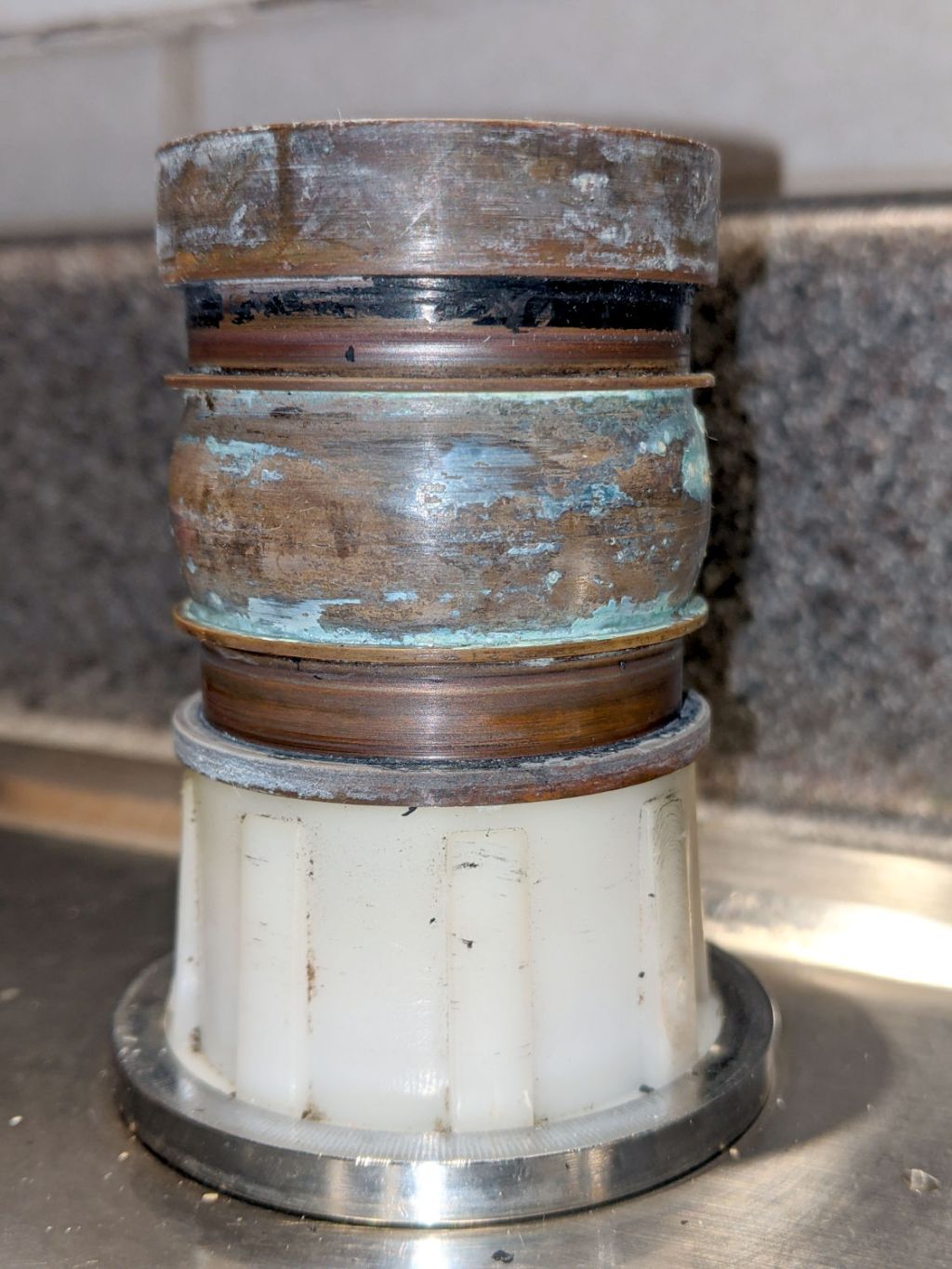
    The black gunk around the top of the upper seal area has the consistency of hard plastic paint, although it’s most likely rubber particles from the o-ring burnished against the bronze base by the sliding PP shim ring:

    American Standard Elite faucet - base
    American Standard Elite faucet – base

    Remember Nisley’s First Rule of Plumbing: Never look inside your water supply pipes.

    As before, the o-rings wear on their inner diameters, indicating that they turn with the spout around the base.

    For lack of anything smarter, I removed as much of the debris as feasible, installed new seals, reassembled the faucet in reverse order, and ordered another set of parts.

    If I hadn’t done such a great job of reinforcing the underside of the sink deck around the mounting rings, to the extent I’m not sure another faucet base else would fit, I’d be far less reluctant to start over.

  • Blog Summary: 2020

    Blog Summary: 2020

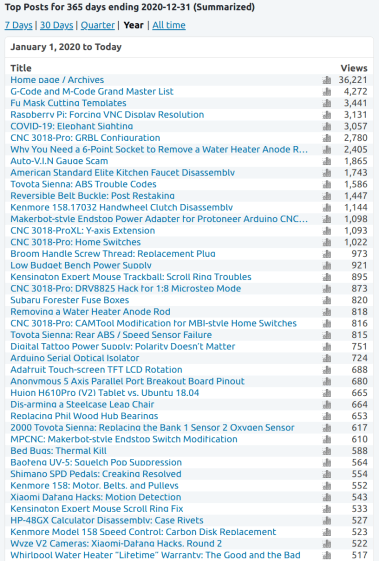
    You can’t make up results like this for a techie kind of blog:

    Blog Top Post Summary - 2020-12-31
    Blog Top Post Summary – 2020-12-31

    Given my demographic cohort, bedbugs suddenly seemed downright friendly.

    Overall, this blog had 109 k visitors and 204 k page views. The ratio of 1.8 pages / visitor has been roughly constant for the last few years, so I assume most folks find one more interesting post before wandering off.

    My take from the increasing volume of ads WordPress shovels at those of you who (foolishly) aren’t using an ad blocker continues to fall:

    Blog Ad Summary - 2020-12-31
    Blog Ad Summary – 2020-12-31

    The CPM graph scale seems deliberately scrunched, but the value now ticks along at 25¢ / thousand impressions, adding up to perhaps $250 over the full year. Obviously, I’m not in this for the money.

    The ratio of five ads per page view remains more or less constant. Because Google continues to neuter Chrome’s ad blocking ability, I highly recommend using Firefox with uBlock Origin.

    WordPress gives me no control over which ads they serve, nor where they put ads on the page. By paying WordPress about $50 / year I could turn off all their ads and convert the blog into a dead loss. I’m nearing their 3 GB limit for media files on a “free” blog, so the calculation may change late next year.

    Onward, into Year Two …

  • KeyboardIO Atreus Keymapping

    KeyboardIO Atreus Keymapping

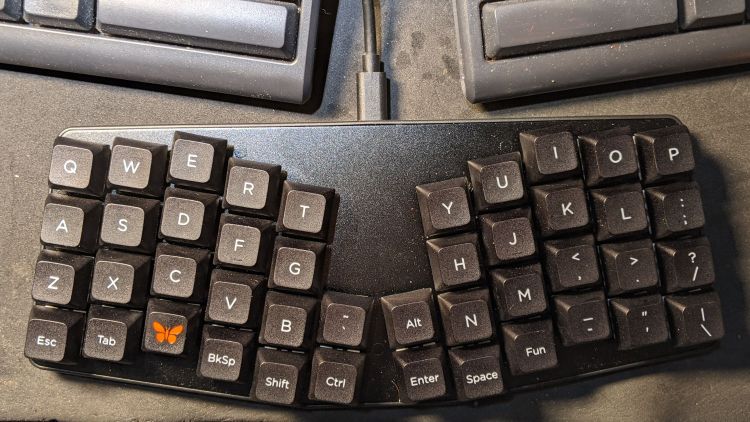
    Having a customizable keyboard like the KeyboardIO Atreus means one must customize it. As it turns out, I wanted to use some features of the underlying QMK Kaleidoscope firmware that aren’t exposed by Chrysalis, KeyboardIO’s otherwise competent keymap configuration utility, so what you see below runs on hard mode.

    Start by installing QMK, compiling the default Atreus layout, and flashing the keyboard just to confirm all the steps work:

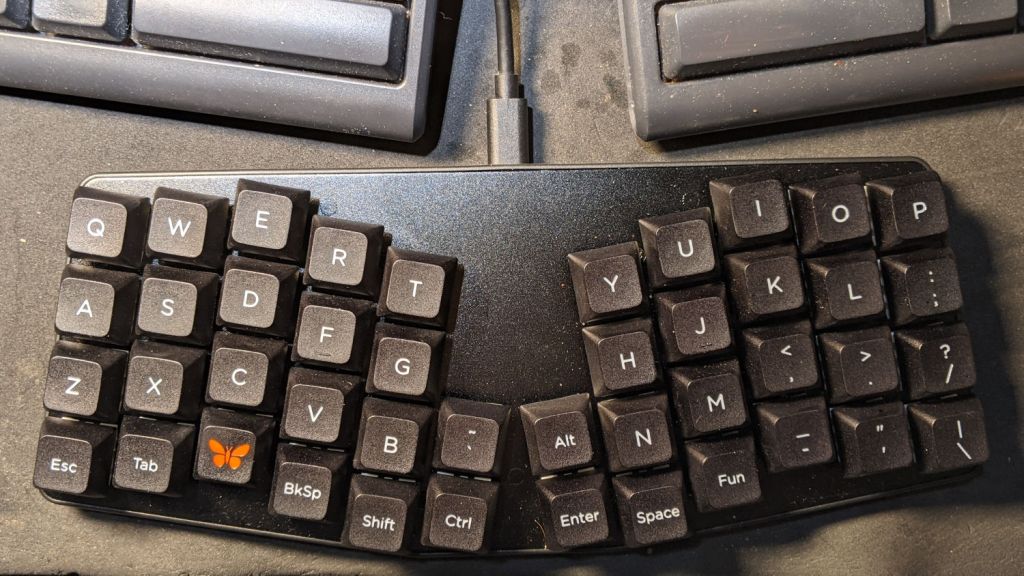
    Atreus keyboard - overview
    Atreus keyboard – overview

    With all that working, add (or create) two lines to the rules.mk file in the keymap directory you’re tweaking:

    AUTO_SHIFT_ENABLE = yes			# allow automagic shifting
    TAP_DANCE_ENABLE = yes			# allow multi-tap keys

    Enabling Auto-Shift lets you generate shifted characters (like Z) by briefly holding down the unshifted key (like z). This requires unlearning an entire lifetime of touch typing practice, but is definitely worthwhile; if a thumb still reaches for the shift key, there’s no harm done. There are, of course, a myriad options, all of which I left unchanged.

    Complex passwords suffer, as you must blind-type carefully while tapping each key rapidly.

    Enabling Tap Dance lets a key generate one character when tapped and another when double-tapped; you can go crazy with more taps. An enum{} in the keymap.c file generates indexes for the keys and an array holds the action definitions:

    enum {
        TD_SPC_ENT,
        TD_BS_DEL,
    };
    
    qk_tap_dance_action_t tap_dance_actions[] = {
        [TD_SPC_ENT] = ACTION_TAP_DANCE_DOUBLE(KC_SPC, KC_ENT),
        [TD_BS_DEL] = ACTION_TAP_DANCE_DOUBLE(KC_BSPC, KC_DEL),
    };

    Then each key uses a TD() macro in the keymap.c file:

    … TD(TD_BS_DEL), … TD(TD_SPC_ENT), …

    In contrast, layer shifting uses straightforward built-in macros. The Fun key produces a momentary shift to Layer 1 (known as _RS) when held down:

    … MO(_RS), …

    The ESC key in the lower left corner emits the expected Escape key code when tapped and switches to Layer 2 (a.k.a. _LW) when held:

    LT(_LW,KC_ESC), …

    For reference, the current state of the keymap.c file:

    // Modified from the KeyboardIO layout
    // Ed Nisley - KE4ZNU
    // Enable Auto Shift and Tap Dance in rules.mk
    
    #include QMK_KEYBOARD_H
    
    enum layer_names {
        _QW,
        _RS,
        _LW,
    };
    
    enum {
        TD_SPC_ENT,
        TD_BS_DEL,
    };
    
    qk_tap_dance_action_t tap_dance_actions[] = {
        [TD_SPC_ENT] = ACTION_TAP_DANCE_DOUBLE(KC_SPC, KC_ENT),
        [TD_BS_DEL] = ACTION_TAP_DANCE_DOUBLE(KC_BSPC, KC_DEL),
    };
    
    const uint16_t PROGMEM keymaps[][MATRIX_ROWS][MATRIX_COLS] = {
      [_QW] = LAYOUT( /* Qwerty */
        KC_Q,    KC_W,    KC_E,    KC_R,    KC_T,                      KC_Y,    KC_U,    KC_I,    KC_O,    KC_P    ,
        KC_A,    KC_S,    KC_D,    KC_F,    KC_G,                      KC_H,    KC_J,    KC_K,    KC_L,    KC_SCLN ,
        KC_Z,    KC_X,    KC_C,    KC_V,    KC_B,    KC_GRV,  KC_LALT, KC_N,    KC_M,    KC_COMM, KC_DOT,  KC_SLSH ,
        LT(_LW,KC_ESC), KC_TAB, KC_LGUI,  TD(TD_BS_DEL), KC_LSFT,  KC_LCTL, KC_ENT , TD(TD_SPC_ENT),  MO(_RS), KC_MINS, KC_QUOT, KC_BSLS),
    
      [_RS] = LAYOUT( /* [> RAISE <] */
        KC_EXLM, KC_AT,   KC_UP,   KC_DLR,  KC_PERC,                  KC_PGUP, KC_7,    KC_8,   KC_9, KC_HOME,
        KC_LPRN, KC_LEFT, KC_DOWN, KC_RGHT, KC_RPRN,                  KC_PGDN, KC_4,    KC_5,   KC_6, KC_END,
        KC_LBRC, KC_RBRC, KC_HASH, KC_LCBR, KC_RCBR, KC_CIRC, KC_AMPR,KC_ASTR, KC_1,    KC_2,   KC_3, KC_PLUS,
        KC_NO  , KC_INS,  KC_LGUI, KC_DEL , KC_BSPC, KC_LCTL, KC_LALT,KC_SPC,  KC_TRNS, KC_DOT, KC_0, KC_EQL ),
    
      [_LW] = LAYOUT( /* [> LOWER <] */
        KC_INS,  KC_HOME, KC_UP,   KC_END,  KC_PGUP,                   KC_UP,   KC_F7,   KC_F8,   KC_F9,   KC_F10  ,
        KC_DEL,  KC_LEFT, KC_DOWN, KC_RGHT, KC_PGDN,                   KC_DOWN, KC_F4,   KC_F5,   KC_F6,   KC_F11  ,
        KC_NO,   KC_VOLU, KC_NO,   KC_NO,   RESET,   _______, _______, KC_NO,   KC_F1,   KC_F2,   KC_F3,   KC_F12  ,
        KC_NO,   KC_VOLD, KC_LGUI, KC_LSFT, KC_BSPC, KC_LCTL, KC_LALT, KC_SPC,  TO(_QW), KC_PSCR, KC_SLCK, KC_PAUS )
    };
    

    With all that set up, It Just Works and I can contemplate grafting a status LED into the thing.

  • Sharing the Lane in Red Oaks Mill

    Sharing the Lane in Red Oaks Mill

    We’re in the middle of three southbound lanes on Rt 376 in Red Oaks Mill, turning left into the rightmost lane going down the hill across the bridge, when a car approaches from behind:

    Red Oaks Mill Intersection - close pass - approach - 2020-12-24
    Red Oaks Mill Intersection – close pass – approach – 2020-12-24

    Most drivers seem content to wait behind us until we get into the huge intersection where there’s plenty of room (comparatively speaking) to pass, but not this one:

    Red Oaks Mill Intersection - close pass - waiting - 2020-12-24
    Red Oaks Mill Intersection – close pass – waiting – 2020-12-24

    I warned Mary (one the reasons we have radios on our bikes) about the mirror just behind her shoulder and she verified the minimal clearance:

    Red Oaks Mill Intersection - close pass - arms length - 2020-12-24
    Red Oaks Mill Intersection – close pass – arms length – 2020-12-24

    Prudence dictated we wait until he was clear before moving:

    Red Oaks Mill Intersection - close pass - rolling - 2020-12-24
    Red Oaks Mill Intersection – close pass – rolling – 2020-12-24

    Of course, the signal timing doesn’t let us get all the way through the intersection under the best of conditions, but we make an impressive enough parade to keep oncoming cars from moving before we’re out of their way.

    This section of NY Rt 376 is also NY Bike Route 9, which doesn’t explain why NYS DOT pays so little attention to bicycle safety.

  • Straightening Armature Wire

    Straightening Armature Wire

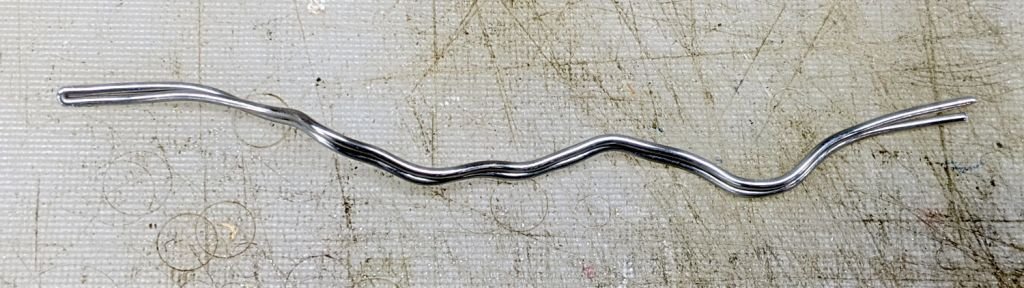
    Although I was blithely unaware when I bought some useful-looking surplus, it turns out 1/16 inch armature wire works really well to seal our homebrew masks around our noses. Mary added a narrow passage along the top edge of her slightly reshaped Fu Mask pattern to retain the wire and I provided 4.5 inch lengths of straightened wire:

    Armature wire - stock vs. straightened
    Armature wire – stock vs. straightened

    The wire comes off the roll in dead-soft condition, so I can straighten (and slightly harden) it by simply rolling each wire with eight fingertips across the battered cutting board. The slightly wavy wire shows its as-cut condition and the three straight ones are ready for their masks.

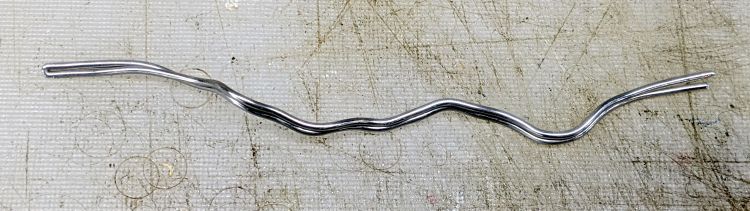
    Although nearly pure aluminum wire doesn’t work-harden quickly, half a year of mask duty definitely takes its toll. This sample came from my biking mask after the edges wore out:

    Armature wire - work-hardened
    Armature wire – work-hardened

    We initially thought using two wires would provide a better fit, but more metal just made adjusting the nose seal more difficult after each washing. The wire has work-hardened enough to make the sharper bends pretty much permanent; they can be further bent, but no longer roll out under finger pressure.

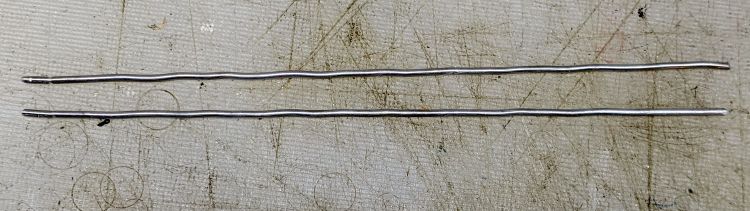
    Although we’re not yet at the point where we must reuse wires, I took this as an opportunity to improve my annealing hand: heat the wire almost to its melting point, hold it there for a few seconds, then let it cool slowly. The usual technique involves covering the aluminum with something like hand soap or permanent marker ink, heat until the soap / marker burns away, then let it air-cool. Unlike steel, there’s no need for quenching or tempering.

    Blue Sharpie worked surprisingly well with a propane torch:

    Armature wire - annealed straightened
    Armature wire – annealed straightened

    As far as I can tell after a few attempts, the pigment vanishes just below the annealing temperature and requires another pass to reach the right temperature. Sweep the flame steadily, don’t pause, and don’t hold the wire over anything melt-able.

    Those wires (I cut the doubled wire apart) aren’t quite as soft as the original stock, but they rolled straight and are certainly good enough for our simple needs; they’re back in the Basement Laboratory Warehouse for future (re)use.

  • Enover Outlet Timer: Over-powered Zener Diode

    Enover Outlet Timer: Over-powered Zener Diode

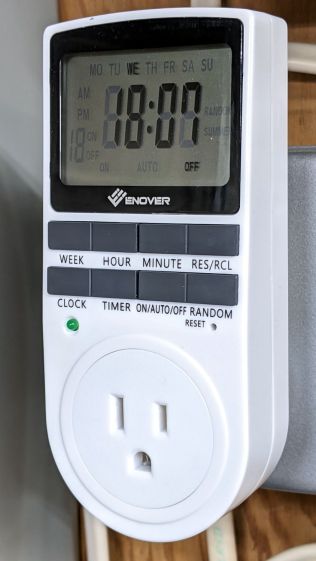
    This being the season of lights, I deployed some outlet timers to turn them on at dusk and off at bedtime. The timers spend much of the rest of their lives plugged into outlets in the Basement Laboratory to keep their internal NiMH backup batteries charged, although they’re not controlling anything:

    Enover outlet timer - overview
    Enover outlet timer – overview

    This one is labeled ENOVER, but it’s essentially identical to all the others sporting random alphabetic names; I have a few more labeled UKOKE in the same plastic case. The current crop uses a different case and has one fewer button, but don’t expect any real difference.

    One of the timers had a blank display and didn’t respond to button pushes or a pin punch poked in the RESET hole, so I dismantled it to see what was inside.

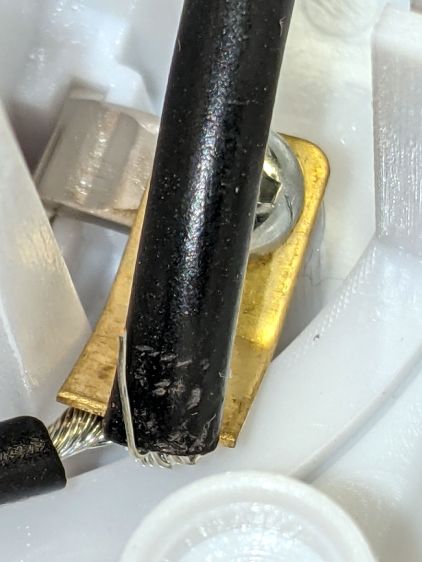
    Both the hot and neutral terminals had stray wire strands:

    Enover outlet timer - stray wire strand
    Enover outlet timer – stray wire strand

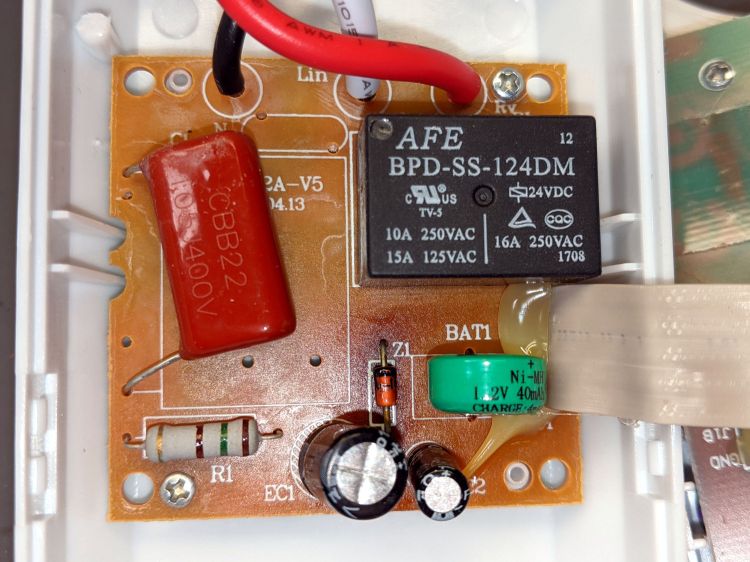
    The power board had the usual missing components, suggesting it had been cheapnified after passing whatever regulatory inspection it might have endured to get a CE mark on its dataplate:

    Enover outlet timer - power board - overview
    Enover outlet timer – power board – overview

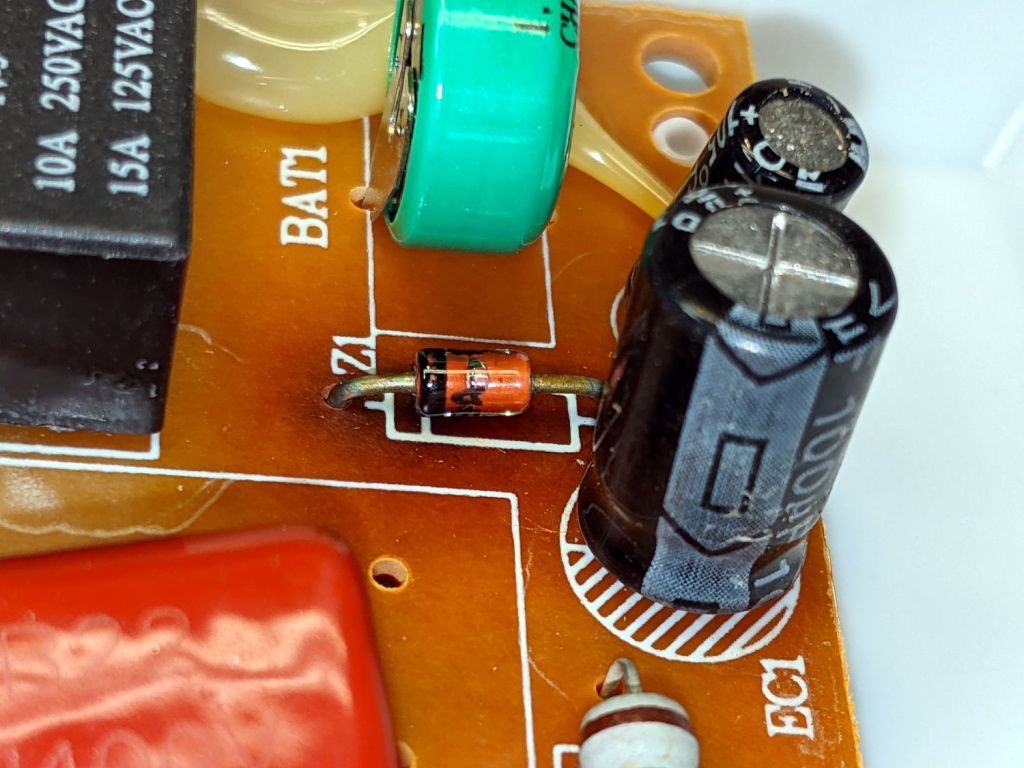
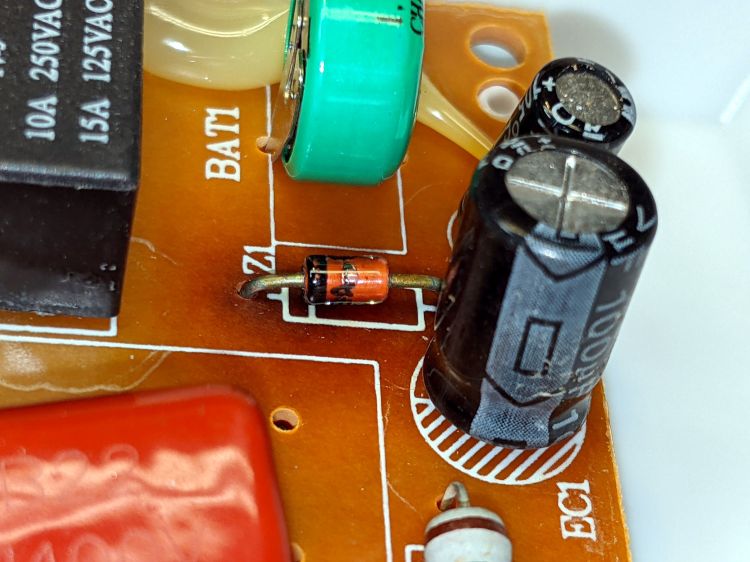
    The alert reader may have already noticed the mmmmm smoking gun:

    Enover outlet timer - scorched diode
    Enover outlet timer – scorched diode

    Incredibly, Z1 has a part number wrapped around it! A quick lookup shows a 1N4749A is a 24 V 1 W Zener diode, neatly matching the 24 V relay. The datasheet gives a 10.5 mA test current and a 38 mA maximum regulator current, with a caveat: “Valid provided that electrodes at a distance of 10mm from case are kept at ambient temperature”

    The relay datasheet says 8.3 mA nominal coil current, a mere 200 mW, which is much easier to dissipate in wire wrapped around a steel core than in a little diode.

    Evidently the poor diode ran rather hot before becoming a dead short, because a phenolic PCB (definitely not at ambient temperature) ought not discolor like that.

    Indeed, measuring Z1 in another, still functional, Enover timer showed 25 V and a similarly discolored patch around Z1, suggesting the circuit design requires a bit more disspation from the diode than it can comfortably deliver.

    I replaced it with a 1N970B from the Basement Laboratory Warehouse, rated for only 0.5 W in a seemingly identical case, buttoned the whole thing up, and left it in the middle of the concrete basement floor overnight. It wasn’t smoking and continued working in the morning, so I defined things to be no worse than before and declared victory.

    Should when the next one fails the same way, I’ll epoxy a small heatsink to that poor diode and its leads to reduce its overall temperature.

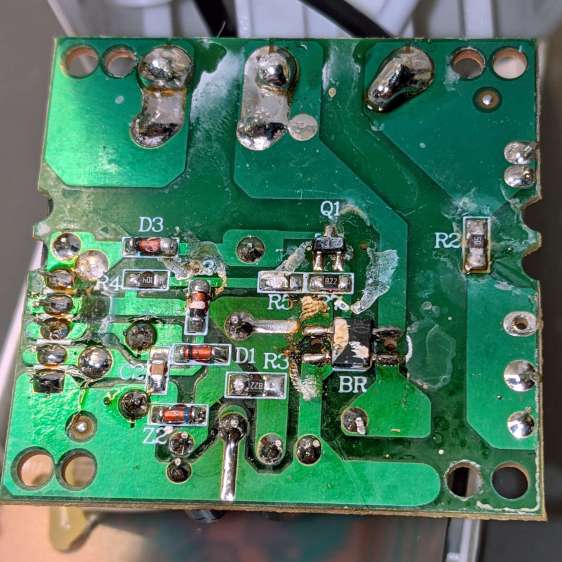
    For future reference, the underside of the PCB shows a distinct lack of post-soldering flux cleanup:

    Enover outlet timer - power board - solder side
    Enover outlet timer – power board – solder side

    I swabbed it with denatured alcohol, although doing so certainly didn’t make any change to its behavior.

    Memo to Self: no-clean flux is a thing.

    It’s worth noting no other components show signs of overheating, despite the diode becoming a short circuit, so R1 (a big power resistor) is most likely the shunt regulator’s dropping resistor and can survive the additional power.

    Should the diode fail open, the rest of the circuitry will be toast.