The Smell of Molten Projects in the Morning

Ed Nisley's Blog: Shop notes, electronics, firmware, machinery, 3D printing, laser cuttery, and curiosities. Contents: 100% human thinking, 0% AI slop.

Month: November 2018

  • Vacuum Tube LEDs: 21HB5A on a Guilloche Platter

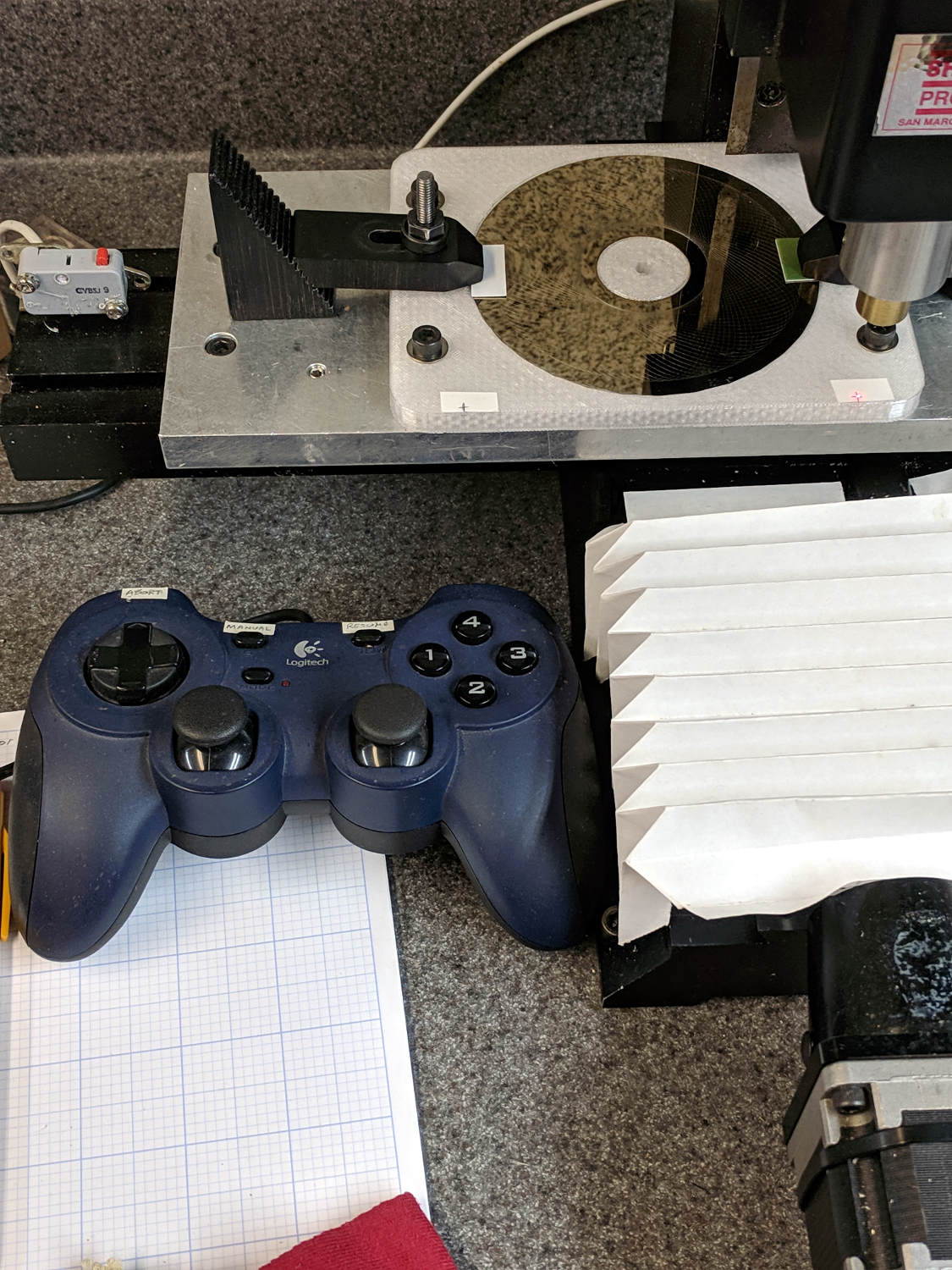
    With the Joggy Thing running in LinuxCNC 2.7, touching XY off on the fixture was trivially easy:

    LinuxCNC - Sherline Mill - Logitech Gamepad
    LinuxCNC – Sherline Mill – Logitech Gamepad

    The pips are 100 mm apart at (-50,-50) and (+50,50). Astonishingly, the laser aligner batteries are in fine shape.

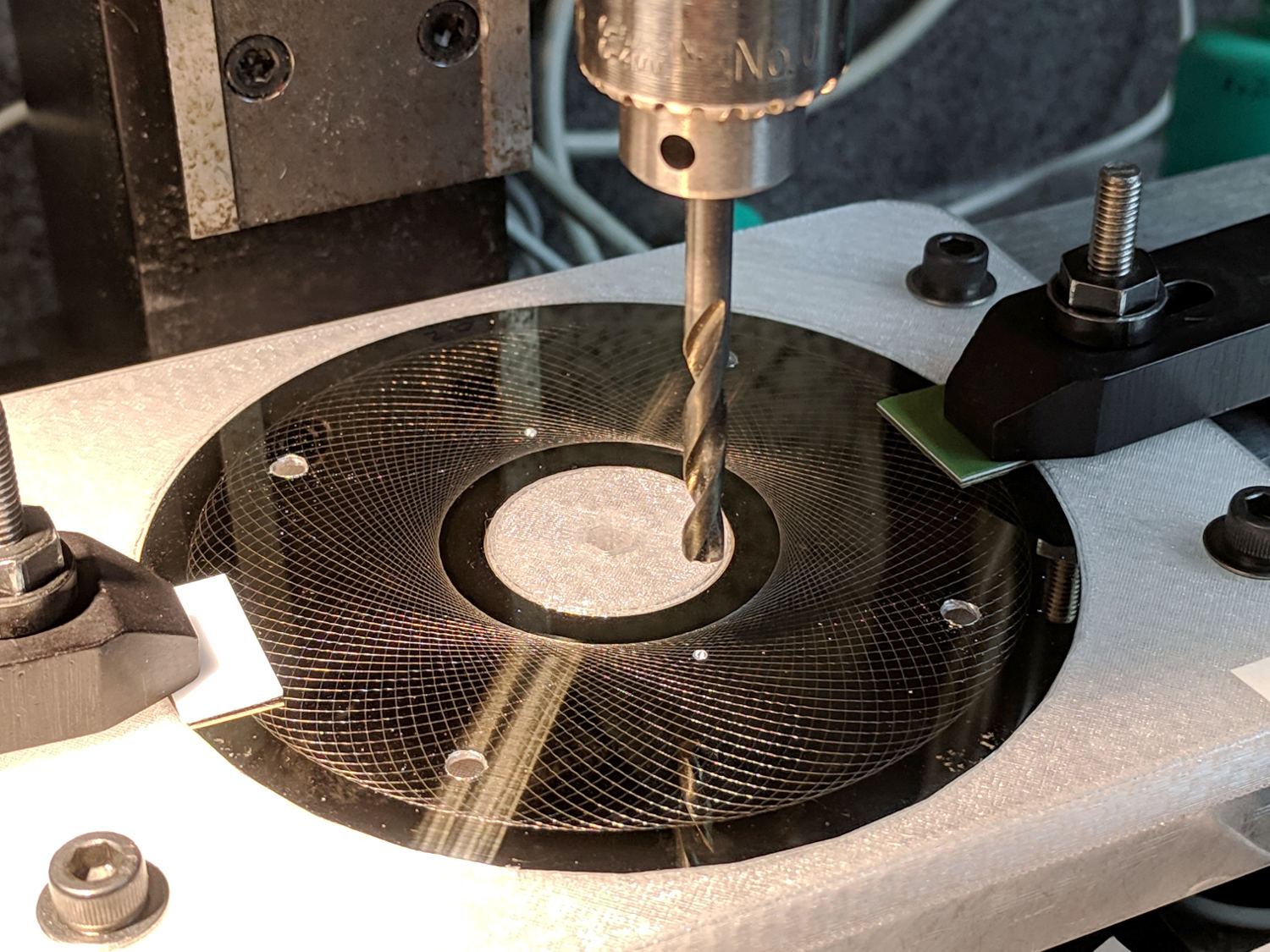
    I should have protected the platter before drilling all those holes:

    Guilloche platter - drilling
    Guilloche platter – drilling

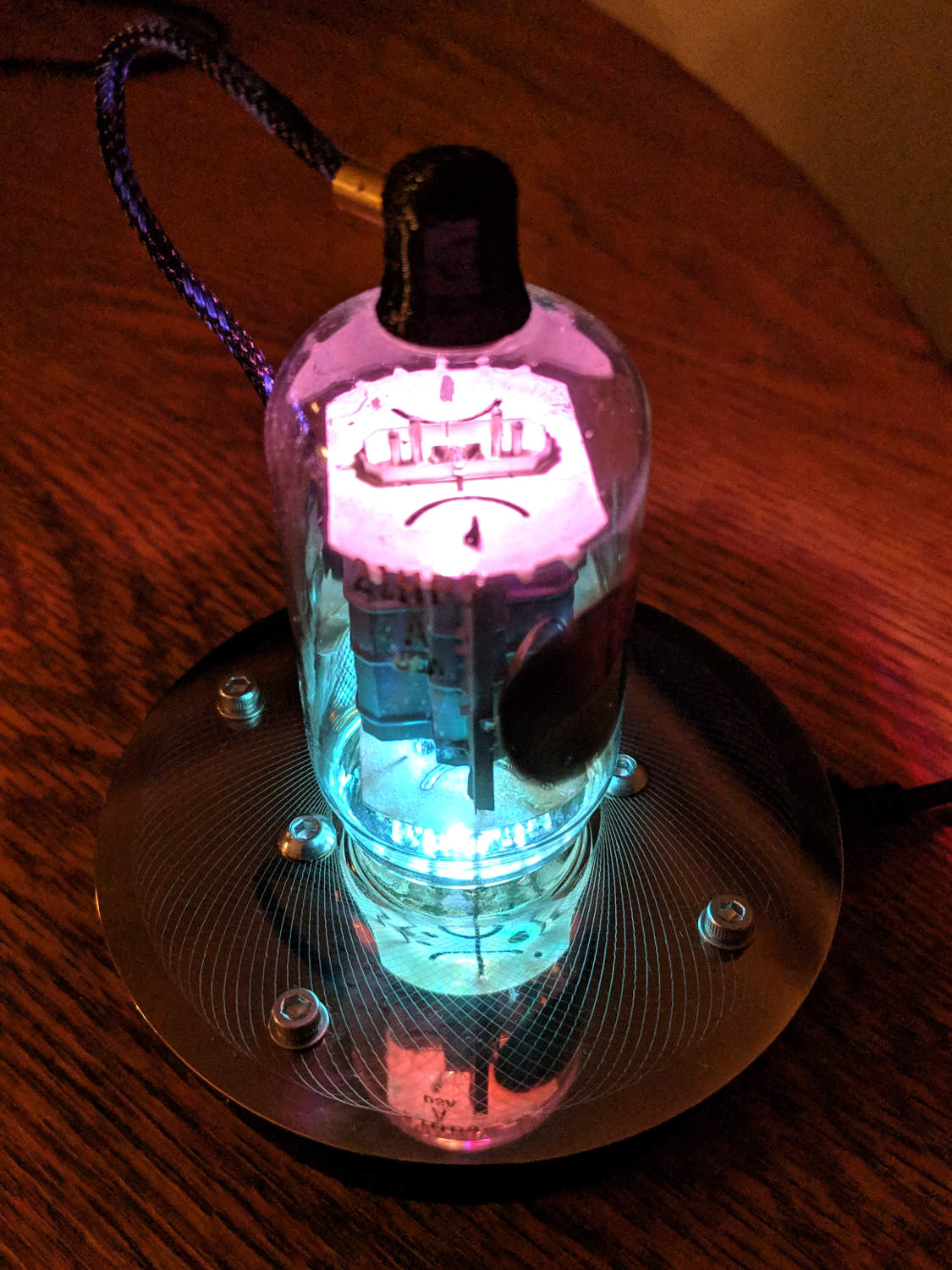
    All’s well that ends well:

    21HB5A - Guilloche platter
    21HB5A – Guilloche platter

    It looks even better in the dark, although you’d never know it from this picture:

    21HB5A - Guilloche platter - dark
    21HB5A – Guilloche platter – dark

    I wish I could engrave those patterns on already-drilled platters, but dragging a diamond point into a hole can’t possibly end well. I could deploy the Tiny Sandblaster with a vinyl mask, if I had enough artistic eptitude to lay out a good-looking mask.

  • LinuxCNC 2.7 vs. Logitech Joggy Thing

    The old Atom running LinuxCNC for the Sherline finally stopped booting, so I popped the Optiplex 760 off the stack and did a live-USB trial run. The latency / jitter worked out around 25 µs, slightly worse than before, but still Good Enough, and the StepConf utility coerced the motors into working OK.

    What didn’t work was the old Eagle-to-HAL code defining the Logitch Gamepad as a Joggy Thing to allow smooth joystick jog control. Well, stuff changes over the course of eight years, but, in this case, the fix turned out to be a one-liner: the probe_parport module isn’t needed nowadays.

    With that out of the way, it runs fine:

    LinuxCNC - Sherline Mill - Logitech Gamepad
    LinuxCNC – Sherline Mill – Logitech Gamepad

    The INI and HAL files defining the Sherline configuration as a GitHub Gist:

    # HAL config file automatically generated by Eagle-CAD ULP:
    # [/mnt/bulkdata/Project Files/eagle/ulp/hal-write-2.5.ulp]
    # (C) Martin Schoeneck.de 2008
    # Charalampos Alexopoulos 2011
    # Mods Ed Nisley KE4ZNU 2010 2013
    # Path [/mnt/bulkdata/Project Files/eagle/projects/LinuxCNC for M2/]
    # ProjectName [LinuxCNC Sherline Configuration]
    # File name [/mnt/bulkdata/Project Files/eagle/projects/LinuxCNC for M2/LinuxCNC Sherline Configuration.hal]
    # Created [11:17:21 17-Feb-2013]
    ####################################################
    # Load realtime and userspace modules
    loadrt trivkins
    loadrt [EMCMOT]EMCMOT key=[EMCMOT]SHMEM_KEY num_joints=[TRAJ]AXES base_period_nsec=[EMCMOT]BASE_PERIOD servo_period_nsec=[EMCMOT]SERVO_PERIOD traj_period_nsec=[EMCMOT]SERVO_PERIOD
    # not needed in 2.7
    # loadrt probe_parport
    loadrt hal_parport cfg="[PARPORT]ADDRESS out"
    loadrt stepgen step_type=0,0,0,0
    loadrt pwmgen output_type=0
    loadusr -W hal_manualtoolchange
    loadusr -W hal_input -KA Dual
    loadrt logic count=1 personality=0x104
    loadrt constant count=13
    loadrt and2 count=17
    loadrt conv_float_s32 count=1
    loadrt flipflop count=4
    loadrt mux2 count=5
    loadrt mux4 count=1
    loadrt not count=8
    loadrt or2 count=14
    loadrt scale count=7
    loadrt timedelay count=1
    loadrt toggle count=1
    ####################################################
    # Hook functions into threads
    addf stepgen.make-pulses base-thread
    addf pwmgen.make-pulses base-thread
    addf parport.0.read base-thread
    addf parport.0.write base-thread
    addf parport.0.reset base-thread
    addf logic.0 base-thread
    addf motion-command-handler servo-thread
    addf motion-controller servo-thread
    addf stepgen.update-freq servo-thread
    addf stepgen.capture-position servo-thread
    addf pwmgen.update servo-thread
    addf constant.0 servo-thread
    addf constant.1 servo-thread
    addf constant.2 servo-thread
    addf constant.3 servo-thread
    addf constant.4 servo-thread
    addf constant.5 servo-thread
    addf constant.6 servo-thread
    addf constant.7 servo-thread
    addf constant.8 servo-thread
    addf constant.9 servo-thread
    addf constant.10 servo-thread
    addf constant.11 servo-thread
    addf constant.12 servo-thread
    addf and2.0 servo-thread
    addf and2.1 servo-thread
    addf and2.2 servo-thread
    addf and2.3 servo-thread
    addf and2.4 servo-thread
    addf and2.5 servo-thread
    addf and2.6 servo-thread
    addf and2.7 servo-thread
    addf and2.8 servo-thread
    addf and2.9 servo-thread
    addf and2.10 servo-thread
    addf and2.11 servo-thread
    addf and2.12 servo-thread
    addf and2.13 servo-thread
    addf and2.14 servo-thread
    addf and2.15 servo-thread
    addf and2.16 servo-thread
    addf conv-float-s32.0 servo-thread
    addf toggle.0 servo-thread
    addf flipflop.0 servo-thread
    addf flipflop.1 servo-thread
    addf flipflop.2 servo-thread
    addf flipflop.3 servo-thread
    addf timedelay.0 servo-thread
    addf or2.0 servo-thread
    addf or2.1 servo-thread
    addf or2.2 servo-thread
    addf or2.3 servo-thread
    addf or2.4 servo-thread
    addf or2.5 servo-thread
    addf or2.6 servo-thread
    addf or2.7 servo-thread
    addf or2.8 servo-thread
    addf or2.9 servo-thread
    addf or2.10 servo-thread
    addf or2.11 servo-thread
    addf or2.12 servo-thread
    addf or2.13 servo-thread
    addf not.0 servo-thread
    addf not.1 servo-thread
    addf not.2 servo-thread
    addf not.3 servo-thread
    addf not.4 servo-thread
    addf not.5 servo-thread
    addf not.6 servo-thread
    addf not.7 servo-thread
    addf scale.0 servo-thread
    addf scale.1 servo-thread
    addf scale.2 servo-thread
    addf scale.3 servo-thread
    addf scale.4 servo-thread
    addf scale.5 servo-thread
    addf scale.6 servo-thread
    addf mux2.0 servo-thread
    addf mux4.0 servo-thread
    addf mux2.1 servo-thread
    addf mux2.2 servo-thread
    addf mux2.3 servo-thread
    addf mux2.4 servo-thread
    ####################################################
    # Set parameters
    setp parport.0.reset-time [PARPORT]RESET_TIME
    setp stepgen.0.maxaccel [AXIS_0]STEPGEN_MAXACCEL
    setp stepgen.0.maxvel [AXIS_0]MAX_VELOCITY
    setp stepgen.0.dirhold [PARPORT]DIRHOLD
    setp stepgen.0.dirsetup [PARPORT]DIRSETUP
    setp stepgen.0.steplen [PARPORT]STEPLEN
    setp stepgen.0.stepspace [PARPORT]STEPSPACE
    setp stepgen.0.position-scale [AXIS_0]SCALE
    setp parport.0.pin-03-out-reset FALSE
    setp parport.0.pin-05-out-reset FALSE
    setp parport.0.pin-07-out-reset FALSE
    setp parport.0.pin-09-out-reset FALSE
    setp parport.0.pin-17-out-reset FALSE
    setp stepgen.1.maxaccel [AXIS_1]STEPGEN_MAXACCEL
    setp stepgen.1.maxvel [AXIS_1]MAX_VELOCITY
    setp stepgen.1.dirhold [PARPORT]DIRHOLD
    setp stepgen.1.dirsetup [PARPORT]DIRSETUP
    setp stepgen.1.steplen [PARPORT]STEPLEN
    setp stepgen.1.stepspace [PARPORT]STEPSPACE
    setp stepgen.1.position-scale [AXIS_1]SCALE
    setp stepgen.2.maxaccel [AXIS_2]STEPGEN_MAXACCEL
    setp stepgen.2.maxvel [AXIS_2]MAX_VELOCITY
    setp stepgen.2.dirhold [PARPORT]DIRHOLD
    setp stepgen.2.dirsetup [PARPORT]DIRSETUP
    setp stepgen.2.steplen [PARPORT]STEPLEN
    setp stepgen.2.stepspace [PARPORT]STEPSPACE
    setp stepgen.2.position-scale [AXIS_2]SCALE
    setp stepgen.3.maxaccel [AXIS_3]STEPGEN_MAXACCEL
    setp stepgen.3.maxvel [AXIS_3]MAX_VELOCITY
    setp stepgen.3.dirhold [PARPORT]DIRHOLD
    setp stepgen.3.dirsetup [PARPORT]DIRSETUP
    setp stepgen.3.steplen [PARPORT]STEPLEN
    setp stepgen.3.stepspace [PARPORT]STEPSPACE
    setp stepgen.3.position-scale [AXIS_3]SCALE
    setp parport.0.pin-04-out-invert TRUE
    setp parport.0.pin-06-out-invert TRUE
    ####################################################
    # Set constants
    setp constant.0.value 0.1
    setp constant.1.value 20
    setp constant.2.value [TRAJ]MAX_LINEAR_VELOCITY
    setp constant.3.value [TRAJ]MAX_ANGULAR_VELOCITY
    setp constant.4.value 60
    setp constant.5.value 0.50
    setp constant.6.value 1.00
    setp constant.7.value 0.10
    setp constant.8.value 0.10
    setp constant.9.value 0.0
    setp constant.10.value -1.0
    setp constant.11.value 0.020
    setp constant.12.value 0.000
    ####################################################
    # Connect Modules with nets
    net a-amp-enable logic.0.in-03 axis.3.amp-enable-out stepgen.3.enable
    net a-analog halui.jog.3.analog mux2.4.out
    net a-button-minus or2.0.in0 input.0.btn-joystick and2.7.in0
    net a-button-plus or2.0.in1 input.0.btn-thumb2 and2.8.in0
    net a-buttons-active or2.0.out or2.1.in0 or2.11.in1
    net a-direction parport.0.pin-08-out stepgen.3.dir
    net a-disable not.7.out and2.13.in1
    net a-enable or2.11.in0 flipflop.3.out not.7.in mux2.4.sel
    net a-jog input.0.abs-z-position mux2.4.in1
    net a-knob-active or2.9.out not.2.in and2.15.in1
    net a-knob-inactive not.2.out and2.14.in1
    net a-select and2.16.in0 and2.15.out
    net a-set flipflop.3.set and2.16.out
    net a-step parport.0.pin-09-out stepgen.3.step
    net all-amps-enabled logic.0.and parport.0.pin-17-out
    net angular_motion or2.11.out mux2.0.sel
    net any-buttons-active mux4.0.sel0 or2.12.out
    net axis-disabled-value constant.9.out mux2.1.in0 mux2.2.in0 mux2.3.in0 mux2.4.in0
    net az-buttons-active or2.1.out or2.12.in1 or2.13.in0
    net az-reset flipflop.2.reset and2.14.out flipflop.3.reset
    net button-crawl scale.4.out mux4.0.in3
    net button-fast scale.2.out mux4.0.in1 scale.4.in
    net estop-a and2.0.in0 input.0.btn-top2
    net estop-b and2.0.in1 input.0.btn-base
    net estop-out parport.0.pin-01-out iocontrol.0.emc-enable-in iocontrol.0.user-enable-out
    net homeswitches parport.0.pin-10-in-not axis.0.home-sw-in axis.1.home-sw-in axis.2.home-sw-in axis.3.home-sw-in
    net jog-crawl toggle.0.out mux4.0.sel1
    net jog-speed halui.jog-speed mux4.0.out
    net knob-crawl mux4.0.in2 scale.3.out
    net knob-fast mux4.0.in0 scale.1.out scale.3.in
    net manual-mode halui.mode.manual input.0.btn-base3
    net n_9 axis.0.motor-pos-cmd stepgen.0.position-cmd
    net n_11 axis.0.motor-pos-fb stepgen.0.position-fb
    net n_13 and2.0.out halui.estop.activate
    net n_14 or2.3.in0 input.0.btn-base5
    net n_15 or2.3.in1 input.0.btn-base6
    net n_16 toggle.0.in or2.3.out
    net n_17 conv-float-s32.0.out input.0.abs-x-flat input.0.abs-y-flat input.0.abs-z-flat input.0.abs-rz-flat
    net n_18 constant.1.out conv-float-s32.0.in
    net n_19 constant.4.out scale.0.gain
    net n_20 constant.5.out scale.1.gain
    net n_21 constant.6.out scale.2.gain
    net n_22 constant.7.out scale.3.gain
    net n_23 scale.4.gain constant.8.out
    net n_24 constant.0.out halui.jog-deadband
    net n_25 constant.2.out mux2.0.in0
    net n_26 mux2.0.in1 constant.3.out
    net n_34 axis.1.motor-pos-cmd stepgen.1.position-cmd
    net n_36 axis.1.motor-pos-fb stepgen.1.position-fb
    net n_42 or2.7.in0 input.0.abs-x-is-pos
    net n_43 or2.7.in1 input.0.abs-x-is-neg
    net n_44 or2.8.in0 input.0.abs-y-is-pos
    net n_45 or2.8.in1 input.0.abs-y-is-neg
    net n_46 or2.9.in0 input.0.abs-z-is-pos
    net n_47 or2.9.in1 input.0.abs-z-is-neg
    net n_48 or2.10.in0 input.0.abs-rz-is-pos
    net n_49 or2.10.in1 input.0.abs-rz-is-neg
    net n_51 constant.10.out scale.5.gain scale.6.gain
    net n_54 constant.11.out timedelay.0.on-delay
    net n_55 constant.12.out timedelay.0.off-delay
    net n_56 timedelay.0.out and2.1.in1 and2.2.in1 and2.4.in1 and2.3.in1 and2.5.in1 and2.6.in1 and2.8.in1 and2.7.in1
    net n_57 and2.1.out halui.jog.0.minus
    net n_58 and2.2.out halui.jog.0.plus
    net n_59 and2.3.out halui.jog.1.minus
    net n_60 halui.jog.1.plus and2.4.out
    net n_61 and2.5.out halui.jog.2.minus
    net n_62 and2.6.out halui.jog.2.plus
    net n_63 and2.7.out halui.jog.3.minus
    net n_64 and2.8.out halui.jog.3.plus
    net n_67 axis.2.motor-pos-cmd stepgen.2.position-cmd
    net n_69 axis.2.motor-pos-fb stepgen.2.position-fb
    net n_77 axis.3.motor-pos-cmd stepgen.3.position-cmd
    net n_79 axis.3.motor-pos-fb stepgen.3.position-fb
    net probe-in parport.0.pin-15-in-not motion.probe-input
    net program-resume halui.program.resume input.0.btn-base4
    net reset-estop input.0.btn-base2 halui.estop.reset
    net tool-change iocontrol.0.tool-change hal_manualtoolchange.change
    net tool-changed hal_manualtoolchange.changed iocontrol.0.tool-changed
    net tool-number iocontrol.0.tool-prep-number hal_manualtoolchange.number
    net tool-prepare-loopback iocontrol.0.tool-prepare iocontrol.0.tool-prepared
    net vel-per-minute scale.0.out scale.1.in scale.2.in
    net vel-per-second mux2.0.out scale.0.in
    net x-amp-enable logic.0.in-00 axis.0.amp-enable-out stepgen.0.enable
    net x-analog mux2.1.out halui.jog.0.analog
    net x-buttons-active or2.5.in0 or2.4.out
    net x-direction parport.0.pin-02-out stepgen.0.dir
    net x-disable not.4.out and2.12.in1
    net x-enable not.4.in flipflop.0.out mux2.1.sel
    net x-hat-minus or2.4.in1 input.0.abs-hat0x-is-neg and2.1.in0
    net x-hat-plus or2.4.in0 input.0.abs-hat0x-is-pos and2.2.in0
    net x-jog input.0.abs-x-position mux2.1.in1
    net x-knob-active or2.7.out not.0.in and2.9.in0
    net x-knob-inactive not.0.out and2.10.in0 and2.11.in0
    net x-set and2.9.out flipflop.0.set
    net x-step parport.0.pin-03-out stepgen.0.step
    net xy-buttons-active or2.5.out or2.12.in0 or2.13.in1
    net xy-reset flipflop.0.reset and2.10.out flipflop.1.reset
    net xyza-buttons-active or2.13.out timedelay.0.in
    net y-amp-enable logic.0.in-01 axis.1.amp-enable-out stepgen.1.enable
    net y-analog halui.jog.1.analog mux2.2.out
    net y-buttons-active or2.6.out or2.5.in1
    net y-direction parport.0.pin-04-out stepgen.1.dir
    net y-disable not.5.out and2.9.in1
    net y-enable flipflop.1.out not.5.in mux2.2.sel
    net y-hat-minus or2.6.in1 input.0.abs-hat0y-is-neg and2.4.in0
    net y-hat-plus or2.6.in0 input.0.abs-hat0y-is-pos and2.3.in0
    net y-jog input.0.abs-y-position scale.5.in
    net y-jog-reversed mux2.2.in1 scale.5.out
    net y-knob-active not.1.in or2.8.out and2.11.in1
    net y-knob-inactive not.1.out and2.10.in1
    net y-select and2.12.in0 and2.11.out
    net y-set flipflop.1.set and2.12.out
    net y-step parport.0.pin-05-out stepgen.1.step
    net z-amp-enable logic.0.in-02 axis.2.amp-enable-out stepgen.2.enable
    net z-analog mux2.3.out halui.jog.2.analog
    net z-button-minus or2.2.in0 input.0.btn-thumb and2.5.in0
    net z-button-plus or2.2.in1 input.0.btn-top and2.6.in0
    net z-buttons-active or2.2.out or2.1.in1
    net z-direction parport.0.pin-06-out stepgen.2.dir
    net z-disable not.6.out and2.16.in1
    net z-enable not.6.in flipflop.2.out mux2.3.sel
    net z-jog input.0.abs-rz-position scale.6.in
    net z-jog-reversed scale.6.out mux2.3.in1
    net z-knob-active not.3.in or2.10.out and2.13.in0
    net z-knob-inactive not.3.out and2.15.in0 and2.14.in0
    net z-set and2.13.out flipflop.2.set
    net z-step parport.0.pin-07-out stepgen.2.step
    view raw Sherline.hal hosted with ❤ by GitHub
    # Ed Nisley – KE4ZNU
    # Just do not run stepconf ever again…
    [EMC]
    MACHINE = Sherline-XYZA
    DEBUG = 0
    RS274NGC_STARTUP_CODE = G21 G40 G49 G54 G80 G90 G92.1 G94 G97 G98
    [DISPLAY]
    DISPLAY = axis
    EDITOR = gedit
    GEOMETRY = AXYZ
    POSITION_OFFSET = RELATIVE
    POSITION_FEEDBACK = ACTUAL
    MAX_FEED_OVERRIDE = 3.0
    INTRO_GRAPHIC = /home/ed/linuxcnc/configs/Sherline-XYZA/Sherline.gif
    INTRO_TIME = 3
    PROGRAM_PREFIX = /mnt/bulkdata/
    #PROGRAM_PREFIX = /home/ed/linuxcnc/nc_files/
    #INCREMENTS = .1in .05in .01in .005in .001in .0005in .0001in
    INCREMENTS = 10 mm, 1 mm, 0.1 mm, 90 deg, 45 deg, 10 deg
    [FILTER]
    PROGRAM_EXTENSION = .py Python Script
    py = python
    [TASK]
    TASK = milltask
    CYCLE_TIME = 0.010
    [RS274NGC]
    PARAMETER_FILE = emc.var
    [EMCMOT]
    EMCMOT = motmod
    SHMEM_KEY = 111
    COMM_TIMEOUT = 1.0
    COMM_WAIT = 0.010
    BASE_PERIOD = 50000
    SERVO_PERIOD = 1000000
    [PARPORT]
    ADDRESS = 0x378
    RESET_TIME = 10000
    STEPLEN = 25000
    STEPSPACE = 25000
    DIRSETUP = 50000
    DIRHOLD = 50000
    [HAL]
    HALUI = halui
    HALFILE = Sherline.hal
    HALFILE = custom.hal
    POSTGUI_HALFILE = custom_postgui.hal
    [TRAJ]
    AXES = 4
    COORDINATES = X Y Z A
    MAX_ANGULAR_VELOCITY = 45.00
    DEFAULT_ANGULAR_VELOCITY = 36.0
    LINEAR_UNITS = inch
    ANGULAR_UNITS = degree
    CYCLE_TIME = 0.010
    DEFAULT_VELOCITY = 0.400
    MAX_LINEAR_VELOCITY = 0.400
    POSITION_FILE = lastposition.txt
    NO_FORCE_HOMING = 1
    [EMCIO]
    EMCIO = io
    CYCLE_TIME = 0.100
    TOOL_TABLE = Sherline.tbl
    TOOL_CHANGE_AT_G30 = 1
    [AXIS_0]
    TYPE = LINEAR
    MAX_VELOCITY = 0.400
    MAX_ACCELERATION = 5.0
    STEPGEN_MAXACCEL = 10.0
    SCALE = 16000.0
    FERROR = 0.05
    MIN_FERROR = 0.01
    MIN_LIMIT = -1.0
    MAX_LIMIT = 9.5
    BACKLASH = 0.003
    HOME_IS_SHARED = 1
    HOME_SEQUENCE = 1
    HOME_SEARCH_VEL = 0.3
    HOME_LATCH_VEL = 0.03
    HOME_FINAL_VEL = 0.4
    HOME_OFFSET = 9.1
    HOME = 5.25
    [AXIS_1]
    TYPE = LINEAR
    MAX_VELOCITY = 0.400
    MAX_ACCELERATION = 5.0
    STEPGEN_MAXACCEL = 10.0
    SCALE = 16000.0
    FERROR = 0.05
    MIN_FERROR = 0.01
    MIN_LIMIT = 0.00
    MAX_LIMIT = 5.10
    BACKLASH = 0.003
    HOME_IS_SHARED = 1
    HOME_SEQUENCE = 2
    HOME_SEARCH_VEL = 0.3
    HOME_LATCH_VEL = 0.03
    HOME_FINAL_VEL = 0.4
    HOME_OFFSET = 5.1
    HOME = 4.5
    [AXIS_2]
    TYPE = LINEAR
    MAX_VELOCITY = 0.333
    MAX_ACCELERATION = 3.0
    STEPGEN_MAXACCEL = 6.0
    SCALE = 16000.0
    FERROR = 0.05
    MIN_FERROR = 0.01
    MIN_LIMIT = 0.0
    MAX_LIMIT = 6.680
    BACKLASH = 0.005
    HOME_IS_SHARED = 1
    HOME_SEQUENCE = 0
    HOME_SEARCH_VEL = 0.150
    HOME_LATCH_VEL = 0.015
    HOME_FINAL_VEL = 0.33
    HOME_OFFSET = 6.680
    HOME = 6.500
    [AXIS_3]
    TYPE = ANGULAR
    ###WRAPPED_ROTARY = 1
    MAX_VELOCITY = 40.0
    MAX_ACCELERATION = 250.0
    STEPGEN_MAXACCEL = 275.0
    SCALE = 160.0
    FERROR = 1
    MIN_FERROR = .25
    MIN_LIMIT = -999999999.9
    MAX_LIMIT = 999999999.9
    HOME_SEARCH_VEL = 0
    HOME_LATCH_VEL = 0
    HOME = 0.0
    view raw Sherline.ini hosted with ❤ by GitHub

  • Icecast and Ezstream Configuration

    Plugging a 64 GB USB stick with directories full of MP3 / OGG files into an always-on Raspberry Pi running Pi-Hole, one can use Icecast to stream them for clients on the LAN, so as to avoid over-the-Intertubes streaming issues.

    The only changes in the /etc/icecast2/icecast.xml file cover passwords, the number of source streams, and the hostname. It’s that simple, really.

    Given a directory of files, generate a file-per-line playlist:

    find /mnt/music/goodmusic/ -name \*mp3 | sort > /mnt/music/goodmusic/playlist.m3u
    

    Then set up a corresponding Ezstream XML file, perhaps imaginatively named goodmusic.xml:

    <ezstream>
        <url>http://localhost:8000/goodmusic</url>
        <sourcepassword>make-up-your-own</sourcepassword>
        <format>MP3</format>
        <filename>/mnt/music/goodmusic/playlist.m3u</filename>
        <shuffle>1</shuffle>
        <stream_once>0</stream_once>
        <svrinfoname>Good Music</svrinfoname>
        <svrinfourl>pihole.local</svrinfourl>
        <svrinfogenre>Good Music Streaming 24x7</svrinfogenre>
        <svrinfodescription>Techno Dub</svrinfodescription>
        <svrinfobitrate>128</svrinfobitrate>
        <svrinfochannels>2</svrinfochannels>
        <svrinfosamplerate>44100</svrinfosamplerate>
        <svrinfopublic>1</svrinfopublic>
    </ezstream>
    

    Fire off the source stream in /etc/rc.local:

    ezstream -c /home/pi/Icecast/goodmusic.xml &
    

    The ampersand tells Bash to fire-and-forget the process, so it runs all the time. One could, I suppose, put it in crontab to start after each boot or puzzle out the corresponding systemd incantation, but …

    Add the station to your streaming media player:

             'KEY_KP5'   : ['Good Music',False,['mplayer','-playlist','http://192.168.1.2:8000/goodmusic.m3u']],
    

    And then It Just Works™.

  • Xubuntu Startup Delay vs. xsetwacom

    Over the years, various xsetwacom incantations have confined the tablet stylus to the left-hand landscape monitor on my desk. Updating to Xubuntu 18.04 once again changed the monitors names (from HEAD-0 back to DP-1), but xsetwacom stopped working.

    My startup.sh script runs from Xubuntu’s “Application Autostart” list, so X is already running and xsetwacom should do the right thing. Alas, even with $XAUTHORITY and $DISPLAY set correctly (automagically by X), xsetwacom still didn’t corral the cursor.

    Some rummaging around the Intertubes suggested a delay would allow X to get up to speed and, indeed, sleeping for two seconds solved the problem:

    logger "startup.sh - copying Xauthority values"
    whoami > /tmp/who
    cp /home/ed/.Xauthority /tmp/Xauthority.txt
    echo $XAUTHORITY > /tmp/XAUTHORITY.txt
    cp $XAUTHORITY /tmp/xauth.cp
    echo $DISPLAY > /tmp/DISPLAY.txt
    # xsetwacom needs an additional delay after $XAUTHORITY and $DISPLAY become correct
    logger "startup.sh - waiting aimlessly"
    sleep 2s
    logger "startup.sh - doing wacom setup"
    xsetwacom --verbose set "Wacom Graphire3 6x8 Pen stylus" MapToOutput "DP-1"
    xsetwacom --verbose set "Wacom Graphire3 6x8 Pen eraser" MapToOutput "DP-1"
    

    Sheesh & similar remarks.

    The complete Bash script as a GitHub Gist:

    logger "startup.sh – starting"
    logger "startup.sh – setting configurations"
    #setxkbmap -option terminate:ctrl_alt_bksp
    #pactl set-default-sink alsa_output.pci-0000_00_1b.0.hdmi-stereo
    amixer -D pulse sset Master 41%
    amixer -D pulse sset Master 1%-
    gsettings set org.gnome.Evince page-cache-size 500
    # enable Kinesis volume and calculator keys
    #/home/ed/bin/Kinesis/kfreestyle2d /dev/hidraw6 &
    logger "startup.sh – starting applications"
    /usr/bin/thunar &
    /usr/bin/gimp &
    /usr/bin/chromium-browser &
    /usr/bin/digikam &
    /usr/bin/firefox &
    /usr/bin/thunderbird &
    /usr/bin/xfce4-terminal &
    logger "startup.sh – copying Xauthority values"
    # similar lines in .xprofile happen before X grabs the display
    whoami > /tmp/who
    cp /home/ed/.Xauthority /tmp/Xauthority.txt
    echo $XAUTHORITY > /tmp/XAUTHORITY.txt
    cp $XAUTHORITY /tmp/xauth.cp
    echo $DISPLAY > /tmp/DISPLAY.txt
    # xsetwacom needs an additional delay after $XAUTHORITY and $DISPLAY become correct
    logger "startup.sh – waiting aimlessly"
    sleep 2s
    logger "startup.sh – doing wacom setup"
    xsetwacom –verbose set "Wacom Graphire3 6×8 Pen stylus" MapToOutput "DP-1"
    #xsetwacom –verbose set "Wacom Graphire3 6×8 Pen stylus" MapToOutput "HEAD-0"
    xsetwacom –verbose set "Wacom Graphire3 6×8 Pen eraser" MapToOutput "DP-1"
    #xsetwacom –verbose set "Wacom Graphire3 6×8 Pen eraser" MapToOutput "HEAD-0"
    logger "startup.sh — done"
    view raw startup.sh hosted with ❤ by GitHub

    The cruft in there reminds me of previous fixes / workarounds / haxx, so it’s not entirely wasted space.

  • Kindle Fire Picture Frame: Side Block

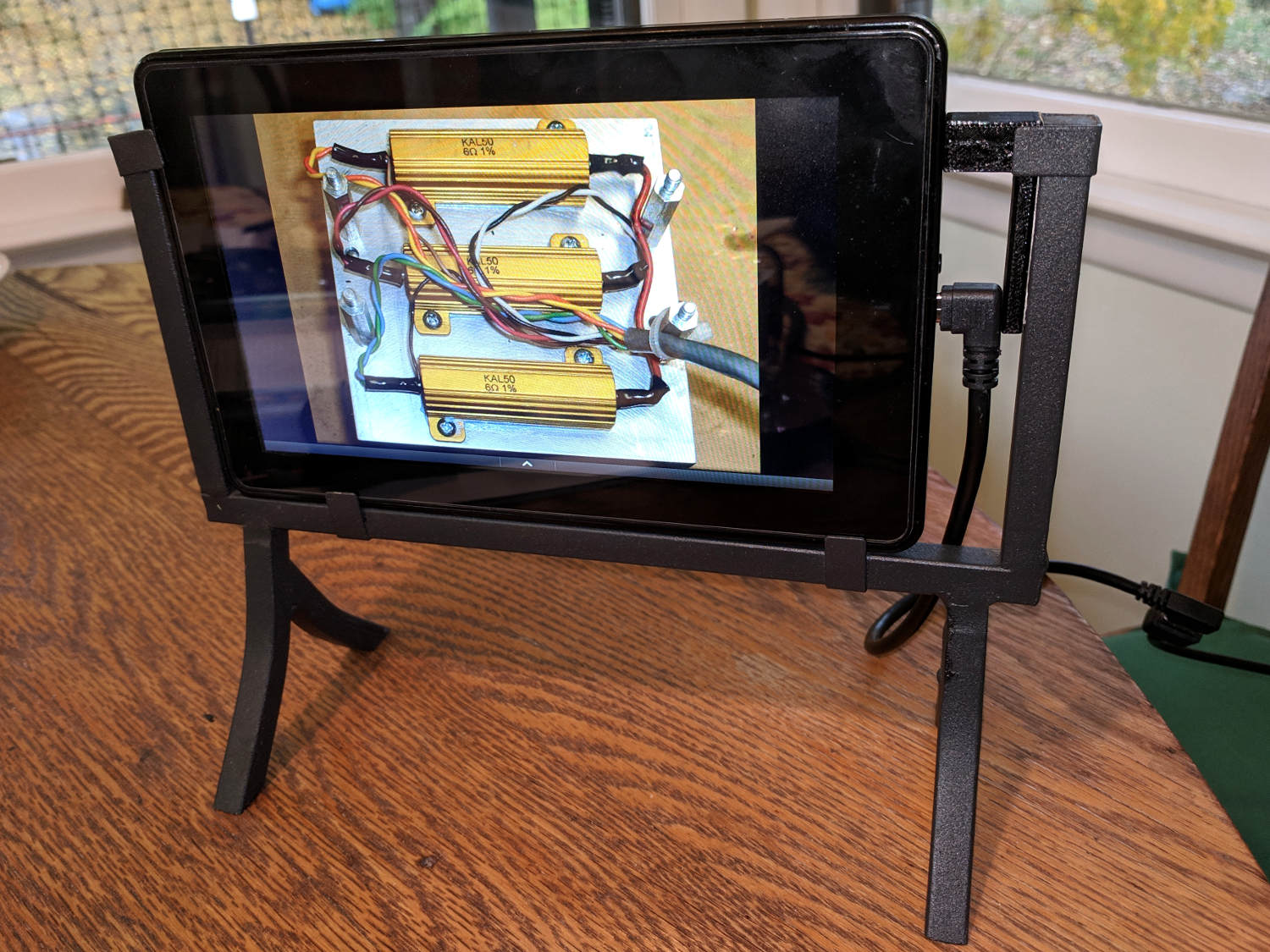
    A steel frame that Came With The House™ emerged from a hidden corner and, instants before tossing it in the recycle heap, I realized it had excellent upcycling potential:

    Kindle Fire Picture Frame - Test Run
    Kindle Fire Picture Frame – Test Run

    Stipulated: I need better pictures for not-so-techie audiences.

    Anyhow, my long-disused Kindle Fire fits perfectly into the welded-on clips, with just enough room for a right-angle USB cable, and Photo Frame Slideshow Premium does exactly what’s necessary to show pictures from internal storage with no network connection.

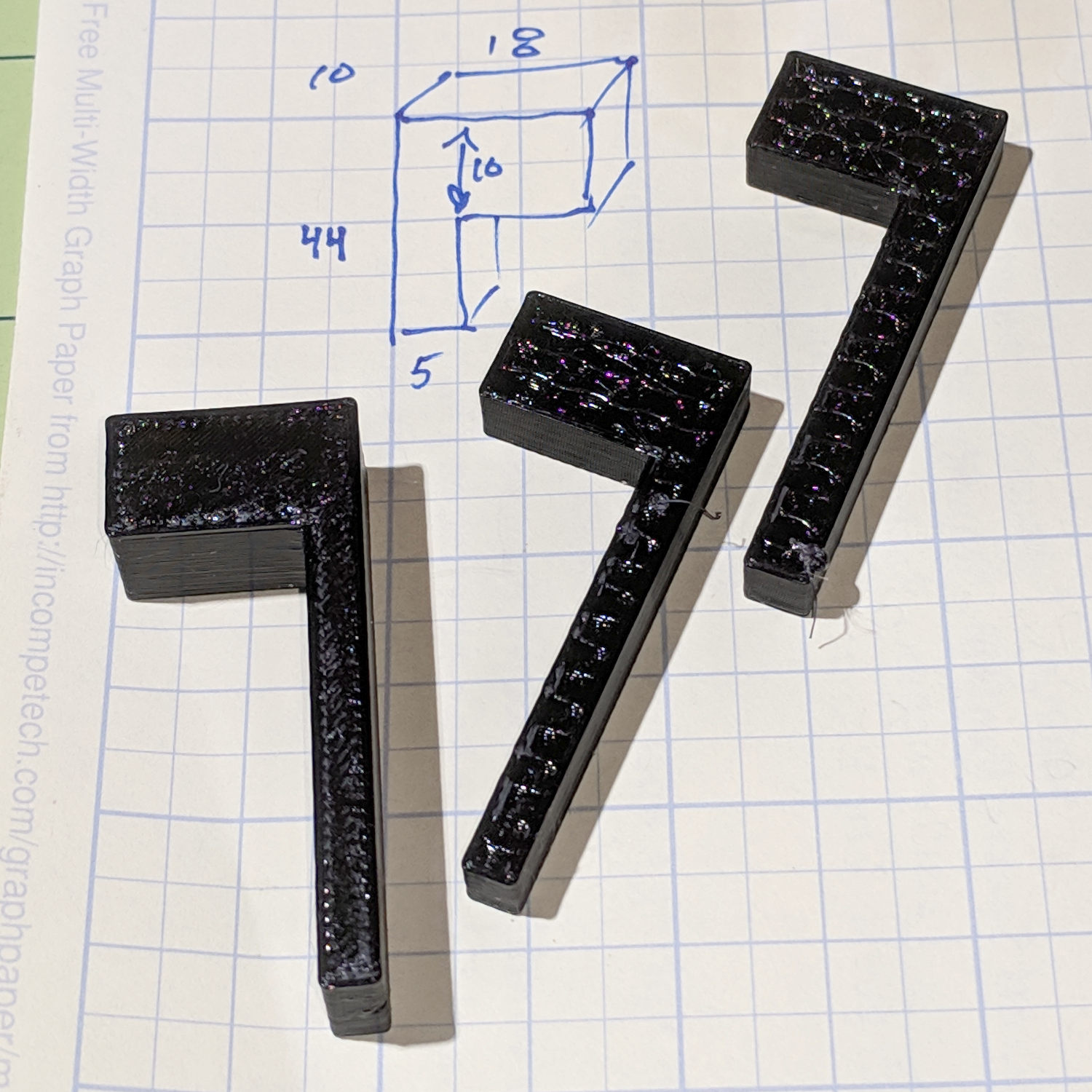
    All I needed was a small block holding the Kindle against the far side of the frame:

    Kindle Frame - side blocks
    Kindle Frame – side blocks

    A strip of double-stick carpet tape holds the block onto the frame. To extract the Kindle, should the need arise, slide it upward to clear the bottom clips, rotate it rearward, and out it comes.

    Getting a good block required three tries, because the basement has cooled off enough to trigger Marlin’s Thermal Runaway protection for the M2’s platform heater. A test fit after the first failure showed the long leg was 1 mm too wide and, after the second failure, I reduced the fan threshold to 15 s and the minimum layer time to 5 s, producing the third block without incident.

    The platform heater runs at 40 V and I considered bumping it to 43 V for a 15% power boost, but it has no trouble keeping up when the fan isn’t blowing chilly basement air across its surface.

    The OpenSCAD source code, such as it is, doesn’t deserve its own GitHub Gist:

    // Block to hold Kindle in a picture frame mount
    // Ed Nisley - KE4ZNU
    // November 2018
    
    Protrusion = 0.1;
    
    difference() {
    
      cube([18,44,10]);
      translate([-Protrusion,-Protrusion,-Protrusion])
        cube([18-4 + Protrusion,44-10 + Protrusion,10 + 2*Protrusion]);
    
    }
    
  • Lenovo Headset Volume Control Lube

    The volume control wart pod on the cable of my old and longsuffering Lenovo headset had been dropping out the right channel for a while, eventually prompting me to discover it comes apart by simply pulling on the halves:

    Lenovo Headset - control pod
    Lenovo Headset – control pod

    There being no way to get closer to the open-frame volume pot’s innards, I eased a drop of DeoxIT Red along its edge (upper in the photo), slipped another drop into what’s presumably the wiper opening in the knob, and ran it through enough cycles to spread the juice evenly.

    Reassemble in reverse order and It Just Works™ again.

  • Small Stone Moving By Itself

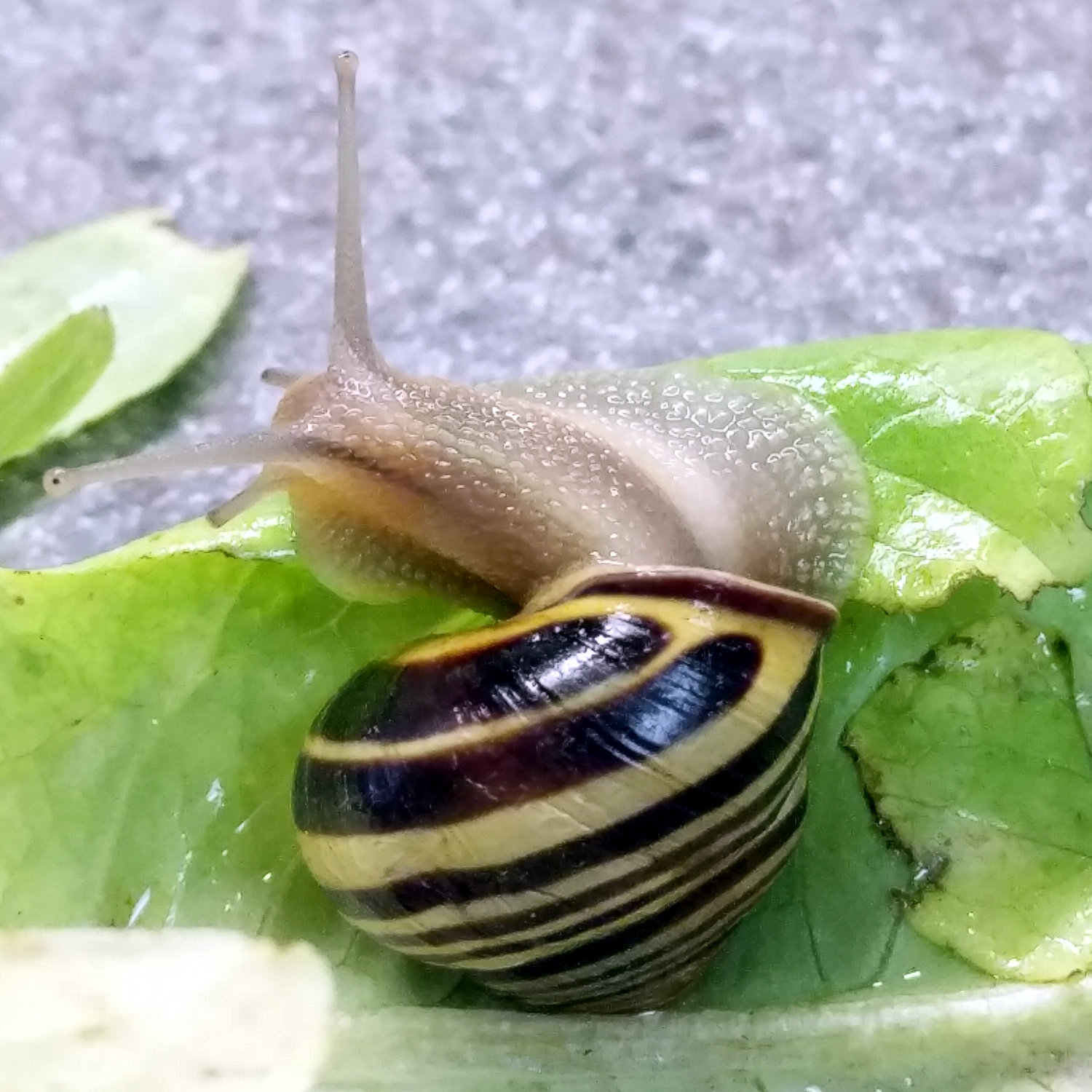
    A decorative snail emerged from within a large garden lettuce:

    Snail - looking left
    Snail – looking left

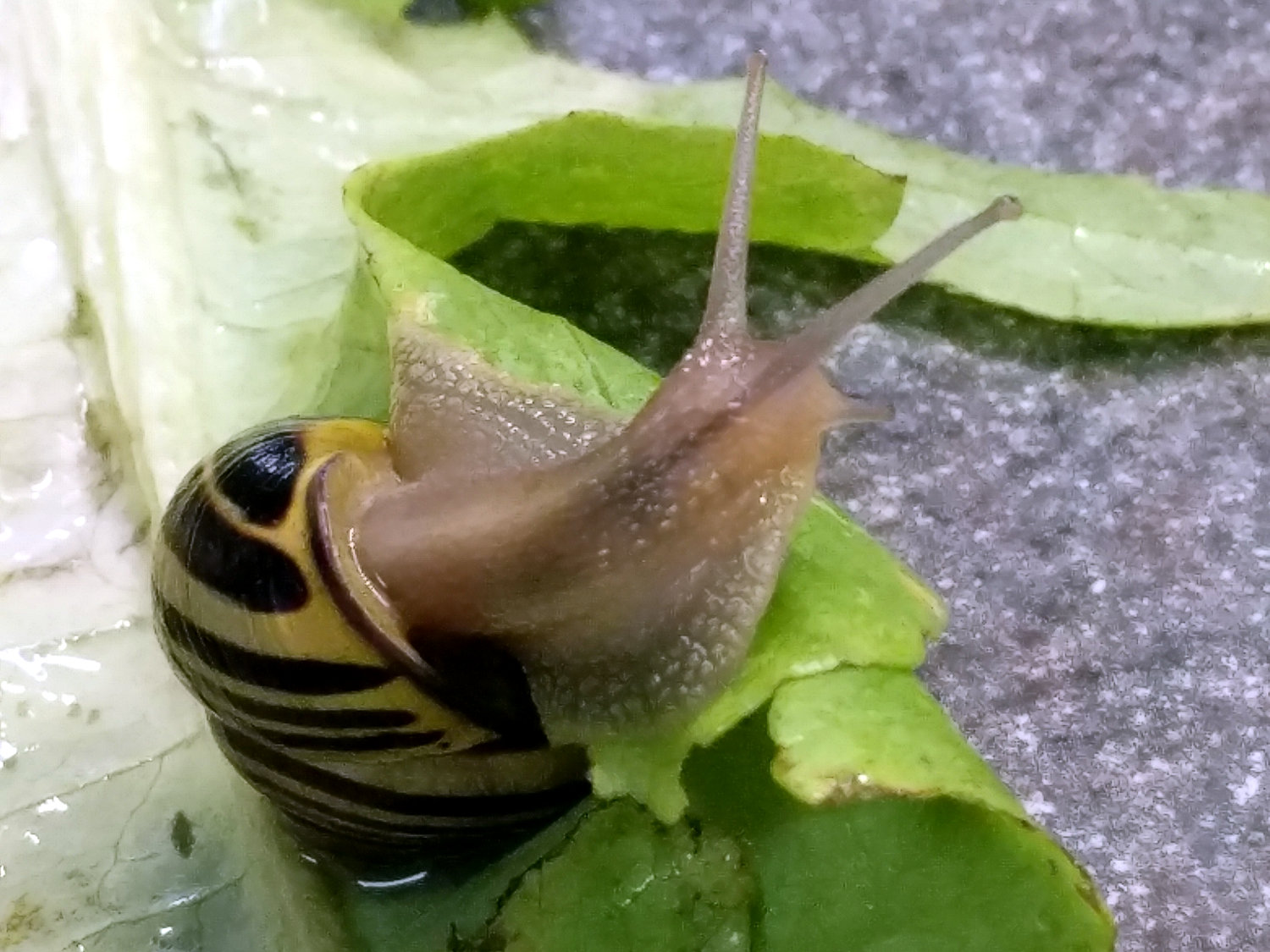
    It seemed interested in its new surroundings:

    Snail - looking right
    Snail – looking right

    And eventually set off on an adventure:

    Snail - escaping
    Snail – escaping

    We returned it to the Great Outdoors, far from the garden goodies, and wished it well.

    Sometimes, having eyes mounted on stalks would be advantageous, but I’m unwilling to give up opposable thumbs to get ’em.