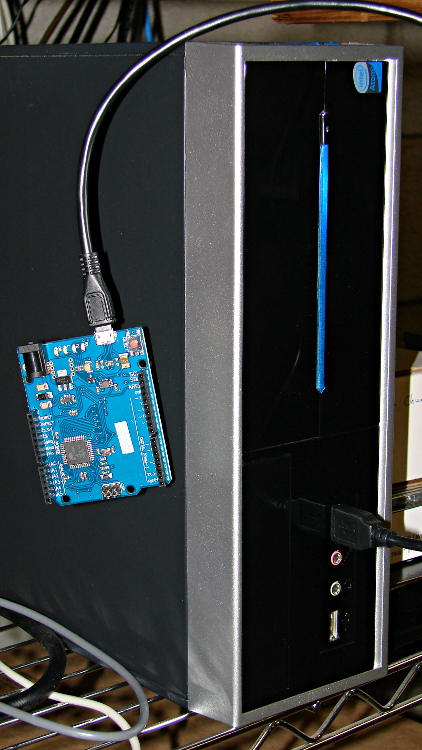
Going through the usual dance to reveal the HAL pin names for an Arduino Leonardo knockoff shows that it is, indeed, both a mouse and a keyboard.
Pawing through less /proc/bus/input/devices reveals:
I: Bus=0003 Vendor=2341 Product=8036 Version=0101
N: Name="Arduino LLC Arduino Leonardo"
P: Phys=usb-0000:00:1d.0-1/input2
S: Sysfs=/devices/pci0000:00/0000:00:1d.0/usb2/2-1/2-1:1.2/input/input3
U: Uniq=
H: Handlers=kbd mouse1 event3
B: EV=100017
B: KEY=70000 0 0 0 0 e080ffdf 1cfffff ffffffff fffffffe
B: REL=103
B: MSC=10
Tweaking the permissions:
sudo chgrp users /dev/input/event3
sudo chgrp users /dev/input/mouse1
sudo chmod g+w /dev/input/event3
sudo chmod g+w /dev/input/mouse1
The output of lsusb shows something interesting:
Bus 005 Device 001: ID 1d6b:0001 Linux Foundation 1.1 root hub
Bus 004 Device 006: ID 06f2:0011 Emine Technology Co. KVM Switch Keyboard
Bus 004 Device 005: ID 046d:c401 Logitech, Inc. TrackMan Marble Wheel
Bus 004 Device 004: ID 04d9:1203 Holtek Semiconductor, Inc. MC Industries Keyboard
Bus 004 Device 003: ID 046d:c216 Logitech, Inc. Dual Action Gamepad
Bus 004 Device 002: ID 0451:2046 Texas Instruments, Inc. TUSB2046 Hub
Bus 004 Device 001: ID 1d6b:0001 Linux Foundation 1.1 root hub
Bus 003 Device 001: ID 1d6b:0001 Linux Foundation 1.1 root hub
Bus 002 Device 002: ID 2341:8036
Bus 002 Device 001: ID 1d6b:0001 Linux Foundation 1.1 root hub
Bus 001 Device 001: ID 1d6b:0002 Linux Foundation 2.0 root hub
For whatever reason, this board doesn’t report a device name. It’s plugged into the same USB port as that mouse, so it gets the same Bus and Device numbers, which helps confirm that’s the board.
Querying the attributes with udevadm produces the all-important product string:
udevadm info --query=all --attribute-walk --name=/dev/bus/usb/002/002
... snippage ...
  looking at device '/devices/pci0000:00/0000:00:1d.0/usb2/2-1':
    KERNEL=="2-1"
    SUBSYSTEM=="usb"
    DRIVER=="usb"
    ATTR{configuration}==""
    ATTR{bNumInterfaces}==" 3"
    ATTR{bConfigurationValue}=="1"
    ATTR{bmAttributes}=="80"
    ATTR{bMaxPower}=="500mA"
    ATTR{urbnum}=="17"
    ATTR{idVendor}=="2341"
    ATTR{idProduct}=="8036"
    ATTR{bcdDevice}=="0100"
    ATTR{bDeviceClass}=="02"
    ATTR{bDeviceSubClass}=="00"
    ATTR{bDeviceProtocol}=="00"
    ATTR{bNumConfigurations}=="1"
    ATTR{bMaxPacketSize0}=="64"
    ATTR{speed}=="12"
    ATTR{busnum}=="2"
    ATTR{devnum}=="2"
    ATTR{version}==" 2.00"
    ATTR{maxchild}=="0"
    ATTR{quirks}=="0x0"
    ATTR{authorized}=="1"
    ATTR{manufacturer}=="Arduino LLC"
    ATTR{product}=="Arduino Leonardo"
Then we know enough to discover what it can do:
halrun
halcmd: loadusr -W hal_input -KRAL Leo
halcmd: show all
Loaded HAL Components:
ID      Type  Name                                      PID   State
     5  User  hal_input                                 11265 ready
     3  User  halcmd11264                               11264 ready

Component Pins:
Owner   Type  Dir         Value  Name
     5  bit   OUT         FALSE  input.0.btn-middle
     5  bit   OUT          TRUE  input.0.btn-middle-not
     5  bit   OUT         FALSE  input.0.btn-mouse
     5  bit   OUT          TRUE  input.0.btn-mouse-not
     5  bit   OUT         FALSE  input.0.btn-right
     5  bit   OUT          TRUE  input.0.btn-right-not
     5  bit   OUT         FALSE  input.0.key-0
     5  bit   OUT          TRUE  input.0.key-0-not
     5  bit   OUT         FALSE  input.0.key-1
     5  bit   OUT          TRUE  input.0.key-1-not
     5  bit   OUT         FALSE  input.0.key-102nd
     5  bit   OUT          TRUE  input.0.key-102nd-not
     5  bit   OUT         FALSE  input.0.key-2
     5  bit   OUT          TRUE  input.0.key-2-not
     5  bit   OUT         FALSE  input.0.key-3
     5  bit   OUT          TRUE  input.0.key-3-not
     5  bit   OUT         FALSE  input.0.key-4
     5  bit   OUT          TRUE  input.0.key-4-not
     5  bit   OUT         FALSE  input.0.key-5
     5  bit   OUT          TRUE  input.0.key-5-not
     5  bit   OUT         FALSE  input.0.key-6
     5  bit   OUT          TRUE  input.0.key-6-not
     5  bit   OUT         FALSE  input.0.key-7
     5  bit   OUT          TRUE  input.0.key-7-not
     5  bit   OUT         FALSE  input.0.key-8
     5  bit   OUT          TRUE  input.0.key-8-not
     5  bit   OUT         FALSE  input.0.key-9
     5  bit   OUT          TRUE  input.0.key-9-not
     5  bit   OUT         FALSE  input.0.key-a
     5  bit   OUT          TRUE  input.0.key-a-not
     5  bit   OUT         FALSE  input.0.key-apostrophe
     5  bit   OUT          TRUE  input.0.key-apostrophe-not
     5  bit   OUT         FALSE  input.0.key-b
     5  bit   OUT          TRUE  input.0.key-b-not
     5  bit   OUT         FALSE  input.0.key-backslash
     5  bit   OUT          TRUE  input.0.key-backslash-not
     5  bit   OUT         FALSE  input.0.key-backspace
     5  bit   OUT          TRUE  input.0.key-backspace-not
     5  bit   OUT         FALSE  input.0.key-c
     5  bit   OUT          TRUE  input.0.key-c-not
     5  bit   OUT         FALSE  input.0.key-capslock
     5  bit   OUT          TRUE  input.0.key-capslock-not
     5  bit   OUT         FALSE  input.0.key-comma
     5  bit   OUT          TRUE  input.0.key-comma-not
     5  bit   OUT         FALSE  input.0.key-compose
     5  bit   OUT          TRUE  input.0.key-compose-not
     5  bit   OUT         FALSE  input.0.key-d
     5  bit   OUT          TRUE  input.0.key-d-not
     5  bit   OUT         FALSE  input.0.key-delete
     5  bit   OUT          TRUE  input.0.key-delete-not
     5  bit   OUT         FALSE  input.0.key-dot
     5  bit   OUT          TRUE  input.0.key-dot-not
     5  bit   OUT         FALSE  input.0.key-down
     5  bit   OUT          TRUE  input.0.key-down-not
     5  bit   OUT         FALSE  input.0.key-e
     5  bit   OUT          TRUE  input.0.key-e-not
     5  bit   OUT         FALSE  input.0.key-end
     5  bit   OUT          TRUE  input.0.key-end-not
     5  bit   OUT         FALSE  input.0.key-enter
     5  bit   OUT          TRUE  input.0.key-enter-not
     5  bit   OUT         FALSE  input.0.key-equal
     5  bit   OUT          TRUE  input.0.key-equal-not
     5  bit   OUT         FALSE  input.0.key-esc
     5  bit   OUT          TRUE  input.0.key-esc-not
     5  bit   OUT         FALSE  input.0.key-f
     5  bit   OUT          TRUE  input.0.key-f-not
     5  bit   OUT         FALSE  input.0.key-f1
     5  bit   OUT          TRUE  input.0.key-f1-not
     5  bit   OUT         FALSE  input.0.key-f10
     5  bit   OUT          TRUE  input.0.key-f10-not
     5  bit   OUT         FALSE  input.0.key-f11
     5  bit   OUT          TRUE  input.0.key-f11-not
     5  bit   OUT         FALSE  input.0.key-f12
     5  bit   OUT          TRUE  input.0.key-f12-not
     5  bit   OUT         FALSE  input.0.key-f2
     5  bit   OUT          TRUE  input.0.key-f2-not
     5  bit   OUT         FALSE  input.0.key-f3
     5  bit   OUT          TRUE  input.0.key-f3-not
     5  bit   OUT         FALSE  input.0.key-f4
     5  bit   OUT          TRUE  input.0.key-f4-not
     5  bit   OUT         FALSE  input.0.key-f5
     5  bit   OUT          TRUE  input.0.key-f5-not
     5  bit   OUT         FALSE  input.0.key-f6
     5  bit   OUT          TRUE  input.0.key-f6-not
     5  bit   OUT         FALSE  input.0.key-f7
     5  bit   OUT          TRUE  input.0.key-f7-not
     5  bit   OUT         FALSE  input.0.key-f8
     5  bit   OUT          TRUE  input.0.key-f8-not
     5  bit   OUT         FALSE  input.0.key-f9
     5  bit   OUT          TRUE  input.0.key-f9-not
     5  bit   OUT         FALSE  input.0.key-g
     5  bit   OUT          TRUE  input.0.key-g-not
     5  bit   OUT         FALSE  input.0.key-grave
     5  bit   OUT          TRUE  input.0.key-grave-not
     5  bit   OUT         FALSE  input.0.key-h
     5  bit   OUT          TRUE  input.0.key-h-not
     5  bit   OUT         FALSE  input.0.key-home
     5  bit   OUT          TRUE  input.0.key-home-not
     5  bit   OUT         FALSE  input.0.key-i
     5  bit   OUT          TRUE  input.0.key-i-not
     5  bit   OUT         FALSE  input.0.key-insert
     5  bit   OUT          TRUE  input.0.key-insert-not
     5  bit   OUT         FALSE  input.0.key-j
     5  bit   OUT          TRUE  input.0.key-j-not
     5  bit   OUT         FALSE  input.0.key-k
     5  bit   OUT          TRUE  input.0.key-k-not
     5  bit   OUT         FALSE  input.0.key-kp0
     5  bit   OUT          TRUE  input.0.key-kp0-not
     5  bit   OUT         FALSE  input.0.key-kp1
     5  bit   OUT          TRUE  input.0.key-kp1-not
     5  bit   OUT         FALSE  input.0.key-kp2
     5  bit   OUT          TRUE  input.0.key-kp2-not
     5  bit   OUT         FALSE  input.0.key-kp3
     5  bit   OUT          TRUE  input.0.key-kp3-not
     5  bit   OUT         FALSE  input.0.key-kp4
     5  bit   OUT          TRUE  input.0.key-kp4-not
     5  bit   OUT         FALSE  input.0.key-kp5
     5  bit   OUT          TRUE  input.0.key-kp5-not
     5  bit   OUT         FALSE  input.0.key-kp6
     5  bit   OUT          TRUE  input.0.key-kp6-not
     5  bit   OUT         FALSE  input.0.key-kp7
     5  bit   OUT          TRUE  input.0.key-kp7-not
     5  bit   OUT         FALSE  input.0.key-kp8
     5  bit   OUT          TRUE  input.0.key-kp8-not
     5  bit   OUT         FALSE  input.0.key-kp9
     5  bit   OUT          TRUE  input.0.key-kp9-not
     5  bit   OUT         FALSE  input.0.key-kpasterisk
     5  bit   OUT          TRUE  input.0.key-kpasterisk-not
     5  bit   OUT         FALSE  input.0.key-kpdot
     5  bit   OUT          TRUE  input.0.key-kpdot-not
     5  bit   OUT         FALSE  input.0.key-kpenter
     5  bit   OUT          TRUE  input.0.key-kpenter-not
     5  bit   OUT         FALSE  input.0.key-kpminus
     5  bit   OUT          TRUE  input.0.key-kpminus-not
     5  bit   OUT         FALSE  input.0.key-kpplus
     5  bit   OUT          TRUE  input.0.key-kpplus-not
     5  bit   OUT         FALSE  input.0.key-kpslash
     5  bit   OUT          TRUE  input.0.key-kpslash-not
     5  bit   OUT         FALSE  input.0.key-l
     5  bit   OUT          TRUE  input.0.key-l-not
     5  bit   OUT         FALSE  input.0.key-left
     5  bit   OUT          TRUE  input.0.key-left-not
     5  bit   OUT         FALSE  input.0.key-leftalt
     5  bit   OUT          TRUE  input.0.key-leftalt-not
     5  bit   OUT         FALSE  input.0.key-leftbrace
     5  bit   OUT          TRUE  input.0.key-leftbrace-not
     5  bit   OUT         FALSE  input.0.key-leftctrl
     5  bit   OUT          TRUE  input.0.key-leftctrl-not
     5  bit   OUT         FALSE  input.0.key-leftmeta
     5  bit   OUT          TRUE  input.0.key-leftmeta-not
     5  bit   OUT         FALSE  input.0.key-leftshift
     5  bit   OUT          TRUE  input.0.key-leftshift-not
     5  bit   OUT         FALSE  input.0.key-m
     5  bit   OUT          TRUE  input.0.key-m-not
     5  bit   OUT         FALSE  input.0.key-minus
     5  bit   OUT          TRUE  input.0.key-minus-not
     5  bit   OUT         FALSE  input.0.key-n
     5  bit   OUT          TRUE  input.0.key-n-not
     5  bit   OUT         FALSE  input.0.key-numlock
     5  bit   OUT          TRUE  input.0.key-numlock-not
     5  bit   OUT         FALSE  input.0.key-o
     5  bit   OUT          TRUE  input.0.key-o-not
     5  bit   OUT         FALSE  input.0.key-p
     5  bit   OUT          TRUE  input.0.key-p-not
     5  bit   OUT         FALSE  input.0.key-pagedown
     5  bit   OUT          TRUE  input.0.key-pagedown-not
     5  bit   OUT         FALSE  input.0.key-pageup
     5  bit   OUT          TRUE  input.0.key-pageup-not
     5  bit   OUT         FALSE  input.0.key-pause
     5  bit   OUT          TRUE  input.0.key-pause-not
     5  bit   OUT         FALSE  input.0.key-q
     5  bit   OUT          TRUE  input.0.key-q-not
     5  bit   OUT         FALSE  input.0.key-r
     5  bit   OUT          TRUE  input.0.key-r-not
     5  bit   OUT         FALSE  input.0.key-right
     5  bit   OUT          TRUE  input.0.key-right-not
     5  bit   OUT         FALSE  input.0.key-rightalt
     5  bit   OUT          TRUE  input.0.key-rightalt-not
     5  bit   OUT         FALSE  input.0.key-rightbrace
     5  bit   OUT          TRUE  input.0.key-rightbrace-not
     5  bit   OUT         FALSE  input.0.key-rightctrl
     5  bit   OUT          TRUE  input.0.key-rightctrl-not
     5  bit   OUT         FALSE  input.0.key-rightmeta
     5  bit   OUT          TRUE  input.0.key-rightmeta-not
     5  bit   OUT         FALSE  input.0.key-rightshift
     5  bit   OUT          TRUE  input.0.key-rightshift-not
     5  bit   OUT         FALSE  input.0.key-s
     5  bit   OUT          TRUE  input.0.key-s-not
     5  bit   OUT         FALSE  input.0.key-scrolllock
     5  bit   OUT          TRUE  input.0.key-scrolllock-not
     5  bit   OUT         FALSE  input.0.key-semicolon
     5  bit   OUT          TRUE  input.0.key-semicolon-not
     5  bit   OUT         FALSE  input.0.key-slash
     5  bit   OUT          TRUE  input.0.key-slash-not
     5  bit   OUT         FALSE  input.0.key-space
     5  bit   OUT          TRUE  input.0.key-space-not
     5  bit   OUT         FALSE  input.0.key-sysrq
     5  bit   OUT          TRUE  input.0.key-sysrq-not
     5  bit   OUT         FALSE  input.0.key-t
     5  bit   OUT          TRUE  input.0.key-t-not
     5  bit   OUT         FALSE  input.0.key-tab
     5  bit   OUT          TRUE  input.0.key-tab-not
     5  bit   OUT         FALSE  input.0.key-u
     5  bit   OUT          TRUE  input.0.key-u-not
     5  bit   OUT         FALSE  input.0.key-up
     5  bit   OUT          TRUE  input.0.key-up-not
     5  bit   OUT         FALSE  input.0.key-v
     5  bit   OUT          TRUE  input.0.key-v-not
     5  bit   OUT         FALSE  input.0.key-w
     5  bit   OUT          TRUE  input.0.key-w-not
     5  bit   OUT         FALSE  input.0.key-x
     5  bit   OUT          TRUE  input.0.key-x-not
     5  bit   OUT         FALSE  input.0.key-y
     5  bit   OUT          TRUE  input.0.key-y-not
     5  bit   OUT         FALSE  input.0.key-z
     5  bit   OUT          TRUE  input.0.key-z-not
     5  s32   OUT             0  input.0.rel-wheel-counts
     5  float OUT             0  input.0.rel-wheel-position
     5  bit   IN          FALSE  input.0.rel-wheel-reset
     5  float IN              1  input.0.rel-wheel-scale
     5  s32   OUT             0  input.0.rel-x-counts
     5  float OUT             0  input.0.rel-x-position
     5  bit   IN          FALSE  input.0.rel-x-reset
     5  float IN              1  input.0.rel-x-scale
     5  s32   OUT             0  input.0.rel-y-counts
     5  float OUT             0  input.0.rel-y-position
     5  bit   IN          FALSE  input.0.rel-y-reset
     5  float IN              1  input.0.rel-y-scale
That’s a pretty decent assortment of directly usable names and features, even without keyboard LEDs. The mouse pins could be repurposed for general sensor values:
- counts = integer = accumulated encoder wheel ticks
- position = float = count / scale (why divided? I don’t know)
- scale = float = turns counts into position
- reset = bit = resets position or maybe count (not sure)
I think you could use count to transfer a bare ADC reading from the Leonardo, then use scale to get the actual voltage in “position”. In that situation, reset wouldn’t be at all useful.
The keyboard pins could transfer Boolean sensors.
You’d want to give HAL exclusive control of the Leonardo-is-not-a-mouse, because the incoming data would make hash of the, ah, LinuxCNC UI experience in short order. I’m not sure how to control that; the Leonardo advice boils down to “be careful” and “use a physical switch”.
I have *no* idea where the names come from, but apparently the OS / kernel / something has a HID layer that translates bare USB capability bits into strings. How that relates to a particular device, what the choices might be, how one could add / replace the names for a given device, and all that, I don’t know yet.
 The Smell of Molten Projects in the Morning
Comments
5 responses to “HAL Pin Names for an Arduino Leonardo Knockoff”
The Leonardo indeed presents multiple HIDs out of the box. The ‘secret sauce’ is entirely (well, mostly ;) ) in the Bootloader (Last I poked, the “Catalina” bootloader was the current one – it went through a few iterations during the beta phase).
It is running what you can consider bastardised LUFA-USB code… meaning if you can do it with LUFA, you can get your Leonardo to do it. I’ve dressed mine up as a kbd, a mouse, a huuuuge multi-button joystick for FlightSim (using a custom control panel to interface directly into Flight Simulator but just using Joystick Button Mapping and thus avoiding ‘middleware’ to spoof it otherwsie) etc.
The VID/PIDs are a little confusing – it will use one for the Bootloader, and it can then enumerate more either via the bootloader, or in the main loop() . You can also do things like manipulate the USB_MAX_POWER inside a sketch if you make it a public var out of the bootloader – thus enabling you to run the bootloader as a ‘standard’ 500ma USB device, but switch to ‘low-power 80ma’ device that will allow it to plug into a Mac keyboard USB Port without generating whinge messages about power-usage on the port…This also means that the device can ‘appear/disappear/appear as something else’ depending on if its running Just the Bootloader, a bootloader and ‘non-usb’ sketch (where it will then present a normal-ish USB-Serial port) or a ‘usb’ Sketch that then launches into a bunch of USB manipulation.
Fascinating device to learn the ins and outs of the USB Network (cause ultimately, despite ‘bus’ in its name, it is really a network interface).. and LUFA is some pretty fascinating stuff unto itself (and the possibilities it provides ;) ).
Thanks for the pointers to those projects, although I must admit just looking at that stuff scares me witless.
Fortunately, Dan Newman has a pack of Leonardo boards and has started poking into the USB interface; he knows more about that sort of thing than any one person really should.
We think it’ll make a dandy data acquisition board that can plug directly into LinuxCNC’s
hal_inputmodule…Oh – and yes – “Device Names” are presented as part of the USB Handshake – so you can set them via the Bootloader (for the ‘lower’ level USB devices) or inside the Sketch (as long as you enumerate it after the sketch is running, otherwise it will continue to use the ‘first-negotiated’ names from the Bootloader.
In windows land – the .inf ‘driver’ file often is nothing more than a VID/PID mapping to present a ‘friendly’ name inside Device Manager but otherwise maps it to a standard HID device…
Regarding “position = float = count / scale (why divided? I don’t know)”
In many cases, the scale is in the form of “X counts per inch”, rather than “X inches per count”. Dividing lets you use specify the scale in the cleaner format. That is particularly handy when the scale is something like 1024 counts per inch – the reciprocal is 0.0009765625 inches per count – messy.
May not be perfectly logical, but that is the reason I did it that way when I wrote the original HAL encoder component all those years ago. ;-) Later components just followed the pattern.
Which makes it perfectly obvious!
(Then, by conservation of perversity, we have 3D printers carrying about eight significant figures in their steps/mm values; there ain’t no justice.)
Thanks…