The Smell of Molten Projects in the Morning

Ed Nisley's Blog: Shop notes, electronics, firmware, machinery, 3D printing, laser cuttery, and curiosities. Contents: 100% human thinking, 0% AI slop.

Tag: Thing-O-Matic

Using and tweaking a Makerbot Thing-O-Matic 3D printer

  • Broom Handle Screw Thread: Replacement Plug

    Somehow, we wound up with a broom handle and a broom head, the former missing a threaded stub that was firmly lodged in the latter. A few minutes of Quality Shop Time sawed off the end of the handle and unscrewed the stub to produce this array of fragments:

    Broken broom handle thread
    Broken broom handle thread

    It’s a cylindrical Thing tailor-made for (or, back in the day, by!) a lathe. My lathe has quick-change gears that can actually cut a 5 TPI thread, but that seems like a lot of work for such a crude fitting. Instead, an hour or so of desk work produced this:

    Broom Handle Screw - solid model - overview
    Broom Handle Screw – solid model – overview

    Some after-the-fact search-fu revealed that the thread found on brooms and paint rollers is a 3/4-5 Acme. Machinery’s Handbook has 13 pages of data for various Acme screw threads, making a distinction between General Purpose Acme threads and Stub Acme Threads: GP thread depth = 0.5 × pitch, Stub = 0.3 × pitch. For a 5 TPI thread = 0.2 inch pitch, that’s GP = 0.1 inch vs. Stub = 0.06 inch.

    I measured a 5.0 mm pitch (which should be 5.08 mm = 0.2 inch exactly) and a crest-to-root depth of 1.4 mm = 0.055 inch, which makes them look like 3/4-5 Stub Acme threads. But, I didn’t know that at the time; a simple half-cylinder 2.5 mm wide and 1.25 mm tall was a pretty close match to what I saw on the broken plastic part.

    Although OpenSCAD’s MCAD library has some screw forms, they’re either machine screws with V threads or ball screws with spheres. The former obviously weren’t appropriate and the latter produced far too many facets, so I conjured up a simpler shape: 32 slightly overlapping cylinders per turn, sunk halfway in the shaft at their midpoint, and tilted at the thread’s helix angle.

    Broom Handle Screw - thread model closeup
    Broom Handle Screw – thread model closeup

    The OpenSCAD source code has a commented-out section that removes a similar shape from the shaft between the raised thread, but that brought the rendering to its knees. Fortunately, it turned out to be unnecessary, but it’s there if you want it.

    With the shaft diameter set to the “root diameter” of the thread and the other dimensions roughly matching the broken plastic bits, this emerged an hour later:

    Broom handle screw plug - as built
    Broom handle screw plug – as built

    The skirt thread was 0.25 to 0.30 mm thick, so the first-layer height tweak and packing density adjustments worked fine and all the dimensions came out perfectly. The cylindrical thread form doesn’t have much overhang and the threads came out fine; I think the correct straight-sided form would have more problems.

    The hole down the middle accommodates a 1/4-20 bolt that applies enough clamping force to keep the shaft in compression, which ought to prevent it from breaking in normal use. I intended to use a hex bolt, but found a carriage bolt that was exactly the right length and had a head exactly the same diameter as the shaft, so I heated it with a propane torch and mushed its square shank into the top of the hexagonal bolt hole (the source code now includes a square recess):

    Broom handle screw plug - in handle
    Broom handle screw plug – in handle

    The dimples on the side duplicate the method that secured the original plastic piece: four dents punched into the metal handle lock the plastic in place. It seems to work reasonably well, though, and is certainly less conspicuous than the screws I’d use.

    Screwing it in place shows that it’s slightly too long (I trimmed the length in the source code):

    Broom handle installed
    Broom handle installed

    It’s back in service, ready for use…

    The OpenSCAD source code:

    // Broom Handle Screw End Plug
    // Ed Nisley KE4ZNU March 2013
    
    // Extrusion parameters must match reality!
    //  Print with +1 shells and 3 solid layers
    
    ThreadThick = 0.25;
    ThreadWidth = 2.0 * ThreadThick;
    
    HoleWindage = 0.2;
    
    function IntegerMultiple(Size,Unit) = Unit * ceil(Size / Unit);
    
    Protrusion = 0.1;			// make holes end cleanly
    
    //----------------------
    // Dimensions
    
    PI = 3.14159265358979;
    
    PostOD = 22.3;              // post inside metal handle
    PostLength = 25.0;
    
    FlangeOD = 24.0;            // stop flange
    FlangeLength = 3.0;
    
    PitchDia = 15.5;            // thread center diameter
    ScrewLength = 20.0;
    
    ThreadFormOD = 2.5;         // diameter of thread form
    ThreadPitch = 5.0;
    
    BoltOD = 7.0;               // clears 1/4-20 bolt
    BoltSquare = 6.5;          	// across flats
    BoltHeadThick = 3.0;
    
    RecessDia = 6.0;			// recesss to secure post in handle
    
    OALength = PostLength + FlangeLength + ScrewLength; // excludes bolt head extension
    
    $fn=8*4;
    
    echo("Pitch dia: ",PitchDia);
    echo("Root dia: ",PitchDia - ThreadFormOD);
    echo("Crest dia: ",PitchDia + ThreadFormOD);
    
    //----------------------
    // Useful routines
    
    module Cyl_Thread(pitch,length,pitchdia,cyl_radius,resolution=32) {
    
    Cyl_Adjust = 1.25;                      // force overlap
    
        Turns = length/pitch;
        Slices = Turns*resolution;
        RotIncr = 1/resolution;
        PitchRad = pitchdia/2;
        ZIncr = length/Slices;
        helixangle = atan(pitch/(PI*pitchdia));
        cyl_len = Cyl_Adjust*(PI*pitchdia)/resolution;
    
        union() {
            for (i = [0:Slices-1]) {
                translate([PitchRad*cos(360*i/resolution),PitchRad*sin(360*i/resolution),i*ZIncr])
                    rotate([90+helixangle,0,360*i/resolution])
                        cylinder(r=cyl_radius,h=cyl_len,center=true,$fn=12);
            }
        }
    }
    
    module PolyCyl(Dia,Height,ForceSides=0) {			// based on nophead's polyholes
    
      Sides = (ForceSides != 0) ? ForceSides : (ceil(Dia) + 2);
    
      FixDia = Dia / cos(180/Sides);
    
      cylinder(r=(FixDia + HoleWindage)/2,
               h=Height,
    	   $fn=Sides);
    }
    
    module ShowPegGrid(Space = 10.0,Size = 1.0) {
    
      Range = floor(50 / Space);
    
    	for (x=[-Range:Range])
    	  for (y=[-Range:Range])
    		translate([x*Space,y*Space,Size/2])
    		  %cube(Size,center=true);
    
    }
    
    //-------------------
    // Build it...
    
    ShowPegGrid();
    
    difference() {
        union() {
            cylinder(r=PostOD/2,h=PostLength);
            cylinder(r=PitchDia/2,h=OALength);
            translate([0,0,PostLength])
                cylinder(r=FlangeOD/2,h=FlangeLength);
            translate([0,0,(PostLength + FlangeLength)])
                Cyl_Thread(ThreadPitch,(ScrewLength - ThreadFormOD/2),PitchDia,ThreadFormOD/2);
        }
    
        translate([0,0,-Protrusion])
            PolyCyl(BoltOD,(OALength + 2*Protrusion),6);
        translate([0,0,(OALength - BoltHeadThick)])
            PolyCyl(BoltSquare,(BoltHeadThick + Protrusion),4);
    
    //    translate([0,0,(PostLength + FlangeLength + ThreadFormOD)])
    //        Cyl_Thread(ThreadPitch,(ScrewLength - ThreadFormOD/2),PitchDia,ThreadFormOD/2);
    
    	for (i = [0:90:270]) {
    		rotate(i)
    			translate([PostOD/2,0,PostLength/2])
    				sphere(r=RecessDia/2,$fn=8);
    	}
    }
    
  • Skeinforge: First Layer Thickness

    Somewhere along the way, I lost part of the constellation of settings that produce a properly sized first layer. While looking for something else, I discovered that the Z-axis level started at half the expected 0.25 mm:

    (<layer> 0.125 )
    (<skirt>)
    G1 X-13.25 Y29.2675 Z0.125 F15000.0
    

    The key turned out to be (re?)enabling the Skeinforge Bottom setting:

    • Additional Height over Layer Thickness: 1.0
    • Altitude: 0.0

    Then it comes out right:

    (<layer> 0.25 )
    (<skirt>)
    G1 X-13.25 Y29.2675 Z0.25 F15000.0
    

    The excellent illustrations at the bottom of the Official Documentation (which I don’t recall seeing before) show you what’s going on; you really can’t deduce the geometry from the parameter names alone.

    The first layers were still within ±0.05 mm of 0.25 mm, which suggests the plastic squooshes out around the nozzle and rebounds to nearly the correct thickness, but they tended toward consistently too thin rather than OK-on-average. The first trial with the proper Bottom setting came out spot on at 0.25 mm around the Skirt thread, so it’s back on track.

    The first layer comes out at 20 mm/s and sticks like glue to the Kapton tape. The remaining layers run at 40 mm/s for infill and 20 mm/s for perimeters, producing spot-on dimensions, with 250 mm/s traverses between printed sections. It’d be nice to run faster, but accuracy has its benefits for mechanical parts.

    That’s with a 2.95 mm Filament Diameter setting closely matching the average actual diameter and a 0.95 Filament Packing Density. I think the Density is slightly too low, so I’ll bump that to 1.0 for the next object.

  • G-Code and M-Code Grand Master List

    Here’s a combined and sorted list of all the G-Code and M-Code commands for (as many of) the Free Software G-Code interpreters (that I could find) relevant to DIY 3D printing. With any luck, I now know:

    • What a given command does
    • What other interpreters do with that command

    The short descriptions come from tables on the original source pages, perhaps with a bit of massaging to make things more uniform; I did as little rearranging and editing as possible.

    If you see anything wrong or have another G-Code interpreter I should include, let me know…

    3D Printer G-Code and M-Code Commands
    
    27 Feb 2013
    Ed Nisley - KE4ZNU
    
    V3 - NIST RS274NGC V3- http://www.nist.gov/manuscript-publication-search.cfm?pub_id=823374
    LC - LinuxCNC - http://www.linuxcnc.org/docs/
    RG - ReplicatorG - http://replicat.org/gcodes and /mcodes
    JF - Jetty Firmware - http://replicat.org/mcodes at bottom
    RR - RepRap - http://reprap.org/wiki/G_codes (cross-linked from many G-Code pages)
    MF - Marlin Firmware dialect of RR (via Dan Newman)
    
    G0  LC  Coordinated Straight Motion Rapid
    G0  MF  same as G1
    G0  RG  Rapid Motion
    G0  RR  Rapid move
    G0  V3  rapid positioning
    G1  LC  Coordinated Straight Motion Feed Rate
    G1  MF  Coordinated Movement X Y Z E
    G1  RG  Coordinated Motion
    G1  RR  Controlled move
    G1  V3  linear interpolation
    G2  LC  Coordinated Helical Motion Feed Rate
    G2  MF  CW ARC
    G2  RG  Arc - Clockwise
    G2  V3  circular/helical interpolation (clockwise)
    G3  LC  Coordinated Helical Motion Feed Rate
    G3  MF  CCW ARC
    G3  RG  Arc - Counter Clockwise
    G3  V3  circular/helical interpolation (counterclockwise)
    G4  LC  Dwell
    G4  MF  Dwell S<seconds> or P<milliseconds>
    G4  RG  Dwell
    G4  RR  Dwell
    G4  V3  dwell
    G5.1    LC  Quadratic B-Spline
    G5.2    LC  NURBs Block Open
    G5.3    LC  NURBs Block Close
    G7  LC  Diameter Mode (lathe)
    G8  LC  Radius Mode (lathe)
    G10 LC  L10 Set Tool Table, Calculated, Workpiece
    G10 LC  L11 Set Tool Table, Calculated, Fixture
    G10 LC  L1  Set Tool Table Entry
    G10 LC  L20 Coordinate System Origin Setting Calculated
    G10 LC  L2  Coordinate System Origin Setting
    G10 RG  Create Coordinate System Offset from the Absolute one
    G10 RR  Head Offset
    G10 V3  coordinate system origin setting
    G17 LC  Arc plane XY
    G17 RG  Select XY plane (default)
    G17 V3  XY-plane selection
    G17.1   LC  Arc plane UV
    G18 LC  Arc plane ZX
    G18 RG  Select XZ plane (not implemented)
    G18 V3  XZ-plane selection
    G18.1   LC  Arc plane WU
    G19 LC  Arc plane YZ
    G19 RG  Select YX plane (not implemented)
    G19 V3  YZ-plane selection
    G19.1   LC  Arc plane VW
    G20 LC  Unit of Measure - inch
    G20 RG  Inches as units
    G20 RR  Set Units to Inches
    G20 V3  inch system selection
    G21 LC  Unit of Measure - millimeter
    G21 RG  Millimeters as units
    G21 RR  Set Units to Millimeters
    G21 V3  millimeter system selection
    G28 LC  Go to Predefined Position
    G28 MF  Home all Axis
    G28 RG  Home given Axes to maximum
    G28 RR  Move to Origin
    G28 V3  return to home
    G28.1   LC  Store Predefined Position
    G29-G32 RR  Bed probing
    G30 LC  Go to Predefined Position
    G30 RG  Go Home via Intermediate Point (not implemented)
    G30 V3  return to secondary home
    G30.1   LC  Store Predefined Position
    G31 RG  Single probe (not implemented)
    G32 RG  Probe area (not implemented)
    G33 LC  Spindle Synchronized Motion
    G33.1   LC  Rigid Tapping
    G38.2   LC  Probe toward, stop on contact, error
    G38.2   V3  straight probe
    G38.3   LC  Probe toward, stop on contact
    G38.4   LC  Probe away, stop on release, error
    G38.5   LC  Probe away, stop on release
    G40 LC  Cancel Cutter Compensation
    G40 V3  cancel cutter radius compensation
    G41 LC  Cutter Compensation - left
    G41 V3  start cutter radius compensation left
    G41.1   LC  Dynamic Cutter Compensation - left
    G42 LC  Cutter Compensation - right
    G42 V3  start cutter radius compensation right
    G42.1   LC  Dynamic Cutter Compensation - right
    G43 LC  Use Tool Length Offset from Tool Table
    G43 V3  tool length offset (plus)
    G43.1   LC  Dynamic Tool Length Offset
    G49 LC  Cancel Tool Length Offset
    G49 V3  cancel tool length offset
    G53 LC  Motion in Machine Coordinate System
    G53 RG  Set absolute coordinate system
    G53 V3  motion in machine coordinate system
    G54-G59 RG  Use coordinate system from G10 P0-5
    G54 LC  Select Coordinate System 1
    G54 V3  use preset work coordinate system 1
    G55 LC  Select Coordinate System 2
    G55 V3  use preset work coordinate system 2
    G56 LC  Select Coordinate System 3
    G56 V3  use preset work coordinate system 3
    G57 LC  Select Coordinate System 4
    G57 V3  use preset work coordinate system 4
    G58 LC  Select Coordinate System 5
    G58 V3  use preset work coordinate system 5
    G59 LC  Select Coordinate System 6
    G59 V3  use preset work coordinate system 6
    G59.1   LC  Select Coordinate System 7
    G59.1   V3  use preset work coordinate system 7
    G59.2   LC  Select Coordinate System 8
    G59.2   V3  use preset work coordinate system 8
    G59.3   LC  Select Coordinate System 9
    G59.3   V3  use preset work coordinate system 9
    G61 LC  Path Control Mode - exact path
    G61 V3  set path control mode: exact path
    G61.1   LC  Path Control Mode - exact stop (same as G61)
    G61.1   V3  set path control mode: exact stop
    G64 LC  Path Control Mode - Optional Tolerance
    G64 V3  set path control mode: continuous
    G73 LC  Drilling Cycle with Chip Breaking
    G76 LC  Multi-pass Threading Cycle (Lathe)
    G80 LC  Cancel Motion Modes
    G80 V3  cancel motion mode (including any canned cycle)
    G81 LC  Drilling Cycle
    G81 V3  canned cycle: drilling
    G82 LC  Drilling Cycle with Dwell
    G82 V3  canned cycle: drilling with dwell
    G83 LC  Drilling Cycle with Peck
    G83 V3  canned cycle: peck drilling
    G84 V3  canned cycle: right hand tapping
    G85 LC  Boring Cycle, No Dwell, Feed Out
    G85 V3  canned cycle: boring, no dwell, feed out
    G86 LC  Boring Cycle, Stop, Rapid Out
    G86 V3  canned cycle: boring, spindle stop, rapid out
    G87 V3  canned cycle: back boring
    G88 V3  canned cycle: boring, spindle stop, manual out
    G89 LC  Boring Cycle, Dwell, Feed Out
    G89 V3  canned cycle: boring, dwell, feed out
    G90 LC  G91 Distance Mode
    G90 MF  Use Absolute Coordinates
    G90 RG  Absolute Positioning
    G90 RR  Set to Absolute Positioning
    G90 V3  absolute distance mode
    G90.1   LC  Arc Distance Mode - absolute IJK
    G91 MF  Use Relative Coordinates
    G91 RG  Relative Positioning
    G91 RR  Set to Relative Positioning
    G91 V3  incremental distance mode
    G91.1   LC  Arc Distance Mode - incremental IJK
    G92.1   V3  cancel offset coordinate systems and set parameters to zero
    G92 LC  Coordinate System Offset
    G92 MF  Set current position to cordinates given
    G92 RG  Define current position on axes
    G92 RR  Set Position
    G92 V3  offset coordinate systems and set parameters
    G92.1   LC  Cancel Coordinate System Offsets
    G92.2   LC  Cancel Coordinate System Offsets
    G92.2   V3  cancel offset coordinate systems but do not reset parameters
    G92.3   LC  Restore Axis Offsets
    G92.3   V3  apply parameters to offset coordinate systems
    G93 LC  Feed Mode - Inverse time
    G93 V3  inverse time feed rate mode
    G94 LC  Feed Mode - Units per minute
    G94 RG  Feed rate mode (not implemented)
    G94 V3  units per minute feed rate mode
    G95 LC  Feed Mode - Units per revolution
    G96 LC  Constant Surface Speed
    G97 LC  RPM Mode
    G97 RG  Spindle speed rate
    G98 LC  Canned Cycle Z Retract Mode
    G98 V3  initial level return in canned cycles
    G99 LC  Canned Cycle Z Retract Mode
    G99 V3  R-point level return in canned cycles
    G161    RG  Home negative
    G162    RG  Home positive
    
    M0  LC  Program Pause
    M0  RG  Unconditional Halt (not supported on SD)
    M0  RR  Stop
    M0  V3  program stop
    M1  LC  Program Pause - optional
    M1  RG  Optional Halt (not supported on SD)
    M1  RR  Sleep
    M1  V3  optional program stop
    M2  LC  Program End
    M2  RG  End program
    M2  V3  program end
    M3  LC  Spindle Control - clockwise ON
    M3  RG  spindle on, CW
    M3  RR  Spindle On, Clockwise (CNC specific)
    M3  V3  turn spindle clockwise
    M4  LC  Spindle Control - counterclockwise ON
    M4  RG  spindle on, CCW
    M4  RR  Spindle On, Counter-Clockwise (CNC specific)
    M4  V3  turn spindle counterclockwise
    M5  LC  Spindle Control - OFF
    M5  RG  spindle off
    M5  RR  Spindle Off (CNC specific)
    M5  V3  stop spindle turning
    M6  LC  Tool Change
    M6  RG  Tool change. This code waits until the toolhead is ready before proceeding. This is often used to wait for a toolhead to reach the its set temperature before beginning a print. ReplicatorG also supports giving a timeout with M6 P<secs>.
    M6  V3  tool change
    M7  LC  Coolant Control - mist ON
    M7  RG  coolant A on (flood coolant)
    M7  RR  Mist Coolant On (CNC specific)
    M7  V3  mist coolant on
    M8  LC  Coolant Control - flood ON
    M8  RG  cooland B on (mist coolant)
    M8  RR  Flood Coolant On (CNC specific)
    M8  V3  flood coolant on
    M9  LC  Coolant Control - OFF
    M9  RG  all coolants off
    M9  RR  Coolant Off (CNC specific)
    M9  V3  mist and flood coolant off
    M10 RG  close clamp
    M10 RR  Vacuum On (CNC specific)
    M11 RG  open clamp
    M11 RR  Vacuum Off (CNC specific)
    M13 RG  spindle CW and coolant A on
    M14 RG  spindle CCW and coolant A on
    M17 MF  Enable/Power all stepper motors
    M17 RG  enable motor(s)
    M17 RR  Enable/Power all stepper motors
    M18 MF  Disable all stepper motors; same as M84
    M18 RG  disable motor(s)
    M18 RR  Disable all stepper motors
    M20 MF  List SD card
    M20 RR  List SD card
    M21 MF  Init SD card
    M21 RG  open collet
    M21 RR  Initialize SD card
    M22 MF  Release SD card
    M22 RG  close collet
    M22 RR  Release SD card
    M23 MF  Select SD file (M23 filename.g)
    M23 RR  Select SD file
    M24 MF  Start/resume SD print
    M24 RR  Start/resume SD print
    M25 MF  Pause SD print
    M25 RR  Pause SD print
    M26 MF  Set SD position in bytes (M26 S12345)
    M26 RR  Set SD position
    M27 MF  Report SD print status
    M27 RR  Report SD print status
    M28 MF  Start SD write (M28 filename.g)
    M28 RR  Begin write to SD card
    M29 MF  Stop SD write
    M29 RR  Stop writing to SD card
    M30 LC  Program End - exchange pallet shuttles
    M30 MF  Delete file from SD (M30 filename.g)
    M30 RG  program rewind
    M30 RR  Delete a file on the SD card
    M30 V3  program end, pallet shuttle, and reset
    M31 MF  Output time since last M109 or SD card start to serial
    M40-M46 RG  change gear ratio (0 - 6)
    M40 RR  Eject
    M41 RR  Loop
    M42 MF  Change pin status via gcode
    M42 RR  Stop on material exhausted / Switch I/O pin
    M43 RR  Stand by on material exhausted
    M48 LC  Feed & Spindle Overrides - Enable
    M48 V3  enable speed and feed overrides
    M49 LC  Feed & Spindle Overrides - Disable
    M49 V3  disable speed and feed overrides
    M50 LC  Feed Override Control
    M50 RG  read spindle speed
    M51 LC  Spindle Override Control
    M52 LC  Adaptive Feed Control
    M53 LC  Feed Stop Control
    M60 LC  Pallet Change Pause
    M60 V3  pallet shuttle and program stop
    M61 LC  Set Current Tool Number
    M62 LC  Output Control - synchronized ON
    M63 LC  Output Control - synchronized OFF
    M64 LC  Output Control - immediate ON
    M65 LC  Output Control - immediate OFF
    M66 LC  Input Control - wait
    M67 LC  Analog Output Control - synchronized
    M68 LC  Analog Output Control - immediate
    M70 RG  Display message on machine, with optional timeout specified by P-code in seconds
    M71 RG  Pause activity and display message, resuming build on button push. Optional timeout specified by P-code in seconds. If timeout is specified and no button is pushed, machine should shut down or reset.
    M72 RG  Play a song or tone defined by the machine, by a P-code specifying a song type. Default songs are Error Sound (P0), a Ta-da sound (P1), and a warning sound (P2). all other sounds are user or machine specific, with P2 the default for unknown sounds.
    M73 RG  Manually set build percentage. Valid P values are 0 to 100, values over 100 are rounded down to 100
    M80 MF  Turn on Power Supply
    M80 RR  ATX Power On
    M81 MF  Turn off Power Supply
    M81 RR  ATX Power Off
    M82 MF  Set E codes absolute (default)
    M82 RR  set extruder to absolute mode
    M83 MF  Set E codes relative while in Absolute Coordinates (G90) mode
    M83 RR  set extruder to relative mode
    M84 MF  Disable steppers until next move, or use S<seconds> to specify an inactivity timeout, after which the steppers will be disabled.  S0 to disable the timeout.
    M84 RR  Stop idle hold
    M85 MF  Set inactivity shutdown timer with parameter S<seconds>. To disable set zero (default)
    M92 MF  Set axis_steps_per_unit - same syntax as G92
    M92 RR  Set axis_steps_per_unit
    M98 RR  Get axis_hysteresis_mm
    M99 RR  Set axis_hysteresis_mm
    M100    LC  through M199   User Defined M codes
    M101    RR  Extruder on, fwd
    M101    RR  Turn extruder 1 on Forward / Undo Extruder Retraction
    M102    RR  Extruder on, reverse
    M102    RR  Turn extruder 1 on Reverse
    M103    RR  Extruder off
    M103    RR  Turn all extruders off / Extruder Retraction
    M104    MF  Set extruder target temp
    M104    RR  Set Extruder Temperature
    M104    RR  Snn set temperature in degrees Celsius
    M105    MF  Read current temp
    M105    RR  get extruder temperature
    M105    RR  Get Extruder Temperature
    M106    MF  Fan on
    M106    RR  Fan On
    M106    RR  turn fan on
    M107    MF  Fan off
    M107    RR  Fan Off
    M107    RR  turn fan off
    M108    RR  Set Extruder's Max Speed (Rnnn = RPM, Pnnn = PWM)
    M108    RR  Set Extruder Speed
    M109    MF  Wait for extruder current temp to reach target temp.
    M109    RR  Set Extruder Temperature and Wait
    M109    RR  Snnn set build platform temperature in degrees Celsuis
    M110    RR  Set Current Line Number
    M110    RR  Snnn set chamber temperature in degrees Celsius
    M111    RR  Set Debug Level
    M112    RR  Emergency Stop
    M113    RR  Set Extruder PWM
    M114    MF  Display current position
    M114    MF  Output current position to serial port
    M114    RR  Get Current Position
    M115    MF  Capabilities string
    M115    RR  Get Firmware Version and Capabilities
    M116    RR  Wait
    M117    MF  display message
    M117    RR  Get Zero Position
    M118    RR  Negotiate Features
    M119    MF  Output Endstop status to serial port
    M119    RR  Get Endstop Status
    M120    RR  M121, M122 Snnn set the PID gain for the temperature regulator (not currently supported by ReplicatorG)
    M123    RR  M124 Snnn set iMax and iMin windup guard for the PID controller (not currently supported by ReplicatorG)
    M126    JF  use acceleration for subsequent instructions
    M126    RG  valve open (acceleration on for subsequent instructions in the Jetty Firmware)
    M126    RR  Open Valve
    M127    JF  disable acceleration for subsequent instructions
    M127    RG  valve close (acceleration off for subsequent instructions in the Jetty Firmware)
    M127    RR  Close Valve
    M128    RR  Extruder Pressure PWM
    M128    RR  get position
    M129    RR  Extruder pressure off
    M129    RR  get range (not currently supported by ReplicatorG)
    M130    RR  Set PID P value
    M130    RR  set range (not currently supported by ReplicatorG)
    M131    RR  Set PID I value
    M132    RR  Set PID D value
    M133    RR  Set PID I limit value
    M134    RR  Write PID values to EEPROM
    M136    RR  Print PID settings to host
    M140    MF  Set bed target temp
    M140    RR  Bed Temperature (Fast)
    M141    RR  Chamber Temperature (Fast)
    M142    RR  Holding Pressure
    M143    RR  Maximum hot-end temperature
    M160    RR  Number of mixed materials
    M190    MF  Wait for bed current temp to reach target temp.
    M190    RR  Wait for bed temperature to reach target temp
    M200    JF  reset (to pick up changes)
    M200    MF  Set filament diameter
    M200    RR  reset driver
    M200    RR  Set filament diameter / Get Endstop Status
    M201    JF  set maximum rates of acceleration/deceleration
    M201    MF  Set max acceleration in units/s^2 for print moves (M201 X1000 Y1000)
    M201    RR  Set max printing acceleration
    M202    MF  Set max acceleration in units/s^2 for travel moves (M202 X1000 Y1000) Unused in Marlin!!
    M202    RR  clear buffer (not currently supported by ReplicatorG)
    M202    RR  Set max travel acceleration
    M203    JF  set maximum feed rates
    M203    MF  Set maximum feedrate that your machine can sustain (M203 X200 Y200 Z300 E10000) in mm/sec
    M203    RR  Set maximum feedrate
    M204    JF  set default rates of acceleration
    M204    MF  Set default acceleration: S normal moves T filament only moves (M204 S3000 T7000) im mm/sec^2  also sets minimum segment time in ms (B20000) to prevent buffer underruns and M20 minimum feedrate
    M204    RR  Set default acceleration
    M205    JF  set minimum feed rates and planner speed
    M205    MF   advanced settings:  minimum travel speed S=while printing T=travel only,  B=minimum segment time X= maximum xy jerk, Z=maximum Z jerk, E=maximum E jerk
    M205    RR  advanced settings
    M206    JF  set extruded noodle diameter, extruder maximum reverse feed rate, extruder deprime, slowdown limit, and direction of extruder feed
    M206    MF  set additional homeing offset
    M206    RR  set home offset
    M207    JF  set JKN Advance parameters K and K2
    M207    RR  calibrate z axis by detecting z max length
    M208    JF  set extruder steps per millimeter
    M208    RR  set axis max travel
    M209    JF  turn acceleration planner on or off; enable or disable override of gcode temperature settings
    M209    RR  enable automatic retract
    M215    JF  set steps per millimeter for each axis
    M216    JF  set maximum speed changes for each axis
    M220    MF  S<factor in percent> set speed factor override percentage
    M220    RR  Set speed factor override percentage
    M221    MF  S<factor in percent> set extrude factor override percentage
    M221    RR  set extrude factor override percentage
    M226    RR  Gcode Initiated Pause
    M227    RR  Enable Automatic Reverse and Prime
    M228    RR  Disable Automatic Reverse and Prime
    M229    RR  Enable Automatic Reverse and Prime
    M230    RR  Disable / Enable Wait for Temperature Change
    M240    MF  Trigger a camera to take a photograph
    M240    RR  Start conveyor belt motor / Echo off
    M241    RR  Stop conveyor belt motor / echo on
    M245    RR  Start cooler
    M246    RR  Stop cooler
    M300    RR  Play beep sound
    M300    RR  Snnn set servo 1 position
    M301    MF  Set PID parameters P I and D
    M301    RR  Set PID parameters - Hot End
    M301    RR  Snnn set servo 2 position
    M302    MF  Allow cold extrudes
    M303    MF  PID relay autotune S<temperature> sets the target temperature. (default target temperature = 150C)
    M304    RR  Set PID parameters - Bed
    M310    RG  (filepath) logging
    M311    RG  stop logging
    M312    RG  (message) log message
    M320    RG  acceleration on for subsequent instructions
    M321    RG  acceleration off for subsequent instructions
    M400    MF  Finish all moves
    M420    RR  Set RGB Colors as PWM
    M500    MF  stores paramters in EEPROM
    M500    RR  stores paramters in EEPROM
    M501    MF  reads parameters from EEPROM (if you need reset them after you changed them temporarily).
    M501    RR  reads parameters from EEPROM
    M502    MF  reverts to the default "factory settings".  You still need to store them in EEPROM afterwards if you want to.
    M502    RR  reverts to the default "factory settings".
    M503    MF  print the current settings (from memory not from eeprom)
    M503    RR  Print settings
    M999    MF  Restart after being stopped by error
    
  • Stepper Motor Thermal Coefficient vs. Thermal Compound and Forced Air

    Prompted by that comment, a bit more data emerges.

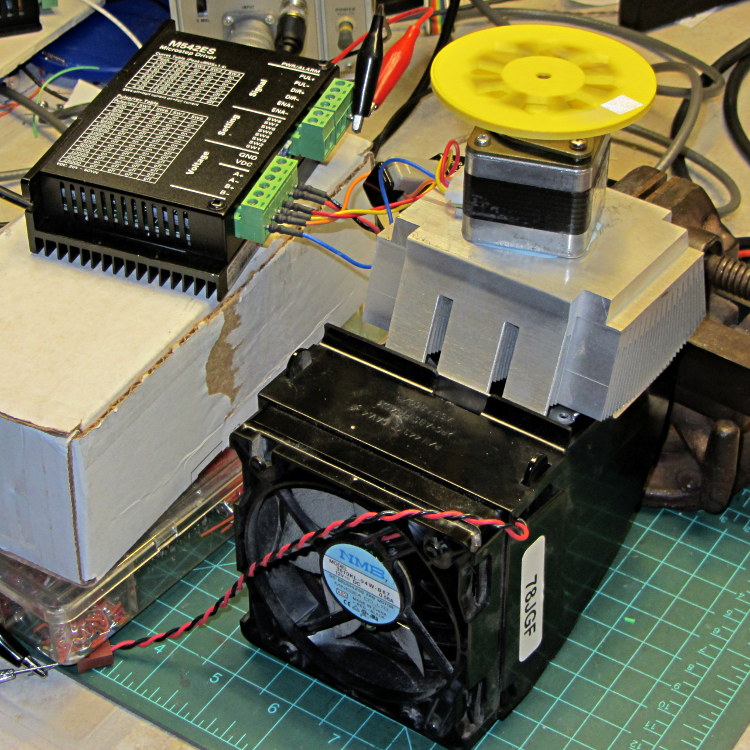
    This unsteady ziggurat barely supports the aluminum CPU heatsink atop a PC CPU exhaust duct; the two came from different PCs and have no relation to each other.  The vise in the background keeps the whole affair from falling over. The fan sucks air through the heatsink and exhausts it out the front.

    NEMA 17 Stepper - Heatsink with Fan
    NEMA 17 Stepper – Heatsink with Fan

    Throughout all this, the stepper driver runs at a bit over 10 k step/sec, tuned to avoid the howling mechanical resonances in that stack. At 1/8 microstepping, that’s 6.25 rev/s = 375 RPM, which would drive the Thing-O-Matic at 210 mm/s and the M2 at 225 mm/s. Your speed will vary, of course, depending on the pulley diameter / number of teeth / belt pitch, etc.

    Under the same conditions as before (i.e., no thermal compound, fan off), the stepper stabilized at 143 °F = 62 °C in the 57 °F = 14 °C Basement Laboratory ambient, with 1.91 A peak current (I don’t believe that second decimal place, either) and a 6.6 °C/W case-to-ambient coefficient. That’s close enough to the 63 °C and 6.7 °C/W coefficient from the earlier test, so the conditions seem roughly the same.

    Smoothing a thin layer of heatsink compound on the butt of the motor, then squishing it firmly atop the heatsink, cut the temperature to 130 °F = 53 °C without the fan. That suggests the case-to-ambient coefficient is now 5.3 °C/W: the thermal compound helps by 1.3 °C/W.

    Turning on the fan drops the case temperature to 84 °F = 29 °C, which works out to a coefficient of 2.1 °C/W. Obviously, moving air over that heatsink helps the cooling a lot: the heatsink felt cold to the touch and the motor case was barely warm.

    Increasing the current to 2.37 A dissipates 11.2 W, which would be scary without the heatsink and air flow. The temperature stabilized at 91 °F = 33 °C, for a coefficient of 1.7 °C/W.

    At 2.83 A = 16 W, the temperature rises to 100 °F = 38 °C, with a coefficient of 1.5 °C/W. While it’s not unstoppable with that much current, the motor has plenty of torque! The motor becomes pleasantly warm, the heatsink stays just above cool, and all seems right with the world. I suspect the windings get a bit toasty in there, but they can’t possibly be worse off than inside a case at boiling-water temperatures.

    Using the original insulated-motor coefficient of 19 °C/W, 16 W would cook the motor at 320 °C. Perhaps the case would make a nice extruder heater after it stopped being a motor?

    [Update: See the comments for the results of just blowing air over the motor case.]

  • Stepper Motor Thermal Coefficient

    You’ve probably seen this exchange on whatever DIY 3D printing forum you monitor:

    1. My stepper motors get scorching hot, what should I do?
    2. Turn down the current!
    3. That worked great, but …
    4. … now all my objects have a shift in the middle.
    5. Your motor is losing steps: turn up the current!
    6. Uh, right.
    NEMA 17 Stepper on cloth
    NEMA 17 Stepper on cloth

    So, with that setup on the bench, I ran a simple experiment with current, temperature, and heat transfer. Most DIY 3D printers have stepper motors attached to a plywood chassis or plastic holder, so the first data point comes from a motor with no mechanical thermal path to the outside world (which is the Basement Laboratory at 14 °C ambient).

    Running at about 1200 step/s with a winding current of 1 A peak from a 24 A supply, the motor stabilized at 52 °C = 125 °F after half an hour.

    Both windings have a 2 Ω resistance and carry 1 A peak = 0.7 A rms, so the total power dissipation is:

    2 × [(1 A / √2)2 × 2 Ω] = 2 W

    That’s the same power produced with the motor stopped at a full step position, where the peak current flows in a single winding and the other winding carries zero current:

    (1 A)2 × 2 Ω = 2 W

    The temperature rise suggests a thermal coefficient of about 19 °C/W = (52 °C – 14 °C) / 2 W.

    The next current setting on the driver is 1.46 A, which doubles the power dissipation to 4.3 W. Assuming a large number of linearities, that would cook the motor at 82 °C = 180 °F above ambient. Even though the motor could probably withstand that temperature, for what should be obvious reasons I didn’t go there.

    Instead, I parked the motor atop a big CPU heatsink harvested from an obsolete PC, sans thermal compound, mechanical fitting, and anything more secure than gravity holding it in place:

    NEMA 17 Stepper on Heatsink
    NEMA 17 Stepper on Heatsink

    The results:

    Ambient 14 °C
    Winding 2 ohm
    A pk A rms Power W Case °C °C/W amb °C/W incr
    1.00 0.71 2.0 28 7.0 7.0
    1.46 1.03 4.3 42 6.6 6.2
    1.91 1.35 7.3 63 6.7 6.9

    The thermal coefficients represent the combination of all interfaces from motor case to ambient, but the case and heatsink stabilized to about the same temperature, so the main limit (as always) will be heat transfer to ambient air. Obviously, the heatsink sits in the wrong orientation with little-to-no air flow, not to mention that the butt end of a stepper motor isn’t precisely machined and has plenty of air between the two surfaces. Improving all that would be in the nature of fine tuning and should substantially lower the coefficient.

    What’s of interest: just perching the motor on a big chunk of aluminum dropped the case temperature 24 °C without no further effort.

    Blowing air over the case (probably) won’t be nearly as effective. Epoxy-ing a liquid-cooled cold plate to the end cap would improve the situation beyond all reasonable bounds, plus confer extreme geek cred.

    Hmmm, the Warehouse Wing does have some copper tubing…

  • Stepper Driver Waveforms: Current Control

    A bit more data from this setup:

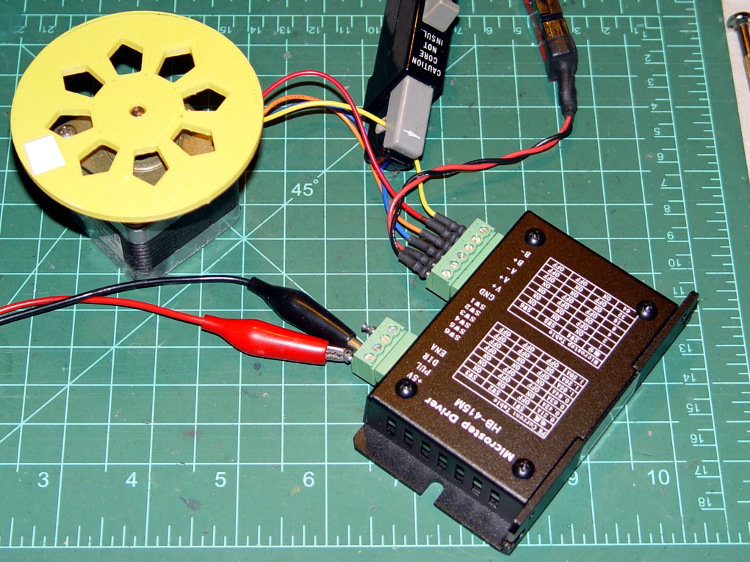
    HB-415M Driver - test setup
    HB-415M Driver – test setup

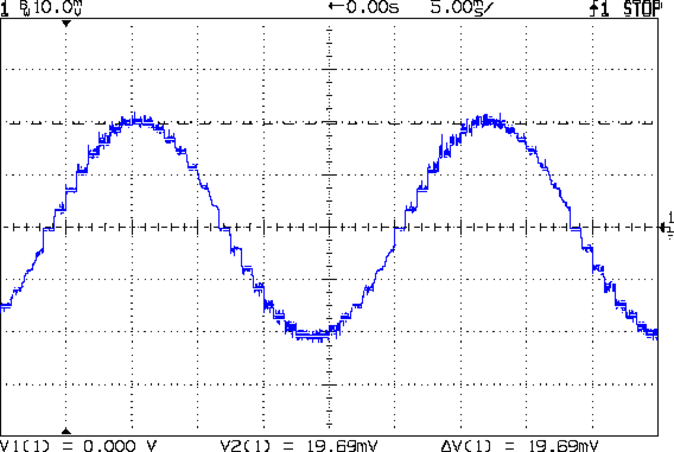
    As you saw earlier the low-speed waveform looked reasonably good, although the HB-415M driver produces only 71% of its rated current (so it’s actually 1 A peak, not the 1.5 A in the caption):

    HB-415M 8-step 1.5A 20V
    HB-415M 8-step 1.5A 20V

    The driver runs in 1/8 microstep mode, which means 1 revolution = 8 × 200 step = 1600 steps. Each cycle of that stepped sine wave has 32 microsteps  = 4 full steps/cycle × 8 microsteps. One cycle is about 27 ms, so 1 step = 840 µs → 1200 step/s → 0.74 rev/s → 44 rpm. The Thing-O-Matic runs at 47 step/mm → 34 mm/rev, so this speed corresponds to travel at 25 mm/s, roughly the usual printing pace.

    Admittedly, that hairball on the bench isn’t a realistic arrangement, because the motor runs with no load. On the other paw, assuming you’ve done a good job eliminating mechanical binding, then it’s probably pretty close to what you’d see during constant-speed travel.

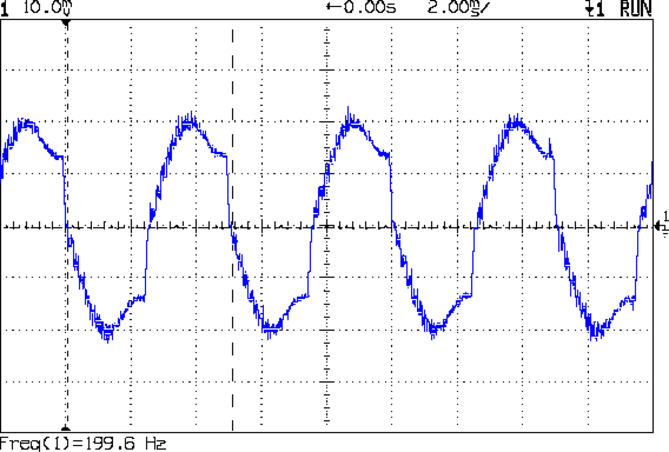
    Cranking the pulse generator to 6400 step/s = 133 mm/s produces this waveform:

    HB-415M 1A 8step 24V
    HB-415M 1A 8step 24V

    The power supply was 24 V, but there was no visible difference at 20 V. The driver evidently can’t control the winding current on the downward side of the waveform. Adding some frictional torque by grabbing the yellow interrupter wheel improved the situation, but not by much.

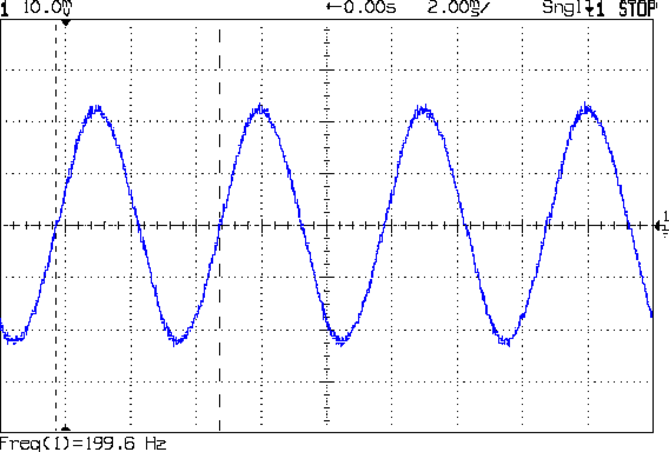
    A box of 2M542 drivers just arrived from a nominally reputable supplier, although they were actually labeled M542ES. Under the same conditions, they produce this waveform:

    M542ES 1A 8step 24V
    M542ES 1A 8step 24V

    So there’s something to be said for larger drivers; the HB-415M drivers were operating at their upper limit and the M542ES at their lower limit, both producing close to 1 A peak.

  • American Standard Elite Kitchen Faucet: Handle Failure

    Strange though it may seem, the kitchen faucet handle broke while Mary was using it. The rear wall of the socket that fits over the cartridge valve stem fractured:

    American Standard Faucet Handle - broken mount
    American Standard Faucet Handle – broken mount

    Having no water in the kitchen is not to be tolerated, so I applied a redneck fix while pondering the problem:

    Kitchen Faucet - redneck handle repair
    Kitchen Faucet – redneck handle repair

    Based on that comment, I called the American Standard hotline (800-442-1920), described the situation, and they’re sending a replacement handle and cartridge. Evidently the new handle won’t fit the old cartridge, which makes me feel better about not stockpiling repair parts, even while I now wonder what the new cartridge part number might be and how you’d tell them apart.

    Anyhow, the redneck fix wouldn’t suffice for the next week; I needed something slightly more permanent. The broken wall fit neatly in place on the mount, but:

    • It must withstand far more force than a simple glue joint can provide
    • I can’t machine square holes
    • Wrapping a metal sleeve around the mount seemed like too much work

    You undoubtedly saw this coming a while ago:

    Am Std Faucet Handle Sleeve - solid model
    Am Std Faucet Handle Sleeve – solid model

    The mount tapers slightly from the handle body toward the open end to provide draft for the molding process. I applied a hull() operator to two thin rectangles spaced the right distance apart along the Z axis to create a positive model of the mount, which then gets subtracted from the blocky outer rectangle. The hole clears a 10-32 screw that fits the standard setscrew threads (normally hidden behind the handle’s red-and-blue button).

    Unlike most printed parts I’ve done recently, the sleeve suffered from severe shrinkage along the outside walls:

    Faucet handle sleeve - build distortion
    Faucet handle sleeve – build distortion

    The inside maintained the right shape, so I cleared the nubs with a file and pressed it in place around the mount with the rear wall snapped into position. The black plastic socket evidently isolates the handle from the valve stem and I used a stainless 10-32 screw to prevent the nightmare scenario of having the sleeve slide downward along the tapered mount and block the setscrew. Overall, it came out fine:

    American Standard faucet handle - compression sleeve
    American Standard faucet handle – compression sleeve

    However, the chunky sleeve didn’t clear the opening in the escutcheon cap, which put the cap on the windowsill for the next week. The result works much better than the redneck fix and looks almost presentable. It’s certainly less conspicuous:

    American Standard faucet handle - temporary repair
    American Standard faucet handle – temporary repair

    I hope the new handle has a much more robust socket…

    The OpenSCAD source code:

    // Quick fix for broken American Standard Elite 4454 faucet handle
    // Ed Nisley KE4ZNU February 2013
    
    //- Extrusion parameters must match reality!
    //  Print with +2 shells and 3 solid layers
    
    ThreadThick = 0.25;
    ThreadWidth = 2.0 * ThreadThick;
    
    HoleFinagle = 0.4;
    HoleFudge = 1.00;
    
    function IntegerMultiple(Size,Unit) = Unit * ceil(Size / Unit);
    function HoleAdjust(Diameter) = HoleFudge*Diameter + HoleFinagle;
    
    Protrusion = 0.1;           // make holes end cleanly
    
    //----------------------
    // Dimensions
    
    Wall = 5.0;
    
    Slice = ThreadThick;                // minimal thickness for hull object
    
    ShaftEnd = [11.6,17.8,Slice];
    ShaftBase = [12.1,18.8,Slice];
    ShaftLength = 19.0;
    
    Block = [(ShaftBase[0] + 2*Wall),(ShaftBase[1] + 2*Wall),ShaftLength - Protrusion];
    
    ScrewOffset = 6.5;          // from End
    ScrewDia = 5.0;             // clearance
    
    //----------------------
    // Useful routines
    
    module ShowPegGrid(Space = 10.0,Size = 1.0) {
    
        Range = floor(50 / Space);
    
        for (x=[-Range:Range])
            for (y=[-Range:Range])
                translate([x*Space,y*Space,Size/2])
                %cube(Size,center=true);
    
    }
    
    module PolyCyl(Dia,Height,ForceSides=0) {           // based on nophead's polyholes
      Sides = (ForceSides != 0) ? ForceSides : (ceil(Dia) + 2);
      FixDia = Dia / cos(180/Sides);
      cylinder(r=HoleAdjust(FixDia)/2,h=Height,$fn=Sides);
    }
    
    //----------------------
    // Model the handle's tapered shaft
    
    module Shaft() {
    
        hull() {
            translate([0,0,ShaftLength - Slice/2])
                cube(ShaftEnd, center=true);
            translate([0,0,Slice/2])
                cube(ShaftBase, center=true);
        }
    
    }
    
    //----------------------
    // Build it!
    
    ShowPegGrid();
    
    difference() {
        translate([0,0,ShaftLength/2])
            cube(Block,center=true);
        Shaft();
        translate([0,0,ShaftLength - ScrewOffset])
            rotate([-90,0,0])
                PolyCyl(ScrewDia,ShaftBase[1],6);
    }