Ed Nisley's Blog: Shop notes, electronics, firmware, machinery, 3D printing, laser cuttery, and curiosities. Contents: 100% human thinking, 0% AI slop.
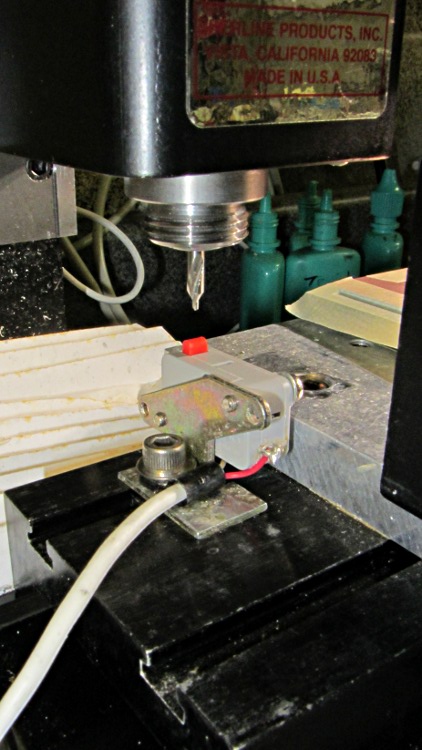
Putting the tool length switch atop the tooling plate has the advantage that it’s higher than most of the workpieces, but it also soaks up a bit of precious real estate. Moving it off the plate to the table puts it nearly level with the top of the plate, but at least now I have room for clamp blocks and suchlike:
Relocated tool length switch
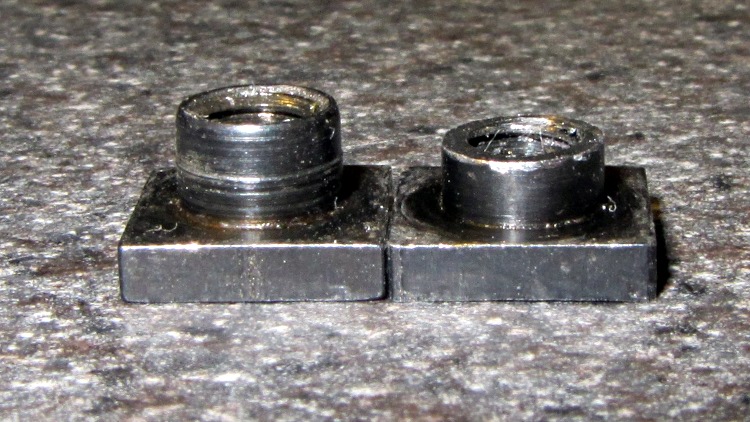
It turns out that Sherline T-nuts protrude just an itsy above the top of the table (which lets them locate the tooling plate to the slot, for example), so I shortened one by filing it down to size:
Original and shortened Sherline T-nuts
Now, I’d like to front as if all that happened in a rational and well-thought-out manner, but the fact of the matter is that I completely used up one 10-32 stainless socket-head cap screw while thinking it was somehow still bottoming out in the slot, before realizing that the T-nut was sticking up. Drat!
It always feels good when the parts fit together, even if they don’t actually do anything yet…
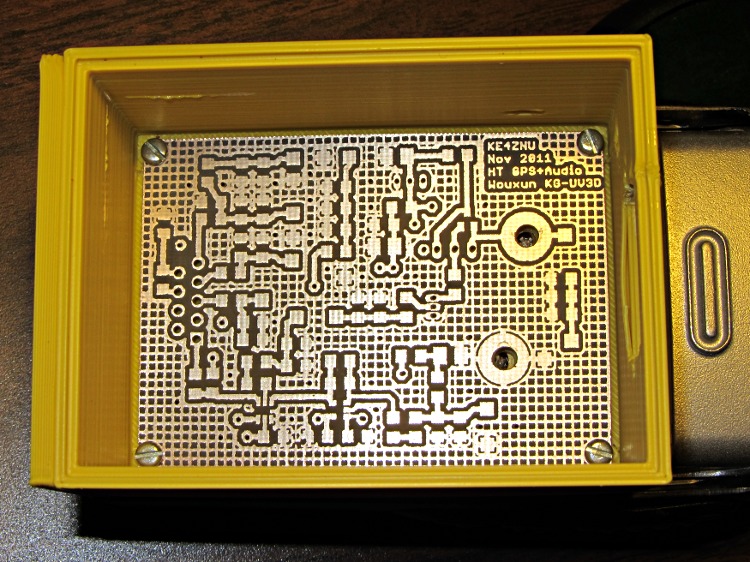
Bare PCB in Wouxun HT battery case
That’s the bare PCB in the first-pass 3D-printed battery case adapter, both of which need quite a bit more work. In particular, the case desperately needs some sort of latch to hold the yet-to-be-built contacts against the HT’s battery terminals.
Amazingly, all the holes lined up spot on, although I think the lower battery contact could move half a millimeter closer to the base of the radio. The battery case contacts are large enough to work as-is and, for what it’s worth, the Wouxun battery cases seem to differ slightly among themselves, too.
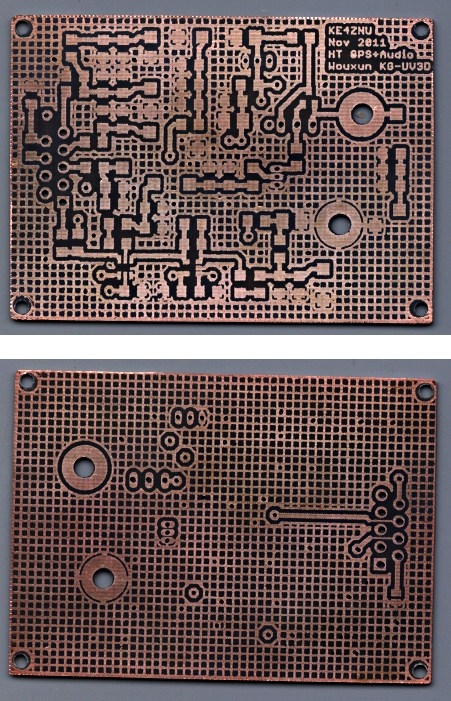
The circuit has provision for pairs of SMD caps on all the inputs, with which I hope to squash RFI from both the VHF and UHF amateur bands by choosing their self-resonant frequencies appropriately.
Herewith, the script that you’ll apply to schematics built with parts from the hal-config-2.4.lbr.odt library (which you must rename to get ride of the ODT extension):
/******************************************************************************
 * HAL-Configurator
 *
 * Author: Martin Schoeneck 2008
 * Additional gates and tweaks: Ed Nisley KE4ZNU 2010
 *****************************************************************************/
#usage "<h1>HAL-Configurator</h1>Start from a Schematic where symbols from hal-config.lbr are used!";

string output_path =    "./";
string dev_loadrt =     "LOADRT";
string dev_loadusr =    "LOADUSR";
string dev_thread =     "THREAD";
string dev_parameter =  "PARAMETER";

string dev_names[] = {
"CONSTANT",								// must be first entry to make set_constants() work
"ABS",				// 2.4
"AND2",
"BLEND",			// 2.4
"CHARGE-PUMP",		// 2.4
"COMP",
"CONV_S32_FLOAT",	// 2.4
"DDT",				// 2.4
"DEADZONE",			// 2.4
"DEBOUNCE",			// 2.4
"EDGE",
"ENCODER",			// 2.4
"ENCODER-RATIO",	// 2.4
"ESTOP-LATCH",
"FLIPFLOP",
"FREQGEN",			// 2.4
"LOWPASS",
"MULT2",			// 2.4
"MUX2",
"MUX4",				// 2.4
"MUX8",				// 2.4
"NEAR",				// 2.4
"NOT",
"ONESHOT",
"OR2",
"SAMPLER",			// 2.4
"SCALE",			// 2.4
"SELECT8",			// 2.4
"SUM2",
"TIMEDELAY",		// 2.4
"TOGGLE",			// 2.4
"WCOMP",			// 2.4
"XOR2",				// 2.4
""					// end flag
};

/*******************************************************************************
 * Global Stuff
 ******************************************************************************/

string FileName;
string ProjectPath;
string ProjectName;

void Info(string Message) {
	dlgMessageBox(";<b>Info</b><p>\n" + Message);
}

void Warn(string Message) {
	dlgMessageBox("!<b>Warning</b><p>\n" + Message + "<p>see usage");
}

void Error(string Message) {
	dlgMessageBox(":<hr><b>Error</b><p>\n" + Message + "<p>see usage");
	exit(1);
}

string replace(string str, char a, char b) {
	// in string str replace a with b
	int pos = -1;
	do {
		// find that character
		pos = strchr(str, a);
		// replace if found
		if(pos >= 0) {
			str[pos] = b;
		}
	} while(pos >= 0);

	return str;
}

// the part name contains an index and is written in capital letters
string get_module_name(UL_PART P) {
	// check module name, syntax: INDEX:NAME
	string mod_name = strlwr(P.name);
	// split string at the : if exists
	string a[];
	int c = strsplit(a, mod_name, ':');
	mod_name = a[c-1];
	// if name starts with '[' we need uppercase letters
	if(mod_name[0] == '[') {
		mod_name = strupr(mod_name);
	}

	return mod_name;
}

string comment(string mess) {
	string str = "\n\n####################################################\n";
	if(mess != "") {
		str += "# " + mess + "\n";
	}

	return str;
}

// if this is a device for loading a module, load it (usr/rt)
string load_module(UL_PART P) {
	string str = "";

	// it's a module if the device's name starts with LOADRT/LOADUSR
	if((strstr(P.device.name, dev_loadrt) == 0) ||
	   (strstr(P.device.name, dev_loadusr) == 0)) {

		// now add the string to our script
		str += P.value + "\n";
	}

	return str;
}

// count used digital gates (and, or, etc) and load module if neccessary
string load_blocks() {
	string str = "";

	int index;

	int dev_counters[];
	string dname[];

	// count the gates that are used
	schematic(S) { S.parts(P) {
		strsplit(dname,P.device.name,'.');		// extract first part of name
		if ("" != lookup(dev_names,dname[0],0)) {
			for (index = 0;  (dname[0] != dev_names[index]) ; index++) {
				continue;
			}
			dev_counters[index]++;
		}
	} }

// force lowercase module names...

	for (index = 0; ("" != dev_names[index]) ; index++) {
		if (dev_counters[index]) {
			sprintf(str,"%sloadrt %s\t\tcount=%d\n",str,strlwr(dev_names[index]),dev_counters[index]);
		}
	}

	return str;
}

string hook_function(UL_NET N) {
	string str = "";

	// is this net connected to a thread (work as functions here)?
	int    noclkpins       = 0;
	string thread_name     = "";  // this net should be connected to a thread
	string thread_position = "";
	N.pinrefs(PR) {
		// this net is connected to a clk-pin
		if(PR.pin.function == PIN_FUNCTION_FLAG_CLK) {
			// check the part: is it a thread-device?
			if(strstr(PR.part.device.name, dev_thread) == 0) {
				// we need the name of the thread
				thread_name = strlwr(PR.part.name);
				// and we need the position (position _ is ignored)
				thread_position = strlwr(PR.pin.name);
				thread_position = replace(thread_position, '_', ' ');
			}
		} else {
			// no clk-pin, this is no function-net
			noclkpins++;
			break;
		}
	}

	// found a thread?
	if(noclkpins == 0 && thread_name != "") {
		// all the other pins are interesting now
		N.pinrefs(PR) {
			// this pin does not belong to the thread
			if(strstr(PR.part.device.name, dev_thread) != 0) {
				// name of the pin is name of the function
				//string function_name = strlwr(PR.pin.name);
				string function_name = strlwr(PR.instance.gate.name);
				// if functionname starts with a '.', it will be appended to the modulename
				if(function_name[0] == '.') {
					// if the name is only a point, it will be ignored
					if(strlen(function_name) == 1) {
						function_name = "";
					}
					function_name = get_module_name(PR.part) + function_name;
				}
				str += "addf " + function_name + "\t\t" + thread_name + "\t" + thread_position + "\n";
			}
		}
	}

	return str;
}

string set_parameter(UL_NET N) {
	string str = "";

	// is this net connected to a parameter-device?
	int    nodotpins       = 0;
	string parameter_value = "";
	N.pinrefs(PR) {
		// this net is connected to a dot-pin
		if(PR.pin.function == PIN_FUNCTION_FLAG_DOT) {
			// check the part: is it a parameter-device?
//			str += "** dev name [" + PR.part.device.name + "] [" + dev_parameter + "]\n";
			if(strstr(PR.part.device.name, dev_parameter) == 0) {
				// we need the value of that parameter
				parameter_value = PR.part.value;
//				str += "**  value [" + PR.part.value +"]\n";
			}
		} else {
			// no clk-pin, this is no function-net
			nodotpins++;
			break;
		}
	}

	// found a parameter?
	if(nodotpins == 0 && parameter_value != "") {
		// all the other pins are interesting now
		N.pinrefs(PR) {
//			str += "** dev name [" + PR.part.device.name + "] [" + dev_parameter + "]\n";
			// this pin does not belong to the parameter-device
			if(strstr(PR.part.device.name, dev_parameter) != 0) {
				// name of the pin is name of the function
				//string parameter_name = strlwr(PR.pin.name);
				string parameter_name = strlwr(PR.instance.gate.name);
				// if functionname starts with a '.', it will be appended to the modulename
//				str += "** param (gate) name [" + parameter_name + "]\n";
				if(parameter_name[0] == '.') {
					// if the name is only a point, it will be ignored
					if(strlen(parameter_name) == 1) {
						parameter_name = "";
					}
					parameter_name = get_module_name(PR.part) + parameter_name;
//					str += "** param (part) name [" + parameter_name + "]\n";
				}
				str += "setp " + parameter_name + "\t" + parameter_value + "\n";
			}
		}
	}

	return str;
}

// if this is a 'constant'-device, set its value
// NOTE: this is hardcoded to use the first entry in the dev_names[] array!
string set_constants(UL_PART P) {
	string str = "";

	// 'constant'-device?
	if(strstr(P.device.name, dev_names[0]) == 0) {
		str += "setp " + get_module_name(P) + ".value\t" + P.value + "\n";
	}

	return str;
}

string connect_net(UL_NET N) {
	string str = "";

	// find all neccessary net-members
	string pins = "";
	N.pinrefs(P) {
		// only non-functional pins are connected
		if(P.pin.function == PIN_FUNCTION_FLAG_NONE) {
			string pin_name =  strlwr(P.pin.name);
			string part_name = strlwr(P.part.name);
			pin_name =  replace(pin_name,  '$', '_');
			part_name = replace(part_name, '$', '_');
			pins += part_name + "." + pin_name + " ";
		}
	}

	if(pins != "") {
		string net_name = strlwr(N.name);
		net_name = replace(net_name, '$', '_');
		str += "net " + net_name + " " + pins + "\n";
	}

	return str;
}

/*******************************************************************************
 * Main program.
 ******************************************************************************/
// is the schematic editor running?
if (!schematic) {
	Error("No Schematic!<br>This program will only work in the schematic editor.");
}

schematic(S) {
	ProjectPath = filedir(S.name);
	ProjectName = filesetext(filename(S.name), "");
}

// build configuration

string cs = "# HAL config file automatically generated by Eagle-CAD ULP:\n";
cs += "# [" + argv[0] + "]\n";
cs += "# (C) Martin Schoeneck.de 2008\n";
cs += "# Mods Ed Nisley 2010\n";

FileName = ProjectPath + ProjectName + ".hal";

cs += "# Path        [" + ProjectPath + "]\n";
cs += "# ProjectName [" + ProjectName + "]\n";

//cs += "# File name: [" + FileName + "]\n\n";

// ask for a filename: where should we write the configuration?

FileName = dlgFileSave("Save Configuration", FileName, "*.hal");

if(!FileName) {
	exit(0);
}

cs += "# File name   [" + FileName + "]\n";
cs += "# Created     [" + t2string(time(),"hh:mm:ss dd-MMM-yyyy") + "]\n\n";

schematic(S) {
	// load modules
	cs += comment("Load realtime and userspace modules");
	S.parts(P) {
		cs += load_module(P);
	}

	// load blocks
	cs += load_blocks();

	// add functions
	cs += comment("Hook functions into threads");
	S.nets(N) {
		cs += hook_function(N);
	}

	// set parameters
	cs += comment("Set parameters");
	S.nets(N) {
		cs += set_parameter(N);
	}

	// set constant values
	cs += comment("Set constants");
	S.parts(P) {
		cs += set_constants(P);
	}

	// build nets and connect them
	cs += comment("Connect Modules with nets");
	S.nets(N) {
		cs += connect_net(N);
	}
}

// open/overwrite the target file to save the configuration
output(FileName, "wt") {
	printf(cs);
}
I just updated EMC2 on the Sherline CNC mill from 2.4.6 to 2.4.7 (which mis-identifies itself as 2.4.6 on the splash screen) and the Axis UI failed to start. A bit of digging shows that the name of Button 1 (the left button in the right-hand quad, clearly labeled 1) has inexplicably changed from btn-trigger to btn-joystick.
Logitech Gamepad Pendant
Most likely the change has nothing to do with EMC2, because (I think) those names bubble up from the HID driver that actually talks to the hardware and that stuff has also been updated; this is all on Ubuntu 10.04 LTS. But in any event, the name is now different.
That requires a tweak to the Eagle schematics, which will regenerate Logitech_Gamepad.hal, but you can just edit the latter file and change btn-trigger to btn-joystick.
As nearly as I can tell, changing the pin name in the Logitech library component, saving the library, then updating the library in the schematic doesn’t do squat. Evidently, Eagle keeps track of which components you’ve used and won’t update them unless you do some manual gymnatistics, which makes a certain amount of sense.
That means one must:
Delete both “gates” of the old component (INPUT.0.BUTTONS first, then INPUT.0)
Make sure you’re on Page 2 where the basic gate will go
Add the revised LOGITECH_DUAL_ACTION_GAMEPAD to get the INPUT.1 “gate”
Rename it to INPUT.0
Use Move to jiggle it around a bit to ensure its pins get hitched up to the existing nets
Switch to Page 1 where the button nets lie in wait
Type invoke input.0 into the Eagle command line
Pick -BUTTONS from the list to select that “gate”
Position that gate appropriately
Use Move to jiggle the gate
Save everything
Run the Eagle2Hal ULP to get a new HAL output file
Put that file where it’ll do the most good
There, now, wasn’t that obvious?
The modified Logitech_Gamepad.hal file:
# HAL config file automatically generated by Eagle-CAD ULP:
# [/mnt/bulkdata/Project Files/eagle/ulp/hal-write-2.4.ulp]
# (C) Martin Schoeneck.de 2008
# Mods Ed Nisley 2010
# Path        [/mnt/bulkdata/Project Files/eagle/projects/EMC2 HAL Configuration/]
# ProjectName [Logitech Gamepad - 2.4.7]
# File name   [/mnt/bulkdata/Project Files/eagle/projects/EMC2 HAL Configuration/Logitech Gamepad - 2.4.7.hal]
# Created     [10:40:31 11-Nov-2011]

####################################################
# Load realtime and userspace modules
loadrt constant		count=16
loadrt and2		count=17
loadrt flipflop		count=4
loadrt mux2		count=5
loadrt mux4		count=1
loadrt not		count=8
loadrt or2		count=10
loadrt scale		count=7
loadrt timedelay		count=1
loadrt toggle		count=1
loadrt wcomp		count=6

####################################################
# Hook functions into threads
addf toggle.0		servo-thread
addf wcomp.1		servo-thread
addf wcomp.2		servo-thread
addf wcomp.3		servo-thread
addf and2.0		servo-thread
addf and2.4		servo-thread
addf and2.3		servo-thread
addf and2.2		servo-thread
addf and2.1		servo-thread
addf constant.6		servo-thread
addf constant.5		servo-thread
addf constant.4		servo-thread
addf constant.3		servo-thread
addf constant.2		servo-thread
addf constant.1		servo-thread
addf constant.0		servo-thread
addf constant.7		servo-thread
addf constant.8		servo-thread
addf scale.1		servo-thread
addf scale.2		servo-thread
addf scale.3		servo-thread
addf mux4.0		servo-thread
addf mux2.0		servo-thread
addf scale.4		servo-thread
addf scale.0		servo-thread
addf wcomp.5		servo-thread
addf wcomp.4		servo-thread
addf wcomp.0		servo-thread
addf flipflop.1		servo-thread
addf flipflop.0		servo-thread
addf and2.5		servo-thread
addf and2.6		servo-thread
addf and2.7		servo-thread
addf and2.8		servo-thread
addf flipflop.2		servo-thread
addf flipflop.3		servo-thread
addf or2.4		servo-thread
addf or2.8		servo-thread
addf or2.7		servo-thread
addf or2.6		servo-thread
addf or2.5		servo-thread
addf or2.3		servo-thread
addf or2.2		servo-thread
addf or2.1		servo-thread
addf or2.0		servo-thread
addf not.1		servo-thread
addf not.2		servo-thread
addf not.3		servo-thread
addf not.4		servo-thread
addf not.5		servo-thread
addf not.6		servo-thread
addf not.7		servo-thread
addf not.0		servo-thread
addf constant.9		servo-thread
addf mux2.1		servo-thread
addf mux2.2		servo-thread
addf mux2.3		servo-thread
addf mux2.4		servo-thread
addf constant.10		servo-thread
addf constant.11		servo-thread
addf scale.5		servo-thread
addf scale.6		servo-thread
addf constant.12		servo-thread
addf constant.13		servo-thread
addf timedelay.0		servo-thread
addf constant.14		servo-thread
addf constant.15		servo-thread
addf and2.16		servo-thread
addf and2.15		servo-thread
addf and2.14		servo-thread
addf and2.13		servo-thread
addf and2.12		servo-thread
addf and2.11		servo-thread
addf and2.10		servo-thread
addf and2.9		servo-thread
addf or2.9		servo-thread

####################################################
# Set parameters

####################################################
# Set constants
setp constant.0.value	+0.02
setp constant.1.value	-0.02
setp constant.2.value	60
setp constant.3.value	1.00
setp constant.4.value	0.10
setp constant.5.value	0.50
setp constant.6.value	0.10
setp constant.7.value	+0.5
setp constant.8.value	-0.5
setp constant.9.value	0.0
setp constant.10.value	[TRAJ]MAX_LINEAR_VELOCITY
setp constant.11.value	[TRAJ]MAX_ANGULAR_VELOCITY
setp constant.12.value	-1.0
setp constant.13.value	0.1
setp constant.14.value	0.020
setp constant.15.value	0.000

####################################################
# Connect Modules with nets
net a-button-minus or2.2.in0 input.0.btn-joystick and2.15.in0
net a-button-plus or2.2.in1 input.0.btn-thumb2 and2.16.in0
net a-buttons-active or2.2.out or2.3.in0 or2.4.in1
net a-disable not.7.out and2.5.in1
net a-enable or2.4.in0 flipflop.3.out not.7.in mux2.4.sel
net a-jog wcomp.2.in input.0.abs-z-position mux2.4.in1
net a-knob-active not.2.out and2.7.in1
net a-knob-inactive wcomp.2.out not.2.in and2.6.in1
net a-select and2.8.in0 and2.7.out
net a-set flipflop.3.set and2.8.out
net angular_motion or2.4.out mux2.0.sel
net any-buttons-active mux4.0.sel0 or2.8.out
net az-buttons-active or2.3.out or2.8.in1 or2.9.in0
net az-reset flipflop.2.reset and2.6.out flipflop.3.reset
net button-crawl scale.4.out mux4.0.in3
net button-fast scale.2.out mux4.0.in1 scale.4.in
net jog-crawl toggle.0.out mux4.0.sel1
net jog-speed halui.jog-speed mux4.0.out
net knob-crawl mux4.0.in2 scale.3.out
net knob-fast mux4.0.in0 scale.1.out scale.3.in
net n_1 constant.10.out mux2.0.in0
net n_2 and2.0.in0 input.0.btn-top2
net n_3 and2.0.in1 input.0.btn-base
net n_4 and2.0.out halui.abort
net n_5 halui.mode.manual input.0.btn-base3
net n_6 wcomp.0.max wcomp.1.max wcomp.2.max wcomp.3.max constant.0.out
net n_7 halui.program.resume input.0.btn-base4
net n_8 wcomp.0.min wcomp.1.min wcomp.2.min wcomp.3.min constant.1.out
net n_9 mux2.0.in1 constant.11.out
net n_10 constant.12.out scale.5.gain scale.6.gain
net n_11 or2.0.in0 input.0.btn-base5
net n_12 or2.0.in1 input.0.btn-base6
net n_13 constant.9.out mux2.1.in0 mux2.2.in0 mux2.3.in0 mux2.4.in0
net n_14 mux2.1.out halui.jog.0.analog
net n_15 toggle.0.in or2.0.out
net n_16 constant.2.out scale.0.gain
net n_17 constant.5.out scale.1.gain
net n_18 constant.3.out scale.2.gain
net n_19 constant.4.out scale.3.gain
net n_20 scale.4.gain constant.6.out
net n_21 halui.jog.1.analog mux2.2.out
net n_22 mux2.2.in1 scale.5.out
net n_23 scale.6.out mux2.3.in1
net n_24 constant.13.out halui.jog-deadband
net n_25 wcomp.4.max constant.7.out wcomp.5.max
net n_26 constant.8.out wcomp.4.min wcomp.5.min
net n_27 mux2.3.out halui.jog.2.analog
net n_28 halui.jog.3.analog mux2.4.out
net n_29 timedelay.0.out and2.9.in1 and2.10.in1 and2.12.in1 and2.11.in1 and2.13.in1 and2.14.in1 and2.16.in1 and2.15.in1
net n_30 and2.9.out halui.jog.0.minus
net n_31 or2.9.out timedelay.0.in
net n_32 constant.14.out timedelay.0.on-delay
net n_33 constant.15.out timedelay.0.off-delay
net n_34 and2.10.out halui.jog.0.plus
net n_35 and2.11.out halui.jog.1.minus
net n_36 halui.jog.1.plus and2.12.out
net n_37 and2.13.out halui.jog.2.minus
net n_38 and2.14.out halui.jog.2.plus
net n_39 and2.15.out halui.jog.3.minus
net n_40 and2.16.out halui.jog.3.plus
net vel-per-minute scale.0.out scale.1.in scale.2.in
net vel-per-second mux2.0.out scale.0.in
net x-buttons-active or2.7.in0 or2.5.out
net x-disable not.4.out and2.4.in1
net x-enable not.4.in flipflop.0.out mux2.1.sel
net x-hat-jog wcomp.4.in input.0.abs-hat0x-position
net x-hat-minus wcomp.4.under or2.5.in1 and2.9.in0
net x-hat-plus or2.5.in0 wcomp.4.over and2.10.in0
net x-jog wcomp.0.in input.0.abs-x-position mux2.1.in1
net x-knob-active not.0.out and2.1.in0
net x-knob-inactive wcomp.0.out not.0.in and2.2.in0 and2.3.in0
net x-set and2.1.out flipflop.0.set
net xy-buttons-active or2.7.out or2.8.in0 or2.9.in1
net xy-reset flipflop.0.reset and2.2.out flipflop.1.reset
net y-buttons-active or2.6.out or2.7.in1
net y-disable not.5.out and2.1.in1
net y-enable flipflop.1.out not.5.in mux2.2.sel
net y-hat-jog wcomp.5.in input.0.abs-hat0y-position
net y-hat-minus wcomp.5.under or2.6.in1 and2.12.in0
net y-hat-plus or2.6.in0 wcomp.5.over and2.11.in0
net y-jog wcomp.1.in input.0.abs-y-position scale.5.in
net y-knob-active not.1.out and2.3.in1
net y-knob-inactive not.1.in wcomp.1.out and2.2.in1
net y-select and2.4.in0 and2.3.out
net y-set flipflop.1.set and2.4.out
net z-button-minus or2.1.in0 input.0.btn-thumb and2.13.in0
net z-button-plus or2.1.in1 input.0.btn-top and2.14.in0
net z-buttons-active or2.1.out or2.3.in1
net z-disable not.6.out and2.8.in1
net z-enable not.6.in flipflop.2.out mux2.3.sel
net z-jog wcomp.3.in input.0.abs-rz-position scale.6.in
net z-knob-active not.3.out and2.5.in0
net z-knob-inactive not.3.in wcomp.3.out and2.7.in0 and2.6.in0
net z-set and2.5.out flipflop.2.set
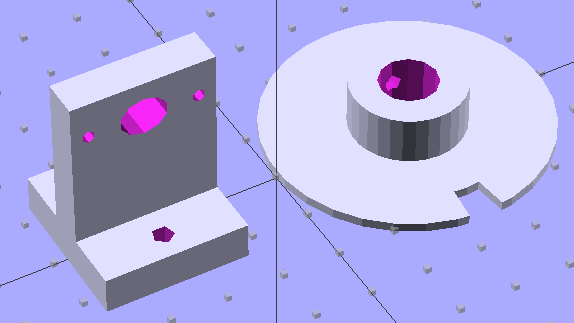
The wheel fits the shaft with a 4-40 setscrew to hold it in place. The post has 4-40 mounting holes for one of those optical switches, plus a big hole for the wiring. The solid models look about like you’d expect:
Wheel and post solid model
I located the post’s holes on the baseplate with a spindly pair of transfer punches, after transferring the wheel’s centerline by eyeballometric guesstimation:
Locating holes with transfer punches
Then aligned the baseplate on the Sherline, located the holes, and drilled ’em with manual CNC to get the proper spacing:
Drilling opto switch post holes
And then it went together quite smoothly:
Dyno with sync wheel
What’s really nice about 3D printing is you can build stuff like this without too much fuss & bother: figure out the solid model, walk gingerly through the software minefield, and (usually) assemble the parts later that day.
A bit of wiring to power the LED and pull up the phototransistor should do the trick.
The OpenSCAD code, including a few tweaks that rationalize spacings and sizes and suchlike:
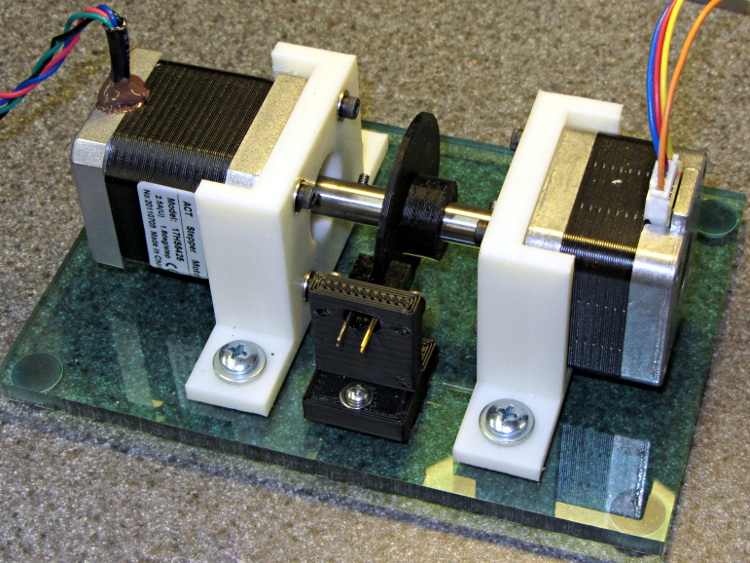
Combine two of those mounts with one of those couplers, add two NEMA 17 steppers (the one on the right is that one), slide a baseplate underneath, sprinkle with various screws, and shazam you get a stepper motor dynamometer:
Stepper Dynamometer
The baseplate puts the mounts 65 mm apart on the 10-32 screw centers, which is entirely a function of the coupler length, and is easy with manual CNC on the Sherline.
Changing the motors is straightforward: loosen coupler setscrew, remove base screws, slide motor away from coupler, remove mount screws. Won’t happen that often, methinks.
The general idea is to drive one stepper with a known current, apply a known resistive load to the other motor’s windings, and then plot torque vs. speed. It won’t be quite that simple, of course, but should produce some interesting data.
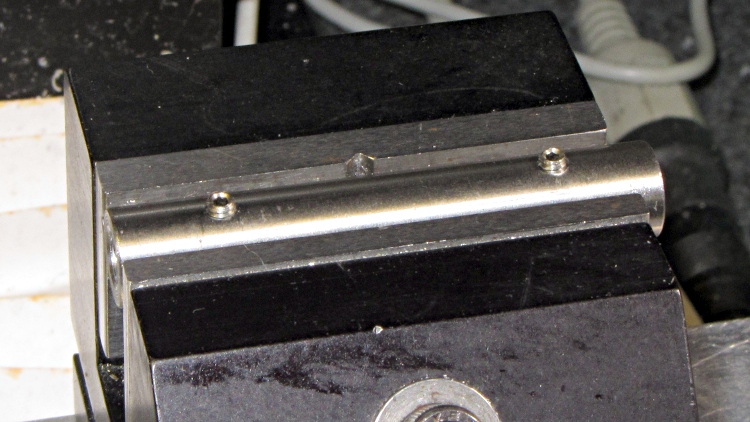
This simple cylinder connects two NEMA 17 stepper motors together:
Stepper Shaft Coupler
It’s quick-and-dirty:
Cut 2+ inches of 0.375 drill rod, face both ends
Drill #8 = 0.199 inch = 5.06 mm (because #9 = 0.196 inch = 4.98 mm is a bit too snug)
Cross-drill #41 in the Sherline (because #43 makes for stiff tapping)
Tap 4-40 for the setscrews
File off rough edges, run #8 drill through the bore to clean out tapping chips &c
Now, you probably don’t want to do this in real life, because you want a coupler with a bit of compliance to soak up the inevitable misalignment and dampen the mechanical resonances.




 The Smell of Molten Projects in the Morning