The Smell of Molten Projects in the Morning

Ed Nisley's Blog: Shop notes, electronics, firmware, machinery, 3D printing, laser cuttery, and curiosities. Contents: 100% human thinking, 0% AI slop.

Tag: RPi

Raspberry Pi

  • Raspberry Pi Streaming Radio Player: Improved Pipe Handling

    My Raspberry Pi-based streaming radio player generally worked fine, except sometimes the keypad / volume control knob would stop responding after switching streams. This being an erratic thing, the error had to be a timing problem in otherwise correct code and, after spending Quality Time with the Python subprocess and select doc, I decided I was abusing mplayer’s stdin and stdout pipes.

    This iteration registers mplayer’s stdout pipe as Yet Another select.poll() Polling Object, so that the main loop can respond whenever a complete line arrives. Starting mplayer in quiet mode reduces the tonnage of stdout text, at the cost of losing the streaming status that I really couldn’t do anything with, and eliminates the occasional stalls when mplayer (apparently) dies in the middle of a line.

    The code kills and restarts mplayer whenever it detects an EOF or stream cutoff. That works most of the time, but a persistent server or network failure can still send the code into a sulk. Manually selecting a different stream (after we eventually notice the silence) generally sets things right, mainly by whacking mplayer upside the head; it’s good enough.

    It seems I inadvertently invented streaming ad suppression by muting (most of) the tracks that produced weird audio effects. Given that the “radio stations” still get paid for sending ads to me, I’m not actually cheating anybody out of their revenue: I’ve just automated our trips to the volume control knob. The audio goes silent for a few seconds (or, sheesh, a few minutes) , blatting a second or two of ad noise around the gap to remind us of what we’re missing; given the prevalence of National Forest Service PSAs, the audio ad market must be a horrific wasteland.

    The Python source code as a GitHub Gist:

    from evdev import InputDevice,ecodes,KeyEvent
    import subprocess32 as subp
    import select
    import re
    import sys
    import time
    import logging
    Media = {'KEY_KP7' : ['Classical',False,['mplayer','–quiet','-playlist','http://stream2137.init7.net/listen.pls'%5D%5D,
    'KEY_KP8' : ['Jazz',False,['mplayer','–quiet','-playlist','http://stream2138.init7.net/listen.pls'%5D%5D,
    'KEY_KP9' : ['WMHT',False,['mplayer','–quiet','http://live.str3am.com:2070/wmht1'%5D%5D,
    'KEY_KP4' : ['Classic 1000',True,['mplayer','–quiet','-playlist','http://listen.radionomy.com/1000classicalhits.m3u'%5D%5D,
    'KEY_KP5' : ['DCNY 911',False,['mplayer','–quiet','-playlist','http://www.broadcastify.com/scripts/playlists/1/12305/-5857889408.m3u'%5D%5D,
    'KEY_KP6' : ['WAMC',False,['mplayer','–quiet','http://pubint.ic.llnwd.net/stream/pubint_wamc'%5D%5D,
    'KEY_KP1' : ['60s',True,['mplayer','–quiet','-playlist','http://listen.radionomy.com/all60sallthetime-keepfreemusiccom.m3u'%5D%5D,
    'KEY_KP2' : ['50-70s',True,['mplayer','–quiet','-playlist','http://listen.radionomy.com/golden-50-70s-hits.m3u'%5D%5D,
    'KEY_KP3' : ['Soft Rock',True,['mplayer','–quiet','-playlist','http://listen.radionomy.com/softrockradio.m3u'%5D%5D,
    'KEY_KP0' : ['Zen',True,['mplayer','–quiet','-playlist','http://listen.radionomy.com/zen-for-you.m3u'%5D%5D
    }
    CurrentKC = 'KEY_KP3'
    Controls = {'KEY_KPSLASH' : '//////',
    'KEY_KPASTERISK' : '******',
    'KEY_KPENTER' : ' ',
    'KEY_KPMINUS' : '<',
    'KEY_KPPLUS' : '>',
    'KEY_VOLUMEUP' : '*',
    'KEY_VOLUMEDOWN' : '/'
    }
    MuteStrings = ["TargetSpot","[Unknown]","Advert:","+++","—","SRR","Srr","ZEN FOR"]
    MuteDelay = 8.0 # delay before non-music track; varies with buffering
    UnMuteDelay = 7.5 # delay after non-music track
    Muted = False # keep track of muted state
    MixerChannel = 'PCM' # which amixer thing to use
    logging.basicConfig(format='%(asctime)s %(levelname)s:%(message)s',filename='/tmp/Streamer.log',level=logging.INFO)
    logger = logging.getLogger()
    # set up event inputs and polling objects
    # This requires some udev magic to create the symlinks
    k = InputDevice('/dev/input/keypad')
    k.grab()
    kp = select.poll()
    kp.register(k.fileno(),select.POLLIN + select.POLLPRI + select.POLLERR)
    v = InputDevice('/dev/input/volume')
    v.grab()
    vp = select.poll()
    vp.register(v.fileno(),select.POLLIN + select.POLLPRI + select.POLLERR)
    # set up file for output tracing
    lw = open('/tmp/mp.log','w') # mplayer piped output
    # set the mixer output low enough that the initial stream won't wake the dead
    subp.call(['amixer','sset',MixerChannel,'10'])
    # Start the player with the default stream, set up for polling
    print 'Starting mplayer on',Media[CurrentKC][0],' -> ',Media[CurrentKC][-1][-1]
    logging.info('Starting mplayer on %s -> %s',Media[CurrentKC][0],Media[CurrentKC][-1][-1])
    p = subp.Popen(Media[CurrentKC][-1],
    stdin=subp.PIPE,stdout=subp.PIPE,stderr=subp.STDOUT)
    pp = select.poll() # this may be valid for other invocations, but is not pretty
    pp.register(p.stdout.fileno(),select.POLLIN + select.POLLPRI + select.POLLERR)
    print ' … running'
    #——————–
    #— Play the streams
    while True:
    # pluck next line from mplayer and decode it
    if [] != pp.poll(10):
    text = p.stdout.readline()
    if 'ICY Info: ' in text: # these lines may contain track names
    lw.write(text)
    lw.flush()
    trkinfo = text.split(';') # also splits at semicolon embedded in track name
    # logging.info('Raw split line: %s', trkinfo)
    for ln in trkinfo:
    if 'StreamTitle' in ln: # this part contains a track name
    NeedMute = False # assume a listenable track
    if 2 == ln.count("'"): # exactly two single quotes = probably none embedded in track name
    trkhit = re.search(r"StreamTitle='(.*)'",ln)
    if trkhit: # true for valid search results
    TrackName = trkhit.group(1) # the string between the two quotes
    print 'Track name: ', TrackName
    logging.info('Track name: [%s]', TrackName)
    if Media[CurrentKC][1] and ( (len(TrackName) == 0) or any(m in TrackName for m in MuteStrings) ) :
    NeedMute = True
    else:
    print ' … semicolon in track name: ', ln
    logging.info('Semicolon in track name: [' + ln + ']')
    else:
    print ' … quotes in track name: ', ln
    logging.info('Quotes in track name: [' + ln + ']')
    if NeedMute:
    print ' … muting:',
    if Media[CurrentKC][1] and not Muted:
    time.sleep(MuteDelay) # brute-force assumption about buffer leadtime
    subp.call(['amixer','-q','sset',MixerChannel,'mute'])
    Muted = True
    print 'done'
    logging.info('Track muted')
    else:
    print ' … unmuting:',
    if Muted:
    if Media[CurrentKC][1]:
    time.sleep(UnMuteDelay) # another brute-force timing assumption
    Muted = False
    subp.call(['amixer','-q','sset',MixerChannel,'unmute'])
    print 'done'
    logging.info('Track unmuted')
    elif 'Exiting.' in text: # mplayer just imploded
    lw.write(text)
    lw.flush()
    print 'Got EOF / stream cutoff'
    logging.info('EOF or stream cutoff')
    print ' … killing dead mplayer'
    pp.unregister(p.stdout.fileno())
    p.terminate() # p.kill()
    p.wait()
    # print ' … flushing pipes'
    # lw.truncate(0)
    print ' … discarding keys'
    while [] != kp.poll(0):
    kev = k.read
    print ' … restarting mplayer: ',Media[CurrentKC][0]
    logging.info('Restarting mplayer')
    p = subp.Popen(Media[CurrentKC][-1],
    stdin=subp.PIPE,stdout=subp.PIPE,stderr=subp.STDOUT)
    pp.register(p.stdout.fileno(),select.POLLIN + select.POLLPRI + select.POLLERR)
    print ' … running'
    logging.info(' … running')
    # accept pending events from volume control knob
    if [] != vp.poll(10):
    vev = v.read()
    lw.write('Volume')
    lw.flush()
    for e in vev:
    if e.type == ecodes.EV_KEY:
    kc = KeyEvent(e).keycode
    # print 'Volume kc: ',kc
    if kc in Controls:
    print 'Vol Control: ',kc
    try:
    p.stdin.write(Controls[kc])
    except Exception as e:
    print "Can't send control: ",e
    print ' … restarting player: ',Media[CurrentKC][0]
    logging.info('Error sending volume, restarting player')
    pp.unregister(p.stdout.fileno())
    p = subp.Popen(Media[CurrentKC][-1],
    stdin=subp.PIPE,stdout=subp.PIPE,stderr=subp.STDOUT)
    pp.register(p.stdout.fileno(),select.POLLIN + select.POLLPRI + select.POLLERR)
    print ' … running'
    logging.info(' … running')
    # accept pending events from keypad
    if [] != kp.poll(10):
    kev = k.read()
    lw.write("Keypad")
    lw.flush()
    for e in kev:
    if e.type == ecodes.EV_KEY:
    kc = KeyEvent(e).keycode
    if kc == 'KEY_NUMLOCK': # discard these, as we don't care
    continue
    # print 'Got: ',kc
    if (kc == 'KEY_BACKSPACE') and (KeyEvent(e).keystate == KeyEvent.key_hold):
    if True:
    print 'Backspace = shutdown!'
    p.kill()
    logging.shutdown()
    q = subp.call(['sudo','shutdown','-P','now'])
    q.wait()
    time.sleep(5)
    print "Oddly, we did not die…"
    else:
    print 'BS = bail from main!'
    logging.shutdown()
    sys.exit(0)
    break
    if KeyEvent(e).keystate != KeyEvent.key_down: # discard key up & other rubbish
    continue
    if kc in Controls:
    print 'Control:', kc
    try:
    p.stdin.write(Controls[kc])
    except Exception as e:
    print "Can't send control: ",e
    print ' … restarting player: ',Media[CurrentKC][0]
    logging.info('Error sending controls, restarting player')
    pp.unregister(p.stdout.fileno())
    p.terminate() # p.kill()
    p.wait()
    p = subp.Popen(Media[CurrentKC][-1],
    stdin=subp.PIPE,stdout=subp.PIPE,stderr=subp.STDOUT)
    pp.register(p.stdout.fileno(),select.POLLIN + select.POLLPRI + select.POLLERR)
    print ' … running'
    logging.info(' … running')
    if kc in Media:
    print 'Switching stream to ',Media[kc][0],' -> ',Media[kc][-1][-1]
    logging.info('Switching stream: ' + Media[kc][0] + ' -> ' + Media[kc][-1][-1])
    CurrentKC = kc
    print ' … halting player'
    try:
    p.communicate(input='q')
    except Exception as e:
    print 'Perhaps mplayer died?',e
    print ' … killing it for sure'
    pp.unregister(p.stdout.fileno())
    p.terminate() # p.kill()
    p.wait()
    # print ' … flushing pipes'
    # lw.truncate(0)
    print ' … restarting player: ',Media[CurrentKC][0]
    p = subp.Popen(Media[CurrentKC][-1],
    stdin=subp.PIPE,stdout=subp.PIPE,stderr=subp.STDOUT)
    pp.register(p.stdout.fileno(),select.POLLIN + select.POLLPRI + select.POLLERR)
    print ' … running'
    logging.info(' … running')
    print 'Out of loop!'
    logging.shutdown()
    view raw Streamer.py hosted with ❤ by GitHub
  • APRS iGate KE4ZNU-10: Southern Coverage

    A pleasant Friday morning ride with several stops:

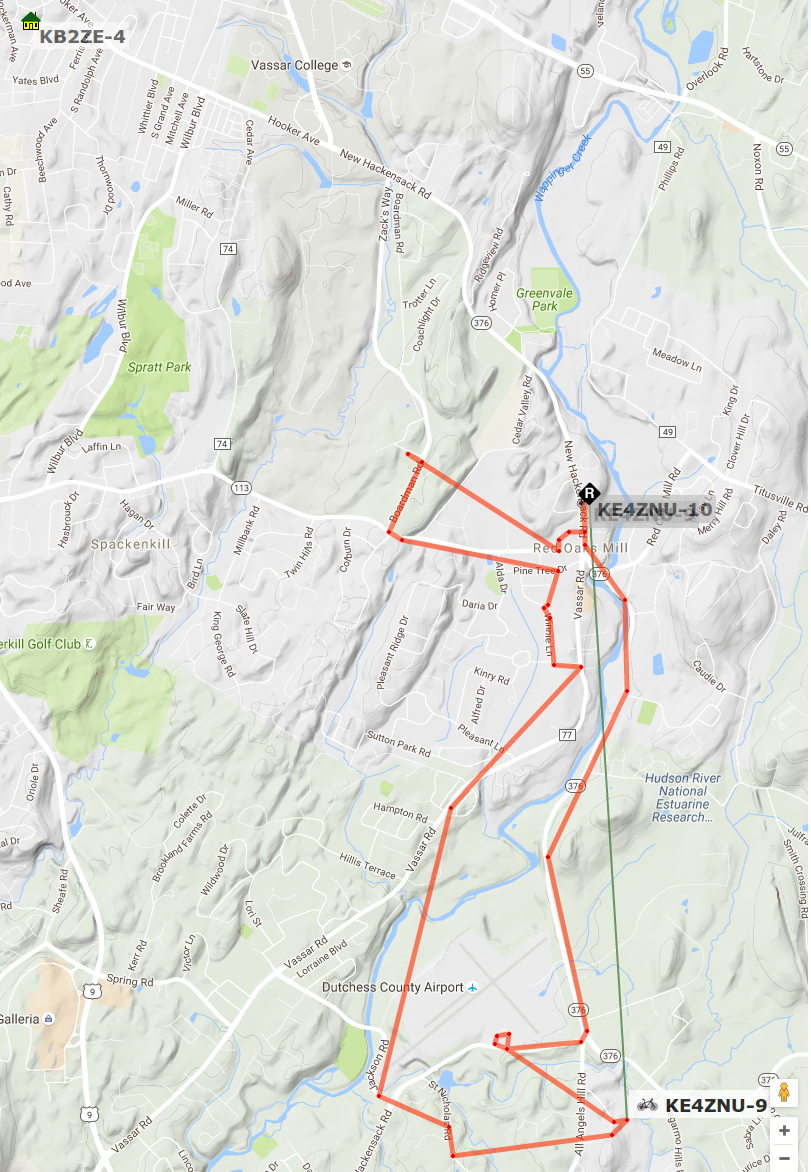
    KE4ZNU-9 - APRS Reception - 2016-09-09
    KE4ZNU-9 – APRS Reception – 2016-09-09

    KE4ZNU-10 handled the spots near Red Oaks Mill, along parts of Vassar Rd that aren’t hidden by that bluff, and along Rt 376 north of the airport.

    The KB2ZE-4 iGate in the upper left corner caught most of the spots; it has a much better antenna in a much better location than the piddly mobile antenna in our attic.

    Several of the spots along the southern edge of the trip went through the K2PUT-15 digipeater high atop Mt. Ninham near Carmel, with coverage of the entire NY-NJ-CT area.

    The APRS-IS database filters out packets received by multiple iGates, so there’s only one entry per spot.

    All in all, KE4ZNU-10 covers the southern part of our usual biking range pretty much the way I wanted.

  • Raspberry Pi Serial vs. TNC-Pi2 vs. APRX

    The APRX iGate program I’m using produces a hardware & software event log file:

    2016-09-03 11:24:40.368 TTY /dev/serial0 read timeout. Closing TTY for later re-open.
    2016-09-03 11:25:10.373 TTY /dev/serial0 Opened.
    2016-09-03 11:32:05.485 CLOSE APRSIS noam.aprs2.net:14580 heartbeat timeout
    2016-09-03 11:32:15.495 CLOSE APRSIS noam.aprs2.net:14580 reconnect
    2016-09-03 11:32:15.776 CONNECT APRSIS noam.aprs2.net:14580
    2016-09-03 12:25:11.154 TTY /dev/serial0 read timeout. Closing TTY for later re-open.
    2016-09-03 12:25:46.154 TTY /dev/serial0 Opened.
    2016-09-03 15:50:14.905 TTY /dev/serial0 read timeout. Closing TTY for later re-open.
    2016-09-03 15:50:46.155 TTY /dev/serial0 Opened.
    2016-09-03 16:50:51.155 TTY /dev/serial0 read timeout. Closing TTY for later re-open.
    2016-09-03 16:51:26.155 TTY /dev/serial0 Opened.
    

    I have no idea what’s going on with the “read timeout” messages. They seem to occur almost exactly a hour apart, except when they’re a few hours apart. The TNC-Pi2 board includes a PIC processor; maybe it loses track of something every now & again, but APRX only notices if it happens in the middle of a read operation.

    The APRSIS server connection drops every few days and APRX seems well-equipped to tolerate that.

    All in all, it’s working fine…

  • Red Oaks Mill APRS iGate: KE4ZNU-10

    APRS coverage of this part of the Mighty Wappinger Creek Valley isn’t very good, particularly for our bicycle radios (low power, crappy antennas, lousy positions), so I finally got around to setting up a receive-only APRS iGate in the attic.

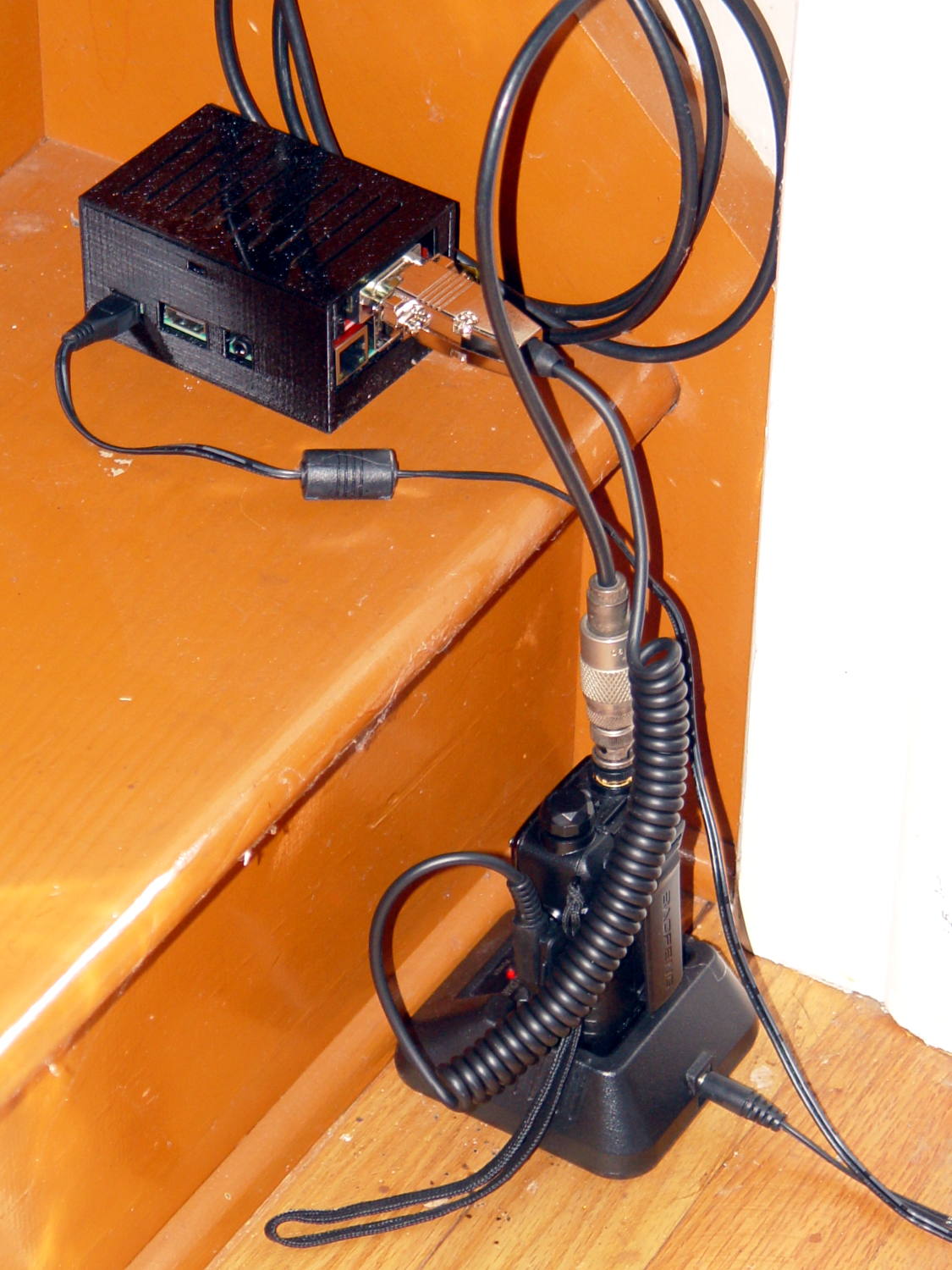
    The whole setup had that lashed-together look:

    KE4ZNU-10 APRS iGate - hardware
    KE4ZNU-10 APRS iGate – hardware

    It’s sitting on the bottom attic stair, at the lower end of a 10 °F/ft gradient, where the Pi 3’s onboard WiFi connects to the router in the basement without any trouble at all.

    After about a week of having it work just fine, I printed a case from Thingiverse:

    KE4ZNU-10 APRS iGate - RPi TNC-Pi case
    KE4ZNU-10 APRS iGate – RPi TNC-Pi case

    Minus the case, however, you can see a TNC-Pi2 kit atop a Raspberry Pi 3, running APRX on a full-up Raspbian Jessie installation:

    RPi TNC-Pi2 stack - heatshrink spacers
    RPi TNC-Pi2 stack – heatshrink spacers

    You must solder the TNC-Pi2 a millimeter or two above the feedthrough header to keep the component leads off the USB jacks. The kit includes a single, slightly too short, aluminum standoff that would be perfectly adequate, but I’m that guy: those are four 18 mm lengths of heatshrink tubing to stabilize the TNC, with the obligatory decorative Kapton tape.

    The only misadventure during kit assembly came from a somewhat misshapen 100 nF ceramic cap:

    Monolithic cap - 100 nF - QC failure
    Monolithic cap – 100 nF – QC failure

    Oddly, it measured pretty close to the others in the kit package. I swapped in a 100 nF ceramic cap from my heap and continued the mission.

    The threaded brass inserts stand in for tiny 4-40 nuts that I don’t have. The case has standoffs with small holes; I drilled-and-tapped 4-40 threads and it’ll be all good.

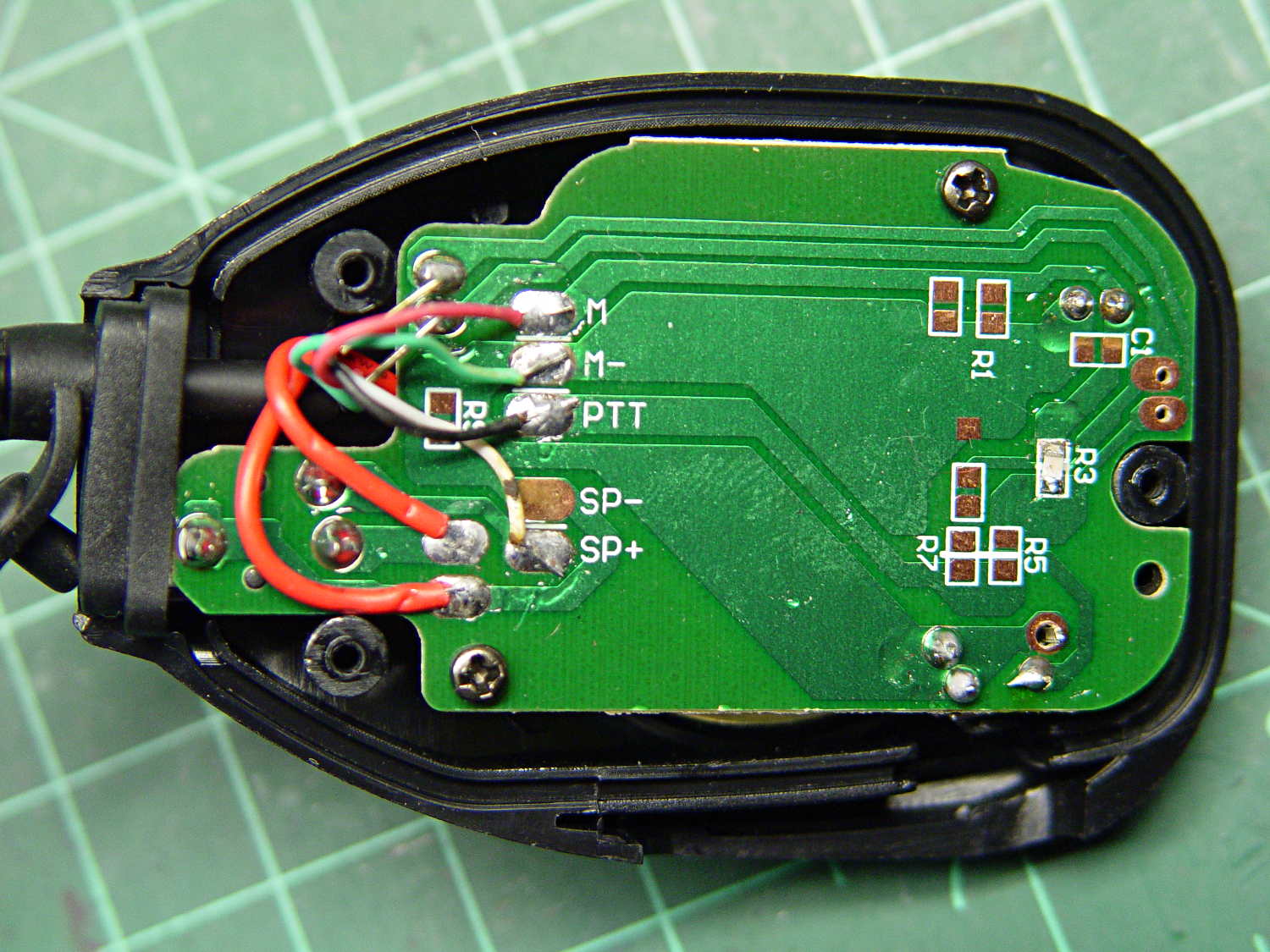
    The radio, a craptastic Baofeng UV-5R, has a SMA-RP to UHF adapter screwed to the cable from a mobile 2 meter antenna on a random slab of sheet metal on the attic floor. It has Kenwood jack spacing, but, rather than conjure a custom plug, I got a clue and bought a pair of craptastic Baofeng speaker-mics for seven bucks delivered:

    Baofeng speaker-mic wiring
    Baofeng speaker-mic wiring

    For reference, the connections:

    Baofeng speaker-mic cable - pins and colors
    Baofeng speaker-mic cable – pins and colors

    Unsoldering the speaker-mic head and replacing it with a DE-9 connector didn’t take long.

    The radio sits in the charging cradle, which probably isn’t a good idea for the long term. The available Baofeng “battery eliminators” appear to be even more dangerously craptastic than the radios and speaker-mics; I should just gut the cheapest one and use the shell with a better power supply.

    I initially installed Xastir on the Pi, but it’s really too heavyweight for a simple receive-only iGate. APRX omits the fancy map displays and runs perfectly well in a headless installation with a trivial setup configuration.

    There are many descriptions of the fiddling required to convert the Pi 3’s serial port device names back to the Pi / Pi 2 “standard”. I did some of that, but in point of fact none’s required for the TNC-Pi2; use the device name /dev/serial0 and it’s all good:

    <interface>
    serial-device /dev/serial0 19200 8n1 KISS
    callsign $mycall # callsign defaults to $mycall
    tx-ok false # transmitter enable defaults to false
    telem-to-is false # set to 'false' to disable
    </interface>
    

    Because the radio looks out over an RF desert, digipeating won’t be productive and I’ve disabled the PTT. All the received packets go to the Great APRS Database in the Cloud:

    server   noam.aprs2.net
    

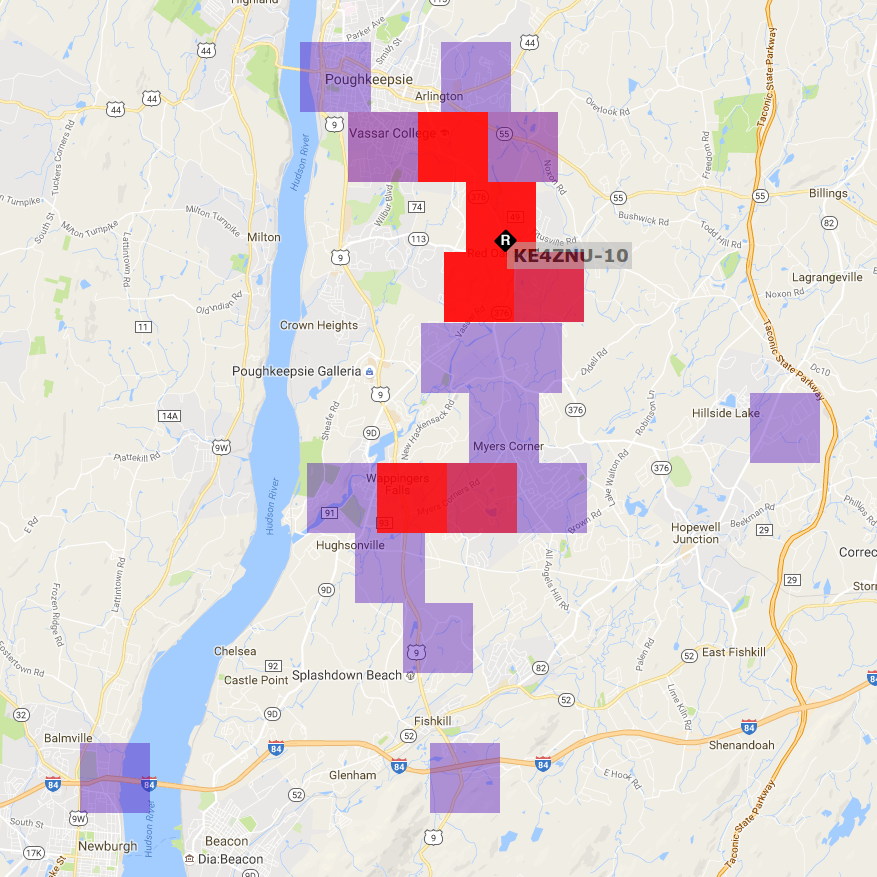
    An APRS reception heat map for the last few days in August:

    KE4ZNU-10 Reception Map - 2016-08
    KE4ZNU-10 Reception Map – 2016-08

    The hot red square to the upper left reveals a peephole through the valley walls toward Mary’s Vassar Farms garden plot, where her bike spends a few hours every day. The other hotspots show where roads overlap the creek valley; the skinny purple region between the red endcaps covers the vacant land around the Dutchess County Airport. The scattered purple blocks come from those weird propagation effects that Just Happen; one of the local APRS gurus suggests reflections from airplane traffic far overhead.

    An RPi 3 is way too much computer for an iGate: all four cores run at 0.00 load all day long. On the other paw, it’s $35 and It Just Works.

  • Raspberry Pi Streaming Radio Player: Mostly Viable Product

    The latest version of my simpleminded streaming radio player includes:

    • More durable parsing for track titles with embedded quotes and semicolons
    • Muting during empty / non-music Radionomy tracks
    • The Dutchess County E911 service

    Audionomy’s empty / non-music tracks include a remarkable number of mis-encoded MP3 sections triggering decoding problems; those problems don’t occur during music tracks. Some tracks come through as advertisements, which would be mostly OK apart from the garbled / high-volume gibberish, but on the whole they’re un-listenable:

    ICY Info: StreamTitle='';
    A:1271.0 (21:10.9) of 0.0 (00.0)  4.0% 44%
    [mp3float @ 0x7623e080]overread, skip -7 enddists: -5 -5
    [mp3float @ 0x7623e080]overread, skip -9 enddists: -6 -6
    A:1271.2 (21:11.2) of 0.0 (00.0)  4.0% 45%
    [mp3float @ 0x7623e080]overread, skip -7 enddists: -5 -5
    A:1309.1 (21:49.1) of 0.0 (00.0)  4.0% 42%
    ICY Info: StreamTitle='Targetspot - TargetSpot';
    A:1316.4 (21:56.4) of 0.0 (00.0)  4.0% 40%
    [mp3float @ 0x7623e080]overread, skip -5 enddists: -4 -4
    [mp3float @ 0x7623e080]overread, skip -5 enddists: -2 -2
    

    Muting happens in the mixer, because that seems easier than messing with mplayer in mid-flight. Rather than attempt to control the muted state with specific timeouts, I just un-mute after a new track title arrives; that has no effect if it’s already un-muted. The delays depend on the buffer fill level and avoid the worst of the gibberish.

    The player still falls over dead / jams solid on occasion, generally because the incoming data has stopped streaming or delivered severe encoding problems. Other than that, it runs pretty much all day, every day, on at least one of the Raspberry Pi streamers.

    Still no track display. Mostly, we still don’t miss it.

    The Python source code as a GitHub Gist:

    from evdev import InputDevice,ecodes,KeyEvent
    import subprocess32 as subprocess
    import select
    import re
    import sys
    import time
    Media = {'KEY_KP7' : ['Classical',['mplayer','-playlist','http://stream2137.init7.net/listen.pls'%5D%5D,
    'KEY_KP8' : ['Jazz',['mplayer','-playlist','http://stream2138.init7.net/listen.pls'%5D%5D,
    'KEY_KP9' : ['WMHT',['mplayer','http://live.str3am.com:2070/wmht1'%5D%5D,
    'KEY_KP4' : ['Classic 1000',['mplayer','-playlist','http://listen.radionomy.com/1000classicalhits.m3u'%5D%5D,
    'KEY_KP5' : ['DCNY 911',['mplayer','-playlist','http://www.broadcastify.com/scripts/playlists/1/12305/-5857889408.m3u'%5D%5D,
    'KEY_KP6' : ['WAMC',['mplayer','http://pubint.ic.llnwd.net/stream/pubint_wamc'%5D%5D,
    'KEY_KP1' : ['60s',['mplayer','-playlist','http://listen.radionomy.com/all60sallthetime-keepfreemusiccom.m3u'%5D%5D,
    'KEY_KP2' : ['50-70s',['mplayer','-playlist','http://listen.radionomy.com/golden-50-70s-hits.m3u'%5D%5D,
    'KEY_KP3' : ['Soft Rock',['mplayer','-playlist','http://listen.radionomy.com/softrockradio.m3u'%5D%5D,
    'KEY_KP0' : ['Zen',['mplayer','-playlist','http://listen.radionomy.com/zen-for-you.m3u'%5D%5D
    }
    CurrentKC = 'KEY_KP7'
    Controls = {'KEY_KPSLASH' : '//////',
    'KEY_KPASTERISK' : '******',
    'KEY_KPENTER' : ' ',
    'KEY_KPMINUS' : '<',
    'KEY_KPPLUS' : '>',
    'KEY_VOLUMEUP' : '*',
    'KEY_VOLUMEDOWN' : '/'
    }
    MuteDelay = 5.5 # delay before non-music track; varies with buffering
    UnMuteDelay = 7.3 # delay after non-music track
    MixerChannel = 'PCM' # which amixer thing to use
    # set up event inputs and polling objects
    # This requires some udev magic to create the symlinks
    k = InputDevice('/dev/input/keypad')
    k.grab()
    kp = select.poll()
    kp.register(k.fileno(),select.POLLIN + select.POLLPRI + select.POLLERR)
    v = InputDevice('/dev/input/volume')
    v.grab()
    vp = select.poll()
    vp.register(v.fileno(),select.POLLIN + select.POLLPRI + select.POLLERR)
    # set up files for mplayer pipes
    lw = open('/tmp/mp.log','w') # mplayer piped output
    lr = open('/tmp/mp.log','r') # … reading that output
    # set the mixer output low enough that the initial stream won't wake the dead
    subprocess.call(['amixer','sset',MixerChannel,'10'])
    # Start the player with the default stream
    print 'Starting mplayer on',Media[CurrentKC][0],' -> ',Media[CurrentKC][-1][-1]
    p = subprocess.Popen(Media[CurrentKC][-1],
    stdin=subprocess.PIPE,stdout=lw,stderr=subprocess.STDOUT)
    print ' … running'
    #——————–
    #— Play the streams
    while True:
    # pluck next line from mplayer and decode it
    text = lr.readline()
    if 'ICY Info: ' in text: # these lines may contain track names
    trkinfo = text.split(';') # also splits at semicolon embedded in track name
    for ln in trkinfo:
    if 'StreamTitle' in ln: # this part contains a track name
    if 2 == ln.count("'"): # exactly two single quotes = probably none embedded in track name
    trkhit = re.search(r"StreamTitle='(.*)'",ln)
    if trkhit: # true for valid search results
    TrackName = trkhit.group(1) # the string between the two quotes
    print 'Track name: ', TrackName
    if ('' == TrackName or 'TargetSpot' in TrackName) and 'radionomy' in Media[CurrentKC][-1][-1]:
    print ' … muting empty Radionomy track'
    time.sleep(MuteDelay)
    subprocess.call(['amixer','-q','sset',MixerChannel,'mute'])
    else:
    print ' … unmuting'
    time.sleep(UnMuteDelay)
    subprocess.call(['amixer','-q','sset',MixerChannel,'unmute'])
    else:
    print ' … semicolon in track name: ', ln
    else:
    print ' … quotes in track name: ', ln
    elif 'Exiting…' in text:
    print 'Got EOF / stream cutoff'
    print ' … killing dead mplayer'
    p.kill()
    print ' … flushing pipes'
    lw.truncate(0)
    print ' … discarding keys'
    while [] != kp.poll(0):
    kev = k.read
    print ' … restarting mplayer: ',Media[CurrentKC][0]
    p = subprocess.Popen(Media[CurrentKC][-1],
    stdin=subprocess.PIPE,stdout=lw,stderr=subprocess.STDOUT)
    print ' … running'
    continue
    # accept pending events from volume control knob
    if [] != vp.poll(10):
    vev = v.read()
    for e in vev:
    if e.type == ecodes.EV_KEY:
    kc = KeyEvent(e).keycode
    # print 'Volume kc: ',kc
    if kc in Controls:
    print 'Vol Control: ',kc
    try:
    p.stdin.write(Controls[kc])
    except Exception as e:
    print "Can't send control: ",e
    print ' … restarting player: ',Media[CurrentKC][0]
    p = subprocess.Popen(Media[CurrentKC][-1],
    stdin=subprocess.PIPE,stdout=lw,stderr=subprocess.STDOUT)
    print ' … running'
    # accept pending events from keypad
    if [] != kp.poll(10):
    kev = k.read()
    for e in kev:
    if e.type == ecodes.EV_KEY:
    kc = KeyEvent(e).keycode
    if kc == 'KEY_NUMLOCK':
    continue
    # print 'Got: ',kc
    if (kc == 'KEY_BACKSPACE') and (KeyEvent(e).keystate == KeyEvent.key_hold):
    if True:
    print 'Backspace = shutdown!'
    p = subprocess.call(['sudo','shutdown','-HP','now'])
    else:
    print 'BS = bail from main, ssh to restart!'
    sys.exit(0)
    if KeyEvent(e).keystate != KeyEvent.key_down:
    continue
    if kc in Controls:
    print 'Control:', kc
    try:
    p.stdin.write(Controls[kc])
    except Exception as e:
    print "Can't send control: ",e
    print ' … restarting player: ',Media[CurrentKC][0]
    p = subprocess.Popen(Media[CurrentKC][-1],
    stdin=subprocess.PIPE,stdout=lw,stderr=subprocess.STDOUT)
    print ' … running'
    if kc in Media:
    print 'Switching stream to ',Media[kc][0],' -> ',Media[kc][-1][-1]
    CurrentKC = kc
    print ' … halting player'
    try:
    p.communicate(input='q')
    except Exception as e:
    print 'Perhaps mplayer died?',e
    print ' … killing it for sure'
    p.kill()
    print ' … flushing pipes'
    lw.truncate(0)
    print ' … restarting player: ',Media[CurrentKC][0]
    p = subprocess.Popen(Media[CurrentKC][-1],
    stdin=subprocess.PIPE,stdout=lw,stderr=subprocess.STDOUT)
    print ' … running'
    print 'Out of loop!'
    view raw Streamer.py hosted with ❤ by GitHub
  • Raspberry Pi Power Heartbeat LED

    While looking for something else, I found a reference to the /boot/overlays/README file, wherein it is written:

            act_led_trigger         Choose which activity the LED tracks.
                                    Use "heartbeat" for a nice load indicator.
                                    (default "mmc")
    
            act_led_activelow       Set to "on" to invert the sense of the LED
                                    (default "off")
    
            act_led_gpio            Set which GPIO to use for the activity LED
                                    (in case you want to connect it to an external
                                    device)
                                    (default "16" on a non-Plus board, "47" on a
                                    Plus or Pi 2)
    
    ... snippage ...
    
            pwr_led_trigger
            pwr_led_activelow
            pwr_led_gpio
                                    As for act_led_*, but using the PWR LED.
                                    Not available on Model A/B boards.
    

    Although the power LED isn’t (easily) visible through the Canakit cases I’m using (it’s under the barely visible hole in front of the small hole near the hacked RUN connector), turning it into a heartbeat pulse distinguishes the CPU’s “running” and “halted” states; whether it will also distinguish “crashed” is up for grabs.

    It’s not at all clear what other choices you have.

    To enable heartbeating, add this to /boot/config.txt:

    # turn power LED into heartbeat
    dtparam=pwr_led_trigger=heartbeat
    #
    

    I expected a simple 50% duty cycle heartbeat, but it’s an annoying double blink: long off / on / off / on / long off. Fortunately, it still isn’t (easily) visible …

    While you have that file open, reduce the GPU memory to the absolute minimum for headless operation:

    # minimal GPU memory for headless operation
    gpu_mem=16
    #
    

    Some further ideas, including a way to turn off the HDMI interface.

  • Streaming Player: NFS Program Distribution

    With three identical Raspberry Pi streaming players tootling around the house, it finally dawned on me that they should fetch their Python program directly from The Definitive Source, rather than a local copy.

    Tweak the auto-startup in /etc/rc.local:

    mount -o ro mollusk:/mnt/bulkdata/Project\ Files/Streaming\ Media\ Player/Firmware/ /mnt/part
    sudo -u pi python /mnt/part/Streamer.py &
    

    There’s probably a way to redirect all of the stdout and stderr results to a file for debugging, but the obvious method doesn’t work:

    sudo -u pi sh -c "python /mnt/part/Streamer.py 2>&1 > /tmp/st.log" &
    

    That redirects stdout from the subprocess call to set up the mixer, but doesn’t catch Python’s print output.

    Using the Python logging library would get most of the way to the goal, although stdout from things like the mixer would still vanish.

    Continuing with the network theme, one could netboot the RPi players, but that requires more sysadmin hackery than I’m willing to do, what with the good being the enemy of the best.