Ed Nisley's Blog: Shop notes, electronics, firmware, machinery, 3D printing, laser cuttery, and curiosities. Contents: 100% human thinking, 0% AI slop.
Being a Linux box, a Raspberry Pi requires a tidy shutdown, but, because it uses so little power after that, I decided to forego a power switch and just blip the CPU reset line to start it up again. Canakit cases require a bit of flush-cutter hackage to accommodate a crude socket atop the RUN header:
Canakit RPi Case – reset switch – header clearance
The switch originally had three terminals, but turned out to be SPST NO with one unused pin. Flush cutters and some hot melt glue to the rescue:
Canakit RPi Case – reset switch – interior
The end result looks OK, modulo a few scuffs on the shiny black plastic:
Canakit RPi Case – reset switch – exterior
Yeah, a clumsy swipe could wipe that actuator right off the top; we’ll see how long it lasts…
The least horrible way to get events from the keypad turned out to be a simple non-blocking poll from Python’s select library, then sucking the event input queue dry; the main loop now does what might be grandiosely overstated as cooperative multitasking. Well, hey, it reads lines from mplayer’s output pipe and processes keypad events and doesn’t stall (for very long) and that’s multi enough for me.
It extracts the stream title from the ICY Info line, but I still haven’t bothered with a display. It may well turn out that this thing doesn’t need a display. The stream title will be enclosed in single quotes, but it may also contain non-escaped and non-paired single quotes (a.k.a. apostrophes): the obvious parsing strategy doesn’t work. I expect titles can contain non-escaped semicolons, too, which will kill the algorithm I’m using stone cold dead. Some try - except armor may be appropriate.
This code does not tolerate a crappy WiFi connection very well at all. I eventually replaced a long-antenna WiFi adapter with an actual Ethernet cable and all the mysterious problems at the far end of the house Went Away. Soooo this code won’t tolerate random network stream dropouts very well, either; we’ll see how poorly that plays out in practice.
The hackery to monitor / kill / restart / clean up after mplayer and its pipes come directly from seeing what failed, then whacking that mole in the least intrusive manner possible. While it would be better to wrap a nice abstract model around what mplayer is (assumed to be) doing, it’s not at all clear to me that I can build a sufficiently durable model to be worth the effort. Basically, trying to automate a program designed to be human-interactive is always a recipe for disaster.
The option for the Backspace / Del key lets you do remote debugging by editing the code to just bail out of the loop instead of shut down. Unedited, it’s a power switch: the Pi turns off all the peripherals and shuts itself down. The key_hold conditional means you must press-and-hold that button to kill the power, but don’t run this on your desktop PC, OK?
Autostarting the program requires one line in /etc/rc.local:
sudo -u pi python /home/pi/Streamer.py &
AFAICT, using cron with an @REBOOT line has timing issues with the network being available, but I can’t point to any solid evidence that hacking rc.localwaits until the network is up, either. So far, so good.
I make no apologies for any of the streams; I needed streams behind all the buttons and picked stuff from Xiph’s listing. The AAC+ streams from the Public Domain Project give mplayer a bad bellyache; I think its codecs can’t handle the “+” part of AAC+.
All in all, not bad for a bit over a hundred lines of code, methinks…
More fiddling will happen, but we need some continuous experience for that; let the music roll!
This file contains hidden or bidirectional Unicode text that may be interpreted or compiled differently than what appears below. To review, open the file in an editor that reveals hidden Unicode characters.
Learn more about bidirectional Unicode characters
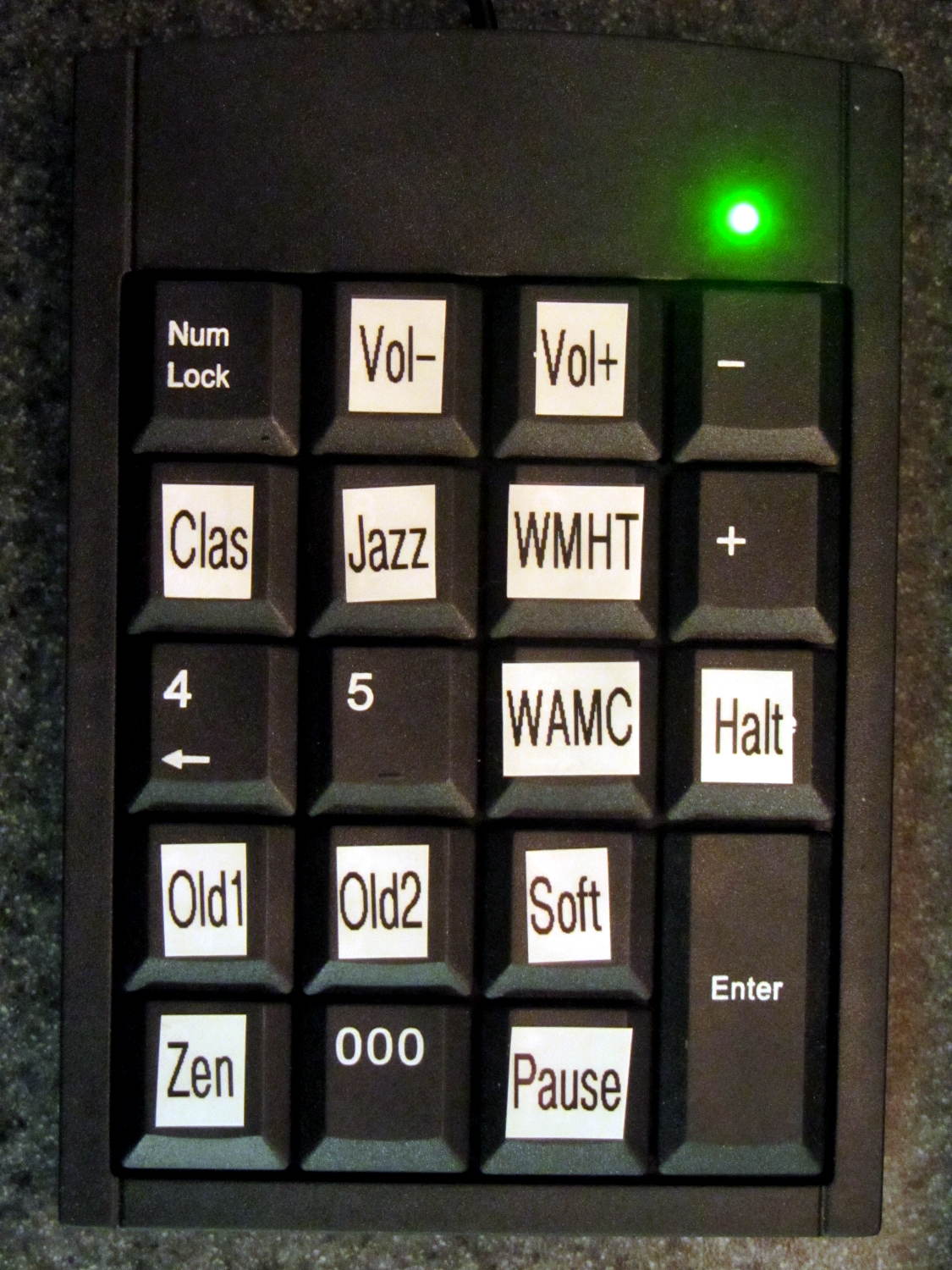
Stipulated: garish labels that don’t fit the keys well at all.
I need more than one stream for testing; the only one that matters is Classical.
The keypad uses the same 2.4 GHz ISM band as the Raspberry Pi’s Wifi radio, which means holding a key down (which should never happen) puts a dent in mplayer’s cache fill level. Even absent that interference, the WiFi link seems more than a little iffy, probably because it’s at the far end of the house and upstairs from the router.
Other WiFi devices report that 2.4 GHz RF has trouble punching through the intervening fifty feet of hardwood floor (on the diagonal, the joists amount to a lot of wood) and multiple sets of doubled wallboard sheets; the RPi probably needs a better radio with an actual antenna. I did move the WiFi control channel away from the default used by the (relatively distant) neighbors, which seemed to improve its disposition.
USB WiFi dongle (in power hog mode) on a short extension cable for better reception
As much hardware doc as you need:
RPi Streaming Player – first lashup
The green plug leads off to a set of decent-quality PC speakers with far more bass drive than seems absolutely necessary in this context. The usual eBay vendor bungled an order for the adapter between the RCA line-out jacks and the 3.5 mm plug that will avoid driving the speakers from the UCA202’s headphone monitor output; I doubt that will make any audible difference. If you need an adapter with XLR female to 1/4 inch mono, let me know…
The keypad labels provide all the UI documentation there is:
This file contains hidden or bidirectional Unicode text that may be interpreted or compiled differently than what appears below. To review, open the file in an editor that reveals hidden Unicode characters.
Learn more about bidirectional Unicode characters
The Media dictionary relates keycodes with the command line parameters required to fire mplayer at the streaming stations. With that running, the Controls dictionary turns keycodes into mplayer keyboard controls.
There’s no display: you have no idea what’s going on. I must start the program manually through an ssh session and can watch mplayer‘s console output.
Poking the Halt button forcibly halts the RPi, after which you squeeze the Reset button to reboot the thing. There’s no indication that it’s running, other than sound coming out of the speakers, and no way to tell it fell of the rails other than through the ssh session.
The loop blocks on events, so it can’t also extract stream titles from the (not yet implemented) mplayer stdout pipe / file and paste them on the (missing) display; that’s gotta go.
There’s a lot not to like about all that, of course, but it’s in the tradition of getting something working to discover how it fails and, in this case, how it sounds, which is even more important.
The general idea is to use keystrokes plucked from a cheap numeric keypad to control mplayer, with the intent of replacing some defunct CD players and radios and suchlike. The keypads look about like you’d expect:
Numeric keypads
The keypad layouts are, of course, slightly different (19 vs 18 keys!) and they behave differently with regard to their NumLock state, but at least they produce the same scancodes for the corresponding keys. The black (wired) keypad has a 000 button that sends three 0 events in quick succession, which isn’t particularly useful in this application.
With the appropriate udev rule in full effect, this Python program chews its way through incoming events and reports only the key-down events that will eventually be useful:
This file contains hidden or bidirectional Unicode text that may be interpreted or compiled differently than what appears below. To review, open the file in an editor that reveals hidden Unicode characters.
Learn more about bidirectional Unicode characters
e.type is numeric, so just compare against evcodes.EV_KEY
KeyEvent(e).scancode is the numeric key identifier
KeyEvent(e).keystate = 1 for the initial press
Those KeyEvent(e).key_down/up/hold values don’t change
If you can type KEY_KP0 correctly, wrapping it in quotes isn’t such a big stretch, so I don’t see much point to running scancodes through ecodes.KEY[KeyEvent(e).scancode] just to compare the enumerations.
I’m surely missing something Pythonic, but I don’t get the point of attaching key_down/up/holdconstants to the key event class. I suppose that accounts for changed numeric values inside inherited classes, but … sheesh.
Anyhow, that loop looks like a good starting point.
At least on my network, disabling the IPv6 functions makes Avahi start up faster. You do that by tweaking the obvious IPV6 line in /etc/avahi/avahi-daemon.conf:
Sorta like wedding pictures: you can expose for the groom-in-black or the bride-in-white, but not both at the same time.
The wireless keypad does not have a slot for the USB radio: put ’em in a bag to keep ’em together when not in use.
The general idea is to create a standard name (/dev/input/keypad) for either keypad when it gets plugged in, so the program need not figure out the device name from first principles. This being an embedded system, I can ensure only one keypad will be plugged in at any one time.
The wired keypad has an odd name that makes a certain perverse sense:
That may be because the 0x06a2 Vendor ID was cloned (that’s pronounced “ripped-off”) from Creative Labs. My guess is they ripped the entire chipset, because the 0x4101 device ID came from a Creative Labs wireless keyboard + mouse:
lsusb
... snippage ...
Bus 001 Device 011: ID 062a:4101 Creative Labs
... snippage ...
Because it’s a dual-mode wireless device, we need more information to create the corresponding udev rule. The keyboard part appears (on this boot) as event0, which we find thusly:
ll /dev/input/by-id
total 0
lrwxrwxrwx 1 root root 9 Feb 5 17:39 usb-Burr-Brown_from_TI_USB_Audio_CODEC-event-if03 -> ../event1
lrwxrwxrwx 1 root root 9 Feb 5 17:39 usb-MOSART_Semi._2.4G_Keyboard_Mouse-event-kbd -> ../event0
lrwxrwxrwx 1 root root 9 Feb 5 17:39 usb-MOSART_Semi._2.4G_Keyboard_Mouse-if01-event-mouse -> ../event2
lrwxrwxrwx 1 root root 9 Feb 5 17:39 usb-MOSART_Semi._2.4G_Keyboard_Mouse-if01-mouse -> ../mouse0
Some spelunking suggests using the environment variables set up by the default udev rules, which we find thusly:
sudo udevadm control --reload
sudo udevadm trigger
And then It Just Works:
ll /dev/input/by-id
total 0
lrwxrwxrwx 1 root root 9 Feb 5 17:39 usb-Burr-Brown_from_TI_USB_Audio_CODEC-event-if03 -> ../event1
lrwxrwxrwx 1 root root 9 Feb 5 19:03 usb-MOSART_Semi._2.4G_Keyboard_Mouse-event-kbd -> ../event0
lrwxrwxrwx 1 root root 9 Feb 5 19:03 usb-MOSART_Semi._2.4G_Keyboard_Mouse-if01-event-mouse -> ../event2
lrwxrwxrwx 1 root root 9 Feb 5 19:03 usb-MOSART_Semi._2.4G_Keyboard_Mouse-if01-mouse -> ../mouse0ll /dev/input
ll /dev/input
total 0
drwxr-xr-x 2 root root 120 Feb 5 19:03 by-id
drwxr-xr-x 2 root root 120 Feb 5 19:03 by-path
crw-rw---- 1 root input 13, 64 Feb 5 19:03 event0
crw-rw---- 1 root input 13, 65 Feb 5 17:39 event1
crw-rw---- 1 root input 13, 66 Feb 5 19:03 event2
lrwxrwxrwx 1 root root 6 Feb 5 19:03 keypad -> event0
crw-rw---- 1 root input 13, 63 Feb 5 17:39 mice
crw-rw---- 1 root input 13, 32 Feb 5 19:03 mouse0
My configuration hand is strong…
Note: Once again, I manually restored the source code after the WordPress “improved” editor shredded it by replacing all the double-quote and greater-than symbols inside the “protected” sourcecode blocks with their HTML-escaped equivalents. Some breakage may remain and, as always, WP can shred sourcecode blocks even if I don’t edit the post. They’ve (apparently) banned me from contacting Support, because of an intemperate rant based on years of having them ignore this (and other) problems. I didn’t expect any real help, so this isn’t much of a step backwards in terms of actual support …