The Smell of Molten Projects in the Morning

Ed Nisley's Blog: Shop notes, electronics, firmware, machinery, 3D printing, laser cuttery, and curiosities. Contents: 100% human thinking, 0% AI slop.

Tag: RPi

Raspberry Pi

  • IBM 5100 APL: Nested Emulators

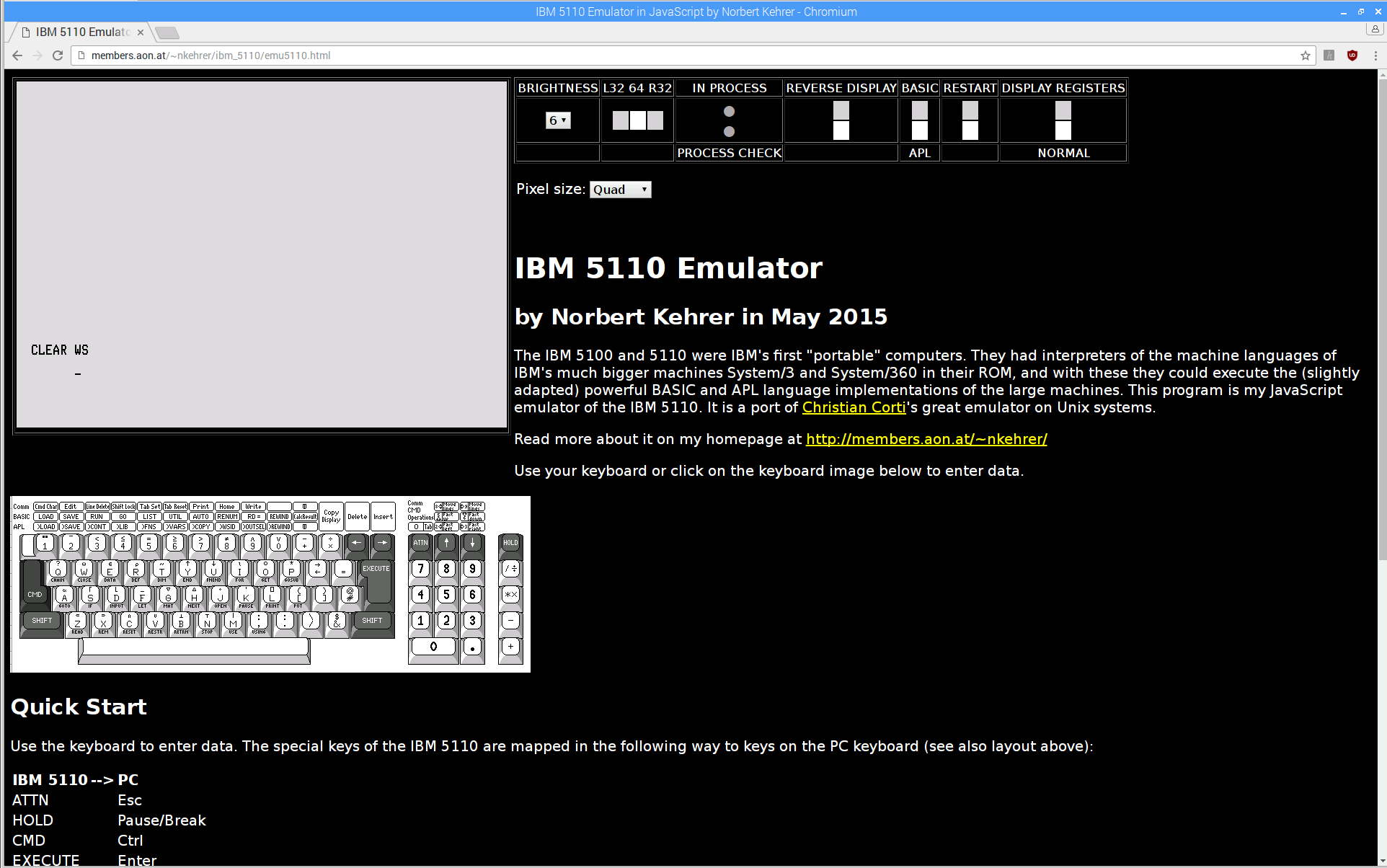
    A discussion about Raspberry Pi performance prompted this:

    IBM 5110 Emulator - Javascript on Raspberry Pi
    IBM 5110 Emulator – Javascript on Raspberry Pi

    From the inside out:

    Starting the show takes 17 seconds from clicking the Restart button (second from right, top row) to APL’s Clear WS prompt. I have no idea how that compares with a Genuine IBM 5100.

    I distinctly remember writing APL programs, but that’s about as far as my memory will take me. [sigh]

  • Making and Mounting SD Card Backup Images

    The process of creating, configuring, and backing up a Raspberry Pi goes a little something like this:

    unzip /mnt/diskimages/ISOs/Raspberry\ Pi/2016-11-25-raspbian-jessie-lite.zip
    sudo dcfldd statusinterval=16 bs=4M if=2016-11-25-raspbian-jessie-lite.img of=/dev/sdb
    ... Micro SD card to Pi, boot, perform various configuration tweaks ...
    ... card back to PC ...
    sudo dcfldd statusinterval=16 bs=4M if=/dev/sdb of=Streamer5-2017-01-02.img
    zip -1 Streamer5-2017-01-02.zip Streamer5-2017-01-02.img
    rsync -ahuv --progress Streamer5-2017-01-02.zip /mnt/diskimages/ISOs/Raspberry\ Pi/
    

    The ZIP operation crushes an 8 GB image down to 1.6 GB, obviously depending on most of the image being filled with binary zeros or foxes or something trivial like that. You could work around that with fsarchiver, at the cost of handling each partition separately.

    You can pipe the incoming image through GZIP when you don’t need the image right away:

    sudo dcfldd statusinterval=16 bs=4M if=/dev/sdb | gzip -1c > Streamer5-2017-01-02.gz
    

    There’s an obvious gotcha when you try to write an image to a (slightly) smaller card than the one it came from. Writing a smaller image on a larger card works just fine.

    With a raw image in hand, you must know the disk partition offsets within the image to mount them in loopback mode:

    fdisk -l Streamer5-2017-01-02.img
    Disk Streamer5-2017-01-02.img: 7.4 GiB, 7892631552 bytes, 15415296 sectors
    Units: sectors of 1 * 512 = 512 bytes
    Sector size (logical/physical): 512 bytes / 512 bytes
    I/O size (minimum/optimal): 512 bytes / 512 bytes
    Disklabel type: dos
    Disk identifier: 0xc280d360
    
    Device                    Boot  Start      End  Sectors  Size Id Type
    Streamer5-2017-01-02.img1        8192   137215   129024   63M  c W95 FAT32 (LBA)
    Streamer5-2017-01-02.img2      137216 15415295 15278080  7.3G 83 Linux
    

    Knowing the offsets, the mounts go like this:

    sudo mount -o loop,offset=$(( 8192*512 )) Streamer5-2017-01-02.img /mnt/loop/
    ... snippage ...
    sudo mount -o loop,offset=$(( 137216*512 )) Streamer5-2017-01-02.img /mnt/loop/
    

    Because a Jessie Lite system will fit neatly into a 2 GB SD Card, you can trim the disk image to eliminate most of the unused space:

    sudo losetup -f
    /dev/loop0
    
    sudo losetup /dev/loop0 Streamer5-2017-01-02.img
    
    sudo partprobe /dev/loop0
    
    sudo gparted /dev/loop0
    ... resize ext4 partition from 7 GB to 1.8 GB
    
    sudo losetup -d /dev/loop0
    
    fdisk -l Streamer5-2017-01-02.img
    Disk Streamer5-2017-01-02.img: 7.4 GiB, 7892631552 bytes, 15415296 sectors
    Units: sectors of 1 * 512 = 512 bytes
    Sector size (logical/physical): 512 bytes / 512 bytes
    I/O size (minimum/optimal): 512 bytes / 512 bytes
    Disklabel type: dos
    Disk identifier: 0xc280d360
    
    Device                    Boot  Start     End Sectors  Size Id Type
    Streamer5-2017-01-02.img1        8192  137215  129024   63M  c W95 FAT32 (LBA)
    Streamer5-2017-01-02.img2      137216 3833855 3696640  1.8G 83 Linux
    
    truncate --size=$(( (3833855+1)*512 )) Streamer5-2017-01-02.img
    ... or, if you don't care about an exact fit, use ...
    truncate --size=2G Streamer5-2017-01-02.img
    

    The partition and filesystem will plump up to fill the SD Card during the first boot on the Raspberry Pi.

    There exist automagic utilities for all that, but practicing simple stuff helps keep it all fresh…

  • Raspberry Pi Streaming Radio Player: Yet Another Cheap Wireless Keypad

    One might think, just from looking, that this black wireless USB numeric keypad:

    BonyTek Wireless USB Numeric Keypad
    BonyTek Wireless USB Numeric Keypad

    Was identical to the white keypads I already used on the streaming media players:

    Wireless Keypad - colored labels
    Wireless Keypad – colored labels

    One would, of course, be wrong.

    They both claim to be manufactured by “Creative Labs” with a 0x062a vendor ID, but with different model IDs:

    • White = 0x4101 “Wireless Keyboard/Mouse”
    • Black = 0x4182

    Astonishingly, that model ID appears nowhere in Google’s search results, yet it actually works when plugged into my desktop PC.

    The new model ID requires Yet Another Udev Rule in /etc/udev/rules.d/Streamer.rules:

    ATTRS{idVendor}=="062a", ATTRS{idProduct}=="4182", ENV{ID_INPUT_KEYBOARD}=="1", SYMLINK+="input/keypad"
    

    No big deal by now …

  • Raspberry Pi Streaming Radio Player: Ignoring a Missing Volume Knob

    The Dell AC511 USB SoundBars have volume control knobs, which this udev rule turns into the /dev/input/volume device:

    ATTRS{name}=="Dell Dell AC511 USB SoundBar", SYMLINK+="input/volume"
    

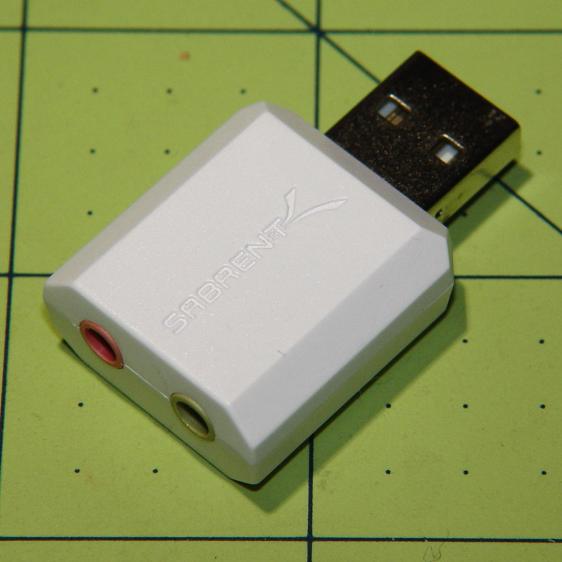
    I recently wanted to use an ordinary USB “sound card” that did not, of course, have a volume knob:

    Sabrent USB Audio Adapter
    Sabrent USB Audio Adapter

    This hack skips the configuration that makes the knob’s events visible to the Python program:

    import os.path
    
    ... snippage ...
    
    # if volume control knob exists, then set up its events
    
    VolumeDevice = '/dev/input/volume'
    
    vp = select.poll()
    if os.path.exists(VolumeDevice):
      v = InputDevice(VolumeDevice)
      v.grab()
      vp.register(v.fileno(),select.POLLIN + select.POLLPRI + select.POLLERR)
    

    It turns out that if you never register a device with the event polling interface, then the interface never reports any events and the rest of the code remains blissfully undisturbed: the non-existent knob doesn’t do anything, while the volume control buttons on the keypad continue to function as usual.

    The end result of this fiddling puts a Raspberry Pi 2 Model B to work as a streaming player on my Electronics Workbench, untethering the laptop from those powered speakers:

    RPi 2 Streaming Player - USB sound gadget
    RPi 2 Streaming Player – USB sound gadget

    It’s a shame that USB audio gadget is so big, because it crowds out standard USB plugs to the side.

    The most satisfactory LED configuration for a translucent case with an external WiFi adapter seems to be:

    dtparam=pwr_led_trigger=cpu0
    dtparam=act_led_trigger=mmc0
    

    The rest of the code remains unchanged as shown in that GitHub Gist.

    Bomb the bass!

  • Raspberry Pi: Forcing VNC Display Resolution

    You can use VNC with a headless Raspberry Pi, but, absent a display with which to negotiate the screen resolution, X defaults something uselessly small: 720×480. To force a more reasonable resolution, edit /boot/config.txt and set the framebuffer size:

    framebuffer_width=1920
    framebuffer_height=1280
    

    You can use a nonstandard resolutions, as with the 1920×1280 that fits neatly on my 2560×1440 landscape monitor, but getting too weird will surely bring its own reward. When you plug in a display, X will ought to negotiate as usual for the highest resolution the display can handle.

    The System Configuration dialog has a “Resolution” button offering standard resolutions:

    RPi display resolution configuration
    RPi display resolution configuration

    The shiny RPi Pixel UI bakes the RealVNC server directly into whatever handles the startup process these days, rendering all previous recommendations about forcing VNC resolutions inoperative. I found the trick of editing the config file on StackExchange after the usual flailing around.

    Memo to Self: Remmina (the VNC client I use in XFCE on my desktop PC) doesn’t respond well to having the VNC server shut down while it’s connected. Fire up a command prompt, enter this:

    sleep 10 ; sudo reboot
    

    Then, quick like a bunny, disconnect the VNC session.

  • Raspberry Pi Streaming Radio Player: Improved Pipe Handling

    My Raspberry Pi-based streaming radio player generally worked fine, except sometimes the keypad / volume control knob would stop responding after switching streams. This being an erratic thing, the error had to be a timing problem in otherwise correct code and, after spending Quality Time with the Python subprocess and select doc, I decided I was abusing mplayer’s stdin and stdout pipes.

    This iteration registers mplayer’s stdout pipe as Yet Another select.poll() Polling Object, so that the main loop can respond whenever a complete line arrives. Starting mplayer in quiet mode reduces the tonnage of stdout text, at the cost of losing the streaming status that I really couldn’t do anything with, and eliminates the occasional stalls when mplayer (apparently) dies in the middle of a line.

    The code kills and restarts mplayer whenever it detects an EOF or stream cutoff. That works most of the time, but a persistent server or network failure can still send the code into a sulk. Manually selecting a different stream (after we eventually notice the silence) generally sets things right, mainly by whacking mplayer upside the head; it’s good enough.

    It seems I inadvertently invented streaming ad suppression by muting (most of) the tracks that produced weird audio effects. Given that the “radio stations” still get paid for sending ads to me, I’m not actually cheating anybody out of their revenue: I’ve just automated our trips to the volume control knob. The audio goes silent for a few seconds (or, sheesh, a few minutes) , blatting a second or two of ad noise around the gap to remind us of what we’re missing; given the prevalence of National Forest Service PSAs, the audio ad market must be a horrific wasteland.

    The Python source code as a GitHub Gist:

    from evdev import InputDevice,ecodes,KeyEvent
    import subprocess32 as subp
    import select
    import re
    import sys
    import time
    import logging
    Media = {'KEY_KP7' : ['Classical',False,['mplayer','–quiet','-playlist','http://stream2137.init7.net/listen.pls'%5D%5D,
    'KEY_KP8' : ['Jazz',False,['mplayer','–quiet','-playlist','http://stream2138.init7.net/listen.pls'%5D%5D,
    'KEY_KP9' : ['WMHT',False,['mplayer','–quiet','http://live.str3am.com:2070/wmht1'%5D%5D,
    'KEY_KP4' : ['Classic 1000',True,['mplayer','–quiet','-playlist','http://listen.radionomy.com/1000classicalhits.m3u'%5D%5D,
    'KEY_KP5' : ['DCNY 911',False,['mplayer','–quiet','-playlist','http://www.broadcastify.com/scripts/playlists/1/12305/-5857889408.m3u'%5D%5D,
    'KEY_KP6' : ['WAMC',False,['mplayer','–quiet','http://pubint.ic.llnwd.net/stream/pubint_wamc'%5D%5D,
    'KEY_KP1' : ['60s',True,['mplayer','–quiet','-playlist','http://listen.radionomy.com/all60sallthetime-keepfreemusiccom.m3u'%5D%5D,
    'KEY_KP2' : ['50-70s',True,['mplayer','–quiet','-playlist','http://listen.radionomy.com/golden-50-70s-hits.m3u'%5D%5D,
    'KEY_KP3' : ['Soft Rock',True,['mplayer','–quiet','-playlist','http://listen.radionomy.com/softrockradio.m3u'%5D%5D,
    'KEY_KP0' : ['Zen',True,['mplayer','–quiet','-playlist','http://listen.radionomy.com/zen-for-you.m3u'%5D%5D
    }
    CurrentKC = 'KEY_KP3'
    Controls = {'KEY_KPSLASH' : '//////',
    'KEY_KPASTERISK' : '******',
    'KEY_KPENTER' : ' ',
    'KEY_KPMINUS' : '<',
    'KEY_KPPLUS' : '>',
    'KEY_VOLUMEUP' : '*',
    'KEY_VOLUMEDOWN' : '/'
    }
    MuteStrings = ["TargetSpot","[Unknown]","Advert:","+++","—","SRR","Srr","ZEN FOR"]
    MuteDelay = 8.0 # delay before non-music track; varies with buffering
    UnMuteDelay = 7.5 # delay after non-music track
    Muted = False # keep track of muted state
    MixerChannel = 'PCM' # which amixer thing to use
    logging.basicConfig(format='%(asctime)s %(levelname)s:%(message)s',filename='/tmp/Streamer.log',level=logging.INFO)
    logger = logging.getLogger()
    # set up event inputs and polling objects
    # This requires some udev magic to create the symlinks
    k = InputDevice('/dev/input/keypad')
    k.grab()
    kp = select.poll()
    kp.register(k.fileno(),select.POLLIN + select.POLLPRI + select.POLLERR)
    v = InputDevice('/dev/input/volume')
    v.grab()
    vp = select.poll()
    vp.register(v.fileno(),select.POLLIN + select.POLLPRI + select.POLLERR)
    # set up file for output tracing
    lw = open('/tmp/mp.log','w') # mplayer piped output
    # set the mixer output low enough that the initial stream won't wake the dead
    subp.call(['amixer','sset',MixerChannel,'10'])
    # Start the player with the default stream, set up for polling
    print 'Starting mplayer on',Media[CurrentKC][0],' -> ',Media[CurrentKC][-1][-1]
    logging.info('Starting mplayer on %s -> %s',Media[CurrentKC][0],Media[CurrentKC][-1][-1])
    p = subp.Popen(Media[CurrentKC][-1],
    stdin=subp.PIPE,stdout=subp.PIPE,stderr=subp.STDOUT)
    pp = select.poll() # this may be valid for other invocations, but is not pretty
    pp.register(p.stdout.fileno(),select.POLLIN + select.POLLPRI + select.POLLERR)
    print ' … running'
    #——————–
    #— Play the streams
    while True:
    # pluck next line from mplayer and decode it
    if [] != pp.poll(10):
    text = p.stdout.readline()
    if 'ICY Info: ' in text: # these lines may contain track names
    lw.write(text)
    lw.flush()
    trkinfo = text.split(';') # also splits at semicolon embedded in track name
    # logging.info('Raw split line: %s', trkinfo)
    for ln in trkinfo:
    if 'StreamTitle' in ln: # this part contains a track name
    NeedMute = False # assume a listenable track
    if 2 == ln.count("'"): # exactly two single quotes = probably none embedded in track name
    trkhit = re.search(r"StreamTitle='(.*)'",ln)
    if trkhit: # true for valid search results
    TrackName = trkhit.group(1) # the string between the two quotes
    print 'Track name: ', TrackName
    logging.info('Track name: [%s]', TrackName)
    if Media[CurrentKC][1] and ( (len(TrackName) == 0) or any(m in TrackName for m in MuteStrings) ) :
    NeedMute = True
    else:
    print ' … semicolon in track name: ', ln
    logging.info('Semicolon in track name: [' + ln + ']')
    else:
    print ' … quotes in track name: ', ln
    logging.info('Quotes in track name: [' + ln + ']')
    if NeedMute:
    print ' … muting:',
    if Media[CurrentKC][1] and not Muted:
    time.sleep(MuteDelay) # brute-force assumption about buffer leadtime
    subp.call(['amixer','-q','sset',MixerChannel,'mute'])
    Muted = True
    print 'done'
    logging.info('Track muted')
    else:
    print ' … unmuting:',
    if Muted:
    if Media[CurrentKC][1]:
    time.sleep(UnMuteDelay) # another brute-force timing assumption
    Muted = False
    subp.call(['amixer','-q','sset',MixerChannel,'unmute'])
    print 'done'
    logging.info('Track unmuted')
    elif 'Exiting.' in text: # mplayer just imploded
    lw.write(text)
    lw.flush()
    print 'Got EOF / stream cutoff'
    logging.info('EOF or stream cutoff')
    print ' … killing dead mplayer'
    pp.unregister(p.stdout.fileno())
    p.terminate() # p.kill()
    p.wait()
    # print ' … flushing pipes'
    # lw.truncate(0)
    print ' … discarding keys'
    while [] != kp.poll(0):
    kev = k.read
    print ' … restarting mplayer: ',Media[CurrentKC][0]
    logging.info('Restarting mplayer')
    p = subp.Popen(Media[CurrentKC][-1],
    stdin=subp.PIPE,stdout=subp.PIPE,stderr=subp.STDOUT)
    pp.register(p.stdout.fileno(),select.POLLIN + select.POLLPRI + select.POLLERR)
    print ' … running'
    logging.info(' … running')
    # accept pending events from volume control knob
    if [] != vp.poll(10):
    vev = v.read()
    lw.write('Volume')
    lw.flush()
    for e in vev:
    if e.type == ecodes.EV_KEY:
    kc = KeyEvent(e).keycode
    # print 'Volume kc: ',kc
    if kc in Controls:
    print 'Vol Control: ',kc
    try:
    p.stdin.write(Controls[kc])
    except Exception as e:
    print "Can't send control: ",e
    print ' … restarting player: ',Media[CurrentKC][0]
    logging.info('Error sending volume, restarting player')
    pp.unregister(p.stdout.fileno())
    p = subp.Popen(Media[CurrentKC][-1],
    stdin=subp.PIPE,stdout=subp.PIPE,stderr=subp.STDOUT)
    pp.register(p.stdout.fileno(),select.POLLIN + select.POLLPRI + select.POLLERR)
    print ' … running'
    logging.info(' … running')
    # accept pending events from keypad
    if [] != kp.poll(10):
    kev = k.read()
    lw.write("Keypad")
    lw.flush()
    for e in kev:
    if e.type == ecodes.EV_KEY:
    kc = KeyEvent(e).keycode
    if kc == 'KEY_NUMLOCK': # discard these, as we don't care
    continue
    # print 'Got: ',kc
    if (kc == 'KEY_BACKSPACE') and (KeyEvent(e).keystate == KeyEvent.key_hold):
    if True:
    print 'Backspace = shutdown!'
    p.kill()
    logging.shutdown()
    q = subp.call(['sudo','shutdown','-P','now'])
    q.wait()
    time.sleep(5)
    print "Oddly, we did not die…"
    else:
    print 'BS = bail from main!'
    logging.shutdown()
    sys.exit(0)
    break
    if KeyEvent(e).keystate != KeyEvent.key_down: # discard key up & other rubbish
    continue
    if kc in Controls:
    print 'Control:', kc
    try:
    p.stdin.write(Controls[kc])
    except Exception as e:
    print "Can't send control: ",e
    print ' … restarting player: ',Media[CurrentKC][0]
    logging.info('Error sending controls, restarting player')
    pp.unregister(p.stdout.fileno())
    p.terminate() # p.kill()
    p.wait()
    p = subp.Popen(Media[CurrentKC][-1],
    stdin=subp.PIPE,stdout=subp.PIPE,stderr=subp.STDOUT)
    pp.register(p.stdout.fileno(),select.POLLIN + select.POLLPRI + select.POLLERR)
    print ' … running'
    logging.info(' … running')
    if kc in Media:
    print 'Switching stream to ',Media[kc][0],' -> ',Media[kc][-1][-1]
    logging.info('Switching stream: ' + Media[kc][0] + ' -> ' + Media[kc][-1][-1])
    CurrentKC = kc
    print ' … halting player'
    try:
    p.communicate(input='q')
    except Exception as e:
    print 'Perhaps mplayer died?',e
    print ' … killing it for sure'
    pp.unregister(p.stdout.fileno())
    p.terminate() # p.kill()
    p.wait()
    # print ' … flushing pipes'
    # lw.truncate(0)
    print ' … restarting player: ',Media[CurrentKC][0]
    p = subp.Popen(Media[CurrentKC][-1],
    stdin=subp.PIPE,stdout=subp.PIPE,stderr=subp.STDOUT)
    pp.register(p.stdout.fileno(),select.POLLIN + select.POLLPRI + select.POLLERR)
    print ' … running'
    logging.info(' … running')
    print 'Out of loop!'
    logging.shutdown()
    view raw Streamer.py hosted with ❤ by GitHub
  • APRS iGate KE4ZNU-10: Southern Coverage

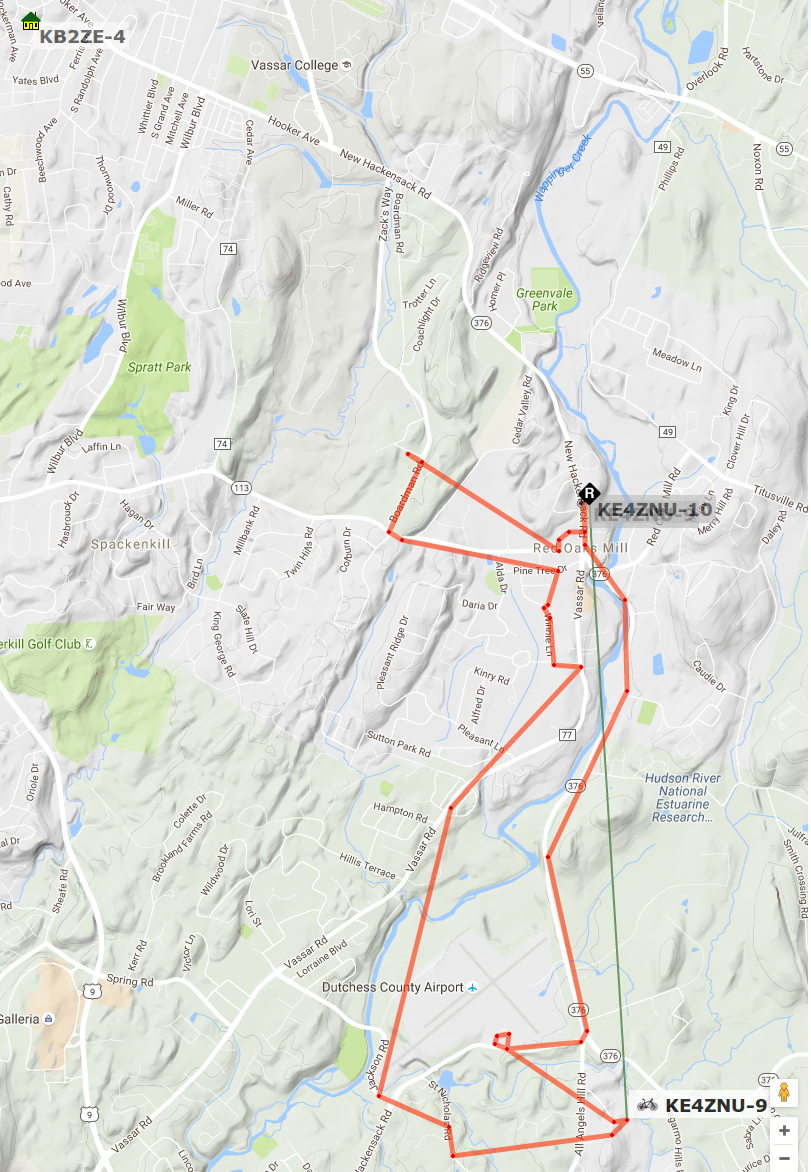
    A pleasant Friday morning ride with several stops:

    KE4ZNU-9 - APRS Reception - 2016-09-09
    KE4ZNU-9 – APRS Reception – 2016-09-09

    KE4ZNU-10 handled the spots near Red Oaks Mill, along parts of Vassar Rd that aren’t hidden by that bluff, and along Rt 376 north of the airport.

    The KB2ZE-4 iGate in the upper left corner caught most of the spots; it has a much better antenna in a much better location than the piddly mobile antenna in our attic.

    Several of the spots along the southern edge of the trip went through the K2PUT-15 digipeater high atop Mt. Ninham near Carmel, with coverage of the entire NY-NJ-CT area.

    The APRS-IS database filters out packets received by multiple iGates, so there’s only one entry per spot.

    All in all, KE4ZNU-10 covers the southern part of our usual biking range pretty much the way I wanted.