The Smell of Molten Projects in the Morning

Ed Nisley's Blog: Shop notes, electronics, firmware, machinery, 3D printing, laser cuttery, and curiosities. Contents: 100% human thinking, 0% AI slop.

Tag: Repairs

If it used to work, it can work again

  • Tour Easy: Baofeng Radio PTT Cable Glitch

    Tour Easy: Baofeng Radio PTT Cable Glitch

    The signal from the Baofeng UV-5R HT tucked behind the seat of my Tour Easy became exceedingly choppy on recent rides. Here’s an earlier version to give you an idea of the situation:

    Radio in seat wedge pack in bottle holder
    Radio in seat wedge pack in bottle holder

    Of course, it worked perfectly in the garage and only failed while on a ride. The clue turned out to be having it fail more on rough roads and crappy scab patches (courtesy of NSYDOT) than on relatively smooth asphalt.

    That led me to wiggle of All The Cables while crouched beside the bike in the garage, listening to another HT, and watching the transmit LED. After about five minutes of this, I found wiggling the 3.5 mm connector between the cable from the PTT button on the handlebar and the radio blinked the transmit LED: ah-HA!

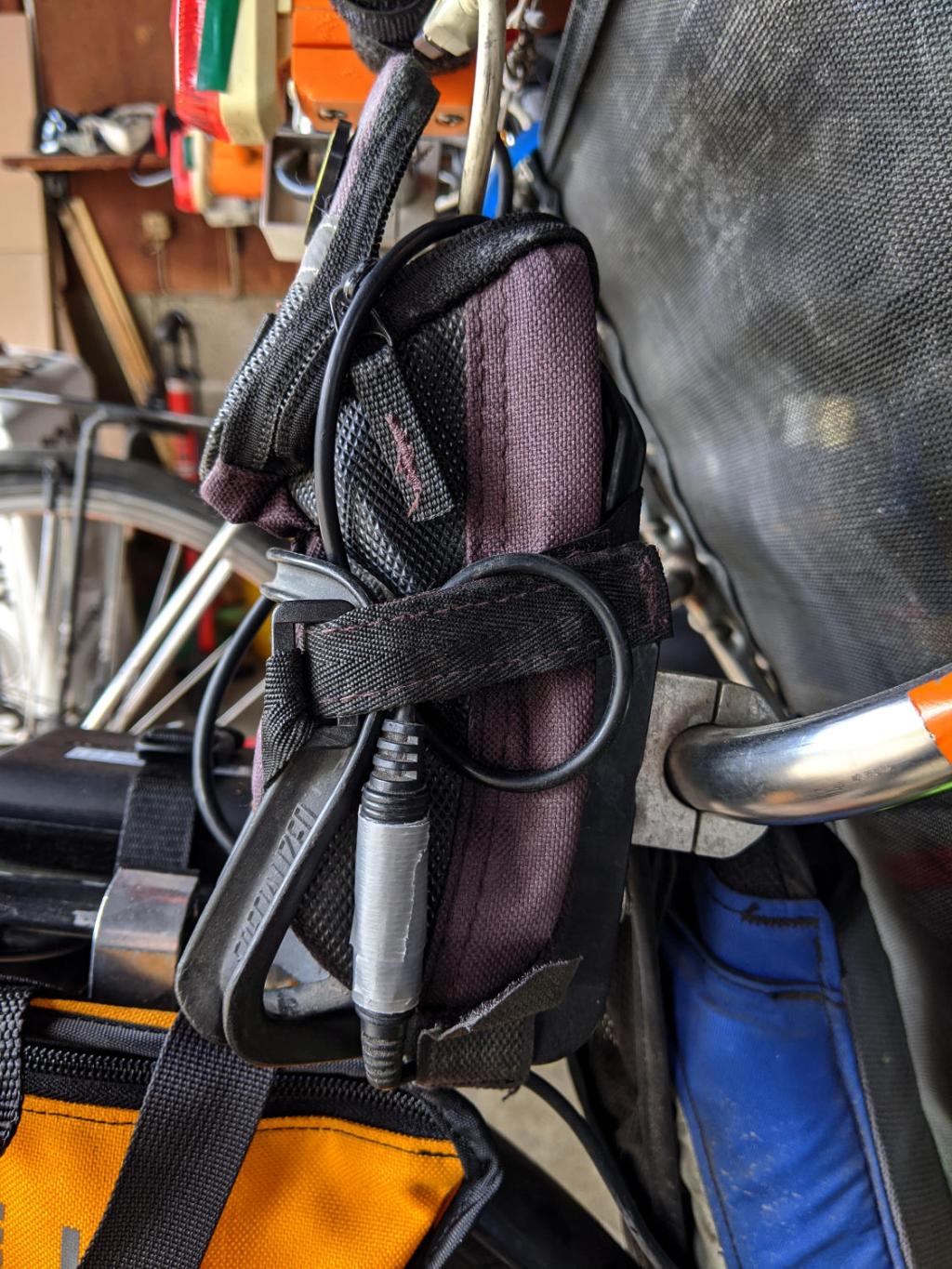
    The connector had worked itself loose from the straps holding the radio pack in place, pulled some slack in the cable, and was bouncing around in mid-air. A wrap of duct tape now holds the connector halves together, the upper loop passes around the Velco-ish strap, and the lower loop (from the PTT button) goes through the bottom of the repurposed bottle holder:

    Tour Easy - Baofeng PTT cable connection
    Tour Easy – Baofeng PTT cable connection

    No trouble on the next two rides, so we’ll call it fixed.

    Protip: it’s always the connector.

  • Cheese Slicer Re-wiring

    Cheese Slicer Re-wiring

    This happens occasionally:

    Cheese slicer - snapped wire
    Cheese slicer – snapped wire

    Repairing it with a length of 20 mil = 0.5 mm music wire didn’t take long:

    Cheese slicer - new wire
    Cheese slicer – new wire

    What did take a while was removing one of the screws, turning off another millimeter of thread, and sticking it back in again. The new wire is slightly thinner, stacks up just slightly less under the screw head (maybe I used two turns instead of three?), and let the thread stick into the Delrin bushing I put inside the aluminum roller.

    Imagine the middle screw with a slightly longer smooth end and you’ve got the idea:

    Cheese slicer - screw shafts
    Cheese slicer – screw shafts

    That was easy …

    It’s worth noting the JB Weld epoxy coating remains in as-applied condition after well over a year.

  • Round Soaker Hose Splint

    Round Soaker Hose Splint

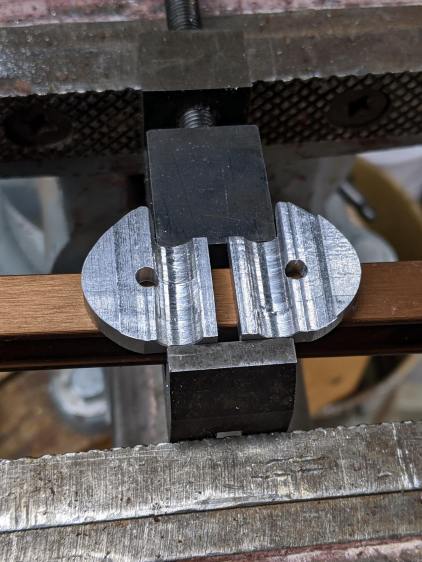
    One of two new round rubber soaker hoses arrived with a slight crimp, enough to suggest it would crumble at an inopportune moment. Rather than return the hose for something that’s not an obvious failure, I clamped the crimp:

    Round Soaker Hose Splice - top
    Round Soaker Hose Splice – top

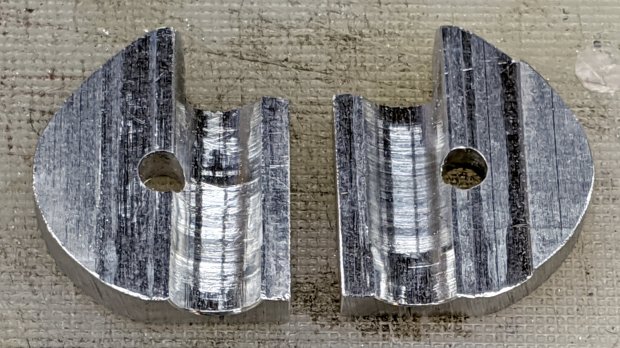
    Unlike the clamps for the punctured flat soaker hoses, this one doesn’t need to withstand much pressure and hold back a major leak, so I made the pieces a bit thicker and dispensed with the aluminum backing plates:

    Round Soaker Hose Splice - bottom
    Round Soaker Hose Splice – bottom

    The solid model is basically the same as for the flat hoses, with a slightly oval cylinder replacing the three channels:

    Round Soaker Hose Splice - OpenSCAD model
    Round Soaker Hose Splice – OpenSCAD model

    The OpenSCAD source code as a GitHub Gist:

    // Rubber Soaker Hose Splice
    // Ed Nisley KE4ZNU 2020-03
    Layout = "Build"; // [Hose,Block,Show,Build]
    TestFit = false; // true to build test fit slice from center
    //- Extrusion parameters must match reality!
    /* [Hidden] */
    ThreadThick = 0.25;
    ThreadWidth = 0.40;
    HoleWindage = 0.2;
    Protrusion = 0.1; // make holes end cleanly
    inch = 25.4;
    function IntegerMultiple(Size,Unit) = Unit * ceil(Size / Unit);
    ID = 0;
    OD = 1;
    LENGTH = 2;
    //———-
    // Dimensions
    // Hose lies along X axis
    Hose = [200,14.5,13.6]; // X = longer than anything else
    // 8-32 stainless screws
    Screw = [4.1,8.0,3.0]; // OD = head LENGTH = head thickness
    Washer = [4.4,9.5,1.0];
    Nut = [4.1,9.7,6.0];
    Block = [50.0,Hose.y + 2*Washer[OD],4.0 + 1.5*Hose.z]; // overall splice block size
    echo(str("Block: ",Block));
    Kerf = 1.0; // cut through middle to apply compression
    CornerRadius = Washer[OD]/2;
    NumScrews = 3; // screws along each side of cable
    ScrewOC = [(Block.x – 2*CornerRadius) / (NumScrews – 1),
    Block.y – 2*CornerRadius,
    2*Block.z // ensure complete holes
    ];
    echo(str("Screw OC: x=",ScrewOC.x," y=",ScrewOC.y));
    //———————-
    // Useful routines
    module PolyCyl(Dia,Height,ForceSides=0) { // based on nophead's polyholes
    Sides = (ForceSides != 0) ? ForceSides : (ceil(Dia) + 2);
    FixDia = Dia / cos(180/Sides);
    cylinder(d=(FixDia + HoleWindage),h=Height,$fn=Sides);
    }
    // Hose shape
    // This includes magic numbers measured from reality
    module HoseProfile() {
    NumSides = 12*4;
    rotate([0,-90,0])
    translate([0,0,-Hose.x/2])
    resize([Hose.z,Hose.y,0])
    cylinder(d=Hose.z,h=Hose.x,$fn=NumSides);
    }
    // Outside shape of splice Block
    // Z centered on hose rim circles, not overall thickness through center ridge
    module SpliceBlock() {
    difference() {
    hull()
    for (i=[-1,1], j=[-1,1]) // rounded block
    translate([i*(Block.x/2 – CornerRadius),j*(Block.y/2 – CornerRadius),-Block.z/2])
    cylinder(r=CornerRadius,h=Block.z,$fn=4*8);
    for (i = [0:NumScrews – 1], j=[-1,1]) // screw holes
    translate([-(Block.x/2 – CornerRadius) + i*ScrewOC.x,
    j*ScrewOC.y/2,
    -(Block.z/2 + Protrusion)])
    PolyCyl(Screw[ID],Block.z + 2*Protrusion,6);
    cube([2*Block.x,2*Block.y,Kerf],center=true); // slice through center
    }
    }
    // Splice block less hose
    module ShapedBlock() {
    difference() {
    SpliceBlock();
    HoseProfile();
    }
    }
    //———-
    // Build them
    if (Layout == "Hose")
    HoseProfile();
    if (Layout == "Block")
    SpliceBlock();
    if (Layout == "Show") {
    difference() {
    SpliceBlock();
    HoseProfile();
    }
    color("Green",0.25)
    HoseProfile();
    }
    if (Layout == "Build") {
    SliceOffset = TestFit && !NumScrews%2 ? ScrewOC.x/2 : 0;
    intersection() {
    translate([SliceOffset,0,Block.z/4])
    if (TestFit)
    cube([ScrewOC.x/2,4*Block.y,Block.z/2],center=true);
    else
    cube([4*Block.x,4*Block.y,Block.z/2],center=true);
    union() {
    translate([0,0.6*Block.y,Block.z/2])
    ShapedBlock();
    translate([0,-0.6*Block.y,Block.z/2])
    rotate([0,180,0])
    ShapedBlock();
    }
    }
    }

  • bCNC Rounding vs. G-Code Arcs: GRBL Error 33

    bCNC Rounding vs. G-Code Arcs: GRBL Error 33

    While cutting the top deck of the Pickett-flavored Tek Circuit Computer on the MPCNC, this happened:

    Tek CC - top deck - failed arcs
    Tek CC – top deck – failed arcs

    I traced the off-center circle with a marker to make it more visible, as it’s the drag knife cut that should have been the exit move after completing the window.

    Huh. It never did that before …

    The bCNC plot looked fine, but the Terminal log showed three Error 33 reports:

    Failed arc command - bCNC screen - terminal and plot
    Failed arc command – bCNC screen – terminal and plot

    The GRBL doc has this to say about Error 33:

    The motion command has an invalid target. G2, G3, and G38.2 generates this error, if the arc is impossible to generate or if the probe target is the current position.
    The error messages don’t occur immediately after the failing G2/G3 command, because bCNC sends enough commands to keep the GRBL serial input buffer topped off. After GRBL sends the error message, it continues chewing its way through the buffer and, when bCNC notices the first error, it stops sending more G-Code commands and shudders to a stop.

    The great thing about Free Software is that when it breaks, you have all the pieces. Looking into the GRBL source code provides a definition of Error 33:

    // [G2/3 Offset-Mode Errors]: No axis words and/or offsets in selected plane. The radius to the current
    //   point and the radius to the target point differs more than 0.002mm (EMC def. 0.5mm OR 0.005mm and 0.1% radius).

    Which doesn’t quite match the code, but it’s close enough:

    // Compute difference between current location and target radii for final error-checks.
                float delta_r = fabs(target_r-gc_block.values.r);
                if (delta_r > 0.005) {
                  if (delta_r > 0.5) { FAIL(STATUS_GCODE_INVALID_TARGET); } // [Arc definition error] > 0.5mm
                  if (delta_r > (0.001*gc_block.values.r)) { FAIL(STATUS_GCODE_INVALID_TARGET); } // [Arc definition error] > 0.005mm AND 0.1% radius
                }

    I’ve drag-knifed maybe a dozen top decks with no problem, so figuring out what broke took a while.

    The key turned out to be in the Terminal log, where all coordinates in the G-Code commands had, at most, two decimal places. The GCMC program producing the G-Code emits three decimal places, so bCNC rounded off a digit before squirting commands to GRBL.

    After more searching, it seems I’d told bCNC to do exactly that:

    bCNC Config - Round 2 digits - highlighted
    bCNC Config – Round 2 digits – highlighted

    Perhaps I’d mistakenly set “Decimal digits” instead of “DRO Zero padding” when I reduced the DRO resolution from three decimals to two? It’s set to “2” in the CNC 3018XL configuration, so this seems like a typical one-off brain fade.

    GRBL doesn’t execute invalid commands, so the tool position remains at the end of the window’s outer perimeter while the next two arc commands fail, because their center offsets produced completely invalid radii.

    The three failed arc commands should have cut the right end of the window, the inner side, and the left end, but left the tool position unchanged. The final arc command should have withdrawn the blade along the outer side of the window, but became a complete circle, with the commanded end point equal to the leftover starting point at the same radius from the deck center.

    The same G-Code file fails consistently with Decimal digits = 2 and runs perfectly with Decimal digits = 3, so at least I know a good fix.

    Protip: Keep your hands away from moving machinery, because you never know what might happen!

    This seems sufficiently obscure to merit becoming a Digital Machinist column. More analysis is in order …

  • Craftsman Hedge Trimmer: Laying on of Hands Repair

    Craftsman Hedge Trimmer: Laying on of Hands Repair

    It being the season for hacking down decorative grasses, our ancient Craftsman Hedge Trimmer woke up dead, a decade after I fixed its switch and predicted it’d be good for another decade.

    After verifying the failure isn’t in the wall outlet or the extension cord, haul it to the Basement Laboratory Repair Wing, clamp the blade in the bench vise, remove a myriad screws, and pop the top:

    Craftsman Hedge Trimmer - innards exposed
    Craftsman Hedge Trimmer – innards exposed

    I should have removed the screw in the extreme lower right corner and loosened the similar screw at the rear of the bottom plate; they’re two of the three machine screws engaging nuts embedded in the shell. Everything is greasy enough to let the nuts slide right out of the plastic and no harm was done, but that need not be so.

    After poking around a bit and finding nothing obvious, I checked the resistance across the plug: open-circuit with the switch OFF and nearly shorted with the switch ON.

    Huh.

    Put the case back together with just enough screws to prevent heartache & confusion, unclamp the blade, plug into the bench outlet, discover it works fine again, reinstall the rest of the screws, and continue the mission:

    Decorative grass bunches - early spring clearcut
    Decorative grass bunches – early spring clearcut

    We moved the Praying Mantis oothecae to nearby bushes for science!

  • Batmax NP-BX1 Batteries

    Batmax NP-BX1 Batteries

    Having recently lost one of the year-old DOT-01 batteries, a quartet of Batmax NP-BX1 batteries for the Sony HDR-AS30V helmet camera just arrived:

    Batmax DOT-01 Wasabi NP-BX1 - 2020-04
    Batmax DOT-01 Wasabi NP-BX1 – 2020-04

    The orange curve is the last surviving (“least dead”) Wasabi battery from the 2017-08 batch and the dark green curve just above it is another DOT-01 from 2019-02. The problem is not so much their reduced capacity, but their grossly reduced voltage-under-load that triggers a premature camera shutdown.

    The Batmax batteries measure better than the craptastic Wasabi batteries, worse than the STK batteries, and should survive the next year of riding. As before, I have zero belief that Amazon would send me a “genuine” Sony NP-BX1 battery, even at six times the nominal price, nor that it would perform six times better.

    Batmax is one of many randomly named Amazon Marketplace sellers offering seemingly identical NP-BX1 batteries: Newmowa, Miady, Powerextra, Pickle Power, LP, Enegon, and so forth. Mysteriously, it’s always cheaper to get a handful of batteries and a charger, rather than just the batteries, so I now have a two-socket USB charger:

    Batmax NP-BX1 - USB dual charger
    Batmax NP-BX1 – USB dual charger

    Despite the “5 V 2 A – 10 W” and “4.2 V 0.6 A – 5 W” label on the back, charging a pair of batteries after a ride started at 700 mA from a USB 3.0 port. The charger makes no claims about USB 3 compliance, so I’d expect it to top out around 1 A from a generously specified port.
  • CVS BP3MV1 Blood Pressure Monitor: Laying on of Hands Fix

    Our CVS blood pressure meter (a relabeled Microlife unit) ran its pump for a few seconds this morning, gave up, and spat out Err 3, which translates into “Inflation of the cuff takes too long”. Not surprising, as the motor wasn’t running.

    The AA alkaline cell quartet has plenty of mojo and no corrosion, but the motor doesn’t even turn over. The display is fine and the pressure release valve clicks, so it’s not completely dead.

    This unit is sufficiently old to have the compelling advantage of transferring data through a USB (mini-B) connection, rather than a Bluetooth link through some sketchy Internet cloudy Android app, so it’s worth at least a look inside. Four screws and some internal snaps along the sides hold the case together; it’s a surprisingly easy teardown.

    The business side of the PCB looks good:

    CVS Blood Pressure Monitor - PCB
    CVS Blood Pressure Monitor – PCB

    The various wires and solder joints for the “high current” parts look OK, although the wires likely don’t go all the way through the PCB:

    CVS Blood Pressure Monitor - PCB detail
    CVS Blood Pressure Monitor – PCB detail

    Q4 and Q5 look like they switch the compressor pump motor and pressure-release valve. D3 and D4 should tamp down the inductive energy, but they look like they’re in series with the outputs. Yes, the Valve wires are both black.

    The motor has a foam vibration isolation wrap, which is a nice touch. Although you can’t see them well, all its wires & solder joints look like they’re in good shape:

    CVS Blood Pressure Monitor - pump
    CVS Blood Pressure Monitor – pump

    The hose sticking out toward you plugs into the black right-angle fitting in the lower right corner of the picture. It’d help to have smaller fingers than mine, but I managed to get the hose off and on the fitting with only minor muttering.

    Seeing nothing obviously wrong, I installed the same batteries, poked the switch to start a measurement, and the motor ran fine. Of course, the measurement failed because the cuff & pressure sensor weren’t connected.

    Connect the hose, plug in the cuff & wrap it around my arm, poke the button, and everything works fine.

    Reassemble everything and it still works fine.

    I still think there’s a bad wire or solder joint in there somewhere, so this delightful “repair” can’t possibly last very long …