The Smell of Molten Projects in the Morning

Ed Nisley's Blog: Shop notes, electronics, firmware, machinery, 3D printing, laser cuttery, and curiosities. Contents: 100% human thinking, 0% AI slop.

Tag: MPCNC

Pimping and using a Mostly Printed CNC Machine

  • MPCNC: Z-Axis Height Probe

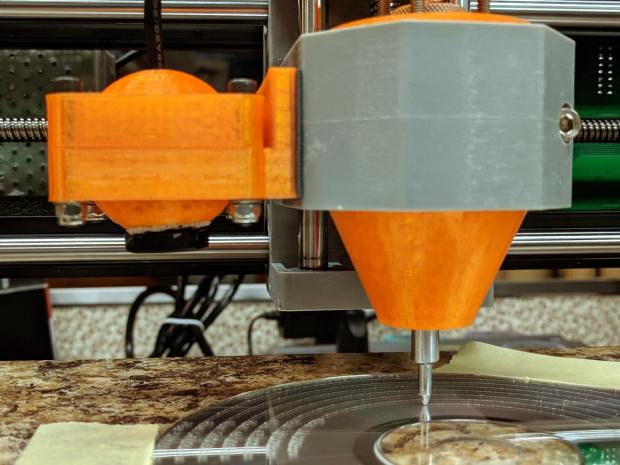
    A slight modification to the MPCNC LM12UU collet pen holder turns it into a long-reach Z-Axis Height Probe:
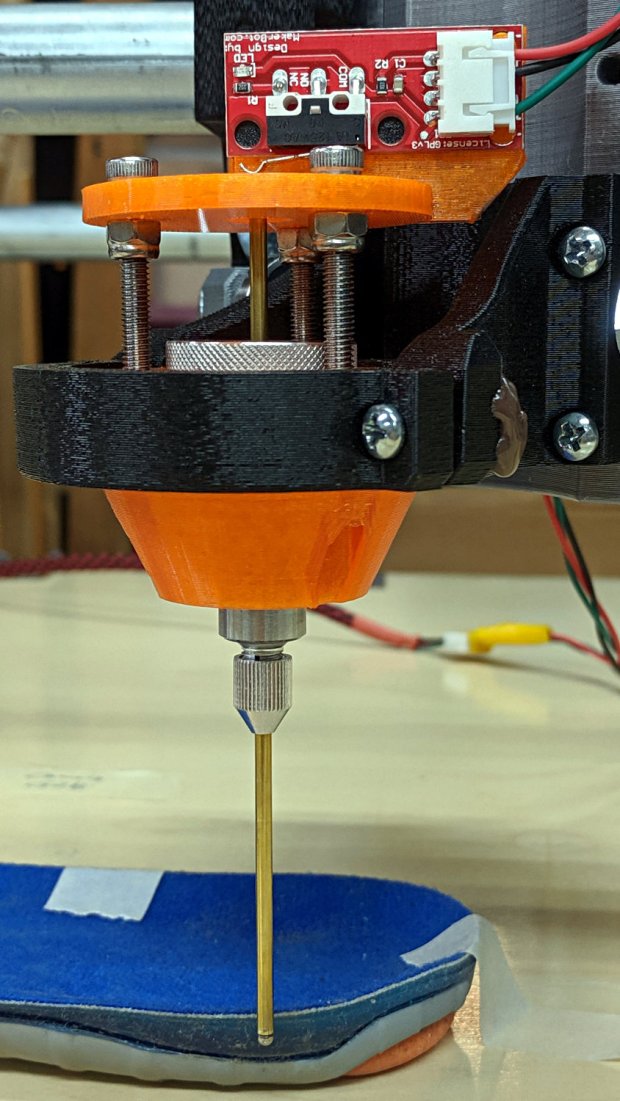
    CNC 3018-Pro - Z-Axis height probe - overview
    CNC 3018-Pro – Z-Axis height probe – overview

    A flange on the top plate holds a Makerbot-style endstop switch:
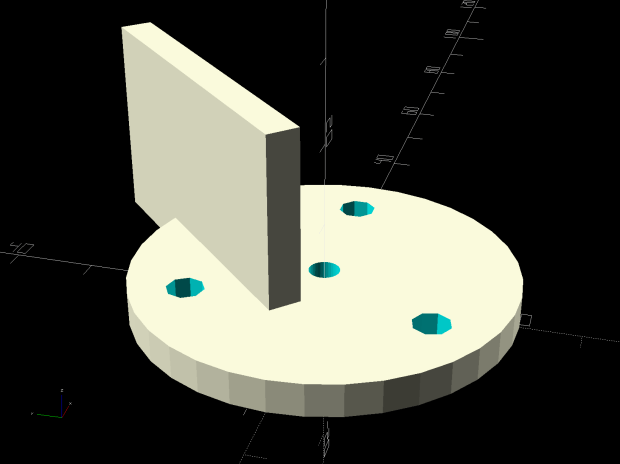
    Collet Holder - LM12UU - switch plate - solid model
    Collet Holder – LM12UU – switch plate – solid model

    The brass probe rod sports a 3/32 inch ball epoxied on its tip, although for my simple needs I could probably use the bare rod:
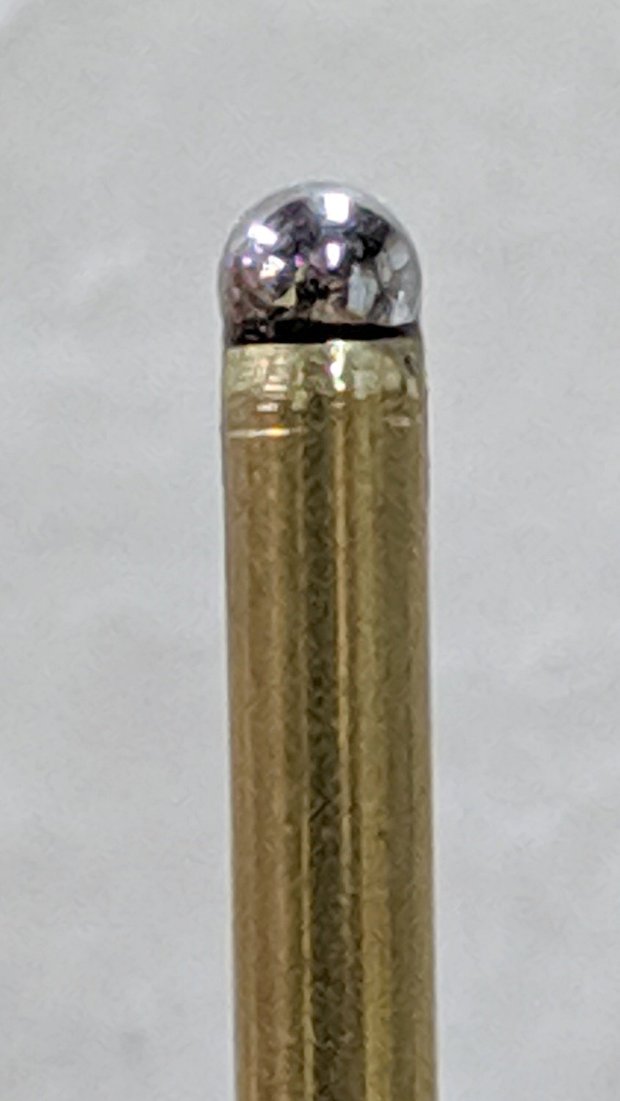
    CNC 3018-Pro - Z-Axis height probe - ball tip detail
    CNC 3018-Pro – Z-Axis height probe – ball tip detail

    I clamped the rod to extend a bit beyond the plate, where it can soak up most of the switch release travel, leaving just enough to reset the clickiness after each probe:

    CNC 3018-Pro - Z-Axis height probe - detail
    CNC 3018-Pro – Z-Axis height probe – detail

    The probe responds only to Z motion, not tip deflection in XY, so it’s not particularly good for soft objects with sloped sides, like the insole shown above. It works fine for rigid objects and should suffice to figure the modeling workflow.

    The bCNC Auto-Level probe routine scans a grid over a rectangular region:

    Insole - bCNC AutoLevel Probe Map - detail
    Insole – bCNC AutoLevel Probe Map – detail

    Which Meshlab turns into a solid model:

    Insole - Meshlab triangulation
    Insole – Meshlab triangulation

    That’s the bottom of the insole probed on a 5 mm grid, which takes something over an hour to accomplish.

    The OpenSCAD code as a GitHub Gist:

    // Collet pen cartridge holder using LM12UU linear bearing
    // Ed Nisley KE4ZNU – 2019-04-26
    // 2019-06 Adapted from LM12UU drag knife holder
    // 2019-09 Probe switch mount plate
    Layout = "Build"; // [Build, Show, Puck, Mount, Plate, SwitchPlate]
    /* [Hidden] */
    // Extrusion parameters
    ThreadThick = 0.25; // [0.20, 0.25]
    ThreadWidth = 0.40; // [0.40]
    // Constants
    Protrusion = 0.1; // [0.01, 0.1]
    HoleWindage = 0.2;
    inch = 25.4;
    function IntegerMultiple(Size,Unit) = Unit * ceil(Size / Unit);
    ID = 0;
    OD = 1;
    LENGTH = 2;
    //- Adjust hole diameter to make the size come out right
    module PolyCyl(Dia,Height,ForceSides=0) { // based on nophead's polyholes
    Sides = (ForceSides != 0) ? ForceSides : (ceil(Dia) + 2);
    FixDia = Dia / cos(180/Sides);
    cylinder(r=(FixDia + HoleWindage)/2,h=Height,$fn=Sides);
    }
    //- Dimensions
    // Basic shape of DW660 snout fitting into the holder
    // Lip goes upward to lock into MPCNC mount
    Snout = [44.6,50.0,9.6]; // LENGTH = ID height
    Lip = 4.0; // height of lip at end of snout
    // Holder & suchlike
    PenShaft = 3.5; // hole to pass pen cartridge
    WallThick = 4.0; // minimum thickness / width
    Screw = [4.0,8.5,25.0]; // thread ID, washer OD, length
    Insert = [4.0,6.0,10.0]; // brass insert
    Bearing = [12.0,21.0,30.0]; // linear bearing body
    Plate = [PenShaft,Snout[OD] – WallThick,WallThick]; // spring reaction plate
    echo(str("Plate: ",Plate));
    SpringSeat = [0.56,7.5,2*ThreadThick]; // wire = ID, coil = OD, seat depth = length
    PuckOAL = max(Bearing[LENGTH],(Snout[LENGTH] + Lip)); // total height of DW660 fitting
    echo(str("PuckOAL: ",PuckOAL));
    Key = [Snout[ID],25.7,(Snout[LENGTH] + Lip)]; // rectangular key
    NumScrews = 3;
    //ScrewBCD = 2.0*(Bearing[OD]/2 + Insert[OD]/2 + WallThick);
    ScrewBCD = (Snout[ID] + Bearing[OD])/2;
    echo(str("Screw BCD: ",ScrewBCD));
    NumSides = 9*4; // cylinder facets (multiple of 3 for lathe trimming)
    // MBI Endstop switch PCB
    PCB = [40.0,1.6,16.5]; // endstop PCB, switch downward, facing parts
    Touchpoint = [-4.8,4.8,4.5]; // contact point from PCB edges, solder side
    TapeThick = 1.0; // foam mounting tape
    SwitchMount = [PCB.x,WallThick,PCB.z + Touchpoint.z + Plate.z];
    module DW660Puck() {
    translate([0,0,PuckOAL])
    rotate([180,0,0]) {
    cylinder(d=Snout[OD],h=Lip/2,$fn=NumSides);
    translate([0,0,Lip/2])
    cylinder(d1=Snout[OD],d2=Snout[ID],h=Lip/2,$fn=NumSides);
    cylinder(d=Snout[ID],h=(Snout[LENGTH] + Lip),$fn=NumSides);
    translate([0,0,(Snout[LENGTH] + Lip) – Protrusion])
    cylinder(d1=Snout[ID],d2=2*WallThick + Bearing[OD],h=PuckOAL – (Snout[LENGTH] + Lip),$fn=NumSides);
    intersection() {
    translate([0,0,0*Lip + Key.z/2])
    cube(Key,center=true);
    cylinder(d=Snout[OD],h=Lip + Key.z,$fn=NumSides);
    }
    }
    }
    module MountBase() {
    difference() {
    DW660Puck();
    translate([0,0,-Protrusion]) // bearing
    PolyCyl(Bearing[OD],2*PuckOAL,NumSides);
    for (i=[0:NumScrews – 1]) // clamp screws
    rotate(i*360/NumScrews)
    translate([ScrewBCD/2,0,-Protrusion])
    rotate(180/8)
    PolyCyl(Insert[OD],2*PuckOAL,8);
    }
    }
    module SpringPlate() {
    difference() {
    cylinder(d=Plate[OD],h=Plate[LENGTH],$fn=NumSides);
    translate([0,0,-Protrusion]) // pen cartridge hole
    PolyCyl(PenShaft,2*Plate[LENGTH],NumSides);
    translate([0,0,Plate.z – SpringSeat[LENGTH]]) // spring retaining recess
    PolyCyl(SpringSeat[OD],SpringSeat[LENGTH] + Protrusion,NumSides);
    for (i=[0:NumScrews – 1]) // clamp screws
    rotate(i*360/NumScrews)
    translate([ScrewBCD/2,0,-Protrusion])
    rotate(180/8)
    PolyCyl(Screw[ID],2*PuckOAL,8);
    }
    }
    module SwitchPlate() {
    translate([0,0,Plate.z])
    rotate([180,0,0])
    SpringPlate();
    rotate(45)
    translate([Touchpoint.x,Touchpoint.y + TapeThick,0])
    cube(SwitchMount,center=false);
    }
    //—–
    // Build it
    if (Layout == "Puck")
    DW660Puck();
    if (Layout == "Plate")
    SpringPlate();
    if (Layout == "SwitchPlate")
    SwitchPlate();
    if (Layout == "Mount")
    MountBase();
    if (Layout == "Show") {
    MountBase();
    translate([0,0,1.6*PuckOAL])
    rotate([180,0,0])
    SpringPlate();
    }
    if (Layout == "Build") {
    translate([0,Snout[OD]/2,PuckOAL])
    rotate([180,0,0])
    MountBase();
    translate([0,-Snout[OD]/2,0])
    SpringPlate();
    }
  • bCNC Probe Camera Calibration

    I’m sure I’ll do this again some time …

    Focus the camera at whatever distance needed to clear the longest tooling you’ll use or, at least, some convenient distance from the platform. You must touch off Z=0 at the surface before using bCNC’s probe camera alignment, because it will move the camera to the preset focus distance.

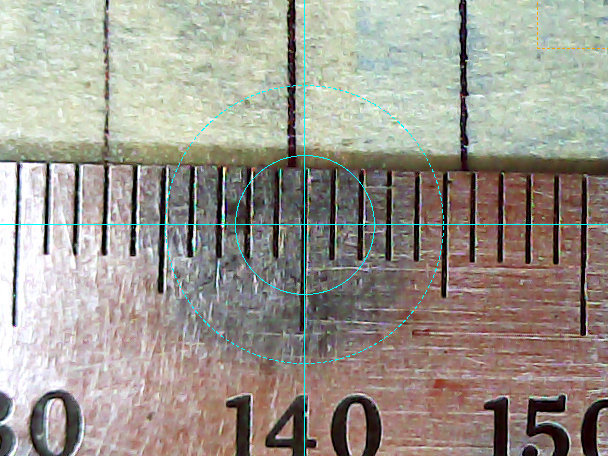
    Align the camera’s optical axis perpendicular to the table by making it stare into a mirror flat on the platform, then tweaking the camera angles until the crosshair centers on the reflected lens image. This isn’t dead centered, but it’s pretty close:

    CNC 3018-Pro - bCNC Probe Camera - collimation - detail
    CNC 3018-Pro – bCNC Probe Camera – collimation – detail

    The camera will be focused on the mirror, not the reflection, as you can tell by the in-focus crud on the mirror. Whenever you focus the lens, you’ll probably move the optical axis, so do the best you can with the fuzzy image.

    You can adjust small misalignments with the Haircross (seems backwards to me) Offset values.

    A cheap camera’s lens barrel may not be aligned with its optical axis, giving the lens a jaunty tilt when it’s correctly set up:

    CNC 3018-Pro - Engraving - taped
    CNC 3018-Pro – Engraving – taped

    With the camera focus set correctly, calibrate the camera Offset from the tool (a.k.a. Spindle) axis:

    • Put a pointy tool at XY=0
    • Touch off Z=0 on a stack of masking tape
    • Put a dent in the tape with the bit
    • Move to the camera’s focused Z level
    • Make the dent more conspicuous with a Sharpie, as needed
    • Register the spindle location
    • Jog to center the crosshair on the dent
    • Register the camera location

    Calibrate the Crosshair ring diameter thusly:

    • Put an object with a known size on the platform
    • Touch off Z=0 at its surface
    • Move to the camera’s focused Z level
    • Set the Crosshair diameter equal to the known object size
    • Adjust the Scale value to make the Crosshair overlay reality

    For example, calibrating the diameter to 10 mm against a shop scale:

    CNC 3018-Pro Probe Camera - scale factor - detail
    CNC 3018-Pro Probe Camera – scale factor – detail

    At 10 mm above the CD, setting the camera’s resolution to 11.5 pixel/mm:

    CNC 3018-Pro - bCNC probe camera - settings
    CNC 3018-Pro – bCNC probe camera – settings

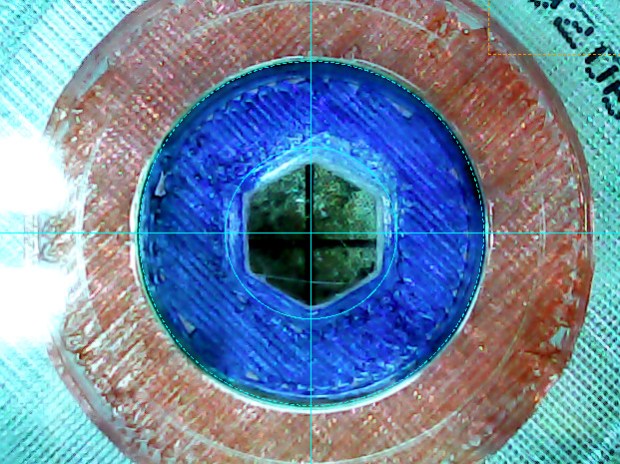
    Makes the outer circle exactly 15.0 mm in diameter to match the CD hub ring ID:

    CNC 3018-Pro - bCNC probe camera - red-blue CD target
    CNC 3018-Pro – bCNC probe camera – red-blue CD target

    I doubt anybody can find the pixel/mm value from first principles, so you must work backwards from an object’s actual size.

  • CNC 3018-Pro: Diamond Drag Engraving Test Disk

    The smaller and more rigid CNC 3018-Pro should be able to engrave text faster than the larger and rather springy MPCNC, which could engrave text at about 50 mm/min. This test pattern pushes both cutting depth and engraving speed to absurd values:

    Engraving Test Pattern - 2019-09-18
    Engraving Test Pattern – 2019-09-18

    Compile the GCMC source to generate G-Code, lash a CD / DVD to the platform (masking tape works fine), touch off the XY coordinates in the center, touch off Z=0 on the surface, then see what happens:

    CNC 3018-Pro - Engraving test pattern - curved text
    CNC 3018-Pro – Engraving test pattern – curved text

    The “engraving depth” translates directly into the force applied to the diamond point, because the spring converts displacement into force. Knowing the Z depth, you can calculate or guesstimate the force.

    Early results from the 3018 suggest it can engrave good-looking text about 20 times faster than the MPCNC:

    CNC 3018-Pro - Engraving - speeds
    CNC 3018-Pro – Engraving – speeds

    You must trade off speed with accuracy on your very own machine, as your mileage will certainly differ!

    The GCMC source code as a GitHub Gist:

    // Engraving test piece
    // Ed Nisley KE4ZNU – 2019-09
    //—–
    // Command line parameters
    // -D OuterDia=number
    if (!isdefined("OuterDia")) {
    OuterDia = 120mm – 2mm; // CD = 120, 3.5 inch drive = 95
    }
    OuterRad = OuterDia / 2.0;
    comment("Outer Diameter: ",OuterDia);
    comment(" Radius: ",OuterRad);
    //—–
    // Library routines
    include("tracepath.inc.gcmc");
    include("engrave.inc.gcmc");
    //—–
    // Bend text around an arc
    function ArcText(TextPath,Center,Radius,BaseAngle,Align) {
    PathLength = TextPath[-1].x;
    Circumf = 2*pi()*Radius;
    TextAngle = to_deg(360 * PathLength / Circumf);
    AlignAngle = BaseAngle + (Align == "Left" ? 0 :
    Align == "Center" ? -TextAngle / 2 :
    Align == "Right" ? -TextAngle :
    0);
    ArcPath = {};
    foreach(TextPath; pt) {
    if (!isundef(pt.x) && !isundef(pt.y) && isundef(pt.z)) { // XY motion, no Z
    r = Radius – pt.y;
    a = 360deg * (pt.x / Circumf) + AlignAngle;
    ArcPath += {[r*cos(a) + Center.x, r*sin(a) + Center.y,-]};
    }
    elif (isundef(pt.x) && isundef(pt.y) && !isundef(pt.z)) { // no XY, Z up/down
    ArcPath += {pt};
    }
    else {
    error("Point is not pure XY or pure Z: " + to_string(pt));
    }
    }
    return ArcPath;
    }
    //—–
    // Set up for drawing
    SafeZ = 10.0mm; // above clamps and screws
    TravelZ = 1.0mm; // above workpiece
    PlotZ = -0.5mm; // tune for best results
    TextSpeed = 1000mm; // intricate detail
    DrawSpeed = 2000mm; // smooth curves
    TextFont = FONT_HSANS_1_RS;
    TextSize = [2.0mm,2.0mm];
    TextLeading = 2*TextSize.y; // line spacing
    DiskCenter = [0mm,0mm]; // middle of the platter
    InnerDia = 40mm;
    InnerRad = InnerDia / 2.0;
    comment("Inner Diameter: ",InnerDia);
    comment(" Radius: ",InnerRad);
    NumRings = ceil((OuterRad – (InnerRad + TextLeading))/TextLeading); // number of rings to draw
    comment("Numer of rings: ",NumRings);
    if (1) {
    comment("Text Size begins");
    feedrate(TextSpeed);
    ts = "Text size: " + to_string(TextSize);
    tp = scale(typeset(ts,TextFont),TextSize);
    tpa = ArcText(tp,DiskCenter,OuterRad,90deg,"Left");
    engrave(tpa,TravelZ,PlotZ);
    }
    if (1) {
    comment("Depth variations begin");
    TextRadius = OuterRad;
    pz = 0.0mm;
    repeat(NumRings ; i) {
    comment(" depth: " + to_string(pz));
    feedrate(TextSpeed);
    ts = "Depth: " + to_string(pz) + " at " + to_string(TextSpeed) + "/min";
    tp = scale(typeset(ts,TextFont),TextSize);
    tpa = ArcText(tp,DiskCenter,TextRadius,-5deg,"Right");
    engrave(tpa,TravelZ,pz);
    feedrate(DrawSpeed);
    goto([0,-TextRadius,-]);
    move([-,-,pz]);
    arc_ccw([-TextRadius,0,-],-TextRadius);
    goto([-,-,TravelZ]);
    feedrate(TextSpeed);
    tp = scale(typeset("Rad: " + to_string(TextRadius),TextFont),TextSize);
    tpa = ArcText(tp,DiskCenter,TextRadius,180deg,"Right");
    engrave(tpa,TravelZ,PlotZ);
    TextRadius -= TextLeading;
    pz -= 0.10mm;
    }
    }
    if (1) {
    comment("Feedrate variations begin");
    TextRadius = OuterRad;
    ps = 250mm;
    repeat(NumRings ; i) {
    comment(" speed: " + to_string(ps) + "/min");
    feedrate(ps);
    ts = "Speed: " + to_string(ps) + "/min at " + to_string(PlotZ);
    tp = scale(typeset(ts,TextFont),TextSize);
    tpa = ArcText(tp,DiskCenter,TextRadius,5deg,"Left");
    engrave(tpa,TravelZ,PlotZ);
    TextRadius -= TextLeading;
    ps += 250mm;
    }
    }
    if (1) {
    comment("Off-center text arcs begin");
    feedrate(TextSpeed);
    tc = [-40mm/sqrt(2),-40mm/sqrt(2)]; // center point
    r = 3mm;
    s = [0.5mm,0.5mm];
    ts = "Radius: " + to_string(r) + " Size: " + to_string(s);
    tp = scale(typeset(ts,TextFont),s);
    tpa = ArcText(tp,tc,r,0deg,"Center");
    engrave(tpa,TravelZ,PlotZ);
    r = 5mm;
    s = [1.0mm,1.0mm];
    ts = "Radius: " + to_string(r) + " Size: " + to_string(s);
    tp = scale(typeset(ts,TextFont),s);
    tpa = ArcText(tp,tc,r,0deg,"Center");
    engrave(tpa,TravelZ,PlotZ);
    r = 8mm;
    s = [1.5mm,1.5mm];
    ts = "Radius: " + to_string(r) + " Size: " + to_string(s);
    tp = scale(typeset(ts,TextFont),s);
    tpa = ArcText(tp,tc,r,0deg,"Center");
    engrave(tpa,TravelZ,PlotZ);
    r = 15mm;
    s = [3.0mm,3.0mm];
    ts = "Radius: " + to_string(r) + " Size: " + to_string(s);
    tp = scale(typeset(ts,FONT_HSCRIPT_2),s);
    tpa = ArcText(tp,tc,r,0deg,"Center");
    engrave(tpa,TravelZ,PlotZ);
    }
    if (1) {
    comment("Attribution begins");
    feedrate(TextSpeed);
    tp = scale(typeset("Ed Nisley – KE4ZNU – softsolder.com",TextFont),TextSize);
    tpa = ArcText(tp,DiskCenter,15mm,0deg,"Center");
    engrave(tpa,TravelZ,PlotZ);
    tp = scale(typeset("Engraving Test Disc",TextFont),TextSize);
    tpa = ArcText(tp,DiskCenter,15mm,180deg,"Center");
    engrave(tpa,TravelZ,PlotZ);
    }
    goto([-,-,SafeZ]);
    goto([0mm,0mm,-]);
    comment("Done!");
    #!/bin/bash
    # Engraving test pattern generator
    # Ed Nisley KE4ZNU – 2019-08
    Diameter='OuterDia=116mm'
    Flags='-P 3 –pedantic'
    # Set these to match your file layout
    LibPath='/opt/gcmc/library'
    Prolog='/mnt/bulkdata/Project Files/CNC 3018-Pro Router/Patterns/gcmc/prolog.gcmc'
    Epilog='/mnt/bulkdata/Project Files/CNC 3018-Pro Router/Patterns/gcmc/epilog.gcmc'
    Script='/mnt/bulkdata/Project Files/CNC 3018-Pro Router/Patterns/Engraving Test.gcmc'
    ts=$(date +%Y%m%d-%H%M%S)
    fn='TestPattern_'${ts}'.ngc'
    echo Output: $fn
    rm -f $fn
    echo "(File: "$fn")" > $fn
    /opt/gcmc/src/gcmc -D $Diameter $Flags \
    –include "$LibPath" –prologue "$Prolog" –epilogue "$Epilog" \
    "$Script" >> $fn
  • CNC 3018-Pro: GRBL Configuration

    The CNC 3018-Pro router arrived with GRBL 1.1f installed on the Camtool V3.3 board and ran well enough, although it accelerated very slowly. After installing Home switches, figuring out the travel limits, and trying different speeds & accelerations, it runs much better:

    3018 CNC - Endstop switches - overview
    3018 CNC – Endstop switches – overview

    Configuration values to remember for next time:

    $1=100 turns off the stepper motor drivers after 100 ms of inactivity:

    3018 X - 100ms timeout - 100mm-min 12V 500 ma-div
    3018 X – 100ms timeout – 100mm-min 12V 500 ma-div

    There’s no force worth mentioning on a diamond scribe when the motors stop, so there’s no reason to keep them energized, and the DRV8825 chips resume from the same microstep when re-enabled.

    $3=5 reverses the X and Z motor rotation, so you can use the same type of cable on all three axes and have them move the way you’d expect.

    $20=1 turns on Soft Limits, thereby producing an error when you (or the G-Code) tries to move beyond the machine’s limits, as defined by the $120 $121 $122 values relative to the Home switch positions.

    $21=0 leaves Hard Limits off, because I didn’t see much point in switches on both ends of all the axes for this little bitty machine.

    $22=1 enables the Home cycle, after which you must start each session by homing the machine.

    $27=1.000 sets the Pull-off distance from all three Home positions, so the machine ends up at absolute XYZ = -1.000 mm relative to the switch trip points after homing. This depends on the mechanics of the limit switches, but seems OK with the MBI-style switches I used:

    3018 CNC - X axis endstop - 1 mm pull-off
    3018 CNC – X axis endstop – 1 mm pull-off

    $100 $101 $102 = 1600 set the XYZ step/mm, which requires knowing the 3018-Pro uses two-start leadscrews with a 2 mm pitch = 4 mm lead:

    3018 CNC - two-start leadscrew
    3018 CNC – two-start leadscrew

    The Camtool V3.3 board hardwires the DRV8825 stepper controllers into 32 microstep mode, so:

    1600 step/mm = (200 full step/rev) × (32 microstep/full step) / (4 mm/rev)

    $110 $111 $112 = 1100 set the maximum speed along the XYZ axes in mm/min. Note the hard upper limit set by the maximum microcontroller interrupt rate of about 40 k/s:

    1500 mm/min = 25 mm/s = (40×10³ step/s) / (1600 step/mm)

    I’ll have more to say about speed limits, stepper current, torque, and similar topics.

    $120 $121 $122 = 3000 set the acceleration along the XYZ axes in mm/sec². These are two orders of magnitude higher than the default acceleration, which accounts for the as-received sluggish acceleration.

    $130=299.000 $131=179.000 $132=44.000 set the XYZ travel limits relative to the Home switch trip points, which feed into the $20=1 Soft Limits. You could probably eke out another millimeter along each axis, but this is what I came up with.

    With all those in place, the G54 coordinate system puts the XY origin dead in the middle of the platform and the Z origin a little bit below its upper travel limit. Set them thusly:

    G10 L2 P1 X-147 Y-90.6 Z-1.5

    The original and tweaked GRBL configuration settings as a GitHub Gist:

    $0=10
    $1=25
    $2=0
    $3=5
    $4=0
    $5=0
    $6=0
    $10=1
    $11=0.010
    $12=0.002
    $13=0
    $20=0
    $21=0
    $22=0
    $23=0
    $24=25.000
    $25=500.000
    $26=250
    $27=1.000
    $30=1000
    $31=0
    $32=0
    $100=1600.000
    $101=1600.000
    $102=1600.000
    $110=1000.000
    $111=1000.000
    $112=800.000
    $120=30.000
    $121=30.000
    $122=30.000
    $130=200.000
    $131=200.000
    $132=200.000
    $0=10
    $1=100
    $2=0
    $3=5
    $4=0
    $5=0
    $6=0
    $10=1
    $11=0.010
    $12=0.020
    $13=0
    $20=1
    $21=0
    $22=1
    $23=0
    $24=100.000
    $25=1000.000
    $26=25
    $27=1.000
    $30=1000
    $31=0
    $32=0
    $100=1600.000
    $101=1600.000
    $102=1600.000
    $110=1100.000
    $111=1100.000
    $112=1100.000
    $120=3000.000
    $121=3000.000
    $122=3000.000
    $130=299.000
    $131=179.000
    $132=44.000
    ok
    [G54:-147.000,-90.600,-1.500]
    [G55:0.000,0.000,0.000]
    [G56:0.000,0.000,0.000]
    [G57:0.000,0.000,0.000]
    [G58:0.000,0.000,0.000]
    [G59:0.000,0.000,0.000]
    [G28:0.000,0.000,0.000]
    [G30:0.000,0.000,0.000]
    [G92:0.000,0.000,0.000]
    [TLO:0.000]
    [PRB:0.000,0.000,0.000:0]
    ok

    The as-shipped configuration is mostly for reference, but ya never know when it might come in handy.

  • Raspberry Pi vs. MicroSD: Another One Bites the Dust

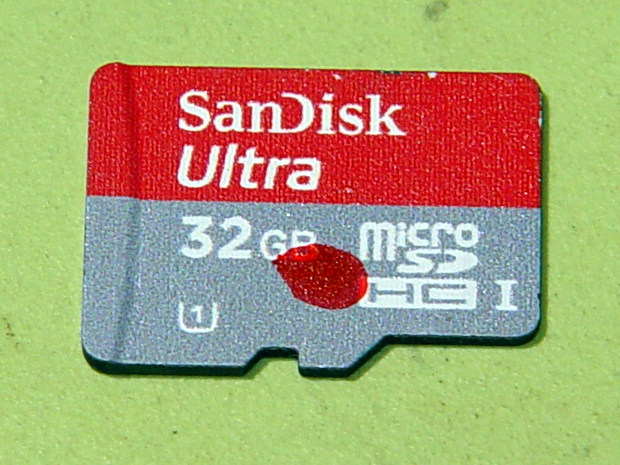
    The Raspberry Pi running the MPCNC recently seized up with baffling symptoms, which generally indicates the poor little MicroSD card serving as a “hard disk” has failed:

    Defunct Sandisk Ultra 32 GB MicroSD
    Defunct Sandisk Ultra 32 GB MicroSD

    I managed to open a terminal emulator, whereupon all of the non-built-in shell commands couldn’t be found.

    Proceed as before: binary-copy the entire MicroSD card to another one, pop it in the RPi, and it’s all good again.

    For the record, the new card is an unused Samsung Evo Plus. I do not understand the difference between the “Evo Plus” and “Evo+” branding, other than to suspect one of being a very good fake.

    In round numbers, MicroSD cards seem to last a year under what seems like not-too-demanding service; I’m not running the MPCNC all day, every day.

  • Logitech “Quickcam for Notebooks Deluxe” USB Camera Disassembly

    My collection of old USB cameras emitted a Logitech Quickcam for Notebooks Deluxe, with a tag giving a cryptic M/N of V-UGB35. Given Logitech’s penchant for overlapping names, its USB identifiers may be more useful for positive ID:

    ID 046d:08d8 Logitech, Inc. QuickCam for Notebook Deluxe

    It works fine as a simple V4L camera and its 640×480 optical resolution may suffice for simple purposes, even if it’s not up to contemporary community standards.

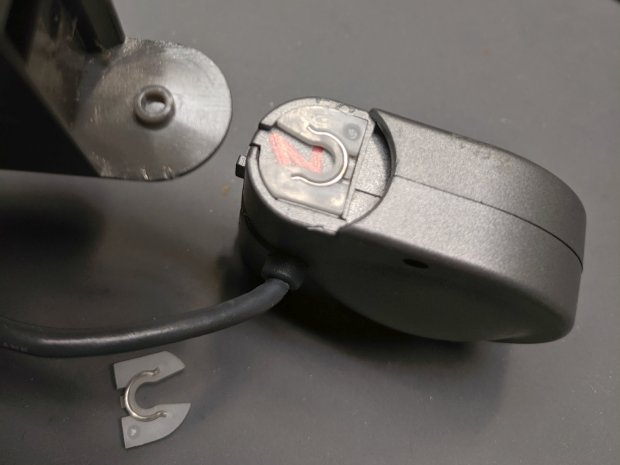
    The key disassembly step turned out to be simply pulling the pivoting base off, then recovering an errant spring clip from the Laboratory Floor:

    Logitech V-UGB35 USB Camera - mount removed
    Logitech V-UGB35 USB Camera – mount removed

    The clips have a beveled side and fit into their recesses in only one orientation; there’s no need for brute force.

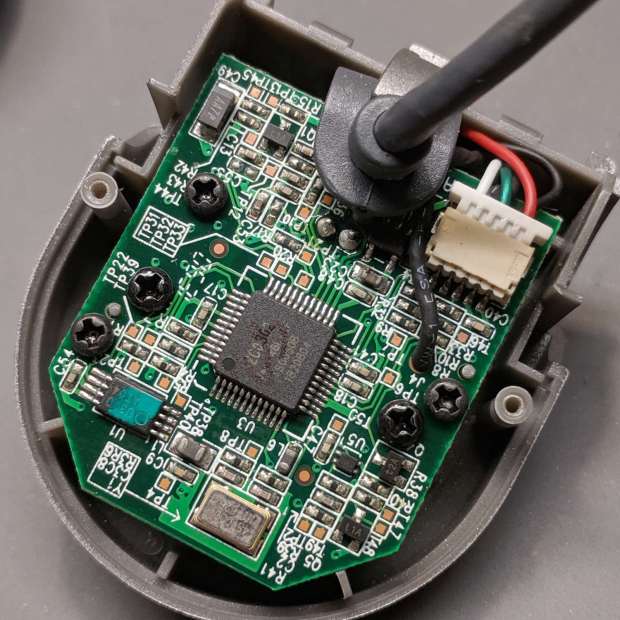
    Removing the two obvious case screws reveals the innards:

    Logitech V-UGB35 USB Camera - PCB rear
    Logitech V-UGB35 USB Camera – PCB rear

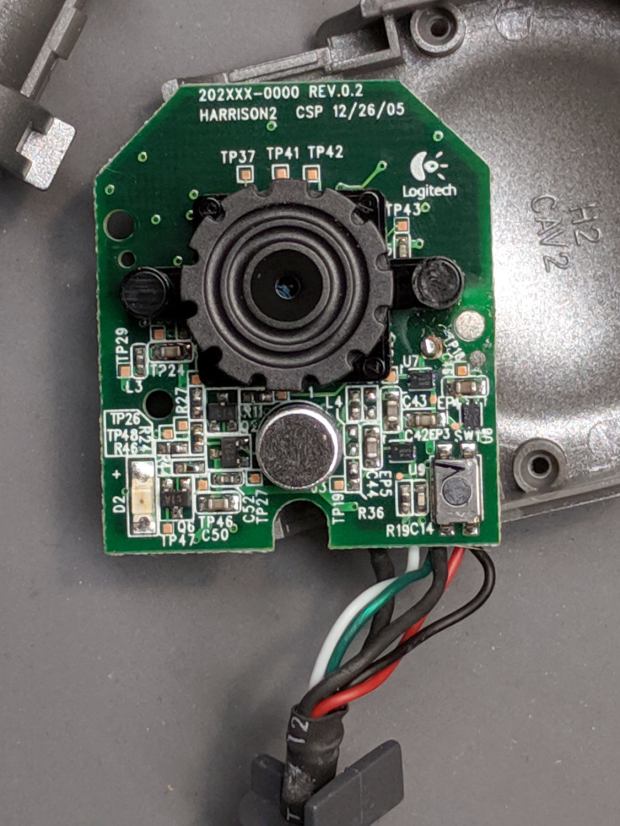
    Three more screws secure the PCB:

    Logitech V-UGB35 USB Camera - PCB front
    Logitech V-UGB35 USB Camera – PCB front

    The ribbed focus knob around the lens makes it more useful than a nominally fixed-focus camera.

    Reassembly is in reverse order.

    I miss having obvious case screws …

  • MPCNC: Calculating Spring Rates

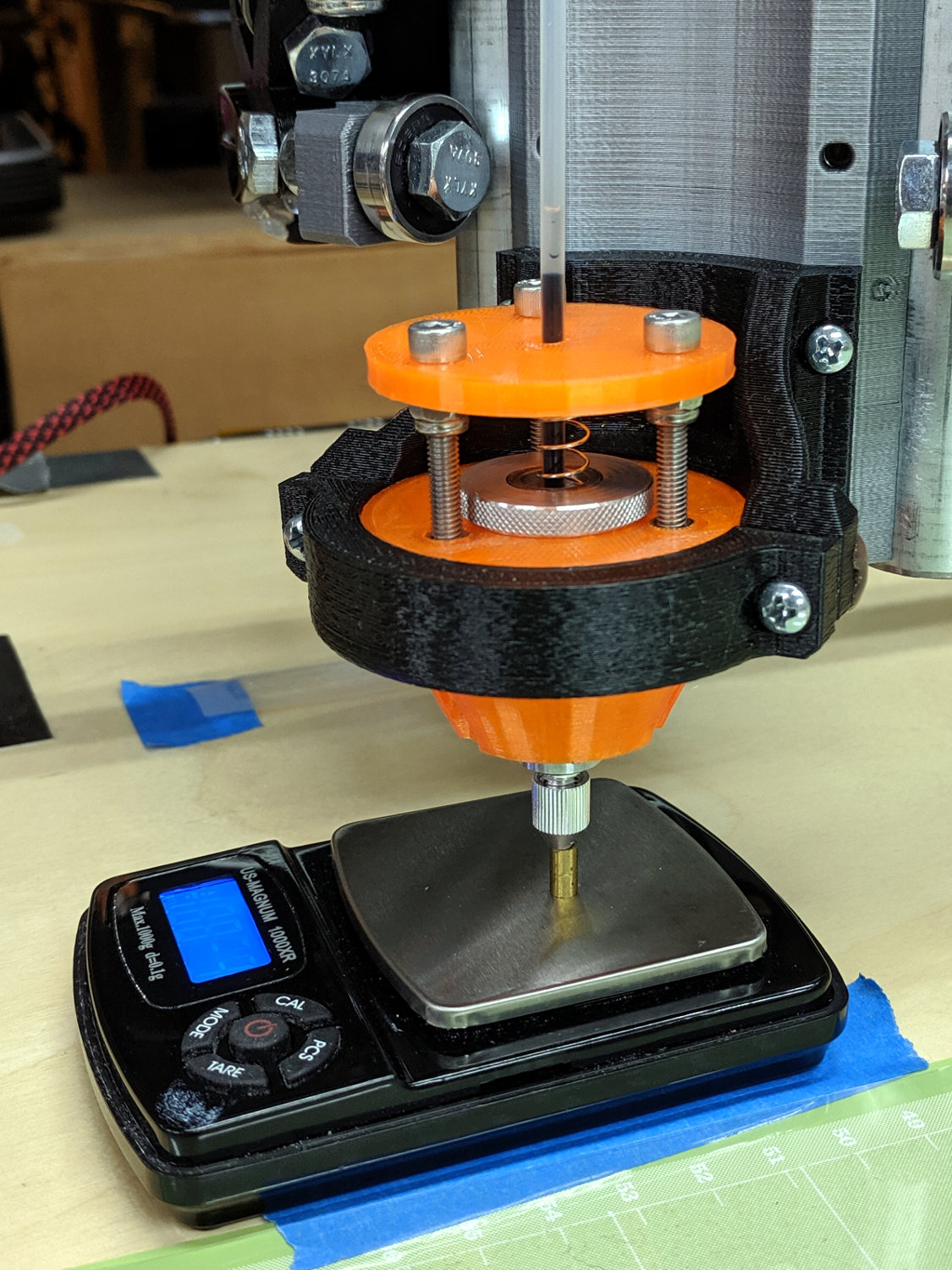
    Calculate the spring rates for the drag knife, diamond engraver, and collet pen holders by measuring the downforce every 0.5 mm (or so):

    LM12UU Collet Pen Holder - spring rate test
    LM12UU Collet Pen Holder – spring rate test

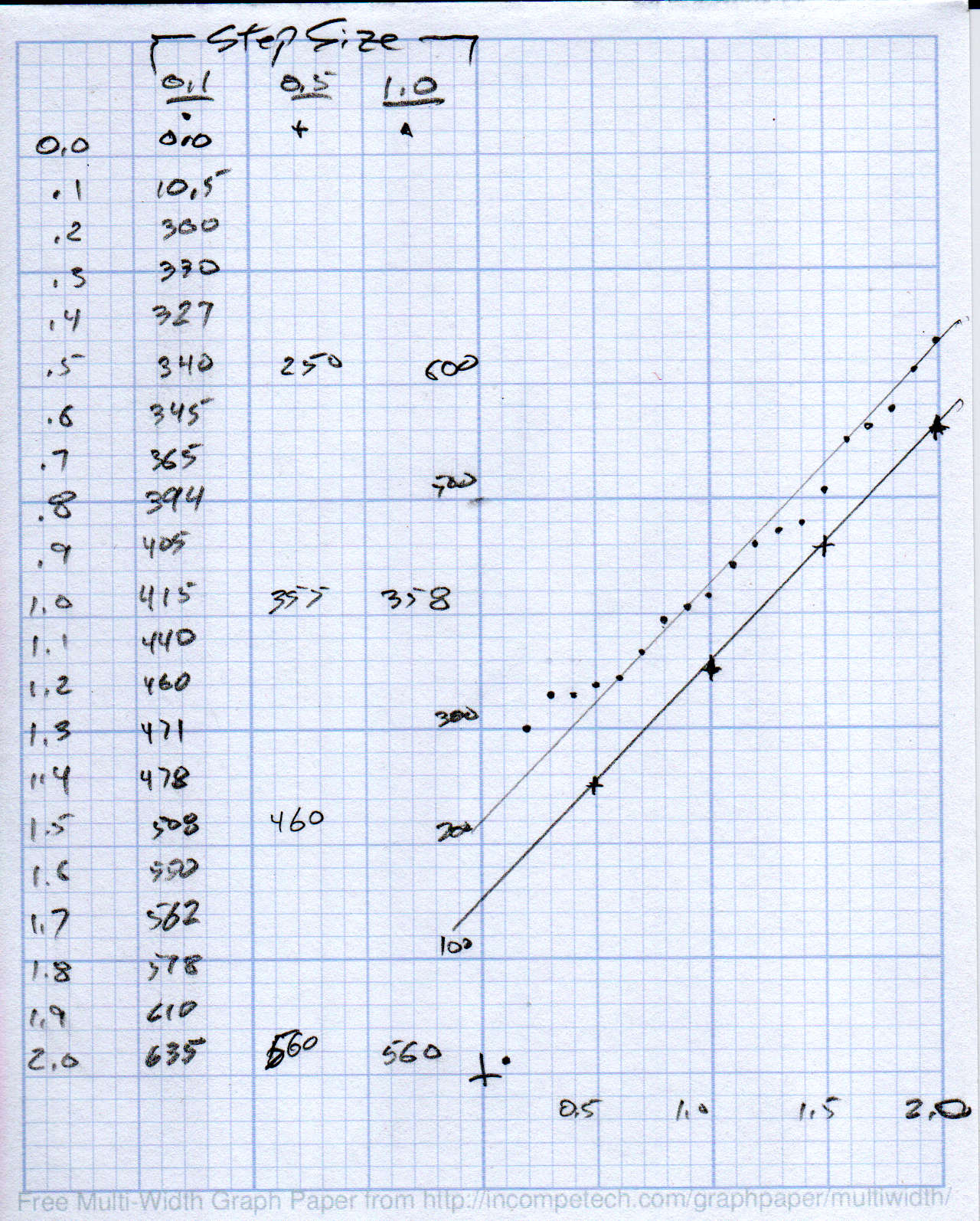
    Then plotting the data points and eyeballing a straight-line curve fit:

    MPCNC - Drag Knife Holder - spring constant
    MPCNC – Drag Knife Holder – spring constant

    Doing it on hard mode definitely has a certain old-school charm. The graph highlights mis-measured data and similar problems, because, if you don’t see a pretty nearly straight line, something’s gone awry.

    But we live in the future, so there’s an easier way:

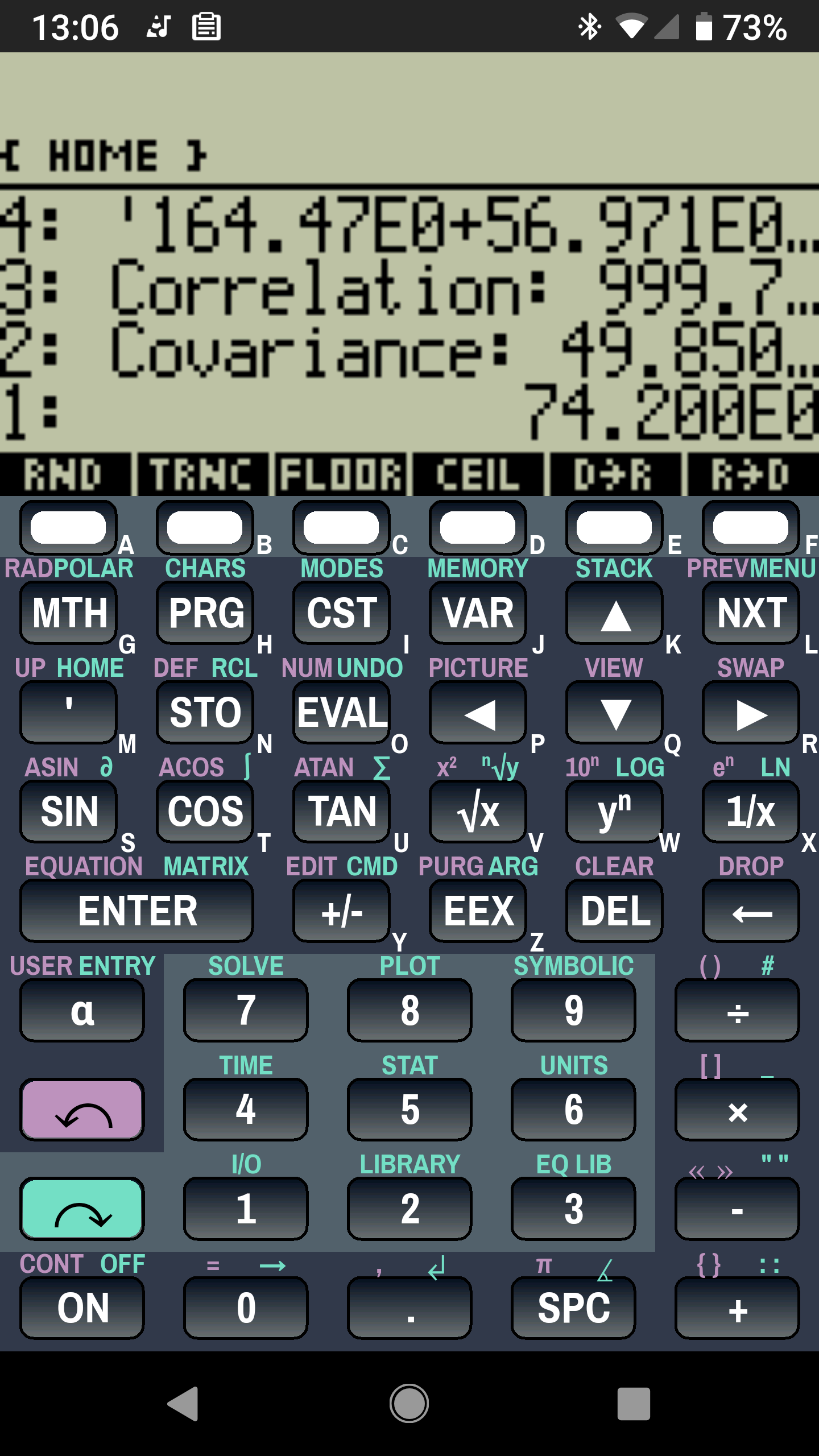
    Droid48 - Spring Rate - Linear Fit coefficients
    Droid48 – Spring Rate – Linear Fit coefficients

    Well, OK, it’s the future as of the early 1990s, when HP introduced its HP 48 calculators. I’m using the Droid48 emulator on my ancient Google Pixel: living in the past, right here in the future.

    Start by firing up the STAT library (cyan arrow, then the 5 key), selecting Fit Data … from the dropdown list, then selecting the Linear Fit model:

    Droid48 - Spring Rate - Linear Fit screen
    Droid48 – Spring Rate – Linear Fit screen

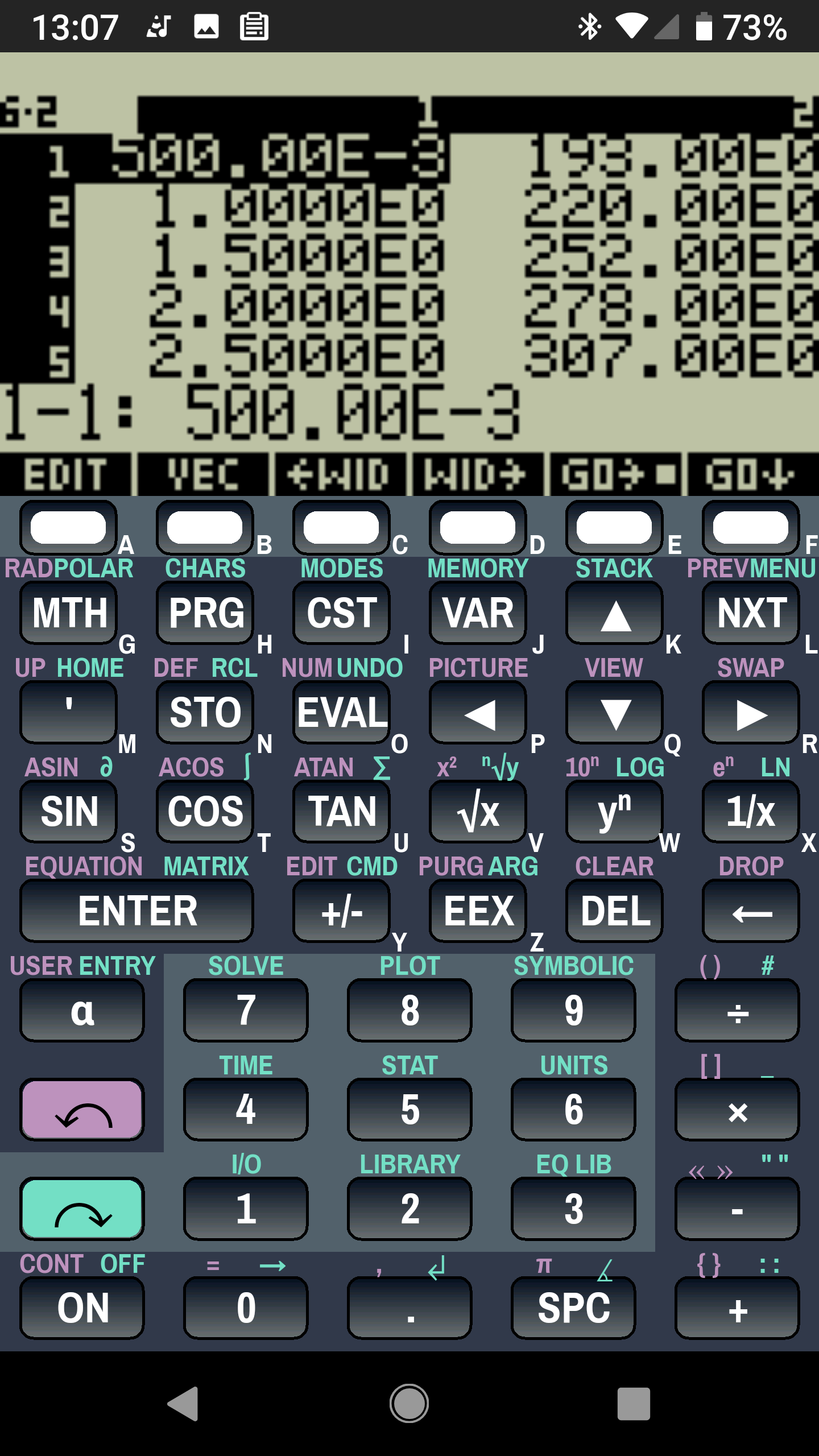
    Then tap EDIT and enter the data in a tiny spreadsheet:

    Droid48 - Spring Rate - Linear Fit data
    Droid48 – Spring Rate – Linear Fit data

    My default “engineering mode” numeric display format doesn’t show well on the tiny screen. Tapping the WID→ key helps a bit, but shorter numbers would be better.

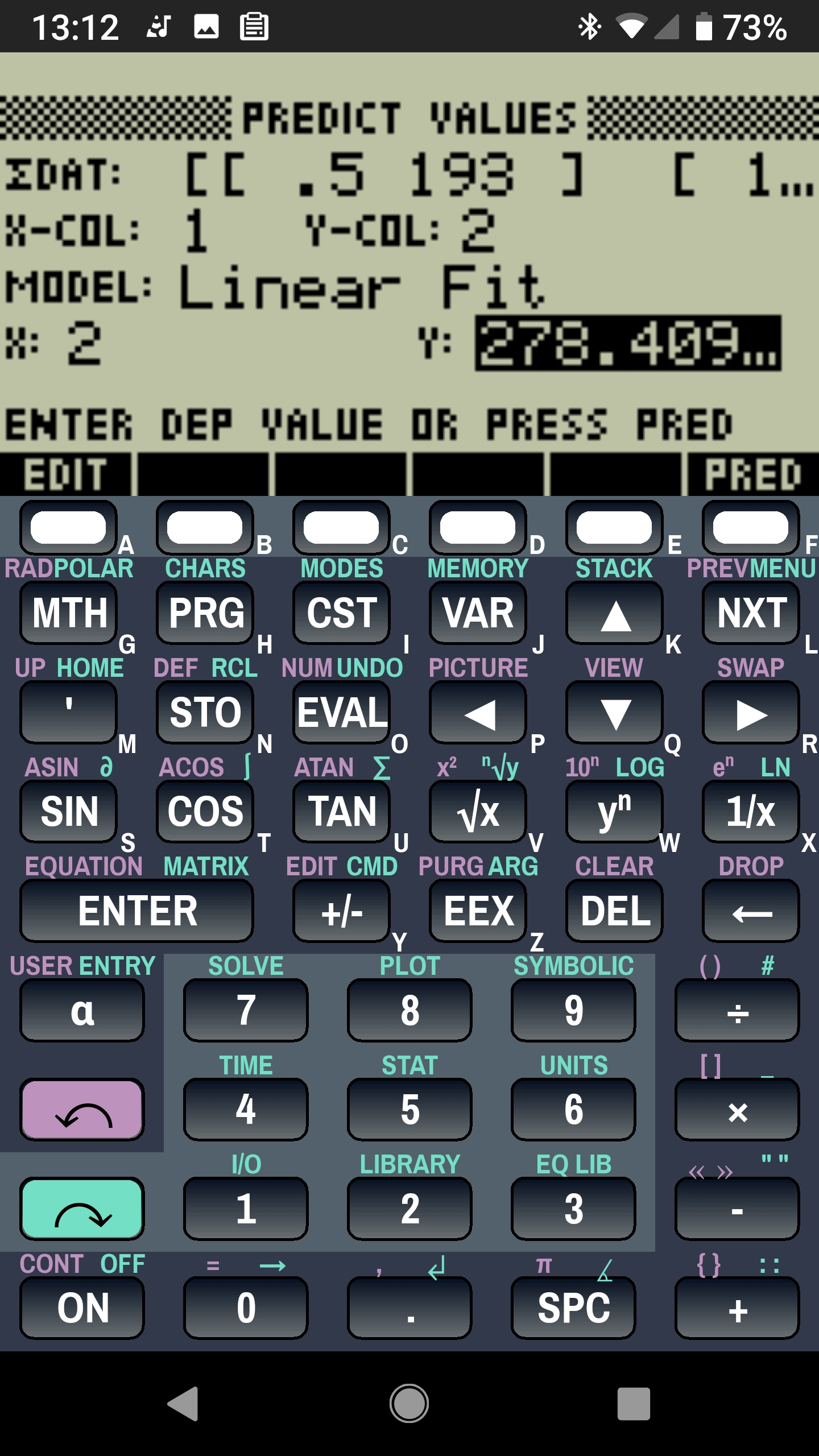
    With the data entered, set an X value and tap the PRED key to get the corresponding Y value:

    Droid48 - Spring Rate - Linear Fit prediction
    Droid48 – Spring Rate – Linear Fit prediction

    Tapping the OK button puts the line’s coefficients on the stack, as shown in the first picture. Write ’em on a strip of tape, stick to the top of the holder, and it’s all good:

    LM12UU Collet Pen Holder - test plot - overview
    LM12UU Collet Pen Holder – test plot – overview

    Works for me, anyhow.

    HP still has the HP 48g manuals online. The (unofficial) HP Museum has a page on the HP 48S. More than you want to know about the 48 series.