The Smell of Molten Projects in the Morning

Ed Nisley's Blog: Shop notes, electronics, firmware, machinery, 3D printing, laser cuttery, and curiosities. Contents: 100% human thinking, 0% AI slop.

Tag: M2

Using and tweaking a Makergear M2 3D printer

  • Rounded Rectangles in OpenSCAD: Mold Positives?

    A discussion on the OpenSCAD mailing list about making a rectangular solid with rounded edges having different radii eventually produced this delightful result:

    Basic Rounded Cube
    Basic Rounded Cube

    Those guys make me feel dumb, because they’re generally solving problems I can’t even imagine, but I know what to do with this solution. One could slice it in half horizontally, emboss a height map defining a logo / picture into the top surface, print it out on your favorite 3D printer, maybe smooth / seal the surface a bit, define it to be a positive mold pattern, cast / pour flexible silicone around it, and get a negative mold for a pourable precious material such as, oh, chocolate.

    You could make half a dozen of them, arrange them inside a suitable printed frame, pour the silicone, and get a multi-cavity mold for better manufacturing productivity.

    The overall block lacks draft, because the problem it solves presumes you need a block of specific outside dimensions: it overlays three full-size rectangular blocks that define the dimensions. OpenSCAD constructs spheres such that they may be slightly smaller than the defined radius at the poles and, depending on their alignment, a face at the equator may reduce the outer dimension of a surrounding hull.

    Given a sufficiently bendy silicone mold, you might not need any draft at all. If you do need draft and you don’t care about a very slightly undersized pattern, remove the internal blocks and increase the XY spacing of the lower four spheres by enough to make the draft come out right.

    The grayscale logo / image should have nice smooth transitions that produce suitable draft for the fine details; a bare black-and-white image might not work well. Shallow is good, but that conflicts with 3D printing’s crappy resolution: 1 mm = 10 layers, tops. That might not matter in practice.

    You’re supposed to temper the chocolate, but that’s probably more relevant for Fine Art molds.

    The (slightly modified) OpenSCAD source code:

    module rcube(size=[30, 20, 10], radius=[3, 2, 1], center=true)
    	hull() {
    		translate( center ? [0,0,0] : size/2 ) {
    			cube(size-2*radius+[2*radius[0],0,0],center=true);
    			cube(size-2*radius+[0,2*radius[1],0],center=true);
    			cube(size-2*radius+[0,0,2*radius[2]],center=true);
    
    			for(x = [-0.5,0.5], y = [-0.5,0.5], z = [-0.5,0.5])
    				translate([x * ( size[0] - 2*radius[0]),
    						   y * ( size[1] - 2*radius[1]),
    						   z * ( size[2] - 2*radius[2])])
    					scale([radius[0], radius[1], radius[2]])
    						sphere(1.0,$fn=4*4);
    		}
    	}
    
    rcube();
    

    When I get around to doing molds, maybe I can remember what I was thinking…

  • Canon NB-6LH Battery Test Fixture

    Our Larval Engineer’s new camera uses Canon NB-6LH batteries, which have exactly the same nominal capacity as the NB-5L batteries for my camera, despite being not quite the same size. I cannot imagine any reason for that, other than brand fractionation, but there it is.

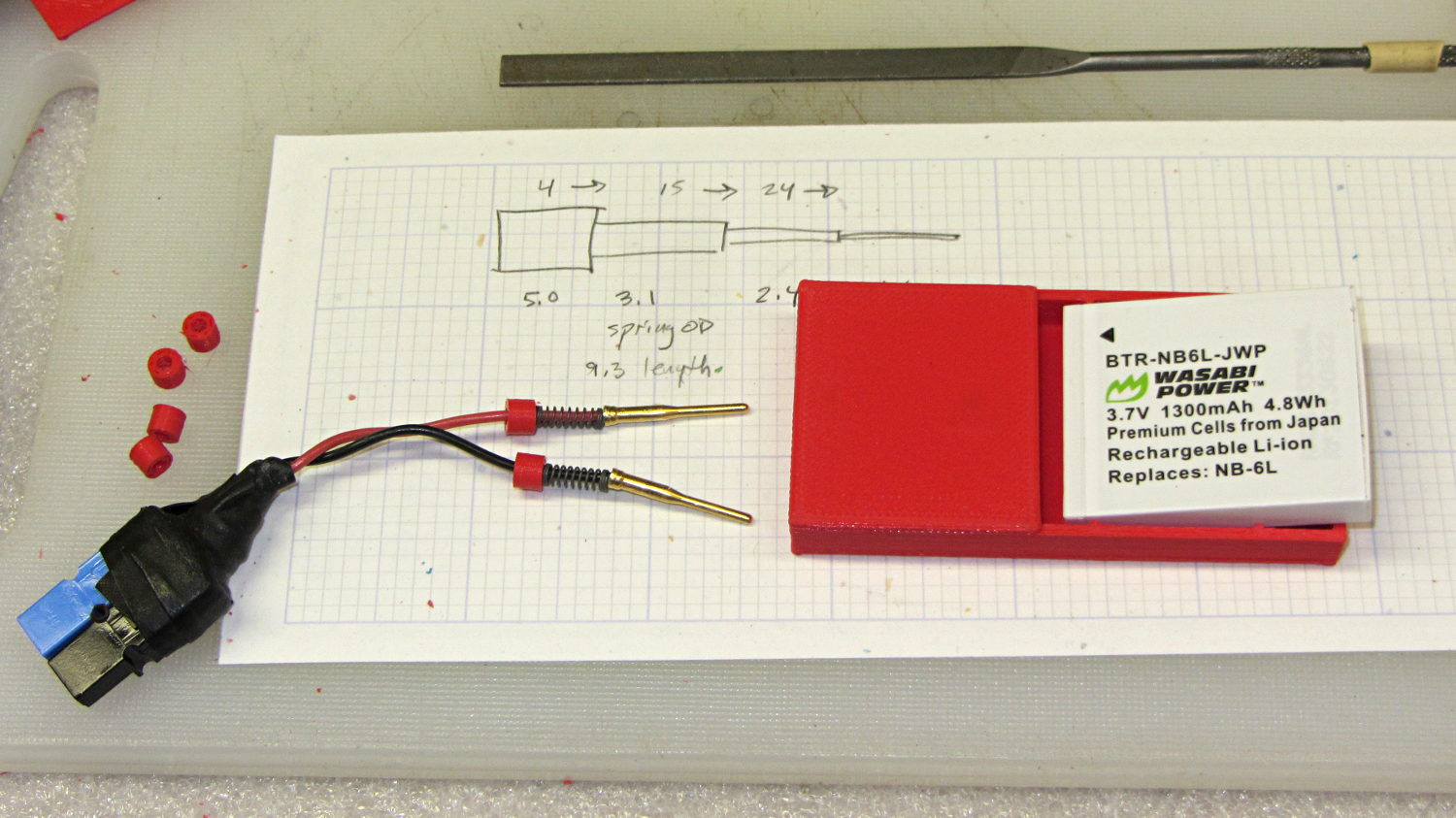
    Fortunately, the sizes are pretty close, so I conjured up another 3D printed battery test fixture for the rundown tests:

    Canon NB-6L battery holder
    Canon NB-6L battery holder

    That hideous Powerpole thing came from one of the AA cell packs I’d been using to power the HTs on the bikes, before switching to lithium battery packs. It’s easier to harvest something suitable than to build a new thing, particularly for such a low duty cycle gadget.

    This view of the solid model shows the contact pins, with the lid floating over its alignment pegs (made from snippets of 1.75 mm filament):

    NB-6L Holder - fit layout
    NB-6L Holder – fit layout

    The pegs simplify gluing the lid in place, a process for which you can never have enough clamps:

    Canon NB-6L holder - lid gluing
    Canon NB-6L holder – lid gluing

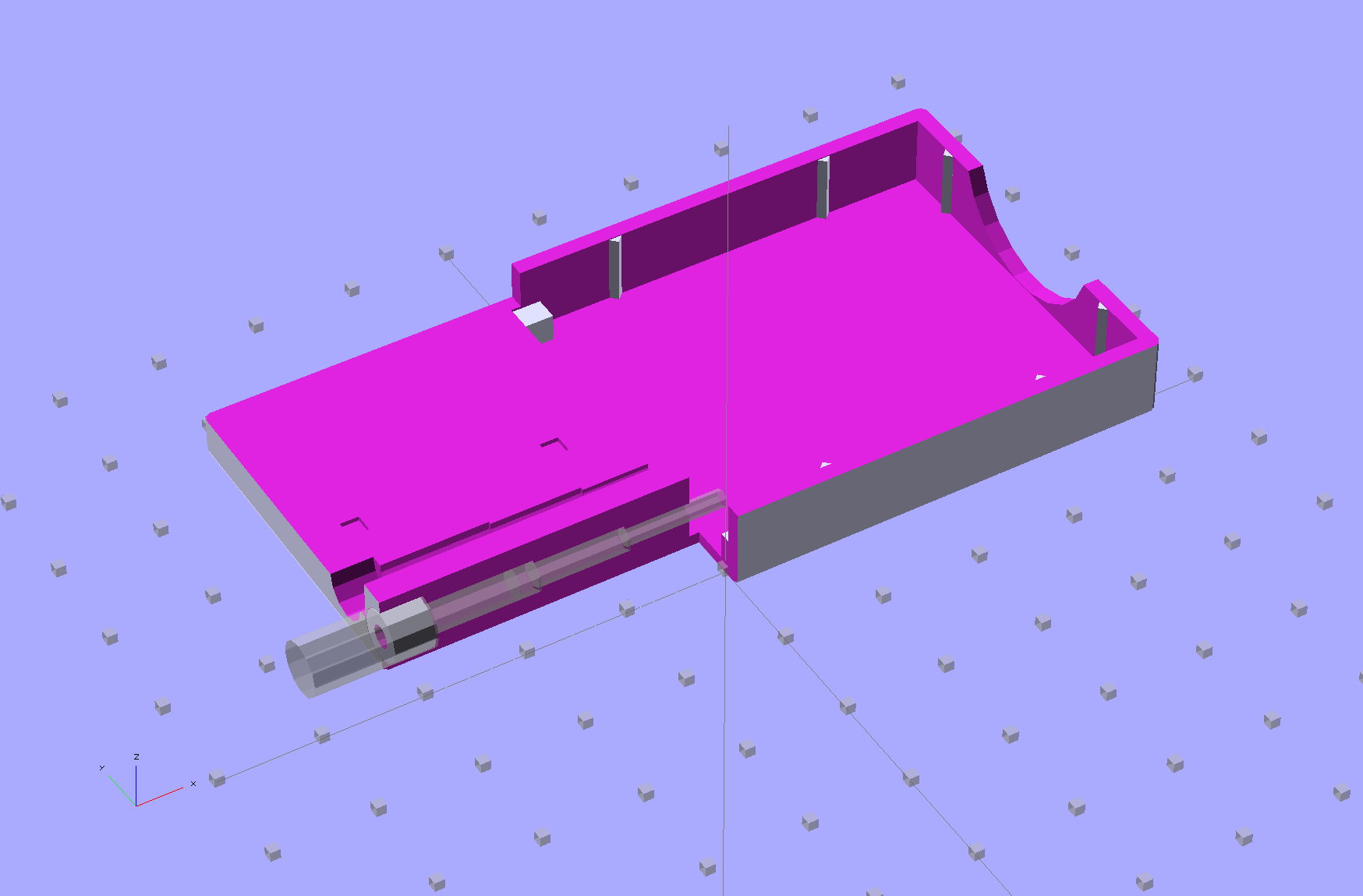
    A cutaway shows the stepped holes around the contact pin, with the coil springs being the largest cylinder to the right of the solid-looking plug:

    NB-6L Holder - show layout
    NB-6L Holder – show layout

    The contact pins look like this, at least after one remembers to slide on all the parts before soldering the wires in place:

    Canon NB-6L holder - contact pin detail
    Canon NB-6L holder – contact pin detail

    I filed off the inevitable solder bumps, rounded the butt ends with gentle suasion, and generally tidied the pins up so they’re smooth and symmetrical. The springs don’t have a lot of oomph, so wasting any force on friction or binding is a Bad Thing.

    The holes require reaming with twist drills for a nice slip fit around the pins. The OpenSCAD script prints out the relevant diameters and depths:

    ECHO: "Contact pin tip dia: 1.6"
    ECHO: "Drill depth to taper end: 24.1 -- Dia: 2.4"
    ECHO: "            to ferrule end: 15 -- Dia: 3.1"
    ECHO: "            to plug end: 4 -- Dia: 5.2"
    

    Grab the proper drill in a pin punch, adjust so that length protrudes, and have at it. Making the holes about 0.2 mm larger than nominal works well, although your mileage will definitely vary.

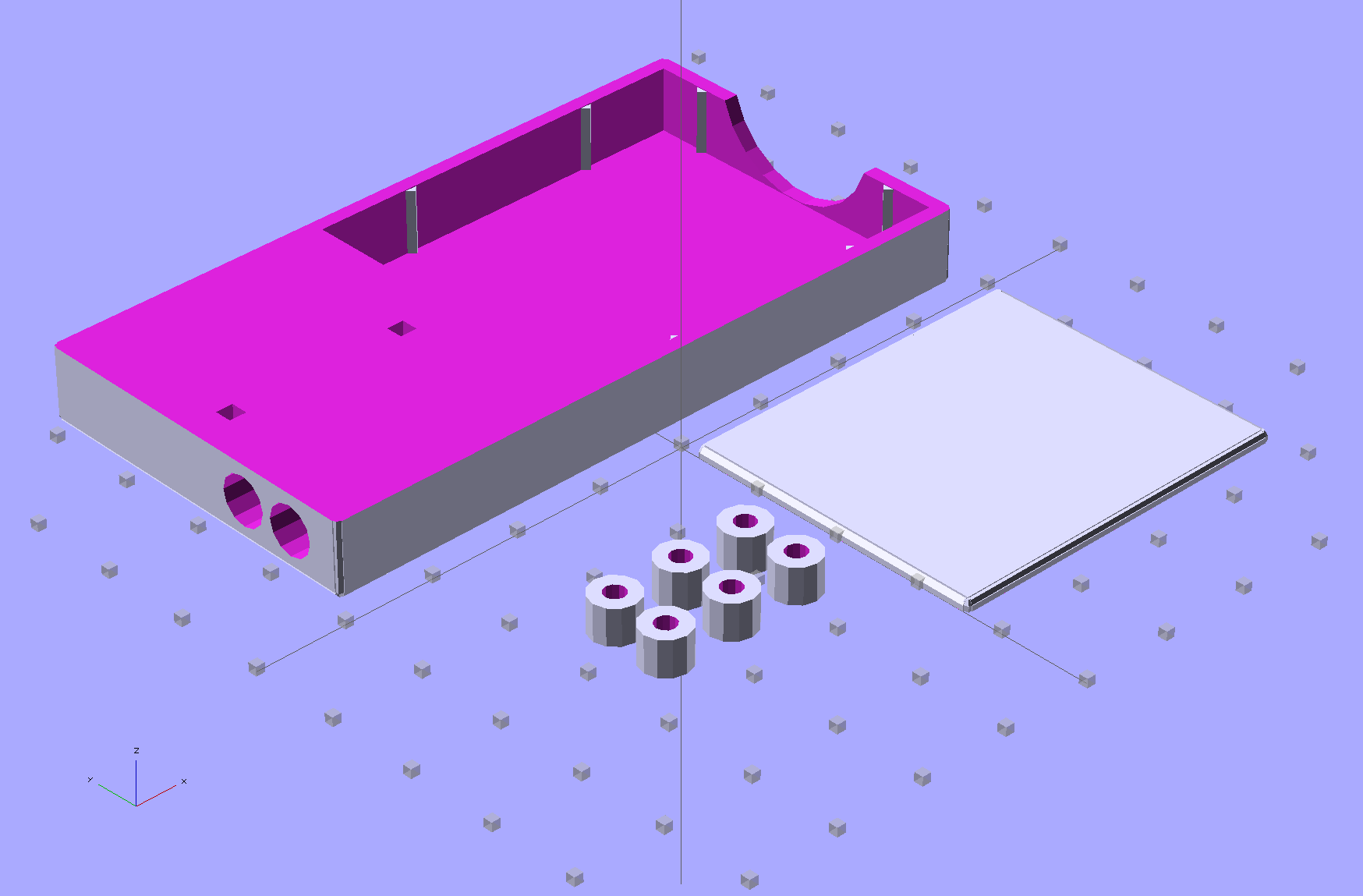
    The build layout includes extra retaining plugs, as they tend to go walkabout under the bench:

    NB-6L Holder - build layout
    NB-6L Holder – build layout

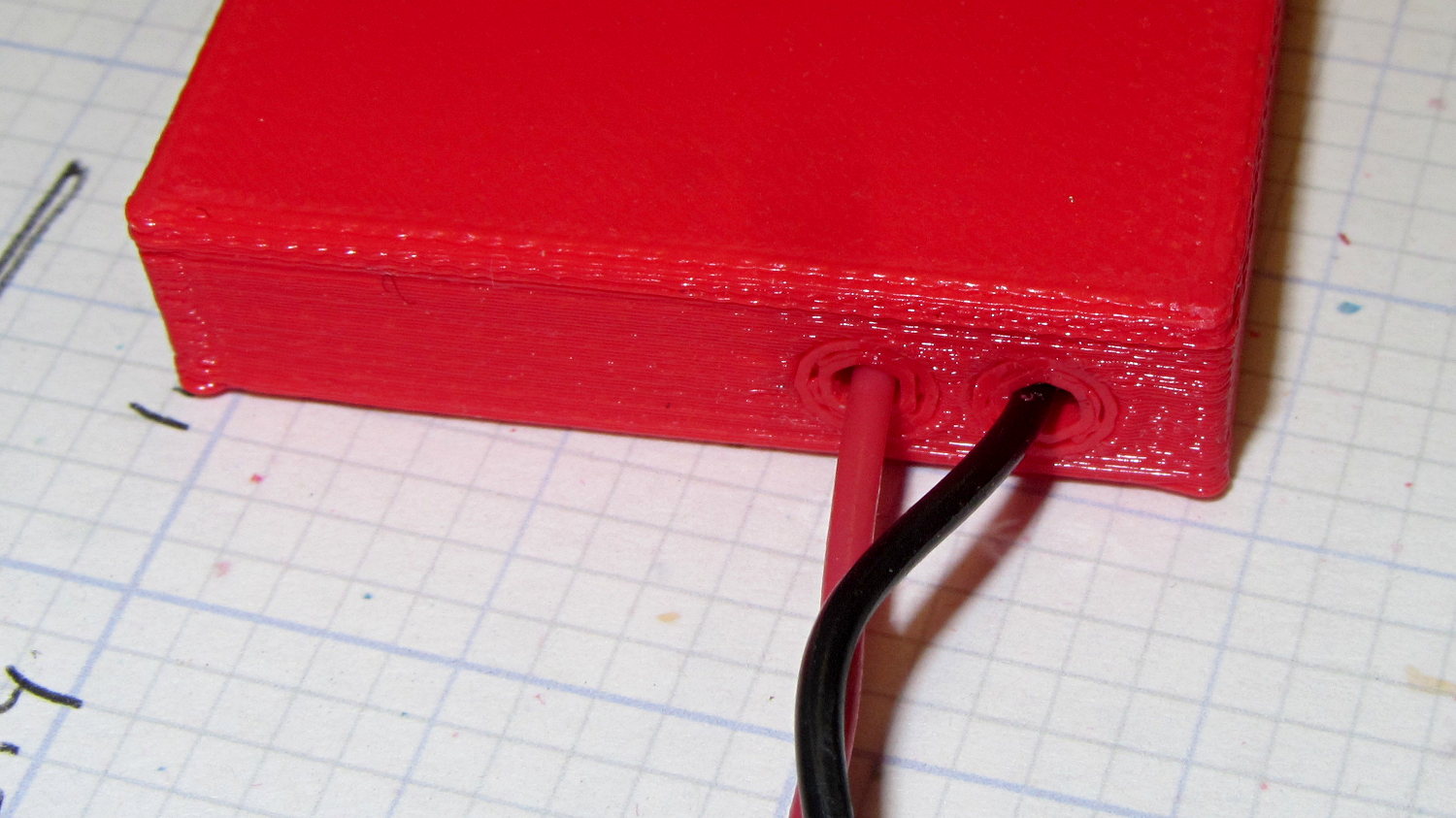
    Add a dab of PVC cement with THF inside the holes and the plugs push firmly into place:

    Canon NB-6L holder - pin retaining plugs - detail
    Canon NB-6L holder – pin retaining plugs – detail

    I loves me my 3D printer…

    The OpenSCAD source code:

    // Holder for Canon NB-6L Li-Ion battery
    // Ed Nisley KE4ZNU January 2013
    
    include <MCAD/boxes.scad>
    
    // Layout options
    
    Layout = "Plugs";					//  Show Build Fit Case Lid Pins Plugs AlignPins
    
    //- Extrusion parameters - must match reality!
    //  Print with +2 shells and 3 solid layers
    
    ThreadThick = 0.20;
    ThreadWidth = 0.40;
    
    HoleWindage = 0.2;
    
    function IntegerMultiple(Size,Unit) = Unit * ceil(Size / Unit);
    
    Protrusion = 0.1;			// make holes end cleanly
    
    inch = 25.4;
    
    BuildOffset = 3.0;			// clearance for build layout
    
    Gap = 8.0;					// separation for Fit parts
    
    //- Battery dimensions - rationalized from several samples
    //  Coordinate origin at battery corner by contact plates on bottom surface
    
    BatteryLength = 42.5;
    BatteryWidth = 35.5;
    BatteryThick =  7.0;
    
    ContactWidth = 2.10;
    ContactLength = 4.10;
    ContactRecess = 0.85;
    
    ContactOC = 3.18;			// center-to-center across contact face
    ContactOffset = 4.45;		// offset from battery edge
    ContactHeight = 3.05;		// offset from battery bottom plane
    
    AlignThick = 2.8;			// alignment recesses on contact face
    AlignDepth = 2.0;			// into face
    AlignWidth1 = 0.7;			// across face at contacts
    AlignWidth2 = 2.0;			//  ... other edge
    
    //- Pin dimensions
    
    PinTipDia = 1.6;
    PinTipLength = 10.0;
    
    PinTaperLength = 2.3;
    
    PinShaftDia = 2.4;
    PinShaftLength = 6.8;
    
    PinFerruleDia = 3.1;
    PinFerruleLength = 2.0;
    
    PinLength = PinTipLength + PinTaperLength + PinShaftLength + PinFerruleLength;
    
    ExtendRelax = 1.5 + ContactRecess;		// pin extension when no battery is present
    ExtendOvertravel = 1.0;					//  ... beyond engaged position
    
    //- Spring dimensions
    
    SpringDia = 3.1;						// coil OD
    SpringMax = 9.3;
    SpringLength = SpringMax - 0.3;			// slightly compressed
    SpringMin = 4.5;
    
    SpringPlugOD = IntegerMultiple(5.0,ThreadWidth);		// plug retaining the spring
    SpringPlugID = 2.0;
    SpringPlugLength = IntegerMultiple(4.0,ThreadWidth);
    SpringPlugSides = 3*4;
    
    SpringTravel = ExtendRelax + ExtendOvertravel;
    
    //- Holder dimensions
    
    GuideRadius = ThreadWidth;						// friction fit ridges
    GuideOffset = 10;
    WallThick = 4*ThreadWidth;						// holder sidewalls
    
    BaseThick = 6*ThreadThick;			// bottom of holder to bottom of battery
    TopThick = 6*ThreadThick;			// top of battery to top of holder
    
    ThumbRadius = 10.0;			// thumb opening at end of battery
    
    CornerRadius = 3*ThreadThick;			// nice corner rounding
    
    CaseLength = SpringPlugLength + SpringLength + PinLength - ExtendRelax
    			+ BatteryLength + GuideRadius + WallThick;
    CaseWidth = 2*WallThick + 2*GuideRadius + BatteryWidth;
    CaseThick = BaseThick + BatteryThick + TopThick;
    
    AlignPinOD = 1.75;			// lid alignment pins - filament snippets
    AlignPinLength = 5.0;
    AlignPinInset = 7.0;
    
    //- XY origin at front left battery corner, Z on platform below that
    
    CaseLengthOffset = -(SpringPlugLength + SpringLength + PinLength - ExtendRelax);
    CaseWidthOffset = -(WallThick + GuideRadius);
    CaseThickOffset = BaseThick;
    
    LidLength = ExtendRelax - CaseLengthOffset;
    
    echo(str("Contact pin tip dia: ",PinTipDia));
    echo(str("Drill depth to taper end: ",
    		 (SpringPlugLength + SpringLength + PinFerruleLength + PinShaftLength + PinTaperLength),
    		 " -- Dia: ",PinShaftDia));
    echo(str("            to ferrule end: ",
    		  (SpringPlugLength + SpringLength + PinFerruleLength),
    		 " -- Dia: ",PinFerruleDia));
    echo(str("            to plug end: ",SpringPlugLength,
    		 " -- Dia: ",SpringPlugOD));
    
    //----------------------
    // Useful routines
    
    module PolyCyl(Dia,Height,ForceSides=0) {			// based on nophead's polyholes
    
      Sides = (ForceSides != 0) ? ForceSides : (ceil(Dia) + 2);
    
      FixDia = Dia / cos(180/Sides);
    
      cylinder(r=(FixDia + HoleWindage)/2,
               h=Height,
    	   $fn=Sides);
    }
    
    module ShowPegGrid(Space = 10.0,Size = 1.0) {
    
      Range = floor(50 / Space);
    
    	for (x=[-Range:Range])
    	  for (y=[-Range:Range])
    		translate([x*Space,y*Space,Size/2])
    		  %cube(Size,center=true);
    
    }
    
    //-------------------
    
    //-- Guides for tighter friction fit
    
    module Guides() {
      	  translate([GuideOffset,-GuideRadius,CaseThickOffset])
    		PolyCyl(2*GuideRadius,(BatteryThick - Protrusion),4);
    	  translate([GuideOffset,(BatteryWidth + GuideRadius),CaseThickOffset])
    		PolyCyl(2*GuideRadius,(BatteryThick - Protrusion),4);
    	  translate([(BatteryLength - GuideOffset),-GuideRadius,CaseThickOffset])
    		PolyCyl(2*GuideRadius,(BatteryThick - Protrusion),4);
    	  translate([(BatteryLength - GuideOffset),(BatteryWidth + GuideRadius),CaseThickOffset])
    		PolyCyl(2*GuideRadius,(BatteryThick - Protrusion),4);
    	  translate([(BatteryLength + GuideRadius),GuideOffset/2,CaseThickOffset])
    		PolyCyl(2*GuideRadius,(BatteryThick - Protrusion),4);
    	  translate([(BatteryLength + GuideRadius),(BatteryWidth - GuideOffset/2),CaseThickOffset])
    		PolyCyl(2*GuideRadius,(BatteryThick - Protrusion),4);
    
    }
    
    //-- Contact pins (holes therefore)
    
    module PinShape() {
    
      union() {
    	cylinder(r=(PinTipDia + HoleWindage)/2,h=(PinTipLength + Protrusion),$fn=6);
    
    	translate([0,0,PinTipLength])
    	  cylinder(r=(PinShaftDia + HoleWindage)/2,
    			   h=(PinTaperLength + PinShaftLength + Protrusion),$fn=6);
    
    	translate([0,0,(PinLength - PinFerruleLength)])
    	  cylinder(r=(PinFerruleDia + HoleWindage)/2,
    				h=(PinFerruleLength + Protrusion),$fn=6);
    
    	translate([0,0,(PinLength)])
    	  cylinder(r=(SpringDia + HoleWindage)/2,
    				h=(SpringLength + Protrusion),$fn=6);
    
    	translate([0,0,(PinLength + SpringLength - HoleWindage)])	// windage for hole length
    	  cylinder(r=(SpringPlugOD + HoleWindage)/2,h=3*SpringPlugLength,$fn=SpringPlugSides);
    
    //	  translate([0,0,(PinLength + SpringLength + SpringPlugLength)])
    //	  cylinder(r=(SpringPlugOD + HoleWindage)/2,h=2*SpringPlugLength,$fn=SpringPlugSides);	// extend hole
      }
    
    }
    
    module PinAssembly() {
    
      translate([ExtendRelax,ContactOffset,CaseThickOffset + ContactHeight]) {
    	rotate([0,270,0]) {
    	  PinShape();												// pins
    	  translate([0,(2*ContactOC),0])
    		PinShape();
    	}
      }
    
    }
    
    //-- Alignment pins
    
    module AlignPins() {
    
    	for (x=[-1,1])
    		translate([x*(LidLength - 2*AlignPinInset)/2,0,0])
    			rotate(45)
    			PolyCyl(AlignPinOD,AlignPinLength);
    }
    
    //-- Case with origin at battery corner
    
    module Case() {
    
      difference() {
    
    	union() {
    
    	  difference() {
    		translate([(CaseLength/2 + CaseLengthOffset),
    				  (CaseWidth/2 + CaseWidthOffset),
    				  (CaseThick/2)])
    		  roundedBox([CaseLength,CaseWidth,CaseThick],CornerRadius); 	// basic case shape
    
    		translate([-ExtendOvertravel,-GuideRadius,CaseThickOffset])
    		  cube([(BatteryLength + GuideRadius + ExtendOvertravel),
    				(BatteryWidth + 2* GuideRadius),
    				(BatteryThick + Protrusion)]);						// battery space
    
    	  }
    
    	  Guides();
    
    	  translate([-ExtendOvertravel,-GuideRadius,BaseThick])
    		cube([(AlignDepth + ExtendOvertravel),
    			  (AlignWidth1 + GuideRadius),
    			  AlignThick]);											// alignment blocks
    	  translate([-ExtendOvertravel,
    				 (BatteryWidth - AlignWidth2),
    				 BaseThick])
    		cube([(AlignDepth + ExtendOvertravel),
    			  (AlignWidth2 + GuideRadius),
    			  AlignThick]);
    
    	}
    
    	translate([(-ExtendOvertravel),
    			   (CaseWidthOffset - Protrusion),
    			   (CaseThickOffset + BatteryThick)])
    	  cube([CaseLength,
    		    (CaseWidth + 2*Protrusion),
    		    (TopThick + Protrusion)]);								// battery access
    
    	translate([(CaseLengthOffset - Protrusion),
    			   (CaseWidthOffset - Protrusion),
    			   (CaseThickOffset + BatteryThick)])
    	  cube([(CaseLength + 2*Protrusion),
    		    (CaseWidth + 2*Protrusion),
    		    (TopThick + Protrusion)]);								// battery insertion allowance
    
    	translate([(BatteryLength - Protrusion),
    			    (CaseWidth/2 + CaseWidthOffset),
    			    (CaseThickOffset + ThumbRadius)])
    	  rotate([90,0,0])
    		rotate([0,90,0])
    		  cylinder(r=ThumbRadius,
    				   h=(WallThick + GuideRadius + 2*Protrusion),
    				   $fn=22);											// remove thumb notch
    
    	PinAssembly();
    
    	translate([-LidLength/2,BatteryWidth/2,CaseThick - TopThick - (AlignPinLength - TopThick/2)])
    		AlignPins();
      }
    
    }
    
    module Lid() {
    
      difference() {
    	translate([0,0,(CaseThick/2 - BaseThick - BatteryThick)])
    	  roundedBox([LidLength,
    				 CaseWidth,CaseThick],CornerRadius);
    
    	translate([0,0,-(CaseThick/2)])
    	  cube([(LidLength + 2*Protrusion),
    		    (CaseWidth + 2*Protrusion),
    		    (CaseThick)],center=true);
    
    	translate([-ExtendRelax,0,-(AlignPinLength - TopThick/2)])
    		AlignPins();
      }
    
    }
    
    module PlugShape() {
    
      difference() {
    	cylinder(r=SpringPlugOD/2,h=SpringPlugLength,$fn=SpringPlugSides);
    	translate([0,0,-Protrusion])
    	  PolyCyl(SpringPlugID,(SpringPlugLength + 2*Protrusion),SpringPlugSides);
      }
    }
    
    module Plugs() {
      translate([0,ContactOC,0])
    	PlugShape();
      translate([0,-ContactOC,0])
    	PlugShape();
    }
    
    //-------------------
    // Build it!
    
    ShowPegGrid();
    
    if (Layout == "Case")
      Case();
    
    if (Layout == "Lid")
      Lid();
    
    if (Layout == "Plugs")
    	for (i=[-1:1])
    		translate([i*1.5*SpringPlugOD,0,0])
    			Plugs();
    
    if (Layout == "Pins")
      PinShape();
    
    if (Layout == "AlignPins")
      AlignPins();
    
    if (Layout == "Show") {								// reveal pin assembly
      difference() {
    	Case();
    
    	translate([(CaseLengthOffset - Protrusion),
    			   (CaseWidthOffset - Protrusion + WallThick + ContactOffset + ContactOC),
    			   (BaseThick + ContactHeight)])
    	  cube([(-CaseLengthOffset + Protrusion),
    			 (CaseWidth + 2*Protrusion),
    			 CaseThick + BaseThick - ContactHeight + Protrusion]);
    
    	translate([(CaseLengthOffset - Protrusion),
    			   (CaseWidthOffset - Protrusion),
    			   -Protrusion])
    	  cube([(-CaseLengthOffset + Protrusion),
    			 (WallThick + GuideRadius + ContactOffset + Protrusion),
    			 CaseThick]);
      }
    
      translate([ExtendRelax,ContactOffset,(CaseThickOffset + ContactHeight)]) {	// pins
    	rotate([0,270,0]) {
    	  %PinShape();
    //	  translate([0,(2*ContactOC),0])
    //		%PinShape();
    	}
      }
    
      translate([CaseLengthOffset,ContactOffset,(CaseThickOffset + ContactHeight)])
    	rotate([0,90,0])
    	  PlugShape();
    }
    
    if (Layout == "Build") {
      translate([-(CaseLength/2 + CaseLengthOffset),-(CaseWidthOffset - BuildOffset),0])
    	Case();
      translate([CaseWidth/2,(CaseLengthOffset/2 - BuildOffset),0])
    	rotate([0,0,90])
    	  Lid();
      for (i=[-1:1])
    	translate([CaseLengthOffset/2 + i*1.5*SpringPlugOD,-CaseWidth/2,0])
    		Plugs();
    }
    
    if (Layout == "Fit") {
      Case();
      translate([(-LidLength/2 + ExtendRelax),
    			(CaseWidth/2 + CaseWidthOffset),
    			(BaseThick + BatteryThick + Gap)])
    	  Lid();
      translate([ExtendRelax,ContactOffset,CaseThickOffset + ContactHeight]) {	// pins
    	rotate([0,270,0]) {
    	  %PinShape();
    	  translate([0,(2*ContactOC),0])
    		%PinShape();
    	}
      }
    
      translate([CaseLengthOffset,
    			(ContactOffset + ContactOC),
    			(CaseThickOffset + ContactHeight)])
      rotate([0,90,0])
    	Plugs();
    
      translate([-LidLength/2,BatteryWidth/2,CaseThick])
    #	AlignPins();
    
    }
    
    
  • Thing-o-Matic 286 Conversion

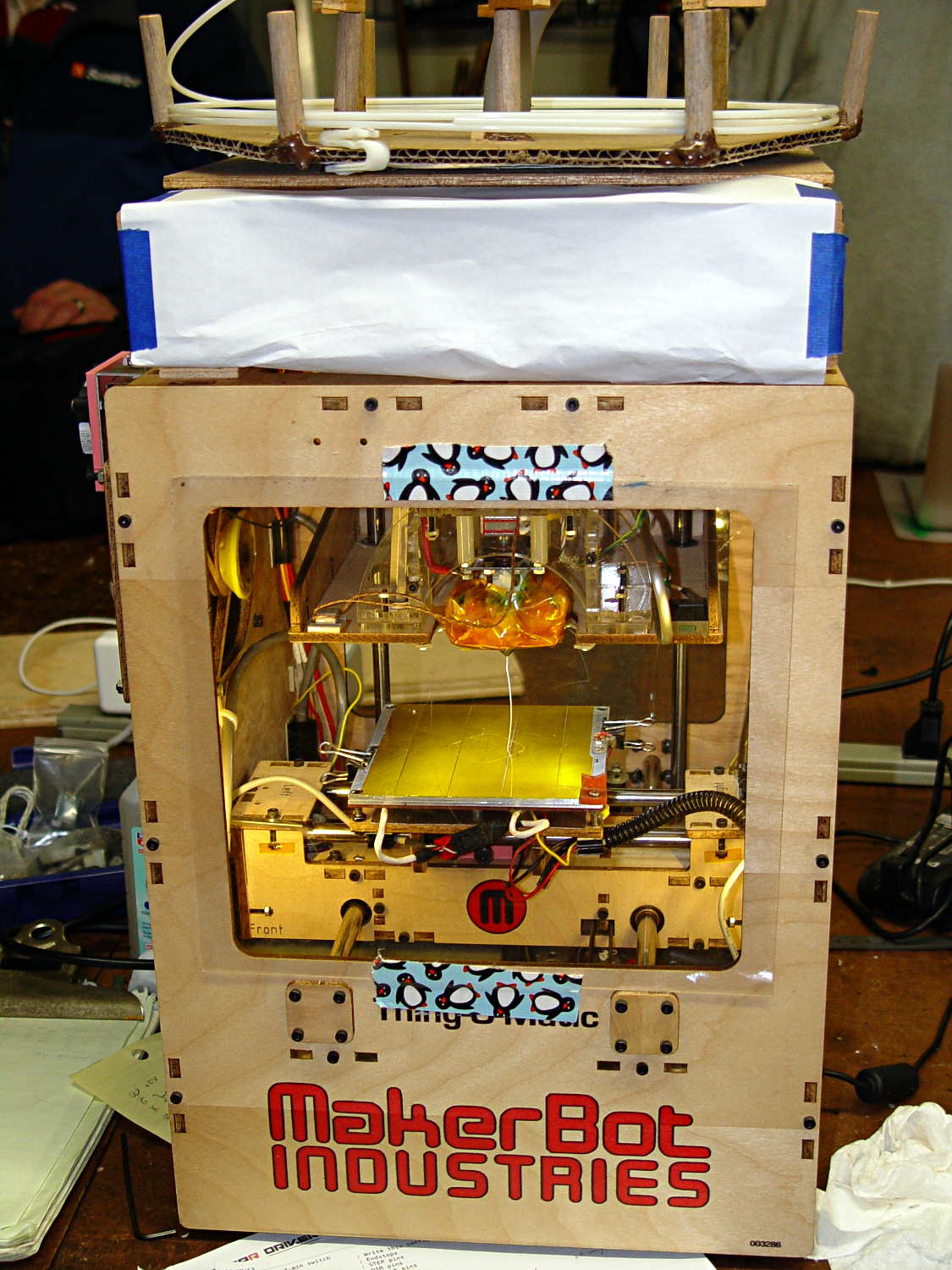
    A few months ago I fired the Thing-O-Matic, only to have it wake up dead. Not exactly dead, but spitting out checksum errors on simple G-Code files sent from Pronterface, which used to work just fine. Trying a bit of this-and-that to no avail, I proposed to The Mighty Thor that I could loan the carcass to Squidwrench, reanimate it with a less bizarre set of hardware and firmware than the much-hacked Makerbot menagerie under the hood, and use it as an exemplar in my 3D Printing classes.

    Fortunately, that particular Thing-O-Matic has the most well-documented hardware evah

    Matt suggested an Azteeg X3 controller, because it has thermocouple inputs that match the existing sensor, Thor ordered one, and I tinkered up a first-pass version of Marlin that could read the inputs and twiddle the motors. The firmware is on Github, not that you’ll need it for anything you’re doing; more on that later.

    Here’s the Official Doc for the microstepping jumpers hidden under the driver boards:

    Azteeg X3 - microstep jumpers
    Azteeg X3 – microstep jumpers

    That’s XYZE = 16 16 8 4, respectively, with a spare slot (and spare driver, not installed) for the second extruder it’ll never have.

    A first pass at setting the motor currents

    The extruder’s Type K thermocouple connects to the TC1 port on the shield, exactly reversed from the way you see the test thermocouple there: the red lead is to the left, the yellow lead is to the right. If you get it backwards, the indicated temperature goes down when you touch the bead. The printer’s thermocouple has some backstory.

    The 10 kΩ thermistor bead connects to the BED port on the main board and isn’t polarized. The Heated Build Platform has a bit of backstory, too.

    The gutted TOM286 carcass with the MBI hardware off to the side:

    TOM286 - gutted electronics bay
    TOM286 – gutted electronics bay

    After a few sessions, it looked pretty cheerful again:

    TOM286 - reborn at Squidwrench
    TOM286 – reborn at Squidwrench

    The penguin duct tape adds a festive flair, don’t you agree?

    This is what you see when looking down through the acrylic baseplate:

    Azteeg X3 - inside TOM286
    Azteeg X3 – inside TOM286

    The blurry silver rectangle off to the left is an aluminum channel glommed to bottom of the acrylic baseplate with silicone snot to eliminate a nasty mechanical resonance.

    The thermal cutout circuitry isn’t wired in yet; the ATX power supply has its -Power-On pin hotwired to the adjacent ground pin for now. The X3 gets its power directly from the +12 V supply, so there doesn’t seem to be any way to power the X3 from the +5 V Standby ouput, deliver +12 V to the motors, and switch the supply through the X3’s ATX output pin.

    The heaters work fine, the motors turn properly, and the extruder feeds molten plastic; all the motor calibrations seem to be pretty close. The first test object was a total botch, of course, but the printer’s parts seem to work OK again.

    Next step: calibration!

  • Water Cooled Stepper Motors: Flow Calculation

    A discussion on the Makergear Google Group about a heated enclosure prompted me to run the numbers for cooling stepper motors with water, rather than fans and finned heatsinks.

    The general idea comes from my measurements of the air-cooled heatsink stuck to a stepper’s end cap. The metal-to-metal conductivity works surprisingly well and reduces the case temperature to slightly over ambient with decent airflow through the heatsink; epoxying a cold plate to the end cap should work just as well. A NEMA 17 stepper case is 42.3 mm square, so a standard 40 mm square CPU cooling plate will fit almost exactly.

    The question then becomes: how much water flow do you need to keep the motors cool?

    Some numbers:

    • Water’s heat capacity is 4.2 J/g·K
    • 1 J = 1 W·s, 1 W = 1 J/s
    • NEMA 17 motors dissipate about 5 W (13 W if you’re abusing them)
    • We’ll cool all four motors in parallel, for a total of 20 W
    • Allow a 5 K = 5 °C temperature rise in each cold plate

    Rub them all together:

    (20 J/s) / (5 K * (4.2 J/g·K)) = 0.95 g/s

    For water, 1 g = 1 cc, so the total flow is 1 cc/s = 3600 cc/h = 3.6 liter/h, which, here in the US, works out to a scant 1 gallon/hour. It’s tough getting a pump that small and cheap flowmeters run around 0.5 liter/m…

    If you don’t want a pump. put an aquarium up on a (sturdy) shelf and drain it through the cold plates. A cubic foot of water, all eight gallons and sixty-some-odd pounds of it, will last 8 hours, which should be enough for most printing projects.

    If you want reliability, drain the coolers into a sump with a float switch (high = on), put another float switch (high = off) on the aquarium, and have the pump top up the aquarium. If the pump fails, your steppers stay cool for the next 8 hours. Heating the water about 5 °C during 8 hours won’t require active cooling.

    Now, managing the hoses leading to the X axis stepper may be challenging, but a cable drag chain would control the rest of the wiring, too.

  • Browning Hi-Power Magazine Capacity Reduction Block: Steel Version

    The Shapeways stainless steel process produces nice results:

    Browning HP Mag Blocks - stainless and plastic - side
    Browning HP Mag Blocks – stainless and plastic – side

    It’s actually bronze-infused stainless steel powder, so it’s not exactly solid steel. The parts spend a day rattling around in a vibratory polisher that slightly rounds off their edges and smooths the surface, but (as with all 3D printed objects) you must learn to love the results; it’s certainly more photogenic than the black plastic version from my M2.

    The bottom view shows the hole I added to reduce the metallic volume; they charge a bit under $0.01/mm3, which encourages airy design:

    Browning HP Mag Blocks - stainless and plastic - bottom
    Browning HP Mag Blocks – stainless and plastic – bottom

    A cross-section view of the solid model shows the interior structure:

    Browning Hi-Power Magazine Block - steel - solid model - section
    Browning Hi-Power Magazine Block – steel – solid model – section

    The vent pipes are somewhat larger than in the plastic version and, obviously, I didn’t include the yellow support structures in the model I sent to Shapeways.

    Their specs give a minimum wall thickness of 3.0 mm, which I’m definitely pushing on some of the internal features. The pipes came out perfectly, as nearly as I can tell, although some polishing media did get wedged in the smaller hole. Air passes freely across the top, which is the important part.

    Although the specs list a ±2 mm (!) tolerance, a comment in a Shapeways forum said that applies to larger objects, with 0.2 mm being typical for smaller objects. The steel and plastic parts match within 0.2 mm of the nominal model dimensions, so that lower tolerance seems about right; I have no idea how consistent it is.

    Another comment recommended carbide tools for secondary operations and that’s definitely true; I wrecked a perfectly good HSS tap trying to thread the central hole. Fortunately, I made the block slightly smaller outside and slightly larger inside, specifically to avoid having a deep thread; I intend to ram a standard M3x0.5 SHCS into that hole and epoxy it in place without worrying about thread damage.

    A trial fit shows it captures the spring tab just like the plastic version did:

    Browning Hi-Power magazine - steel block trial fit
    Browning Hi-Power magazine – steel block trial fit

    I must contact my legislators again, as I’m pretty sure they’re not going to contact me.

    The OpenSCAD source code:

    // Browning Hi-Power Magazine Plug
    // Ed Nisley KE4ZNU December 2013
    
    Layout = "Show";			// Show Whole Split
    							//  Show = section view for demo, not for building
    							//  Whole = upright for steel or plastic
    							//  Split = laid flat for plastic show-n-tell assembly
    
    AlignPins = (Layout == "Split");					// pins only for plastic show-n-tell
    
    Support = true && (Layout != "Split");				// no support for split, optional otherwise
    
    //- Extrusion parameters must match reality!
    //  Print with 2 shells and 3 solid layers
    
    ThreadThick = 0.15;
    ThreadWidth = 0.40;
    
    HoleWindage = 0.2;
    
    Protrusion = 0.1;			// make holes end cleanly
    
    //----------------------
    // Dimensions
    
    Angle = 12.5;				// from vertical
    
    SpringID = 10.3;			// magazine spring curvature (measure with drill shank)
    SpringRadius = SpringID / 2;
    
    Length = 23.0;				// front-to-back perpendicular to magazine shaft
    Height = 18.0;				// bottom-to-top, parallel to magazine shaft
    							//  18 = 10 round max capacity
    
    RectLength = Length - SpringID;	// block length between end radii
    
    HornBaseOD = 8.0;			// fits between follower pegs to prevent shortening
    HornTipOD = 5.0;
    HornAddTip = (HornTipOD/2)*tan(Angle);
    HornAddBase = (HornBaseOD/2)*tan(Angle);
    HornAddLength = HornAddTip + HornAddBase + 2*Protrusion;
    HornLength = 12.0;			// should recompute ODs, but *eh*
    
    ScrewOD = 3.0 - 0.25;		// screw hole dia - minimal thread engagement
    ScrewLength = 13.0;
    ScrewOffset = -1.5;			//   ... from centerline
    							//  OEM = 0.0
    							//  generic A = -1.5
    
    NutOD = 5.6;				// hex nut dia across flats
    NutThick = 2.4;				//  ... generous allowance for nut
    NutTrapLength = 1.5*NutThick;		// allow for epoxy buildup
    NutOffset = 6.0;			//  ... base height from floor
    
    TrimHeight = 2.5;			// vertical clearance for spring clip on base plate
    							//   OEM = 2.5
    							//   generic A = 2.5
    
    TrimOffset = -9.5 + ScrewOffset;	// ... horizontal from centerline
    							//	 OEM = 0.0
    							//   generic A = 1.5
    
    SupportLength = 4.0;		// length of support struts under Trim
    SupportWidth = SpringID;	// ... width
    
    VentDia = 2.5;				// air vent from back of screw recess
    VentOffset = ScrewOffset - 6.0;
    
    RecessDia = 5.0;			// recess to reduce weight
    RecessLength = 0.66*Length;	//  ... internal length
    RecessOffset = 8.5;	//  ... offset from centerline
    
    PinOD = 1.72;				// alignment pins
    PinLength = 6.0;
    PinInset = 0.6*SpringRadius;	// from outside edges
    echo(str("Alignment pin length: ",PinLength));
    
    NumSides = 8*4;				// default cylinder sides
    
    Offset = 5.0/2;				// from centerline for build layout
    
    //----------------------
    // Useful routines
    
    function Delta(a,l) = l*tan(a);				// incremental length due to angle
    
    // Locating pin hole with glue recess
    //  Default length is two pin diameters on each side of the split
    
    module LocatingPin(Dia=PinOD,Len=0.0) {
    
    	PinLen = (Len != 0.0) ? Len : (4*Dia);
    
    	translate([0,0,-ThreadThick])
    		PolyCyl((Dia + 2*ThreadWidth),2*ThreadThick,4);
    
    	translate([0,0,-2*ThreadThick])
    		PolyCyl((Dia + 1*ThreadWidth),4*ThreadThick,4);
    
    	translate([0,0,-(Len/2 + ThreadThick)])
    		PolyCyl(Dia,(Len + 2*ThreadThick),4);
    
    }
    
    module PolyCyl(Dia,Height,ForceSides=0) {			// based on nophead's polyholes
    
      Sides = (ForceSides != 0) ? ForceSides : (ceil(Dia) + 2);
    
      FixDia = Dia / cos(180/Sides);
    
      cylinder(r=(FixDia + HoleWindage)/2,
               h=Height,
    	   $fn=Sides);
    }
    
    module ShowPegGrid(Space = 10.0,Size = 1.0) {
    
      Range = floor(50 / Space);
    
    	for (x=[-Range:Range])
    	  for (y=[-Range:Range])
    		translate([x*Space,y*Space,Size/2])
    		  %cube(Size,center=true);
    
    }
    
    //----------------------
    // The magazine block
    
    module Block(SectionSelect = 0) {
    
    CropHeight = Height*cos(Angle);				// block height perpendicular to base
    echo(str("Perpendicular height: ",CropHeight));
    
    	difference() {
    		union() {
    			intersection() {
    				rotate([Angle,0,0])
    					hull() {
    						for (i=[-1,1])
    							translate([0,i*RectLength/2,-((Length/2)*sin(Angle) + Protrusion)])						cylinder(r=SpringRadius,
    										h=(Height + 2*(Length/2)*sin(Angle) + 2*Protrusion),
    										$fn=NumSides);
    					}
    				translate([0,0,CropHeight/2])
    					cube([2*SpringID,3*Length,CropHeight],center=true);
    			}
    			translate([0,-Height*sin(Angle),Height*cos(Angle)])
    				resize([SpringID,0,0])
    					intersection() {
    						rotate([Angle,0,0])
    							translate([0,0,-(HornAddBase + Protrusion)])
    								cylinder(r1=HornBaseOD/2,
    										r2=HornTipOD/2,
    										h=(HornLength + HornAddLength + Protrusion),
    										$fn=NumSides);
    					cube([2*SpringID,Length,2*(HornLength*cos(Angle) + Protrusion)],center=true);
    				}
    		}
    
    		translate([0,ScrewOffset,-Protrusion])		// screw
    			rotate(180/6)
    				PolyCyl(ScrewOD,(ScrewLength + Protrusion),6);
    
    		translate([0,ScrewOffset,NutOffset])		// nut trap in center
    			rotate(180/6)
    				PolyCyl(NutOD,NutTrapLength,6);
    
    		translate([0,ScrewOffset,-Protrusion])		// nut clearance at base
    			rotate(180/6)
    				PolyCyl(NutOD,(1.1*NutThick + Protrusion),6);
    
    		translate([SpringID/2,TrimOffset,-Protrusion])
    			rotate(180)
    				cube([SpringID,Length,(TrimHeight + Protrusion)],center=false);
    
    		if (AlignPins)								// alignment pins
    			for (i=[-1,1])
    				rotate([Angle,0,0])
    				translate([0,
    							(i*((Length/2)*cos(Angle) - PinInset)),
    							(CropHeight/2 - i*2*PinInset)])
    					rotate([0,90,0]) rotate(45 - Angle)
    						LocatingPin(PinOD,PinLength);
    
    		translate([0,(ScrewOffset + 1.25*NutOD),ScrewLength])	// air vent
    			rotate([90,0,0]) rotate(180/8)
    				PolyCyl(VentDia,3*NutOD,8);
    		translate([0,VentOffset,-(VentDia/2)*tan(Angle)])
    			rotate([Angle,0,0]) rotate(180/8)
    				PolyCyl(VentDia,(RecessLength + (VentDia/2)*tan(Angle)),8);
    
    		translate([0,(RecessOffset + ScrewOffset),0])			// weight reduction recess
    			rotate([Angle,0,0]) rotate(180/8)
    				translate([0,0,-((RecessDia/2)*tan(Angle))])
    				PolyCyl(RecessDia,(RecessLength + (RecessDia/2)*tan(Angle)),8);
    
    		if (SectionSelect == 1)
    			translate([0*SpringID,-2*Length,-Protrusion])
    				cube([2*SpringID,4*Length,(Height + HornLength + 2*Protrusion)],center=false);
    		else if (SectionSelect == -1)
    			translate([-2*SpringID,-2*Length,-Protrusion])
    				cube([2*SpringID,4*Length,(Height + HornLength + 2*Protrusion)],center=false);
    	}
    
    SupportBars = floor((SupportWidth/2) / (4*ThreadWidth));
    
    	if (Support) {									// add support structures
    		for (i = [-SupportBars:SupportBars])
    			translate([i*4*ThreadWidth,
    					   (TrimOffset - SupportLength/2 - ThreadWidth),
    					   (TrimHeight - ThreadThick)/2])
    				color("Yellow")
    				cube([(2*ThreadWidth),SupportLength,(TrimHeight - ThreadThick)],center=true);
    
    		translate([0,(TrimOffset - SupportLength - ThreadWidth),(TrimHeight - ThreadThick)/2])
    			color("Yellow")
    			cube([SupportWidth,(2*ThreadWidth),(TrimHeight - ThreadThick)],center=true);
    
    		translate([0,ScrewOffset,0])
    			for (j=[0:5]) {
    			rotate(30 + 360*j/6)
    				translate([(NutOD/2 - ThreadWidth)/2,0,(1.1*NutThick - ThreadThick)/2])
    					color("Yellow")
    					cube([(NutOD/2 - ThreadWidth),
    						  (2*ThreadWidth),
    						  (1.1*NutThick - ThreadThick)],
    						  center=true);
            }
    	}
    
    }
    
    //-------------------
    // Build it...
    
    ShowPegGrid();
    
    if (Layout == "Show")
    	Block(1);
    
    if (Layout == "Whole")
    	Block(0);
    
    if (Layout ==  "Split") {
    	translate([(Offset + Length/2),Height/2,0])
    		rotate(90) rotate([0,-90,-Angle])
    			Block(-1);
    	translate([-(Offset + Length/2),Height/2,0])
    		rotate(-90) rotate([0,90,Angle])
    			Block(1);
    }
    
  • Planetary Gear Bearing: Now With Knurling!

    OK, I couldn’t resist. Tweaking a few lines of code wrapped a knurl around emmitt’s Gear Bearing for enhanced griptivity:

    Knurled vs original Planetary Gear Bearing
    Knurled vs original Planetary Gear Bearing

    That image has desaturated red to suppress the camera’s red burnout. It looks better in the realm of pure math:

    Planetary Gear Bearing - Kurled - solid model
    Planetary Gear Bearing – Kurled – solid model

    Reducing the tolerance parameter to 0.4 produced a surprisingly rigid, yet freely turning, bearing that required no cleanup: it popped off the plate ready to roll!

    The heavy lifting in the OpenSCAD source code remains emmitt’s work. I replaced the outer cylinder with a knurl and simplified his monogram to stand out better amid the diamonds. This is the affected section:

    ... snippage ...
    translate([0,0,T/2]){
    	difference(){
    //		cylinder(r=D/2,h=T,center=true,$fn=100);
    		render(convexity=10)
    		translate([0,0,-T/2])
    			knurl(k_cyl_hg=T,
    			k_cyl_od=D,
    			knurl_wd=5.0,
    			knurl_hg=5.0,
    			knurl_dp=0.5,
    			e_smooth=5.0/2);
    		herringbone(nr,pitch,P,DR,-tol,helix_angle,T+0.2);
    //		difference(){
    			translate([0,-(D/2+4.5),0])rotate([90,0,0])monogram(h=10);
    //			cylinder(r=D/2-0.25,h=T+2,center=true,$fn=100);
    //		}
    	}
    	rotate([0,0,(np+1)*180/ns+phi*(ns+np)*2/ns])
    	difference(){
    		mirror([0,1,0])
    			herringbone(ns,pitch,P,DR,tol,helix_angle,T);
    		cylinder(r=w/sqrt(3),h=T+1,center=true,$fn=6);
    	}
    	for(i=[1:m])rotate([0,0,i*360/m+phi])translate([pitchD/2*(ns+np)/nr,0,0])
    		rotate([0,0,i*ns/m*360/np-phi*(ns+np)/np-phi])
    			render(convexity=10)
    			herringbone(np,pitch,P,DR,tol,helix_angle,T);
    }
    

    I also added a few render(convexity=n) operations to improve the preview, but that’s just cosmetic.

  • Bell Helmet Visor Mount Tabs

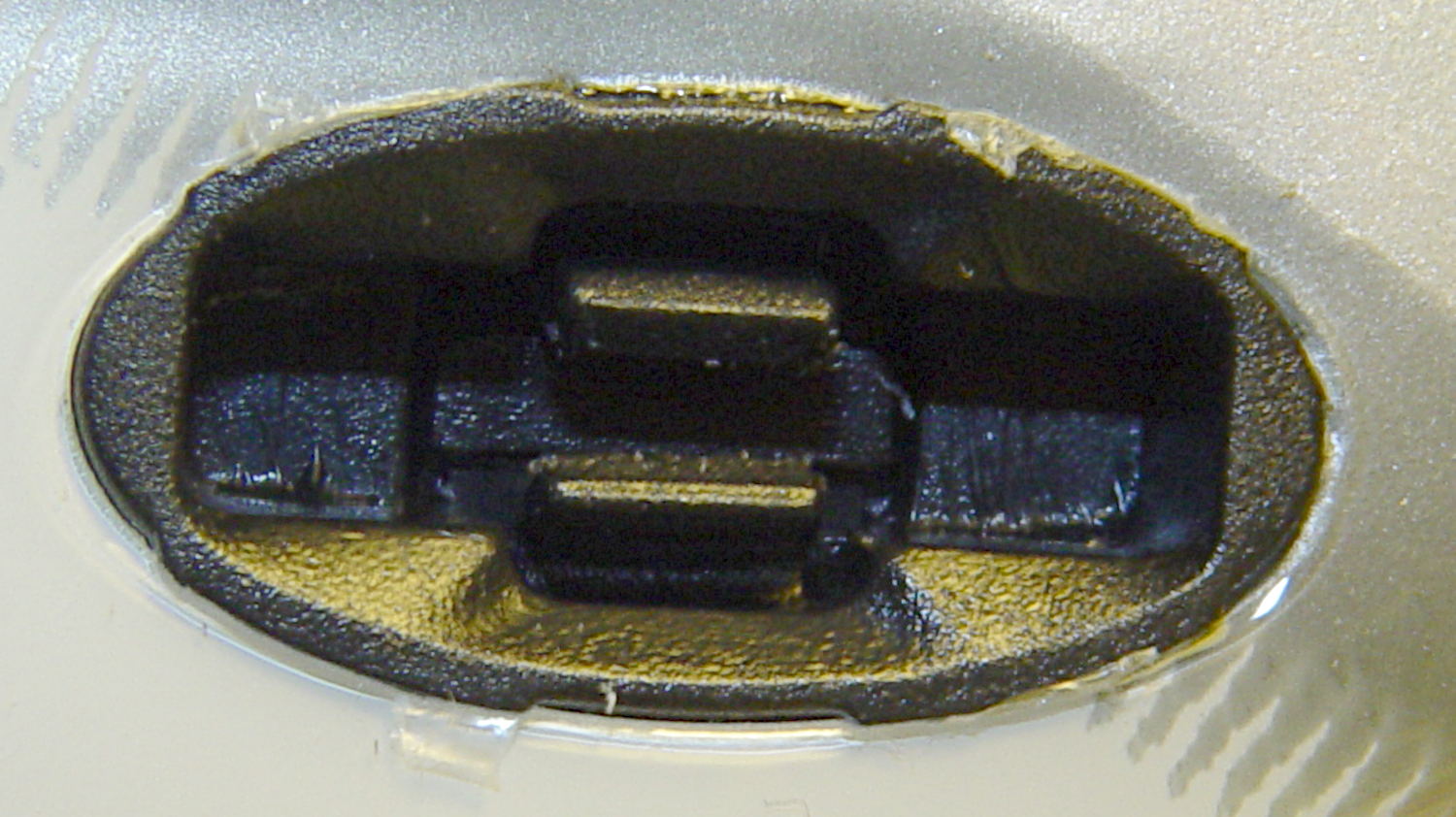
    Santa delivered a pair of helmets that will require mirror mounts and a mic boom before the spring riding season kicks in. The visor has tabs that snap into sockets on each side of the helmet:

    Bell Helmet Visor Mount - socket
    Bell Helmet Visor Mount – socket

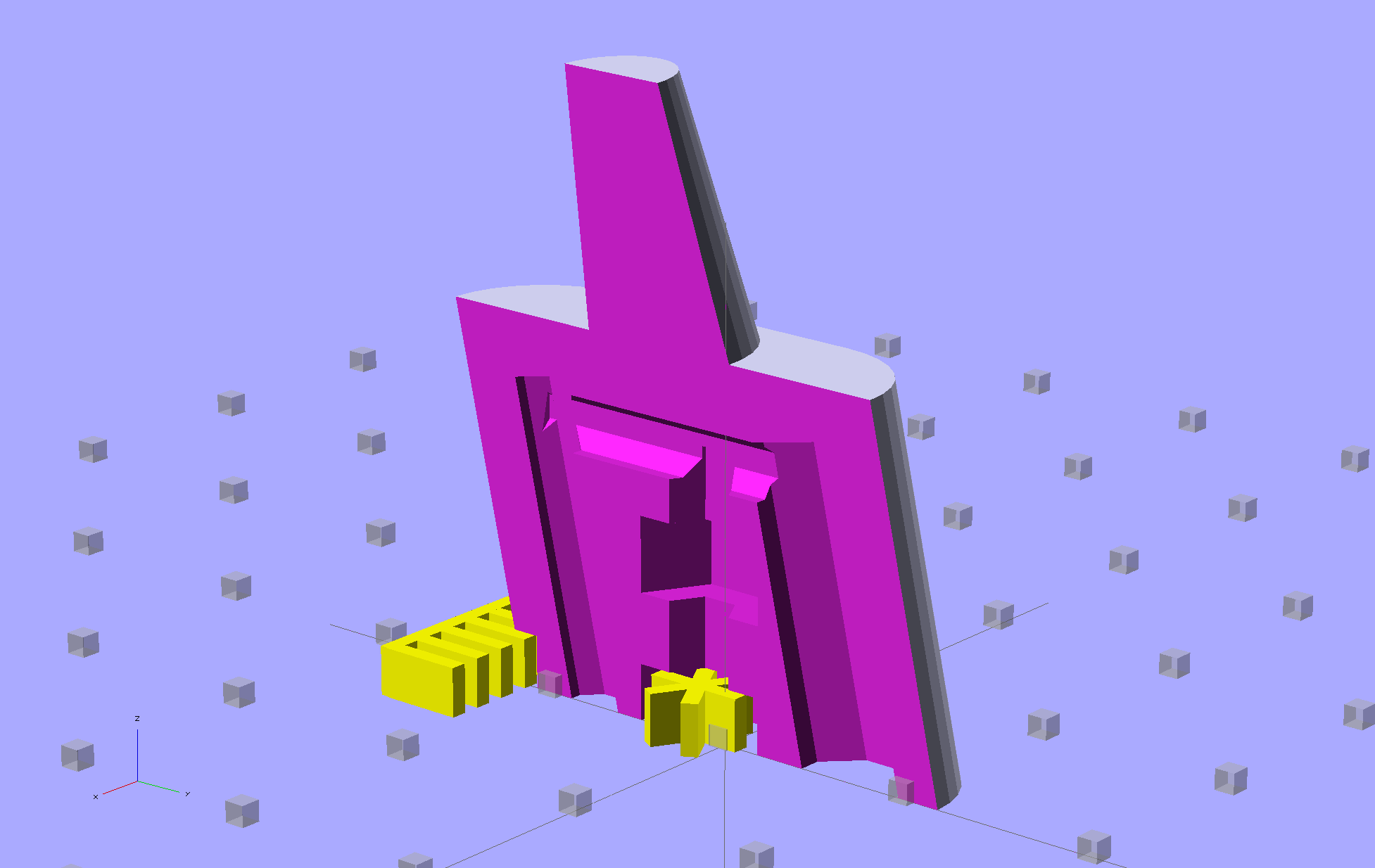
    It occurred to me that I could make an interposer between the helmet and the visor that could anchor the mic boom, with a tab for the helmet and a socket of some sort for the visor. While that’s still on the to-do list, the tab looks like this:

    Bell Helmet Visor Mount
    Bell Helmet Visor Mount

    Those are 1 mm cubes on 10 mm centers, so this is a teeny little thing.

    I don’t have a good idea for the corresponding socket, because those little grippers seem much too small for 3D printing, but now I have some tabs to play with:

    Bell Helmet Visor Mount - OEM vs 3D Printed
    Bell Helmet Visor Mount – OEM vs 3D Printed

    The OpenSCAD source code puts the tab atop an oval base plate, but it’ll eventually stick out of the boom mount:

    // Bell Helmet Visor Mount
    // Ed Nisley KE4ZNU
    // December 2013
    
    // Layout options
    
    Layout = "Build";			// Build Show
    
    //-----
    // Extrusion parameters must match reality!
    
    ThreadThick = 0.20;
    ThreadWidth = 0.4;
    
    HoleWindage = 0.2;
    
    //-- Handy stuff
    
    function IntegerMultiple(Size,Unit) = Unit * ceil(Size / Unit);
    
    Protrusion = 0.1;			// make holes end cleanly
    
    inch = 25.4;
    
    //----------------------
    // Dimensions
    
    //----------------------
    // Useful routines
    
    module PolyCyl(Dia,Height,ForceSides=0) {			// based on nophead's polyholes
    
      Sides = (ForceSides != 0) ? ForceSides : (ceil(Dia) + 2);
    
      FixDia = Dia / cos(180/Sides);
    
      cylinder(r=(FixDia + HoleWindage)/2,
               h=Height,
    	   $fn=Sides);
    }
    
    //- Put peg grid on build surface
    
    module ShowPegGrid(Space = 10.0,Size = 1.0) {
    
    	RangeX = floor(100 / Space);
    	RangeY = floor(125 / Space);
    
    	for (x=[-RangeX:RangeX])
    		for (y=[-RangeY:RangeY])
    			translate([x*Space,y*Space,Size/2])
    			%cube(Size,center=true);
    
    }
    
    //-------------------
    // Shapes
    
    TabBaseLength = 17.0;
    TabTopLength = 15.5;
    
    TabWidth = 4.00;
    TabHeight = 5.5;
    TabEmbed = 0.5;
    TabTaperHeight = 3.70;
    TabBaseHeight = TabHeight - TabTaperHeight;
    
    LatchBar = 2.25;					// square cross section
    WebIndent = 1.60;					// from outside edge of post
    WebThick = TabWidth - 2*WebIndent;
    LatchIndentTall = TabHeight - LatchBar;
    
    PostLength = 5.00;
    PostTaper = 1.25;
    LatchIndentLength = TabBaseLength - 2*(PostLength + PostTaper);
    
    module BellLatch() {
    
    	difference() {
    		intersection() {
    			translate([0,TabWidth/2,0]) rotate([90,0,0])				// side view
    			linear_extrude(height=TabWidth)
    				polygon(points=[
    					[-TabBaseLength/2,-TabEmbed],[-TabBaseLength/2,TabBaseHeight],[-TabTopLength/2,TabHeight],
    					[TabTopLength/2,TabHeight],[TabBaseLength/2,TabBaseHeight],[TabBaseLength/2,-TabEmbed]
    				]);
    
    			translate([0,0,-TabEmbed])
    			linear_extrude(height=(TabHeight + TabEmbed),convexity=3)				// top view
    				polygon(points=[
    					[-TabBaseLength/2,-TabWidth/2],
    					[-TabBaseLength/2, TabWidth/2],
    					[-(TabBaseLength/2 - PostLength), TabWidth/2],
    					[-(TabBaseLength/2 - PostLength - PostTaper),LatchBar/2],
    					[ (TabBaseLength/2 - PostLength - PostTaper),LatchBar/2],
    					[ (TabBaseLength/2 - PostLength),TabWidth/2],
    					[ TabBaseLength/2, TabWidth/2],
    					[ TabBaseLength/2,-TabWidth/2],
    					[ (TabBaseLength/2 - PostLength),-TabWidth/2],
    					[ (TabBaseLength/2 - PostLength - PostTaper),-LatchBar/2],
    					[-(TabBaseLength/2 - PostLength - PostTaper),-LatchBar/2],
    					[-(TabBaseLength/2 - PostLength),-TabWidth/2]
    				]);
    		}
    		for (y=[-1,1])
    		translate([0,y*((TabWidth/2 + WebThick/2)),LatchIndentTall/2])
    			cube([LatchIndentLength,TabWidth,LatchIndentTall],center=true);
    	}
    
    /*	difference() {
    		translate([0,0,TabHeight/2])
    		cube([TabLength,TabWidth,TabHeight],center=true);
    	}
    */
    }
    
    //-------------------
    // Build things...
    
    ShowPegGrid();
    
    if (Layout == "Show")
    	BellLatch();
    
    if (Layout == "Build") {
    	translate([0,0,2.0])
    		BellLatch();
    	difference() {
    		resize([20.0,10.5,2.0])
    			cylinder(r=2,h=2,$fn=32);
    		for (x=[-1,1])
    			translate([x*(5/2 + TabBaseLength/2 + 0.5),0,5+0.6])
    				cube([5,25,10],center=true);
    	}
    
    }