The Smell of Molten Projects in the Morning

Ed Nisley's Blog: Shop notes, electronics, firmware, machinery, 3D printing, laser cuttery, and curiosities. Contents: 100% human thinking, 0% AI slop.

Tag: Improvements

Making the world a better place, one piece at a time

  • OMTech 60 W Laser: Mirror Cleaning

    OMTech 60 W Laser: Mirror Cleaning

    While I was puttering around inside the laser cabinet, I figured it was time to check the mirrors for cleanliness. The first two mirrors looked fine, but Mirror 3 needed help:

    OMTech 60W laser mirror 3 cleaning - before
    OMTech 60W laser mirror 3 cleaning – before

    It turns out OMTech used molybdenum rather than gold-plated silicon or copper, trading off some reflectivity to reduce damage from over-enthusiastic cleaning with a vigorous circular motion.

    A first pass with an optical wipe removed most of the crud:

    OMTech 60W laser mirror 3 cleaning - during
    OMTech 60W laser mirror 3 cleaning – during

    Gentle touch-up with a little more isopropyl alcohol cleared the rest:

    OMTech 60W laser mirror 3 cleaning - after
    OMTech 60W laser mirror 3 cleaning – after

    The focus lens required similar attention, but there is no way to get meaningful pictures of a transparent lens.

    Realigning the mirrors went well (top before, middle during, lower after):

    Beam Alignment Targets- 2022-08-06
    Beam Alignment Targets- 2022-08-06

    The diagonal results at Mirror 3 show the XY axes aren’t quite square, but AFAICT it’s close enough. The rightmost tape shows good beam centering in the nozzle and the Focus target shows excellent Z alignment over about 50 mm of travel.

    Done!

  • OMTech 60W Laser: Repurposing the HV Power Supply Water Protect Input

    OMTech 60W Laser: Repurposing the HV Power Supply Water Protect Input

    For reference, the input terminals on the OMTech anonymous 60 W HV laser power supply:

    OMTech 60W HV power supply - terminals
    OMTech 60W HV power supply – terminals

    AFAICT, that’s the default layout for all similar power supplies.

    The H and L pins are the High- and Low-active enable inputs that, when it’s working right, control the laser output. The KT332 controller (and, most likely, all RuiDa controllers) produce a low-active output, so you just wire the controller’s output to the L input and you’re done.

    That was the original failure that got me to this point: the power supply ignored its L input and turned the beam on at whatever power the PWM signal on the IN terminal called for. Having that happen was surprising, having it happen with the cabinet lid open was … disturbing.

    The P input is intended for the Water Protect signal from the flow sensor on the laser cooling plumbing. When the water is flowing, the IN terminal will be low and the power supply will pay attention to the L input.

    The power supply arrived with a jumper between the P input and the G ground / common terminal:

    OMTech 60W HV power supply - Water Protect jumper
    OMTech 60W HV power supply – Water Protect jumper

    The jumper holds the P input low = active, meaning the power supply thinks the water is always flowing.

    It turns out that the Water Protect signal goes only to the controller. When it’s inactive = no water flowing, the controller will refuse to fire the laser and also sound an alarm. Running the signal directly to the power supply would result in a puzzling failure-to-fire with no diagnostic from the controller.

    I removed that jumper and added a (green) wire from the Lid Interlock signal at the controller:

    OMTech KT332 controller - Lid Interlock input - added wire
    OMTech KT332 controller – Lid Interlock input – added wire

    To the power supply’s P input:

    OMTech 60W HV power supply - Water Protect as Lid Interlock
    OMTech 60W HV power supply – Water Protect as Lid Interlock

    In principle, if this power supply fails the same way as the previous one (with its L input always active), then at least it won’t fire with the lid up.

    Believing that may display a childish naivety, but at least the thing seems marginally safer than it was before.

  • High Impact Art: Smashed Glass Coaster Meniscus Removal

    High Impact Art: Smashed Glass Coaster Meniscus Removal

    After using the smashed glass coaster for a while, the beveled epoxy meniscus around the perimeter proved itself more annoying than expected:

    Glass Coaster - second test
    Glass Coaster – second test

    So I clamped it to the Sherline’s tooling plate and milled off the rim:

    Smashed Glass Coaster - meniscus removal
    Smashed Glass Coaster – meniscus removal

    Given the Sherline’s cramped work envelope, all the action took place along the rearmost edge, requiring eight reclampings indexed parallel to the table with a step clamp.

    The cutter cleared off everything more than 0.3 mm above the surface of the glass chunks. I could probably have gone another 0.1 mm lower, but chopping the bit into the edge of a shattered glass fragment surely wouldn’t end well.

    Polishing the dark gray milled surface might improve it slightly, at the risk of scuffing whatever poured epoxy stands slightly proud of the glass:

    Smashed Glass Coaster - leveled edge
    Smashed Glass Coaster – leveled edge

    Perhaps if I define it to be a border, everybody will think it was intentional.

  • Rounded Petal Acrylic Coaster

    Having gotten the rounded-petal pattern generator working, applying it to acrylic sheets seemed reasonable:

    Cut Acrylic Coaster - top cleaned
    Cut Acrylic Coaster – top cleaned

    The petals stand slightly proud of the black top frame, as the colored sheets were marginally thicker than the black sheet, but it looks OK in person. They’re all epoxied to a transparent base plate, so the bottom view is pretty much the same:

    Cut Acrylic Coaster - bottom
    Cut Acrylic Coaster – bottom

    Because the bottom is perfectly smooth, I think it looks better than the top, which shows irregularities around the petals where the epoxy didn’t quite fill the gaps. There is one small bubble you won’t notice if I don’t tell you about it.

    I laid a small bead of epoxy around the perimeter of the base, laid the black frame in place, ran a bead along the midline of each petal shape plus a drop in the round part, laid the petals in place, and hoped I didn’t use too much epoxy. It turned out all right, with only a few dribbles down the edge that wiped off easily enough.

    I peeled the protective plastic off the top while the epoxy was still tacky, which pulled far too many fine filaments across the surface:

    Cut Acrylic Coaster - frayed top
    Cut Acrylic Coaster – frayed top

    After the final cure, I managed to scrape most of them off with a thumbnail; I hope to never make that mistake again.

    As you might expect, acrylic plastic’s pure saturated colors wipe the floor with Sharpie-scribbled white chipboard:

    Chipboard coaster - rounded petals - front vs back cut
    Chipboard coaster – rounded petals – front vs back cut

    The black frame makes the whole thing overly dark, so the next attempt should use white or perhaps a transparent layer atop a mirror base.

  • Newmowa NP-BX1: Video Duration vs Charge

    Newmowa NP-BX1: Video Duration vs Charge

    Having run the Newmowa NP-BX1 batteries through my old Sony HDR-AS30V helmet camera a few times, a plot seemed in order:

    Newmowa NP-BX1 video duration vs charge
    Newmowa NP-BX1 video duration vs charge

    The cluster of dots shows most of our rides last about an hour.

    The line is an eyeballometrical fit, slightly coerced to pass through the origin because that’s where it should go.

    The 9.1 mA·hr/min slope is in reasonable agreement with past results, given different batteries and charger. The Keweisi meter emerged first from the box.

    Straining the hr/min dimensional nonsense out of the slope suggests the camera averages 550 mA and 1.9 W. Derating those by a few percent to account for the recharge efficiency might be in order, but they’re surely in the right ballpark.

  • Epoxy Mixing Rack

    Epoxy Mixing Rack

    First you mix the epoxy, then you blend in the dye, then you dispense it into the thing you are making. If you’re using many colors, this is obviously not the right way to go about it:

    Acrylic Coaster - epoxy coloring
    Acrylic Coaster – epoxy coloring

    A bit of pondering converted some scrap MDF into a rack holding the little cups and dispensing pipettes:

    Epoxy Mixing Rack
    Epoxy Mixing Rack

    The bar magnet holds the backplate against a bench block to keep it at right angles to the base while the adhesive cures. The base is three layers of MDF with no, small, and large holes fitting the cups. I expect many epoxy spills; scrap MDF reduces deep emotional bonding to the result.

    The LightBurn project has the sign outline as a tool layer to simplify aligning the victims with the laser path, plus one layer defining the cuts for the three plates. I exported it as an SVG image with the same information as colored vectors for use in whatever laser control program you might use.

    The SVG image as a GitHub Gist:

    Loading
    Sorry, something went wrong. Reload?
    Sorry, we cannot display this file.
    Sorry, this file is invalid so it cannot be displayed.

  • Coaster Generator: Simple Petals

    Coaster Generator: Simple Petals

    Having figured out how to intersect a line with a circle, I figured I could do it twice to put arcs on both the inside and the outside of each petal:

    Chipboard coaster - double arcs
    Chipboard coaster – double arcs

    As before, scribbling markers on plain chipboard makes for a … subdued … coaster, so I tried chipboard with one white surface:

    Chipboard coaster - plain vs white
    Chipboard coaster – plain vs white

    Much better.

    Clamping the coaster produces a flatter result:

    Chipboard coaster - clamping
    Chipboard coaster – clamping

    With the risk of squishing excess glue through the kerf:

    Chipboard coaster - excess glue
    Chipboard coaster – excess glue

    That’s the same coaster as in the first picture, carefully arranged with light reflecting off the flat glue surface. In real life, the nearly transparent glue doesn’t look nearly so awful, but smoothing much less glue than seems necessary across the bottom disk suffices.

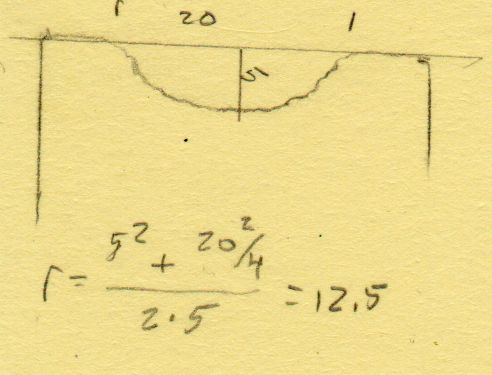
    The geometry doodle with the arcs:

    Chipboard coaster - double arc petal geometry doodle
    Chipboard coaster – double arc petal geometry doodle

    I suppose I should refactor the code with a quadratic solver returning a list of roots, but copypasta suffices for now.

    The GCMC and Bash source code as a GitHub Gist:

    #!/bin/bash
    # Simple petals test piece
    # Ed Nisley KE4ZNU – 2022-07-01
    Flags='-P 4 –pedantic' # quote to avoid leading hyphen gotcha
    SVGFlags='-P 4 –pedantic –svg –svg-no-movelayer –svg-opacity=1.0 –svg-toolwidth=0.2'
    # Set these to match your file layout
    ProjPath='/mnt/bulkdata/Project Files/Laser Cutter/Coasters/Source Code'
    LibPath='/opt/gcmc/library'
    ScriptPath=$ProjPath
    Script='Simple Petals.gcmc'
    [ -z "$1" ] && petals="6" || petals="$1"
    fn=Petals-$petals.svg
    echo Output: $fn
    gcmc $SVGFlags \
    -D "NumPetals=$petals" \
    –include "$LibPath" \
    "$ScriptPath"/"$Script" > "$fn"
    view raw petals.sh hosted with ❤ by GitHub
    // Simple Petals Test Piece
    // Ed Nisley KE4ZNU
    // 2022-07-12 Simplest possible petals
    layerstack("Frame","Petals","Rim","Base","Center","Tool1"); // SVG layers map to LightBurn colors
    //—–
    // Library routines
    include("tracepath.inc.gcmc");
    include("tracepath_comp.inc.gcmc");
    include("varcs.inc.gcmc");
    include("engrave.inc.gcmc");
    FALSE = 0;
    TRUE = !FALSE;
    //—–
    // Command line parameters
    // -D various useful tidbits
    // add unit to speeds and depths: 2000mm / -3.00mm / etc
    if (!isdefined("OuterDia")) {
    OuterDia = 100.0mm;
    }
    if (!isdefined("CenterDia")) {
    CenterDia = 25.0mm;
    }
    if (!isdefined("NumPetals")) {
    NumPetals = 6;
    }
    if (!isdefined("Sash")) {
    Sash = 5.0mm;
    }
    // Petal values
    PetalAngle = 360.0deg/NumPetals; // subtended by inner sides
    PetalHA = PetalAngle/2;
    PetalOD = OuterDia – 2*Sash;
    PetalID = CenterDia + 2*Sash;
    PetalOAL = OuterDia/2 – Sash – (Sash/2)/sin(PetalHA);
    //message("petalOAL: ",PetalOAL);
    // Find petal vertices
    P0 = [(Sash/2) / sin(PetalHA),0.0mm];
    t1 = tan(PetalHA);
    sc = (Sash/2) / cos(PetalHA);
    if (P0.x < PetalID/2) {
    a = 1 + pow(t1,2);
    b = -2 * t1 * sc;
    c = pow(sc,2) – pow(PetalID/2,2);
    xp = (-b + sqrt(pow(b,2) – 4*a*c))/(2*a);
    xn = (-b – sqrt(pow(b,2) – 4*a*c))/(2*a);
    y = xp*t1 – sc;
    if (FALSE) {
    message("a: ",a);
    message("b: ",b);
    message("c: ",c);
    message("p: ",xp," n: ",xn," y: ",y);
    }
    P1 = [xp,y];
    }
    else {
    P1 = P0;
    }
    a = 1 + pow(t1,2);
    b = -2 * t1 * sc;
    c = pow(sc,2) – pow(PetalOD/2,2);
    if (FALSE) {
    message("a: ",a);
    message("b: ",b);
    message("c: ",c);
    }
    xp = (-b + sqrt(pow(b,2) – 4*a*c))/(2*a);
    xn = (-b – sqrt(pow(b,2) – 4*a*c))/(2*a);
    y = to_mm(sqrt(pow(PetalOD/2,2) – pow(xp,2)));
    //message("p: ",xp," n: ",xn," y: ",y);
    P2 = [xp,y];
    PetalWidth = 2*P2.y;
    P3 = [PetalOD/2,0.0mm];
    if (FALSE) {
    message("P0: ",P0);
    message("P1: ",P1);
    message("P2: ",P2);
    message("P3: ",P3);
    }
    // Construct paths
    PetalPoints = {P1,P2};
    OutArc = varc_cw([P2.x,-P2.y] – P2,PetalOD/2);
    OutArc += P2;
    PetalPoints += OutArc;
    if (P0 != P1) {
    PetalPoints += {[P1.x,-P1.y]};
    InArc = varc_ccw(P1 – [P1.x,-P1.y],PetalID/2);
    InArc += [P1.x,-P1.y];
    PetalPoints += InArc;
    }
    else {
    PetalPoints += {P0};
    }
    //— Lay out the frame
    linecolor(0xff0000);
    layer("Frame");
    if (CenterDia) {
    goto([CenterDia/2,0mm]);
    circle_cw([0mm,0mm]);
    }
    repeat(NumPetals;i) {
    a = (i-1)*PetalAngle;
    tracepath(rotate_xy(PetalPoints,a));
    }
    goto([OuterDia/2,0]);
    circle_cw([0mm,0mm]);
    //— Lay out internal pieces for oriented cutting
    // baseplate
    layer("Base");
    relocate([OuterDia + 2*Sash,0]);
    goto([OuterDia/2,0]);
    circle_cw([0mm,0mm]);
    // central circle
    if (CenterDia) {
    layer("Center");
    relocate([OuterDia/2 + Sash,-(OuterDia – CenterDia)/2]);
    goto([CenterDia/2,0mm]);
    circle_cw([0mm,0mm]);
    }
    // petals
    layer("Petals");
    repeat(NumPetals;i) {
    org = [PetalWidth/2 – OuterDia/2,-(OuterDia + Sash)];
    relocate([(i-1)*(PetalWidth + Sash) + org.x,org.y]);
    tracepath(rotate_xy(PetalPoints,90deg));
    }
    // Debugging by printf()
    if (FALSE) {
    layer("Tool1");
    linecolor(0xff1f00);
    goto([Sash/2,0mm]);
    circle_cw([0mm,0mm]);
    goto(P0);
    circle_cw([0mm,0mm]);
    goto([0,0]);
    move([OuterDia/2,0]);
    goto([0,0]);
    move(OuterDia/2 * [cos(PetalHA),sin(PetalHA)]);
    goto(P2);
    move_r([0,-PetalWidth/2]);
    }