The Smell of Molten Projects in the Morning

Ed Nisley's Blog: Shop notes, electronics, firmware, machinery, 3D printing, laser cuttery, and curiosities. Contents: 100% human thinking, 0% AI slop.

Tag: Improvements

Making the world a better place, one piece at a time

  • Logitech Ball Camera Tripod Adapter

    The Logitech notebook webcam that peers into the Thing-O-Matic has terrible dynamic range compensation; turning on the LED ring light washes out the image something awful. An old Logitech ball camera seems better, but it sits atop a rubbery dingus adapted to grip huge old laptops. So I built an adapter with a standard 1/4-20 tripod screw thread in the bottom that ought to make it more useful.

    The old & new mounts compared:

    Logitech ball camera mounts
    Logitech ball camera mounts

    The color change comes from switching to yellow filament for an upcoming larger object.

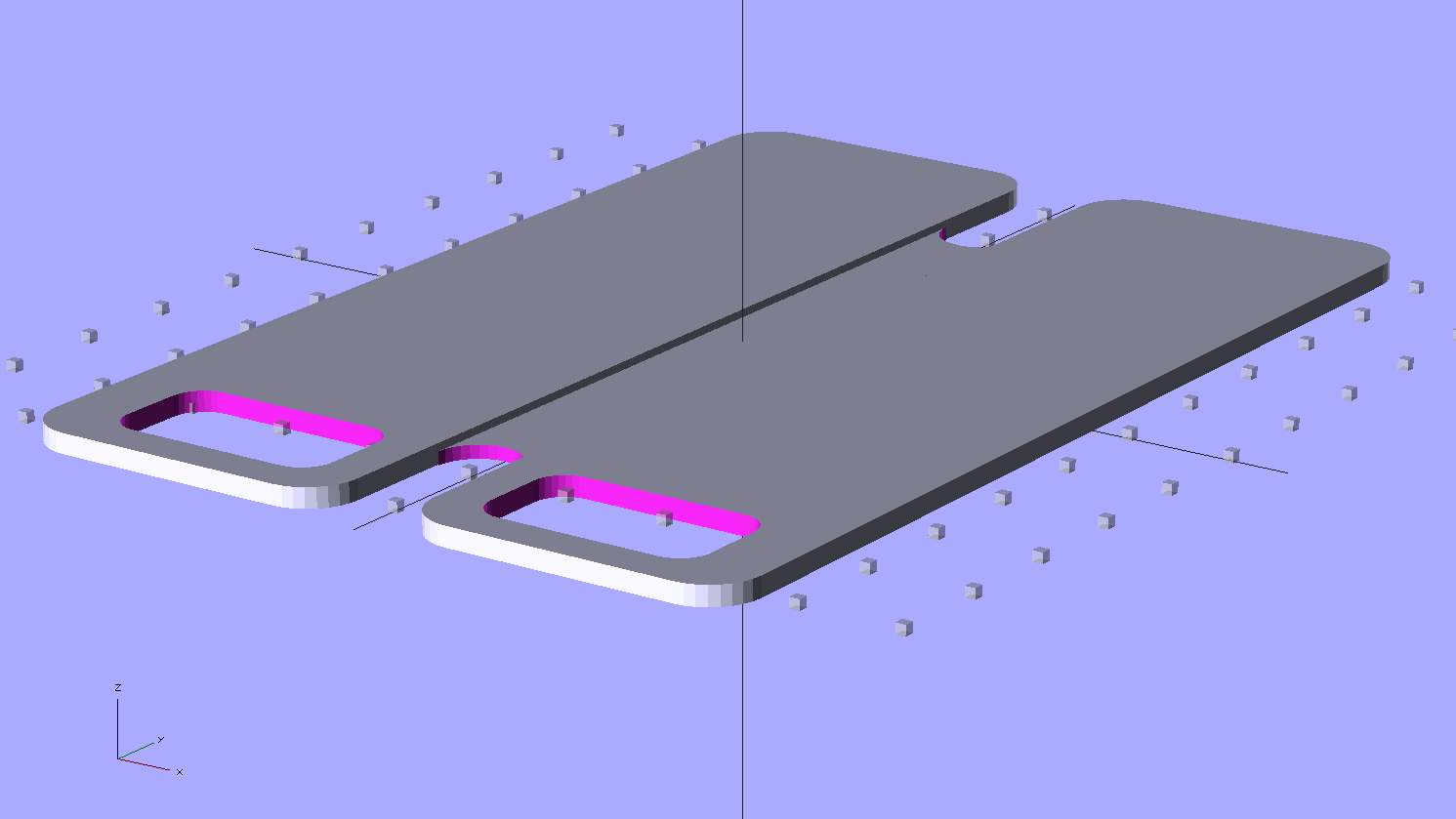
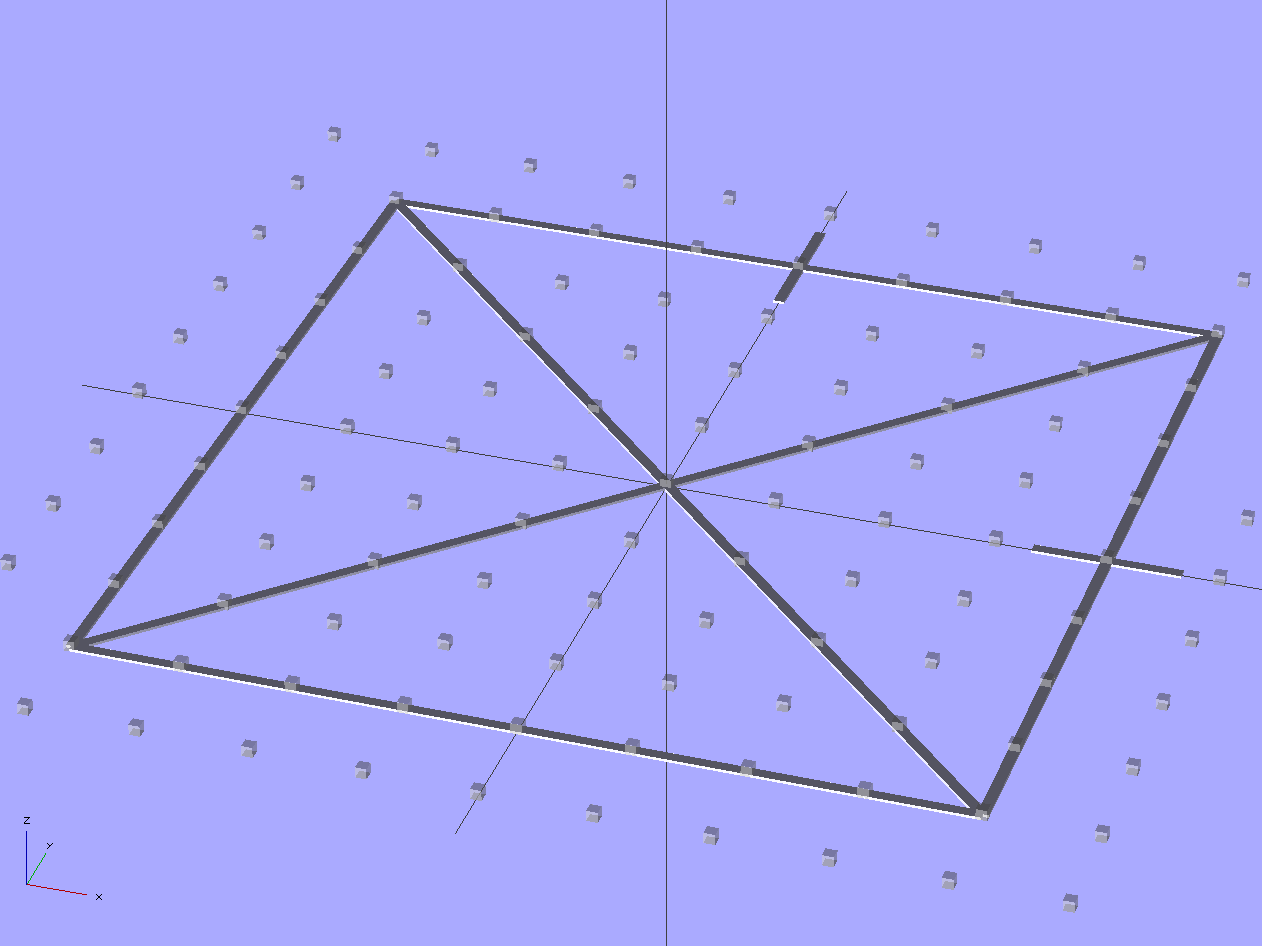
    The solid model shows those tiny little notches will require a bit of riffler file work:

    Logitech camera tripod adapter - solid model
    Logitech camera tripod adapter – solid model

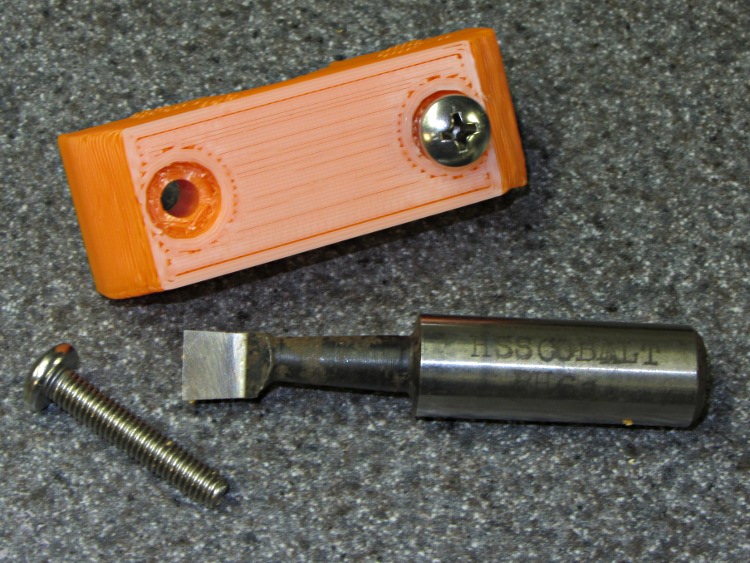
    The bottom has a blind 1/4-20 tapped hole. Lacking a bottoming tap, not having any broken 1/4-20 taps, and being unwilling to grind the end off a perfectly good taper tap, I filed three notches along a bolt. Ran the taper tap in until it hit bottom, ran the bolt in likewise, and defined the result to be Good Enough:

    Homebrew bottoming tap
    Homebrew bottoming tap

    On the other end, the most probable failure will leave that delicate little post jammed firmly inside the camera’s socket. There’s not enough post to allow printing a small guide hole, but there’s no real need for one; I drilled a #50 hole right down the middle, ran a 2-56 screw into it without tapping the hole, and filed the screw head flat:

    Camera mount with filed screw
    Camera mount with filed screw

    After cleaning up those notches, it snapped solidly into place:

    Logitech ball camera with mount
    Logitech ball camera with mount

    And then the camera sits neatly atop a cheap Gorillapod knockoff:

    Logitech ball camera on tripod
    Logitech ball camera on tripod

    That tiny reddish dot in the middle of the imposing set of rings marks the actual lens, so it’s more of a pinhole camera than anything else. The fixed focus kicks in beyond a meter, but a bit of rummaging in the Box o’ Lenses produced a random meniscus lens that pulled the focus in to maybe 100 mm. Alas, that means the camera must float in mid-air about 15 mm inside the Thing-O-Matic’s box. If I can conjure up a mount that holds the ball inside the box, above-and-forward of the stage, that’d work great. VLC can allegedly rotate the image upside-down, so maybe I can mount it bottom-up.

    Here’s everything I know about those two cameras, with the ball camera on top and the webcam on the bottom:

    Logitech ball and notebook webcam data
    Logitech ball and notebook webcam data

    Apparently it’s easier to put that information on a tag than provide a good old data plate on the camera body.

    The OpenSCAD source code:

    // Tripod mount for Logitech ball camera
    // Ed Nisley KE4ZNU - Oct 2011
    
    include </home/ed/Thing-O-Matic/lib/MCAD/units.scad>
    include </home/ed/Thing-O-Matic/Useful Sizes.scad>
    include </home/ed/Thing-O-Matic/lib/visibone_colors.scad>
    
    //-------
    //- Extrusion parameters must match reality!
    //  Print with +0 shells and 3 solid layers
    
    ThreadThick = 0.33;
    ThreadWidth = 2.0 * ThreadThick;
    
    HoleFinagle = 0.2;
    HoleFudge = 1.02;
    
    function HoleAdjust(Diameter) = HoleFudge*Diameter + HoleFinagle;
    
    function IntegerMultiple(Size,Unit) = Unit * ceil(Size / Unit);
    
    Protrusion = 0.1;			// make holes end cleanly
    
    //-------
    // Dimensions
    
    BallDia = 60.0;				// camera ball
    BallRad = BallDia/2;
    
    BaseDia = 16.0;				// interface at tripod surface
    BaseRad = BaseDia/2;
    
    BaseLength = 10.0;			// to base of ball
    
    BoltDia = Tap025_20;		// standard 1/4-20 thread
    BoltLength = 7.0;
    
    StemLength = 8.5;
    StemDia = 4.7;
    StemRad = StemDia/2;
    
    FlangeWidth = 6.6;
    FlangeThick = 2.6;
    
    NotchSectionDia = 1.4;		// toroid cross-section diameter
    NotchSectionRad = NotchSectionDia/2;
    NotchOffset = 2.3;			// from top of stem
    
    //-------
    
    module PolyCyl(Dia,Height,ForceSides=0) {			// based on nophead's polyholes
    
      Sides = (ForceSides != 0) ? ForceSides : (ceil(Dia) + 2);
    
      FixDia = Dia / cos(180/Sides);
    
      cylinder(r=HoleAdjust(FixDia)/2,h=Height,$fn=Sides);
    }
    
    module ShowPegGrid(Space = 10.0,Size = 1.0) {
    
      Range = floor(50 / Space);
    
    	for (x=[-Range:Range])
    	  for (y=[-Range:Range])
    		translate([x*Space,y*Space,Size/2])
    		  %cube(Size,center=true);
    
    }
    
    //-------
    //
    
    ShowPegGrid();
    
    translate([0,0,BaseLength])
      union() {
    	difference() {
    	  translate([0,0,-BaseLength])
    		cylinder(r=BaseRad,h=2*BaseLength);
    	  translate([0,0,BallRad])
    		sphere(r=BallRad);
    	  translate([0,0,-(BaseLength + Protrusion)])
    		PolyCyl(BoltDia,(BoltLength + Protrusion));
    	}
    	rotate(180/16)
    	  cylinder(r=StemRad,h=StemLength,$fn=16);
    	difference() {
    	  translate([0,0,StemLength/2])
    		cube([FlangeWidth,FlangeThick,StemLength],center=true);
    	  translate([0,0,(StemLength - NotchOffset)])
    		rotate_extrude(convexity=3,$fn=64)
    		  translate([FlangeWidth/2,0,0])
    			circle(r=NotchSectionRad,$fn=16);
    	  translate([0,-FlangeWidth/2,StemLength + sqrt(FlangeWidth)])
    		rotate([0,45,0])
    		  cube(FlangeWidth + 2*Protrusion);
    	  translate([0,FlangeWidth/2,StemLength + sqrt(FlangeWidth)])
    		rotate([0,45,180])
    		  cube(FlangeWidth + 2*Protrusion);
    	}
      }
    
  • LTSpice IV: Simulation Run Hotkey

    For some odd reason, Linear Tech’s LTSpice IV simulator has a hotkey to stop a simulation (Ctrl-H), but not one to start the run.

    Add one:

    • Control Panel
    • Drafting Options
    • Hot Keys button
    • Click in Run Simulation slot
    • Tap the ~ key
    • Back out of everything
    LTSPice Run key binding
    LTSPice Run key binding

    Done!

  • Expedient Handlebar Mirror Repair

    We frequently host touring bicyclists who need a campsite in the Mid-Hudson Valley. The most recent couple has been riding for two years, starting eastward from Paris shortly after their wedding. Yeah, it’s a honeymoon trip.

    After riding through Western and Eastern Europe, the Middle East, and several of the ‘Stans, JeanMarc’s handlebar mirror broke in Kazakhstan. Marie toted the carcass out of the ‘Stans, across India, through China, and then from Montreal to here. They’re biking to Houston, where they’ll fly to Peru, ride south and across the Andes, and work their way across the Atlantic on a cargo ship that eventually docks in Germany. Then, a year from now, they’ll just bike back to Paris.

    Makes you feel like sludge, too, doesn’t it?

    With that as prologue, JeanMarc wondered if I could fix the mirror mount. It started as a 10 mm plastic ball on a molded plastic fitting with an integral worm screw and strap; of course, the ball stem snapped off during a hard landing or some such event that comes naturally during long-distance riding. We kicked around some ideas, rummaged through the heap, and came up with a workable, albeit hideous solution.

    I applied a Dremel slitting wheel to a pair of Zerk grease fittings, sliced off the inlet valve, extracted the valve spring, and cleaned up the residue to leave a somewhat misshapen 9.3 mm (really a scant 3/8 inch) ball-like end. A bit of lathe work converted a chunk of PVC pipe into a sleeve grooved for a metal hose clamp. I drilled two #3 holes, tapped them 1/4-28 (which, believe it or not, is the correct thread for a Zerk), bandsawed the pipe in half, introduced the pieces to Mr Belt Sander to round the edges, screwed Zerks into holes, and wound up with a pair of these:

    Handlebar Mirror Mount - detail
    Handlebar Mirror Mount – detail

    Which looks awful on the handlebars, but we’re pretty sure it won’t break and he has a spare if the mirror on Marie’s bike snaps off:

    Handlebar Mirror Mount - fixed
    Handlebar Mirror Mount – fixed

    The Zerk fitting could unscrew, but the threads aren’t exactly in pristine condition after all that fussing and seem to be jammed firmly in place. If we had more time, I’d have heated the PVC and molded it around the handlebars, but we decided that wasn’t really necessary.

    They rode off into the distance this morning… may you have smooth roads and a tailwind, JeanMarc and Marie!

    JeanMarc and Marie
    JeanMarc and Marie
  • Bathroom Sink Replacement

    I finally got around to replacing the sink in the front bathroom, which required a surprising number of tools:

    Bathroom tool midden heap
    Bathroom tool midden heap

    As with the three other sinks I’ve replaced over the years, this one was a beautiful cast-iron monster made by the American Regulator & Standard Sanitary company, back before the name mushed into American Standard. This casting shows the original typography:

    Bathroom sink by American Regulator and Standard Sanitary
    Bathroom sink by American Regulator and Standard Sanitary

    A thin stainless steel trim ring and 16 (!) clamps held the sink in place on the countertop. Harsh experience taught me to support the sink while removing the clamps, because without the clamps there is nothing holding the sink up and I no longer enjoy stopping the tailpiece of a cast-iron sink with my chest…

    Supporting the old sink
    Supporting the old sink

    As it turned out, the sink required two pumps on the jack to break it free from the gunk gluing it in place; I was pleased to be wrong. I toted it to the end of the driveway, put a FREE sign on it, wherefrom it vanished within two hours. We’ll never know if it became someone’s precious antique or just a source of heavy brass fittings at the scrap metal recycler.

    The original vanitory countertop had been recessed into the corner walls before the tiles went up, so I sawed out a chunk of the front edge and bent the plywood enough to tap it out without destroying anything. The countertop rotated around the left-front corner and the right-rear corner looked like this when the dust settled:

    Extracted vanitory countertop
    Extracted vanitory countertop

    Half a century ago, the tile installers did a lovely mud job; the tiles adjoin and the grout is barely 1/16 inch wide. The vanitory case top was dead level, but the tiles weren’t quite aligned and my carefully applied and very neat 5 mm stripe of new caulk looks downright amateurish.

    For what it’s worth, the new countertop started life as a stock kitchen countertop. I sawed off the backsplash, trimmed the length, cut a pair of notches to match the recesses, sawed a hole for the sink, rotated it into place, and screwed it down. You can go the custom-top route, but given that you only see about two square feet when you’re done, dropping $400 for 6 ft2 of fancy material with a gaping sink hole or over a kilobuck for a countertop with built-in recessed sink didn’t make enough sense to us.

    And, no, vanitory is not a misspelling; I learned a new word during this project:

    Vanitory job label
    Vanitory job label

    After we sell the house, the new owners will rip all this out without a second thought. After all, Dusky Rose went out of style a long time ago, a perfect hand-set array of 3/4 x 1-5/8 inch floor tiles isn’t attractive, and nobody cares about mud jobs. We’d rather keep that nice work around (even if we’re willing to put up with a simple countertop), but that’s just us; we’re the type of people who think keeping the original spring-loaded turned-wood dowel in the toilet paper holder is charming.

    They’ll junk that space heater recessed into the wall, too: it has a long coily 120 V heating element strung inside, easily within the reach of questing little fingers. I added a GFI to that circuit, but I can’t imagine anybody else tolerating it. Times change.

  • GPS+Voice Interface for Wouxun KG-UV3D: Circuit Hackage

    Having had my old ICOM IC-Z1A HT stop working, most likely due to the innards finally shaking loose, I replaced it with a Wouxun KG-UV3D dual-band radio. Unfortunately, the interface box I designed to connect the Byonics TinyTrak 3+ GPS modem, the helmet earbud/mic, and the external battery pack to the Z-1A doesn’t work with the Wouxun. It’s all different:

    • Mechanical interface to the radio
    • Battery voltage
    • Power control
    • Mic level
    • PTT interface

    I modified the interface box from my bike thusly:

    GPS-HT Interface Circuit Mods for Wouxun
    GPS-HT Interface Circuit Mods for Wouxun

    Because the KG-UV3D uses the Kenwood HT interface with a single ground for mic, speaker, and PTT functions, there’s no need for galvanic isolation; all the optoisolators & the audio transformer will Go Away when I rebuild it.

    The plug connections:

    Wouxun KG-UV3D Mic & Speaker Jacks
    Tip Ring Shell
    3.5 mm +5 V Mic audio PTT
    2.5 mm Speaker audio Buttons Ground

    One distressing change: the IC-Z1A mic power was 3.5 V behind 400 Ω = 6 mA into an optoisolator LED, but the KG-UV3D puts 5 V behind 50 kΩ = 100 µA into a dead short. I think the voltage will suffice to drive a logic-gate MOSFET to switch the power through a PNP transistor, but, for the moment, I hotwired OK1 and “control” the interface power by unplugging the external battery. The radio runs from its own snap-on Li-Ion pack.

    The PTT now has a separate logic wire and is no longer multiplexed as a DC current on the audio line. The hack on OK2 was the easiest way to make that happen on the existing board, but the TT3 PTT Out line can  probably drive the PTT directly.

    I’m not happy with the audio levels; the KG-UV3D requires more mic gain (which change doesn’t appear in the mods) and more TT3 output. Having tediously calibrated the TT3 for the IC-Z1A, I’m not looking forward to doing that again. I still like using an analog multiplexer to switch the audio signal, though, because it doesn’t mix the machine noise with the voice transmissions.

    Bungied GPS Interface Box
    Bungied GPS Interface Box

    There being no way to mount the box on the radio and no way to control the interface power if I did, I simply lashed it to the side of the pack holding the radio behind the seat. Obviously, that can’t last forever…

    I think the KG-UV3D stuffs more RFI into the mic circuit, because that box is now in the only position that doesn’t result in weird voice audio dropouts. Given the precarious nature of the thing, though, I must look again after getting it in a box on the radio.

    Earth to amateur radio manufacturers: seen from out here, it’d be perfectly OK to standardize some of this stuff!

  • External USB Case vs OEM DVD Drive Mounting Bracket

    That little Lenovo Q150 doesn’t include an optical drive and, mostly, I don’t need one, but sometimes it’s handy to boot from a CD. I picked up a used DVD burner that also fits my Dell E1405 laptop (should I need a spare) and a tiny USB laptop drive case from the usual eBay sources for a grand total of $17 delivered.

    The drive had a mounting bracket on the back that obviously had to come off, because the bracket screws snuggled right in among the USB adapter electronics:

    E1405 DVD drive bracket vs USB electronics
    E1405 DVD drive bracket vs USB electronics

    In fact, that flat tab with a hole would have clunked up against the back of the case and prevented it from sliding all the way in, but the screws also foiled Plan B: flip the bracket around so the tab goes under the drive where it couldn’t get lost if I needed it again.

    So now the bracket & screws live in a little bag in the Box o’ USB Stuff.

    The DVD drive works fine with just a single USB cable, although the case came with a power-only USB cable, so the latter also lives in the bag with the bracket. Maybe I’ll need it in the unlikely event I actually burn a DVD in that drive?

  • DNS Optimization

    A discussion on the MHV LUG mailing list pointed to the Gibson Research DNSBench utility. Letting it chew on all the nameservers it can find, then mulling over the results for a bit, produced this short list:

    • NY Public Library: 68.88.88.2
    • Level 3 Comm: 4.2.2.3 or .5
    • Yale: 130.132.1.10 or 11
    • NTT: 129.250.48.98

    Feed those into Network Manager (or /etc/resolv.conf) in some permuted order and away you go… at least if you’re near Poughkeepsie and using Optimum Online. Change anything and the results will differ.

    I’d been using OpenDNS at 208.67.22[02].22[02], but the new ones test out as marginally faster and are certainly more diverse. Who knew NYPL ran a DNS?