The Smell of Molten Projects in the Morning

Ed Nisley's Blog: Shop notes, electronics, firmware, machinery, 3D printing, laser cuttery, and curiosities. Contents: 100% human thinking, 0% AI slop.

Tag: Improvements

Making the world a better place, one piece at a time

  • Makergear M2 Improved Platform: Solid State Relay and Thermistor

    I’d originally planned to drive the new HBP with a boost converter from the 24 V supply brick, but that didn’t quite work out. The arrival of a 36 V brick from halfway around the planet solved that problem, but the RAMBo platform heater’s 15 A ATO fuse restricts it to 24 V and I don’t quite trust that MOSFET for high current applications, either.

    Sooo, I went full-frontal Cupcake with a solid state relay screwed to a pair of existing holes (!!!) in the M2’s frame:

    M2 - SSR for Improved HBP
    M2 – SSR for Improved HBP

    Note: that’s a DC-to-DC SSR, not the more common DC-to-AC SSR. Basically, it’s an up-armored optically isolated MOSFET, not a triac, and, yes, capitalizing acronyms and initalisms can be contentious.

    Because the RAMBo’s MOSFET now drives the piddly current required to activate the SSR, I rewired the power to apply the M2’s 19.5 V brick to all three inputs by adding two red jumpers on the right side of the Phoenix plugs:

    M2 HBP SSR Wiring
    M2 HBP SSR Wiring

    The M2’s hulking 12 V brick now resides in the Basement Warehouse’s Power Supply Annex.

    The HBP cable comes in from the right side and the 36 V supply arrives through the Powerpole connectors in the lower right. Tucking the ferrite slug on the 19.5 V supply behind the wire loom prevents the cable from pulling the Phoenix connectors out of the RAMBo board at an inopportune moment.

    The original M2 HBP wiring got uncomfortably warm carrying the 10+ A for that platform. It would probably work OK at a lower current, but I’d already put Powerpole connectors on the new HBP. So I ran that cable outside the loom and abandoned the original pair inside.

    The SSR switches the +36 V wire, leaving the HBP at 0 V when it’s not activated: supply hot → SSR → HBP → supply common. That makes no practical difference, but it feels like a Good Idea. Also, the Kapton tape across the SSR terminals should be barely adequate to prevent contact with random conductive clutter; I’m channeling the true spirit of DIY 3D printing…

    I don’t have a connector matching the M2’s 100 kΩ platform thermistor, either, so I just ran the new cable down the outside of the loom and conjured up a two-pin socket for the header on the RAMBo board:

    Improvised 2-pin header socket
    Improvised 2-pin header socket

    Plug it all together, tweak the startup G-Code to properly trip the Z-min switch at its new location, and it Just Works:

    M2 Improved HBP - alignment test
    M2 Improved HBP – alignment test

    Those are thinwall open boxes that came out 5±0.03 mm tall across the array, so the platform is just about as level / aligned as necessary for my simple needs.

    The Z-min switch will move to get rid of that stupid block epoxied to the platform, so I didn’t record the G-Code tweakage…

  • Makergear M2 Improved Platform: Mechanical Adjustments

    The PCB under the improved flat-top glass platform has three soldered-in-place M3 screws that fit the M2’s Y stage support:

    M2 - Improved HBP - bottom view
    M2 – Improved HBP – bottom view

    I applied a tiny rat-tail file to the holes until they became a free sliding fit for the screws.

    The wave springs are mostly decoration, as the silicone rubber disks now take the compression load from the screws, and the platform is quite rigidly mounted.

    The new platform eliminates the M2’s original aluminum support spider, the aluminum heater & heat spreader, and the corner supports & clips, all of which add up to about 780 g. I didn’t bother changing the Y axis acceleration to match, as all those numbers seem rubbery.

    Minus the support spider, the platform rides much lower on the Z axis stage than the M2’s platform. Unfortunately, the Z-min switch clamped to the top of the rear Z-axis guide rod can’t get any higher, even after rearranging the cable and fiddling with the LED:

    M2 - Z min limit switch
    M2 – Z min limit switch

    As a first-pass hack, I moved the switch to the rear of the X gantry and applied Gorilla Tape to hold it in place:

    M2 - Z-min switch at rear X gantry
    M2 – Z-min switch at rear X gantry

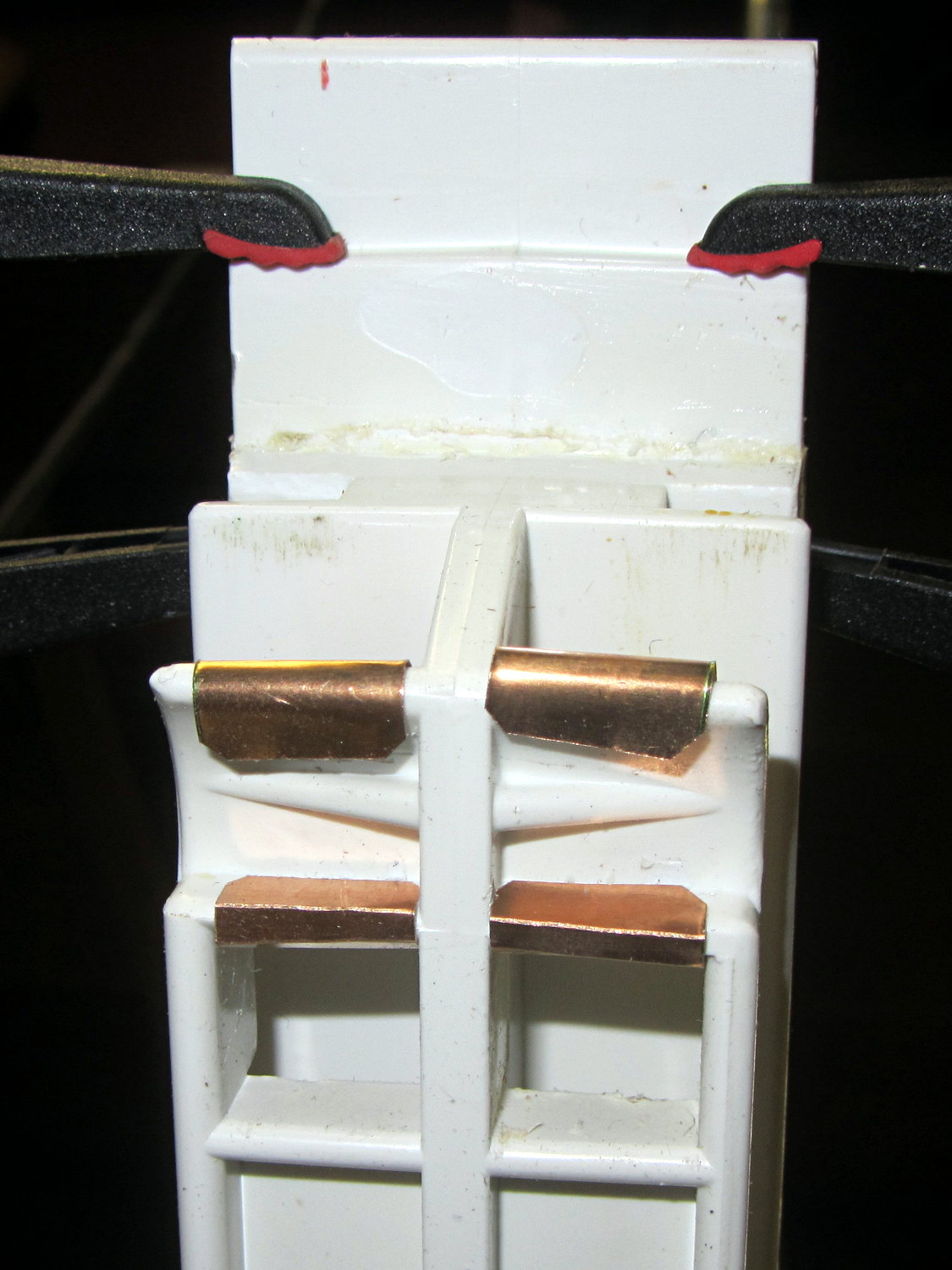
    That required a small block to raise the platform enough to activate the switch before hitting the nozzle. I epoxied a snippet of brass rectangle tube to the left edge of the platform, directly under the switch lever:

     M2 - Improved HBP - rear switch tab
    M2 – Improved HBP – rear switch tab

    The awkward position activates the switch with the platform as far to the rear as possible, so that you can’t inadvertently drag the dangling switch lever across the block in the wrong direction.

    I think it’s stupid, too, but it let me bring up the printer and make sure all the electronics kept working. The next step was to relocate the switch to a more rational place

  • Tour Easy: Handlebar Wrap

    img_3619 - Silicone tape on Tour Easy handlebarAfter more than a few years, the handlebar grips on my Tour Easy are rather worn, so I recently wrapped them with cheerful red and yellow silicone tape.

    Back in the day, you wrapped with cork tape and had to worry about the direction on each side. Silicone tape fuses into a solid mass and the orientation shouldn’t matter; that’s a Good Thing, because I’m not sure what direction would be correct in this situation.

    The yellow section covers the SRAM twist grip, which means it has a moving joint at each end. I suspect the tape will pull back from the larger part of the grip and form an unsightly lump just behind it.

    It’s certainly much grippier than I expected…

    (The small pushbutton switch is the PTT for the amateur radio HT that does voice and APRS/GPS.)

  • Improved M2 Build Platform: 30 V Power and SSR Test

    The 36 V 350 W power brick for the improved M2 HBP arrived and seems to work fine, apart from a distinct smell of hot electronics under load. Dialed back to 30.1 V at the terminals (to match the HBP spec) and with the HBP connected through the same length of 12 AWG wire as before, the supply draws 150 W from the AC line.

    It draws 160 W at 31.7 V and stabilizes at about 100 °C. The heater resistance is 7.6 Ω before it has a chance to cool off, so the heater runs at 4.17 A and 132 W. The supply efficiency is 83% = 132/160, about what you’d expect. The fan runs intermittently with that load.

    In order to dissipate 150 W in the panel at the same resistance, the voltage must be 33.5 V at 4.5 A. I’d want to install it in the M2 and make some measurements before jumping to any conclusions.

    The DC-DC solid state relays work about as expected, too. This is a 60 V 10 A brick, turned on with one of those old Tenergy RTU NiMH 8 cell packs:

    DC-DC SSR Test Setup
    DC-DC SSR Test Setup

    The SSR’s forward drop runs around 1.0 to 1.1 V at 4 A, which suggests a drain-source resistance near 0.25 Ω, rather more than you’d expect for a bare MOSFET, but probably about right for an up-armored device. Or it could just be a crap MOSFET inside there…

    So I think the brick will wind up at about 35 V to make up for the SSR drop. The SSR will dissipate about 5 W and won’t need much heatsinking; just bolting it to an aluminum chassis may suffice.

  • Musings on a Vacuum Table

    After looking at all the holes in the maximum-size PCB platen for the Sherline mill, I started thinking about a vacuum table for things like PCBs and engraved slabs.

    I recently harvested the compressor from a defunct dehumidifier:

    Harvested Dehumidifier Compressor
    Harvested Dehumidifier Compressor

    That ought to be useful in a DIY vacuum table that needs a good, low-volume pump. It seems refrigeration pumps can get down around 29 inches of mercury, so the net pressure difference is maybe 13 psi and I’d round it down to 10 psi. Typical small PCBs, say 1 x 2 inches, would have 20 to 30 pounds of downforce.

    From what I read, the pump will blurp oil from the smaller outlet tube while settling down to pull a vacuum through the larger, rather discolored, inlet tube; adding a larger diameter vertical catch chamber with a splash plate to the outlet would be in order. I think a trash filter on the inlet, perhaps conjured from a defunct whole-house water filter with a 3 micron spun-fiber filter element, should keep dust and crud out of the compressor; the inlet already has a small filter / dryer (the lump next to the compressor body), but that probably won’t withstand an assault of glass-fiber-laden PCB drilling dust.

    As far as the vacuum table goes, I think a 3D printed base with a machinable wax insert might be just the ticket: the base collects all the complexity, including hose fittings and a plenum under the insert, into a 3D model where it’s easy to duplicate and the cheap-and-simple wax acts as a moderately hard sacrificial platform. The base would have 10-32 holes around the outside to match the Sherline’s tooling plate. The wax insert could stand proud of the base and have holes only where they’re needed, so the base holds the insert in place mostly by vacuum.

    You’d (well, I’d) like to cast the wax in place, but it melts around 240 °F = 115 °C and gets pourable around 270 °F = 132 °C, well above the point where PLA gets juicy and about where ABS gets gummy, so I think a drop-in slab makes more sense; cast it on a plate for a flat bottom surface, trim off the mold flash, and drop it in place with the flat side down. Then, with the vacuum turned on, flycut the rumpled top to get a known-flat-and-true surface, mill some vacuum channels, and drill holes to match the 3D printed holes in the plenum; all that would be a G-Code routine, of course. A simple hexagonal drilled pattern (big shallow holes for maximum clamping, little through holes into the plenum) might be a good starting point, at least for the simple, low-stress stuff I’m doing: PCBs and maybe edge-lit ersatz Nixie tubes.

    You could gently heat the part to seal it to the wax, although that might risk losing the top surface alignment. Given reasonably flat PCB material, a custom channel pattern under the board might be just as good.

    When the wax gets sufficiently chopped up that it can’t hold a good seal, toss it in the remelting bin, drop in a new slab, mill it to suit, and continue the mission.

    If you do it right, everything’s parametric and you can generate a custom base with a custom insert by twiddling a few parameters that set the overall size of the thing; print up the base, drop in a wax plate, machine the top surface, done. You’d need two source files: OpenSCAD for the base and custom G-Code for the insert. Maybe the OpenSCAD script can generate and export a DXF-ish file that could produce the mill / drill code for the insert.

  • Plastic Wrap Plastic Cutter Blade: FAIL

    OK, somebody decided that the classic metal blade used on all plastic wrap boxes since the dawn of time cost too much, so they decreed that it be replaced with a plastic blade that costs essentially nothing:

    Walmart plastic wrap - plastic cutter
    Walmart plastic wrap – plastic cutter

    Unfortunately, a thin plastic blade also bends easily and, after a few uses, cracks along the midline. After that, it simply doesn’t work; there’s no way to actually tear the plastic off the roll.

    It turns out that a common hacksaw blade is exactly the right length and, oriented with the teeth pointing to the left, will rip through plastic wrap like, uh, a hacksaw through plastic:

    Walmart plastic wrap - real cutter
    Walmart plastic wrap – real cutter

    That this hack should not be necessary goes without saying…

    There’s a layer of double-stick foam tape between the box and blade. It’s probably removable, but I was in a hurry.

  • Devilspie2: Lua Scripts

    Prompted by that suggestion, here’s the current collection of Devilspie2 scripts (in ~/.config/devilspie2/) that make my dual-monitor setup (left: 2560×1440 landscape, right: 1050×1680 portrait) usable with a single X session in Xubuntu 12.10. The window manager understands about the monitor layout, so maximizing a window will fill whatever monitor it’s currently occupying.

    acroread.lua — maximized on portrait

    if (get_window_name()=="Adobe Reader") then
          unmaximize();
          set_window_geometry(0,0,1000,100);
          set_window_geometry(2561,0,1000,100);
          maximize();
    end
    

    chromium.lua — right half of landscape

    if (get_application_name()=="Chromium" and get_window_name() ~= "Print") then
       set_window_geometry(1400,0,1150,1200);
       maximize_vertically();
    end
    

    debugging.lua — handy with –debug option

    debug_print("Window Name: " .. get_window_name());
    debug_print("Application name: " .. get_application_name());
    

    digikam.lua — right half of landscape, force large Search dialog, dammit

    if (get_application_name() == "Digikam") then
    	debug_print("DigiKam conditional - top");
    	if (get_window_name() == "Advanced Search") then
    		debug_print("Digikam - Adv Search");
    		set_window_geometry(750,100,1000,1300);
    	else
    		debug_print("Main DigiKam window");
    		set_window_geometry(0,0,1400,1000);
    		maximize_vertically();
    	end
    end
    

    firefox.lua — left half of landscape, enlarge dialogs

    if (get_application_name()=="Firefox") then
    	debug_print("FF conditional - top");
    	if (get_window_name() == "Print") then
    		set_window_position(700,350);
    	elseif (0 == string.find(get_window_name(),"Password")) then
    		set_window_position(0,0);
    		maximize_vertically();
    	end
    end
    

    gimp.lua — force Gutenprint dialog to the top, dammit

    if (get_application_name() == "GNU Image Manipulation Program") then
    	debug_print("GIMP conditional - top");
    	if (string.find(get_window_name(),"Print")) then
    		debug_print("GIMP - GutenPrint")
    		set_window_position(700,350);
    		make_always_on_top();
    	else
    		debug_print("GIMP - Main window");
    	end
    end
    

    passwords.lua — put password dialogs in mid-screen

    if (get_window_name()=="Password Required") then
    	debug_print("Password");
    	set_window_position(700,350);
    end
    

    pronterface.lua — force to middle-ish of Desktop 2

    if (get_window_name()=="Printer Interface") then
       set_window_workspace(2);
       set_window_position(1200,750);
    end
    

    slic3r.lua — force to right side of Desktop 2

    if (get_window_name()=="Slic3r") then
       set_window_workspace(2);
       set_window_geometry(1600,0,700,700);
    end
    

    terminal.lua — maximized on portrait

    if (get_window_name()=="Terminal") then
       set_window_position(2561,0);
       maximize();
    end
    

    thunderbird.lua — left half of landscape, force big dialogs

    if (get_application_name() == "Thunderbird") then
    	debug_print("TBird conditional - top");
    	if (1 == string.find(get_window_name(),"Print")) then
    		debug_print("TBird - print...");
    		set_window_position(700,350);
    	elseif (string.find(get_window_name(),"Sending") or
    			string.find(get_window_name(),"Confirm") or
    			string.find(get_window_name(),"Processing")) then
    		debug_print("TBird - generic dialog");
    		set_window_position(200,600);
    	elseif (string.find(get_window_name(),"Write:")) then
    		debug_print("TBird - writing");
    		set_window_geometry(1300,0,900,600);
    		maximize_vertically();
    	elseif (0 == string.find(get_window_name(),"Password")) then
    		debug_print("Main TBird window?");
    		debug_print(" name: ",get_window_name());
    		set_window_geometry(0,0,1300,1200);
    		maximize_vertically();
    	end
    end