The Smell of Molten Projects in the Morning

Ed Nisley's Blog: Shop notes, electronics, firmware, machinery, 3D printing, laser cuttery, and curiosities. Contents: 100% human thinking, 0% AI slop.

Tag: Improvements

Making the world a better place, one piece at a time

  • Vacuum Tube Lights: Duodecar Rebuild

    You’ll recall the LED atop the 21HB5A tube failed, shortly after replacing the bottom LED and rewiring the ersatz plate lead, which led me to rebuild the whole thing with SK6812 RGBW LEDs. So I printed all the plastic parts again, because the duodecar tube socket’s pin circle can fit into a hard drive platter’s unmodified 25 mm hole, then drilled another platter to suit:
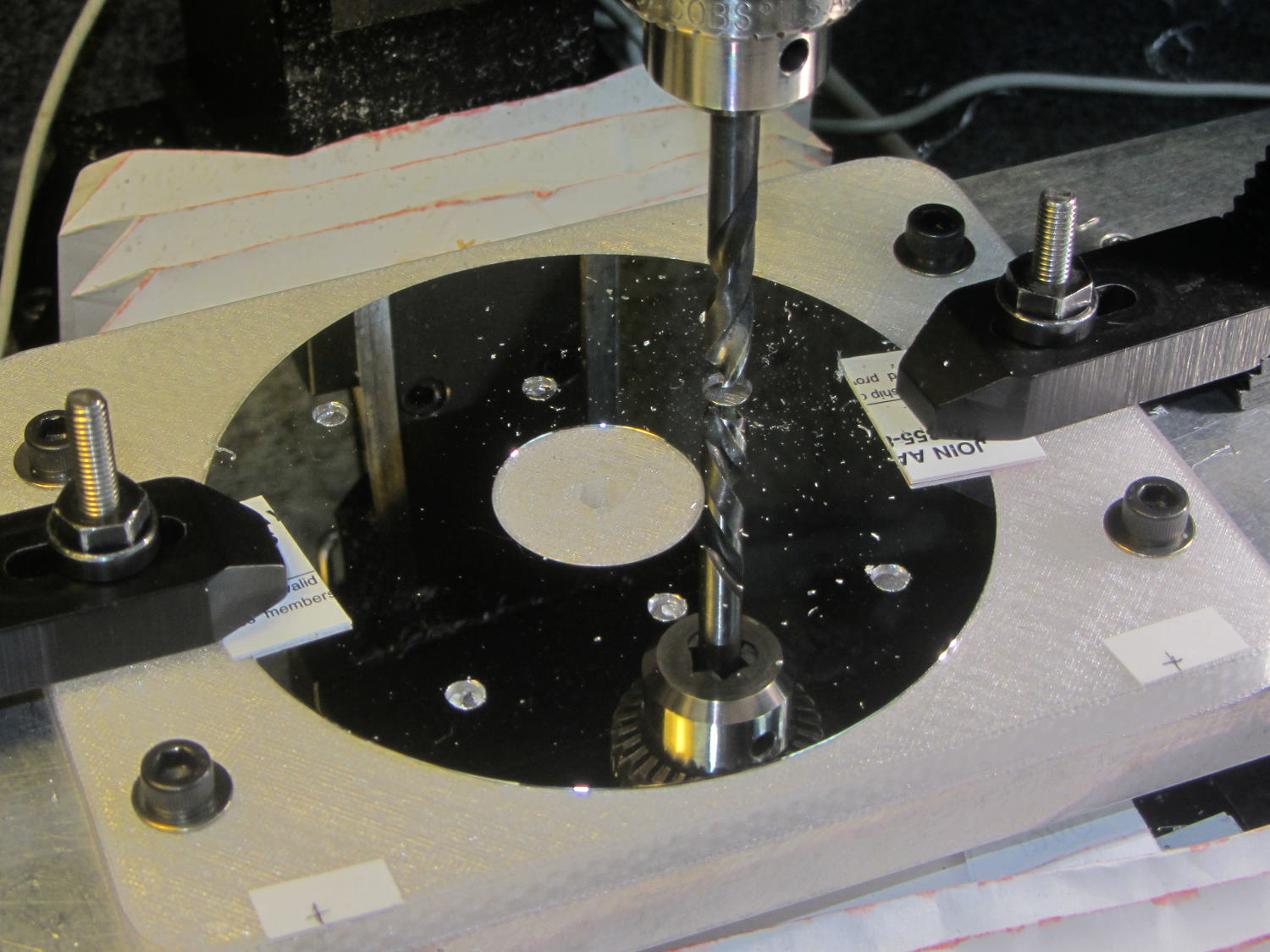
    Duodecar disk drilling
    Duodecar disk drilling

    The hole under the drill fits the 3.5 mm stereo socket for the ersatz plate lead, so it’s bigger than before.

    I’ve switched from Arduino Pro Minis with a separate USB converter to Arduino Nanos with an on-board CH340 USB chip, because the fake FTDI chips on the converters are a continuing aggravation:
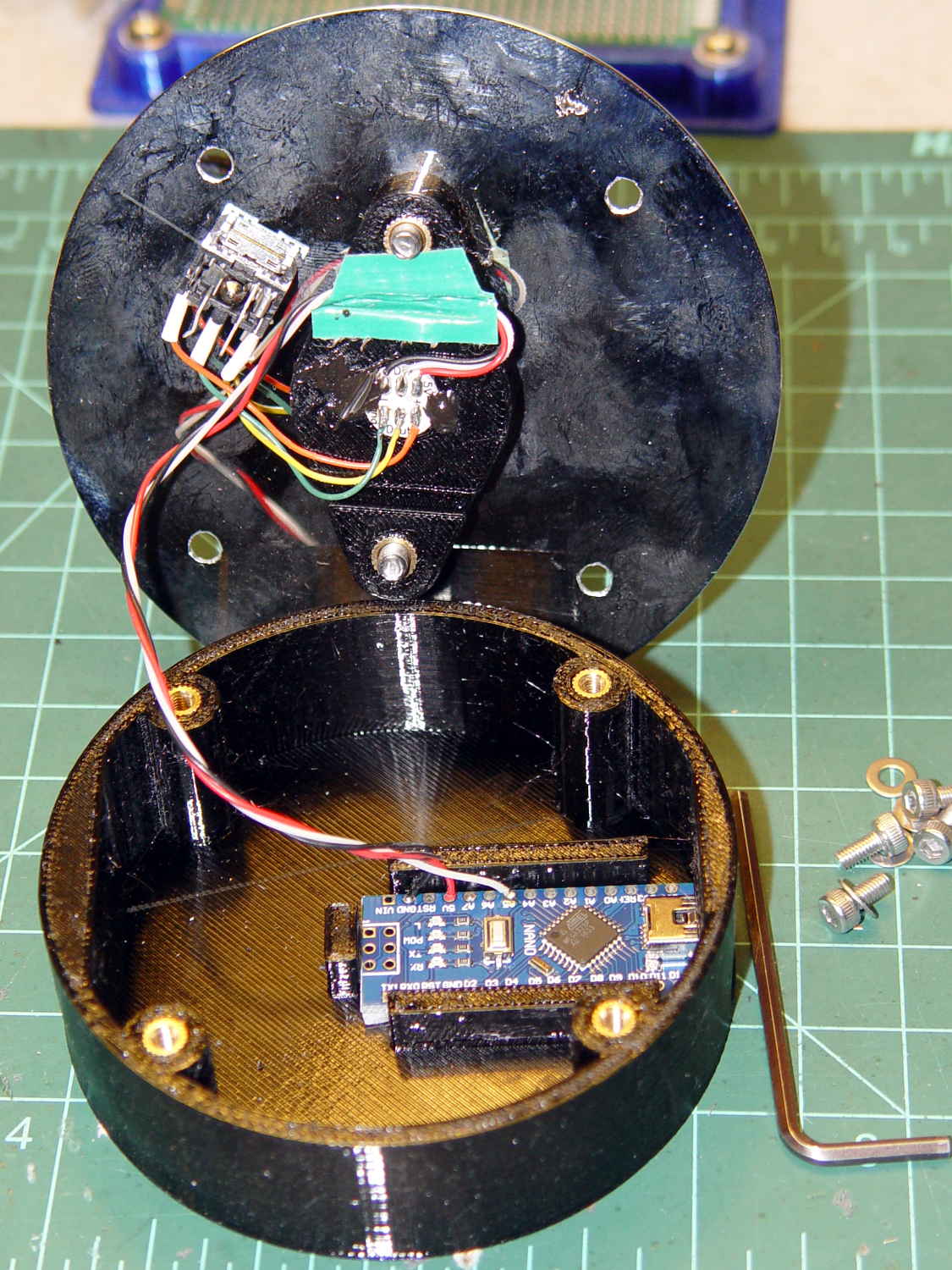
    21HB5A base - interior
    21HB5A base – interior

    Adding those wire slots to the sockets definitely helps tidy things up; the wires no longer need a crude cable tie anchoring them to the socket mounting screws.

    I wanted to drive the LEDs from the A7 pin, rather than the A3 pin I’d been using on the Pro Minis, to keep the wires closer together, but it turns out that A6 and A7 can’t become digital output pins. So I used A5, although I may come to regret the backward incompatibility.

    In any event, the 21HB5A tube looks spiffy with its new LEDs in full effect:
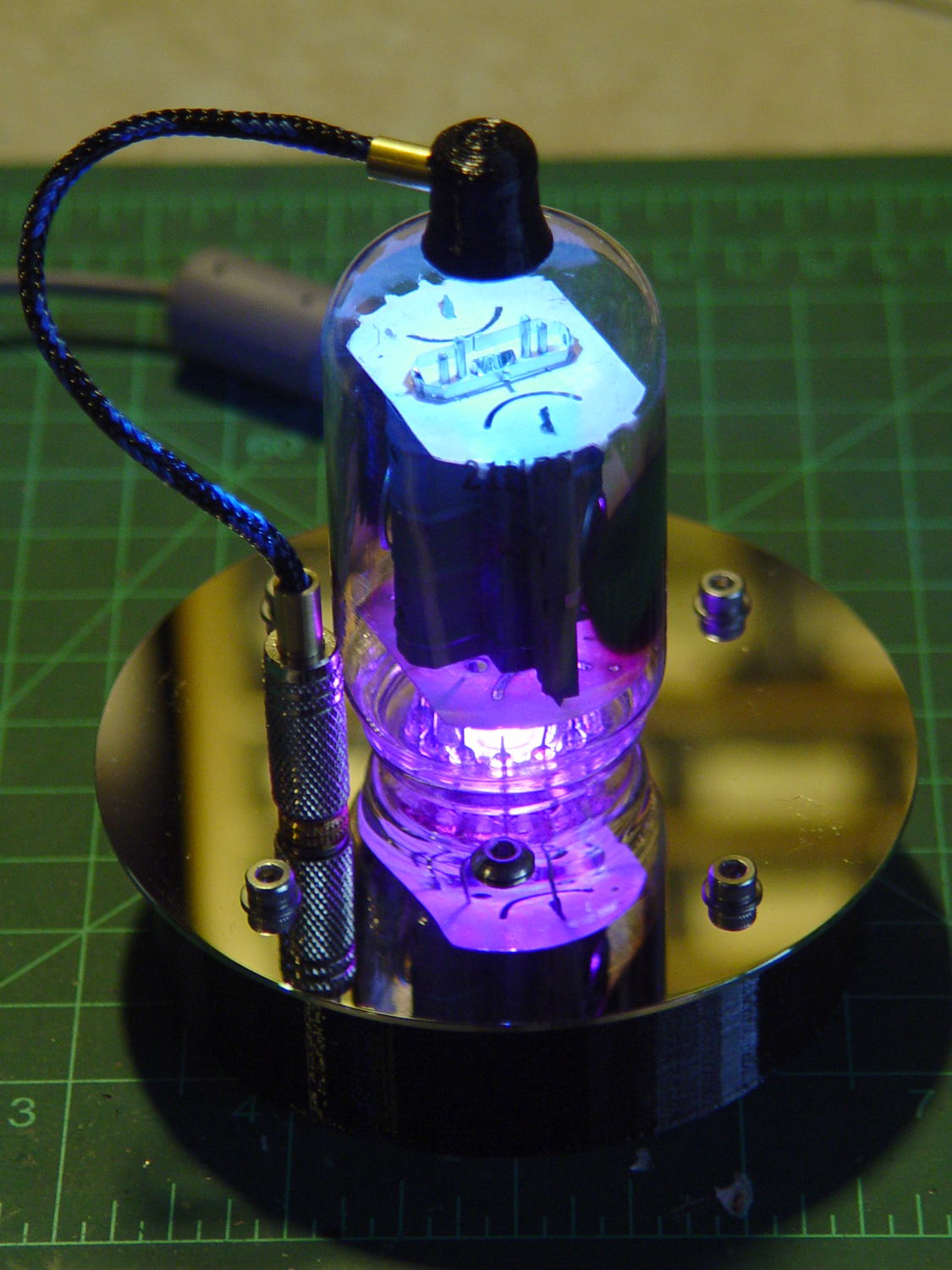
    21HB5A with RBGBW LEDs - cyan violet phase
    21HB5A with RBGBW LEDs – cyan violet phase

    I dialed the white LED PWM down to 32, making the colors somewhat pastel, rather than washed-out.

    The Arduino source code as a GitHub Gist:

    // Neopixel mood lighting for vacuum tubes
    // Ed Nisley – KE4ANU – June 2016
    // September 2016 – Add Morse library and blinkiness
    // October 2016 – Set random colors at cycle end
    // March 2017 – RGBW SK6812 LEDs
    #include <Adafruit_NeoPixel.h>
    #include <morse.h>
    #include <Entropy.h>
    //———-
    // Pin assignments
    const byte PIN_NEO = A5; // DO – data out to first Neopixel
    const byte PIN_HEARTBEAT = 13; // DO – Arduino LED
    #define PIN_MORSE 12
    //———-
    // Constants
    // number of pixels
    #define PIXELS 2
    // index of the Morse output pixel and how fast it sends
    boolean Send_Morse = false;
    #define PIXEL_MORSE (PIXELS – 1)
    #define MORSE_WPM 10
    // lag between adjacent pixel, degrees of slowest period
    #define PIXELPHASE 45
    // update LEDs only this many ms apart (minus loop() overhead)
    #define UPDATEINTERVAL 50ul
    #define UPDATEMS (UPDATEINTERVAL – 1ul)
    // number of steps per cycle, before applying prime factors
    #define RESOLUTION 500
    //———-
    // Globals
    // instantiate the Neopixel buffer array
    Adafruit_NeoPixel strip = Adafruit_NeoPixel(PIXELS, PIN_NEO, NEO_GRBW + NEO_KHZ800);
    uint32_t FullWhite = strip.Color(255,255,255,255);
    uint32_t FullOff = strip.Color(0,0,0,0);
    uint32_t MorseColor;
    struct pixcolor_t {
    unsigned int Prime;
    unsigned int NumSteps;
    unsigned int Step;
    float StepSize;
    float Phase;
    byte MaxPWM;
    };
    unsigned int PlatterSteps;
    byte PrimeList[] = {3,5,7,13,19,29};
    // colors in each LED
    enum pixcolors {RED, GREEN, BLUE, WHITE, PIXELSIZE};
    struct pixcolor_t Pixels[PIXELSIZE]; // all the data for each pixel color intensity
    uint32_t UniColor;
    unsigned long MillisNow;
    unsigned long MillisThen;
    // Morse code
    char * MorseText = " cq cq cq de ke4znu";
    LEDMorseSender Morse(PIN_MORSE, (float)MORSE_WPM);
    uint8_t PrevMorse, ThisMorse;
    //– Figure PWM based on current state
    byte StepColor(byte Color, float Phi) {
    byte Value;
    Value = (Pixels[Color].MaxPWM / 2.0) * (1.0 + sin(Pixels[Color].Step * Pixels[Color].StepSize + Phi));
    // Value = (Value) ? Value : Pixels[Color].MaxPWM; // flash at dimmest points for debug
    return Value;
    }
    //– Select three unique primes for the color generator function
    // Then compute all the step parameters based on those values
    void SetColorGenerators(void) {
    Pixels[RED].Prime = PrimeList[random(sizeof(PrimeList))];
    do {
    Pixels[GREEN].Prime = PrimeList[random(sizeof(PrimeList))];
    } while (Pixels[RED].Prime == Pixels[GREEN].Prime);
    do {
    Pixels[BLUE].Prime = PrimeList[random(sizeof(PrimeList))];
    } while (Pixels[BLUE].Prime == Pixels[RED].Prime ||
    Pixels[BLUE].Prime == Pixels[GREEN].Prime);
    do {
    Pixels[WHITE].Prime = PrimeList[random(sizeof(PrimeList))];
    } while (Pixels[WHITE].Prime == Pixels[RED].Prime ||
    Pixels[WHITE].Prime == Pixels[GREEN].Prime ||
    Pixels[WHITE].Prime == Pixels[BLUE].Prime);
    printf("Primes: %d %d %d %d\r\n",Pixels[RED].Prime,Pixels[GREEN].Prime,Pixels[BLUE].Prime,Pixels[WHITE].Prime);
    Pixels[RED].MaxPWM = 255;
    Pixels[GREEN].MaxPWM = 255;
    Pixels[BLUE].MaxPWM = 255;
    Pixels[WHITE].MaxPWM = 32;
    unsigned int PhaseSteps = (unsigned int) ((PIXELPHASE / 360.0) *
    RESOLUTION * (unsigned int) max(max(max(Pixels[RED].Prime,Pixels[GREEN].Prime),Pixels[BLUE].Prime),Pixels[WHITE].Prime));
    printf("Pixel phase offset: %d deg = %d steps\r\n",(int)PIXELPHASE,PhaseSteps);
    for (byte c=0; c < PIXELSIZE; c++) {
    Pixels[c].NumSteps = RESOLUTION * Pixels[c].Prime; // steps per cycle
    Pixels[c].StepSize = TWO_PI / Pixels[c].NumSteps; // radians per step
    Pixels[c].Step = random(Pixels[c].NumSteps); // current step
    Pixels[c].Phase = PhaseSteps * Pixels[c].StepSize;; // phase in radians for this color
    printf(" c: %d Steps: %d Init: %d Phase: %d deg",c,Pixels[c].NumSteps,Pixels[c].Step,(int)(Pixels[c].Phase * 360.0 / TWO_PI));
    printf(" PWM: %d\r\n",Pixels[c].MaxPWM);
    }
    }
    //– Helper routine for printf()
    int s_putc(char c, FILE *t) {
    Serial.write(c);
    }
    //——————
    // Set the mood
    void setup() {
    pinMode(PIN_HEARTBEAT,OUTPUT);
    digitalWrite(PIN_HEARTBEAT,LOW); // show we arrived
    Serial.begin(57600);
    fdevopen(&s_putc,0); // set up serial output for printf()
    printf("Vacuum Tube Mood Light – RGBW\r\nEd Nisley – KE4ZNU – March 2017\r\n");
    Entropy.initialize(); // start up entropy collector
    // set up pixels
    strip.begin();
    strip.show();
    // lamp test: a brilliant white flash
    printf("Lamp test: flash white\r\n");
    for (byte i=0; i<5 ; i++) {
    for (int j=0; j < strip.numPixels(); j++) { // fill LEDs with white
    strip.setPixelColor(j,FullWhite);
    }
    strip.show();
    delay(500);
    for (int j=0; j < strip.numPixels(); j++) { // fill LEDs with black
    strip.setPixelColor(j,FullOff);
    }
    strip.show();
    delay(500);
    }
    // get an actual random number
    uint32_t rn = Entropy.random();
    printf("Random seed: %08lx\r\n",rn);
    randomSeed(rn);
    // set up the color generators
    SetColorGenerators();
    // set up Morse generator
    Morse.setup();
    Morse.setMessage(String(MorseText));
    MorseColor = strip.Color(255,random(32,64),random(16),0);
    PrevMorse = ThisMorse = digitalRead(PIN_MORSE);
    printf("Morse enabled: %d at %d wpm color: %08lx\n [%s]\r\n",Send_Morse,MORSE_WPM,MorseColor,MorseText);
    MillisNow = MillisThen = millis();
    }
    //——————
    // Run the mood
    void loop() {
    if (!Morse.continueSending()) {
    printf("Restarting Morse message\r\n");
    Morse.startSending();
    }
    ThisMorse = digitalRead(PIN_MORSE);
    MillisNow = millis();
    if (((MillisNow – MillisThen) >= UPDATEMS) || // time for color change?
    (PrevMorse != ThisMorse)) { // Morse output bit changed?
    digitalWrite(PIN_HEARTBEAT,HIGH);
    if (Send_Morse && ThisMorse) { // if Morse output high, overlay flash
    strip.setPixelColor(PIXEL_MORSE,MorseColor);
    }
    PrevMorse = ThisMorse;
    strip.show(); // send out precomputed colors
    boolean CycleRun = false; // check to see if all cycles have ended
    for (byte c=0; c < PIXELSIZE; c++) { // compute next increment for each color
    if (++Pixels[c].Step >= Pixels[c].NumSteps) {
    Pixels[c].Step = 0;
    printf("Cycle %d steps %d at %8ld delta %ld ms\r\n",c,Pixels[c].NumSteps,MillisNow,(MillisNow – MillisThen));
    }
    else {
    CycleRun = true; // this color is still cycling
    }
    }
    // If all cycles have completed, reset the color generators
    if (!CycleRun) {
    printf("All cycles ended: setting new color generator values\r\n");
    SetColorGenerators();
    }
    for (int i=0; i < strip.numPixels(); i++) { // for each pixel
    byte Value[PIXELSIZE];
    for (byte c=0; c < PIXELSIZE; c++) { // … for each color
    Value[c] = (Pixels[c].MaxPWM / 2.0) * (1.0 + sin(Pixels[c].Step * Pixels[c].StepSize – i*Pixels[c].Phase));
    }
    UniColor = strip.Color(Value[RED],Value[GREEN],Value[BLUE],Value[WHITE]);
    strip.setPixelColor(i,UniColor);
    }
    MillisThen = MillisNow;
    digitalWrite(PIN_HEARTBEAT,LOW);
    }
    }
    view raw TubeMorse.ino hosted with ❤ by GitHub
  • Raspberry Pi Streaming Radio Player: OLED Display

    With the OLED wired up to the Raspberry Pi, the LUMA.OLED driver makes it surprisingly easy to slap text on the screen, at least after some obligatory fumbling around:

    RPi OLED Display - Plenitude
    RPi OLED Display – Plenitude

    Connect the hardware, install the driver, then the setup goes like this:

    import textwrap
    
    from luma.oled.device import sh1106
    from luma.core.serial import spi
    from luma.core.render import canvas
    from PIL import ImageFont
    
    … snippage …
    
    font1 = ImageFont.truetype('/usr/share/fonts/truetype/dejavu/DejaVuSansMono.ttf',14)
    font2 = ImageFont.truetype('/usr/share/fonts/truetype/dejavu/DejaVuSans.ttf',11)
    
    wrapper = textwrap.TextWrapper(width=128//font2.getsize('n')[0])
    
    StatLine = 0
    DataLine = 17           # allow for weird ascenders and accent marks
    LineSpace = 16
    
    Contrast = 255          # OLED brightness setting
    
    serial = spi(device=0,port=0)
    device = sh1106(serial)
    device.contrast(Contrast)
    

    The Python Imaging Library below the LUMA driver supports Truetype fonts that look much better than the default fonts. For these tiny displays, DejaVu Sans comes close enough to being a single-stroke (“stick”) font and, being proportional, packs more text into a fixed horizontal space.

    The textwrap library chops a string into lines of a specified length, which works great with a fixed-width font and not so well with a proportional font. I set the line length based on the width of a mid-size lowercase letter and hope for the best. In round numbers, each 128 pixel line can hold 20-ish characters of the size-11 (which might be the height in pixels) font.

    It also understands hyphens and similar line-ending punctuation:

    Felix Mendelssohn-
    Bartholdy - Piano
    Concerto No.01 in
    

    It turns out whatever library routine blits characters into the bitmap has an off-by-one error that overwrites the leftmost column with the pixel columns that should be just off-screen on the right; it may also overwrite the topmost row with the bottommost row+1. I poked around a bit, couldn’t find the actual code amid the layers of inherited classes and methods and suchlike, and gave up: each line starts in pixel column 1, not 0. With textwrap generally leaving the rightmost character in each line blank, the picket-fence error (almost) always overwrites the first column with dark pixels.

    Display coordinates start at (0,0) in the upper left corner, but apparently the character origin corresponds to the box around an uppercase letter, with ascenders and diacritical marks extending (at least) one pixel above that. The blue area in these displays starts at (0,16), but having the ascenders poke into the yellow section is really, really conspicuous, so DataLine Finagles the text down by one pixel. The value of Linespace avoids collisions between descenders and ascenders in successive lines that you (well, I) wouldn’t expect with a spacing equal to the font height.

    The display has a variable brightness setting, called “contrast” by the datasheet and driver, that determines the overall LED current (perhaps according to an exponential relationship, because an α appears in the tables). I tweak the value in Contrast based on where the streamer lives, with 1 being perfectly suitable for a dark room and 255 for ordinary lighting.

    The LUMA package includes a scrolling terminal emulator. With maybe four lines, tops, on that display (in a reasonable font, anyhow), what’s the point?

    Instead, I homebrewed a panel with manual positioning:

    def ShowStatus(L1=None,L2=None,L3='None'):
      with canvas(device) as screen:
        screen.text((1,StatLine),Media[CurrentKC][0][0:11],
                 font=font1,fill='white')
        screen.text((127-(4*font1.getsize('M')[0] + 2),StatLine),'Mute' if Muted else ' ',
                 font=font1,fill='white')
    
        screen.text((1,DataLine),L1,
                 font=font2,fill='white')
        screen.text((1,DataLine + 1*LineSpace),L2,
                 font=font2,fill='white')
        screen.text((1,DataLine + 2*LineSpace),L3,
                 font=font2,fill='white')
    

    Yeah, those are global variables in the first line; feel free to object-orient it as you like.

    The LUMA driver hands you a blank screen inside the with … as …: context, whereupon you may draw as you see fit and the driver squirts the bitmap to the display at the end of the context. There’s apparently a way to set up a permanent canvas and update it at will, but this works well enough for now.

    That means you (well, I) must mange those three lines by hand:

    ShowStatus('Startup in ' + Location,
               'Mixer: ' + MixerChannel + ' = ' + MixerVol,
               'Contrast: ' + str(Contrast))
    

    Chopping the track info string into lines goes like this:

    if TrackName:
      info = wrapper.wrap(TrackName)
      ShowStatus(info[0],
                 info[1] if len(info) > 1 else '',
                 info[2] if len(info) > 2 else '')
    else:
      ShowStatus('No track info','','')
    

    Something along the way ruins Unicode characters from the track info, converting them into unrelated (and generally accented) characters. They work fine when shipped through the logging interface, so it may be due to a font incompatibility or, more likely, my not bothering to work around Python 2’s string vs. byte stream weirdness. Using Python 3 would be a Good Idea, but I’m unsure all the various & sundry libraries are compatible and unwilling to find out using programming as an experimental science.

    The Python source code as a GitHub Gist:

    from evdev import InputDevice,ecodes,KeyEvent
    import subprocess32 as subp
    import select
    import re
    import sys
    import time
    import logging
    import logging.handlers
    import os.path
    import argparse as args
    import textwrap
    from luma.oled.device import sh1106
    from luma.core.serial import spi
    from luma.core.render import canvas
    from PIL import ImageFont
    # URL must be last entry in command line list
    Media = {'KEY_KP7' : ['Classical',False,['mplayer','-playlist','http://stream2137.init7.net/listen.pls'%5D%5D,
    'KEY_KP8' : ['Jazz',False,['mplayer','-playlist','http://stream2138.init7.net/listen.pls'%5D%5D,
    'KEY_KP9' : ['WMHT',False,['mplayer','http://wmht.streamguys1.com/wmht1'%5D%5D,
    'KEY_KP4' : ['Classic 1k',True,['mplayer','-playlist','http://listen.radionomy.com/1000classicalhits.m3u'%5D%5D,
    'KEY_KP5' : ['Love',True,['mplayer','-playlist','/home/pi/Playlists/LoveRadio.m3u']],
    'KEY_KP6' : ['WAMC',False,['mplayer','-playlist','http://playerservices.streamtheworld.com/pls/WAMCFM.pls'%5D%5D,
    'KEY_KP1' : ['60s',True,['mplayer','-playlist','http://listen.radionomy.com/all60sallthetime-keepfreemusiccom.m3u'%5D%5D,
    'KEY_KP2' : ['50-70s',True,['mplayer','-playlist','http://listen.radionomy.com/golden-50-70s-hits.m3u'%5D%5D,
    'KEY_KP3' : ['Soft Rock',True,['mplayer','-playlist','http://listen.radionomy.com/softrockradio.m3u'%5D%5D,
    'KEY_KP0' : ['Zen',False,['mplayer','http://iradio.iceca.st:80/zenradio'%5D%5D,
    'KEY_KPDOT' : ['Ambient',False,['mplayer','http://185.32.125.42:7331/maschinengeist.org.mp3'%5D%5D,
    'KEY_KPMINUS' : ['Relaxation',True,['mplayer','-playlist','/home/pi/Playlists/Frequences-relaxation.m3u']],
    'KEY_KPPLUS' : ['Plenitude',True,['mplayer','-playlist','/home/pi/Playlists/Radio-PLENITUDE.m3u']]
    }
    # these keycode will be fed directly into mplayer
    Controls = {'KEY_KPSLASH' : '//////',
    'KEY_KPASTERISK' : '******',
    'KEY_VOLUMEUP' : '*',
    'KEY_VOLUMEDOWN' : '/'
    }
    # stream title keywords that trigger muting
    MuteStrings = ['TargetSpot', # common Radionomy insert
    'Intro of','Jingle','*bumper*', # Radio-PLENITUDE
    '[Unknown]','Advert:','+++','—','SRR','Srr', # softrockradio
    'PEACE LK1','PEACE J1'] # Frequences-relaxation
    # Set up default configuration
    CurrentKC = 'KEY_KP7' # default stream source
    MuteDelay = 6.5 # delay before non-music track; varies with buffering
    UnMuteDelay = 9.0 # delay after non-music track
    MixerChannel = 'PCM' # default amixer output control
    MixerVol = '30' # mixer gain
    RestartDelay = 10 # delay after stream failure
    Contrast = 255 # OLED brightness setting
    # Set up command line parsing
    cmdline = args.ArgumentParser(description='Streaming Radio Player',epilog='KE4ZNU – http://softsolder.com&#39;)
    cmdline.add_argument('Loc',help='Location: BR1 BR2 …',default='any',nargs='?')
    args = cmdline.parse_args()
    # Set up logging
    LogFN = '/home/pi/Streamer.log'
    LogFmt = logging.Formatter('%(asctime)s %(levelname)s: %(message)s')
    LogHandler = logging.handlers.RotatingFileHandler(LogFN,backupCount=9)
    LogHandler.setFormatter(LogFmt)
    logger = logging.getLogger('StreamLog')
    logger.addHandler(LogHandler)
    logger.setLevel(logging.INFO)
    # Tweak config based on where we are
    Location = vars(args)['Loc'].upper()
    logger.info('Player setup for: ' + Location)
    if Location == 'BR1':
    CurrentKC = 'KEY_KPDOT'
    MixerVol = '5'
    Contrast = 1
    elif Location == 'BR2':
    MuteDelay = 4.5
    UnMuteDelay = 8.5
    MixerVol = '5'
    Contrast = 1
    elif Location == 'LR':
    MixerVol = '40'
    CurrentKC = 'KEY_KPPLUS'
    # set up event inputs and polling objects
    # This requires some udev magic to create the symlinks
    k = InputDevice('/dev/input/keypad')
    k.grab()
    kp = select.poll()
    kp.register(k.fileno(),select.POLLIN + select.POLLPRI + select.POLLERR)
    # if volume control knob exists, then set up its events
    VolumeDevice = '/dev/input/volume'
    vp = select.poll()
    if os.path.exists(VolumeDevice):
    logger.info('Volume control device: %s',VolumeDevice)
    v = InputDevice(VolumeDevice)
    v.grab()
    vp.register(v.fileno(),select.POLLIN + select.POLLPRI + select.POLLERR)
    # set up file for mplayer output tracing
    lw = open('/home/pi/mp.log','w') # mplayer piped output
    # set the mixer output low enough that the initial audio won't wake the dead
    subp.call(['amixer','-q','sset',MixerChannel,MixerVol])
    if Media[CurrentKC][1]:
    subp.call(['amixer','-q','sset',MixerChannel,'mute'])
    Muted = True # squelch anything before valid track name
    logger.info('Audio muted at startup')
    else:
    subp.call(['amixer','-q','sset',MixerChannel,'unmute'])
    Muted = False # allow early audio
    logger.info('Audio unmuted at startup')
    # Set up OLED display
    font1 = ImageFont.truetype('/usr/share/fonts/truetype/dejavu/DejaVuSansMono.ttf',14)
    font2 = ImageFont.truetype('/usr/share/fonts/truetype/dejavu/DejaVuSans.ttf',11)
    wrapper = textwrap.TextWrapper(width=128//font2.getsize('n')[0])
    StatLine = 0
    DataLine = 17 # allow one line for weird ascenders and accent marks
    LineSpace = 16
    serial = spi(device=0,port=0)
    device = sh1106(serial)
    device.contrast(Contrast)
    def ShowStatus(L1=None,L2=None,L3='None'):
    with canvas(device) as screen:
    screen.text((1,StatLine),Media[CurrentKC][0][0:11],
    font=font1,fill='white')
    screen.text((127-(4*font1.getsize('M')[0] + 2),StatLine),'Mute' if Muted else ' ',
    font=font1,fill='white')
    screen.text((1,DataLine),L1,
    font=font2,fill='white')
    screen.text((1,DataLine + 1*LineSpace),L2,
    font=font2,fill='white')
    screen.text((1,DataLine + 2*LineSpace),L3,
    font=font2,fill='white')
    ShowStatus('Startup in ' + Location,
    'Mixer: ' + MixerChannel + ' = ' + MixerVol,
    'Contrast: ' + str(Contrast))
    # Start the player with the default stream, set up for polling
    logger.info('Starting mplayer on %s -> %s',Media[CurrentKC][0],Media[CurrentKC][-1][-1])
    p = subp.Popen(Media[CurrentKC][-1],
    stdin=subp.PIPE,stdout=subp.PIPE,stderr=subp.STDOUT)
    pp = select.poll() # this may be valid for other invocations, but is not pretty
    pp.register(p.stdout.fileno(),select.POLLIN + select.POLLPRI + select.POLLERR)
    #——————–
    #— Play the streams
    while True:
    # pluck next line from mplayer and decode it
    if [] != pp.poll(10):
    text = p.stdout.readline()
    if 'Error: ' in text: # something horrible went wrong
    lw.write(text)
    lw.flush()
    logger.info('Unsolvable problem! ' + text)
    logger.info('Exiting')
    LogHandler.doRollover()
    logging.shutdown()
    sys.exit('Exit streamer on mplayer error –' + text)
    if 'ICY Info: ' in text: # these lines may contain track names
    lw.write(text)
    lw.flush()
    trkinfo = text.split(';') # also splits at semicolon embedded in track name
    # logger.info('Raw split line: %s', trkinfo)
    for ln in trkinfo:
    if 'StreamTitle' in ln: # this part probably contains the track name
    NeedMute = False # assume a listenable track
    trkhit = re.search(r"StreamTitle='(.*)'",ln) # extract title if possible
    if trkhit: # regex returned valid result?
    TrackName = trkhit.group(1) # get string between two quotes
    else:
    logger.info('Regex failed for line: [' + ln + ']')
    TrackName = 'Invalid StreamTitle format!'
    logger.info('Track name: [%s]', TrackName)
    if Media[CurrentKC][1] and ( (len(TrackName) == 0) or any(m in TrackName for m in MuteStrings) ) :
    NeedMute = True
    if NeedMute:
    if Media[CurrentKC][1] and not Muted:
    time.sleep(MuteDelay) # brute-force assumption about buffer leadtime
    subp.call(['amixer','-q','sset',MixerChannel,'mute'])
    Muted = True
    logger.info('Track muted')
    else:
    if Muted:
    if Media[CurrentKC][1]:
    time.sleep(UnMuteDelay) # another brute-force timing assumption
    subp.call(['amixer','-q','sset',MixerChannel,'unmute'])
    Muted = False
    logger.info('Track unmuted')
    if TrackName:
    info = wrapper.wrap(TrackName)
    ShowStatus(info[0],
    info[1] if len(info) > 1 else '',
    info[2] if len(info) > 2 else '')
    else:
    ShowStatus('No track info','','')
    elif 'Exiting.' in text: # mplayer just imploded
    lw.write(text)
    lw.flush()
    logger.info('EOF or stream cutoff: [' + text + ']')
    ShowStatus('Killing dead Mplayer','','')
    pp.unregister(p.stdout.fileno())
    p.terminate() # p.kill()
    p.wait()
    logger.info('Discarding keys')
    while [] != kp.poll(0):
    kev = k.read
    time.sleep(RestartDelay)
    logger.info('Restarting mplayer')
    ShowStatus('Restarting Mplayer','','')
    p = subp.Popen(Media[CurrentKC][-1],
    stdin=subp.PIPE,stdout=subp.PIPE,stderr=subp.STDOUT)
    pp.register(p.stdout.fileno(),select.POLLIN + select.POLLPRI + select.POLLERR)
    logger.info(' … running')
    ShowStatus('Mplayer running','','')
    # accept pending events from volume control knob
    if [] != vp.poll(10):
    vev = v.read()
    lw.write('Volume')
    lw.flush()
    for e in vev:
    if e.type == ecodes.EV_KEY:
    kc = KeyEvent(e).keycode
    if kc in Controls:
    try:
    p.stdin.write(Controls[kc])
    except Exception as e:
    logger.info('Error sending volume, restarting player: ' + str(e))
    try:
    pp.unregister(p.stdout.fileno())
    except Exception as e:
    logger.info('Cannot unregister stdout: ' + str(e))
    ShowStatus('Vol error','Restarting',' Mplayer')
    time.sleep(RestartDelay)
    p = subp.Popen(Media[CurrentKC][-1],
    stdin=subp.PIPE,stdout=subp.PIPE,stderr=subp.STDOUT)
    pp.register(p.stdout.fileno(),select.POLLIN + select.POLLPRI + select.POLLERR)
    logger.info(' … running')
    # accept pending events from keypad
    if [] != kp.poll(10):
    kev = k.read()
    lw.write('Keypad')
    lw.flush()
    for e in kev:
    if e.type == ecodes.EV_KEY:
    kc = KeyEvent(e).keycode
    if kc == 'KEY_NUMLOCK': # discard these, as we don't care
    continue
    if (kc == 'KEY_BACKSPACE') and (KeyEvent(e).keystate == KeyEvent.key_hold):
    if True:
    logger.info('Shutting down')
    LogHandler.doRollover()
    logging.shutdown()
    p.kill()
    q = subp.call(['sudo','shutdown','-P','now'])
    q.wait()
    time.sleep(5)
    else:
    logger.info('Exiting from main')
    LogHandler.doRollover()
    logging.shutdown()
    sys.exit('Exit on command')
    break
    if KeyEvent(e).keystate != KeyEvent.key_down: # now OK to discard key up & hold
    continue
    if kc == 'KEY_KPENTER': # toggle muted state
    if Muted:
    logger.info('Forcing unmute')
    subp.call(['amixer','-q','sset',MixerChannel,'unmute'])
    Muted = False
    else:
    logger.info('Forcing mute')
    subp.call(['amixer','-q','sset',MixerChannel,'mute'])
    Muted = True
    continue
    if kc in Controls:
    logger.info('Control: ' + kc)
    try:
    p.stdin.write(Controls[kc])
    except Exception as e:
    logger.info('Error sending controls, restarting player: ' + str(e))
    ShowStatus('Ctl error','Restarting',' Mplayer')
    try:
    pp.unregister(p.stdout.fileno())
    except Exception as e:
    logger.info('Cannot unregister stdout: ' + str(e))
    p.terminate() # p.kill()
    p.wait()
    time.sleep(RestartDelay)
    p = subp.Popen(Media[CurrentKC][-1],
    stdin=subp.PIPE,stdout=subp.PIPE,stderr=subp.STDOUT)
    pp.register(p.stdout.fileno(),select.POLLIN + select.POLLPRI + select.POLLERR)
    logger.info(' … running')
    ShowStatus('Mplayer',' running','')
    if kc in Media:
    logger.info('Switching stream: ' + Media[kc][0] + ' -> ' + Media[kc][-1][-1])
    oldname = Media[CurrentKC][0]
    CurrentKC = kc
    ShowStatus('Switching from',oldname,'Halt Mplayer')
    try:
    pp.unregister(p.stdout.fileno())
    except Exception as e:
    logger.info('Cannot unregister stdout: ' + str(e))
    try:
    p.communicate(input='q')
    except Exception as e:
    logger.info('Mplayer already dead? ' + str(e))
    try:
    p.terminate() # p.kill()
    p.wait()
    except Exception as e:
    logger.info('Trouble with terminate or wait: ' + str(e))
    if Media[CurrentKC][1]:
    subp.call(['amixer','-q','sset',MixerChannel,'mute'])
    Muted = True
    logger.info('Audio muted for restart')
    else:
    subp.call(['amixer','-q','sset',MixerChannel,'unmute'])
    Muted = False
    logger.info('Audio unmuted for restart')
    time.sleep(RestartDelay)
    logger.info('Restarting Mplayer')
    p = subp.Popen(Media[CurrentKC][-1],
    stdin=subp.PIPE,stdout=subp.PIPE,stderr=subp.STDOUT)
    pp.register(p.stdout.fileno(),select.POLLIN + select.POLLPRI + select.POLLERR)
    logger.info(' … running')
    ShowStatus('Started Mplayer','','')
  • Raspberry Pi: OLED Display

    These cute displays have barely enough dots for the job:

    RPi OLED Display - Classical
    RPi OLED Display – Classical

    That’s a 0.96 inch = 24.4 mm OLED display, measured diagonally, with a breathtaking 8192 = 128×64 dots. It’s a binary display: on or off pixels, nothing in between. This is not a color display: what you see is what it does, with a two-pixel void between the yellow and blue sections.

    The void is a physical separation that does not affect the display addressing: the yellow section has 16 rows, the blue section has 48. It’s your responsibility to keep things where they belong; a character descender from the yellow section will appear in the blue section.

    They’re three bucks each, shipped halfway around the planet: search eBay / Amazon for oled 128x64 yellow. The all-blue and all-white versions do not have the two-pixel void. I have some white 1.3 inch versions on the way for those applications requiring 35% more visibility.

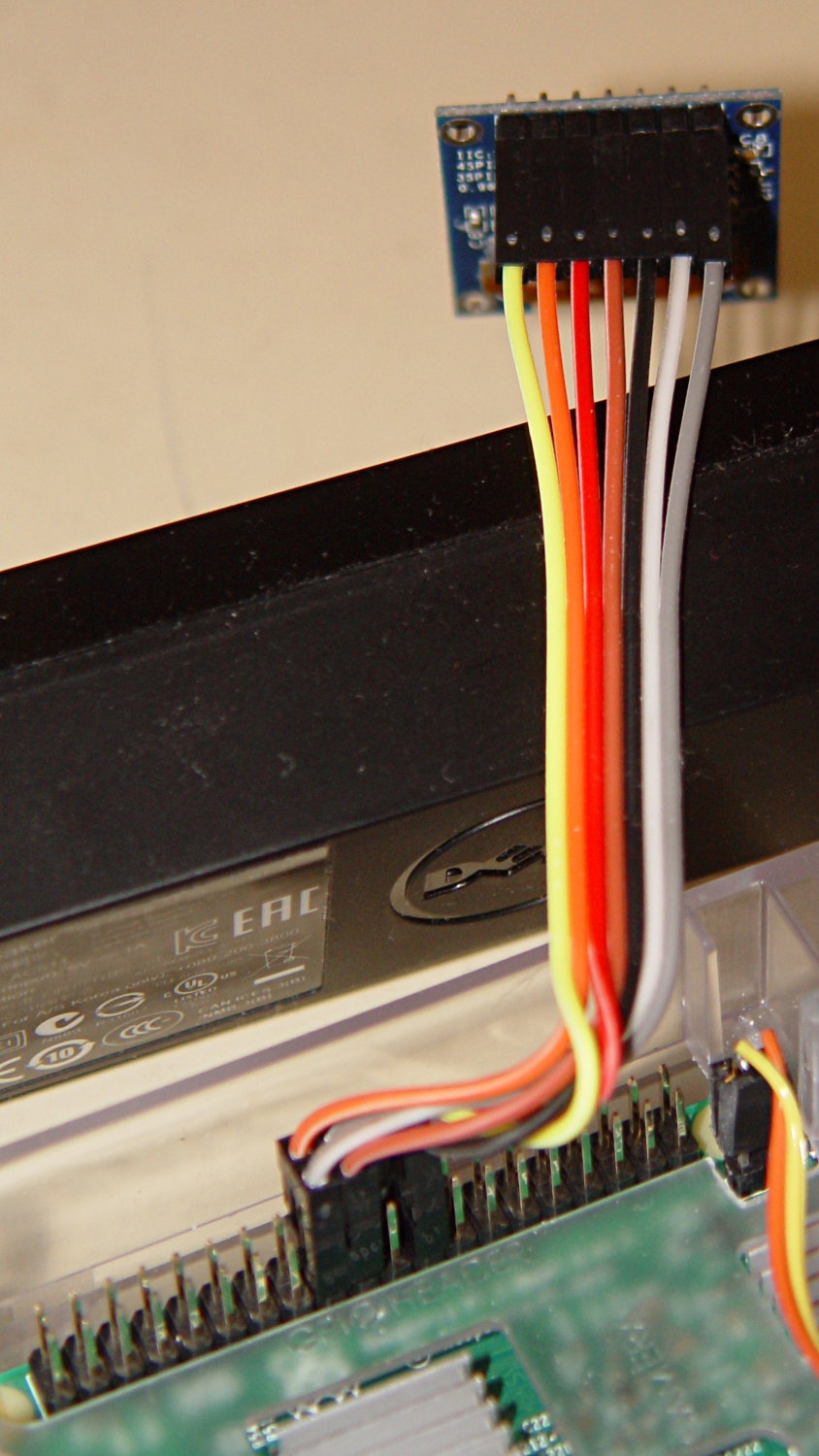
    The SPI interface uses all seven wires, peeled from a premade 100 mm 40-pin cable with female pin connectors:

    RPi OLED Display - Wiring
    RPi OLED Display – Wiring

    Other OLED versions have a four-wire I2C interface. The boards have option jumpers on the back, but the pin header along the edge will have 7 holes for SPI or 4 holes for I2C .

    Caveat emptor for online buyers: the item picture(s) may not match the title or the description text. The low-end sellers carrying beach balls, cookware, MOSFETs, cheap consumer electronics, and OLEDs do not understand the tech on a small board that’s Just Another SKU among thousands.

    For cables, search eBay or Amazon for ribbon dupont "female to female" 10cm. Amazon has sets of male-female, male-male, and female-female jumpers for ten bucks in various lengths. The insulation seems rather stiff and I may be forced to build better cables with fine wire inside PET braid.

    The SPI interface soaks up a tidy block of pins on the RPi’s big header:

    RPi OLED Display - RPi connector detail
    RPi OLED Display – RPi connector detail

    The LUMA-OLED Python driver doc gives a useful summary of those connections, herewith extracted for future reference:

    • 17 VCC – 3.3 V works for sure, 5 V might not
    • 18 DC – Data/Command
    • 19 D1 (“dee one”) – Data to display = MOSI
    • 20 GND
    • 21 not used, that’s the pin in the midst of the block
    • 22 RST – Reset
    • 23 D0 (“dee zero”) – clock to display = SCLK
    • 24 CS – Chip Select = CE0 (“cee ee zero”)

    Pin 1 is in front on the left end of that picture, closest to the MicroSD card slot, and proceeds 1-2, 3-4, and so forth along the length of the connector: odds toward the CPU, evens toward the PCB edge.

    The LUMA-OLD maintainter must have OLED boards with a slightly different SPI pinout than mine: VCC and GND are interchanged. Caveat emptor!

    Obviously, it’s desperately in need of a cute little case, which is in the nature of fine tuning.


  • SK2812 RGBW LED: Test Fixture

    [Edit: The SK2812 in the title and elsewhere should be SK6812. If I change the title, then all the other links break. So it goes.]

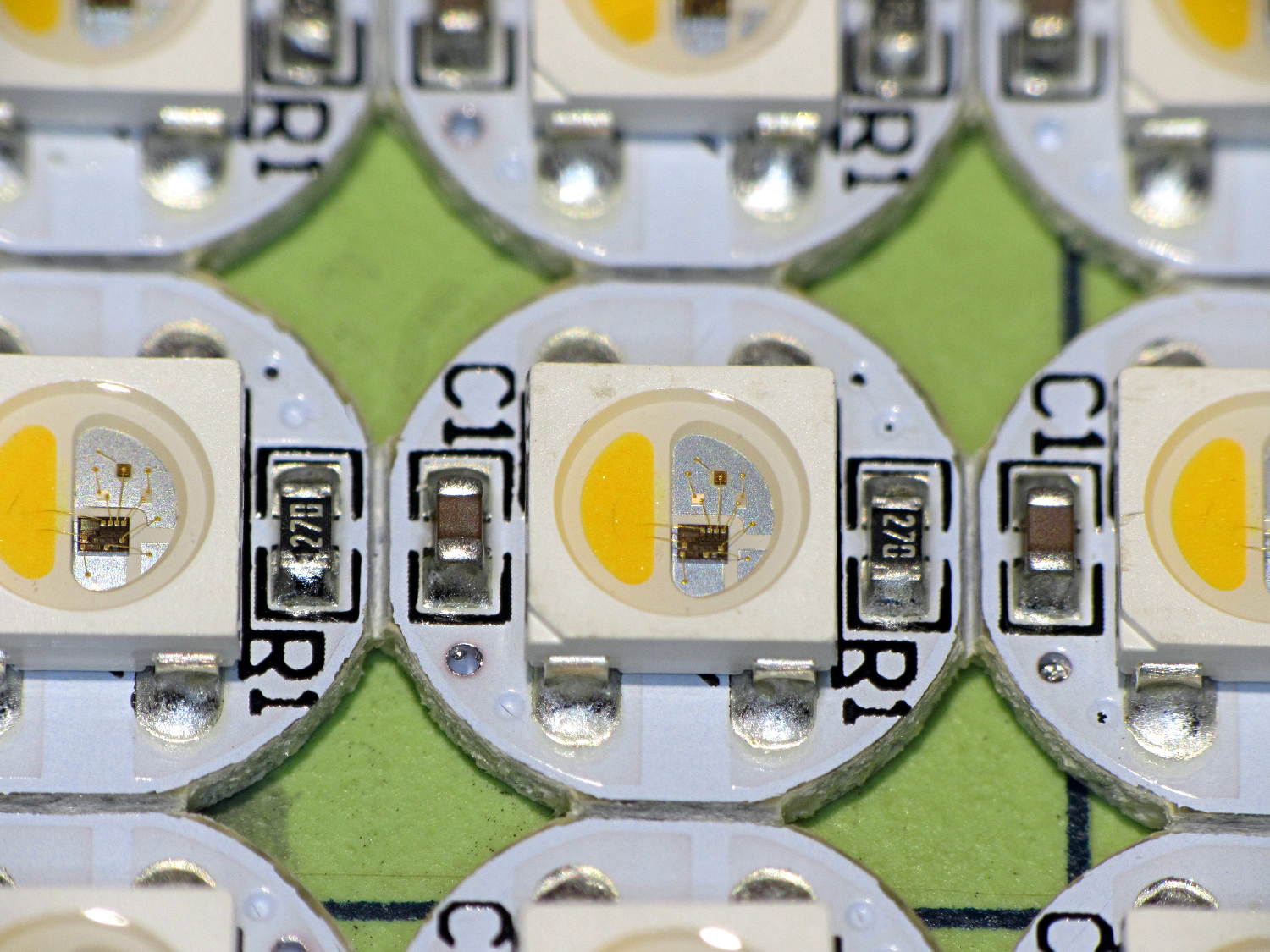
    An envelope of RGBW LEDs, allegedly with SK6812 controllers, arrived from halfway around the planet:

    SK2812RGBW LEDs - as received
    SK2812RGBW LEDs – as received

    The yellow phosphor sauce poured atop the blue LED on the left that makes it glow white leaves the upper loop of two wire bonds sticking out, but I can’t fault ’em for that. The overall build quality looks better than the ill-fated WS2812 LEDs, although it’s hard to tell by looking.

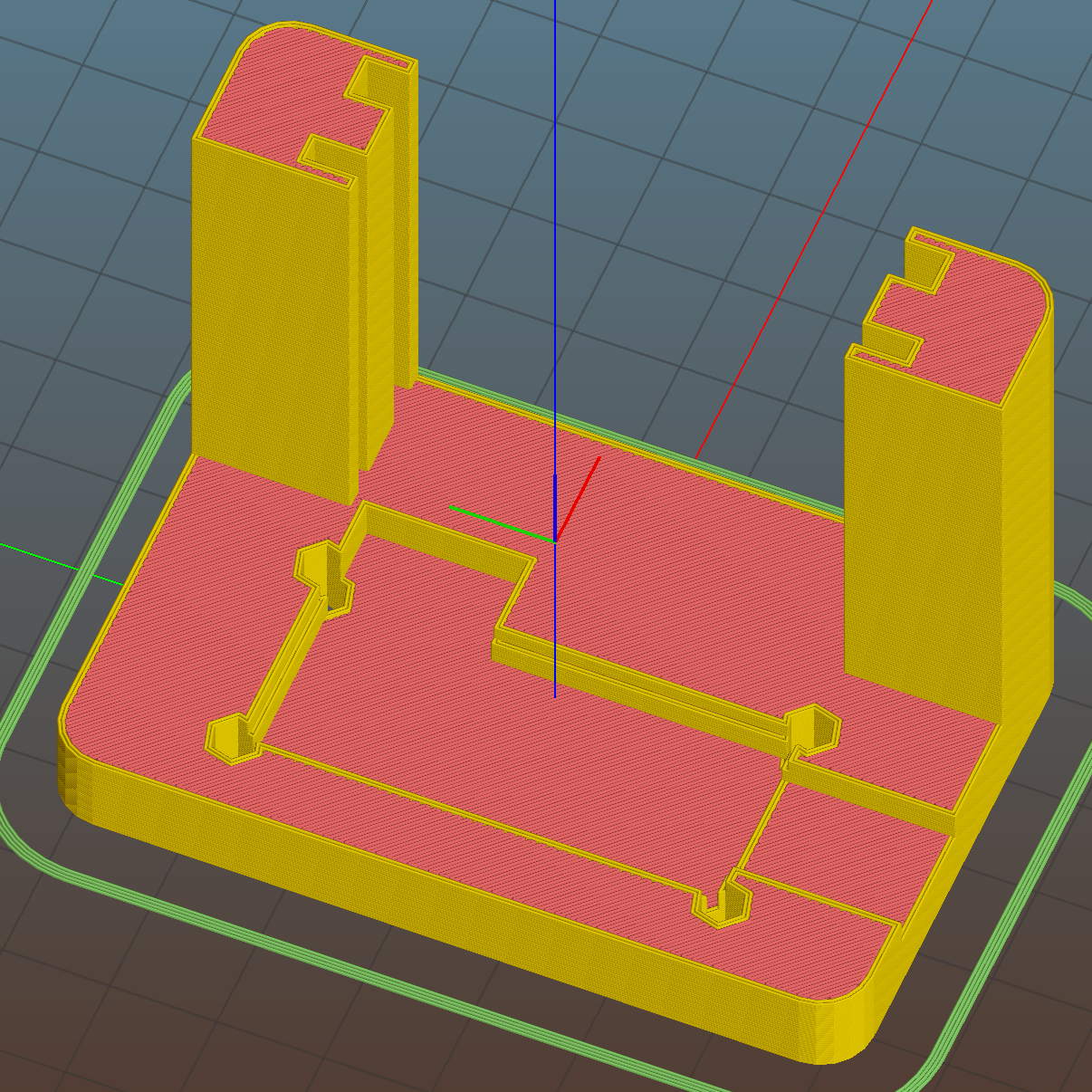
    I conjured a test stand from the vasty digital deep by tweaking the WS2812 mount:

    SK6812 LED Array Test Fixture - Slic3r preview
    SK6812 LED Array Test Fixture – Slic3r preview

    Wiring up a 5×5 panel went as before:

    SK2812RGBW test fixture - rear
    SK2812RGBW test fixture – rear

    The array test code adds another pixel channel and runs another raised sine wave with another random period, accomplished without much hackage.

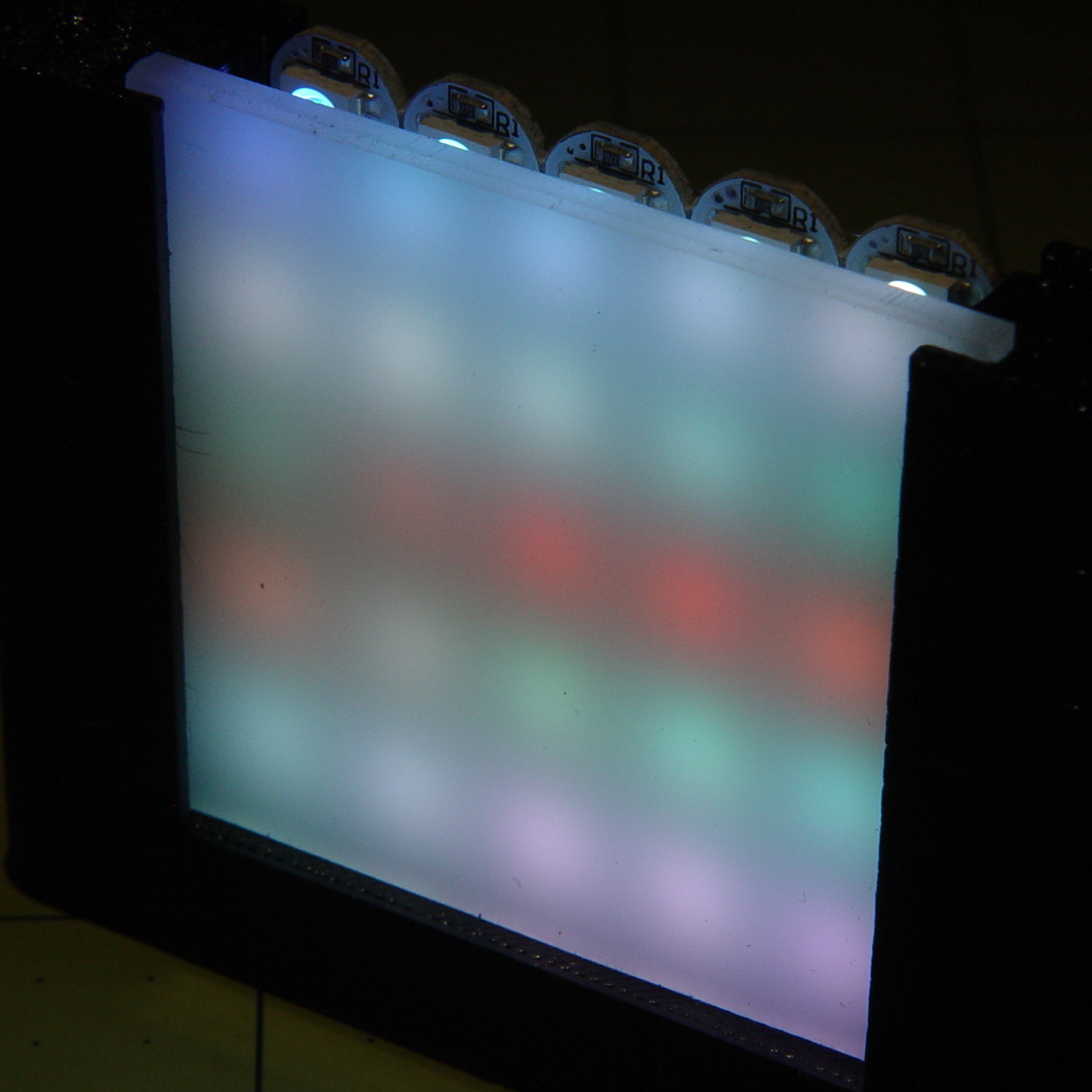
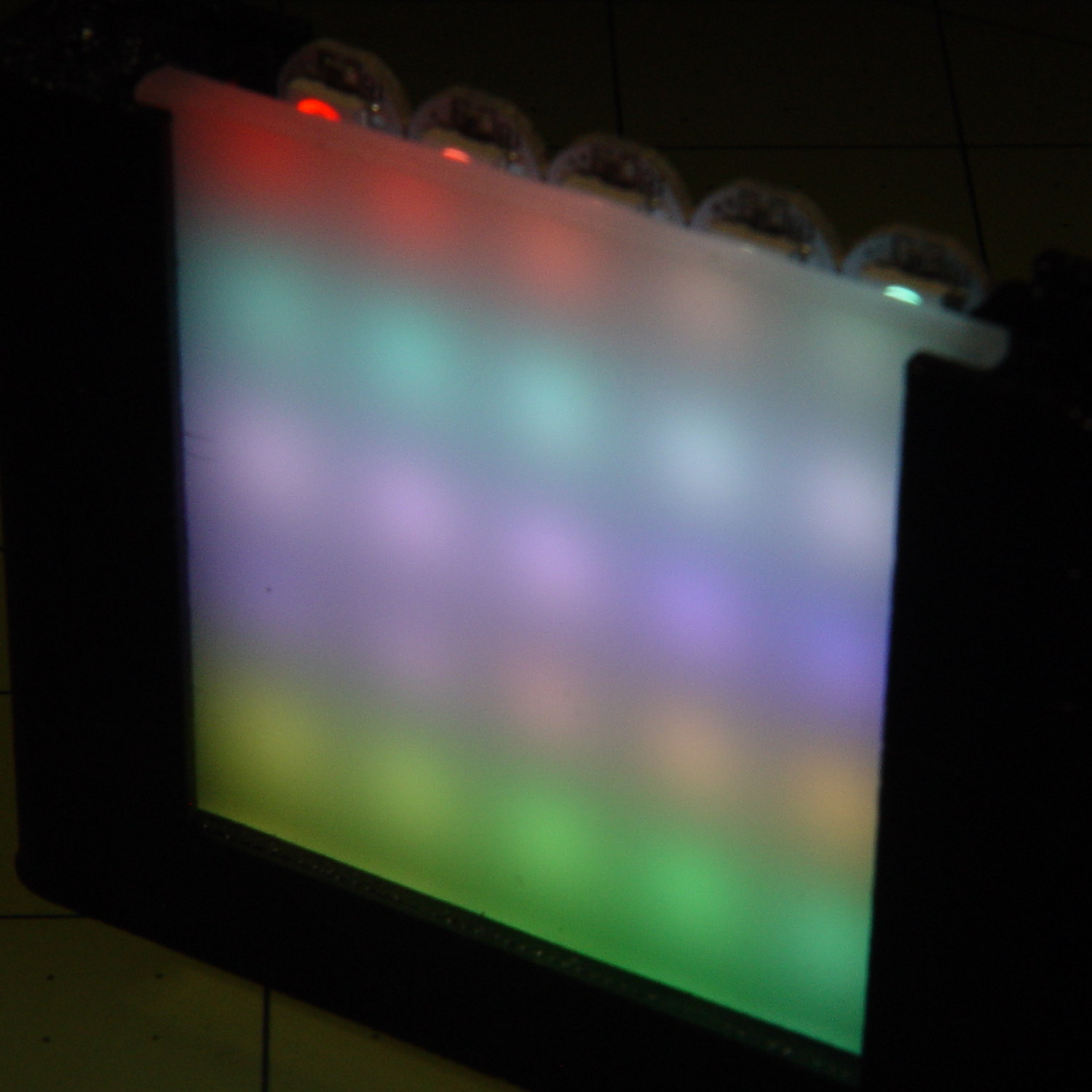
    With the warm-white LED at full throttle (MaxPWM = 255), the panel tends toward the pallid end of HSV space:

    SK2812RGBW test fixture - front - W PWM255
    SK2812RGBW test fixture – front – W PWM255

    Dialing the white MaxPWM back to 32 crisps things a bit:

    SK2812RGBW test fixture - front - W PWM32
    SK2812RGBW test fixture – front – W PWM32

    Of course, the RGBW data stream isn’t compatible with the RGB data stream, so vacuum tubes with SK6812 chips require a slightly different driver and I can’t mix the two chips on a single tube.

    The Arduino source code as a GitHub Gist:

    // SK6812 RGBW LED array exerciser
    // Ed Nisley – KE4ANU – February 2017
    #include <Adafruit_NeoPixel.h>
    //———-
    // Pin assignments
    const byte PIN_NEO = A3; // DO – data out to first Neopixel
    const byte PIN_HEARTBEAT = 13; // DO – Arduino LED
    //———-
    // Constants
    #define UPDATEINTERVAL 20ul
    const unsigned long UpdateMS = UPDATEINTERVAL – 1ul; // update LEDs only this many ms apart minus loop() overhead
    // number of steps per cycle, before applying prime factors
    #define RESOLUTION 100
    // phase difference between LEDs for slowest color
    #define BASEPHASE (PI/16.0)
    // LEDs in each row
    #define NUMCOLS 5
    // number of rows
    #define NUMROWS 5
    #define NUMPIXELS (NUMCOLS * NUMROWS)
    #define PINDEX(row,col) (row*NUMCOLS + col)
    //———-
    // Globals
    // instantiate the Neopixel buffer array
    Adafruit_NeoPixel strip = Adafruit_NeoPixel(NUMPIXELS, PIN_NEO, NEO_GRBW + NEO_KHZ800);
    uint32_t FullWhite = strip.Color(255,255,255,255);
    uint32_t FullOff = strip.Color(0,0,0,0);
    struct pixcolor_t {
    byte Prime;
    unsigned int NumSteps;
    unsigned int Step;
    float StepSize;
    float TubePhase;
    byte MaxPWM;
    };
    // colors in each LED
    enum pixcolors {RED, GREEN, BLUE, WHITE, PIXELSIZE};
    struct pixcolor_t Pixels[PIXELSIZE]; // all the data for each pixel color intensity
    unsigned long MillisNow;
    unsigned long MillisThen;
    //– Figure PWM based on current state
    byte StepColor(byte Color, float Phi) {
    byte Value;
    Value = (Pixels[Color].MaxPWM / 2.0) * (1.0 + sin(Pixels[Color].Step * Pixels[Color].StepSize + Phi));
    // Value = (Value) ? Value : Pixels[Color].MaxPWM; // flash at dimmest points
    // printf("C: %d Phi: %d Value: %d\r\n",Color,(int)(Phi*180.0/PI),Value);
    return Value;
    }
    //– Helper routine for printf()
    int s_putc(char c, FILE *t) {
    Serial.write(c);
    }
    //——————
    // Set the mood
    void setup() {
    pinMode(PIN_HEARTBEAT,OUTPUT);
    digitalWrite(PIN_HEARTBEAT,LOW); // show we arrived
    Serial.begin(57600);
    fdevopen(&s_putc,0); // set up serial output for printf()
    printf("WS2812 / SK6812 array exerciser\r\nEd Nisley – KE4ZNU – February 2017\r\n");
    /// set up Neopixels
    strip.begin();
    strip.show();
    // lamp test: run a brilliant white dot along the length of the strip
    printf("Lamp test: walking white\r\n");
    strip.setPixelColor(0,FullWhite);
    strip.show();
    delay(250);
    for (int i=1; i<NUMPIXELS; i++) {
    digitalWrite(PIN_HEARTBEAT,HIGH);
    strip.setPixelColor(i-1,FullOff);
    strip.setPixelColor(i,FullWhite);
    strip.show();
    digitalWrite(PIN_HEARTBEAT,LOW);
    delay(250);
    }
    strip.setPixelColor(NUMPIXELS – 1,FullOff);
    strip.show();
    delay(250);
    // fill the array, row by row
    printf(" … fill\r\n");
    for (int i=NUMROWS-1; i>=0; i–) { // for each row
    digitalWrite(PIN_HEARTBEAT,HIGH);
    for (int j=NUMCOLS-1; j>=0 ; j–) {
    strip.setPixelColor(PINDEX(i,j),FullWhite);
    strip.show();
    delay(100);
    }
    digitalWrite(PIN_HEARTBEAT,LOW);
    }
    // clear to black, column by column
    printf(" … clear\r\n");
    for (int j=NUMCOLS-1; j>=0; j–) { // for each column
    digitalWrite(PIN_HEARTBEAT,HIGH);
    for (int i=NUMROWS-1; i>=0; i–) {
    strip.setPixelColor(PINDEX(i,j),FullOff);
    strip.show();
    delay(100);
    }
    digitalWrite(PIN_HEARTBEAT,LOW);
    }
    delay(1000);
    // set up the color generators
    MillisNow = MillisThen = millis();
    printf("First random number: %ld\r\n",random(10));
    Pixels[RED].Prime = 3;
    Pixels[GREEN].Prime = 5;
    Pixels[BLUE].Prime = 7;
    Pixels[WHITE].Prime = 11;
    printf("Primes: (%d,%d,%d,%d)\r\n",
    Pixels[RED].Prime,Pixels[GREEN].Prime,Pixels[BLUE].Prime,Pixels[WHITE].Prime);
    unsigned int PixelSteps = (unsigned int) ((BASEPHASE / TWO_PI) *
    RESOLUTION * (unsigned int) max(max(max(Pixels[RED].Prime,Pixels[GREEN].Prime),Pixels[BLUE].Prime),Pixels[WHITE].Prime));
    printf("Pixel phase offset: %d deg = %d steps\r\n",(int)(BASEPHASE*(360.0/TWO_PI)),PixelSteps);
    Pixels[RED].MaxPWM = 255;
    Pixels[GREEN].MaxPWM = 255;
    Pixels[BLUE].MaxPWM = 255;
    Pixels[WHITE].MaxPWM = 32;
    for (byte c=0; c < PIXELSIZE; c++) {
    Pixels[c].NumSteps = RESOLUTION * (unsigned int) Pixels[c].Prime;
    Pixels[c].Step = (3*Pixels[c].NumSteps)/4;
    Pixels[c].StepSize = TWO_PI / Pixels[c].NumSteps; // in radians per step
    Pixels[c].TubePhase = PixelSteps * Pixels[c].StepSize; // radians per tube
    printf("c: %d Steps: %5d Init: %5d",c,Pixels[c].NumSteps,Pixels[c].Step);
    printf(" PWM: %3d Phi %3d deg\r\n",Pixels[c].MaxPWM,(int)(Pixels[c].TubePhase*(360.0/TWO_PI)));
    }
    }
    //——————
    // Run the mood
    void loop() {
    MillisNow = millis();
    if ((MillisNow – MillisThen) > UpdateMS) {
    digitalWrite(PIN_HEARTBEAT,HIGH);
    unsigned int AllSteps = 0;
    for (byte c=0; c < PIXELSIZE; c++) { // step to next increment in each color
    if (++Pixels[c].Step >= Pixels[c].NumSteps) {
    Pixels[c].Step = 0;
    printf("Color %d steps %5d at %8ld delta %ld ms\r\n",c,Pixels[c].NumSteps,MillisNow,(MillisNow – MillisThen));
    }
    AllSteps += Pixels[c].Step; // will be zero only when all wrap at once
    }
    if (0 == AllSteps) {
    printf("Grand cycle at: %ld\r\n",MillisNow);
    }
    for (int k=0; k < NUMPIXELS; k++) { // for each pixel
    byte Value[PIXELSIZE];
    for (byte c=0; c < PIXELSIZE; c++) { // … for each color
    Value[c] = StepColor(c,-k*Pixels[c].TubePhase); // figure new PWM value
    // Value[c] = (c == RED && Value[c] == 0) ? Pixels[c].MaxPWM : Value[c]; // flash highlight for tracking
    }
    uint32_t UniColor = strip.Color(Value[RED],Value[GREEN],Value[BLUE],Value[WHITE]);
    strip.setPixelColor(k,UniColor);
    }
    strip.show();
    MillisThen = MillisNow;
    digitalWrite(PIN_HEARTBEAT,LOW);
    }
    }

  • ShopVac Hose Barb Adapter

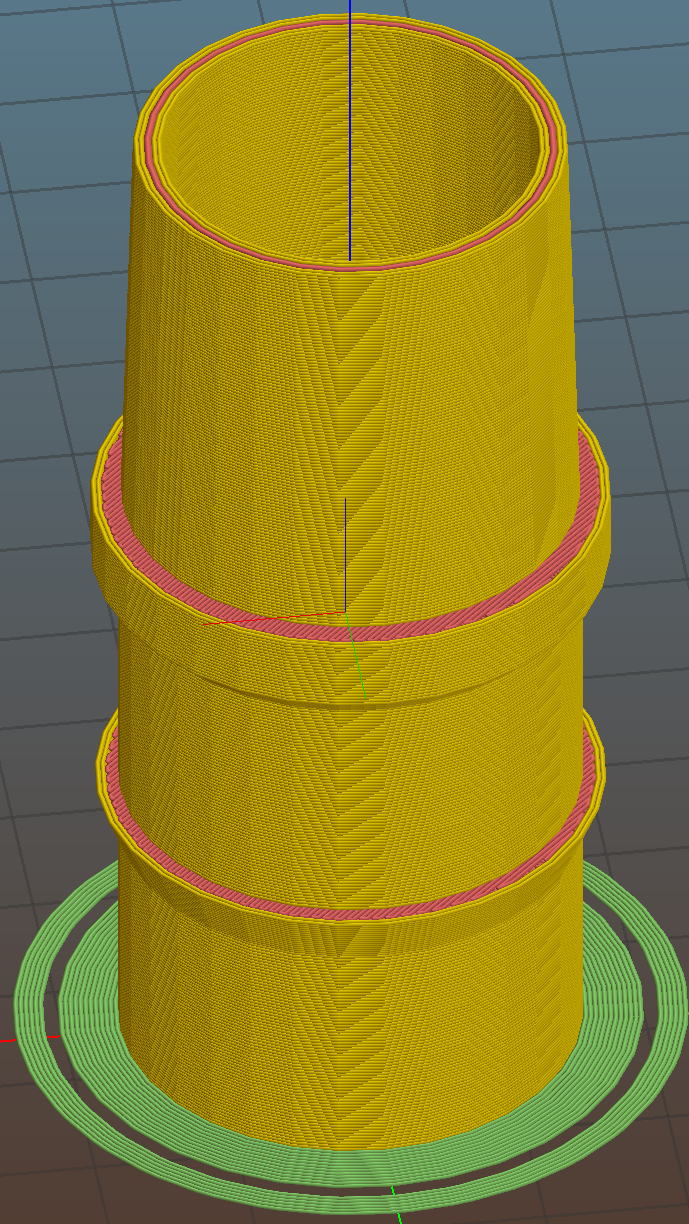
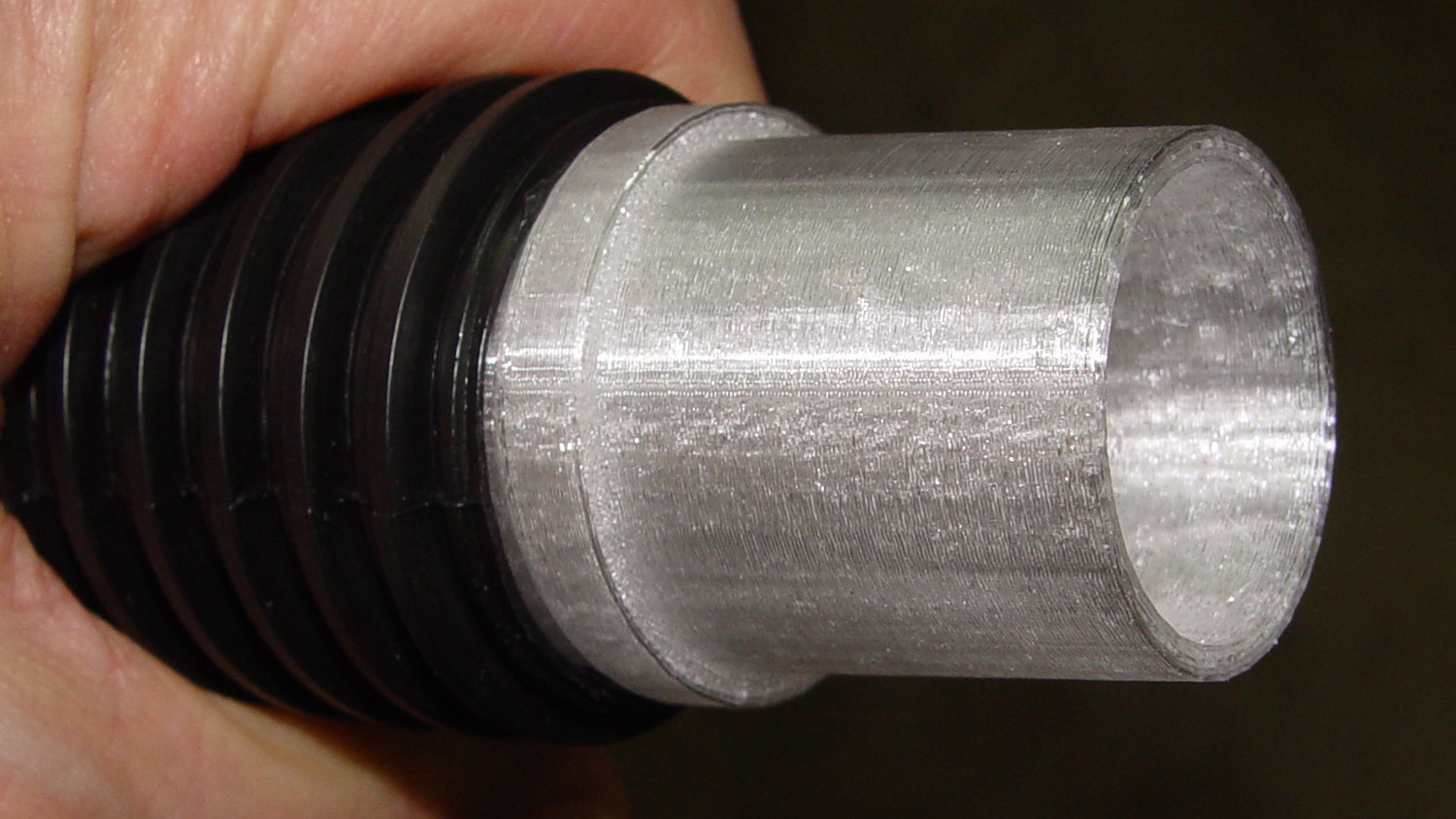
    A small ShopVac arrived with a ribbed hose carrying an absurdly long wand, so I conjured a barbed adapter with a much shorter tapered snout for the machine tools:

    Vacuum hose fittings - hose barb to nozzle
    Vacuum hose fittings – hose barb to nozzle

    Trimming the hose end at one of the ribs makes a tidy fit:

    Vacuum hose fittings - ribbed hose barb
    Vacuum hose fittings – ribbed hose barb

    Now I need not trip over the vacuum hose between the bandsaw bench and the sander bench…

    The OpenSCAD code as a GitHub Gist:

    // Vacuum Hose Fittings
    // Ed Nisley KE4ZNU July 2016
    // March 2017
    Layout = "HoseBarb"; // PVCtoHose ExpandRing PipeToPort FVacPipe FVacFitting HoseBarb
    //- Extrusion parameters must match reality!
    // Print with 2 shells and 3 solid layers
    ThreadThick = 0.25;
    ThreadWidth = 0.40;
    HoleWindage = 0.2;
    Protrusion = 0.1; // make holes end cleanly
    //———————-
    // Dimensions
    ID = 0;
    OD = 1;
    LENGTH = 2;
    VacNozzle = [30.1,31.8,30.0]; // nozzle on vacuum hose (taper ID to OD over length)
    MINOR = 0;
    MAJOR = 1;
    PITCH = 2;
    FORM_OD = 3;
    HoseThread = [32.0,(37.0 + HoleWindage),4.25,(1.8 + 0.20)]; // vacuum hose thread
    NumSegments = 64; // .. number of cylinder approximations per turn
    $fn = NumSegments;
    ThreadLength = 4 * HoseThread[PITCH];
    ScrewOAL = ThreadLength + HoseThread[PITCH];
    WallThick = 2.5;
    echo(str("Pitch dia: ",HoseThread[MAJOR]));
    echo(str("Root dia: ",HoseThread[MAJOR] – HoseThread[FORM_OD]));
    echo(str("Crest dia: ",HoseThread[MAJOR] + HoseThread[FORM_OD]));
    //———————-
    // Wrap cylindrical thread segments around larger plug cylinder
    module CylinderThread(Pitch,Length,PitchDia,ThreadOD,PerTurn,Chirality = "Left") {
    CylFudge = 1.02; // force overlap
    ThreadSides = 6;
    RotIncr = 1/PerTurn;
    PitchRad = PitchDia/2;
    Turns = Length/Pitch;
    NumCyls = Turns*PerTurn;
    ZStep = Pitch / PerTurn;
    HelixAngle = ((Chirality == "Left") ? -1 : 1) * atan(Pitch/(PI*PitchDia));
    CylLength = CylFudge * (PI*(PitchDia + ThreadOD) / PerTurn) / cos(HelixAngle);
    for (i = [0:NumCyls-1]) {
    Angle = ((Chirality == "Left") ? -1 : 1) * 360*i/PerTurn;
    translate([PitchRad*cos(Angle),PitchRad*sin(Angle),i*ZStep])
    rotate([90+HelixAngle,0,Angle]) rotate(180/ThreadSides)
    cylinder(r1=ThreadOD/2,
    r2=ThreadOD/(2*CylFudge),
    h=CylLength,
    center=true,$fn=ThreadSides);
    }
    }
    //– PVC fitting to vacuum hose
    module PVCtoHose() {
    Fitting = [34.0,41.0,16.0]; // 1 inch PVC elbow
    Adapter = [HoseThread[MAJOR],(Fitting[OD] + 2*WallThick + HoleWindage),(ScrewOAL + Fitting[LENGTH])]; // dimensions for entire fitting
    union() {
    difference() {
    cylinder(d=Adapter[OD],h=Adapter[LENGTH]); // overall fitting
    translate([0,0,-Protrusion]) // remove thread pitch dia
    cylinder(d=HoseThread[MAJOR],h=(ScrewOAL + 2*Protrusion));
    translate([0,0,(ScrewOAL – Protrusion)]) // remove PVC fitting dia
    cylinder(d=(Fitting[OD] + HoleWindage),h=(Fitting[LENGTH] + 2*Protrusion));
    }
    translate([0,0,HoseThread[PITCH]/2]) // add the thread form
    CylinderThread(HoseThread[PITCH],ThreadLength,HoseThread[MAJOR],HoseThread[FORM_OD],NumSegments,"Left");
    }
    }
    //– Expander ring from small OD to large ID PVC fittings
    // So a small elbow on the bandsaw fits into the hose adapter, which may not be long-term useful
    module ExpandRing() {
    Fitting_L = [34.0,41.0,16.0]; // 1 inch PVC pipe elbow
    Fitting_S = [26.8,32.8,17]; // 3/4 inch PVC elbow
    difference() {
    cylinder(d1=Fitting_L[OD],d2=(Fitting_L[OD] – HoleWindage),h=Fitting_L[LENGTH]); // overall fitting
    translate([0,0,-Protrusion])
    cylinder(d=(Fitting_S[OD] + HoleWindage),h=(Fitting_L[LENGTH] + 2*Protrusion));
    }
    }
    //– 1 inch PVC pipe into vacuum port
    // Stick this in the port, then plug a fitting onto the pipe section
    module PipeToPort() {
    Pipe = [26.5,33.5,20.0]; // 1 inch Schedule 40 PVC pipe
    difference() {
    union() {
    cylinder(d=Pipe[OD],h=(Pipe[LENGTH] + Protrusion));
    translate([0,0,(Pipe[LENGTH] – Protrusion)])
    cylinder(d1=VacNozzle[OD],d2=VacNozzle[ID],h=VacNozzle[LENGTH]);
    }
    translate([0,0,-Protrusion])
    cylinder(d=Pipe[ID],h=(Pipe[LENGTH] + VacNozzle[LENGTH] + 2*Protrusion));
    }
    }
    //– Female Vac outlet inside PVC pipe
    // Plug this into PVC fitting, then plug hose + nozzle into outlet
    module FVacPipe() {
    VacPort = [30.0,31.3,25]; // vacuum port on belt sander (taper ID to OD over length)
    Pipe = [26.5,33.5,20.0]; // 1 inch Schedule 40 PVC pipe
    difference() {
    cylinder(d=Pipe[OD],h=VacPort[LENGTH]);
    translate([0,0,-Protrusion])
    cylinder(d1=VacPort[ID],d2=VacPort[OD],h=(VacPort[LENGTH] + 2*Protrusion));
    }
    }
    //– Female Vac outlet on 3/4 inch fitting OD
    // Jam this onto OD of fitting, plug hose + nozzle into outlet
    module FVacFitting() {
    Adapter = [26.5,(33.5 + 2*WallThick),17.0]; // overall adapter
    //VacPort = [30.0,31.3,25]; // vacuum port on belt sander (taper ID to OD over length)
    VacPort = [30.1,31.8,30.0]; // vacuum port for bandsaw = inverse of hose nozzle
    Fitting = [26.8,32.8,17]; // 3/4 inch PVC elbow
    TaperLength = 5.0; // inner taper to avoid overhang
    difference() {
    cylinder(d=Adapter[OD],h=Adapter[LENGTH]); // overall fitting
    translate([0,0,-Protrusion])
    cylinder(d=(Fitting[OD] + HoleWindage),h=(Adapter[LENGTH] + 2*Protrusion));
    }
    translate([0,0,Adapter[LENGTH]])
    difference() {
    cylinder(d=Adapter[OD],h=TaperLength);
    translate([0,0,-Protrusion])
    cylinder(d1=(Fitting[OD] + HoleWindage),d2=VacPort[ID],h=(TaperLength + 2*Protrusion));
    }
    translate([0,0,(TaperLength + Adapter[LENGTH])]) // vac fitting
    difference() {
    cylinder(d=Adapter[OD],h=VacPort[LENGTH]);
    translate([0,0,-Protrusion])
    cylinder(d1=VacPort[ID],d2=VacPort[OD],h=(VacPort[LENGTH] + 2*Protrusion));
    }
    }
    //– Hose barb to male vacuum taper
    module HoseBarb() {
    HoseFitting = [29.0,32.2,38.5];
    Barb = [HoseFitting[OD],35.5,4.0];
    BarbOffset = 17.0;
    Seat = [HoseFitting[OD],36.0,5.0];
    SeatSupport = [HoseFitting[OD],Seat[OD],(Seat[OD] – HoseFitting[OD])/2];
    OAL = HoseFitting[LENGTH] + SeatSupport[LENGTH] + Seat[LENGTH] + VacNozzle[LENGTH];
    NumSides = 4*8;
    difference() {
    union() {
    cylinder(d=HoseFitting[OD],h=HoseFitting[LENGTH],$fn=NumSides);
    translate([0,0,BarbOffset])
    cylinder(d1=Barb[ID],d2=Barb[OD],h=Barb[LENGTH],$fn=NumSides);
    translate([0,0,HoseFitting[LENGTH]])
    cylinder(d1=SeatSupport[ID],d2=SeatSupport[OD],h=SeatSupport[LENGTH],$fn=NumSides);
    translate([0,0,HoseFitting[LENGTH] + SeatSupport[LENGTH]])
    cylinder(d=Seat[OD],h=Seat[LENGTH],$fn=NumSides);
    translate([0,0,HoseFitting[LENGTH] + SeatSupport[LENGTH] + Seat[LENGTH]])
    cylinder(d1=VacNozzle[OD],d2=VacNozzle[ID],h=VacNozzle[LENGTH],$fn=NumSides);
    }
    translate([0,0,-Protrusion])
    cylinder(d1=HoseFitting[ID],d2=(VacNozzle[ID] – 10*ThreadWidth),h=OAL + 2*Protrusion,$fn=NumSides);
    }
    }
    //———-
    // Build things
    if (Layout == "PVCtoHose")
    PVCtoHose();
    if (Layout == "ExpandRing") {
    ExpandRing();
    }
    if (Layout == "PipeToPort") {
    PipeToPort();
    }
    if (Layout == "FVacPipe") {
    FVacPipe();
    }
    if (Layout == "FVacFitting") {
    FVacFitting();
    }
    if (Layout == "HoseBarb") {
    HoseBarb();
    }
  • Streaming Radio Advertisements: Carpet Bombing

    After a protracted silence in a Radionomy stream, the Raspberry Pi player offered this log:

    2017-03-05 11:17:07,890 INFO: Starting mplayer on Plenitude -> /home/pi/Playlists/Radio-PLENITUDE.m3u
    2017-03-05 11:17:13,651 INFO: Track name: []
    2017-03-05 11:44:02,296 INFO: Track name: [David Wahler - Whispers from Eternity]
    2017-03-05 11:46:36,995 INFO: Track name: [Radio PLENITUDE - Jingle Intro Publicité]
    2017-03-05 11:47:07,117 INFO: Track name: []
    2017-03-05 11:49:07,080 INFO: Track name: [Radio PLENITUDE - Jingle Extro Publicité]
    2017-03-05 11:49:10,079 INFO: Track name: [Jef Mounet & Danièle Mounet - L'ancre musicale Natures d'Eau]
    2017-03-05 12:02:02,271 INFO: Track name: [Radio PLENITUDE - Jingle Intro Publicité]
    2017-03-05 12:02:32,424 INFO: Track name: []
    2017-03-05 12:04:32,243 INFO: Track name: [Radio PLENITUDE - Jingle Intro Publicité]
    2017-03-05 12:05:01,925 INFO: Track name: [Targetspot - TargetSpot]
    2017-03-05 12:07:02,276 INFO: Track name: [Radio PLENITUDE - Jingle Intro Publicité]
    2017-03-05 12:07:31,968 INFO: Track name: [Targetspot - TargetSpot]
    2017-03-05 12:09:32,262 INFO: Track name: [Radio PLENITUDE - Jingle Intro Publicité]
    2017-03-05 12:10:02,192 INFO: Track name: [Targetspot - TargetSpot]
    2017-03-05 12:12:02,311 INFO: Track name: [Radio PLENITUDE - Jingle Intro Publicité]
    2017-03-05 12:12:32,184 INFO: Track name: [Targetspot - TargetSpot]
    2017-03-05 12:14:32,085 INFO: Track name: [Radio PLENITUDE - Jingle Intro Publicité]
    2017-03-05 12:15:02,217 INFO: Track name: [Targetspot - TargetSpot]
    2017-03-05 12:17:02,057 INFO: Track name: [Radio PLENITUDE - Jingle Intro Publicité]
    2017-03-05 12:17:32,445 INFO: Track name: [Targetspot - TargetSpot]
    2017-03-05 12:19:32,083 INFO: Track name: [Radio PLENITUDE - Jingle Extro Publicité]
    2017-03-05 12:19:35,171 INFO: Track name: [Jean-Marc Staehle - Bercé par tant de beauté]
    2017-03-05 12:23:42,410 INFO: Track name: [Francesco - Sur le chemin]
    2017-03-05 12:29:50,265 INFO: Track name: [Michel Pépé - Pacifica]
    2017-03-05 12:35:07,493 INFO: Track name: [Radio PLENITUDE - Jingle Intro Publicité]
    2017-03-05 12:35:37,377 INFO: Track name: [Targetspot - TargetSpot]
    2017-03-05 12:37:37,478 INFO: Track name: [Radio PLENITUDE - Jingle Extro Publicité]
    2017-03-05 12:37:41,476 INFO: Track name: [Music And Wellness (Musique Et Bien Etre) - Absolute Winner]
    2017-03-05 12:46:36,742 INFO: Track name: [Radio PLENITUDE - Jingle Intro Publicité]
    2017-03-05 12:47:06,668 INFO: Track name: [Targetspot - TargetSpot]
    2017-03-05 12:49:06,538 INFO: Track name: [Radio PLENITUDE - Jingle Extro Publicité]
    2017-03-05 12:49:10,270 INFO: Track name: [Patrick Vuillaume &Nicole Bally - Pearls of Light (Instrumental by Nicole Bally)]
    2017-03-05 12:53:45,357 INFO: Track name: [Trine Opsahl - Sister moon]
    2017-03-05 12:54:58,596 INFO: Track name: [Peter Kater - Rebirth]
    2017-03-05 13:04:52,726 INFO: Track name: [Radio PLENITUDE - Jingle Intro Publicité]
    2017-03-05 13:05:22,665 INFO: Track name: [Targetspot - TargetSpot]
    2017-03-05 13:07:21,561 INFO: Track name: [Radio PLENITUDE - Jingle Extro Publicité]
    2017-03-05 13:07:25,808 INFO: Track name: [Deuter - Flowing]
    2017-03-05 13:12:55,970 INFO: Track name: [Radio PLENITUDE - Jingle Intro Publicité]
    2017-03-05 13:13:25,859 INFO: Track name: []
    2017-03-05 13:15:26,449 INFO: Track name: [Radio PLENITUDE - Jingle Extro Publicité]
    2017-03-05 13:15:33,022 INFO: Track name: [Radio PLENITUDE - Jingle Intro Publicité]
    2017-03-05 13:15:59,437 INFO: Track name: [Targetspot - TargetSpot]
    2017-03-05 13:17:59,559 INFO: Track name: [Radio PLENITUDE - Jingle Extro Publicité]
    2017-03-05 13:18:06,133 INFO: Track name: [O - Part I]
    

    The Jingle lines introduce a short interlude of chimes separating music from advertisements. The Intro chimes play for 30 seconds and the Extro chimes play for three to five seconds. Some stations have similar interludes, others do not; apparently the station gets to choose the format.

    The [Targetspot - TargetSpot] lines mark two minutes of TargetSpot insertion: either advertisements (if you’re in their target market) or generic musical interludes similar to the station’s genre (if you’re out-of-market). The ads and music often lack volume-matching with the streaming music, rarely have lower volume, and the ads are incomprehensible to my ears. The musical interludes seem to be randomly chosen from a small set of candidate tracks that, along with the chimes, become annoyingly familiar in short order.

    The [] lines (yes, an empty string) mark two minutes of Public Service Announcements, advertisements, or generic musical interludes. I’m uncertain how they differ from the [Targetspot - TargetSpot] insertions.

    At a minimum, Radionomy inserts two minutes of TargetSpot / PSAs after every 12 to 15 minutes of music. Adding in the Jingle markers, ads occupy just under 20% of the total “airtime” for this station.

    However, bizarre events like the 17 nonstop minutes of jingles and ads inserted just after noon occur with inexplicable frequency. I’ve noticed half an hour of similar back-to-back-to-back ads on other stations, so it’s not a rare event.

    To quote the TargetSpot website:

    TargetSpot serves ads in real time to each listener’s personalized stream, creating a one-to-one relationship between the advertiser and the listener. The result is a dramatic increase in message relevancy and campaign effectiveness

    Those keyword markers turn out to be incredibly convenient. Just sayin’…

  • Epoxy Mixing Pads

    Quilters hold fabric in place with freezer paper while piecing their blocks; it’s basically plastic-coated paper that gets tacky at ordinary clothes iron temperatures.

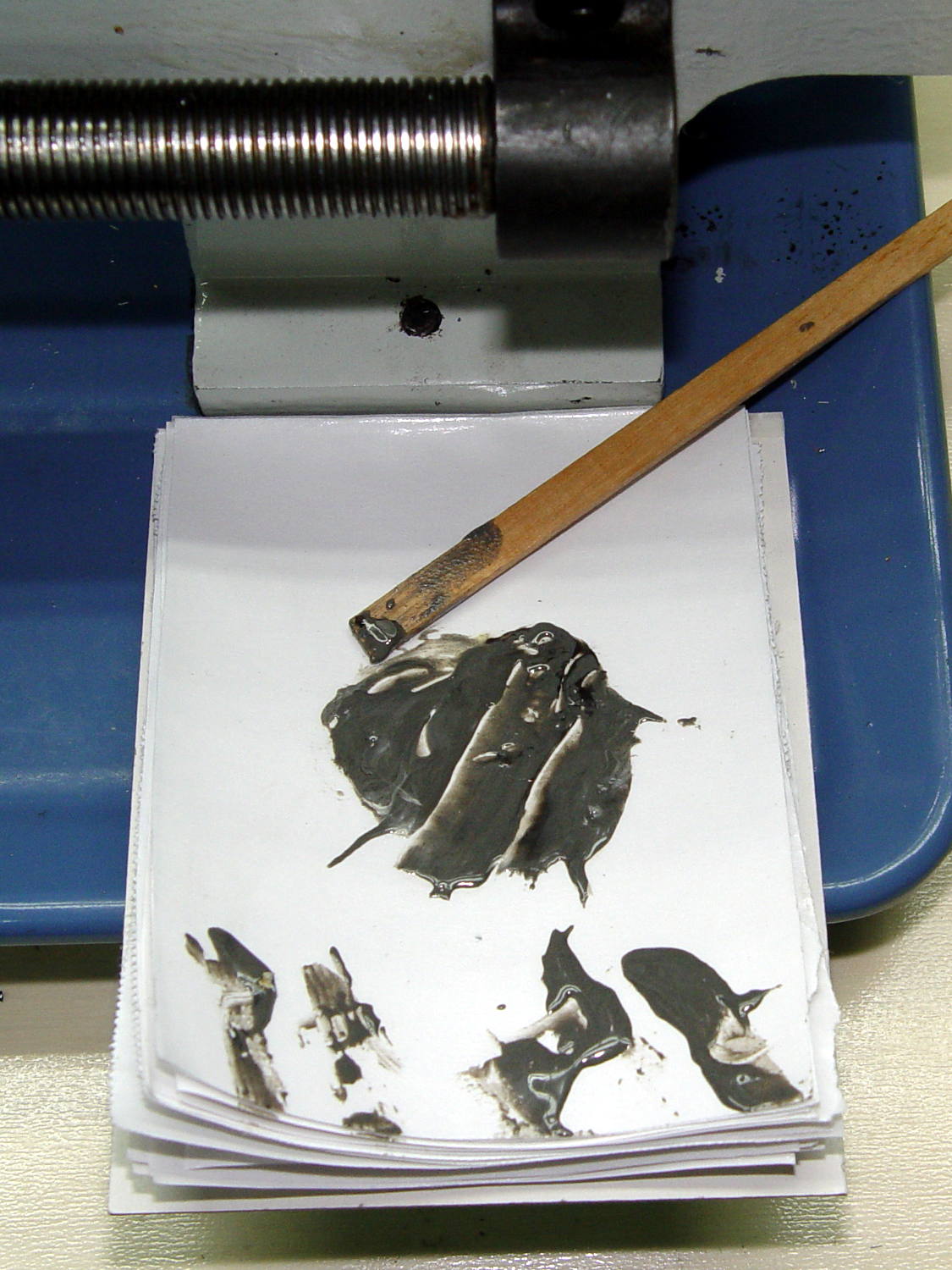
    It’s useful in the shop, too. Cut a length of freezer paper into small pages, pad them plastic-side-up atop a sheet of cardboard, and you get a great place to mix small amounts of epoxy:

    Epoxy mixing pad
    Epoxy mixing pad

    Let the pad stay next to whatever you’re epoxying (like, say, the lathe tailstock ways), then test the leftover epoxy for hardness… rather than messing up the joint you so laboriously created by moving the parts an hour too soon.

    Works for me, anyhow. Highly recommended!