Gastón sent me a note describing how he got serial communications working with an old-school HP 54600-series oscilloscopes. After swapping some hints and tests, it’s worth recording so I (and, perhaps, you!) can make use of it the next time around:
I recently bought a 54616B for which I also bought the 54659 Measurements/Storage module. It comes with an RS232 9-pin port and that, besides the possibility to have the full plethora of additional measurements including FFT, made me buy it.
I saw I had the same problem you had by that time (the oscilloscope printed alright through the serial port but utterly ignored all of the commands I sent to it) so, as I found a solution, I thought it would be nice to share it with you as you share all of your doings with many people on the web.
I discovered that the real problem was not in the interface but in the documentation (go figure, huh!). The terminator character must be, instead of a NL, a semicolon. The NL terminator is probably still valid for the GP-IB interface.
I have tested this setup at 19200 baud, “DTR” flow control on the scope side and a generic USB-Serial converter (Cypress semiconductor) plus a null modem cable and it worked just fine. The software on my PC is Windows 7, but I am running an Xubuntu Xenial under Virtualbox and did the tests using minicom.
Sending NLs did not seem to affect the communication at all but be aware that the error handling routines on the scope side are not the best, meaning that most probably after some errors or just one (which you will see emerge on the scope screen) you will need to reboot the scope to be able to communicate again. No big deal but it could be annoying.
This is a sample of a command sequence to measure the frequency of the calibrator connected to the Channel 1 input:
*RST;:AUT;:MEASURE:SOURCE CHANNEL1;:MEASURE:FREQUENCY?;the answer was, in my case:
;+246300000E+003Let me know if it works for you, or if I can be of any help.
Which knocked me out of my chair!
Wow!
That’s the first time the scope’s serial output pin produced a different voltage in the last, uh, three decades! [grin]
You’re absolutely right about the command parser: it falls off the rails at the slightest provocation and leaves no suicide notes behind.
Gingerly following your technique, I found the scope’s serial interface must be in its “connected to computer” mode; the printer & plotter modes (not surprisingly) don’t respond to commands.
Even with that, I’m unable to get a consistent response to (what seem to be) correctly formatted commands. If I send some
*RST;commands, eventually it’ll reset, but I sometimes can’t get anything back from status inquires like*SRE?;and so forth.Sometimes, a linefeed (Ctrl-J) works as a terminator, sometimes it doesn’t. Even with a semicolon at the end of the command, it sometimes responds only after a Ctrl-J. Recovering from errors seems to require a random number of successive
;and linefeed characters.What definitely doesn’t work: a normal carriage return + linefeed combination! I think that explains my complete lack of success many years ago, as I probably used a terminal program that automatically sent CR+LF at the end of each line.
However, it’s now doing something in response to serial commands, which it never did before.
The only way to use the interface will be with a (tediously debugged) program sending a preset command sequence and receiving a known series of responses. Hand-carving a series of commands just won’t work.
Gastón did a bit more poking around:
It seems that the implementation for the different oscilloscopes of the same family was different. This was to be expectable but I didn’t think it would be *so* different.
In my case, as said, linefeed does nothing at all. This weekend I will try (just for grins of course) to use linefeeds interspersed with the letters of a single command to see to what extent they are ignored.
In my opinion, the inconsistent response you get could have to do with the implementation of the interface on the computer side, or even marginal baud rate or jitter. I had to resort to the Xubuntu-within-Virtualbox-within-Windows7 just because I couldn’t get a consistent communication from Windows 7 alone from my “usual” laptop. I tried another laptop with Xubuntu as OS and the serial port worked only up to 9600 baud, and with some errors from time to time, shown as “Override error” and “RS232 Protocol Error” on the scope screen. From this ones, the oscilloscope did recover without problems. Parser ones in my case are fatal every time. They show as “Unknown Header” and that’s a death signal. The oscilloscope functionality, though, is not affected in any way.
Just as an aside, my HP 54659A interface uses a Philips SCN2661AC1A28 as UART.
I agree with you regarding to the way to use it is with a program that only sends the right sequence of commands and receives in turn a known series of responses. Back in the ’90s I worked with a functional level board tester which used several HPIB-managed instruments (HP3314 arbitrary waveform generator, two programmable power supplies), a couple others with VXI bus, among which there was a display-less version of an HP545xx oscilloscope. That beast was managed from an IBM PS/2 model 70 (a 486 based one) with National Instruments interface boards. Not a hobby setup in any way. Every single time I managed to send the wrong command to the oscilloscope, I had to reboot both the board tester rack and the PC… so the parser’s lack of humor is not exclusive of the 546xx series :).
Even with a fully debugged command sequence, sometimes the oscilloscope decided to act up… this last didn’t happen very often but when it did, it was extremely annoying for the tester operator as the sequence was a lengthy one (about 10 minutes per board) and when it failed, it meant sometimes half an hour of time lost, between recognition of a tester failure (and not simply a board that required multiple test retries and thus took longer than usual), reboot of both instruments rack and computer, and rerun.
And a followup which may discourage all but the stout of heart:
To add to the general confusion, I tried with Ctrl-J instead of a semicolon, and the commands are accepted too. It seems that my tty terminal setup is not as good as I thought it was.
The semicolon, from what I have been reading, is a command separator within a line and perhaps that is why it is accepted as readily as the linefeed. I did test sending newlines between the characters and I got a “Syntax Error” in the scope screen from which the only way to recover was an oscilloscope reboot.
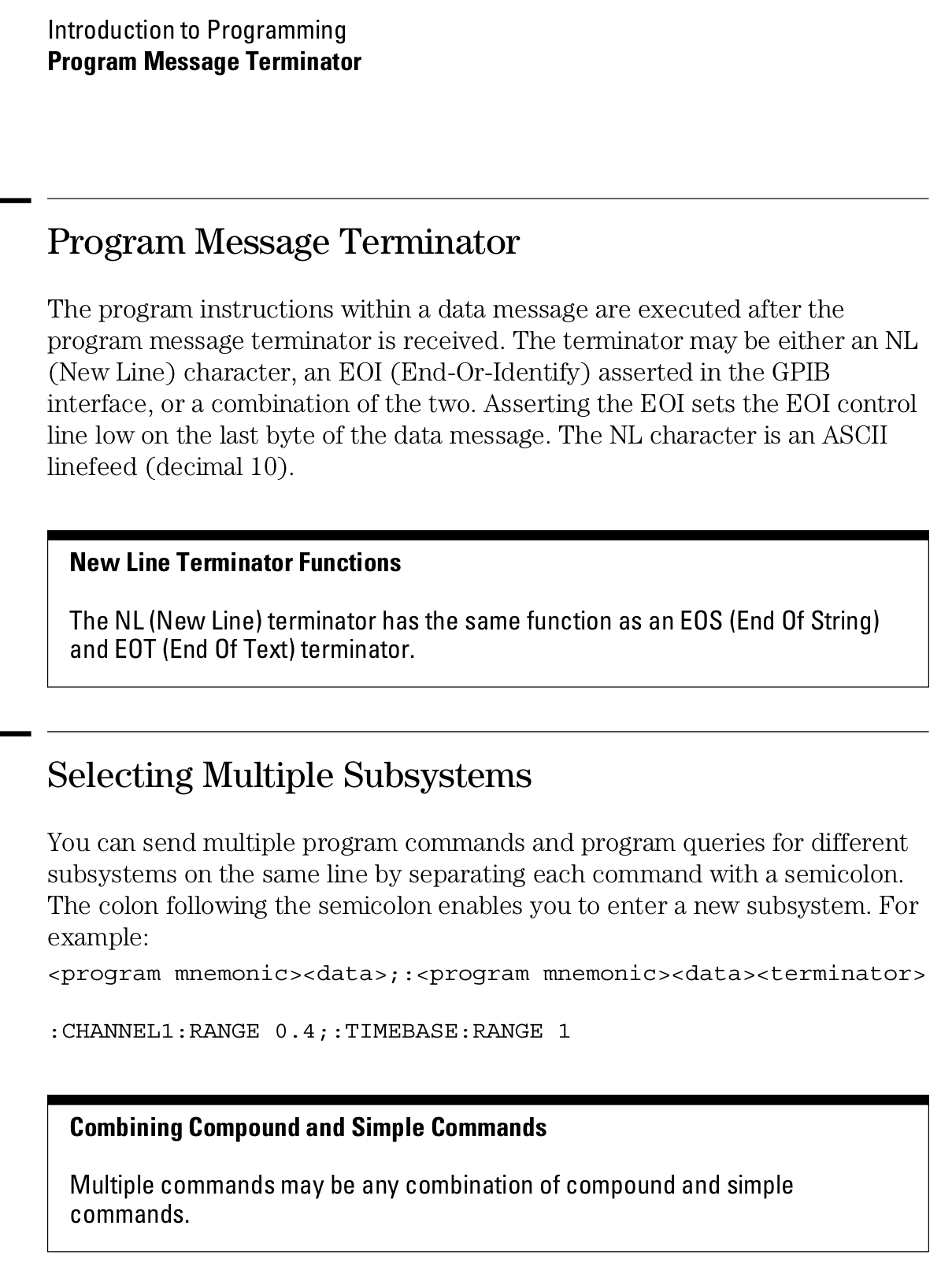
Page 1-12 from the Programmer’s Guide (54600-97032) may be of interest (clicky for more dots):
The bottom line seems to be it’s possible to control the scope through the serial port, but it ain’t pretty!
My old Kermit program continues to slurp screen shots out of the scope, which suffices for my simple needs.
Good luck if you have more complex needs!









 The Smell of Molten Projects in the Morning