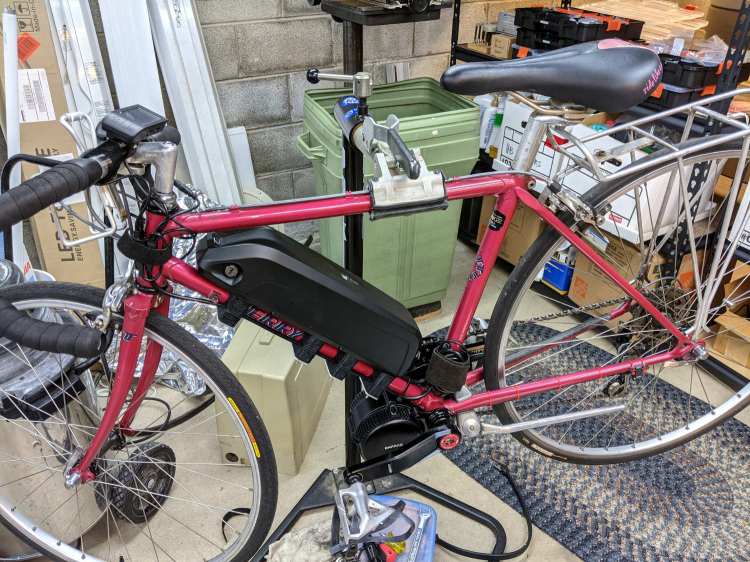
The Bafang 48 V 11.6 A·h battery for Gee’s Terry Symmetry mounts on the downtube:
The battery slides onto a plate screwed to the pair of water bottle studs brazed to the tube:
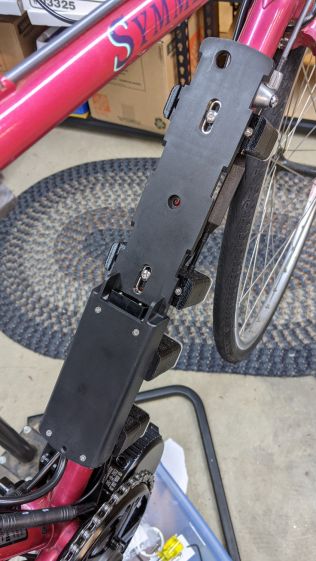
Water bottle studs are (nominally) 65 mm on center. One stud normally appears under the plate’s center hole, with the other stud under either the upper or lower slot, depending on whether the battery fits better mounted lower or higher on the downtube.
However, the Symmetry’s downtube is so short the plate must mount with the lowest slot matching the uppermost stud, putting the lower stud beneath the metal compartment with its complete lack of mounting holes.
Well, I can fix that:
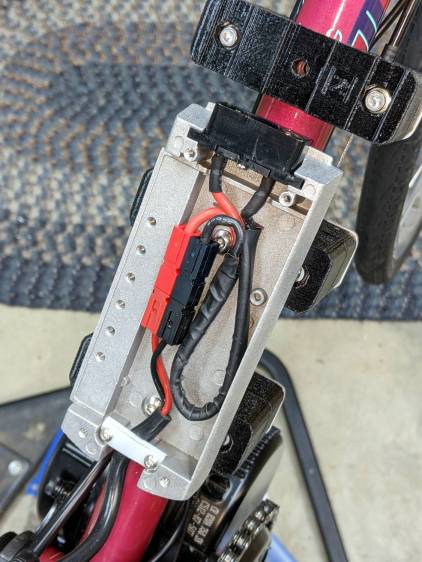
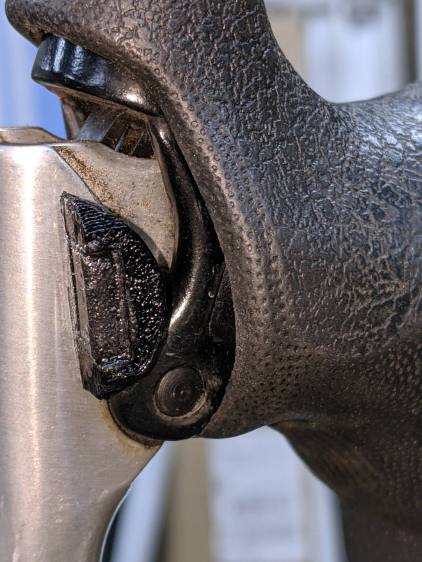
The upper hole in the metal base is 65 mm from the middle of the lower slot in the plastic baseplate, which will be (approximately) centered on the upper stud inside the black plastic mount. The location of that hole is not a free variable: it requires measuring and marking from the slot with the battery plate assembled.
The lower hole in the base puts the bottom of its plastic mount just about even with the end of the plate.
I shortened the battery side of the cable, crimped on (genuine!) 45 A Powerpole pins, and shaped the wiring to put the connector inside the metal compartment, out of harm’s way, and shielded from the weather.
The small bar of white HDPE serves as a cable clamp, held by a pair of M3 BHCS in the conveniently tapped holes.
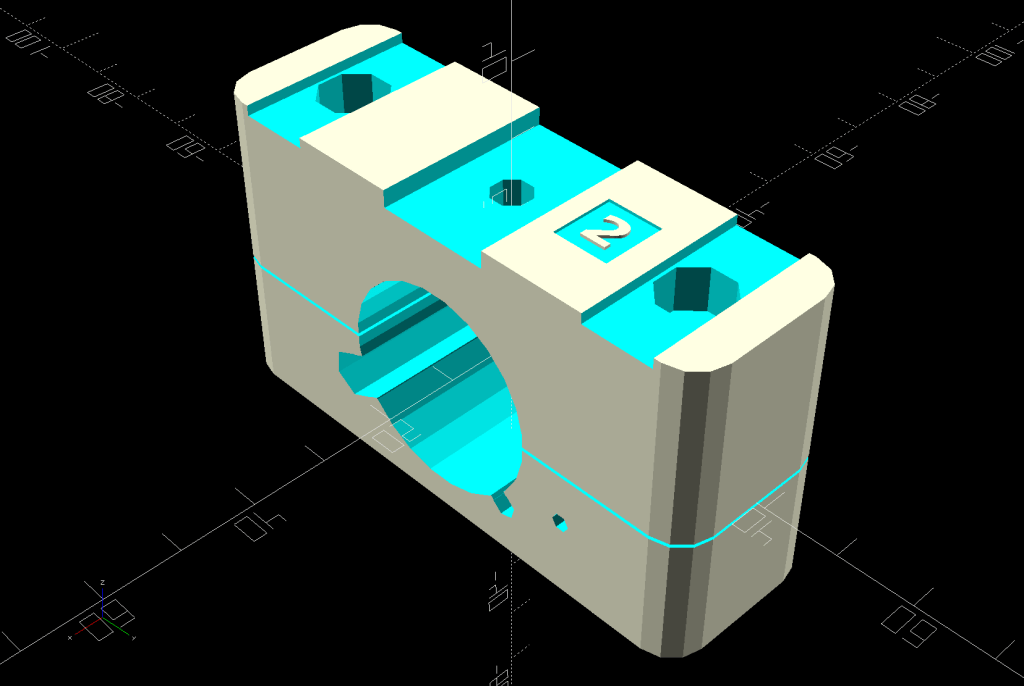
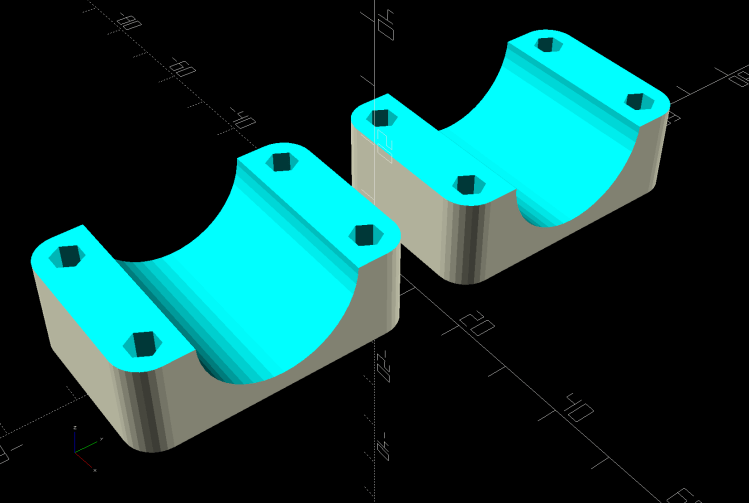
With all that settled, the final iteration of the 3D printed mounting blocks took shape:
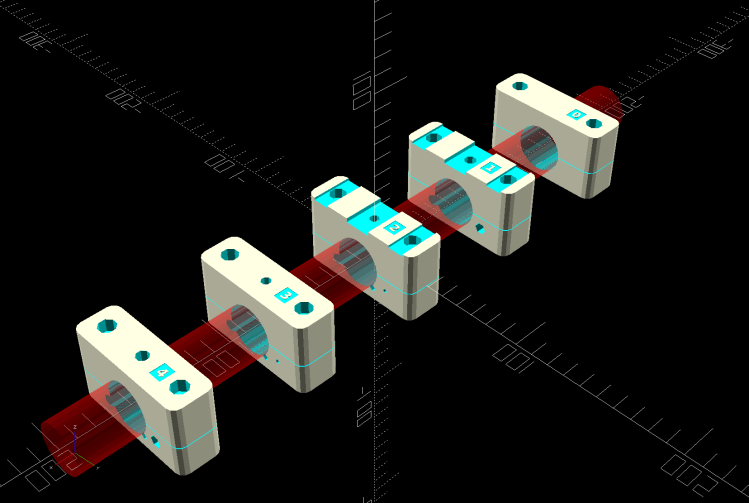
A station number from 1 through 4 identifies the blocks (station 0 is the blank block shape) and, of course, they’re all different. I refactored the OpenSCAD code used for Mary’s Tour Easy to put the feature selection into vectors, rather than convoluted logic:
Latches = [false,true,true,false,false];                // clearance for battery latch clips
Notch = [false,true,true,false,false];                  // notch for battery screw pockets
Recess = ["None","TeeNut","Bottle","Bottle","TeeNut"];  // stud or nut clearance against frame

HarnessCable = [false,true,true,true,true];             // passage for main harness cable

ShiftWire = [false,true,true,true,true];                //  .. shifter wire through sensor
Ferrules = ["None","Both","Front","None","Back"];       // ferrule and bushing ssockets

GearCable = [false,false,true,true,true];               //  .. gear sensor cable
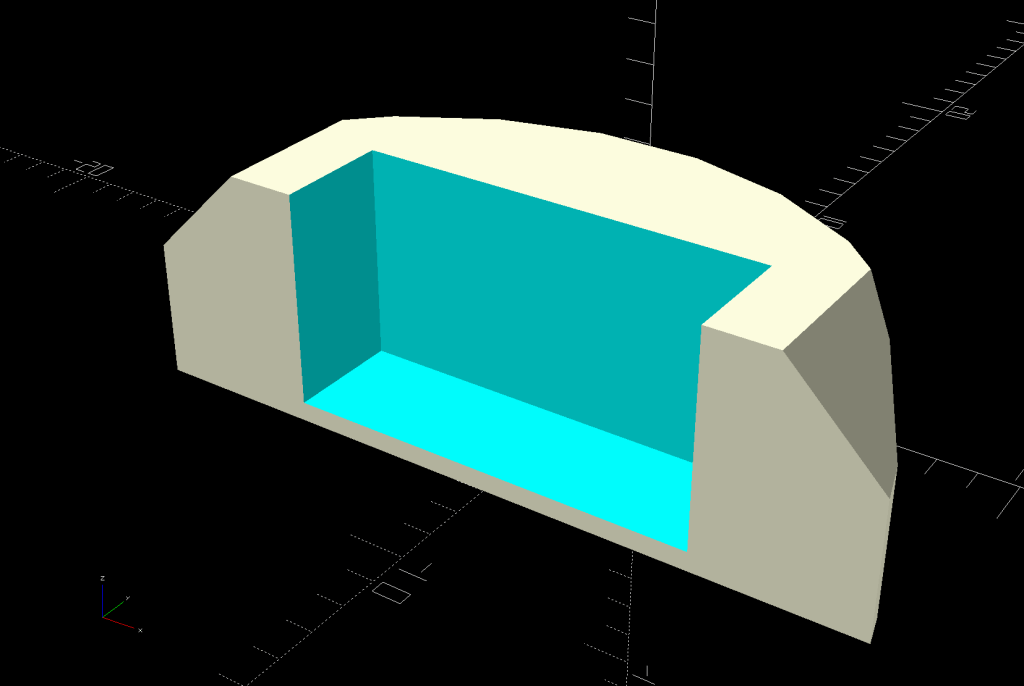
Producing the features for a specific block is now a straightforward series of obvious choices. For example, adding the channels to clear the battery latches at stations 1 and 2 looks like this:
        if (Latches[BlkNum])
            for (i=[-1,1])
                translate([0,i*LatchOC/2,BlockMaxZ - LatchThick/2 + Protrusion])
                    cube([BossSlotOAL,LatchWidth,LatchThick + Protrusion],center=true);
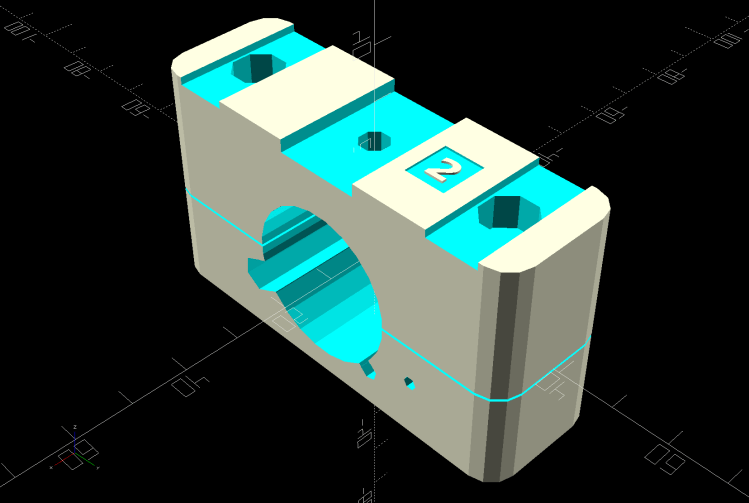
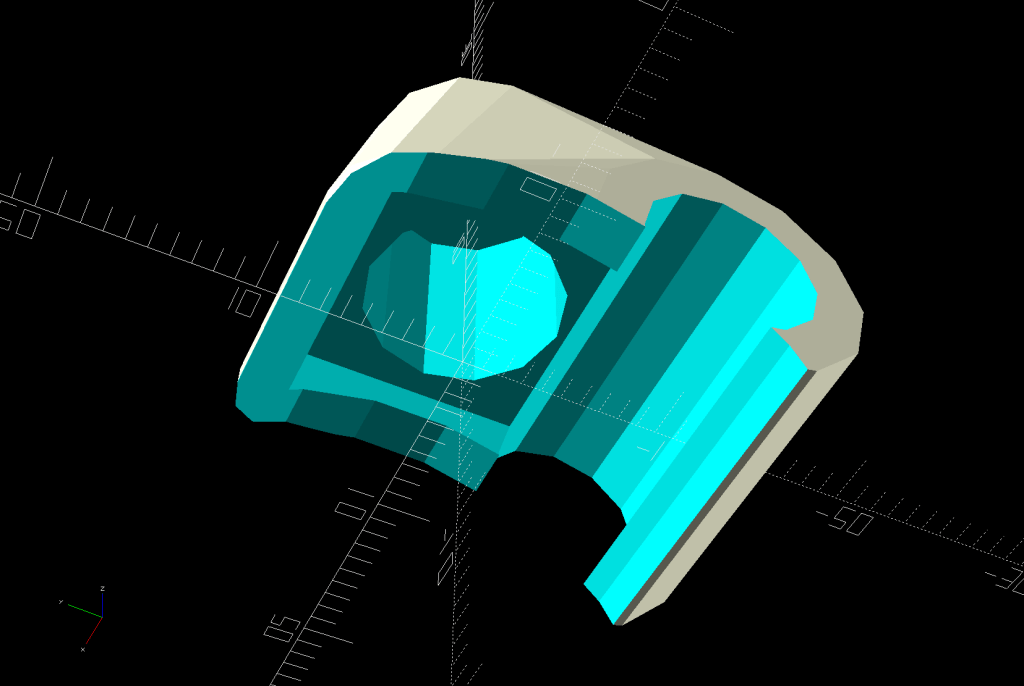
Both parts of the block show the station number to avoid mixups:
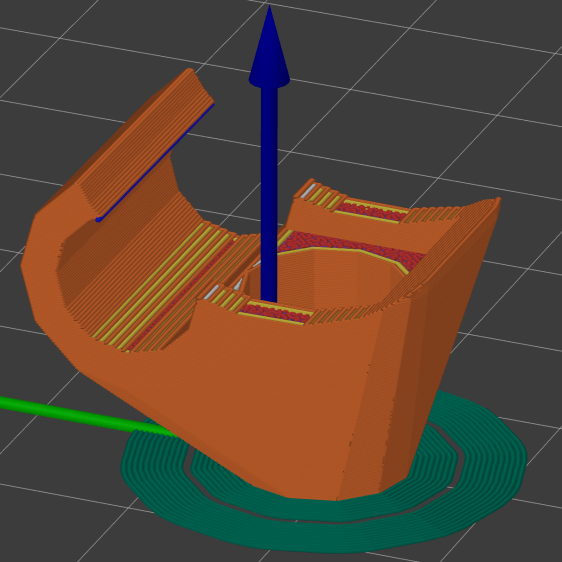
Each block requires a bit under three hours of printing time, so they’re produced singly:
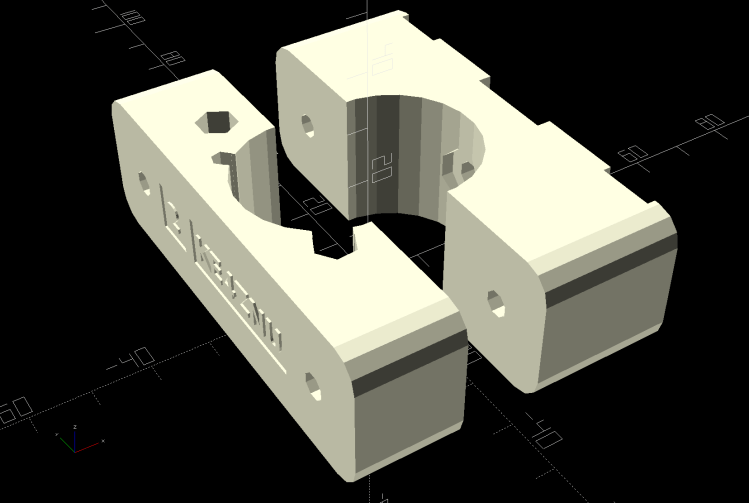
Building them sideways produces the best surface finish in all the recesses and holes. Small support structures under the rounded corners make them look Good Enough™ for their purpose.
A test assembly:
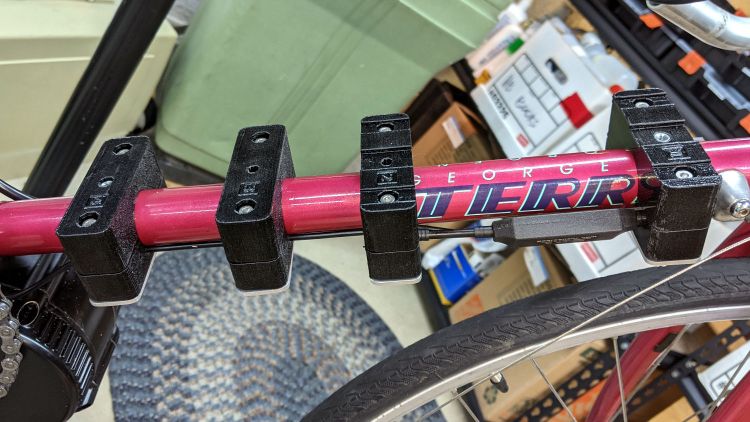
The two middle blocks (stations 3 and 2) sit at the water bottle studs. The rightmost block (station 1) is 130 mm from station 2, with the Bafang gear sensor on the rear derailleur cable.
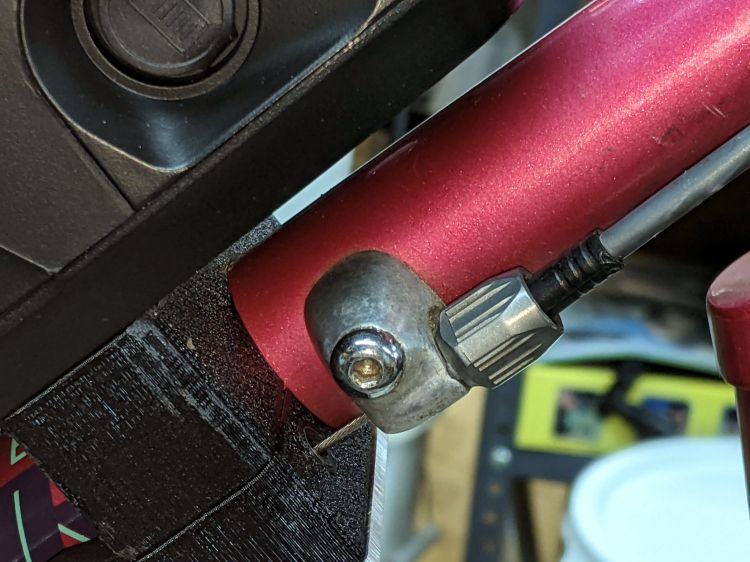
An aluminum plate spreads the clamping force from the M4 screws across the bottom, as seen here below the cable stop cap holding the harness cable:
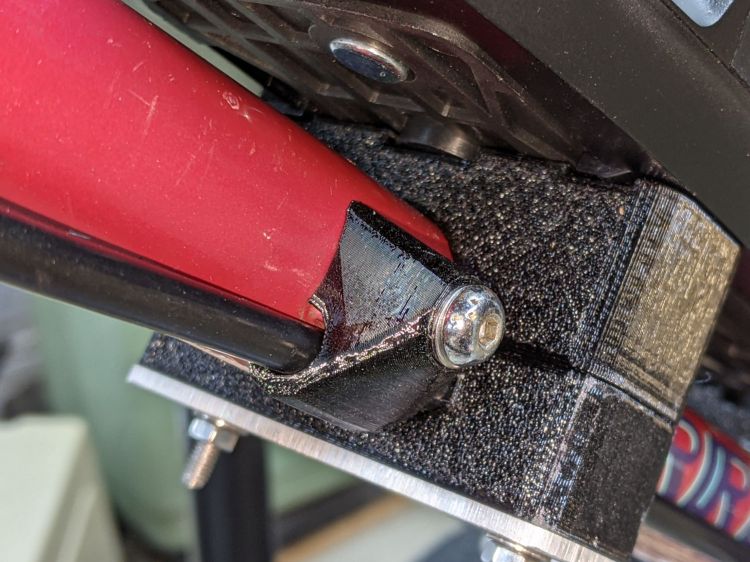
Those 50 mm screws are too long; a soon-to-arrive bag of 45 mm screws should fit perfectly. The final assembly will use nyloc nuts so they won’t vibrate loose.
The OpenSCAD source code for all the pieces as a GitHub Gist:
| // Terry Symmetry – Bafang e-bike conversion | |
| // Ed Nisley KE4ZNU 2021-06 | |
| Layout = "BuildClip"; // [Frame,Block,AllBlocks,BuildBlock,DispMount,BrakeMagnet,ShiftCap,BuildShiftCap,Case,NutMold,HeadClip, BuildClip] | |
| Station = 4; // [0:4] | |
| Support = false; | |
| //- Extrusion parameters must match reality! | |
| /* [Hidden] */ | |
| ThreadThick = 0.25; | |
| ThreadWidth = 0.40; | |
| HoleWindage = 0.2; | |
| Protrusion = 0.1; // make holes end cleanly | |
| inch = 25.4; | |
| function IntegerMultiple(Size,Unit) = Unit * ceil(Size / Unit); | |
| ID = 0; | |
| OD = 1; | |
| LENGTH = 2; | |
| //———- | |
| // Dimensions | |
| // Bike frame lies along X axis, rear to +X | |
| FrameTube = [400,28.9 + HoleWindage,28.9 + HoleWindage]; // X = longer than anything else | |
| FrameSides = 24; | |
| SpeedOD = 3.5; // speed sensor cable | |
| PowerOD = 6.7; // power cable | |
| Harness = [6.0,13.0,30.0]; // main motor-to-handlebar cable | |
| GearOD = 3.0; // gear sensor cable | |
| HandlebarMax = 1*inch; // middle handlebar diameter | |
| HandlebarMin = 24.0; // .. tape section | |
| HeadTube = [32.0,35.0,8.0]; // ID=tube OD=lug LENGTH=clear between lugs | |
| BottleStud = [5.0,10.0,IntegerMultiple(1.2,ThreadThick)]; // frame fitting for bottle screws | |
| BafangClampID = 22.3; // their handlebar clamp diameter | |
| ShiftOD = 2.0; // rear shifter cable | |
| ShiftFerrule = [ShiftOD,6.0,10.0]; | |
| ShiftOffset = 7.5; // .. from downtube | |
| ShiftAngle = -20; // .. from midline | |
| BatteryBoss = [5.5,16.0,2.5]; // battery mount boss, center boss is round | |
| BossSlotOAL = 32.0; // .. end bosses are elongated | |
| BossOC = 65.0; // .. along length of mount | |
| LatchWidth = 10.0; // battery latches to mount plate | |
| LatchThick = 1.5; | |
| LatchOC = 56.0; | |
| // Per-block features | |
| // first element is unadorned block | |
| Latches = [false,true,true,false,false]; // clearance for battery latch clips | |
| Notch = [false,true,true,false,false]; // notch for battery screw pockets | |
| Recess = ["None","TeeNut","Bottle","Bottle","TeeNut"]; // stud or nut clearance against frame | |
| HarnessCable = [false,true,true,true,true]; // passage for main harness cable | |
| ShiftWire = [false,true,true,true,true]; // .. shifter wire through sensor | |
| Ferrules = ["None","Both","Front","None","Back"]; // ferrule and bushing ssockets | |
| GearCable = [false,false,true,true,true]; // .. gear sensor cable | |
| // M3 SHCS nyloc nut | |
| Screw3 = [3.0,5.5,35.0]; // OD, LENGTH = head | |
| Washer3 = [3.7,7.0,0.7]; | |
| Nut3 = [3.0,6.0,4.0]; | |
| // M4 SHCS nyloc nut | |
| Screw4 = [4.0,7.0,4.0]; // OD, LENGTH = head | |
| Washer4 = [4.2,8.9,1.0]; | |
| Nut4 = [4.0,7.8,5.0]; | |
| // M5 SHCS nyloc nut | |
| Screw5 = [5.0,8.5,5.0]; // OD, LENGTH = head | |
| Washer5 = [5.5,10.1,1.0]; | |
| Nut5 = [5.0,9.0,5.0]; | |
| Teenut5 = [6.5,17.0,8.0,2.0]; // OD, LENGTH+1 = flange | |
| // 10-32 Philips nyloc nut | |
| Screw10 = [5.2,9.8,3.6]; // OD, LENGTH = head | |
| Washer10 = [5.5,11.0,1.0]; | |
| Nut10 = [5.2,10.7,6.2]; | |
| CableTie = [150,5.0,2.0]; | |
| WallThick = 4.0; // thinnest wall | |
| BlockMinZ = -(FrameTube.z/2 + WallThick); | |
| BlockMaxZ = FrameTube.z/2 + max(WallThick,Teenut5[LENGTH]) + BatteryBoss[LENGTH]; | |
| Block = [25.0,78.0,BlockMaxZ – BlockMinZ]; // Y = battery width | |
| echo(str("Block: ",Block)); | |
| Kerf = 0.5; // cut through middle to apply compression | |
| CornerRadius = 5.0; | |
| EmbossDepth = 2*ThreadThick; // lettering depth | |
| //———————- | |
| // Useful routines | |
| module PolyCyl(Dia,Height,ForceSides=0) { // based on nophead's polyholes | |
| Sides = (ForceSides != 0) ? ForceSides : (ceil(Dia) + 2); | |
| FixDia = Dia / cos(180/Sides); | |
| cylinder(d=(FixDia + HoleWindage),h=Height,$fn=Sides); | |
| } | |
| // frame downtube | |
| module Frame() { | |
| rotate([0,90,0]) rotate(180/FrameSides) | |
| cylinder(d=FrameTube.z,h=FrameTube.x,center=true,$fn=FrameSides); | |
| } | |
| // clamp overall shape | |
| module ClampBlock(BlkNum = 1) { | |
| Screw = Screw4; | |
| Washer = Washer4; | |
| Nut = Nut4; | |
| ScrewOC = LatchOC; | |
| ScrewSides = 8; | |
| ScrewOrient = 180/ScrewSides; | |
| ScrewRecess = LatchThick + Screw[LENGTH] + Washer[LENGTH] + 1.0; | |
| echo(str("Screw length: ",Block.z – ScrewRecess)); | |
| difference() { | |
| hull() | |
| for (i=[-1,1], j=[-1,1]) | |
| translate([i*(Block.x/2 – CornerRadius),j*(Block.y/2 – CornerRadius),BlockMinZ]) | |
| cylinder(r=CornerRadius,h=Block.z,$fn=4*3); | |
| cube([2*Block.x,2*Block.y,Kerf],center=true); | |
| Frame(); | |
| for (j=[-1,1]) { | |
| translate([0,j*ScrewOC/2,BlockMinZ – Protrusion]) | |
| rotate(ScrewOrient) | |
| PolyCyl(Screw[ID],2*Block.z,ScrewSides); | |
| translate([0,j*ScrewOC/2,BlockMaxZ – ScrewRecess]) | |
| rotate(ScrewOrient) | |
| PolyCyl(Washer[OD],BlockMaxZ,ScrewSides); | |
| } | |
| if (Latches[BlkNum]) | |
| for (i=[-1,1]) | |
| translate([0,i*LatchOC/2,BlockMaxZ – LatchThick/2 + Protrusion]) | |
| cube([BossSlotOAL,LatchWidth,LatchThick + Protrusion],center=true); | |
| if (Notch[BlkNum]) | |
| translate([0,0,BlockMaxZ – BatteryBoss[LENGTH]/2 + Protrusion]) | |
| cube([BossSlotOAL,BatteryBoss[OD],BatteryBoss[LENGTH] + Protrusion],center=true); | |
| if (HarnessCable[BlkNum]) | |
| rotate([-155,0,0]) { | |
| translate([0,FrameTube.y/2 – Harness[ID]/2,0]) | |
| cube([2*Block.x,2*Harness[ID],Harness[ID]],center=true); | |
| translate([0,FrameTube.y/2 + Harness[ID]/2,0]) | |
| rotate([0,90,0]) | |
| translate([0,0,-Block.x]) | |
| rotate(180/6) | |
| PolyCyl(Harness[ID],2*Block.x,6); | |
| } | |
| if (GearCable[BlkNum]) | |
| rotate([-45,0,0]) { | |
| translate([0,FrameTube.y/2 – GearOD/2,0]) | |
| cube([2*Block.x,2*GearOD,GearOD],center=true); | |
| translate([0,FrameTube.y/2 + GearOD/2,0]) | |
| rotate([0,90,0]) | |
| translate([0,0,-Block.x]) | |
| rotate(180/6) | |
| PolyCyl(GearOD,2*Block.x,6); | |
| } | |
| rotate([ShiftAngle,0,0]) { | |
| if (ShiftWire[BlkNum]) | |
| translate([-Block.x,FrameTube.y/2 + ShiftOffset,0]) | |
| rotate([0,90,0]) rotate(-(90 + ShiftAngle)) | |
| PolyCyl(ShiftOD,2*Block.x,6); | |
| if (Ferrules[BlkNum] == "Back" || Ferrules[BlkNum] == "Both") { | |
| i = 1; | |
| translate([i*(Block.x/2 – ShiftFerrule[LENGTH]),FrameTube.y/2 + ShiftOffset,0]) | |
| rotate([0,i*90,0]) rotate(-i*(90 + ShiftAngle)) | |
| PolyCyl(ShiftFerrule[OD],Block.x,6); | |
| } | |
| if (Ferrules[BlkNum] == "Front" || Ferrules[BlkNum] == "Both") { | |
| i = -1; | |
| translate([i*(Block.x/2 – ShiftFerrule[LENGTH]),FrameTube.y/2 + ShiftOffset,0]) | |
| rotate([0,i*90,0]) rotate(-i*(90 + ShiftAngle)) | |
| PolyCyl(ShiftFerrule[OD],Block.x,6); | |
| } | |
| } | |
| if (Recess[BlkNum] == "Bottle") { | |
| rotate(ScrewOrient) { | |
| PolyCyl(BottleStud[ID],2*Block.z,ScrewSides); | |
| PolyCyl(BottleStud[OD],FrameTube.z/2 + BottleStud[LENGTH],ScrewSides); | |
| } | |
| } | |
| else if (Recess[BlkNum] == "TeeNut") { | |
| rotate(ScrewOrient) { | |
| PolyCyl(Teenut5[ID],2*Block.z,ScrewSides); | |
| PolyCyl(Teenut5[OD],FrameTube.z/2 + Teenut5[LENGTH+1],ScrewSides); | |
| } | |
| } | |
| translate([0,15,BlockMaxZ – EmbossDepth/2 + Protrusion]) | |
| cube([9.0,8,EmbossDepth],center=true); | |
| translate([0,17,BlockMinZ + EmbossDepth/2 – Protrusion]) | |
| cube([9.0,8,EmbossDepth],center=true); | |
| translate([0,-5,BlockMinZ + EmbossDepth/2 – Protrusion]) | |
| cube([9.0,30,EmbossDepth],center=true); | |
| } | |
| translate([0,15,BlockMaxZ – EmbossDepth]) | |
| linear_extrude(height=EmbossDepth) | |
| rotate(90) | |
| text(text=str(BlkNum),size=5,spacing=1.00,font="Bitstream Vera Sans:style=Bold", | |
| halign="center",valign="center"); | |
| translate([0,17,BlockMinZ]) | |
| linear_extrude(height=EmbossDepth) | |
| rotate(-90) mirror([0,1,0]) | |
| text(text=str(BlkNum),size=4.5,spacing=1.00,font="Bitstream Vera Sans:style=Bold", | |
| halign="center",valign="center"); | |
| translate([0,-5,BlockMinZ]) | |
| linear_extrude(height=EmbossDepth) | |
| rotate(-90) mirror([0,1,0]) | |
| text(text="KE4ZNU",size=4.5,spacing=1.00,font="Bitstream Vera Sans:style=Bold", | |
| halign="center",valign="center"); | |
| } | |
| // complete clamp block | |
| module Clamp(BlkNum = 1) { | |
| ClampBlock(BlkNum); | |
| if (Support) | |
| color("Yellow") { | |
| NumRibs = 7; | |
| RibOC = Block.x/(NumRibs – 1); | |
| intersection() { | |
| translate([0,0,BlockMaxZ + Kerf/2]) | |
| cube([2*Block.x,2*Block.y,Block.z],center=true); | |
| union() { | |
| translate([0,0,Kerf/2]) | |
| cube([1.1*Block.x,FrameTube.y – 2*ThreadThick,4*ThreadThick],center=true); | |
| for (i=[-floor(NumRibs/2):floor(NumRibs/2)]) | |
| translate([i*RibOC,0,0]) | |
| rotate([0,90,0]) rotate(180/FrameSides) | |
| cylinder(d=FrameTube.z – 2*ThreadThick,h=2*ThreadWidth,$fn=FrameSides,center=true); | |
| /* | |
| translate([0,FrameTube.y/2 + PowerOD/2,Kerf/2]) | |
| cube([1.1*Block.x,PowerOD – 2*ThreadWidth,4*ThreadThick],center=true); | |
| for (i=[-floor(NumRibs/2):floor(NumRibs/2)]) | |
| translate([i*RibOC,FrameTube.y/2 + PowerOD/2,PowerOD/4]) | |
| cube([2*ThreadWidth,PowerOD – 2*ThreadWidth,PowerOD/2 – 2*ThreadThick],center=true); | |
| translate([0,-(FrameTube.y/2 + SpeedOD/2),Kerf/2]) | |
| cube([1.1*Block.x,SpeedOD – 2*ThreadWidth,4*ThreadThick],center=true); | |
| for (i=[-floor(NumRibs/2):floor(NumRibs/2)]) | |
| translate([i*RibOC,-(FrameTube.y/2 + SpeedOD/2),SpeedOD/4]) | |
| cube([2*ThreadWidth,SpeedOD – 2*ThreadWidth,SpeedOD/2 – 2*ThreadThick],center=true); | |
| */ | |
| } | |
| } | |
| } | |
| } | |
| // Half clamp sections for printing | |
| module HalfClamp(BlkNum = 1, Section = "Upper") { | |
| render() | |
| if (Section == "Upper") | |
| intersection() { | |
| translate([0,0,BlockMaxZ/2]) | |
| cube([1.1*Block.x,Block.y,BlockMaxZ],center=true); | |
| translate([0,0,-Kerf/2]) | |
| Clamp(BlkNum); | |
| } | |
| else | |
| intersection() { | |
| translate([0,0,-BlockMinZ/2]) | |
| cube([1.1*Block.x,Block.y,-BlockMinZ],center=true); | |
| translate([0,0,-BlockMinZ]) | |
| Clamp(BlkNum); | |
| } | |
| } | |
| // Handlebar mount for controller | |
| module DispMount() { | |
| ClampRing = [HandlebarMax,HandlebarMax + 2*WallThick,10.0]; | |
| ClampOffset = (HandlebarMax + BafangClampID)/2 + 6.0; | |
| DispStudLenth = 16.5; | |
| NumSides = 24; | |
| Tilt = 0*atan2((ClampRing[OD] – BafangClampID)/2,ClampOffset); | |
| echo(str("Tilt: ",Tilt)); | |
| difference() { | |
| union() { | |
| hull() { | |
| cylinder(d=ClampRing[OD],h=ClampRing[LENGTH],$fn=NumSides); | |
| translate([0,ClampOffset,0]) | |
| cylinder(d=BafangClampID,h=ClampRing[LENGTH],$fn=NumSides); | |
| } | |
| translate([0,ClampOffset,0]) | |
| cylinder(d=BafangClampID,h=ClampRing[LENGTH] + DispStudLenth,$fn=NumSides); | |
| translate([-ClampRing[ID]/4,-(ClampRing[OD]/2),ClampRing[LENGTH]/2]) | |
| rotate([0,90,0]) rotate(180/8) | |
| cylinder(d=ClampRing[LENGTH]/cos(180/8),h=ClampRing[ID]/2,$fn=8); | |
| } | |
| cube([Kerf,4*ClampOffset,4*DispStudLenth],center=true); | |
| translate([0,0,-Protrusion]) | |
| cylinder(d=ClampRing[ID],h=ClampRing[LENGTH] + 2*Protrusion,$fn=NumSides); | |
| translate([-ClampRing[ID]/2,-(ClampRing[OD]/2),ClampRing[LENGTH]/2]) | |
| rotate([0,90,0]) rotate(180/8) | |
| PolyCyl(Screw3[ID],ClampRing[ID],8); | |
| for (i=[-1,1]) | |
| translate([i*ClampRing[ID]/4,-(ClampRing[OD]/2),ClampRing[LENGTH]/2]) | |
| rotate([0,i*90,0]) rotate(180/8) | |
| PolyCyl(Washer3[OD],ClampRing[ID],$fn=8); | |
| translate([-5,25,EmbossDepth/2 – Protrusion/2]) | |
| rotate(Tilt) | |
| cube([4.5,21.5,EmbossDepth + Protrusion],center=true); | |
| if (false) | |
| translate([-6,25,EmbossDepth/2 – Protrusion/2]) | |
| rotate(-Tilt) | |
| cube([4.0,27,EmbossDepth + Protrusion],center=true); | |
| } | |
| translate([-5,25,0]) | |
| linear_extrude(height=EmbossDepth) | |
| rotate(90 + Tilt) mirror([0,1,0]) | |
| text(text="KE4ZNU",size=3.3,spacing=1.05,font="Bitstream Vera Sans:style=Bold", | |
| halign="center",valign="center"); | |
| if (false) | |
| translate([-6,25,0]) | |
| linear_extrude(height=EmbossDepth) | |
| rotate(90 – Tilt) mirror([0,1,0]) | |
| text(text="softsolder.com",size=2.2,spacing=1.05,font="Bitstream Vera Sans:style=Bold", | |
| halign="center",valign="center"); | |
| } | |
| // Mold to reshape speed sensor nut | |
| SensorNut = [0,14.4,13.0]; | |
| SensorMold = [SensorNut[OD] + 2*WallThick,SensorNut[OD] + 2*WallThick,SensorNut[LENGTH] + WallThick]; | |
| MoldSides = 20; | |
| RodOD = 1.6; | |
| module NutMoldBlock() { | |
| difference() { | |
| translate([0,0,SensorMold.z/2]) | |
| cube(SensorMold,center=true); | |
| translate([0,0,WallThick]) | |
| rotate(180/MoldSides) | |
| PolyCyl(SensorNut[OD],2*SensorNut[LENGTH],MoldSides); | |
| translate([0,0,-Protrusion]) | |
| rotate(180/8) | |
| PolyCyl(SpeedOD,2*SensorMold.z,8); | |
| for (i=[-1,1]) | |
| translate([i*(SensorMold.x/2 – WallThick/2),SensorMold.y,SensorMold.z/2]) | |
| rotate([90,0,0]) | |
| PolyCyl(RodOD,2*SensorMold.y,6); | |
| } | |
| } | |
| module NutMold() { | |
| gap = 1.0; | |
| for (j=[-1,1]) | |
| translate([0,j*gap,0]) | |
| intersection() { | |
| translate([0,j*SensorMold.y,0]) | |
| cube(2*SensorMold,center=true); | |
| NutMoldBlock(); | |
| } | |
| } | |
| // Brake sensor magnet mount | |
| // Magnetized through thinnest section | |
| module BrakeMagnet() { | |
| Magnet = [10.5,3.0,5.5]; | |
| Plate = 2*ThreadThick; | |
| BrakeRad = 10.0; // brake handle curve Radius | |
| Holder = [2*BrakeRad,7.0,Magnet.z + Plate]; | |
| difference() { | |
| intersection() { | |
| translate([0,-BrakeRad,0]) | |
| rotate(180/24) | |
| cylinder(r=BrakeRad,h=Holder.z,$fn=24); | |
| translate([0,BrakeRad – Holder.y,Holder.z/2]) | |
| cube([2*BrakeRad,2*BrakeRad,Holder.z],center=true); | |
| translate([0,0,-2*BrakeRad/sqrt(2) + Holder.z – 3.0 + BrakeRad]) | |
| rotate([0,45,0]) | |
| cube(2*[BrakeRad,2*BrakeRad,BrakeRad],center=true); | |
| } | |
| translate([0,Magnet.y/2 – Holder.y – Protrusion/2,Magnet.z/2 + Plate + Protrusion/2]) | |
| cube(Magnet + [0,Protrusion,Protrusion],center=true); | |
| } | |
| } | |
| // Shift stud cap | |
| // With passage for harness cable | |
| CapBlock = [18,18,16.5]; | |
| module ShiftCap() { | |
| Rounding = 3.5; | |
| CapM = 3.0; | |
| StudBase = [12.5,12.5,4.5]; | |
| Stud = [5.0,9.3,15.5]; | |
| difference() { | |
| hull() { | |
| translate([0,0,CapBlock.z – 0.5]) | |
| PolyCyl(Washer5[OD],0.5,12); | |
| for (i=[-1,1], j=[-1,1]) | |
| translate([i*(CapBlock.x/2 – Rounding),j*(CapBlock.y/2 – Rounding),0]) | |
| sphere(r=Rounding,$fn=12); | |
| translate([-CapBlock.x/2,-Harness[ID]/2 – StudBase.y/2,StudBase.z/2]) | |
| rotate([0,90,0]) | |
| cylinder(d=Harness[ID] + 2*WallThick,h=CapBlock.x,$fn=12); | |
| } | |
| translate([0,0,-(FrameTube.z/2 – CapM)]) | |
| Frame(); | |
| PolyCyl(Screw5[ID],2*CapBlock.z,6); | |
| PolyCyl(Stud[OD],Stud[LENGTH],12); | |
| translate([0,0,StudBase.z/2]) | |
| cube(StudBase,center=true); | |
| translate([0,-StudBase.y/2,StudBase.z/2]) | |
| cube(StudBase + [0,-StudBase.y/2,0],center=true); | |
| translate([-CapBlock.x,-Harness[ID]/2 – StudBase.y/2,StudBase.z/2]) | |
| rotate([0,90,0]) | |
| cylinder(d=1.5*Harness[ID],h=2*CapBlock.x,$fn=12); | |
| } | |
| } | |
| // Head tube clip for harness cable joint | |
| module HeadClip() { | |
| CableOD = Harness[OD]; | |
| difference() { | |
| linear_extrude(height=HeadTube[LENGTH],convexity=10) | |
| difference() { | |
| hull() { | |
| circle(d=HeadTube[ID] + 2*WallThick,$fn=FrameSides); | |
| translate([0,-(HeadTube[ID] + CableOD)/2]) | |
| rotate(180/(FrameSides/2)) | |
| circle(d=CableOD + 2*WallThick,$fn=FrameSides/2); | |
| } | |
| circle(d=HeadTube[ID] + HoleWindage,$fn=FrameSides); | |
| translate([0,-(HeadTube[ID] + CableOD)/2]) | |
| rotate(180/(FrameSides/2)) | |
| circle(d=CableOD + HoleWindage,$fn=FrameSides/2); | |
| translate([0,-HeadTube[ID]/2]) | |
| square(0.75*CableOD,center=true); | |
| translate([0,HeadTube[ID]]) | |
| square(2*HeadTube[ID],center=true); | |
| } | |
| translate([0,-(HeadTube[ID]/2 + CableOD + WallThick – CableTie.z/2),HeadTube[LENGTH]/2]) | |
| cube([HeadTube[ID],CableTie.z,CableTie.y],center=true); | |
| for (i=[-1,1]) | |
| translate([i*(HeadTube[ID]/2 + WallThick – CableTie.z/2),0,HeadTube[LENGTH]/2]) | |
| cube([CableTie.z,HeadTube[ID],CableTie.y],center=true); | |
| } | |
| } | |
| // Programming cable case | |
| ProgCavity = [60.0,18.0,7.0]; | |
| ProgBlock = [70.0,24.0,13.0]; | |
| ProgCableOD = 4.0; | |
| module ProgrammerCase() { | |
| difference() { | |
| hull() { | |
| for (i=[-1,1], j=[-1,1]) | |
| translate([i*(ProgBlock.x/2 – CornerRadius),j*i*(ProgBlock.y/2 – CornerRadius),-ProgBlock.z/2]) | |
| cylinder(r=CornerRadius,h=ProgBlock.z,$fn=12); | |
| } | |
| translate([-ProgBlock.x,0,0]) | |
| rotate([0,90,0]) | |
| PolyCyl(ProgCableOD,3*ProgBlock.x,6); | |
| cube(ProgCavity,center=true); | |
| translate([0,0,ProgBlock.z/2 + ProgCavity.z/2 – EmbossDepth]) | |
| cube(ProgCavity,center=true); | |
| translate([0,0,-(ProgBlock.z/2 + ProgCavity.z/2 – EmbossDepth)]) | |
| cube(ProgCavity,center=true); | |
| } | |
| translate([0,4,ProgBlock.z/2 – EmbossDepth]) | |
| linear_extrude(height=EmbossDepth) | |
| text(text="Bafang BBS02", | |
| size=5,spacing=1.00,font="Bitstream Vera Sans:style=Bold", | |
| halign="center",valign="center"); | |
| translate([0,-4,ProgBlock.z/2 – EmbossDepth]) | |
| linear_extrude(height=EmbossDepth) | |
| text(text="Programmer", | |
| size=5,spacing=1.00,font="Bitstream Vera Sans:style=Bold", | |
| halign="center",valign="center"); | |
| translate([0,4,-ProgBlock.z/2]) | |
| linear_extrude(height=EmbossDepth) | |
| mirror([1,0]) | |
| text(text="Ed Nisley", | |
| size=5,spacing=1.00,font="Bitstream Vera Sans:style=Bold", | |
| halign="center",valign="center"); | |
| translate([0,-4,-ProgBlock.z/2]) | |
| linear_extrude(height=EmbossDepth) | |
| mirror([1,0]) | |
| text(text="softsolder.com", | |
| size=5,spacing=1.00,font="Bitstream Vera Sans:style=Bold", | |
| halign="center",valign="center"); | |
| } | |
| // Half case sections for printing | |
| module HalfCase(Section = "Upper") { | |
| intersection() { | |
| translate([0,0,ProgBlock.z/4]) | |
| cube([2*ProgBlock.x,2*ProgBlock.y,ProgBlock.z/2],center=true); | |
| if (Section == "Upper") | |
| ProgrammerCase(); | |
| else | |
| translate([0,0,ProgBlock.z/2]) | |
| ProgrammerCase(); | |
| } | |
| } | |
| //———- | |
| // Build them | |
| if (Layout == "Frame") | |
| Frame(); | |
| if (Layout == "DispMount") | |
| DispMount(); | |
| if (Layout == "BrakeMagnet") | |
| BrakeMagnet(); | |
| if (Layout == "ShiftCap") | |
| ShiftCap(); | |
| if (Layout == "HeadClip") | |
| HeadClip(); | |
| if (Layout == "BuildClip") | |
| rotate([-90,0,0]) | |
| HeadClip(); | |
| if (Layout == "BuildShiftCap") | |
| translate([0,0,CapBlock.z]) | |
| rotate([180,0,0]) | |
| ShiftCap(); | |
| if (Layout == "Case") | |
| ProgrammerCase(); | |
| if (Layout == "NutMold") | |
| NutMold(); | |
| if (Layout == "Upper" || Layout == "Lower") | |
| HalfClamp(Station,Layout); | |
| if (Layout == "Block") { | |
| ClampBlock(Station); | |
| if (false) | |
| color("Red", 0.3) | |
| Frame(); | |
| } | |
| if (Layout == "AllBlocks") { | |
| gap = 3*Block.x; | |
| for (i=[0:4]) | |
| translate([i*gap – 2*gap,0,0]) | |
| Clamp(i); | |
| if (true) | |
| color("Red", 0.3) | |
| Frame(); | |
| } | |
| if (Layout == "BuildBlock") { | |
| gap = 5.0; | |
| translate([gap,0,Block.x/2]) | |
| rotate([0,90,0]) | |
| HalfClamp(Station,"Upper"); | |
| translate([-gap – Block.z/2,0,Block.x/2]) | |
| rotate([0,90,0]) | |
| HalfClamp(Station,"Lower"); | |
| } | |







 The Smell of Molten Projects in the Morning