Ed Nisley's Blog: Shop notes, electronics, firmware, machinery, 3D printing, laser cuttery, and curiosities. Contents: 100% human thinking, 0% AI slop.
Category: Science
If you measure something often enough, it becomes science
So I can find it again, the way to change the sudo timeout for a particular user (that would be me) involves adding a line to the /etc/sudoers file using sudo visudo, thusly:
Defaults: ed timestamp_timeout=90
# blank line to make the underscore visible
Note the colon! Should you add the timeout to the global Defaults env_reset line, then everybody gets a monster timeout, which may not be what you want.
You can change the default editor (nano in Ubuntu) thusly:
Squirting it with circuit cooler brought it back to life, albeit briefly, so it’s a real thermal failure. OK, after I get smacked upside the head twice, I can recognize a problem when I see it.
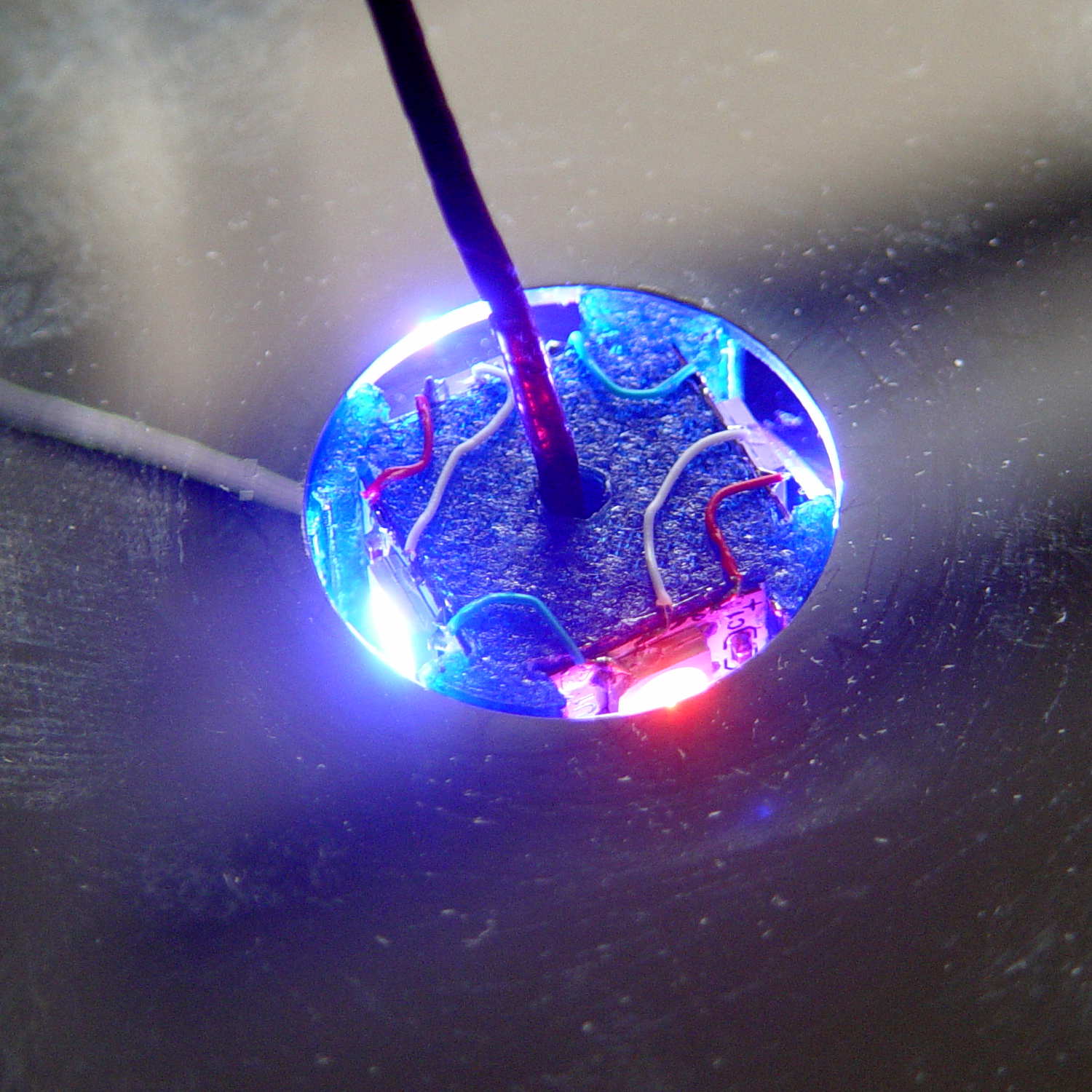
I removed the top cover and jammed a themocouple into the screw hole in the middle of the pillar:
Mood Light – thermocouple location
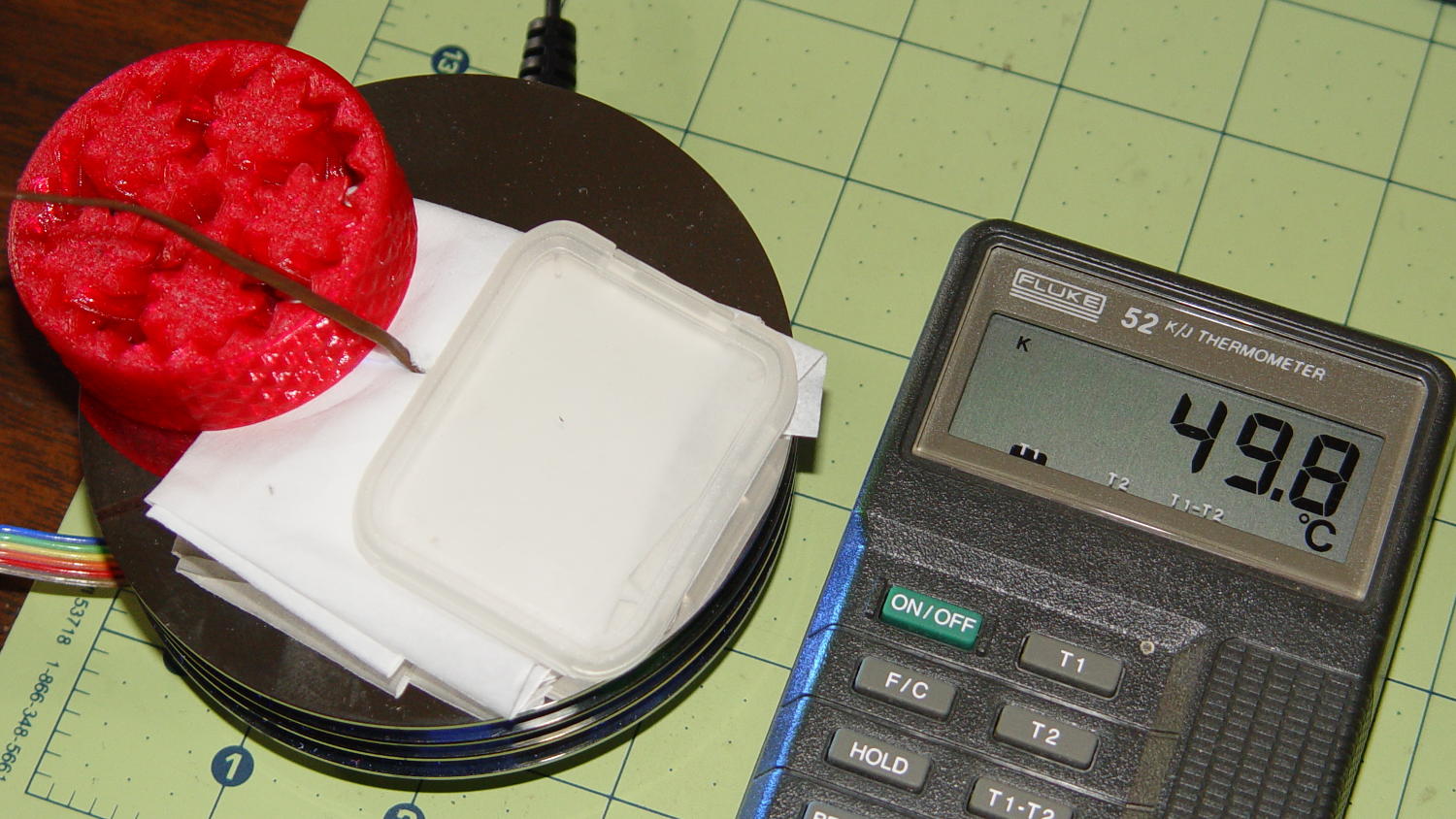
A folded tissue weighted down with random desktop junk kept the breeze out of the interior:
Mood Light – PWM 128 temperature measurement
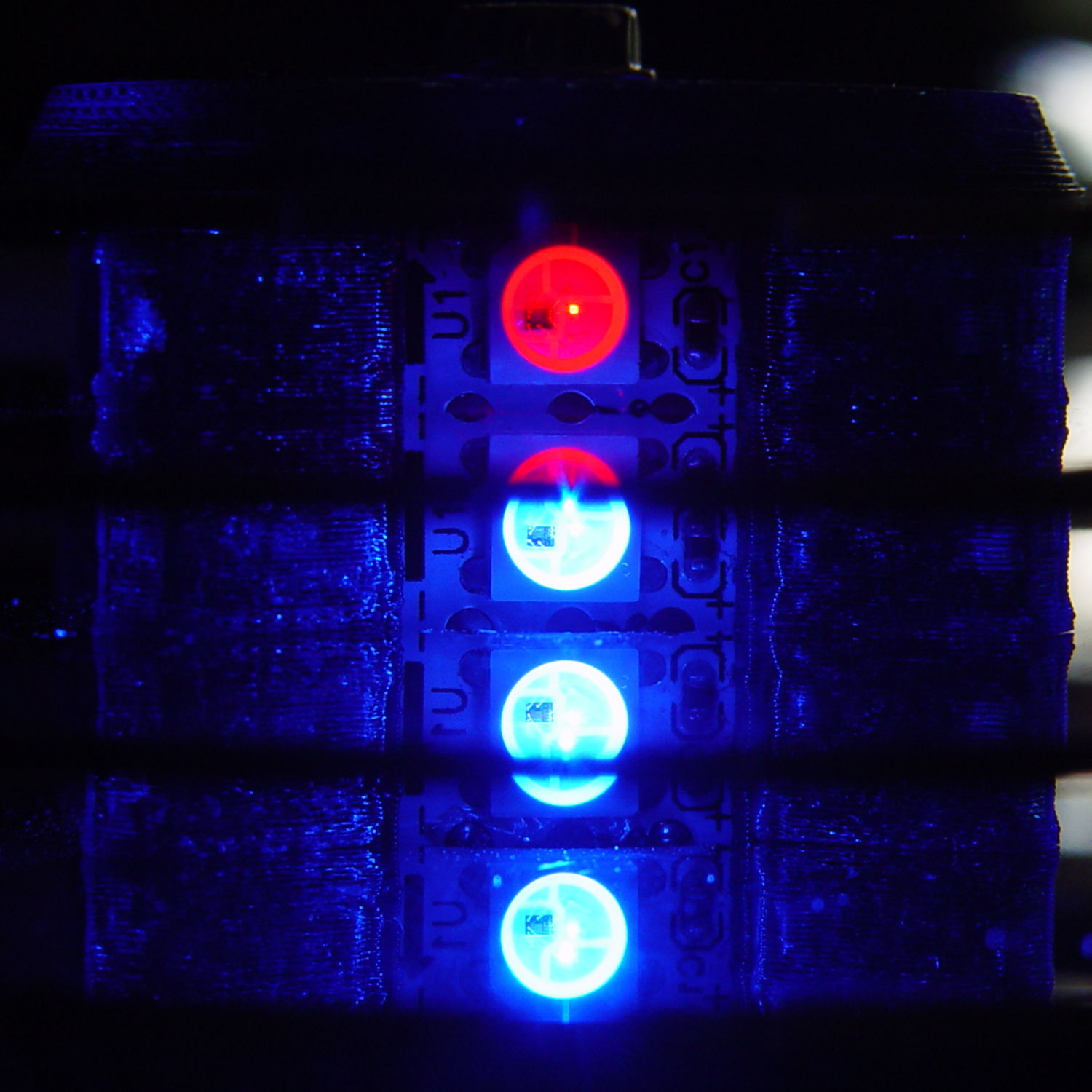
If the middle of the column hits 50 °C, what’s it like inside the 5050 packages with all those LEDs blazing away? Looks like I’ve been cooking those poor knockoff Neopixels to death.
The temperature is 50 °C with the LEDs running at maximum PWM = 128. Reducing the maximum PWM to 64 reduces the core to 30 °C and that dead blue LED springs back to life.
Figuring each LED package dissipate 250-ish mW at full throttle, that’s 120 mW at PWM 128 / 60 mW at PWM 64. The set of 12 packages dissipates 1.4 W / 750 mW, so, in a 22 °C room, the thermal coefficient is up around 10 to 20 °C/W, which is somewhere between bad and awful. Running the LEDs at full throttle obviously isn’t an option and even half-throttle really doesn’t work.
So, OK, mounting LED strips on a clever 3D printed plastic column with zero air circulation isn’t nearly as smart an idea as I thought: barely more than a watt burns right through the redline.
The Neopixel specs have nothing to say about the thermal coefficient from the LED junctions to the package leads, but cooling the copper conductors in the flex PCB can’t possibly hurt.
No, I do not want to CNC machine an aluminum pillar with little tabs on the platter for better heatsinking. It would be an interesting design project, though.
The Power Wheels Racer rules limit the motor to 1440 W, a tidy 60 A at 24 V. Let’s call it 70 A, which lines up neatly with the second major division up from the bottom: the orange current line hits 70 A with torque = 2.6 N·m.
Draw a vertical line at that point and read off all the other parameters from the scales on the left.
The motor will produce 2.6 N·m at just shy of 4500 RPM; call it 4400 RPM.
The SqWr Racer has 9:40 chain-drive gearing, so the rear wheels turn at:
990 RPM = 4400 RPM x (9/40)
With 13 inch diameter wheels, the racer moves at:
38 mph = 990 RPM x (π x 13 inch) x (60 min/hr) x (1 mile / 63.36x103 inch)
Which is scary fast if you ask me. A higher ratio may be in order.
At that speed the motor delivers: 1.6 HP = 1180 W = 2.6 N·m x 4400 RPM x 2π rad/rev / (60 s/min)
… to the shaft and, minus mechanical losses, to the tires.
If the racer doesn’t require that much power to roll at breakneck speed, it’ll go even faster, until the motor’s (falling) power output matches the (rising) mechanical load at some higher speed with correspondingly lower current.
With a current of 70 A and a winding resistance of 0.089 Ω (let’s say 0.10 Ω), the motor dissipates 490 W. That’s probably too much for long-term running, even with a 70% (= 1150 / (1150 + 490)) efficiency.
The mandated Littelfuse 60 A fuse has a bit under 1 mΩ of cold resistance and will dissipate 3.6 W at 60 A. The specs say it will blow within 6 minutes at rated current.
The resistance of the wiring / connectors / switches / whatever should be on that same order. Figuring the racer needs 2 m of stranded copper wire, that calls for 2 AWG or larger (0.5 mΩ/m). Right now, the racer uses 8 AWG (2 mΩ/m) and might have 4 mΩ total resistance, although I think it has less than 2 m of wire. Empirically, the motor conductors get really hot at 40 A for about ten seconds, but that’s with a severely defunct motor.
If the conductors + connectors between the battery and the motor introduce, say, 10 mΩ of resistance, they’ll dissipate 36 W at 60 A. That scales linearly with resistance, so a high-resistance connection will incinerate itself.
Using a PWM controller to reduce the speed will reduce the available horsepower, so the racer will accelerate slowly. With the torque limited to 2.6 N·m, the horsepower will vary linearly with the PWM duty cycle: nearly zero for small PWM, up to 1.5 HP for large PWM at 60 A, then upward as the RPM increases with decreasing load. Yeah, you get more torque when you need it least.
I could make a case for a three-speed transmission in addition to higher gear ratio, although that seems overly complex.
A less beefy motor will be in order and The Mighty Thor suggests a torque converter as a low-budget transmission. Sounds good to me; I should learn more about electric traction motors…
The Power Wheels Racer taking shape at SquidWrench let out The Big Stink at the Mini Maker Faire a few weeks ago, so I brought some test equipment to the regular Weekly Doing and helped with the autopsy.
The PWM motor controller purports to do 60 A at up to 50 V, but removing the cover showed it wasn’t going to do any more controlling:
Motor Controller – smoked housing
That smudge came from a rank of detonated MOSFETs:
Motor Controller – exploded MOSFET
Other MOSFETs had unsoldered themselves:
Motor Controller – unsoldered MOSFETs
Explosively:
Motor Controller – solder ejecta
I brought along an ancient Sears starter-motor ammeter to measure the motor current:
Sears 244-2145 Starter Ammeter – front
The magnetic field around the wire directly drives the meter movement, with two guides for the 75 A and 400 A ranges, and none of that newfangled Hall effect nonsense to contend with:
Sears 244-2145 Starter Ammeter – wire guides
Yeah, that says FEB 79; I’ve been collecting tools for quite a while…
I slapped the motor connectors directly on the battery terminals, holding them with small locking pliers after discovering that the wires got way too hot, way too fast. A snippet of retroreflective tape on the motor sprocket and a laser tach gave us the speed:
12 V: 1600 RPM @ 40 A
24 V: 2400 RPM @ > 100 A
The AmpFlow E30-400 motor data sheet confirmed that those numbers were grossly wrong. Unloaded, it should spin at 5700 RPM at 24 V while drawing 3.2 A (thus, 2800 RPM at 12 V & 1.6 A).
Diassembling the motor showed it hadn’t escaped the carnage:
Motor – charred windings
Those windings should be the usual amber enamel-over-copper, not charred black. The excessive current and reduced speed suggests many shorted turns inside the rotor.
Protip: never disassemble a working DC motor, because you’ll demagnetize the stator. The motor should still run when you put it back together, but the reduced magnetic field will wreck the performance.
As nearly as we could tell, one of the motor wires shorted to the frame when it got pinched under the seat; that’s an easy mistake to make and shows why compulsive wire neatness pays off big time. Shorting the controller output blew the transistors and, after raising the seat to look underneath, the motor would cook itself without generating much torque while you figure out what happened.
As far as I’m concerned, if you’ve never blown up anything that severely, you’re not building interesting stuff and definitely not trying hard enough.
The next iteration should work better!
Thanks to Dragorn of Kismet for stepping into the stench with phone camera in hand…
APRS tracks for my rides around Poughkeepsie in early November 2015:
APRS Coverage – Highland to Hopewell – 2015-11
Turning on the topo data and squinting at the Red Oaks Mill area:
APRS Coverage – Red Oaks Mill area topo – 2015-11
The topography isn’t in my favor, with two ridgelines between Red Oaks Mill and the two APRS nodes near Poughkeepsie. APRS coverage southwest of Red Oaks Mill along the Mighty Wappingers Creek (basically, Vassar Road) ranges from spotty to nonexistent, because that route has even worse topography.
Seems to me an APRSiGate in Red Oaks Mill, running Xastir (perhaps headless) on an RPi, conjured from my heap (perhaps with a shiny new TNC-Pi atop the RPi, rather than an ancient Kantronics KPC-9612), and using a vertical VHF antenna in the attic (because lightning), might improve the situation.
That whole project continues to slip into the future, but at least I have more motivation and linkies…
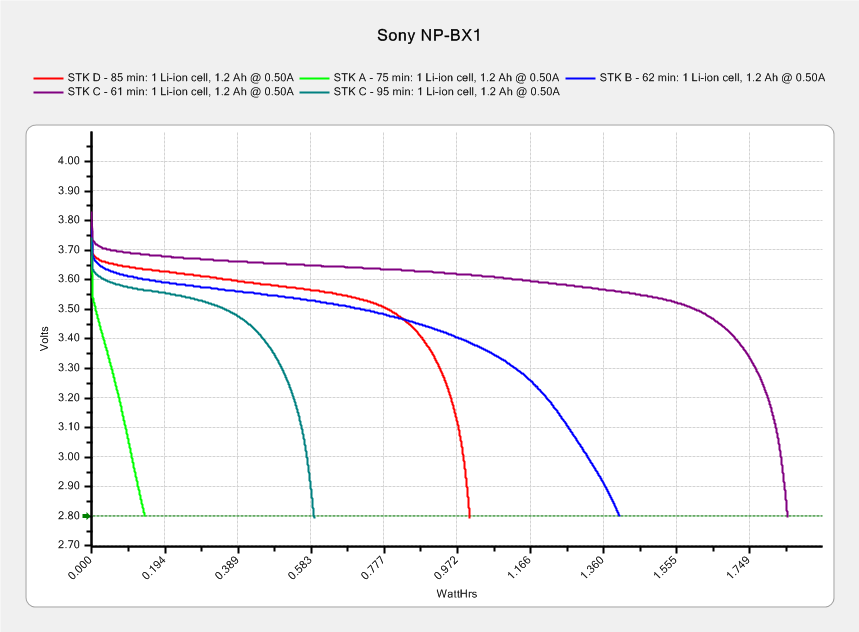
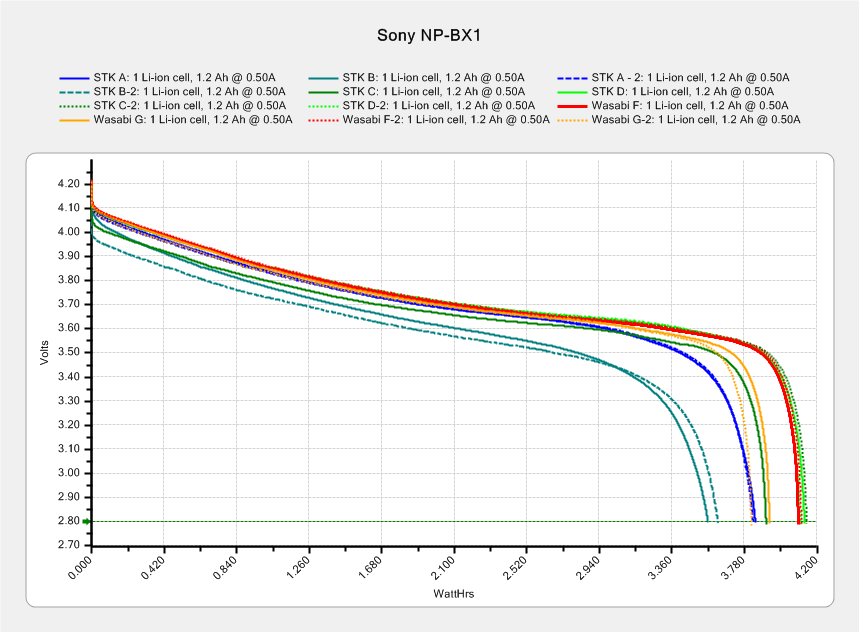
This sheaf of tests shows three of the four STK NP-BX1 batteries deliver about 4 W·h during a constant 500 mA discharge, with battery B trailing behind:
After the three most recent bike rides, I popped the partially discharged battery into the tester and used the same test current:
Sony NP-BX1 – STK ABD – charged vs used – Wh scale – 2015-11-22
The longer curves come from the top chart (with different colors), the shorter ones from the partially discharged batteries. In an ideal world, the shorter curves should give the energy left in the battery after the ride, so subtracting that from the before-ride capacity gives the energy used during the ride.
The results for battery A may not be typical, as the camera turned off before I rolled into the garage. The camera may run with a battery voltage below the 2.8 V cutoff in those tests, so it can extract more energy than the tests. The slope of the curve toward the end suggests it won’t get much, but that will still bias the results.
In round numbers, the bike rides required:
A: 3.8 – 0.1 = 3.7 W·h
B: 3.6 – 1.4 = 2.2 W·h
D: 4.2 – 1.0 = 3.2 W·h
I generally turn the camera off during the mid-ride pause (Protip: never wear a helmet camera into a Port-a-Loo), so at least two of the rides have discontinuous usage. I figured the total run time from the video file sizes at the rate of 22.75 min/4.0 GB, blithely ignoring issues like the battery recovering during the pauses, the effect of ambient temperature vs. camera heating on battery temperature, and so forth and so on.
In an ideal world, dividing the total energy by the run time (converted from minutes to hours and not venturing into pirate·ninja territory) should produce a nearly constant value equal to the camera’s power dissipation:
A: 3.7 W·h / 1.25 h = 2.96 W
B: 2.2 W·h / 1.0 h = 2.1 W
D: 3.2 W·h / 1.4 h = 2.25
Ignoring the suspiciously high result for battery A, it looks like the HDR-AS30V really does dissipate a bit over 2 W while recording 1920×1080@60fps video. That’s with GPS, WiFi, and NFC turned off, of course.
Which turns out to be pretty close to the test conditions: 3.7 V x 500 mA = 1.85 W. I could goose the test current to 600 mA = 2.2 W/3.7 V for the next tests, but maybe long-term consistency is a virtue.
One might reasonably conclude all six came from the same factory; the STK B battery looks like a dud. The two replacement batteries from STK performed slightly better than the first pair.
The Wasabi and SterlingTEK batteries all carry a 1600 mA·h rating that’s far in excess of their actual 1000-ish mA·h performance. If they were advertised as 1.0 A·h batteries, they’d meet their specifications (for small values of “meet”), but nobody would buy a second-tier battery with less capacity than the Sony OEM battery’s 1.24 A·h.
If you rummage around in previous posts, I did verify that battery capacity does increase with decreasing test current, but definitely not by the 60% needed to reach 1600 mA·h.
Because most devices these days operate at constant power from a boost supply, presenting the results against a watt·hour scale would make sense:
They should survive for hour-long rides with the GPS tracker turned off, which is about as much as I want to ride at once. I’ll eventually autopsy the STK B battery, which won’t last all that long.
Credit where credit is due: after I sent the first test results to STK, they sent a pair of replacement batteries and, based on the second test results, refunded the entire purchase price. I’m reluctant to give a five-star rating for customer service, because shipping mis-advertised products should carry a zero-star rating.