The Smell of Molten Projects in the Morning

Ed Nisley's Blog: Shop notes, electronics, firmware, machinery, 3D printing, laser cuttery, and curiosities. Contents: 100% human thinking, 0% AI slop.

Category: Science

If you measure something often enough, it becomes science

  • Panasonic Eneloop Pro NiMH Cells: First Charge

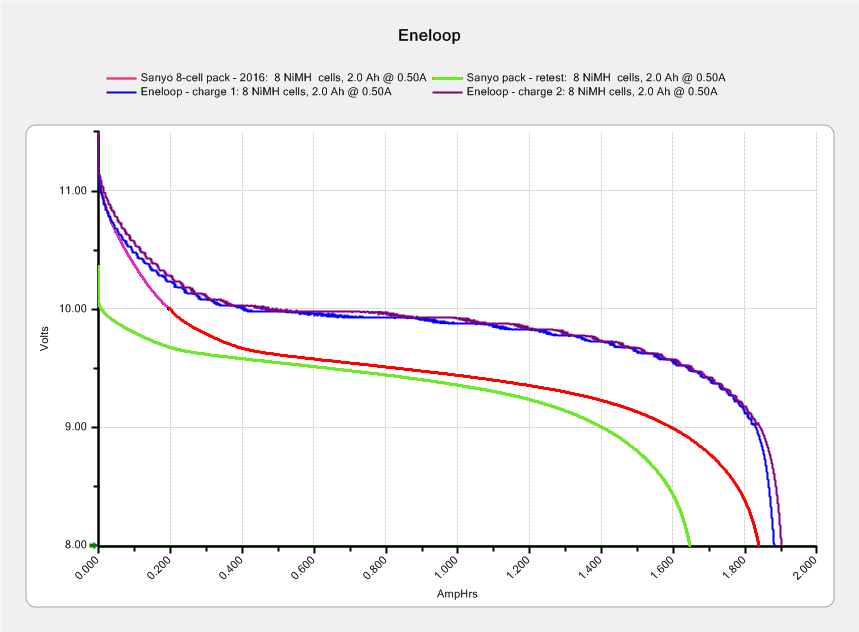
    The Sony DSC-H5 expects a much higher voltage from its pair of NiMH AA cells than the tired Sanyo Eneloops from 2010 can provide these days.

    Eneloop - 8-cell pack - 2010 - 2016 - merged
    Eneloop – 8-cell pack – 2010 – 2016 – merged

    The two upper curves show the first two charges for those eight cells back in 2010.

    The lower curve(s) started out with the wrong endpoint voltage (purple part of the middle curve), so I restarted the test (green curve) and edited the graph image to splice the two curves together into the purple/red curve.

    Although the capacity measured in mA·h isn’t much lower, the voltage depression reduces the available energy and trips the “low battery” alarm much earlier. In round numbers, the old cells were good for a few pictures, even hot off the charger, and didn’t have much energy left without being recharged before use.

    A quartet of Panasonic Eneloop Pro cells just arrived from BatterySpace, a nominally reputable supplier, all sporting a 14-05 date code suggesting they’re just shy of two years old. The packaging claims 85% charge retention after a year, so they should have a bit more than half of their rated 2.45 A·h “minimum” (or 2.55 mA·h “typical”, depending on whether you trust the label on the cell or the big print on the package) capacity remaining (although we don’t know the original state of charge, done from “solar power”). The lower curves say they arrived with 1 A·h remaining:

    Panasonic Eneloop - First Charge
    Panasonic Eneloop – First Charge

    However, the terminal voltage on those bottom curves would have any reasonable device reporting them as dead flat almost instantly, so you really can’t store Eneloops for two years: no surprise there.

    One pass through the 400 mA Sony charger produced the upper curves, with the dotted red curve from Cell A lagging in the middle. After that test, another pass through the charger brought Cell A back (upper solid red line) with the others, so I’ll assume it took a while to wake up.

    A pair of these in the camera will produce 2.2 V through 2.2 A·h, far better than the aged-out Sanyo Eneloops.

    Charging them at 400 mA = C/6 certainly counts as a slow charge. I’ve been charging the Sanyo cells in slow chargers in the hope that they’ll remain happier over the long term.

    The Panasonic Eneloops perform much better than some other cells you’ve seen around here, which may be due to the fact that I paid $5 each for them…


  • Sony 64 GB MicroSDXC Card: The Final Failure

    The fourth Sony MicroSDXC card went into service in late September 2015 and has now failed after about 60 sessions in my Sony HDR-AS30 Action Camera. This one sported a U3 speed rating and I had hopes that would improve its longevity, but that doesn’t seem to be true.

    The defunct Sony card (marked in red to avoid confusion) will join its defunct compadre and the Sandisk Extreme Pro card goes in the camera:

    Sony 64 GB MicroSD SR-64UX - failure
    Sony 64 GB MicroSD SR-64UX – failure

    The 16 bike rides in December added up to 220 GB; call it 13.75 GB/trip. January 2016 shows only three rides and it failed after two February rides: barely 60 rides for a total of 825-ish GB of video data. The three previous Sony cards failed after less than 1 TB of data, putting this one in the same ballpark.

    I have no way to measure the actual write speed, but the camera shuts down after recording less than a minute of 1920×1080 @ 60 f/s video. Previous cards worked fine at lower video resolutions and recording speeds; I’ll assume this one behaves similarly. It might make a capacious “disk” for a Raspberry Pi.

    When the previous card failed, Sony’s “customer support” decided that there might be something wrong with the camera’s firmware causing it to trash the cards, so there was no point in replacing the card under warranty and I should send the camera in for a checkup. When I pointed out that they’d strung me along for a year, until the camera was out of warranty, without mentioning even the possibility that the camera might be at fault and asked whether they’d pick up the $100+ bill for having the camera “examined”, the Nice Man said Level 2 would get back to me after “48 working hours”. When prodded, he agreed that “48 working hours” equaled “6 working days” and didn’t include weekends; when we had that settled, I knew they had no further interest in this matter.

    Sony hasn’t called back and, by now, I don’t expect they ever will. It’s not worth my time to pursue this any further, but if you’re wondering how well Sony MicroSD cards work in Sony cameras and how well they support the failures, now you know.

    So, starting with this riding season, we’ll see how long a Sandisk Extreme Pro card survives…


  • Improved Fireball Cocoa Recipe

    It turns out that non-alkalized / non-Dutch-process cocoa has a much lower surface energy than good old Hershey’s, to the extent that my Fireball Cocoa Recipe produces powder bombs, even after far more stirring than I’m willing to exert.

    The trick is to stir the mud for a while, then let it set for 15 minutes:

    Cocoa mud
    Cocoa mud

    That apparently gives the cocoa time to get along with the milk and join forces. Stir it up again, let it sit for a few minutes, then proceed with the recipe: smooooth cocoa with no powder bombs.

    A bit more Vietmamese cinnamon is no bad thing, either …

  • Monthly Image: Frost Growth

    The northeast vent on the well pit grew an ice rim during the same night that frosted the roofing nails:

    Well Pit Vent Frost
    Well Pit Vent Frost

    The other vent remained clear, so the prevailing breeze definitely goes in one hole and out the other:

    Well Pit Vent Frost - inlet
    Well Pit Vent Frost – inlet

    Well Pit Vent Frost – inlet

    A waterproof Hobo datalogger hangs from the string.

  • Monthly Science: Hard Drive Mood Light Thermal Coefficient

    Having that knockoff Neopixel fail from overheating prompted me to measure what was going on. Because the LEDs sink most of their heat into the package leads, the back of the LED strip should be the hottest part of the package and the Mood Light’s central pillar should be pretty nearly isothermal. Despite that, I figured I should measure the temperature closer to the back of the strip, sooo I drilled a hole for the thermocouple…

    Clamp the whole Mood Light to the Sherline’s tooling plate with the pillar sides mostly square to the axes and line up the spindle 2 mm behind the LED strip:

    Mood Light - aligning thermocouple hole
    Mood Light – aligning thermocouple hole

    The two clamp pads are CD chunks, under just enough pressure to anchor the Mood Light.

    Screw the cap in place (to match-drill both holes at once) and drill a 2 mm (#46, close enough) hole down past the top LED:

    Mood Light - drilling thermocouple hole
    Mood Light – drilling thermocouple hole

    I tucked the Mood Light into a box to ward off breezes, jammed one thermocouple into the new hole, let another float over the top platter, then forced the Neopixels to display constant grayscale PWM values (R=G=B) while recording the LED and air temperatures every five minutes:

    Hard Drive Mood Light - temp vs power data
    Hard Drive Mood Light – temp vs power data

    That was easier and faster than screwing around with automated data collection. The data has some glaring gaps where I went off to do other things during the day.

    I turned those numbers into a graph, printed it out, puzzled over it for a bit, then annotated it with useful numbers:

    Hard Drive Mood Light - temp vs power data - graph
    Hard Drive Mood Light – temp vs power data – graph

    That first little blip over on the left comes from a minute or two at PWM 32; the cooling time constant works out to be a bit under 10 minutes. The warming time constant looks to be somewhat longer, but not by much.

    Eyeballing the endpoint temperatures for each PWM value, feeding in the current measurements, and creating a small table:

    VCC 5 V
    Current 0.057 A
    Package 0.285 W
    Total 3.42 W
    PWM Duty Nom Power Failed LEDs Net Power °C Rise
    0 0.00 0.00 0 0.00 0
    32 0.13 0.43 0 0.43 6
    64 0.25 0.86 0 0.86 12
    85 0.33 1.14 1 1.04 16
    128 0.50 1.71 1 1.62 24
    192 0.75 2.57 1 2.47 35
    255 1.00 3.41 4 3.03 42

    The same blue LED that failed earlier dropped out again, plus another package (on a different strip) went completely dark shortly after I clobbered the LEDs with full power at PWM 255. The Net Power column deducts the power not used by the failed LEDs, under the reasonable assumption that the total heating depends on the number of active LEDs.

    All the failed LEDs worked fine when they cooled to room temperature, so, whatever the failure mode might be, it’s not permanent. The skimpy WS2812B datasheet says bupkis about a protective thermal shutdown circuit, although it specs an 80 °C maximum operating junction temperature. I’ll stipulate a 20 °C temperature difference from junction to thermocouple at PWM 255, but that doesn’t explain the first blue LED failure at PWM 85.

    Methinks these knockoffs will be much happier operating in the mid-30s.

    Turning the last two columns of that table into a graph (minus the PWM 0 line to let the intercept float around) looks like I’m faking it:

    Hard Drive Mood Light - Temperature vs Power
    Hard Drive Mood Light – Temperature vs Power

    The Y intercept is off by less than 1 °C, which seems pretty good under the circumstances. The  kink at PWM 85 shows that I probably didn’t allow enough time for the temperature to stabilize after the blue LED failed.

    So, in round numbers, the thermal coefficient for a dozen knockoff Neopixels on a plastic pillar inside a stack of hard drive platters works out to 14 °C/W.

    The raised sine waves in the Mood Light produce a long-term average PWM half of their maximum PWM. They’ve been perfectly happy with MaxPWM = 64 pushing them barely 6 °C over ambient, so they should continue to work fine at PWM 128 for a 12 °C rise… except, perhaps, during the hottest of mid-summer days.

    Obviously, I should jam a thermistor inside the column and have the Arduino wrap a feedback loop around the column temperature…

  • Roof Nail Frost

    A cold snap in early January caught plenty of humidity inside the house and, in fact, the attic temperature dropped so abruptly that the nails protruding through the roof iced over:

    Roof Nail Frost - overview
    Roof Nail Frost – overview

    You’d think they were coated with plastic:

    Roof Nail Frost - detail flash
    Roof Nail Frost – detail flash

    The incandescent bulb lighting the attic highlights the crystal planes:

    Roof Nail Frost - detail ambient
    Roof Nail Frost – detail ambient

    As nearly as I can tell, the ice sublimes or melts-and-evaporates, because the plywood floor under the nails doesn’t have the drip marks you’d expect.

  • HP 7475A: Superformula Successes

    In the course of running off some Superformula plots, I found what must be my original stash of B-size plotter paper. Although it wasn’t archival paper and has yellowed a bit with age, it’s the smoothest and creamiest paper I’ve touched in quite some time: far nicer than the cheap stuff I picked up while reconditioning the HP 7475A plotter & its assorted pens.

    Once in a while, all my errors and omissions cancel out enough to produce interesting results on that historic paper, hereby documented for future reference…

    A triangle starburst:

    Superformula - triangle burst
    Superformula – triangle burst
    Superformula - triangle burst - detail
    Superformula – triangle burst – detail

    A symmetric starburst:

    Superformula - starburst
    Superformula – starburst
    Superformula - starburst - detail
    Superformula – starburst – detail

    Complex meshed ovals:

    Superformula - meshed ovals
    Superformula – meshed ovals
    Superformula - meshed ovals - details
    Superformula – meshed ovals – details

    They look better in person, of course. Although inkjet printers produce more accurate results in less time, those old pen plots definitely look better in some sense.

    The demo program lets you jam a fixed set of parameters into the plot, so (at least in principle) one could reproduce a plot from the parameters in the lower right corner. Here you go:

    The triangle starburst:

    Superformula - triangle burst - parameters
    Superformula – triangle burst – parameters

    The symmetric starburst:

    Superformula - starburst - parameters
    Superformula – starburst – parameters

    The meshed ovals:

    Superformula - meshed ovals - parameters
    Superformula – meshed ovals – parameters

    The current Python / Chiplotle source code as a GitHub gist:

    from chiplotle import *
    from math import *
    from datetime import *
    from time import *
    from types import *
    import random
    def superformula_polar(a, b, m, n1, n2, n3, phi):
    ''' Computes the position of the point on a
    superformula curve.
    Superformula has first been proposed by Johan Gielis
    and is a generalization of superellipse.
    see: http://en.wikipedia.org/wiki/Superformula
    Tweaked to return polar coordinates
    '''
    t1 = cos(m * phi / 4.0) / a
    t1 = abs(t1)
    t1 = pow(t1, n2)
    t2 = sin(m * phi / 4.0) / b
    t2 = abs(t2)
    t2 = pow(t2, n3)
    t3 = -1 / float(n1)
    r = pow(t1 + t2, t3)
    if abs(r) == 0:
    return (0, 0)
    else:
    # return (r * cos(phi), r * sin(phi))
    return (r, phi)
    def supershape(width, height, m, n1, n2, n3,
    point_count=10 * 1000, percentage=1.0, a=1.0, b=1.0, travel=None):
    '''Supershape, generated using the superformula first proposed
    by Johan Gielis.
    – `points_count` is the total number of points to compute.
    – `travel` is the length of the outline drawn in radians.
    3.1416 * 2 is a complete cycle.
    '''
    travel = travel or (10 * 2 * pi)
    # compute points…
    phis = [i * travel / point_count
    for i in range(1 + int(point_count * percentage))]
    points = [superformula_polar(a, b, m, n1, n2, n3, x) for x in phis]
    # scale and transpose…
    path = []
    for r, a in points:
    x = width * r * cos(a)
    y = height * r * sin(a)
    path.append(Coordinate(x, y))
    return Path(path)
    # RUN DEMO CODE
    if __name__ == '__main__':
    override = False
    plt = instantiate_plotters()[0]
    # plt.write('IN;')
    if plt.margins.soft.width < 11000: # A=10365 B=16640
    maxplotx = (plt.margins.soft.width / 2) – 100
    maxploty = (plt.margins.soft.height / 2) – 150
    legendx = maxplotx – 2900
    legendy = -(maxploty – 750)
    tscale = 0.45
    numpens = 4
    # prime/10 = number of spikes
    m_values = [n / 10.0 for n in [11, 13, 17, 19, 23]]
    # ring-ness 0.1 to 2.0, higher is larger
    n1_values = [
    n / 100.0 for n in range(55, 75, 2) + range(80, 120, 5) + range(120, 200, 10)]
    else:
    maxplotx = plt.margins.soft.width / 2
    maxploty = plt.margins.soft.height / 2
    legendx = maxplotx – 3000
    legendy = -(maxploty – 900)
    tscale = 0.45
    numpens = 6
    m_values = [n / 10.0 for n in [11, 13, 17, 19, 23, 29, 31,
    37, 41, 43, 47, 53, 59]] # prime/10 = number of spikes
    # ring-ness 0.1 to 2.0, higher is larger
    n1_values = [
    n / 100.0 for n in range(15, 75, 2) + range(80, 120, 5) + range(120, 200, 10)]
    print " Max: ({},{})".format(maxplotx, maxploty)
    # spiky-ness 0.1 to 2.0, higher is spiky-er (mostly)
    n2_values = [
    n / 100.0 for n in range(10, 60, 2) + range(65, 100, 5) + range(110, 200, 10)]
    plt.write(chr(27) + '.H200:') # set hardware handshake block size
    plt.set_origin_center()
    # scale based on B size characters
    plt.write(hpgl.SI(tscale * 0.285, tscale * 0.375))
    # slow speed for those abrupt spikes
    plt.write(hpgl.VS(10))
    while True:
    # standard loadout has pen 1 = fine black
    plt.write(hpgl.PA([(legendx, legendy)]))
    pen = 1
    plt.select_pen(pen)
    plt.write(hpgl.PA([(legendx, legendy)]))
    plt.write(hpgl.LB("Started " + str(datetime.today())))
    if override:
    m = 4.1
    n1_list = [1.15, 0.90, 0.25, 0.59, 0.51, 0.23]
    n2_list = [0.70, 0.58, 0.32, 0.28, 0.56, 0.26]
    else:
    m = random.choice(m_values)
    n1_list = random.sample(n1_values, numpens)
    n2_list = random.sample(n2_values, numpens)
    pen = 1
    for n1, n2 in zip(n1_list, n2_list):
    n3 = n2
    print "{0} – m: {1:.1f}, n1: {2:.2f}, n2=n3: {3:.2f}".format(pen, m, n1, n2)
    plt.select_pen(pen)
    plt.write(hpgl.PA([(legendx, legendy – 100 * pen)]))
    plt.write(
    hpgl.LB("Pen {0}: m={1:.1f} n1={2:.2f} n2=n3={3:.2f}".format(pen, m, n1, n2)))
    e = supershape(maxplotx, maxploty, m, n1, n2, n3)
    plt.write(e)
    pen = pen + 1 if (pen % numpens) else 1
    pen = 1
    plt.select_pen(pen)
    plt.write(hpgl.PA([(legendx, legendy – 100 * (numpens + 1))]))
    plt.write(hpgl.LB("Ended " + str(datetime.today())))
    plt.write(hpgl.PA([(legendx, legendy – 100 * (numpens + 2))]))
    plt.write(hpgl.LB("More at https://softsolder.com/?s=7475a&quot;))
    plt.select_pen(0)
    plt.write(hpgl.PA([(-maxplotx,maxploty)]))
    print "Waiting for plotter… ignore timeout errors!"
    sleep(40)
    while NoneType is type(plt.status):
    sleep(5)
    print "Load more paper, then …"
    print " … Press ENTER on the plotter to continue"
    plt.clear_digitizer()
    plt.digitize_point()
    plotstatus = plt.status
    while (NoneType is type(plotstatus)) or (0 == int(plotstatus) & 0x04):
    plotstatus = plt.status
    print "Digitized: " + str(plt.digitized_point)