Ed Nisley's Blog: Shop notes, electronics, firmware, machinery, 3D printing, laser cuttery, and curiosities. Contents: 100% human thinking, 0% AI slop.
These critters look like bumblebees, but they’re squash bees, native to the Americas, working over a squash blossom just inside the garden gate. Much smaller than carpenter bees that drill holes in nearby garden posts, a bit smaller than bumblebees, and good to have around when you’re raising squash!
Squash bees in flower
I noticed the third bee only after looking closely at the picture.
This is a handheld tight macro with the Canon SX230HS using the flash. Surprisingly, the autofocus target picked out the bees and tracked them quite well. A tripod would help, but not all that much.
Of late, something in the pile of input devices attached to my main PC has been feeding occasional bursts of upward scroll commands, to the extent that editing long documents (something I do quite a bit of, oddly enough) was becoming difficult. By process of elimination, the culprit turned out to be the Kensington trackball to the left of the keyboard: unplugging it eliminated the problem.
Having had problems with that thing before and having gotten considerable feedback from other folks, I had a general idea of how to proceed: putz with the IR emitter-detector pair, but not very much. A side view of the pair with the trackball cup and scroll ring removed:
Scroll ring IR emitter-detector quadrature pair
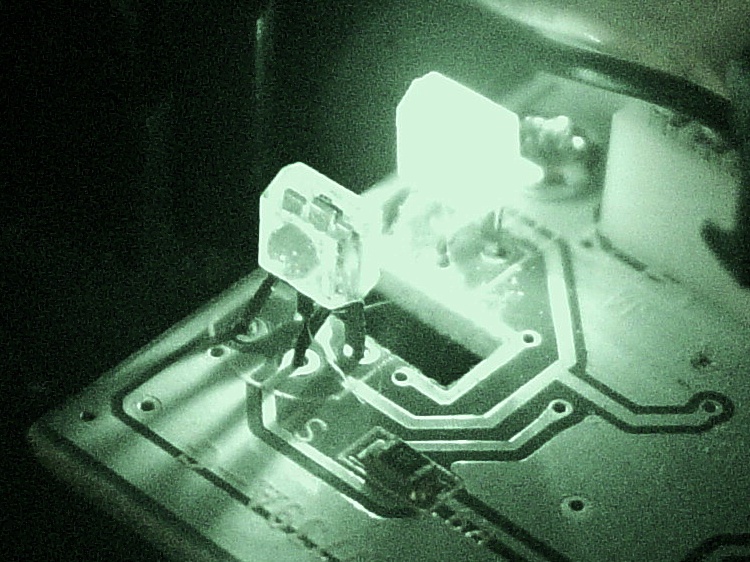
Now, what’s weird about that setup is that the detector lens seems to be pointing in the wrong direction: away from the emitter’s lens. You know it’s the detector because it’s tinted: there’s no point in filtering the emitter’s output (although I have seen gray-tinted IR LEDs, which I think is just to mark them as different from visible LEDs). Here’s proof: a pure IR picture from my Sony DSC-F717 in Nightshot (a.k.a. IR) mode through a Hoya R72 visible-block filter:
Quadrature pair in pure IR
Some possibilities for why the detector is backwards:
It’s an assembly screwup (unlikely, but possible)
That’s not a lens, it’s a locating tab (different on emitter & detector?)
The backside uses the metal conductors as slits to enhance the signal (my favorite)
Here’s a grossly image-enhanced blowup of the detector from that picture:
Quadrature IR detector in pure IR – detail
The case becomes transparent in pure IR, so you can see the metal lead frame inside. I think they’re using the gaps between the leads to enhance the contrast of the scroll ring edges passing through the beam: absolutely no IR except when a gap aligns with a scroll ring opening.
[Update: read the comments for a different interpretation; I’m probably wrong.]
That would also explain why the pair seems so sensitive to alignment: there’s very little IR hitting the detector, because the IR illumination passes through the transparent-to-IR case and vanishes out the far side, with only a tiny bit reflected to the sensor!
Anyhow, I pushed the pair minutely toward each other, just enough to feel the leads bend, and put everything back together. So far it seems to be working perfectly, but it’s done that before …
[Comment: Jack found a different solution that might produce better results:
Just got the Problem with my Scroll ring and thanks to your blog i digged a bit deeper.
here is the Solution for my Problem:
I checked this while connected and i found that bending worked only for a short time, so i gave a closer look to the contacts.
all are soldered from below BUT two contacts are on the upper side. normaly solder should flow into but here it was as simple as just resolder the receiver with enough solder an its now working again. (btw a realigned the magnet to get a better response)
Thanks Jack
ps. the size of the cuts in the metall from the scroll ring differ, a shame for that price..
It’s certainly worth trying, particularly when your Expert Mouse trackball isn’t working…
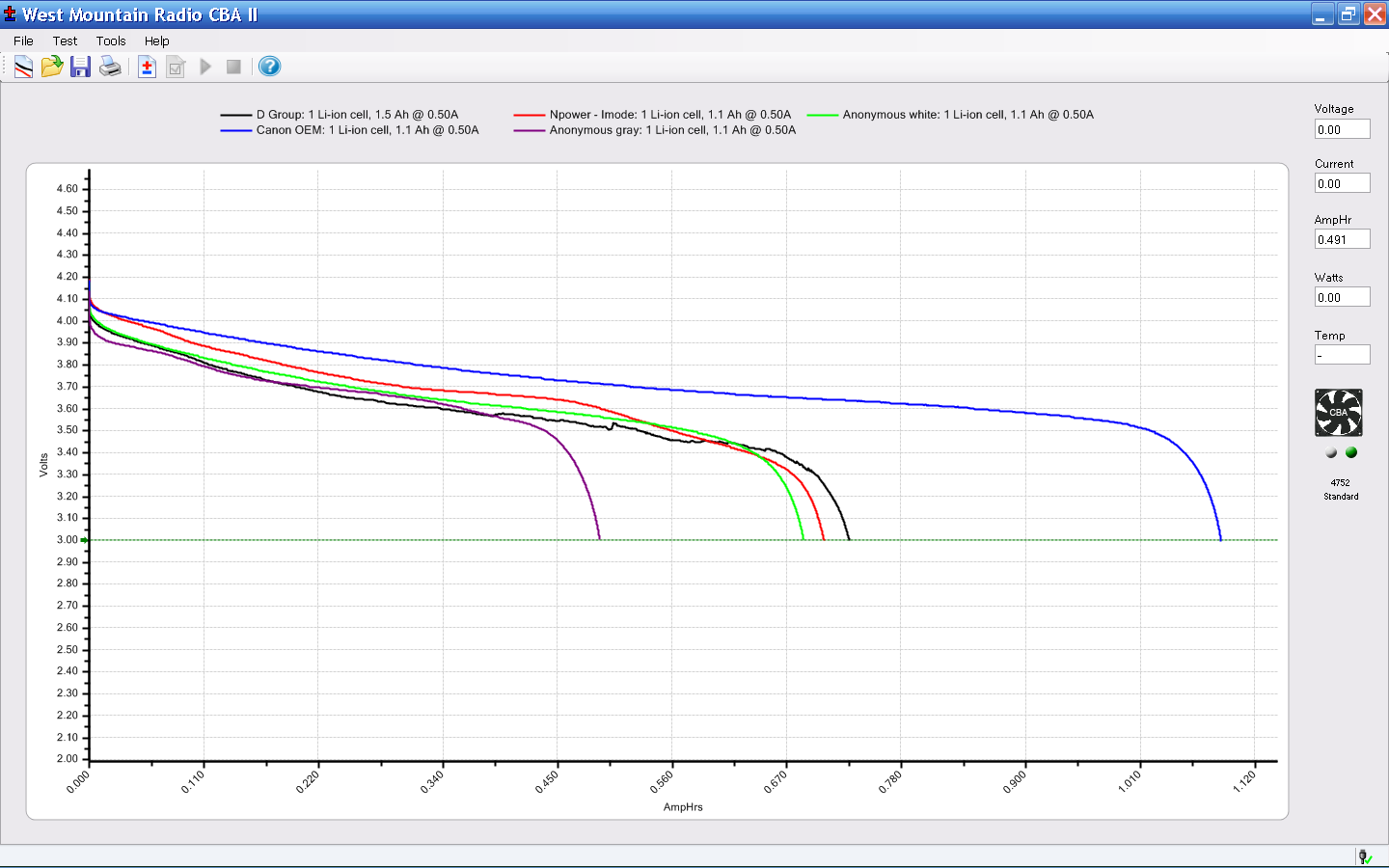
The first version of the NB-5L battery holder worked well enough to get some initial performance curves from the assortment of eBay batteries. I bought one apiece from four different vendors for around $3 each; an order of magnitude less than OEM Canon NB-5L camera batteries. Based on past experience, I didn’t expect much and, lo-and-behold, I wasn’t disappointed in the least! Clicky for more dots:
Canon NB-5L – first tests
Using a 500 mA discharge current (roughly C/2) seemed reasonable, but I have no idea what the camera actually draws and the Canon manual isn’t forthcoming. These are all hot off the Canon charger.
That nice long curve on the top is the OEM Canon NB-5L that came with the camera and delivers pretty much its rated 1050 mAh.
The generic batteries have two faults:
Low discharge voltage (high internal resistance?)
Much less than their claimed capacity (they lie!)
The one labeled D Group was advertised as 1500 mAh, which seemed unreasonable on the face of it. The battery case says 1050 mAh and the vendor said their manufacturer “must have shipped them the wrong batteries”. Yeah, right, like they hadn’t noticed up. They wanted me to return it (on their dime, by “refusing” the shipment, which is, AFAICT, prohibited after you open the package), which says that they didn’t have any batteries with “1500 mAh” printed on the side for an exchange. Of course, their advertising for the other NB-5L batteries they offer on eBay hasn’t changed, so … they lie!
The Anonymous Gray battery is particularly feeble; I may harvest the frame and connector and battery protection circuit to build an external battery pack with far more capacity.
The crinkly black trace comes from testing that battery with wires taped in place before I got the first version of the holder up & running well enough to take the rest of the measurements.
Only one generic battery has a manufacturer’s name, two lack regulatory agency markings (not that I expect any to comply with the requirements implied by those markings), and all four are obviously junk. I’ll use them for around-the-house pix with the charger close at hand, but … now we all know that you don’t get something for nothing. No surprise there, eh?
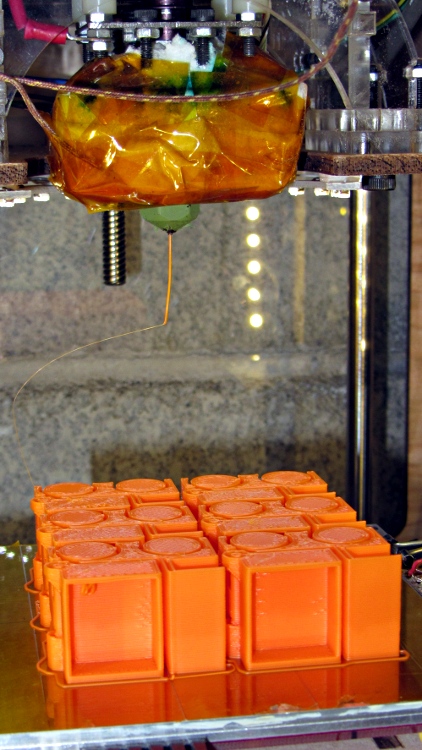
The Tiny Toy Dump Truck by madscifi makes a fine tchotchke for a presentation, serving to illustrate the risks and rewards of printing flat overhangs without support. A fleet of six printed well, after repairing some failures as those tall, tall rings and posts near the dump bed pivot fell over. I pasted them down in mid-print using ABS slurry, which is not a technique to emulate.
A closer look shows the overhang problem in the dump bed and the broken pillars behind the wheels.
Truck overhang failure – grayscale
It’s in monochrome because the camera choked on that much Safety Orange filament in the image, to the extent that no amount of color correction produced a usable result.
A first cut at a holder for Canon NB-5L batteries with those dimensions, with the intent of connecting them to a battery tester.
NB-5L Battery Holder Doodle
The cloud in the middle of the bottom holds pin dimensions, which I measured after I’d been doodling for a bit. They come from my heap; they’re nice heavy-gold plated male pins (yeah, I have the other gender, too) intended for a multi-pin connector. They have a convenient hole that’s normally used to verify you’ve actually soldered the wire properly. I plan to stick a music-wire spring in the hole and secure it through the bottom of the holder with a rectangular pocket below the pin that limits the travel in both directions. Drilling the hole completely through the pin to let the spring wire stick out would prevent having it fall out at the end of travel.
The spring pocket dimensions are right down around the very limit of the feature sizes my TOM can achieve. I’m not sure those blind holes will actually open up far enough.
I’m also not sure the Powerpoles will actually fit in there like that. There’s nothing wrong with pigtail leads.
It’s obviously styled after the Official Canon NB-5L charger, although they use nice bent-steel spring contacts that are trivially easy to make in mass production:
Having acquired a bunch of cheap batteries from the usual eBay suppliers for my new Canon SX230HS pocket camera, it’d be nice to measure their actual (and undoubtedly pathetic) capacity, which implies the need for a holder to make firm contact with the terminals. Sounds like a 3D printer might come in handy for that, doesn’t it?
The first step: measure the dimensions of actual batteries:
NB-5L Battery Dimensions
The terminals lie on what looks to be hard 1/8 inch centers, which must be pure coincidence. They’re recessed anywhere from 0.75 mm to 1.0 mm, depending on who made the thing, into the battery’s endplate.
The Canon charger has three spring-loaded bent-wire contacts, arranged so the (-) terminal touches first as the battery slides into the holder, then (+), and finally the thermistor (T), with about 0.5 mm between each pair. That spring loading provides enough force to hold the battery in the charger.
FWIW, the thermistor is 7.5 kΩ w.r.t. (-) at room temperature.
The plan so far: use three big old gold-plated terminal pins as contacts, with flexible wires to a PowerPole connector that matches the battery tester. Cross-drill the pins to fit music wire lever springs, because the contact spacing is smaller than the smallest coil springs in the Big Box o’ Little Springs. I only need two terminals, so maybe I can force-fit a pair of small coil springs in there, which would be nice.
This dragonfly decided that the tip of the 2 m / 70 cm antenna on Mary’s bike was the best place around to survey the area; it periodically zipped off to snag a meal, then returned to stand watch again.
Those wraparound compound eyes don’t miss much!
Dragonfly on antenna – detail
A few weeks ago, a much larger dragonfly bounced off my helmet and snagged itself in the delay line coil near the middle of the antenna: the dragonfly’s head slid 1/4 turn around the coil and latched firmly in place. Amid much buzzing of wings and thrashing of legs, I managed to unscrew the poor critter, whereupon it flew off undamaged.