The Smell of Molten Projects in the Morning

Ed Nisley's Blog: Shop notes, electronics, firmware, machinery, 3D printing, laser cuttery, and curiosities. Contents: 100% human thinking, 0% AI slop.

Category: Photography & Images

Taking & making images.

  • Desk Lamp Conversion: Photo Light Cold Shoe

    Having recently acquired a pair of photo lights and desirous of eliminating some desktop clutter, I decided this ancient incandescent (!) magnifying desk lamp had outlived its usefulness:

    Desk Lamp - original magnifiying head
    Desk Lamp – original magnifiying head

    The styrene plastic shell isn’t quite so yellowed in real life, but it’s close.

    Stripping off the frippery reveals the tilt stem on the arm:

    Desk Lamp - OEM mount arm
    Desk Lamp – OEM mount arm

    The photo lights have a tilt-pan mount intended for a camera’s cold (or hot) shoe, so I conjured an adapter from the vasty digital deep:

    Photo Light Bracket for Desk Lamp Arm - solid model
    Photo Light Bracket for Desk Lamp Arm – solid model

    Printing with a brim improved platform griptivity:

    Photo Light Bracket for Desk Lamp Arm - Slic3r preview
    Photo Light Bracket for Desk Lamp Arm – Slic3r preview

    Fortunately, the photo lights aren’t very heavy and shouldn’t apply too much stress to the layers across the joint between the stem and the cold shoe. Enlarging the stem perpendicular to the shoe probably didn’t make much difference, but it was easy enough.

    Of course, you (well, I) always forget a detail in the first solid model, so I had to mill recesses around the screw hole to clear the centering bosses in the metal arm plates:

    Photo Lamp - bracket recess milling
    Photo Lamp – bracket recess milling

    Which let it fit perfectly into the arm:

    Desk Lamp - photo lamp mount installed
    Desk Lamp – photo lamp mount installed

    The grody threads on the upper surface around the end of the slot came from poor bridging across a hexagon, so the new version has a simple and tity flat end. The slot is mostly invisible with the tilt-pan adapter in place, anyway.

    There being no need for a quick-disconnect fitting, a 1/4-20 button head screw locks the adapter in place:

    Photo Lamp - screw detail
    Photo Lamp – screw detail

    I stripped the line cord from inside the arm struts and zip-tied the photo lamp’s wall wart cable to the outside:

    Photo Lamp - installed
    Photo Lamp – installed

    And then It Just Works™:

    Photo Lamp - test image
    Photo Lamp – test image

    The lens and its retaining clips now live in the Big Box o’ Optical parts, where it may come in handy some day.

    The OpenSCAD source code as a GitHub Gist:

    // Photo light mount for desk lamp arm
    // Ed Nisley – KE4ZNU
    // 2019-03
    /* [Layout Options] */
    Layout = "Build"; // [Show,Build]
    Part = "Mount"; // [LampArm,ShoeSocket,Mount]
    /* [Extrusion Parameters] */
    ThreadWidth = 0.40;
    ThreadThick = 0.25;
    HoleWindage = 0.2;
    Protrusion = 0.1;
    //—–
    // Dimensions
    /* [Hidden] */
    ID = 0;
    OD = 1;
    LENGTH = 2;
    /* [Dimensions] */
    FrictionDisk = [4.0,16.5,11.0]; // squashed inside desk lamp arm frame
    Divots = [4.0,9.5,0.75]; // recesses for frame alignment bumps
    ArmLength = 30.0; // attached to disk
    ShoeWheelOD = 32.0; // lock wheel on photo lamp
    ShoeBase = [18.5,18.5,2.0] + [HoleWindage,HoleWindage,2*ThreadWidth]; // square base on photo lamp gimbal
    ShoeStem = [6.3,12.0,1.5]; // top slide clearance, ID = 1/4 inch screw
    ShoeBlock = [ShoeWheelOD,ShoeWheelOD,2*(ShoeBase.z + ShoeStem.z)]; // overall shoe block
    NumSides = 3*4;
    //—–
    // Useful routines
    function IntegerMultiple(Size,Unit) = Unit * ceil(Size / Unit);
    module PolyCyl(Dia,Height,ForceSides=0,Center=false) { // based on nophead's polyholes
    Sides = (ForceSides != 0) ? ForceSides : (ceil(Dia) + 2);
    FixDia = Dia / cos(180/Sides);
    cylinder(r=(FixDia + HoleWindage)/2,h=Height,$fn=Sides,center=Center);
    }
    //—–
    // Various Parts
    // Arm captured in disk lamp
    module LampArm() {
    difference() {
    union() {
    cylinder(d=FrictionDisk[OD],h=FrictionDisk[LENGTH],$fn=NumSides,center=true);
    hull()
    for (j=[-1,1])
    translate([0,j*(FrictionDisk[OD]/2 – FrictionDisk[LENGTH]/2),0]) {
    rotate([0,90,0]) rotate(180/NumSides)
    cylinder(d=FrictionDisk[LENGTH]/cos(180/NumSides),h=ArmLength/2,$fn=NumSides);
    translate([ArmLength – FrictionDisk[LENGTH]/2,0,0])
    sphere(d=FrictionDisk[LENGTH],$fn=NumSides);
    }
    }
    rotate(180/6) {
    PolyCyl(FrictionDisk[ID],FrictionDisk[LENGTH] + 2*Protrusion,6,Center=true);
    for (k=[-1,1])
    translate([0,0,k*(FrictionDisk[LENGTH]/2 – Divots[LENGTH]/2)])
    PolyCyl(Divots[OD],Divots[LENGTH] + Protrusion,6,Center=true);
    }
    }
    }
    // Basic hot shoe socket
    module ShoeSocket() {
    difference() {
    union() {
    cube(ShoeBlock,center=true); // overall blocky retainer
    translate([-ShoeBlock.x/2,0,0])
    cylinder(d=ShoeBlock.x,h=ShoeBlock.z,$fn=NumSides,center=true);
    }
    translate([0,0,-2*ShoeBlock.z]) // screw hole throughout
    rotate(180/6)
    PolyCyl(ShoeStem[ID],4*ShoeBlock.z,6);
    translate([0,0,ShoeBase.z/2]) // base slot under pillar
    cube([ShoeBase.x,ShoeBase.y,ShoeBase.z],center=true);
    translate([ShoeBase.x/2,0,ShoeBase.z/2]) // base slot opening
    cube([ShoeBase.x,ShoeBase.y,ShoeBase.z],center=true);
    translate([ShoeStem[OD]/2,0,ShoeBase.z/2 + ShoeStem[LENGTH]]) // stem slot
    cube([2*ShoeStem[OD],ShoeStem[OD],2*ShoeStem[LENGTH]],center=true);
    }
    }
    // Stick parts together
    module Mount() {
    rotate([90,0,0])
    LampArm();
    translate([ArmLength + ShoeBlock.x/2 – Protrusion,0,0])
    ShoeSocket();
    }
    //—–
    // Build things
    if (Layout == "Build") {
    rotate([0,90,0])
    translate([-(ArmLength + ShoeBlock.x),0,0])
    Mount();
    }
    if (Layout == "Show")
    if (Part == "LampArm")
    LampArm();
    else if (Part == "ShoeSocket")
    ShoeSocket();
    else if (Part == "Mount")
    Mount();

    The original dimension doodles, made before I removed the stem and discovered the recesses around the screw hole:

    Photo Light - Desk Lamp Arm Dimensions
    Photo Light – Desk Lamp Arm Dimensions
  • Pileated Woodpecker At Work

    A loud rat-a-tat-a-tat drew our attention to a Pileated Woodpecker excavating a tree along Rt 376:

    Pileated woodpecker
    Pileated woodpecker

    Pileated woodpeckers sculpt their holes with great care, often inspecting their work for smoothness and, perhaps, lunch:

    Pileated woodpecker - exploring hole
    Pileated woodpecker – exploring hole

    Those holes go deep enough inside the tree to serve as shelters for smaller birds during storms.

    We occasionally see and hear them, as well as their smaller relatives, remodeling trees around the house. Good hunting!

    Taken with the Pixel XL zoomed all the way tight, cropped and sharpened a smidge.

  • Sony DSC-F717 Memory Stick Socket Cable Re-Rework

    Once again, the Memory Stick socket cable in my trusty DSC-F717 camera became erratic, leading to continuous C:13:01 “format error” crashes, so I tore it apart. Proceed as before, until the camera carcass disgorges the socket:

    DSC-F717 - Memory Stick socket - side latches
    DSC-F717 – Memory Stick socket – side latches

    Gently pry the metal cover outward to clear the latches along the sides:

    DSC-F717 - Memory Stick socket cover latches
    DSC-F717 – Memory Stick socket cover latches

    The cover remains held in place by two tabs inside the holes on either side of the Memory Stick contacts, one of which is already free in the previous photo:

    DSC-F717 - Memory Stick socket - bottom
    DSC-F717 – Memory Stick socket – bottom

    The small spring on the left ejects the Memory Stick and will, if suitably provoked, launch itself across the bench. Be prepared!

    Use a pointy instrument to ease those tabs away from their latches and pop the top:

    DSC-F717 - opened Memory Stick socket
    DSC-F717 – opened Memory Stick socket

    I cleaned the contacts, not that they appeared particularly filthy, gently bent them upward by three micro-smidgens to apply a bit more pressure to the card’s contacts, and reassembled the socket in reverse order.

    I put a strip of Kapton tape on the back of the cable termination paddle (shown here during the previous repair) to ensure a snug fit:

    DSC-F717 Memory Stick socket - cable entry
    DSC-F717 Memory Stick socket – cable entry

    Unfortunately, I snapped off a locking tab on one of the ribbon cable connections to the main board:

    DSC-F717 - broken cable clamp
    DSC-F717 – broken cable clamp

    The cable threads through the middle of the clamp, which then slides into the socket and applies pressure to the contacts through the cable: no clamp, no pressure, no good.

    For lack of anything smarter, I tamped the clamp into the socket and applied a strip of Kapton tape to maintain everything in more-or-less the right position:

    DSC-F717 - tape-anchored cable
    DSC-F717 – tape-anchored cable

    Definitely unpretty, but better than nothing. While I was in there, I reinforced the other connections with similar clamps.

    Reassemble the camera in reverse order and it’s all good:

    DSC-F717 - repaired - first image
    DSC-F717 – repaired – first image

    It probably won’t last another decade, but ya never know …

  • Turtles!

    Spotted in Lake Walton on an out-and-back ride to the Hopewell Junction Depot end of the rail trail:

    Turtles - Lake Walton - 2019-03-14
    Turtles – Lake Walton – 2019-03-14

    Mary counted & guesstimated fifty turtles in the backwater.

    They’re the snuggliest turtles I’ve ever seen:

    Turtles snuggling - Lake Walton - 2019-03-14
    Turtles snuggling – Lake Walton – 2019-03-14

    Taken with the Pixel XL at maximum zoom, hence the gritty overpixelization.

  • Monthly Image: Cutting Board Shadows

    Seen after topping bowls of chili late on a wintry day:

    Cutting board - grazing sunlight
    Cutting board – grazing sunlight

    Late afternoon sunlight streams across the living room and through the kitchen doorway to sidelight cheddar cheese crumbs on the far side of the kitchen.

    There’s also one magic wintry night when the full moon aligns with the front doorway to light the entire hallway floor for a few Stonehenge moments. It’s always a delightful surprise, even though I’m sure it’s predictable.

  • Sapcicle Season

    Once again, maple sap rises from the ground and falls from damaged branches:

    And, sometimes, a tiny sweet treat during our walks …

  • Sony NP-FS11 Battery Rebuild: 2019

    Three years on, it’s time to rebuild some NP-FS11 lithium battery packs for the ancient Sony F505V camera, starting with packs I’ve rebuilt several times before and the last four cells from 2016.

    The final test shows the 2011-F pack may power an LED blinky, but not much else:

    NP-FS11 - 2011-F 2016-GH - 2019-02-19
    NP-FS11 – 2011-F 2016-GH – 2019-02-19

    Although the total capacity is still about 1.3 A·h for the two best batteries, the camera says the weakest two are dead after a few photos.

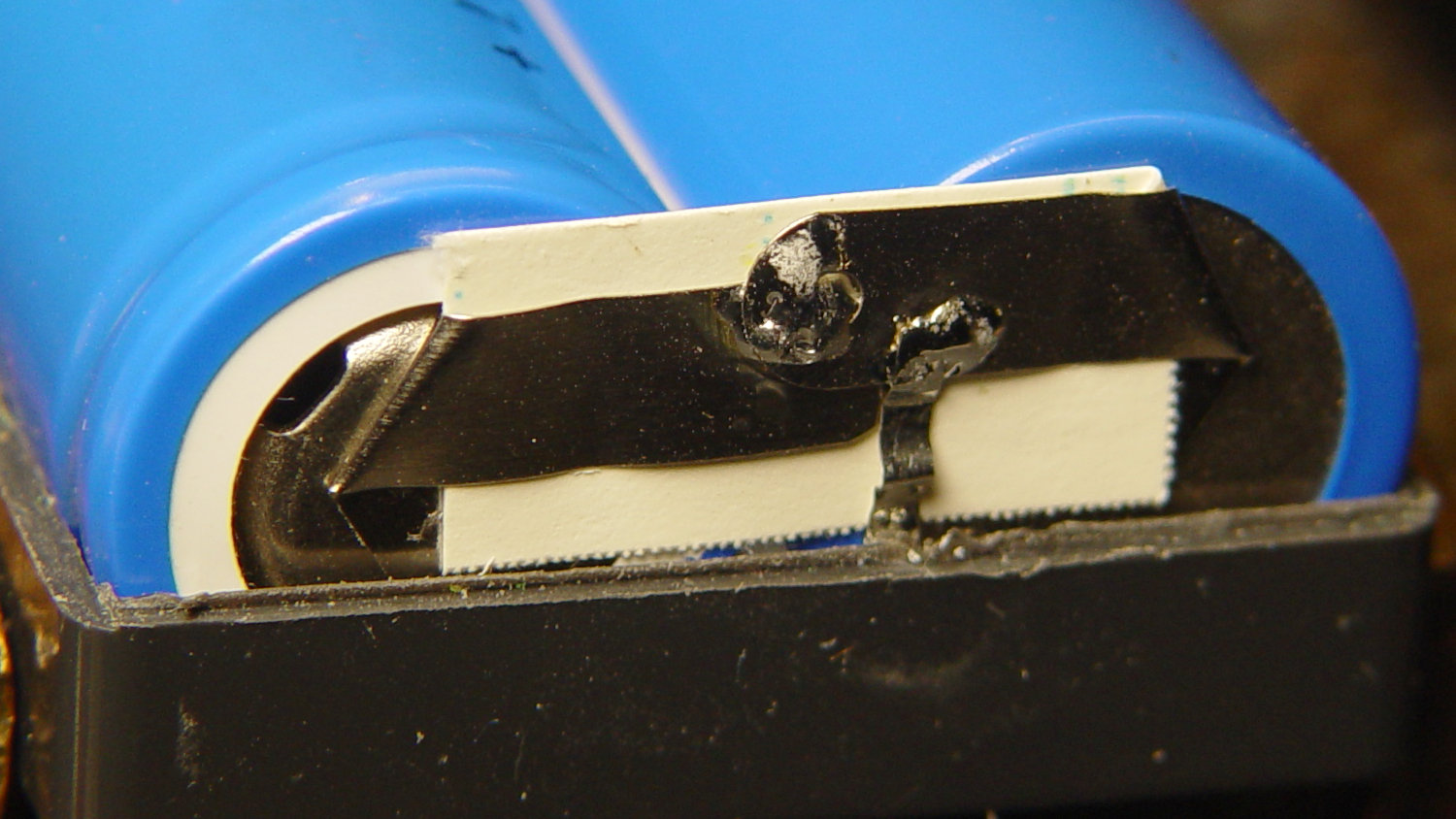
    For reference while resoldering, the joints at the negative terminals:

    NP-FS11 battery rebuld - negative terminals
    NP-FS11 battery rebuld – negative terminals

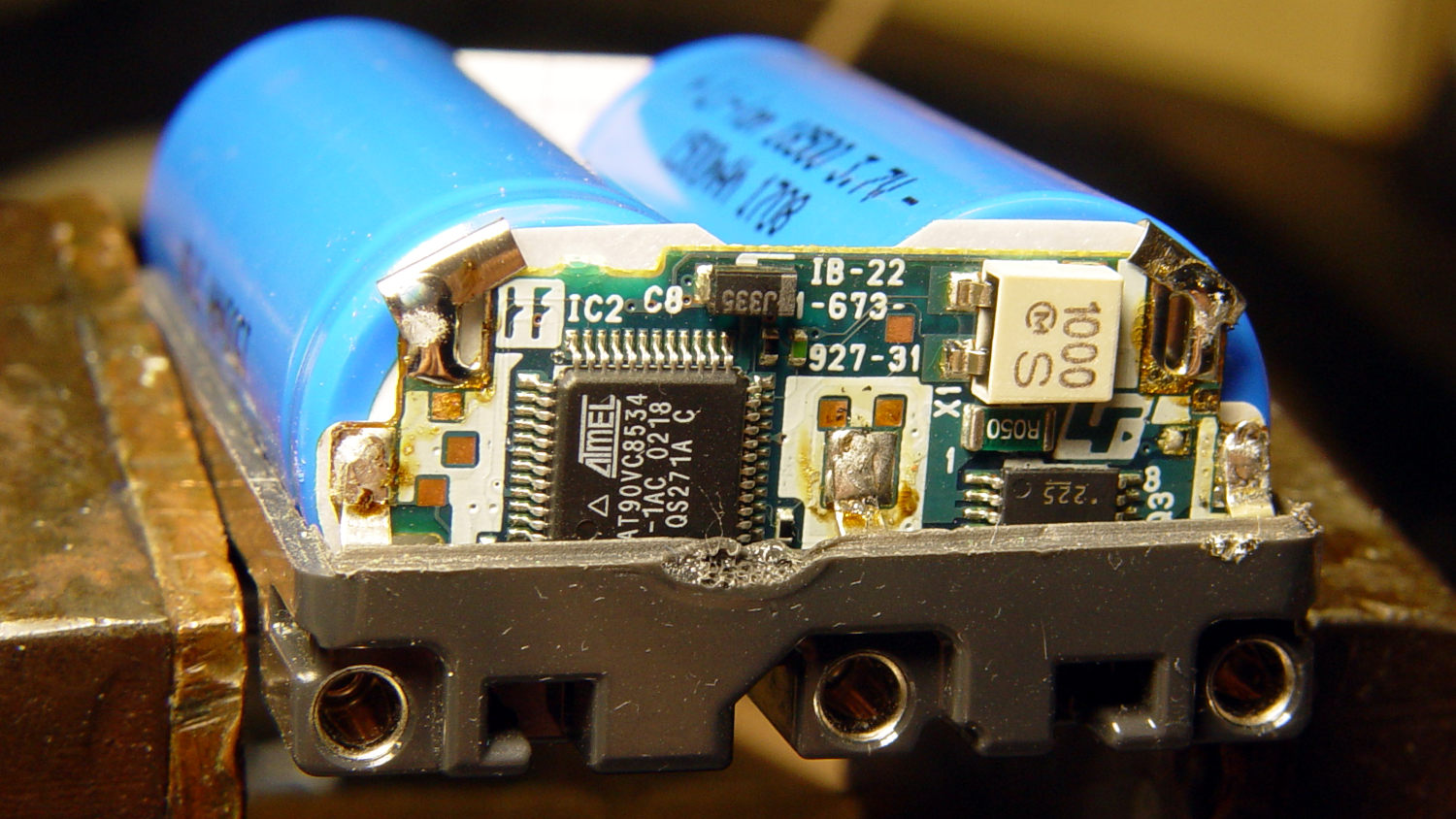
    And the protection PCB on the positive end:

    NP-FS11 battery rebuld - positive terminals
    NP-FS11 battery rebuld – positive terminals

    Unsolder the strap in the middle and the B+ positive connection on the right side to remove the cells.

    If cameras used bare cells, rather than glued-shut “proprietary” packs with super-secret unique ID ROMs, they’d be easier to keep running. My Sony DSC-H5 has other problems, but NiMH AA cells are easy to find.