The Smell of Molten Projects in the Morning

Ed Nisley's Blog: Shop notes, electronics, firmware, machinery, 3D printing, laser cuttery, and curiosities. Contents: 100% human thinking, 0% AI slop.

Category: Photography & Images

Taking & making images.

  • Monthly Image: Deposit Slot

    The Dutchess County Board of Elections occupies the building at 47 Cannon St which, if I recall correctly, was a Central Hudson Gas & Electric Company office back in the day.

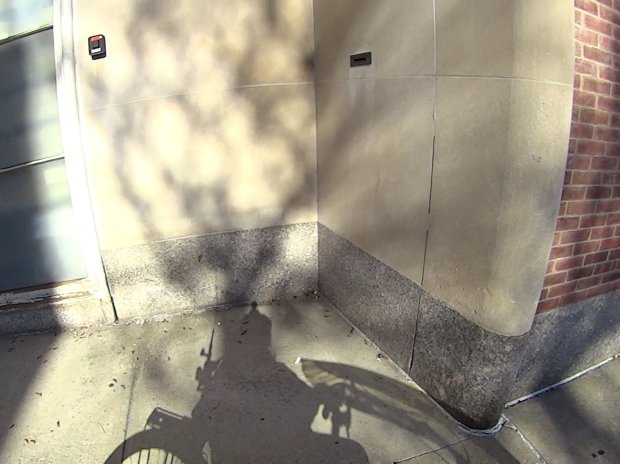
    CHG&E accepted bill payments at all hours through a little slot high on the wall:

    Pay Bills Here - overview
    Pay Bills Here – overview

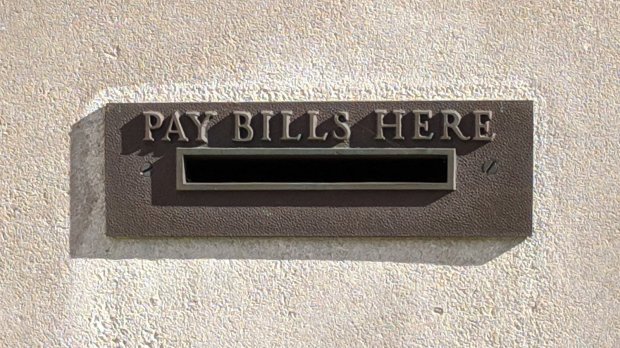
    A closer look:

    Pay Bills Here - envelope slot
    Pay Bills Here – envelope slot

    It’s solid cast brass, neatly milled, and built to last a thousand years. They don’t make ’em like they used to, probably for good reason.

    I’m told somebody once stuffed burning trash through the Arlington branch library’s book return slot. Nowadays, the fire code apparently requires the room behind the slot to be fireproof and isolated from the main structure, which may account for the popularity of outdoor book / media return boxes.

  • DOT-01 NP-BX1 Battery Status

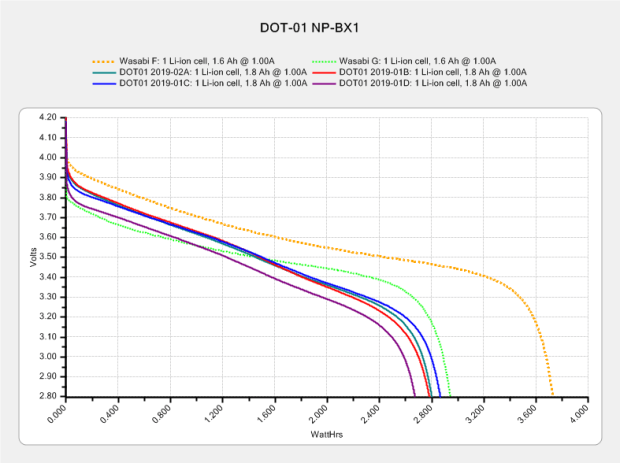
    Back in February, a quartet of DOT-01 NP-BX1 lithium batteries for my Sony HDR-AS30V helmet camera had mediocre performance compared to an older Wasabi battery:

    Dot01 NP-BX1 - new 2019-02
    Dot01 NP-BX1 – new 2019-02

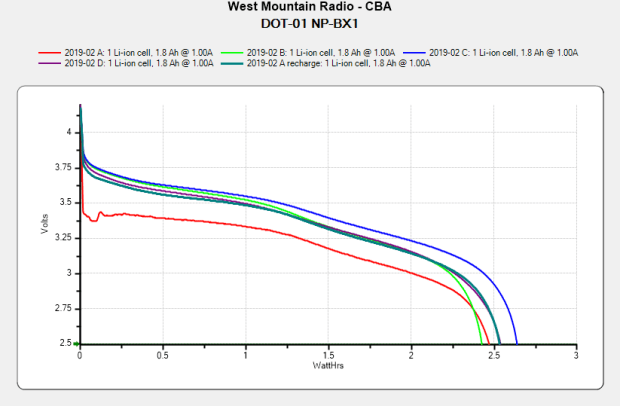
    After eight months of regular use, they’re even further into mediocre:

    Sony DOT-01 NP-BX1 - 2019-10-29
    Sony DOT-01 NP-BX1 – 2019-10-29

    In round numbers, they’re down from 2.8 W·h to 2.5 W·h and now run the camera for about 70 minutes, rather than 90+ when new. Our typical rides go for about an hour, which means I must swap batteries somewhere along the way.

    I still dislike the notion of sticking a 16850 cell next to the camera and powering it from the USB charger running the M20 rear camera requires another helmet cable, but it’s obvious NP-BX1 batteries lack enough active ingredient for the long haul.

  • 3D Foot Scanning

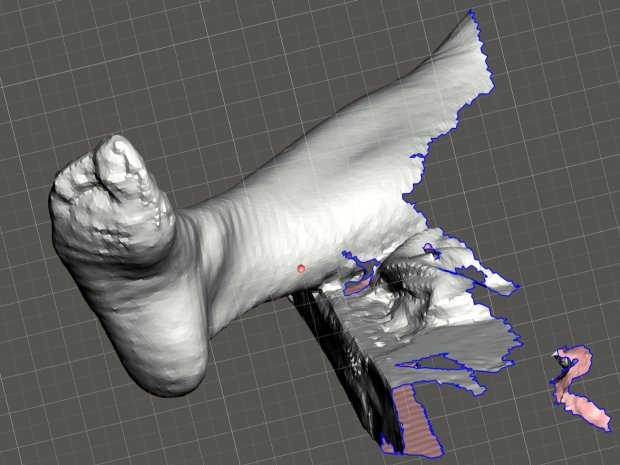
    The Poughkeepsie Library makes a 3DSystems Sense scanner (V1) available to patrons and, after a bit of to-and-fro, I managed to get a not-awful scan of Mary’s right leg:

    Mary - R foot - complete
    Mary – R foot – complete

    This was accomplished under field conditions in a cramped room hosting a Spanish-language “introduction to computers” class. We propped her leg across the edge of a table with her sock as a cushion.

    The depth image resolution seems to be 1 mm and the software attempts to stitch multiple views from different angles into a consistent 3D model. The scanner requires a steady hand and a steady model to successfully glue new data onto the existing model; what seem small misalignments derail the matching.

    The software has several presets, of which “Head” produces the best results. I have no idea what the algorithm thinks of her foot; maybe it’s been trained on some truly ugly faces.

    Exporting the solid model as either STL or PLY allows import into (Windows-only) Meshmixer, wherein I sawed off the pieces we won’t need:

    Mary R foot trimmed
    Mary R foot trimmed

    If only I had a foot fetish …

    The 3DSystems software requires a fairly specific Windows 8 (or 10, which is so not happening) + Intel hardware configuration, which recently arrived as a $250 off-lease Dell Latitude 7250 laptop. It works fine through VNC, so I can use it from the Comfy Desk.

    However, using a 3D scanner in your own home isn’t actually private:

    3DSystems Sense Scanner - EULA
    3DSystems Sense Scanner – EULA

    All your data are belong to them:

    3D Systems may also automatically collect and report back to 3D Systems information about the Software and Licensee’s usage along with limited information about the Device, 3D Printer, and/or other third-party applications. If 3D Systems implements automated data collection practices then Licensee may opt out of providing such data if Licensee has a license that authorizes Commercial Use.

    Oh, and then you must activate the software before using it. The library IT folks tell me I can install & activate the scanner on my system without derailing their setup. I have my doubts, but we’ll see how it goes.

    I must get into photogrammetry, ideally from the sofware libre branch as described there. The openMVG repo seems promising.

  • Monthly Image: Spider vs. Marmorated Stink Bug

    Fortunately, Brown Marmorated Stink Bugs haven’t been as catastrophic as predicted when they arrived a few years ago, perhaps because native critters have learned to deal with them:

    Spider vs. Marmorated Stink Bug
    Spider vs. Marmorated Stink Bug

    Looks like a week’s worth of spider chow!

  • Makergear M2: Octopi Camera Mount

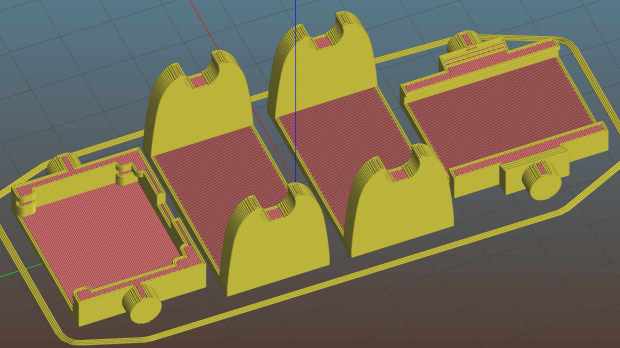
    Octopirint / Octopi works wonderfully well as a controller / G-Code feeder for my Makergear M2. After putting up with an ungainly mass of tape for far too long, I printed Toddman’s Pi Camera Mount:

    Pi Camera - M2 Mount - Slic3r
    Pi Camera – M2 Mount – Slic3r

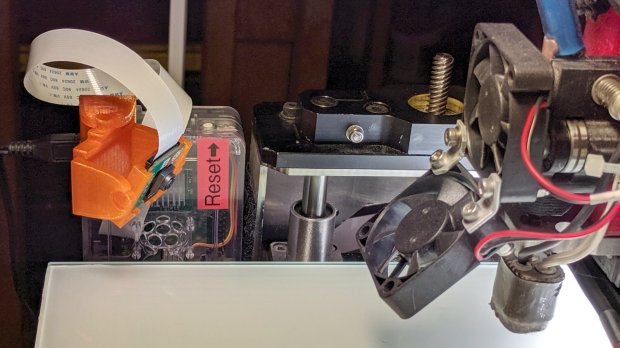
    Which snapped together exactly like it should:

    Makergear M2 - Pi Camera Mount
    Makergear M2 – Pi Camera Mount

    A strip of double-sided foam tape attaches it to the Pi’s case, which is Velcro-ed to the M2’s frame. The cable may be too long, but avoids sharp bends on the way out of the case.

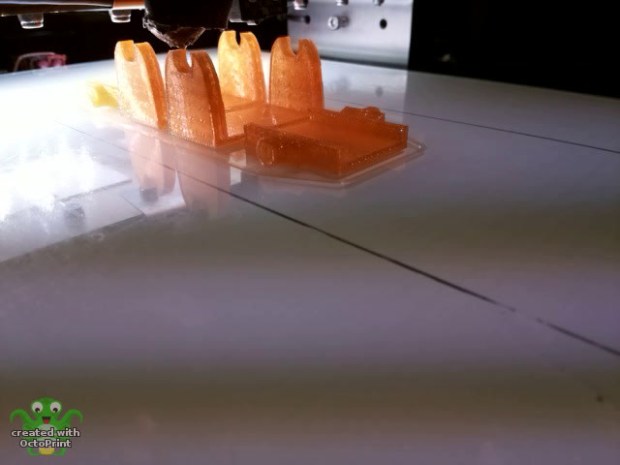
    The whole lashup works fine:

    Pi Camera - M2 Mount - Octopi timelapse
    Pi Camera – M2 Mount – Octopi timelapse

    That’s a second set intended for the CNC 3018-Pro, but it didn’t fit quite as well. The B brackets are slightly too long (or their pivots are slightly too close to their base) to allow the C plates to turn 90° to the mount:

    Pi Camera - M2 Mount - Config 2 diagram
    Pi Camera – M2 Mount – Config 2 diagram

    Nothing one can’t fix with nibbling & filing, but I long for parametric designs …

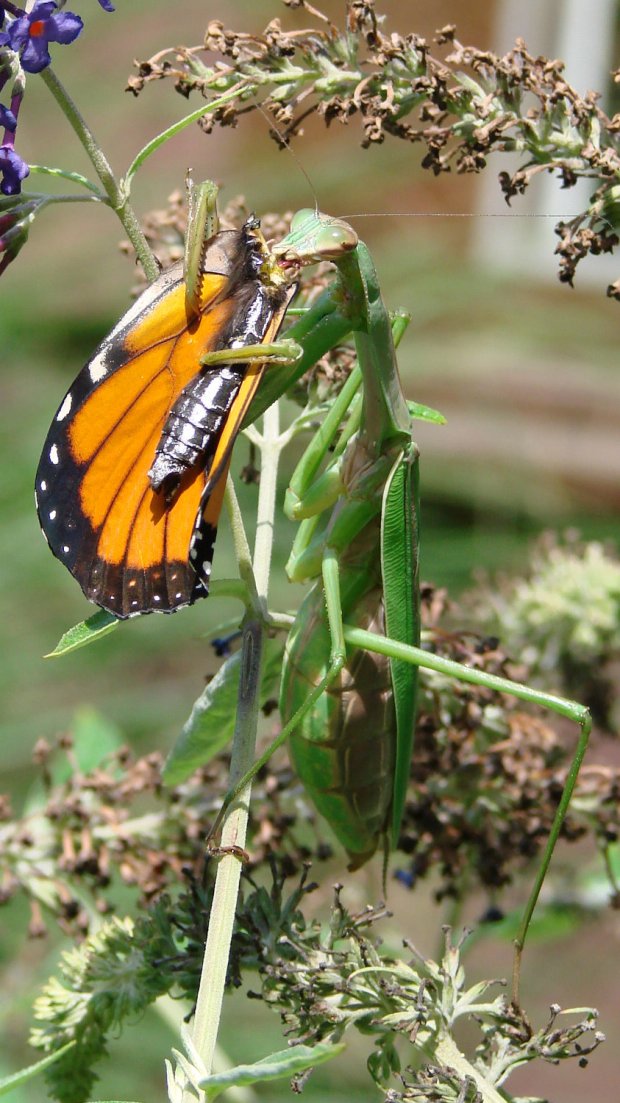
  • Monthly Image: Praying Mantis vs. Monarch Butterfly

    The Butterfly Bush in front of the house attracts all kinds of insects, including Monarch Butterflies (shown here on the Goldenrod planted in the garden):

    Monarch on Goldenrod - left
    Monarch on Goldenrod – left

    This year, the bush also attracted a Praying Mantis:

    Praying Mantis in Butterfly Bush - 2019-09-05
    Praying Mantis in Butterfly Bush – 2019-09-05

    Then lunchtime happened:

    Praying Mantis vs Monarch - 2019-09-11
    Praying Mantis vs Monarch – 2019-09-11

    A closer look:

    Praying Mantis vs Monarch - detail - 2019-09-11
    Praying Mantis vs Monarch – detail – 2019-09-11

    Now, if that isn’t enough nightmare fuel for you, find some in your own neighborhood.

  • CNC 3018-Pro: Probe Camera Case for Anonymous USB Camera

    The anonymous USB camera I used with the stereo zoom microscope not only works with VLC, but also with bCNC, and it has a round PCB with ears:

    CNC 3018-Pro - Probe Camera - PCB
    CNC 3018-Pro – Probe Camera – PCB

    Which suggested putting it in a ball mount for E-Z aiming:

    CNC 3018-Pro - Probe Camera - ball mount
    CNC 3018-Pro – Probe Camera – ball mount

    Black filament snippets serve as alignment pins to hold the ball halves together while they’re getting clamped. They’re epoxied into the upper half of the ball, because who knows when I’ll need to harvest the camera.

    The clamp mount descends from the Tour Easy Daytime Running Lights, with more screws and less fancy shaping:

    USB Camera - Round PCB Mount - solid model - build
    USB Camera – Round PCB Mount – solid model – build

    The clamp pieces fit around the ball with four M3 screws providing the clamping force:

    USB Camera - Round PCB Mount - solid model sectioned
    USB Camera – Round PCB Mount – solid model sectioned

    The whole affair sticks onto the Z axis carrier with double-sided foam tape:

    CNC 3018-Pro - Probe Camera - alignment
    CNC 3018-Pro – Probe Camera – alignment

    It barely clears the strut on the -X side of the carriage, although it does stick out over the edge of the chassis.

    After the fact, I tucked a closed-cell foam ring between the lens threads and the ball housing to stabilize the lens; the original camera glued the thing in place, but some fiddly alignment & focusing lies ahead:

    Alignment mirror - collimation
    Alignment mirror – collimation

    It’s worth noting that the optical axis of these cheap cameras rarely coincides with the physical central axis of the lens. This one requires a jaunty tilt, although it’s not noticeable in any of the pictures I tried to take.

    All in all, this one works just like the probe camera on the MPCNC.

    The OpenSCAD source code as a GitHub Gist:

    // CNC 3018-Pro Probe Camera mount for anonymous USB camera
    // Ed Nisley KE4ZNU – August 2019
    Layout = "Show"; // [Show, Build, Ball, Clamp, Bracket, Mount]
    //——-
    //- Extrusion parameters must match reality!
    // Print with 2 shells
    /* [Hidden] */
    ThreadThick = 0.25;
    ThreadWidth = 0.40;
    HoleWindage = 0.2;
    Protrusion = 0.1; // make holes end cleanly
    function IntegerMultiple(Size,Unit) = Unit * ceil(Size / Unit);
    inch = 25.4;
    ID = 0;
    OD = 1;
    LENGTH = 2;
    //——-
    // Dimensions
    //– Camera
    PCBThick = 1.2;
    PCBDia = 25.0;
    KeySize = [28.0,8.5,IntegerMultiple(PCBThick,ThreadThick)];
    KeyOffset = [0.0,2.0,0.0];
    KeyRadius = IntegerMultiple(sqrt(pow(KeySize.y – KeyOffset.y,2) + pow(KeySize.x/2,2)),0.01);
    echo(str("Key radius: ",KeyRadius));
    Lens = [14.0,18.0,25.0];
    BallID = PCBDia;
    BallOD = IntegerMultiple(2*KeyRadius,5.0);
    echo(str("Ball OD: ",BallOD));
    WallThick = 3.0;
    CableOD = 3.75;
    NumPins = 3;
    Pin = [1.75,1.8,5.0];
    Screw = [
    3.0,6.8,25.0 // M3 ID=thread, OD=washer, LENGTH=below head
    ];
    RoundRadius = IntegerMultiple(Screw[OD]/2,1.0); // corner rounding
    ClampSize = [BallOD + 2*WallThick,BallOD + 2*WallThick,20.0];
    echo(str("Clamp: ",ClampSize));
    MountSize = [5.0,BallOD,25.0];
    MountClearance = 1.0; // distance between clamp and mount
    Kerf = 2*ThreadThick;
    ScrewOC = [ClampSize.x – 2*RoundRadius,ClampSize.y – 2*RoundRadius];
    echo(str("Screw OC: ",ScrewOC));
    Insert = [ // brass insert: body, knurl,length
    3.9,4.9,8.0
    ];
    UseInsert = false;
    NumSides = 12*4;
    //——-
    module PolyCyl(Dia,Height,ForceSides=0) { // based on nophead's polyholes
    Sides = (ForceSides != 0) ? ForceSides : (ceil(Dia) + 2);
    FixDia = Dia / cos(180/Sides);
    cylinder(r=(FixDia + HoleWindage)/2,
    h=Height,
    $fn=Sides);
    }
    //——-
    // Components
    module CamBall(Section="Both") {
    Offset = (Section == "Both") ? 0 :
    (Section == "Upper") ? BallOD/2 :
    (Section == "Lower") ? -BallOD/2 :
    0;
    render(convexity=4)
    intersection(convexity = 3) {
    difference() {
    sphere(d=BallOD,$fn=NumSides);
    sphere(d=BallID,$fn=NumSides); // interior
    PolyCyl(CableOD,2*BallOD,8); // cable & lens holes
    translate([0,0,-Lens[LENGTH]])
    PolyCyl(Lens[OD],Lens[LENGTH],NumSides);
    translate([0,0,-PCBThick])
    PolyCyl(PCBDia,PCBThick,NumSides);
    translate(KeyOffset + [0,-KeySize.y/2,-PCBThick/2]) // PCB key
    cube(KeySize,center=true);
    for (i=[0:NumPins – 1])
    rotate(i*360/NumPins)
    translate([0,-(BallID + BallOD)/4,-Pin[LENGTH]/2])
    PolyCyl(Pin[OD],Pin[LENGTH],6);
    }
    translate([0,0,Offset])
    cube([BallOD,BallOD,BallOD] + 2*[Protrusion,Protrusion,0],center=true);
    }
    }
    module Clamp(Section="Both") {
    Offset = (Section == "Both") ? 0 :
    (Section == "Upper") ? ClampSize.z/2 :
    (Section == "Lower") ? -ClampSize.z/2 :
    0;
    render(convexity=4)
    intersection() {
    difference() {
    hull()
    for (i=[-1,1], j=[-1,1])
    translate([i*ScrewOC.x/2,j*ScrewOC.y/2,0])
    cylinder(r=RoundRadius,h=ClampSize.z,$fn=NumSides,center=true);
    sphere(d=BallOD + 2*HoleWindage,$fn=NumSides); // space around camera ball
    for (i=[-1,1], j=[-1,1]) // screws
    translate([i*ScrewOC.x/2,j*ScrewOC.y/2,-ClampSize.z])
    PolyCyl(Screw[ID],2*ClampSize.z,6);
    if (UseInsert)
    for (i=[-1,1], j=[-1,1]) // inserts
    translate([i*ScrewOC.x/2,j*ScrewOC.y/2,-(ClampSize.z/2 + Protrusion)])
    PolyCyl(Insert[OD],Insert[LENGTH] + Protrusion,8);
    cube([2*ClampSize.x,2*ClampSize.y,Kerf],center=true); // clamping gap
    }
    translate([0,0,Offset])
    cube([ClampSize.x,ClampSize.y,ClampSize.z] + 2*[Protrusion,Protrusion,0],center=true);
    }
    }
    module Bracket() {
    translate([ClampSize.x/2 + MountSize.x/2 + MountClearance,0,MountSize.z/2 – ClampSize.z/2])
    cube(MountSize,center=true);
    translate([ClampSize.x/2 + MountClearance/2,0,-(ClampSize.z + Kerf)/4])
    cube([MountClearance + 2*Protrusion,MountSize.y,(ClampSize.z – Kerf)/2],center=true);
    }
    module Mount() {
    union() {
    Clamp("Lower");
    Bracket();
    }
    }
    //——-
    // Build it!
    if (Layout == "Ball")
    CamBall();
    if (Layout == "Clamp")
    Clamp();
    if (Layout == "Bracket")
    Bracket();
    if (Layout == "Mount")
    Mount();
    if (Layout == "Show") {
    difference() {
    union() {
    color("Purple")
    Clamp("Upper");
    Mount();
    color("LimeGreen")
    CamBall();
    }
    rotate([0,0,45])
    translate([-ClampSize.x,0,0])
    cube(2*ClampSize,center=true);
    }
    }
    if (Layout == "Build") {
    Gap = 0.6;
    translate([-Gap*BallOD,Gap*BallOD,0])
    CamBall("Upper");
    translate([-Gap*BallOD,-Gap*BallOD,0])
    rotate([0,180,0])
    CamBall("Lower");
    translate([Gap*ClampSize.x,-Gap*ClampSize.y,ClampSize.z/2])
    rotate([0,180,0])
    Clamp("Upper");
    translate([Gap*ClampSize.x,Gap*ClampSize.y,ClampSize.z/2]) {
    rotate(180)
    Mount();
    }
    }