The Smell of Molten Projects in the Morning

Ed Nisley's Blog: Shop notes, electronics, firmware, machinery, 3D printing, laser cuttery, and curiosities. Contents: 100% human thinking, 0% AI slop.

Category: PC Tweakage

Remembering which tweaks worked

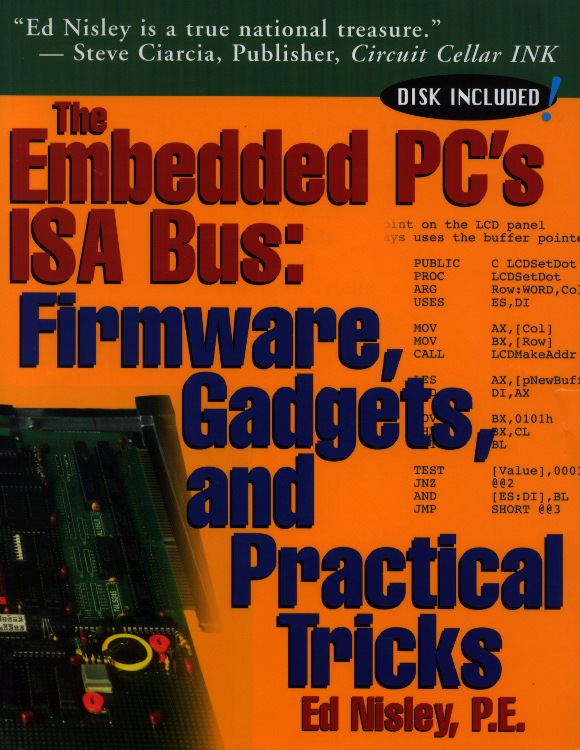
  • The Embedded PC’s ISA Bus: Firmware, Gadgets, and Practical Tricks — Unleashed

    ISA Bus Book - Front Cover
    ISA Bus Book – Front Cover

    A long time ago, in a universe far away, I wrote a book that (barely) catapulted me into the ranks of the thousandaires. Time passes, companies get sold / fail / merge / get bought, and eventually the final owners decided to remainder the book; the last royalty check I recall was for $2.88.

    Anyhow, now that it’s discontinued and just as dead as the ISA bus, I own the copyright again and can do this:

    They’re both ZIP files, disguised as ODT files so WordPress will handle them. Just rename them to get rid of the ODT extension, unzip, and you’re good to go. Note, however, that I do retain the copyright, so if you (intend to) make money off them, be sure to tell me how that works for you.

    The big ZIP has the original pages laid out for printing, crop marks and all, so this is not as wonderful a deal as it might first appear. The little ZIP has the files from the diskette, which was unreadable right from the start.

    Words cannot begin to describe how ugly that front cover really is, but Steve’s encomium still makes me smile.

    The text and layout is firmly locked inside Adobe Framemaker files, where it may sleep soundly forever. The only way I can imagine to get it back into editable form would be to install Windows 98 in a VM, install Framemaker, load up the original files, and export them into some non-proprietary format. Yeah, like that would work, even if I had the motivation.

    If you prefer a dead-tree version, they’re dirt cheap from the usual used-book sources. Search for ISBN 1-57398-017-X (yes, X) and you’ll get pretty close.

    Or, seeing as how I just touched the carton of books I’ve been toting all these years, send me $25 (I’m easy to find; if all else fails, look up my amateur callsign in the FCC database) and get an autographed copy direct from the source. Who knows? It might be worth something some day…

    The back cover has some useful info:

    ISA Bus Book - Back Cover
    ISA Bus Book – Back Cover
  • Kensington Trackball: Scroll Ring Tweakage

    Of late, something in the pile of input devices attached to my main PC has been feeding occasional bursts of upward scroll commands, to the extent that editing long documents (something I do quite a bit of, oddly enough) was becoming difficult. By process of elimination, the culprit turned out to be the Kensington trackball to the left of the keyboard: unplugging it eliminated the problem.

    Having had problems with that thing before and having gotten considerable feedback from other folks, I had a general idea of how to proceed: putz with the IR emitter-detector pair, but not very much. A side view of the pair with the trackball cup and scroll ring removed:

    Scroll ring IR emitter-detector quadrature pair
    Scroll ring IR emitter-detector quadrature pair

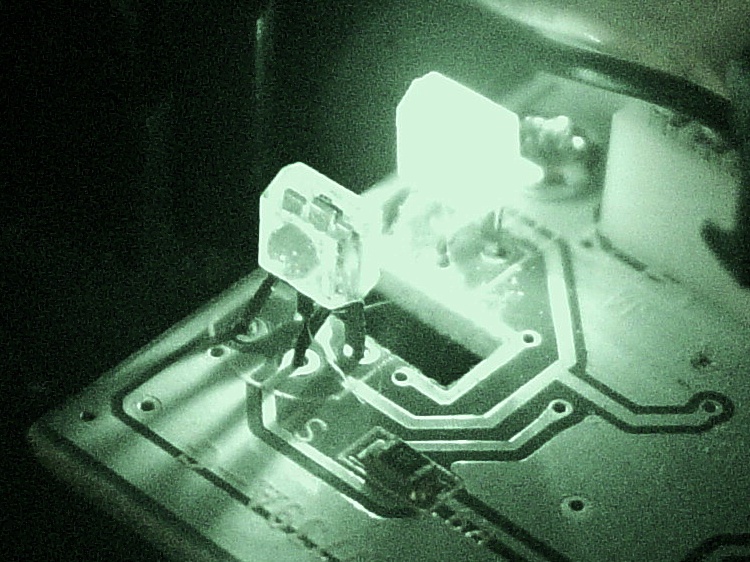
    Now, what’s weird about that setup is that the detector lens seems to be pointing in the wrong direction: away from the emitter’s lens. You know it’s the detector because it’s tinted: there’s no point in filtering the emitter’s output (although I have seen gray-tinted IR LEDs, which I think is just to mark them as different from visible LEDs). Here’s proof: a pure IR picture from my Sony DSC-F717 in Nightshot (a.k.a. IR) mode through a Hoya R72 visible-block filter:

    Quadrature pair in pure IR
    Quadrature pair in pure IR

    Some possibilities for why the detector is backwards:

    • It’s an assembly screwup (unlikely, but possible)
    • That’s not a lens, it’s a locating tab (different on emitter & detector?)
    • The backside uses the metal conductors as slits to enhance the signal (my favorite)

    Here’s a grossly image-enhanced blowup of the detector from that picture:

    Quadrature IR detector in pure IR - detail
    Quadrature IR detector in pure IR – detail

    The case becomes transparent in pure IR, so you can see the metal lead frame inside. I think they’re using the gaps between the leads to enhance the contrast of the scroll ring edges passing through the beam: absolutely no IR except when a gap aligns with a scroll ring opening.

    [Update: read the comments for a different interpretation; I’m probably wrong.]

    That would also explain why the pair seems so sensitive to alignment: there’s very little IR hitting the detector, because the IR illumination passes through the transparent-to-IR case and vanishes out the far side, with only a tiny bit reflected to the sensor!

    Anyhow, I pushed the pair minutely toward each other, just enough to feel the leads bend, and put everything back together. So far it seems to be working perfectly, but it’s done that before …

    [Comment: Jack found a different solution that might produce better results:

    Just got the Problem with my Scroll ring and thanks to your blog i digged a bit deeper.

    here is the Solution for my Problem:

    I checked this while connected and i found that bending worked only for a short time, so i gave a closer look to the contacts.

    all are soldered from below BUT two contacts are on the upper side.
    normaly solder should flow into but here it was as simple as just resolder the receiver with enough solder an its now working again. (btw a realigned the magnet to get a better response)

    Thanks
    Jack

    ps. the size of the cuts in the metall from the scroll ring differ, a shame for that price..

    It’s certainly worth trying, particularly when your Expert Mouse trackball isn’t working…

    Update: Nine years in the future, a real fix appears!

  • External USB Case vs OEM DVD Drive Mounting Bracket

    That little Lenovo Q150 doesn’t include an optical drive and, mostly, I don’t need one, but sometimes it’s handy to boot from a CD. I picked up a used DVD burner that also fits my Dell E1405 laptop (should I need a spare) and a tiny USB laptop drive case from the usual eBay sources for a grand total of $17 delivered.

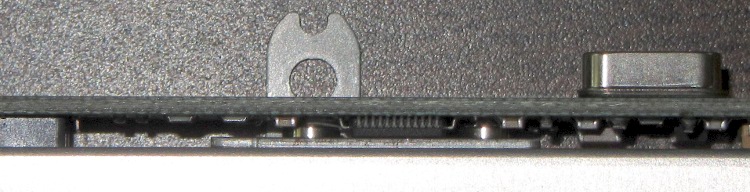
    The drive had a mounting bracket on the back that obviously had to come off, because the bracket screws snuggled right in among the USB adapter electronics:

    E1405 DVD drive bracket vs USB electronics
    E1405 DVD drive bracket vs USB electronics

    In fact, that flat tab with a hole would have clunked up against the back of the case and prevented it from sliding all the way in, but the screws also foiled Plan B: flip the bracket around so the tab goes under the drive where it couldn’t get lost if I needed it again.

    So now the bracket & screws live in a little bag in the Box o’ USB Stuff.

    The DVD drive works fine with just a single USB cable, although the case came with a power-only USB cable, so the latter also lives in the bag with the bracket. Maybe I’ll need it in the unlikely event I actually burn a DVD in that drive?

  • Lenovo Mini Wireless Keyboard: Readable Power Switch

    The backside of the Lenovo N5901 Mini Wireless Keyboard (which arrived with the aforementioned Q150) has a black-on-black power switch with ON and OFF legends (yes, I think they’re backwards, too) embossed in the matte black case: under anything less intense than enhanced interrogation lighting, you (well, I) can’t determine the switch position.

    Of course, the myriad certifications / ratings / labels required for compliance with all the regulations are perfectly legible:

    Lenovo Mini Keyboard - enhanced labels
    Lenovo Mini Keyboard – enhanced labels

    Working a dab of white correction fluid into the letters makes them blindingly obvious; the smudges around the letters will wear off in short order.

    I should probably add a bit of white to the switch background as well.

  • Monthly Aphorism: On Improvements

    • You can rub and you can rub, but you can’t shine shit.

    Eks tells me that was one of his grandmother’s favorite sayings.

    He introduced me to the concept of a “used-car polish”: high shine over deep scratches. Sometimes, that’s exactly what the job requires.

    There’s also the notion of making a silk purse from a sow’s ear (attributed variously to Jonathan Swift and Anon), which someone actually did: render the ear down to a gel, extrude thread, loom cloth, and sew up a purse. Yes, it can be done, but there’s a practical limit in there somewhere.

    Contrary to what you might think, this has nothing to do with a certain Thing-O-Matic. A bit of laparoscopic surgery on our front yard just revealed that our septic leach field has filled with gunk; it’s 56 years old and hadn’t been pumped for two decades before we bought the place. The next week or two should be interesting: I can do the diagnosis, but I can’t handle this repair.

  • Setting KDE Menu Font Size in XFCE

    Just set up an Xubuntu system with a few KDE apps, all of which had minuscule menu fonts. The simple solution is described there and my version of ~/.kde/share/config/kdeglobals looks like this:

    [General]
    desktopFont=Bitstream Vera Sans,12,-1,5,50,0,0,0,0,0
    fixed=Bitstream Vera Sans Mono,10,-1,5,50,0,0,0,0,0
    font=Bitstream Vera Sans,12,-1,5,50,0,0,0,0,0
    menuFont=Bitstream Vera Sans,12,-1,5,50,0,0,0,0,0
    shadeSortColumn=true
    smallestReadableFont=Bitstream Vera Sans,8,-1,5,50,0,0,0,0,0
    taskbarFont=Bitstream Vera Sans,10,-1,5,50,0,0,0,0,0
    toolBarFont=Bitstream Vera Sans,10,-1,5,50,0,0,0,0,0
    widgetStyle=qtcurve
    

    And then It Just Works… the alternative being to drag in the whole KDE configuration tweakage infrastructure, which I’m trying to avoid.

  • Adobe Reader Print Colors

    While printing up handouts for my talk at Cabin Fever, I finally tracked down why Adobe Reader was producing such crappy colors.

    The left is before and the right is after the fix, scanned at the same time with the same image adjustments:

    Oversaturated vs normal printing
    Oversaturated vs normal printing

    All of the print settings appeared correct (plain paper, 720 dpi, normal contrast, etc, etc), but Adobe Reader (and only Adobe Reader) looked like it was trying to print on vastly higher quality paper than I was using. Too much ink, too much contrast, generally useless results.

    The solution was, as always, trivial, after far too much fiddling around.

    In Reader’s Print dialog, there’s a button in the lower-left corner labeled Advanced. Clicky, then put a checkmark in the box that says Let printer determine colors.

    And then It Just Works.

    Equally puzzling: ask for 25 copies of a two-page document, check the Collate box, and you get 25 page 1, 25 page 2, then more page 1 starts coming out. I bet I’d get 25 x 25 sheets of paper by the time it gave up.

    I have no idea what’s going on, either.

    Memo to Self: verify that the box stays checked after updates.